Rotating proxy Python setup is not just picking a random proxy for every request. A reliable scraper needs proxy selection, session handling, timeouts, retry rules, backoff, and logging that make failures diagnosable instead of noisy.
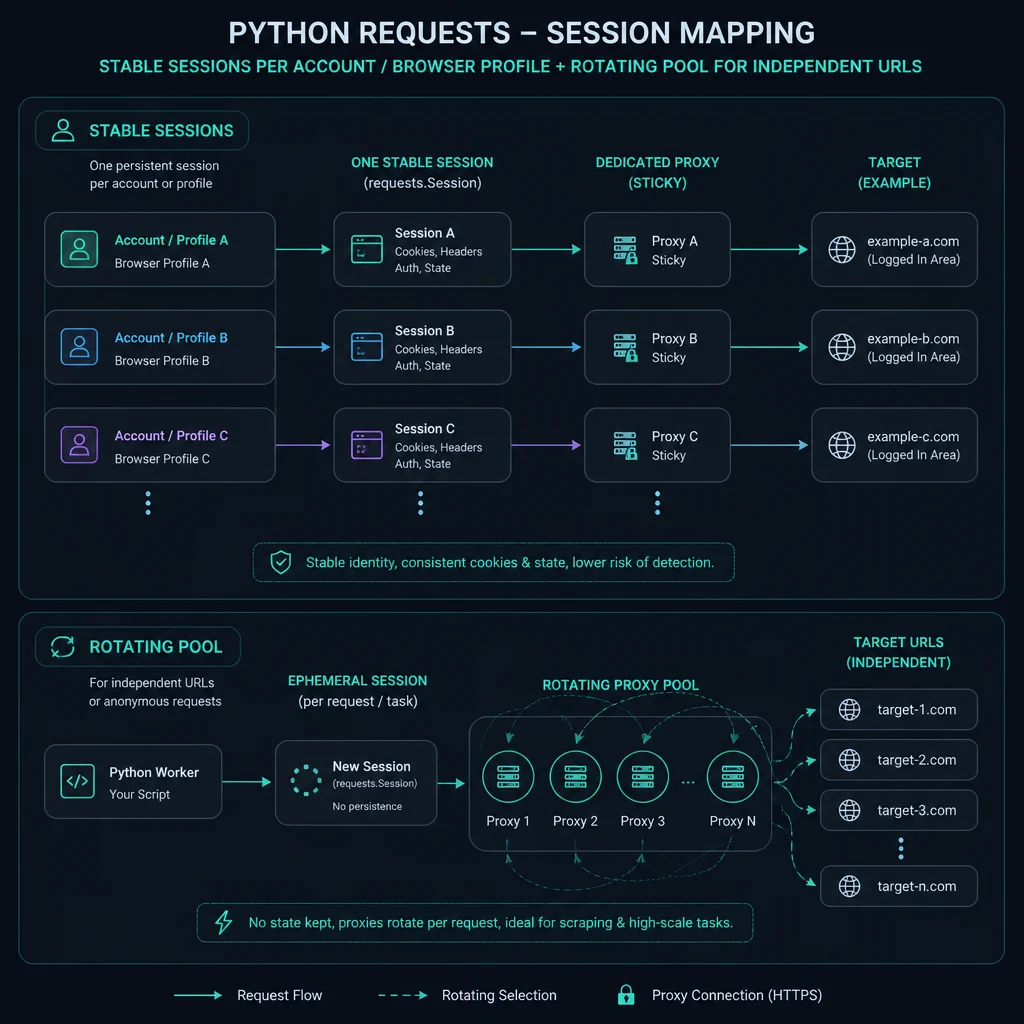
Use per-request rotation when each URL can stand alone. Use a sticky session or static proxy when the workflow logs in, keeps cookies, follows carts, or expects the same visitor identity across multiple pages. If you rotate the IP while reusing the same cookies, your scraper can create avoidable challenges, logouts, and inconsistent responses.
Start with the proxy type before writing code. The best proxy for web scraping guide explains when residential, ISP, or datacenter proxies fit. If you already know you need residential rotation, read the residential proxy setup guide before scaling Python workers.
For product monitoring specifically, the ecommerce scraping workflow covers Amazon URL canonicalization, field validation, page classification, and data-quality checks around the request loop.
Rotating Proxy Python: Quick Setup
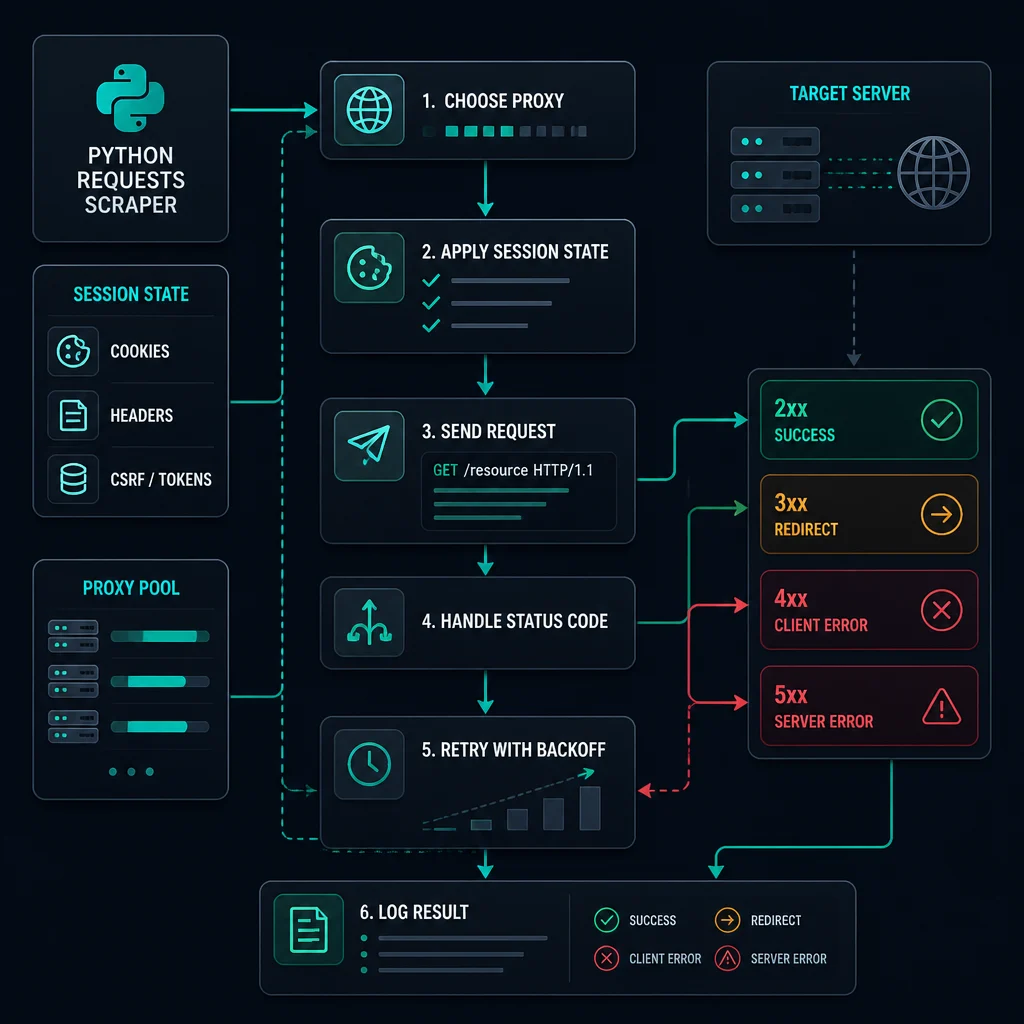
For a simple stateless scrape, the loop looks like this:
- Load a clean proxy list or a residential backconnect endpoint.
- Choose HTTP(S) or SOCKS based on what your proxy plan and client support.
- Set a request timeout.
- Rotate only when the request is independent.
- Back off after 429, 403, timeout, or WAF responses.
- Log proxy, URL, status code, elapsed time, retry count, and error type.
- Remove or cool down proxies that repeatedly fail.
If you need to convert proxy formats before loading them into Python, use the proxy converter.
Basic Requests Proxy Format
Python requests expects proxies as a dictionary. For HTTP(S) proxy endpoints, use the HTTP proxy URL for both http and https traffic:
import requests

proxy_url = "http://username:password@host:port"

proxies = {
    "http": proxy_url,
    "https": proxy_url,
}

response = requests.get(
    "https://example.com",
    proxies=proxies,
    timeout=10,
)
print(response.status_code)
The https key does not always mean the proxy URL should start with https://. In most proxy dashboards, an HTTP proxy can tunnel HTTPS targets through CONNECT, so the proxy URL still starts with http://.
If your provider gives you host:port:username:password, convert it to http://username:password@host:port before passing it to requests.
For a deeper format checklist with HTTP, HTTPS, auth, SOCKS, and timeout examples, use the Python proxy requests guide.
Rotating a Proxy List in Requests
For independent URLs, you can rotate a proxy per request:
from itertools import cycle
import requests

proxy_urls = [
    "http://user:pass@proxy-1.example:8000",
    "http://user:pass@proxy-2.example:8000",
    "http://user:pass@proxy-3.example:8000",
]

proxy_cycle = cycle(proxy_urls)

def next_proxies():
    proxy_url = next(proxy_cycle)
    return {"http": proxy_url, "https": proxy_url}

for url in urls:
    response = requests.get(url, proxies=next_proxies(), timeout=10)
    print(url, response.status_code)
This is fine for stateless scraping. It is not fine for login, carts, checkout, account areas, or multi-step browsing. For those workflows, map one account or browser profile to one stable proxy session.
Using a Session With a Stable Proxy
requests.Session keeps connection pooling and session-level defaults. Use it when one logical task should keep the same proxy, headers, and cookies.
import requests

session = requests.Session()
session.proxies.update({
    "http": "http://username:password@host:port",
    "https": "http://username:password@host:port",
})
session.headers.update({
    "User-Agent": "Mozilla/5.0 (compatible; ExampleBot/1.0)",
})

login_page = session.get("https://example.com/login", timeout=10)
account_page = session.get("https://example.com/account", timeout=10)
Use one session per account, task, or browser profile. Do not rotate the proxy inside the same session unless you intentionally reset cookies and state.
The same consistency rule applies in Scrapy. Use the Scrapy user agent setup to keep a deliberate header profile aligned with each logical session instead of randomizing the header independently.
For residential sessions, this is the same principle as sticky mode: keep cookies, proxy identity, and workflow state together. The sticky vs rotating proxies guide explains when that continuity matters.
Backconnect Rotating Proxies in Python
With a backconnect or residential gateway, your Python code may use one proxy endpoint while the provider rotates the exit IP behind it.
import requests

backconnect_proxy = "http://username:password@gateway.example:8000"

proxies = {
    "http": backconnect_proxy,
    "https": backconnect_proxy,
}

for url in urls:
    response = requests.get(url, proxies=proxies, timeout=10)
    print(url, response.status_code)
Whether this rotates every request depends on the provider. Some gateways rotate per request. Others use a session token, username parameter, port, or route setting to keep one exit IP sticky.
If the gateway supports sticky sessions, use a stable session identifier for multi-step flows and a rotating route for independent requests.
SOCKS5 Proxies in Requests
If your proxy plan or tool requires SOCKS5, install SOCKS support:
pip install "requests[socks]"
Then use a SOCKS URL:
proxies = {
    "http": "socks5://username:password@host:port",
    "https": "socks5://username:password@host:port",
}
Use socks5h:// when you want DNS resolution to happen through the proxy rather than locally. For normal web scraping, HTTP(S) proxies are usually simpler unless your provider or tool specifically requires SOCKS.
For the protocol tradeoff, read SOCKS5 vs HTTP proxy.
Retry Logic Without Retry Storms
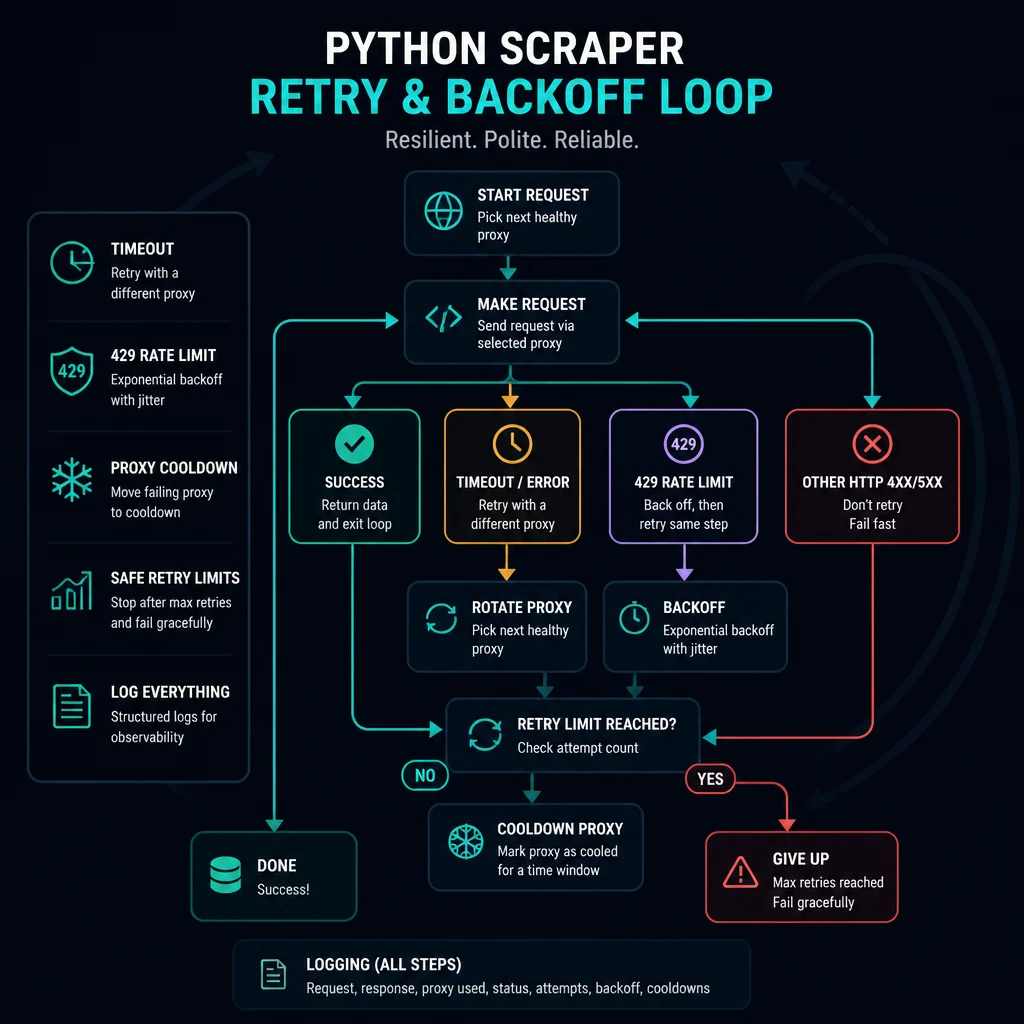
Retry logic should reduce noise, not multiply it.
Start with rules:
- Retry timeouts and temporary 502, 503, or 504 responses.
- Back off on 429 instead of retrying immediately.
- Treat repeated 403s as an access or policy signal, not a retry target.
- Do not blindly retry POST, checkout, cart, or account-changing actions.
- Cap total retries per URL and per proxy.
- Add jitter so workers do not retry at the same instant.
The requests docs show retries through HTTPAdapter and urllib3.util.Retry:
from requests import Session
from requests.adapters import HTTPAdapter
from urllib3.util import Retry

retry = Retry(
    total=3,
    connect=2,
    read=2,
    status=2,
    backoff_factor=1,
    status_forcelist=[429, 502, 503, 504],
    allowed_methods={"GET", "HEAD"},
    respect_retry_after_header=True,
)

session = Session()
adapter = HTTPAdapter(max_retries=retry)
session.mount("http://", adapter)
session.mount("https://", adapter)
This handles basic retry behavior, but you still need application-level decisions. If a proxy returns 407, fix authentication. If every proxy gets 429, lower concurrency and delays instead of rotating harder.
Manual Backoff and Proxy Cooldowns
For scraping, you often need logic around the request, not just adapter retries.
import random
import time
import requests

def fetch(url, proxy_url, max_attempts=3):
    proxies = {"http": proxy_url, "https": proxy_url}

    for attempt in range(1, max_attempts + 1):
        try:
            response = requests.get(url, proxies=proxies, timeout=10)
        except requests.Timeout:
            sleep_for = attempt + random.uniform(0, 1)
            time.sleep(sleep_for)
            continue

        if response.status_code == 429:
            sleep_for = (2 ** attempt) + random.uniform(0, 1)
            time.sleep(sleep_for)
            continue

        if response.status_code in {403, 407}:
            return response

        return response

    return None
Use this as a pattern, not a universal drop-in. A real scraper should also log the URL, proxy, status code, exception, retry count, and elapsed time.
Preventing Rate Limits
Rate-limit prevention starts before a request fails.
Use these controls:
- Limit concurrent workers per proxy identity.
- Add jitter around repeated tasks.
- Respect
Retry-Afterwhen the target sends it. - Cache unchanged pages.
- Separate sensitive endpoints into slower queues.
- Stop retrying after repeated 403, 407, or 429 responses.
- Track request rate per proxy, account, endpoint, and session.
Use the delay calculator before increasing task count. If your Python scraper makes too many requests per minute per proxy, a larger proxy pool may only hide the problem briefly.
Responsible Debugging Before Rotation
Before replacing the proxy pool, prove what failed.
Check:
- Does the same request work locally?
- Does it work through one proxy at low speed?
- Is the proxy format correct?
- Is the protocol HTTP(S) or SOCKS?
- Are credentials accepted, or are you seeing 407?
- Are you reusing cookies after changing IP?
- Does lowering concurrency stop 429s?
- Does the target allow the automation pattern?
Good rotation spreads legitimate traffic. It should not be used to ignore site terms, bypass account rules, or hammer endpoints that are already rate limiting.
Common Mistakes
Avoid these Python proxy mistakes:
- Creating a new session for every request when continuity is required.
- Rotating proxies while reusing the same cookies.
- Retrying immediately after 429.
- Treating 407 as a bad target response instead of a proxy auth failure.
- Loading SOCKS URLs without installing
requests[socks]. - Running too many threads through one proxy.
- Logging proxy passwords in plain text.
- Changing proxy type, headers, and retry logic at the same time.
Change one variable at a time. If success improves only when rotation changes, session design was probably involved. If success improves only when delay increases, the bottleneck was pacing.
FAQ
How do I use a rotating proxy in Python requests?
Pass a proxies dictionary to requests.get() or update a requests.Session. For a list, choose a proxy per independent request. For a backconnect gateway, use the same endpoint and let the provider rotate exits.
Should I rotate proxies on every request?
Only when each request is independent. Do not rotate every request for login, account checks, carts, checkout, or multi-step browsing.
How do I use SOCKS5 proxies with Python requests?
Install requests[socks], then use socks5://username:password@host:port or socks5h://username:password@host:port in the proxies dictionary.
Why do all my rotating proxies get 429?
Your request rate, concurrency, endpoint choice, or retry behavior is probably too aggressive. Reduce per-proxy pressure, add jitter, respect Retry-After, and use the delay calculator.
Why do my rotating proxies get 407?
407 means proxy authentication failed. Check username, password, host, port, protocol, URL encoding, and proxy format before changing rotation logic. If the issue is specific to Python requests, use the Python requests proxy authentication guide to verify one proxy before restarting the rotation loop.
Final Thoughts
Rotating proxy Python workflows work best when rotation, sessions, and retry logic match the target. Rotate independent requests. Keep stable sessions for accounts and multi-step flows. Add timeouts, conservative retries, backoff, and logging before scaling workers.
For proxy selection, start with best proxy for web scraping. For residential session behavior, read how to use residential proxies. For protocol choices, compare SOCKS5 vs HTTP proxy.
Technical references: Requests advanced usage, urllib3 Retry API, and MDN HTTP 429 Too Many Requests.