Proxy authentication error 2606 usually means your proxy server rejected the login details or could not match the request to an allowed customer, plan, location, or session. In practice, it is a proxy setup problem more often than a target website problem.
You may see error 2606 in a browser profile, scraper, bot, proxy checker, cURL command, account tool, or automation platform after adding a proxy in host:port:user:pass format. The request may never reach the destination site because the proxy gateway stops it first.
The fastest fix is to verify the proxy string, username, password, plan status, IP allowlist, and session parameters before changing headers, user agents, or target-site settings.
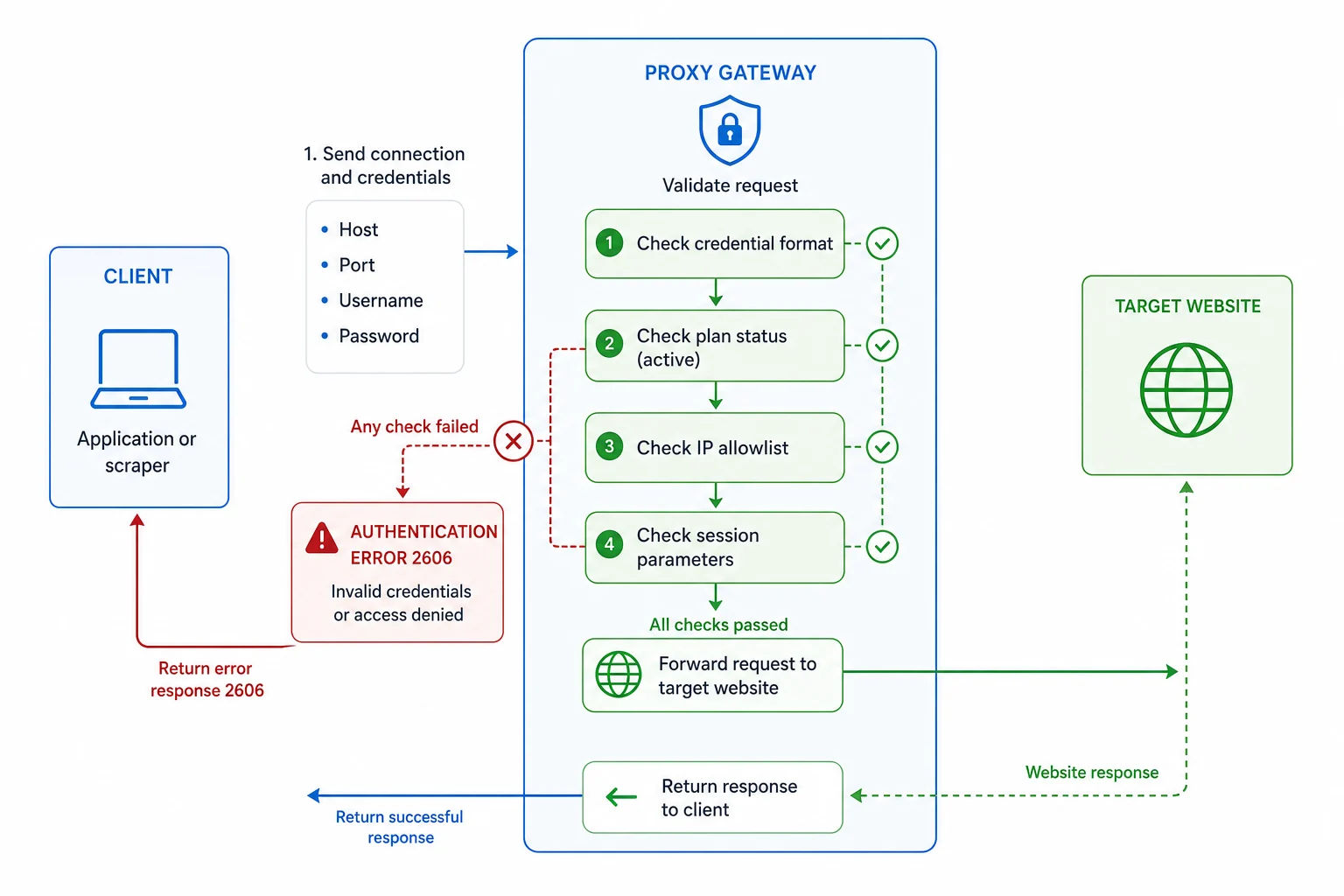
Quick Fixes for Proxy Authentication Error 2606
Start with the basics:
- Copy the proxy credentials again from your provider dashboard.
- Confirm the format your tool expects:
host:port:username:password,username:password@host:port, or separate fields. - Check that the port matches the proxy product and protocol.
- Remove extra spaces, quotes, invisible characters, and line breaks.
- Confirm your plan is active and has enough balance, traffic, or IP allocation.
- If your account uses IP allowlisting, add your current public IP or disable allowlist-only auth.
- Test one proxy with cURL or a browser profile before importing a full list.
- If the username includes country, state, city, sticky-session, or rotation parameters, simplify it and test again.
If a single clean proxy works, the provider and target are probably fine. The problem is usually one malformed line, an unsupported parameter, expired access, or a mismatch between your tool's proxy format and the provider's format.
What Error 2606 Usually Means
Error 2606 is not a standard HTTP status code like HTTP 403 Forbidden or HTTP 429 Too Many Requests. It is usually an application-level or proxy-provider error code shown by the proxy gateway, proxy checker, or automation tool.
That matters because standard HTTP debugging can send you in the wrong direction. A 403 usually means a website, API, CDN, or WAF made an access decision. A 429 usually means you sent too many requests. A proxy authentication error happens earlier: the proxy layer did not accept your identity, access rights, or connection settings.
Common messages around this problem include:
Proxy authentication failedAuthentication error 2606Invalid proxy credentialsBad username or passwordAccess denied by proxyProxy authorization required407 Proxy Authentication Required- Tool-specific connection failures after proxy import
If the tool shows both 2606 and 407, treat it as a proxy login issue first. If the proxy authenticates correctly but the target later returns 403, then move to target access, session, and IP reputation debugging.
Common Causes of Proxy Authentication Error 2606
Most 2606 failures come from one of these causes.
| Cause | What to check |
|---|---|
| Wrong proxy format | Your tool may expect separate host, port, user, and password fields |
| Copied spaces or hidden characters | Recopy the proxy line into a plain-text editor |
| Wrong protocol or port | HTTP, HTTPS, and SOCKS ports may not be interchangeable |
| Expired or inactive plan | Confirm plan status, traffic balance, and billing state |
| IP allowlist mismatch | Add your current public IP or use username/password auth |
| Bad geo/session parameter | Remove country, city, or sticky-session flags and retest |
| Password changed | Regenerate or recopy credentials from the provider dashboard |
| Tool parser issue | Try a smaller import, another format, or URL-encoded credentials |
Do not rotate through hundreds of proxies while the base credential is wrong. Every line will fail for the same reason, and the logs become harder to read.
Check the Proxy Format First
Proxy format is the easiest place to make a mistake. Different tools want different layouts.
Common formats:
host:port:username:password
username:password@host:port
http://username:password@host:port
socks5://username:password@host:port
Some browser-profile tools use four separate fields:
Host: proxy.example.com
Port: 12345
Username: customer-zone-us-session-abc
Password: your-password
If your tool expects separate fields and you paste the full proxy line into the host field, authentication will fail. If your tool expects user:pass@host:port and you import host:port:user:pass, the parser may treat the username as part of the host or port.
When in doubt, test one proxy manually. Do not debug a full CSV import until one clean proxy works.
Test With cURL
For HTTP or HTTPS proxies, a small cURL test can tell you whether the credentials work outside your main tool.
curl -x "http://username:password@host:port" https://ipinfo.io/ip
If the proxy supports SOCKS5:
curl --socks5 "host:port" --proxy-user "username:password" https://ipinfo.io/ip
Good results show the exit IP or a normal response. Authentication problems usually show a proxy auth error, 407 response, connection failure, or provider-specific error message.
If cURL works but your bot or browser profile fails, the issue is probably tool formatting, protocol selection, URL encoding, or how the tool handles special characters in usernames and passwords.
Watch for Special Characters in Credentials
Special characters can break proxy URLs when they are not encoded correctly. This is common with passwords that contain @, :, /, #, ?, or &.
For example, this can be ambiguous:
http://user:p@ss:word@host:port
The tool may not know where the password ends and where the host begins. If your provider lets you regenerate a simpler password, try that. If your tool supports separate username and password fields, use them. If it requires a single URL, URL-encode reserved characters.
Check IP Allowlisting
Some proxy accounts support two authentication modes:
- Username and password authentication.
- IP allowlist authentication.
If your account is set to allowlist mode, the proxy gateway may reject requests from any source IP not on the list. That can cause an authentication-style error even when the username and password are correct.
Check your current public IP from the same machine or server running the tool:
curl https://ipinfo.io/ip
Then compare it with the allowlisted IP in your provider dashboard. If you are running the tool from a VPS, cloud runner, remote desktop, CI job, or another machine, allowlist that machine's public IP, not your home IP.
Check Plan, Balance, and Product Type
Authentication can also fail when the account exists but the requested product is not available.
Check:
- The subscription or prepaid balance is active.
- The plan has remaining traffic or allocated IPs.
- You are using the correct hostname for residential, ISP, or datacenter access.
- You are using the correct port for the protocol.
- The requested country, state, city, or pool is included in the plan.
- The account was not suspended for billing, abuse, or policy reasons.
If you are choosing between proxy types, read datacenter proxies vs residential proxies and ISP proxies vs residential proxies. Product mismatch can look like a credential issue when the gateway refuses access to a pool your account does not include.
Session Parameters Can Break Authentication
Residential proxy usernames often include routing options, such as country, city, state, session ID, or rotation mode. These parameters are powerful, but one invalid value can break the whole login.
For example:
customer-abc-country-us-session-profile1
If the country code, session syntax, zone name, or delimiter is wrong, the proxy gateway may reject the request before it reaches the target. Start with the plain username your provider gives you. Once that works, add geo and session parameters one at a time.
For session-sensitive workflows, read how to use residential proxies. Sticky and rotating sessions matter, but they should be added after authentication is stable.
Proxy Authentication Error 2606 vs Target Blocks
It is easy to confuse proxy auth errors with website blocks, especially when both happen inside the same automation tool.
| Symptom | More likely issue |
|---|---|
| Error appears before any page loads | Proxy authentication |
| cURL through the proxy fails | Proxy credentials, plan, or allowlist |
| Proxy checker says auth failed | Proxy credentials or format |
| Target returns 403 after proxy connects | Target access policy or IP reputation |
| Target returns 429 after proxy connects | Rate limit or request pacing |
| Only one website fails | Target-specific block or behavior |
| Every request through the proxy fails | Proxy setup or account access |
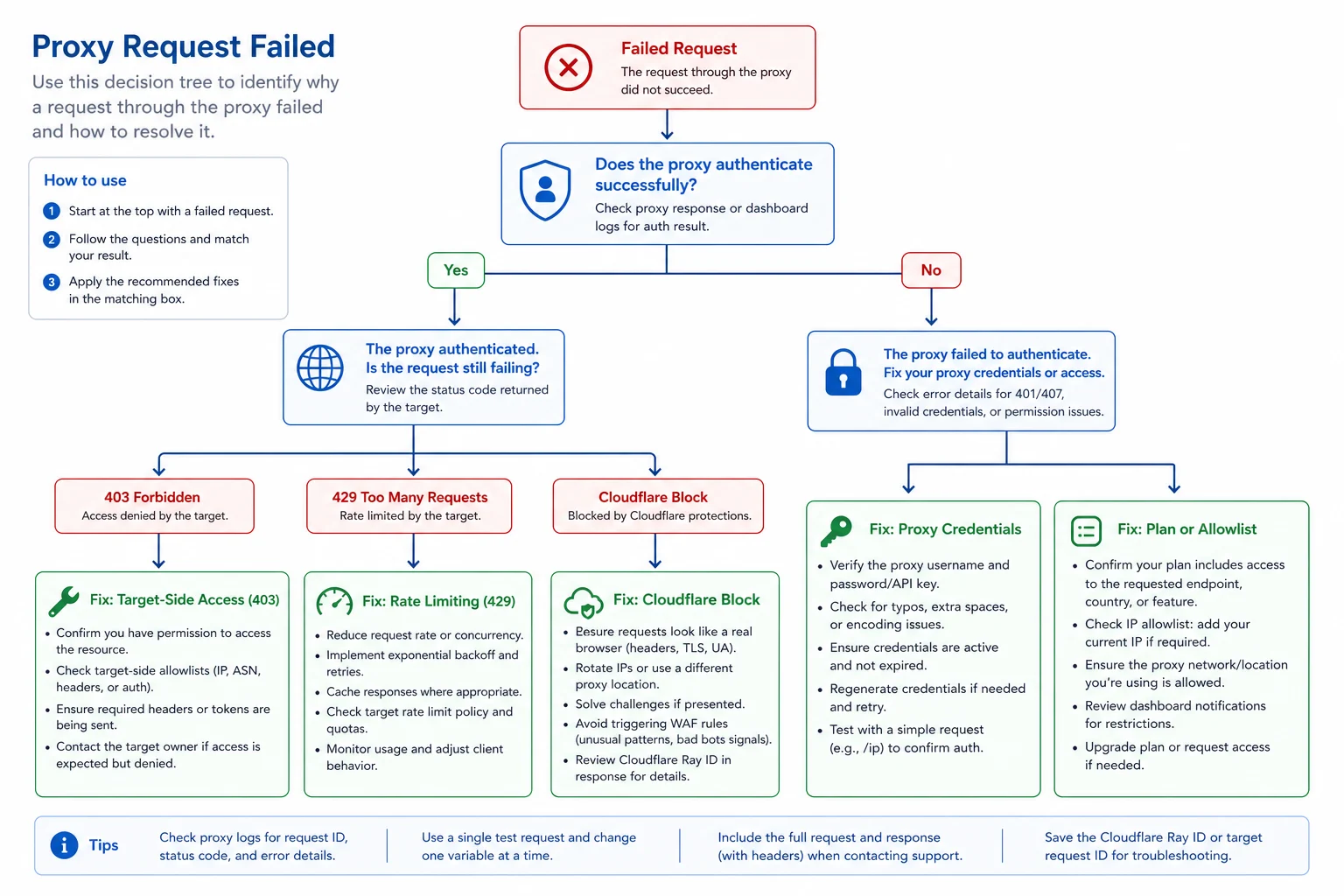
If the proxy connects and the target blocks you, use the HTTP 403 guide, HTTP 429 guide, or Cloudflare 1020 guide depending on the response. If the proxy never authenticates, stay focused on credentials first.
Fix Checklist
Use this order:
- Test one proxy line, not the whole list.
- Confirm the exact format your tool expects.
- Recopy credentials from the provider dashboard.
- Remove extra spaces and hidden characters.
- Try separate fields instead of a single proxy URL.
- Try a simple password if special characters are involved.
- Confirm the protocol and port.
- Check IP allowlisting.
- Confirm plan status and traffic balance.
- Remove geo and session parameters, then add them back one at a time.
- Test from the same machine that will run the automation.
- Save a known-good proxy template for future imports.
This sequence keeps the problem small. Once one known-good line works, scale carefully and log failures by proxy, account, tool, and target.
FAQ
Is proxy authentication error 2606 the same as HTTP 407?
Not exactly. HTTP 407 is a standard response meaning proxy authentication is required. Error 2606 is usually a provider or tool error code, but it often points to the same class of problem: the proxy did not accept your credentials or access settings.
Can proxies be banned and show error 2606?
Usually no. A target-site ban normally appears after the proxy connects, often as 403, 429, a CAPTCHA, or a Cloudflare block. Error 2606 usually means the proxy gateway rejected the connection before the target site was reached.
Why does one tool work but another shows error 2606?
The tools may parse proxy strings differently. One may expect host:port:user:pass, while another expects user:pass@host:port or separate fields. Protocol handling and special characters in passwords can also differ.
Should I rotate proxies after error 2606?
No. Fix authentication first. Rotating through more proxies will not help if the username, password, port, allowlist, or plan access is wrong.
For stable proxy setup, compare residential proxies when you need rotating or sticky sessions, and ISP proxies when you need static dedicated IPs.