A proxy address is the connection information your browser, scraper, bot, app, or operating system uses to send traffic through a proxy server. At minimum, it usually includes a host and port. For private paid proxies, it often also includes a username and password.
The proxy address tells your tool where the proxy gateway is, which protocol to use, and how to authenticate. Once the proxy accepts the connection, it forwards your request to the target website from the proxy exit IP.
If you are new to proxies, the important parts are simple: host, port, protocol, username, and password. Most setup problems come from putting those parts in the wrong format for the tool you are using.
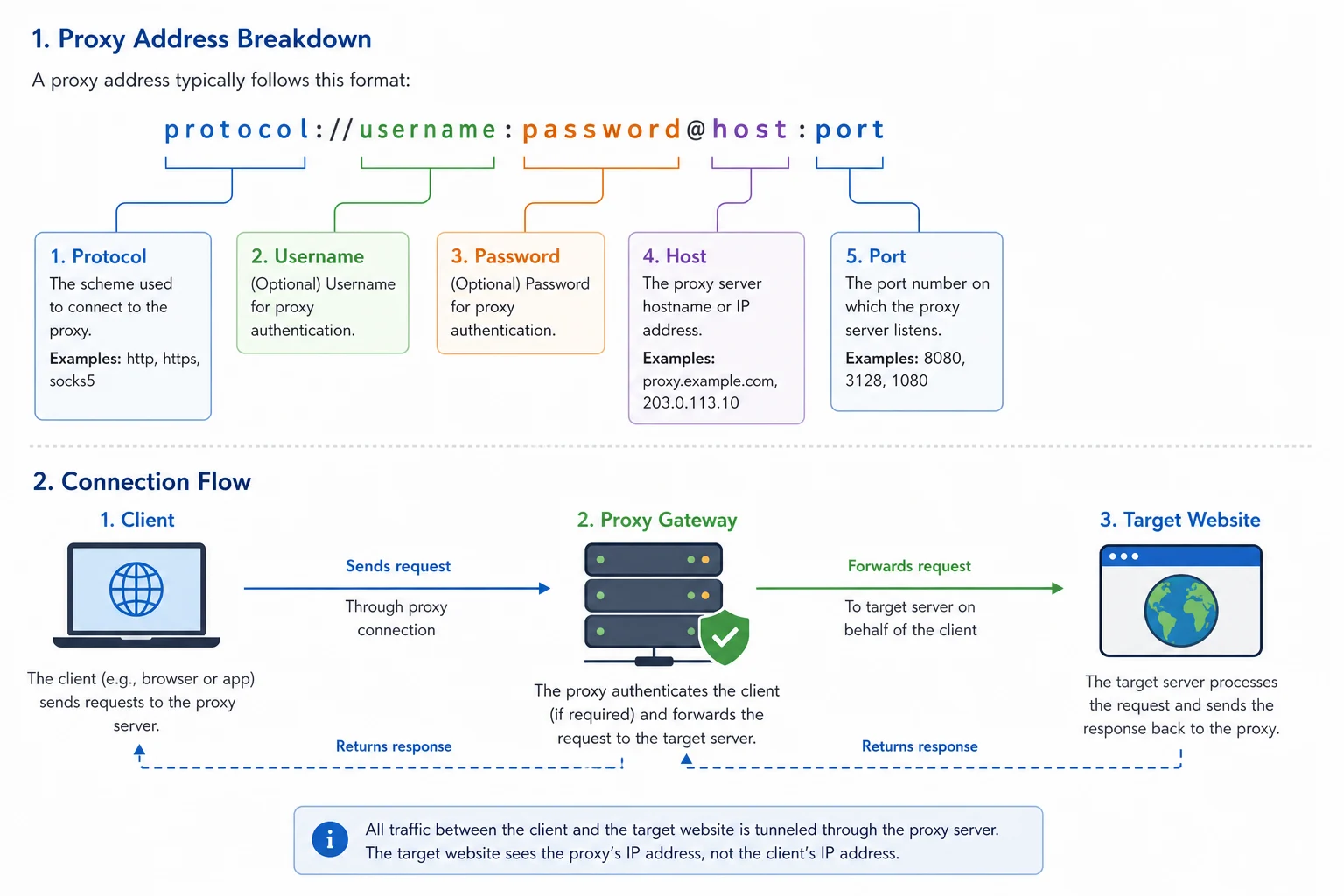
Proxy Address Quick Example
A full proxy URL can look like this:
http://username:password@proxy.example.com:12345
That breaks down into:
| Part | Example | What it means |
|---|---|---|
| Protocol | http:// |
How the app connects to the proxy |
| Username | username |
Account, zone, plan, or routing identity |
| Password | password |
Secret used to authenticate |
| Host | proxy.example.com |
Proxy gateway hostname or IP address |
| Port | 12345 |
Network port for the proxy service |
Many tools do not want the full URL. They ask for the same information in separate fields.
Host: proxy.example.com
Port: 12345
Username: username
Password: password
Protocol: HTTP
The parts are the same. Only the format changes.
Host, IP Address, and Gateway
The host is the proxy server address your tool connects to. It can be a hostname:
proxy.example.com
Or a direct IP address:
192.0.2.10
With many residential and rotating proxy services, the host is a gateway. You connect to one hostname, authenticate with your account, and the provider routes your request through an exit IP from the selected pool. With static ISP or datacenter proxies, the host may map more directly to a specific proxy server or assigned IP.
Do not assume the host is always the final exit IP. For rotating pools, the host is often just the entry point.
What the Port Does
The port tells your app which service to connect to on the proxy host.
Example:
proxy.example.com:12345
Here, 12345 is the port. Providers often use different ports for different products, protocols, or rotation modes.
Common reasons the port matters:
- HTTP and SOCKS may use different ports.
- Residential and ISP products may use different ports.
- Sticky and rotating sessions may use different ports.
- Some providers assign one port per proxy.
- Some tools silently fail when the port is missing or not numeric.
If the host is correct but the port is wrong, you may see connection timeouts, authentication failures, or a proxy checker result that says the proxy is dead.
Username and Password
Private proxies usually require authentication. The username and password prove that your account is allowed to use the proxy.
In simple setups, the username is just an account username:
customer123
In more advanced residential proxy setups, the username can include routing options:
customer123-country-us-session-profile1
Those extra parts can tell the provider to use a country, state, city, sticky session, rotating session, or zone. The exact syntax depends on the provider.
Keep two rules in mind:
- Use the plain credentials first to confirm the proxy works.
- Add location and session parameters only after the basic connection succeeds.
If authentication fails, read proxy authentication error 2606 for a deeper troubleshooting checklist.
Common Proxy Address Formats
Different tools expect different formats.
Host, Port, User, Pass
This is common in bot imports and proxy lists:
host:port:username:password
Example:
proxy.example.com:12345:user123:pass456
URL Format
This is common in code, cURL, environment variables, and some browser tools:
http://username:password@host:port
Example:
http://user123:pass456@proxy.example.com:12345
Separate Fields
This is common in anti-detect browsers, profile managers, and desktop apps:
Protocol: HTTP
Host: proxy.example.com
Port: 12345
Username: user123
Password: pass456
No Username or Password
Some proxies use IP allowlisting instead of credentials:
host:port
With allowlisting, the proxy provider checks the public IP of your machine or server. If that IP is on the allowed list, the proxy accepts the connection. If not, it rejects the request.
HTTP, HTTPS, and SOCKS Proxy Addresses
The protocol tells your app how to speak to the proxy.
Common proxy protocol prefixes:
http://
https://
socks5://
HTTP and HTTPS proxy addresses are widely supported by scrapers, browsers, bots, and API clients. SOCKS5 is more flexible for some tools and traffic types, but support depends on the app.
For a full protocol comparison, read SOCKS5 vs HTTP proxy. Protocol choice affects compatibility, but it does not replace good session handling, request pacing, and credential hygiene.
Proxy Address vs Proxy IP
A proxy address is the connection string or settings your tool uses. A proxy IP is the IP address the target website may see after the proxy forwards your traffic.
They are related, but not always the same.
| Term | Meaning |
|---|---|
| Proxy address | Host, port, protocol, and sometimes username/password |
| Proxy gateway | Provider entry point that accepts your connection |
| Exit IP | IP address the target website sees |
| Sticky session | A stable exit identity for a period of time |
| Rotating session | A setup where the exit IP changes by request or interval |
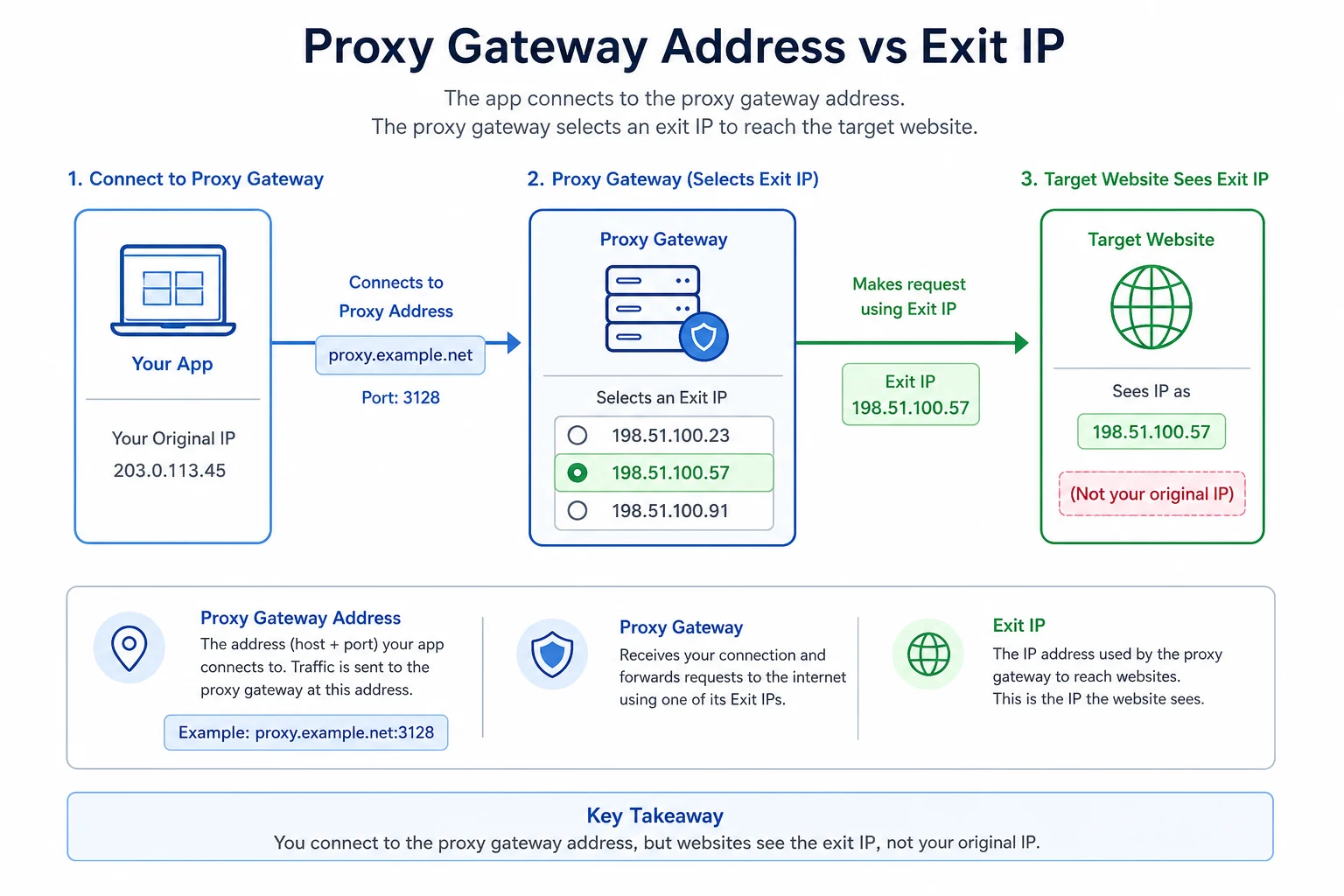
With static ISP proxies, your assigned proxy address may consistently map to the same exit IP. With residential rotating proxies, one gateway address can route to many different exit IPs depending on session settings.
How a Proxy Address Works
The request path usually looks like this:
- Your tool reads the proxy address.
- It connects to the proxy host and port.
- It sends the username and password if required.
- The proxy gateway checks your account, plan, and options.
- The gateway selects or keeps an exit IP.
- The proxy forwards the request to the target website.
- The target website responds to the proxy.
- The proxy returns the response to your tool.
If the connection fails at steps 2 to 4, you are debugging proxy setup. If it fails at steps 6 to 8, you may be debugging target blocks, rate limits, sessions, or website behavior.
How to Test a Proxy Address
Use a simple endpoint first. You want to confirm the proxy works before testing a complex website.
For HTTP proxies:
curl -x "http://username:password@host:port" https://ipinfo.io/ip
For SOCKS5 proxies:
curl --socks5 "host:port" --proxy-user "username:password" https://ipinfo.io/ip
If the command returns an IP address, the proxy authenticated and forwarded the request. If it fails, check the host, port, protocol, username, password, IP allowlist, and plan status.
Once the proxy works on a neutral endpoint, test your real target at low speed. If the target returns HTTP 403, HTTP 429, a Cloudflare block, or an anonymous proxy detected warning, the proxy address may be correct while the target is refusing the traffic.
Common Mistakes
Avoid these mistakes:
- Pasting the entire proxy string into the host field.
- Using
host:port:user:passin a tool that expectsuser:pass@host:port. - Choosing SOCKS5 when the provider gave you an HTTP proxy port.
- Forgetting to include the port.
- Adding
http://to a field that only wants the hostname. - Using a password with
@or:in a URL format without encoding it. - Allowlisting your home IP while running the bot on a VPS.
- Mixing residential gateway credentials with static ISP proxy ports.
- Changing session parameters before the plain proxy works.
One known-good proxy template saves a lot of time. Once you know the exact format your tool accepts, keep that format and only swap the host, port, username, password, or session ID as needed.
Which Proxy Address Should You Use?
Use the proxy type that matches the workflow:
- Use residential proxies when you need broad location coverage, rotating exits, or sticky consumer-style sessions.
- Use ISP proxies when you need stable dedicated IPs for account, monitoring, or session-sensitive workflows.
- Compare datacenter proxies vs residential proxies if cost and speed matter more than consumer IP reputation.
- Read how to use residential proxies if the target expects cookies, logins, carts, or profile continuity.
The proxy address is only the starting point. Good results also depend on matching session mode, location, pacing, retry behavior, and tool configuration to the target.
FAQ
Is a proxy address the same as an IP address?
No. A proxy address is the full connection information your app uses, usually host plus port and sometimes credentials. The proxy IP is the exit IP the target website may see.
What does the port mean in a proxy address?
The port identifies the proxy service on the host. Providers may use different ports for HTTP, SOCKS5, rotating residential, sticky residential, ISP, or datacenter products.
Do all proxy addresses need usernames and passwords?
No. Some proxies use IP allowlisting. Private paid proxies commonly use username and password authentication, and many providers support both modes.
Why does my proxy address work in one app but not another?
The apps may expect different formats. One may want separate fields, while another expects a URL or host:port:user:pass line. Protocol support and special characters in credentials can also change behavior.
Can one proxy address give me many IPs?
Yes. Rotating residential proxy gateways often use one host and port while routing requests through many possible exit IPs. Static ISP and datacenter proxies are more likely to keep the same exit IP.