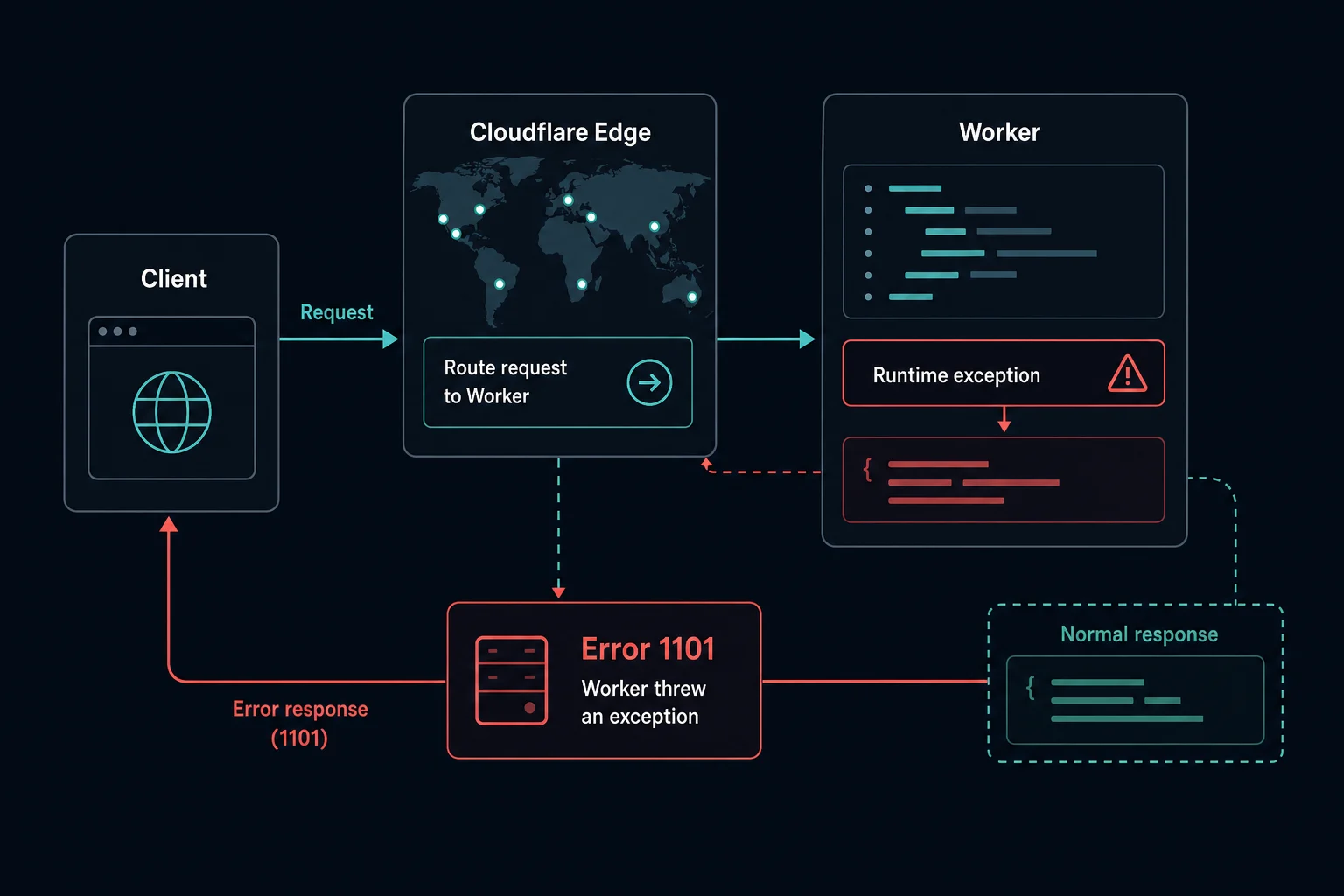
Error 1101 "Worker threw exception" is a Cloudflare Workers error. The site runs code on Cloudflare's network (a Worker), and that code crashed while it handled your request. Cloudflare shows the 1101 page because the Worker never produced a valid response.
The error page does not tell you what went wrong. Only the Worker's logs show the real exception. This guide covers what visitors can do, how developers find the exception, and the causes we see most often.
Not a Cloudflare page? Other "error 1101" messages
The number 1101 also appears in tools that have nothing to do with Cloudflare. If your screen does not show a Cloudflare error page with a Ray ID, this guide does not apply.
- iPhone or iPad restore error 1101 comes from Apple's restore process in Finder or iTunes. Use Apple's restore troubleshooting.
- MIT App Inventor "Error 1101: Unable to get a response with the specified URL" comes from the Web component. Check the URL and that the server (for example, an Arduino web server) is reachable.
- Windows crash or BSOD reports with 1101 are Windows events. They are not related to websites.
Error 1101 quick fix
If you see 1101 on someone else's site
You cannot fix it from your browser. The site's code failed on Cloudflare's servers, so changing browsers, clearing cookies, or switching networks does not help.
- Reload once. Some exceptions only happen on certain requests.
- Try a different page on the same site.
- Wait and try later. The owner has to fix and redeploy the code.
- Report the URL, the time, and the Ray ID from the error page to the site owner.
This is what people see on tools such as Path of Building paste sites (searches like "pobb error 1101"). It is the site's Worker failing, not your build link or your account.
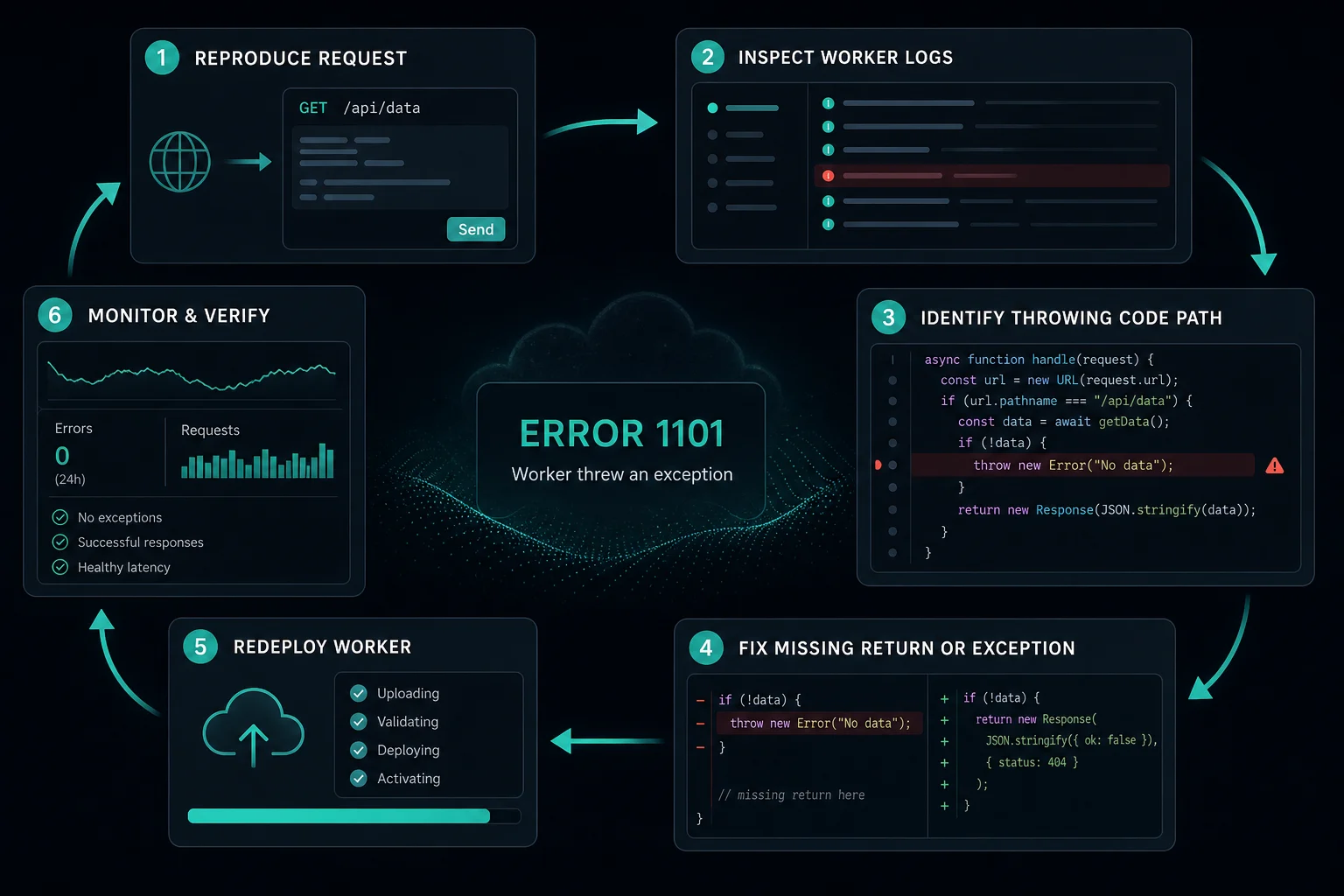
If you own the Worker
- Stream live errors with
npx wrangler tail <worker-name> --format pretty --status errorand reload the failing URL. - Read the exception name, message, and stack trace in the output.
- If the error started after a deploy, roll back to the last working version in the dashboard or with
npx wrangler rollback. - Fix the code path, then add a
try/catchso future failures return a controlled response.
What does "Worker threw exception" mean?
Cloudflare's Workers documentation defines error 1101 as "Worker threw a JavaScript exception." The request path is:
- A visitor requests a URL that matches a Worker route.
- Cloudflare runs the Worker at the edge.
- The Worker throws an error that nothing catches, or its promise rejects.
- Cloudflare returns the 1101 page instead of a response from your code.
The same 1101 page also appears when the runtime decides the Worker will never respond. The runtime reports this as "The script will never generate a response". It happens when all the code for a request has finished, nothing is left in the event loop, and the handler still has not returned a Response.
Your origin server is not involved in 1101. The failure is in the Worker code or its configuration.
How to find the real exception
Use wrangler tail
wrangler tail streams logs from the deployed Worker in real time:
npx wrangler tail <worker-name> --format pretty --status error
Reload the failing URL while the command runs. The output shows the exception message, the stack, and any console.log output from that request. In JSON format (the default), the details are in the exceptions array.
Use --env production if the Worker is deployed to a named Wrangler environment.
Turn on Workers Logs
wrangler tail only shows live traffic. To search past errors, enable Workers Logs in your Wrangler config and redeploy:
# wrangler.toml
[observability]
enabled = true
// wrangler.jsonc
{
  "observability": { "enabled": true }
}
Then open Workers & Pages, select the Worker, and open its logs. Filter with $workers.outcome = "exception" to list only failed invocations. The Worker's metrics page also splits errors into "Uncaught Exception", "Exceeded CPU Time Limits", and "Exceeded Memory", which tells you whether you have a 1101 or a resource problem.
Reproduce it locally
Run the Worker locally and send the same request:
npx wrangler dev
curl -i "http://localhost:8787/the/failing/path?same=params"
If it works locally but fails in production, the difference is usually configuration: bindings, secrets, or environment-specific settings. npx wrangler dev --remote runs against Cloudflare's network with the deployed bindings, which often reproduces the production error.
Catch errors at the top of the handler
A top-level try/catch turns a blank 1101 page into a logged error and a controlled response:
export default {
  async fetch(request, env, ctx) {
    try {
      return await handle(request, env, ctx);
    } catch (err) {
      console.error("Unhandled error", request.url, err && err.stack);
      return new Response("Internal error", { status: 500 });
    }
  },
};
Note the await. Without it, a rejected promise from handle() escapes the try block and still produces 1101.
Common causes of error 1101
| Cause | Typical message in logs | Fix |
|---|---|---|
| Missing binding in this environment | TypeError: Cannot read properties of undefined (reading 'get') |
Add the KV, R2, D1, or service binding under the right [env.<name>] section. Wrangler does not copy bindings from the top level into named environments |
| Missing secret or variable | undefined value used as a string or URL |
Set it with npx wrangler secret put NAME for each environment |
| Unhandled promise rejection | Error from fetch(), JSON parsing, or a storage call with no handler |
await the call inside try/catch, and handle non-OK responses |
| Handler returns nothing | "The script will never generate a response" | Return a Response from every branch. Do not leave a promise that never resolves |
| Bad input | SyntaxError: Unexpected token from request.json() |
Check request.method and Content-Type, then parse inside try/catch |
| Shared state across requests | Cannot perform I/O on behalf of a different request |
Do not store request-bound objects (streams, responses, sockets) in global scope |
| Module fails at startup | ImportError or ReferenceError at module load |
Every request fails until you fix the import. See the Python note below |
Python Workers import errors
Python Workers fail with 1101 on every request if a module throws at import time. One public example is the workers-py issue about importing asgi. The deployed Worker threw ImportError: cannot import name 'wait_until' from 'workers', while pywrangler dev worked locally. The reporter's workaround was to remove the import asgi line. If your Python Worker fails on every request right after a deploy or a runtime change, read the first exception in wrangler tail and check the imports it names.
Framework apps on Workers
Next.js, Remix, Astro, SvelteKit, and other framework adapters run your server code inside a Worker. A crash in a server route or loader shows up as 1101. The fix is the same: tail the Worker and read the stack trace. The trace points to the framework's bundled file, so enable source maps (upload_source_maps = true in wrangler.toml) to see your original file names.
Error 1101 vs. 1102, 1027, and 520
| Error | What happened | Where to look |
|---|---|---|
| Error 1101 | The Worker threw an uncaught exception or never returned a response | Worker logs, code, bindings |
| Error 1102 | The Worker exceeded its CPU time limit or its 128 MB memory limit | CPU-heavy loops, large JSON parsing, buffering large bodies |
| Error 1027 | The Worker hit the free plan's daily request limit | Plan usage, or upgrade to Workers Paid |
| Error 520 | The origin server returned an empty or invalid response, with no Worker failure | Origin server logs and response headers |
The 1101 vs. 1102 difference matters. Exceeding the CPU limit is not an exception in your code, so a try/catch will not stop it. For 1102, reduce work per request: stream large bodies with TransformStream instead of buffering them, cache results, and split large jobs. On the Workers Paid plan you can also raise the CPU limit.
Can proxies fix error 1101?
No. Error 1101 is a code failure on the site's side. A new IP, a VPN, or a proxy reaches the same broken Worker.
If a scraper or monitor sees 1101 on a target, log it as a target-side outage, back off, and retry later. Treat it differently from blocks like Cloudflare Error 1020, where your request was refused on purpose.
How to prevent error 1101
- Wrap the top-level handler in
try/catchand logerr.stack. - Keep Workers Logs enabled so you can search past exceptions.
- Define bindings and secrets for every Wrangler environment, not only the top level.
- Validate request input before you parse it.
- Use gradual deployments or test on a preview URL before you send all traffic to a new version.
- Watch the error rate on the Worker's metrics page after each deploy.
FAQ
What is error 1101?
Error 1101 is a Cloudflare error page. It means the site's Cloudflare Worker threw a JavaScript exception, or finished without returning a response, while it handled your request.
What does "Worker threw exception" mean?
It means code running on Cloudflare Workers crashed with an error that nothing caught. The page is generic. The actual error message is only in the Worker's logs.
Is error 1101 my fault as a visitor?
No. Your request reached Cloudflare, and the site's code failed. Only the site owner can fix it.
How do I fix error 1101 worker threw exception?
Run npx wrangler tail <worker-name> --status error, reproduce the request, and read the exception. Fix that code path, check bindings and secrets for the environment, and add a top-level try/catch. If a deploy caused it, roll back first.
Why does my Worker work in wrangler dev but throw 1101 in production?
Usually because production uses a different Wrangler environment with missing bindings or secrets. Runtime differences can also matter, as in the Python Workers import case above. Try npx wrangler dev --remote to run with the deployed configuration.
Is error 1101 the same as error 1102?
No. Error 1101 is an exception or missing response. Error 1102 means the Worker exceeded its CPU time or memory limit.
Final thoughts
The 1101 page hides the real error, so everything starts with the logs. Tail the Worker, read the stack trace, and fix that exact path. Then add a top-level try/catch and Workers Logs so the next failure is easy to find.
Technical references: Cloudflare Workers errors and exceptions, Cloudflare error 1101, and Cloudflare error 1102.