Error code 526 "Invalid SSL certificate" means Cloudflare could not validate the SSL certificate on the website's origin server, so it refused to connect. Two things must both be true: the site uses Full (strict) SSL/TLS mode, and the origin certificate fails Cloudflare's checks.
If you are a visitor: the fix is on the website's side. Wait and try again later, or tell the site owner. Your browser and your connection are fine.
If you own the site: the origin certificate must meet all of these Full (strict) requirements:
- It is not expired and not revoked.
- A publicly trusted certificate authority or Cloudflare's Origin CA issued it.
- Its Common Name or Subject Alternative Name matches the requested hostname.
- The origin sends the full chain, meaning the leaf and intermediate certificates.
- The origin accepts HTTPS connections on port 443.
Fix the one that fails. Switching the SSL/TLS mode from Full (strict) to Full also removes the error, but it turns off certificate validation. Use it only as a short-term step.
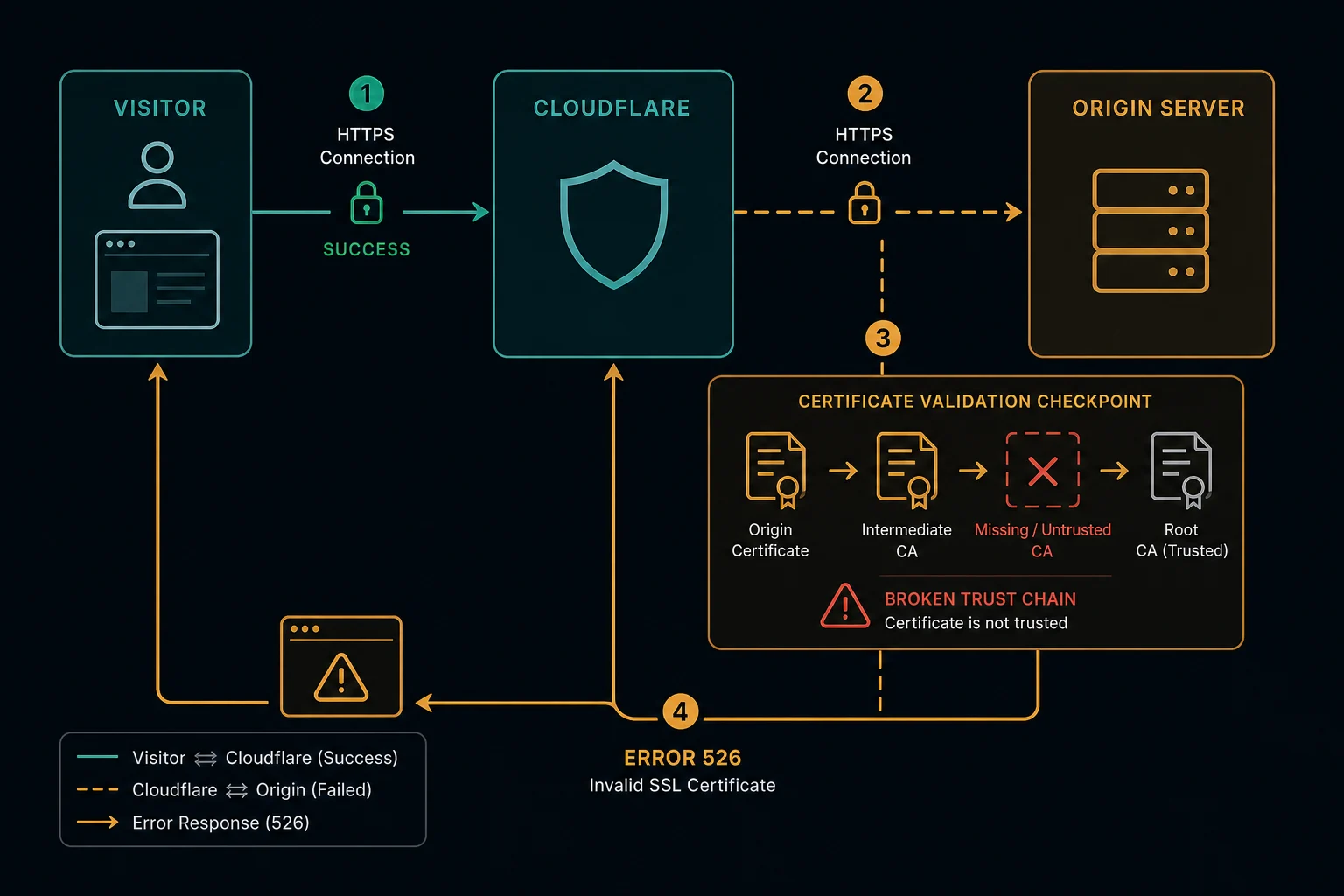
If you see error 526 on a site you are visiting
You may see "Error 526 Invalid SSL certificate" on a Cloudflare page, or Chrome's "This page isn't working. If the problem continues, contact the site owner. HTTP ERROR 526". Both mean the same thing. The website's server has a certificate that Cloudflare does not accept.
This often happens on government services and ID portals, for example during NID validation, after a certificate expires. Only the site's operator can fix it.
What you can do:
- Wait some time and reload. The error ends as soon as the operator installs a valid certificate.
- Check the site's official social accounts or news for an outage notice.
- Contact the site's support with the URL, the time, and the Ray ID shown on the error page.
Clearing your cache, changing browsers, or using a VPN or proxy does not fix a 526. The failed check happens between Cloudflare and the site's server, not on your device.
"526 no reason phrase" and other forms of the error
526 is a Cloudflare status code, not a standard HTTP code. HTTP/2 and HTTP/3 responses also carry no reason phrase. So some apps and logs print "526 no reason phrase", "status 526", or "HTTP response code: 526" instead of the full name. It is the same error.
"Insecure upstream, HTTP response code: 526"
This page comes from Cloudflare Gateway, part of Cloudflare Zero Trust. Your company or school uses it to filter web traffic, often through the WARP client. Gateway shows it when it cannot open a secure connection to the destination site. Cloudflare's docs list these reasons: the site's certificate is expired, revoked, or from an unknown issuer, the name on the certificate does not match the URL, or the site does not support modern cipher suites.
If the destination site has a real certificate problem, only that site can fix it. If the site works for other people, contact your IT administrator. They manage the Gateway policies that affect the connection.
Error 526 vs. 525
| Error | What failed | First check |
|---|---|---|
| 525 | The TLS handshake itself | Port 443, certificate present, SNI, ciphers |
| 526 | Certificate validation in Full (strict) mode | Expiry, trusted issuer, hostname match, chain |
With 525, the connection fails before Cloudflare can use the certificate. With 526, the handshake works, and Cloudflare then rejects the certificate.
How to fix HTTP error 526 as a website owner
1. Read the certificate the origin serves. Connect to the origin IP with the real hostname. Replace 203.0.113.10 and example.com:
openssl s_client -connect 203.0.113.10:443 -servername example.com </dev/null 2>/dev/null \
  | openssl x509 -noout -subject -issuer -dates -ext subjectAltName
The -ext option needs OpenSSL 1.1.1 or later. Check the output against the requirements:
notAftermust be in the future.issuermust be a public CA or Cloudflare Origin CA.subjectAltNamemust include the exact hostname, or a wildcard that covers it. A*.example.comcertificate coverswww.example.combut notexample.comora.b.example.com.
2. Check the chain. Run the same openssl s_client command with -showcerts instead of the pipe. A publicly trusted certificate should end with Verify return code: 0 (ok). A "unable to get local issuer certificate" result usually means the origin does not send the intermediate certificate. Configure the full chain file, for example fullchain.pem from Let's Encrypt.
A Cloudflare Origin CA certificate fails this public check. That is expected. Browsers and openssl do not trust it, but Cloudflare does.
3. Fix the certificate. Pick one:
- Renew the expired certificate and reload the web server.
- Issue a certificate that covers the failing hostname.
- Install a free Cloudflare Origin CA certificate. It works only behind Cloudflare's proxy.
- If you must keep a self-signed or private CA certificate, add it to Cloudflare's Custom Origin Trust Store.
4. Check every server. Intermittent 526 errors often mean one backend still serves the old certificate. Run step 1 against each backend IP.
5. Check Workers. Cloudflare Workers always use Full (strict) for external subrequests. A Worker that fetches an origin with a bad certificate can return 526 even if the zone uses Full mode. The cots_on_external_fetch compatibility flag lets those subrequests use your Custom Origin Trust Store. If the Worker code itself throws instead, Cloudflare shows error 1101, not 526.
Can proxies fix error code 526?
No. A different IP does not change the certificate on the website's server. This applies to VPNs and proxies too.
If you scrape or monitor a site and see 526, treat it as an outage on the target. Back off and retry later. Fast retries do not repair a certificate.
How to prevent error 526
- Automate certificate renewal and alert well before
notAfter. - After renewal, check the served certificate on every backend.
- Add every new subdomain to the certificate before you proxy it.
- Serve the full chain, not only the leaf certificate.
- Prefer Cloudflare Origin CA certificates for origins that only Cloudflare reaches. They can have long validity periods.
FAQ
What does error code 526 mean?
It means Cloudflare could not validate the SSL certificate on the website's origin server in Full (strict) mode, so it refused the connection.
How do I fix error 526 as a visitor?
You cannot. The problem is the website's certificate. Wait, reload later, or contact the site's support with the Ray ID.
What does "invalid SSL certificate error code 526" mean on a government or NID site?
The site's certificate behind Cloudflare is expired or misconfigured. Only the site operator can fix it. Try again later.
Can an expired certificate cause error 526?
Yes. An expired certificate is one of the most common causes, because Full (strict) mode rejects any certificate past its notAfter date.
Is error 526 the same as error 525?
No. Error 525 means the TLS handshake failed. Error 526 means the handshake worked, but Cloudflare rejected the certificate.
Technical reference: Cloudflare error 526 documentation.