Indeed job scraping means collecting job-listing data from Indeed with software, and Indeed's rules do not allow it without permission. As of October 2026, Indeed's Terms of Service prohibit bots, scrapers, and AI agents from accessing or data-mining the site without express written permission, apart from conditional crawling described in its robots.txt.
If you need data about jobs your organization manages, use an ATS export or an approved Indeed partner API. For broader market data, use a licensed source with clear provenance or get written authorization that defines the pages, fields, frequency, storage, and permitted use. A proxy changes the network path. It does not turn prohibited collection into an approved workflow.
This guide quotes the relevant Indeed terms, explains how to choose an allowed source, shows how to design a reliable job-record pipeline, and covers where proxies fit. It is not legal advice. Read the current terms yourself and ask a lawyer about your specific project.
What Indeed's terms of service say about scraping and automated access
These quotes come from Indeed's Terms of Service for the United States, version "Last Updated: September 29, 2026". Indeed changes its terms from time to time and has versions for other countries, so check the current text for your market.
Section D.21, Site Rules. Under "DO NOT, directly or indirectly", the list includes:
"Use any automated system (bots, scrapers, spiders, AI or Agentic AI) to access, data-mine, or submit content to the Site, in bulk or otherwise, without Indeed's express written permission (we conditionally grant permission to crawl the Site solely as outlined in our robots.txt file). You may not crawl, scrape, extract data from, reproduce, duplicate, copy, sell, exploit, trade or resell any part of the Site or access the Site for the development, training, fine-tuning, or improvement of any third-party machine learning model, artificial intelligence (AI) system, or any related software program, model, algorithm, or generative AI tool;"
The same list also prohibits users from trying to "Bypass any security measures or Site limitations".
Section A.3.5, applying to jobs. For job seekers, the terms say:
"Use of any automation, scripting, or bots to automate the Indeed Apply process outside of Indeed's official vendors and tooling is prohibited."
What these clauses cover, in plain terms:
| Activity | What the terms say |
|---|---|
| Scraping job listings with a bot or script | Needs Indeed's express written permission |
| Crawling | Conditionally allowed only as Indeed's robots.txt describes |
| Using Indeed content to train or improve an AI model | Not allowed |
| AI agents that browse or submit content | Named directly ("AI or Agentic AI") in the automated-system clause |
| Auto-apply bots | Not allowed outside Indeed's official vendors and tooling |
| Getting around blocks, CAPTCHAs, or limits | "Bypass any security measures or Site limitations" is prohibited |
Indeed's robots.txt allows some paths and disallows many others. The terms make the robots file the limit of the crawl permission. They do not make it a general license to collect and reuse data.
Check permission before you write code
Do not infer permission from the fact that a listing is visible in a browser. Indeed's Site Rules distinguish ordinary use through public interfaces from access by bots, scrapers, spiders, and other automated systems. They also prohibit bypassing security measures or site limitations.
Use this source order:
| Your requirement | Best starting point | What to verify |
|---|---|---|
| Analyze jobs your company publishes | Your ATS export, database, or webhook | Ownership, fields, update timing, and retention |
| Manage or inspect employer jobs on Indeed | Approved Job Sync or Job Update integration | Partner access, OAuth scopes, employer association, and API terms |
| Build labor-market research | Licensed job dataset | Provenance, coverage, reuse rights, refresh interval, and deletion process |
| Test an explicitly approved web workflow | Written authorization for a narrow page set | Hostnames, fields, request budget, test window, and stop conditions |
| No approved source covers the request | Do not collect | Redesign the project or request access |
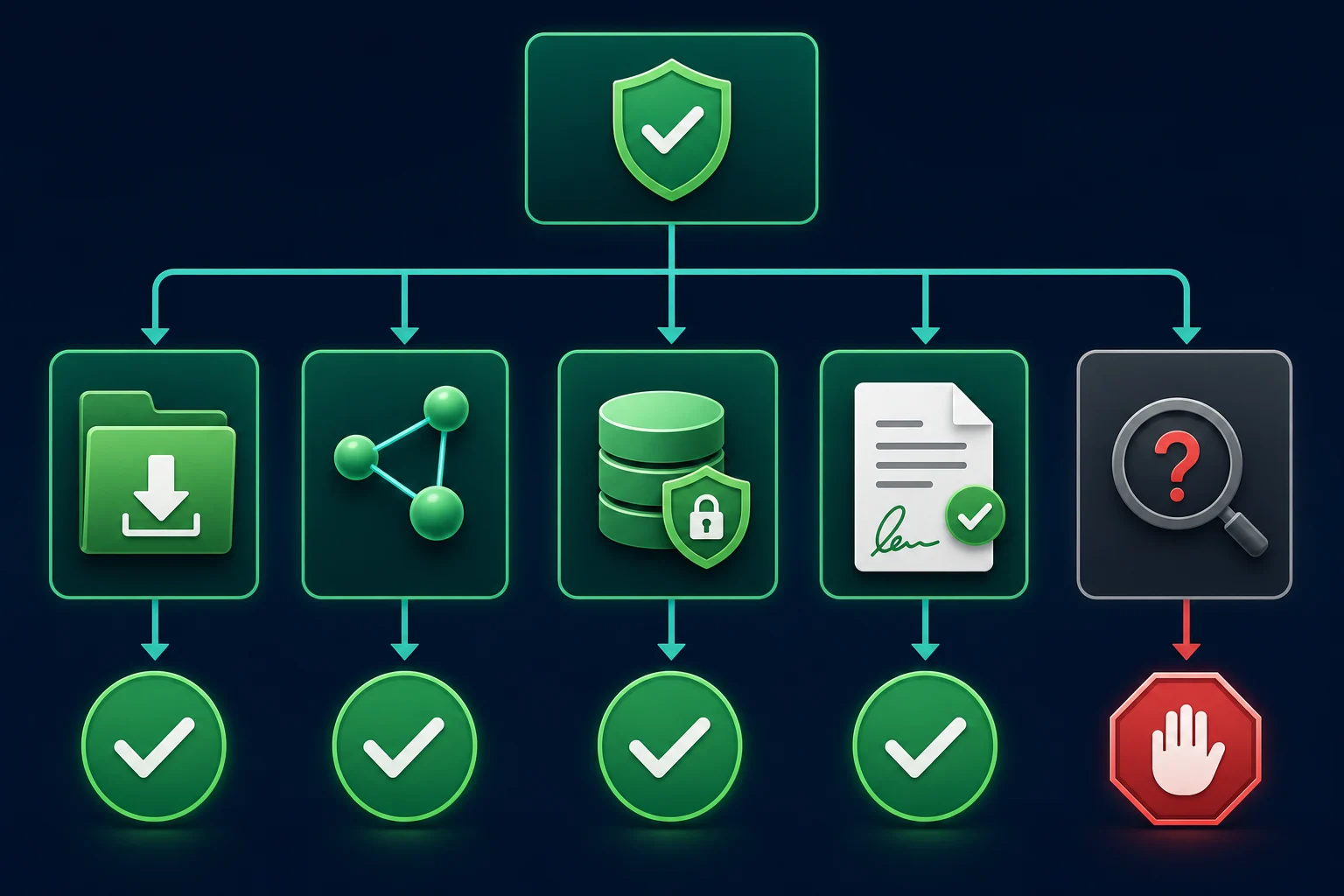
This decision should be recorded for each source rather than hidden in a general legal note. The broader job data scraping guide covers schemas, normalization, duplicates, and listing lifecycles across job sites; this article stays focused on Indeed-specific access choices and controls.
Why the top results are scraper tools
Search for "indeed job scraping" in October 2026 and the results are mostly ready-made scrapers, Python tutorials, and GitHub projects: Apify actors, Outscraper, a Scrapfly tutorial, and open-source scripts. The Scrapfly and GeeksforGeeks tutorials we read do not discuss Indeed's Terms of Service. Scrapfly covers search URLs, embedded page data, and unblocking, and its FAQ calls scraping public job data legal with caveats.
A hosted scraper moves the work to a vendor. It does not change what Indeed's terms say, and the clause quoted above covers use "directly or indirectly". If you pick a tool, the data scraping tools comparison covers the options, but get permission or legal advice for the project first.
What Indeed's official APIs actually cover
Indeed documents several employer and partner integrations, but their names can be misleading if you are looking for a general job-search dataset. As of October 2026, we found no official Indeed API that searches public job postings.
The Disposition Sync API and Job Sync API are listed in the Partner Console as requiring review, and both are built for ATS partners sending data to Indeed.
The old Publisher API, a keyed job search API that affiliate sites used, no longer appears in Indeed's documentation. Secondary sources report it was closed to new developers and later stopped returning data, most of them dating that to 2023. We could not confirm the date from Indeed itself, so treat the exact year as unverified.
The Job Sync API documentation describes an ATS partner integration for creating, updating, expiring, and checking the status of job postings. Confirm with Indeed which integration model is available to your organization and complete its approval and setup process. Access to this publishing integration does not provide a public job-search API.
The Job Update API is likewise a controlled integration for jobs an employer or authorized agency manages, not a public corpus API. Use it only for the employer accounts and operations covered by your approval. Indeed's API Terms condition API use on the applicable documentation and prohibit retrieving more information than an approved integration minimally requires.
Treat API approval and data rights as part of the implementation:
- Confirm the API product matches the business use.
- Complete the Indeed setup and approval for your supported integration model, and obtain employer authorization where applicable.
- Request only the documented OAuth scopes.
- Store the employer, integration, and source identifiers with each record.
- Follow the endpoint's documented rate limits and allowed purposes.
- Revisit storage and downstream-use rules before sharing or reselling data.
If you only need to monitor jobs your organization owns, your ATS is often simpler and more authoritative than reading the copy displayed on Indeed. It also avoids treating a distribution channel as the system of record.
Define a narrow Indeed job record
An approved source is only the first control. Define the exact fields needed for the analysis before retrieving anything. Do not store full HTML, page assets, or unrelated user data by default.
A practical record for employer-owned listings might look like this:
{
  "source": "indeed-partner-api",
  "employer_id": "authorized-employer-id",
  "source_job_id": "stable-job-id",
  "employer_requisition_id": "ENG-142",
  "title": "Platform Engineer",
  "company": "Example Company",
  "location": {
    "country": "US",
    "region": "NY",
    "locality": "New York"
  },
  "date_posted": "2026-08-28",
  "status": "active",
  "observed_at": "2026-09-01T12:00:00Z"
}
Keep the raw source value beside any normalized value that can change meaning. For example, separate a displayed location from remote-work eligibility, and separate an employer's requisition ID from an Indeed or partner API identifier.
The JobPosting vocabulary on Schema.org is a useful reference for common fields. It is not proof that every visible field is accurate or reusable. Validate title, company, location, dates, employment type, compensation, and status against the authorized source contract.
Avoid candidate profiles, resumes, application answers, contact details, and inferred sensitive characteristics. Those fields are unnecessary for listing analytics and create a different privacy and security risk.
Build the authorized collection pipeline
Whether the input is an export, API response, or specifically permitted page, put a validation boundary between retrieval and storage.
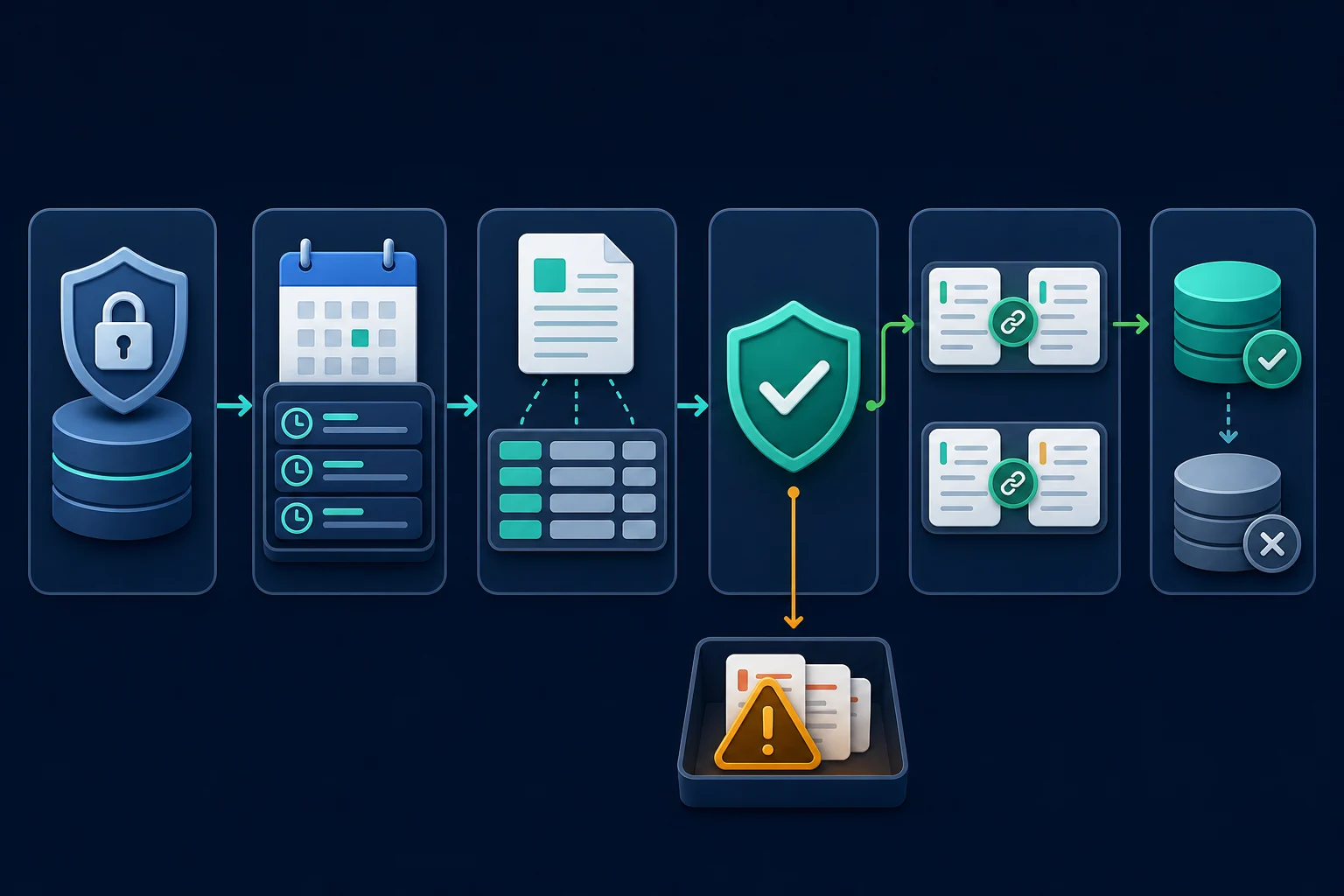
Use these stages:
- Source registry. Store the approved interface, employer or account owner, permitted fields, allowed purpose, review date, request budget, and kill switch.
- Bounded discovery. Read IDs from the approved API, export, webhook, or fixed allowlist. Do not let arbitrary links expand the crawl scope.
- Structured extraction. Map documented API or export fields first. Use page selectors only when written authorization covers that page workflow.
- Validation. Reject missing IDs, impossible dates, unexpected employers, login pages, challenges, consent pages, and schema drift.
- Deduplication. Prefer stable source and requisition IDs. Use normalized title, company, location, and description similarity only as supporting evidence.
- Lifecycle storage. Append observations, derive current state, and retain source lineage rather than overwriting history without an audit trail.
Every run should produce counts for discovered, accepted, quarantined, duplicated, updated, and closed records. A scraper that exits successfully while accepted records fall from 95% to 40% is still failing.
Deduplication, closures, and rate limits
Keep the employer requisition ID, the ATS posting ID, any Indeed-side job ID, and the public URL as separate fields. Match on the stable source ID first, treat changed content under the same ID as an update, and never mark a job closed because one request timed out. The job data scraping guide covers deduplication and the listing lifecycle in detail.
Indeed's API Terms say it monitors and limits API usage. Follow the request budget of the approved interface you use. If it returns HTTP 429, reduce concurrency and honor Retry-After; RFC 6585 defines the status. The HTTP 429 guide explains capped retries and backoff.
When proxies fit an Indeed job data workflow
Most employer API and export jobs do not need a rotating proxy. A direct connection or one stable egress address is easier to authenticate, audit, and allowlist.
A proxy can serve a legitimate role when your authorization specifically covers:
- Testing how your own job appears from approved regions.
- Giving an integration a fixed egress IP for an allowlist.
- Isolating independent customer environments.
- Keeping one browser test session on a consistent network route.
For an approved regional QA task, residential proxies can provide location-specific egress. Keep the proxy, cookies, and browser context stable for the session, and record which region produced each observation.
Do not rotate IPs after 403 responses, challenges, or other denials in an attempt to continue. Stop, classify the response, confirm the authorization and request behavior, and contact the source owner when necessary. IP rotation cannot repair expired OAuth credentials, missing scopes, a broken data mapper, or prohibited access.
Checklist before launch
Before an Indeed-related collector runs in production, confirm all of the following:
- The data owner and permitted business purpose are named.
- The source is an approved API, export, licensed dataset, or written-authorized page set.
- The allowed hostnames, employer IDs, fields, and downstream consumers are recorded.
- Credentials use the minimum scopes and are stored outside logs and source control.
- Each source has its own concurrency, retry, and daily request budget.
401,403,429, challenges, and schema changes have explicit stop or backoff behavior.- Validation rejects unexpected personal data and non-job pages.
- Deletion, correction, retention, and access-review procedures are tested.
- Proxies, if any, solve a documented routing requirement rather than conceal traffic.
For the broader legal review of contracts, privacy, copyright, database rights, and jurisdiction, use the data scraping legality checklist. Qualified counsel should review a real collection project when the authorization or intended reuse is unclear.
FAQ
Is it allowed to scrape Indeed job listings?
Indeed's current Terms prohibit using automated systems to access, data-mine, or scrape the site without express written permission, with conditional crawler access governed by its robots.txt file. Review the current terms for your market and obtain permission for the exact project; public visibility alone is not authorization.
Is there an Indeed Publisher API for job search?
Not one we could confirm as of October 2026. Secondary sources report that Indeed closed the old Publisher API to new developers around 2023, and Indeed's current documentation lists only partner integrations such as Job Sync and Disposition Sync. Check Indeed's documentation directly before you plan around it.
Does Indeed allow bots to apply to jobs?
No. Section A.3.5 of Indeed's terms prohibits automation, scripting, or bots that automate the Indeed Apply process outside Indeed's official vendors and tooling. Auto-apply browser extensions and AI agents fall under that rule unless Indeed has approved them.
Can I use a third-party Indeed scraper tool?
A hosted scraper does not change Indeed's terms, which prohibit automated access "directly or indirectly" without express written permission. Ask Indeed for permission or get legal advice before you rely on one.
Can I build an Indeed scraper in Python?
Python can process an authorized export or call an approved API, but the language does not change the access rules. Build the source contract, authentication, rate limits, field allowlist, validation, and stop conditions first. Do not use Python browser automation to bypass a restriction or challenge.
Does robots.txt make Indeed scraping legal?
No. The Robots Exclusion Protocol communicates crawler rules, while permission, contracts, privacy, intellectual-property rights, and applicable law are separate questions. Indeed's Terms expressly tie conditional crawling permission to its robots rules, so both sources must be reviewed together.
Can proxies prevent an Indeed scraper from being blocked?
No. Proxies can support approved regional testing, stable egress, or workload isolation. They do not grant permission or fix excessive request rates, invalid credentials, missing API scopes, broken parsing, or site-policy denials.
Final thoughts
Indeed job scraping should start with an approved data path: your ATS, an employer-authorized Indeed partner API, a licensed dataset, or narrow written permission. Once access is settled, define a small schema, preserve source identifiers, validate every observation, deduplicate with evidence, and track listings through confirmed closure.
Use proxies only for a documented routing need inside that authorization. If the source rules or response tell you to stop, changing IPs is not a solution; revisiting the source, scope, or permission is.