Competitor price scraping is the automated collection of competitors' public prices so you can compare them with your own. The hard part is not getting a number from a page. It is proving that the number belongs to the right product, variant, seller, market, currency, and offer type.
The short version:
- Decide whether to buy price monitoring software or build a scraper (see the table below).
- Map each of your products to the exact competitor product page before you collect anything.
- Read prices from structured data (JSON-LD) first and fall back to page selectors.
- Validate every observation and quarantine anything that does not match.
- Check prices at a pace the source can handle, and add proxies only when location changes the price.
Start with authorized APIs, licensed feeds, or partner exports when they cover what you need. If public-page collection is permitted for your use case, keep the scope narrow, review the site's terms and robots.txt, and collect only the fields you need for comparison. The data scraping legality guide covers access, terms, copyright, privacy, and intended use.
This guide covers the business side: what to track, how to match offers, what to scope, whether to build or buy, and how to read each price with its context. The engineering side, such as scheduling, validation, change detection, and alerts, has its own pipeline guide, linked in the sections below. Hotel rates need a stay-specific comparison key, which the hotel price scraping guide explains.
Build or Buy: Scraper vs Price Monitoring Software
Many teams do not need to write a scraper at all. Choose by catalog size, number of competitors, and engineering time:
| Option | Examples | Fits when | Tradeoffs |
|---|---|---|---|
| Price monitoring software | Prisync, Price2Spy, Pricefy | You track hundreds to a few thousand SKUs on mainstream retail sites and want a dashboard | Monthly fee per SKU tier. Less control over matching rules and check timing. |
| Managed scraping API plus your own code | Zyte API, ScrapingBee, Apify | You need custom fields or sources but do not want to run browsers or proxies | Per-request cost. You still own matching, validation, and alerts. |
| Your own scraper | Python, Scrapy, Playwright | You need full control, unusual sources, high check frequency, or regional prices | Engineering and maintenance time, proxy cost, parser upkeep |
Software vendors change features and prices often, so test two or three with your own SKU list before you commit. The ecommerce scraping tool guide compares the self-built options in more detail.
Competitor Price Scraping Needs Comparable Offers
Competitor price scraping fails when it compares unlike offers. A product card may show a list price, sale price, loyalty price, coupon price, marketplace seller price, subscription price, unit price, or shipping-adjusted total. Those numbers can all be real, but they should not be mixed in one price series.
Before writing selectors, define the exact observation you need:
| Decision | Example rule |
|---|---|
| Product identity | Match by SKU, GTIN, model number, size, color, and pack count |
| Competitor source | Collect only approved domains, marketplaces, regions, and page types |
| Offer type | Track the generally available shelf price unless a coupon or member price is explicitly in scope |
| Seller | Distinguish first-party retail, marketplace seller, used offer, and refurbished offer |
| Market | Keep country, currency, language, and tax assumptions attached to every observation |
| Availability | Store out-of-stock, unavailable, and unknown as separate states |
If you cannot prove that two observations describe the same product and offer, do not use them for automated pricing decisions. Quarantine them for review instead.
Scope Competitor Price Scraping Before You Crawl
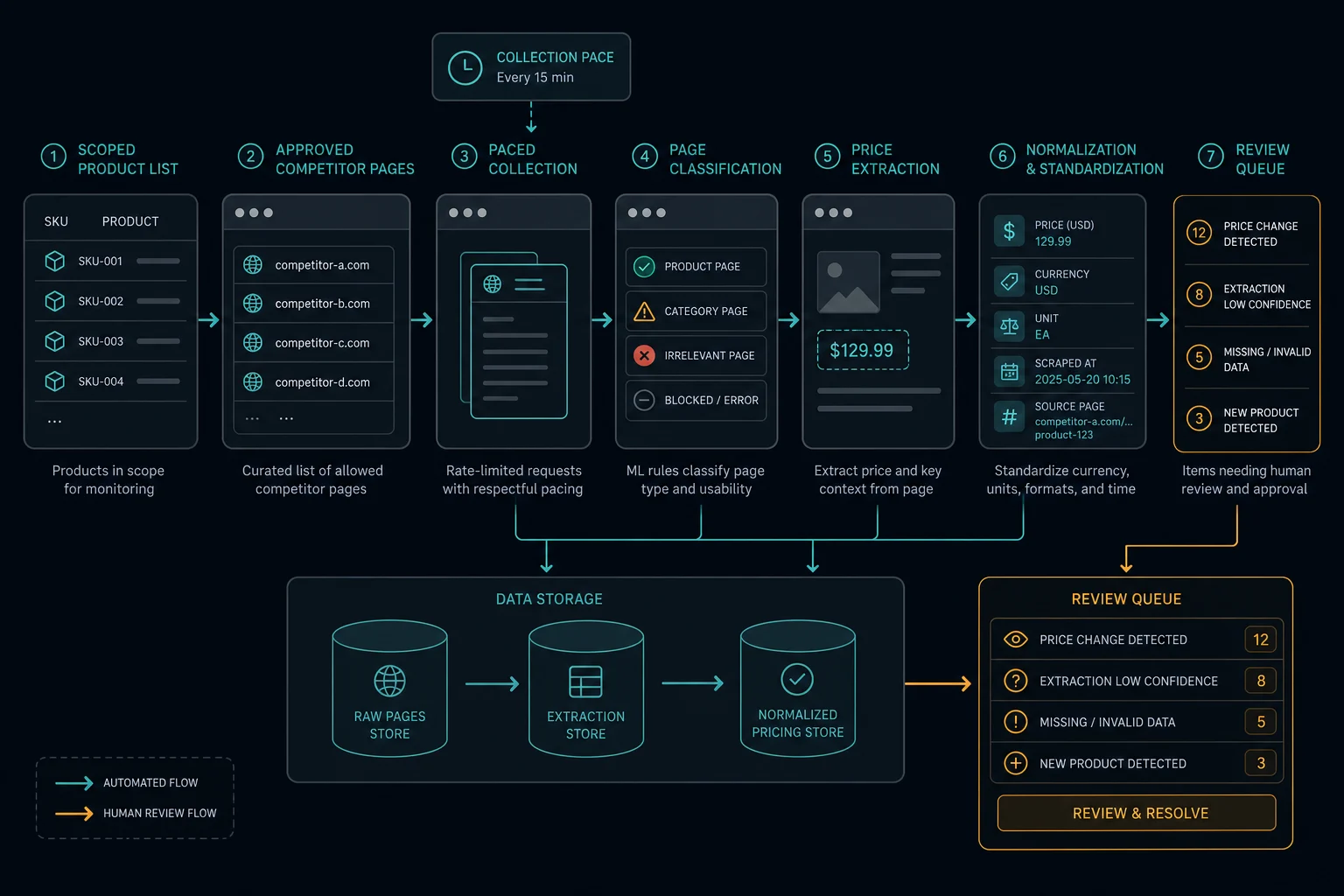
A competitor price scraper should begin from a controlled product list, not from open-ended crawling. Use source-specific mappings so each competitor page is attached to an internal product record before collection starts.
For each monitored item, store:
- Your internal product ID.
- Competitor domain and approved URL pattern.
- Competitor product ID, SKU, model number, or canonical URL.
- Variant attributes that affect price, such as size, color, quantity, condition, and seller.
- Target market, currency, and language.
- Expected page type, such as product detail, offer listing, or category result.
- The intended price definition.
Normalize URLs before enqueueing them. Remove tracking parameters, reject redirects that leave the approved host, deduplicate equivalent URLs, and keep one canonical source URL per competitor offer. These controls prevent a scraper from drifting into pages that were never approved for monitoring.
When the project involves marketplace pages such as Amazon, the ecommerce scraping guide covers product identity, offer validation, and data quality checks in more detail. For eBay-specific marketplace data, the eBay scraping workflow covers listing IDs, seller state, item condition, source selection, and page-state validation.
Choose the Lowest-Complexity Data Source
Use the simplest source that gives you the fields you need and that you have permission to use. Try an official API, a licensed feed, or a partner export first. Then try public server-rendered HTML. Use a browser only when a permitted price appears only after JavaScript runs. A partner export may not show the public shelf price, so confirm that it measures the price you compare. The price monitoring pipeline guide compares each source type, its tradeoffs, and the role of robots.txt.
Extract the Price Without Losing Context
Read structured data first
Many retail product pages include schema.org Product and Offer data in a <script type="application/ld+json"> tag, because search engines use it for rich results. When it is present, it is usually more stable than visual selectors. This function reads every product offer it finds and keeps the raw value for review:
import json
from decimal import Decimal, InvalidOperation

from bs4 import BeautifulSoup


def offers_from_json_ld(html: str) -> list[dict]:
    soup = BeautifulSoup(html, "html.parser")
    results = []
    for tag in soup.find_all("script", type="application/ld+json"):
        try:
            data = json.loads(tag.string or "")
        except json.JSONDecodeError:
            continue
        items = data if isinstance(data, list) else data.get("@graph", [data])
        for item in items:
            if not isinstance(item, dict) or "Product" not in str(item.get("@type")):
                continue
            offers = item.get("offers") or []
            if isinstance(offers, dict):
                offers = [offers]
            for offer in offers:
                raw_price = offer.get("price", offer.get("lowPrice"))
                try:
                    amount = Decimal(str(raw_price))
                except InvalidOperation:
                    amount = None  # keep the record, flag it for review
                results.append({
                    "name": item.get("name"),
                    "sku": item.get("sku") or item.get("gtin13") or item.get("mpn"),
                    "offer_type": offer.get("@type"),
                    "raw_price": raw_price,
                    "amount": amount,
                    "currency": offer.get("priceCurrency"),
                    "availability": offer.get("availability"),
                })
    return results
Check the result against what a shopper sees. Structured data can lag behind the visible price, show the list price instead of a sale price, or describe only the default variant. An AggregateOffer gives a price range (lowPrice), not one seller's price. If the page loads prices with JavaScript, the JSON-LD in the initial HTML may be missing or stale.
Use source adapters for everything else
Avoid a universal selector that tries to parse every competitor the same way. Competitor sites use different markup, discount display rules, variant controls, shipping assumptions, and localized formats. Build source adapters that return a typed observation or a classified failure.
A useful competitor price observation includes:
{
  "product_id": "catalog-1842",
  "competitor": "example-retailer",
  "source_product_id": "SKU-492",
  "market": "US",
  "currency": "USD",
  "seller": "Example Retailer",
  "offer_type": "standard",
  "amount": "49.95",
  "availability": "in_stock",
  "observed_at": "2026-07-07T12:00:00Z",
  "source_url": "https://shop.example/products/SKU-492",
  "parser_version": "example-retailer-v4"
}
Keep the raw display text alongside the normalized decimal amount. That lets an operator review cases like "2 for $10", "from $49", "member price", or currency formats that changed unexpectedly. Store money as decimal values in application code and databases so percentage and threshold checks do not inherit floating-point rounding errors.
Classify the page before extracting the price. A successful HTTP 200 response may still be a consent page, login page, search page, challenge, redirect, or unavailable product. Treat wrong-page responses as data failures, not as empty prices.
Validate Competitor Prices Before They Affect Decisions
A competitor price is useful only when it matches the mapped product and offer. Before an observation reaches a pricing decision, confirm the product, variant, pack size, seller, offer type, currency, and market. If a required field is missing, mark it as unknown. Do not fill it with a different field, such as the list price. A sudden rise in mismatches or missing prices usually means that a competitor changed its site. The pipeline guide covers validation checks, quarantine, and data-quality metrics in detail.
Pace Requests for Monitoring, Not Crawling
Competitor checks repeat, so pace them as a monitoring job, not as a crawl. Give each source its own schedule, concurrency limit, and retry limit. Check fast-changing, high-value products more often than stable products. Stop retries after repeated 403 responses. After a 429 response, wait at least the time in the Retry-After header. The HTTP 429 guide explains backoff. Estimate the load before you scale: 8,000 URLs every four hours is 48,000 checks per day before retries. The pipeline guide covers tiered schedules, jitter, caching, and how often to check.
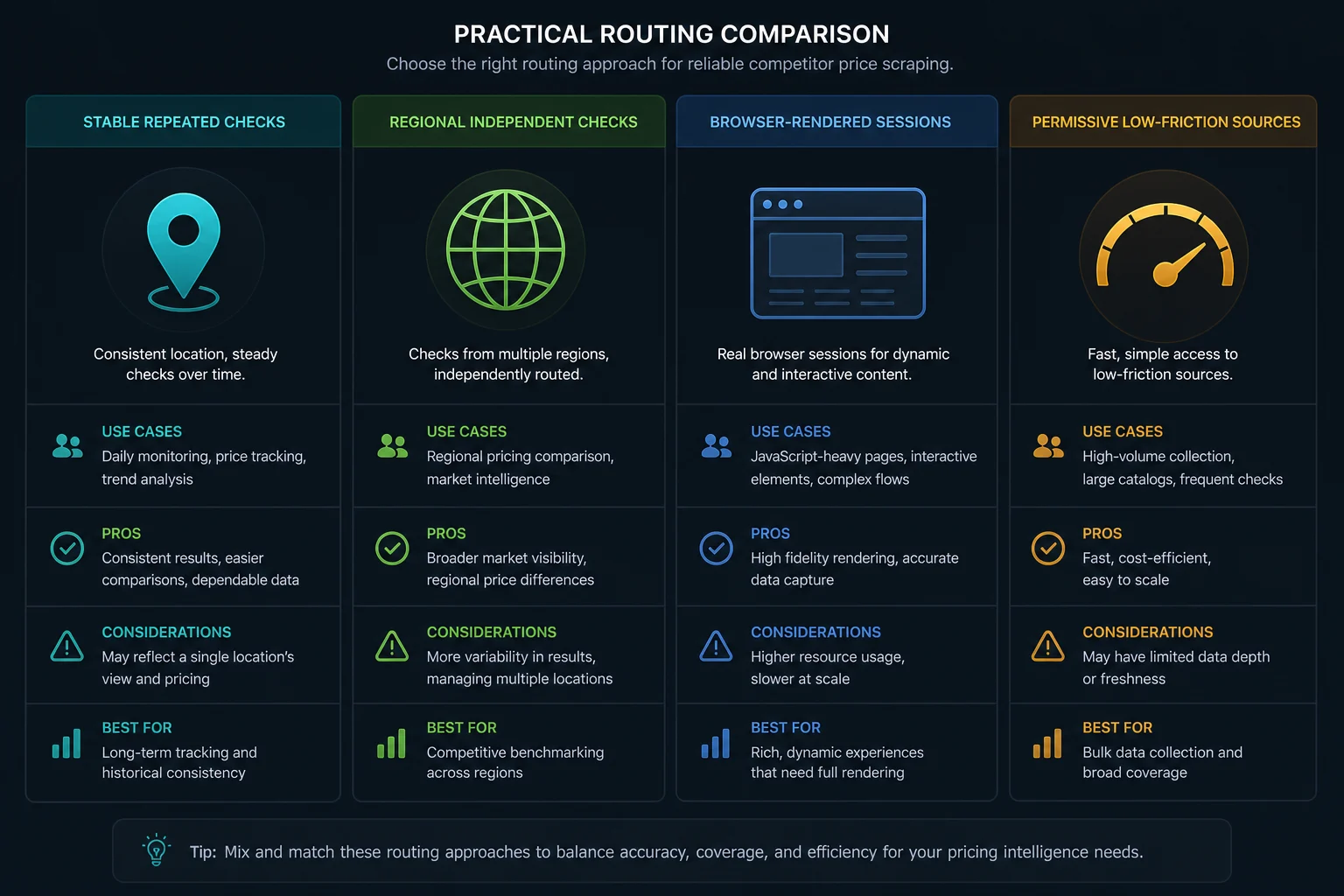
Use Proxies Only Where Routing Changes the Measurement
Use proxies only when the price, stock, language, or tax display changes by location, or when cloud workers need controlled outbound routing. Proxies do not give permission, fix selectors, or make high request rates acceptable. For repeated checks of the same retailers from one market, ISP proxy plans give static IPs with stable latency. When the price changes by country, state, or city, residential proxies provide that targeting. The pipeline guide explains how to match each routing pattern to a monitoring job.
Build Review Loops Around Suspicious Changes
The most expensive competitor price scraping failures are not request errors. They are believable wrong prices that trigger bad decisions. Put review gates between collection and pricing actions.
Route these observations to manual or automated review:
- Price dropped or increased beyond a configured threshold.
- Currency, unit quantity, or market changed unexpectedly.
- Product title or image no longer matches the mapped item.
- Competitor page shows multiple sellers and the selected seller is absent.
- Price appears only in a promotion, coupon, or member-only block.
- The parser version changed since the previous valid observation.
- Two consecutive observations disagree during a short confirmation window.
Keep a small, policy-approved fixture set for each competitor source. Include normal pages, sale pages, out-of-stock pages, variant pages, consent pages, error pages, and marketplace pages with multiple sellers. Run those fixtures through extraction and validation before deploying parser changes.
Competitor Price Scraping FAQ
Is competitor price scraping legal?
It depends on the source, data, jurisdiction, access method, contract terms, and intended use. Prices are usually factual data, but many retailers' terms restrict automated access. Prefer authorized APIs or licensed feeds, review site terms and robots.txt, avoid personal data, and get legal advice for your specific project. This guide is not legal advice.
Should I build a competitor price scraper or buy software?
Buy software if you track a moderate catalog on mainstream retail sites and want a dashboard quickly. Build when you need unusual sources, custom matching rules, regional prices, or check frequencies that software plans do not offer.
Can proxies prevent competitor price scraping blocks?
No. Proxies change routing, but they do not fix aggressive concurrency, forbidden access, broken sessions, ignored rate limits, or a parser that reads the wrong offer. Debug scope, pacing, response classes, and data quality first.
What is the difference between competitor price scraping and price monitoring?
Competitor price scraping is the business task: you decide which competitors, products, and offers to track, and you read each price with its seller, market, and offer type. Price monitoring is the engineering system that runs those checks on a schedule, validates and stores each observation, detects real changes, and sends alerts. For how often to check prices and when to use a browser, read the price monitoring FAQ.
Conclusion
Price monitoring works only when competitor price scraping returns comparable, validated observations. Define the product and offer first, keep competitor scope tight, extract with source-specific adapters, pace requests conservatively, and treat proxies as routing infrastructure rather than a fix for policy or data-quality problems.
Once the collection layer is trustworthy, connect it to a monitoring pipeline that stores observations, confirms unusual changes, and alerts only when a competitor price change is real enough to act on.