llms.txt is a Markdown file, usually at /llms.txt, that gives AI agents a short summary of a site and a curated list of links to clean, LLM-friendly versions of its pages. It is a guide, not a set of rules. It doesn't grant or deny access to anything. That job still belongs to robots.txt, which tells crawlers which paths each user agent may fetch.
So the two files answer different questions. robots.txt says "may you fetch this?" and llms.txt says "if you're here to read, start with these." An agent that respects a site checks robots.txt first and uses llms.txt as a map. Site owners shouldn't expect llms.txt to block training crawlers, and they shouldn't expect it to boost search rankings either. Google says its Search ignores the file.
This guide covers the current llms.txt format (v2, August 2026), who actually reads it, and what we found when we fetched it from 69 well-known sites on October 28, 2026. It also includes a loader script for agent builders. That script checks robots.txt for the file and every same-host link in it, sets aside links to other hosts, and avoids a rule-matching bug in older Python standard library releases.
What llms.txt is and what the v2 format requires
Jeremy Howard of Answer.AI proposed llms.txt in September 2024. The current proposal is v2, published in August 2026. It is a community convention, not an IETF or W3C standard, and it lives in the AnswerDotAI/llms-txt repository.
A file that follows the spec contains these parts, in this order:
- An H1 with the site or project name. This is the only required part.
- A blockquote with a short summary.
- Optional paragraphs or lists (no headings) explaining how to read the rest.
- Zero or more H2 sections. Each one is a "file list" of Markdown links, and each link can be followed by a colon and a short note.
Svelte's root file is a good small example. Here it is, trimmed to two links per section:
# Svelte Documentation for LLMs

> Svelte is a UI framework that uses a compiler to let you write breathtakingly concise components that do minimal work in the browser, using languages you already know — HTML, CSS and JavaScript.

## Documentation Sets

- [Abridged documentation](https://svelte.dev/llms-medium.txt): A shorter version of the Svelte and SvelteKit documentation, with examples and non-essential content removed
- [Compressed documentation](https://svelte.dev/llms-small.txt): A minimal version of the Svelte and SvelteKit documentation, with many examples and non-essential content removed

## Individual Package Documentation

- [Svelte documentation](https://svelte.dev/docs/svelte/llms.txt): This is the developer documentation for Svelte.
- [SvelteKit documentation](https://svelte.dev/docs/kit/llms.txt): This is the developer documentation for SvelteKit.
The links should point at Markdown, not HTML. The spec asks sites to serve a clean Markdown copy of each useful page at the same URL with .md added (page.html.md) or the extension swapped (page.md).
v2 changed several things that older guides still get wrong:
- Files can live at any path.
/docs/llms.txtcovers everything under/docs/, and when several files apply, agents should use the most specific one. That lets a GitHub Pages project site publish its own file. - Discovery uses standard link relations. A page can point to its Markdown copy with
rel="alternate" type="text/markdown"and to the llms.txt that covers it withrel="describedby", either as an HTML<link>or an HTTPLink:header. Optionalis now just a convention. In v1, thellms_txt2ctxtool dropped that section when building a shorter context. v2 removed the tool from the proposal, so the section no longer has any mechanical meaning.- Consumption is spelled out. Agents read or search the llms.txt, then follow only the links they need.
llms-full.txt is not part of the spec
Many docs platforms also publish llms-full.txt, which holds the entire documentation set in a single file. The proposal doesn't define it. It's also nothing like a context-sized summary. On October 28, 2026 we measured:
| File | Size |
|---|---|
platform.claude.com/llms-full.txt |
47.4 MB |
developers.cloudflare.com/llms-full.txt |
69.2 MB |
developers.openai.com/llms-full.txt |
9.4 MB |
svelte.dev/llms-full.txt |
1.27 MB |
At roughly four characters per token, the Claude docs file is about 12 million tokens. That's a corpus to search or index, not something to paste into a prompt. Stripe, Vercel, and Next.js return 404 for llms-full.txt, although all three publish an llms.txt.
llms.txt vs robots.txt for AI
robots.txt has a formal standard, RFC 9309, and every major AI vendor documents its crawlers in robots.txt terms. llms.txt has neither. The llms.txt proposal itself draws the line: robots.txt states what automated access is acceptable, and llms.txt is used "on demand, when an agent needs information about a topic while assisting a user."
| robots.txt | llms.txt | |
|---|---|---|
| Question it answers | May this user agent fetch this path? | Where is the useful, LLM-readable content? |
| Status | IETF standard (RFC 9309, 2022) | Community proposal, v2 (August 2026) |
| Location | /robots.txt at the origin root only |
/llms.txt or any subpath; the most specific file applies |
| Format | User-agent groups with Allow/Disallow rules |
Markdown: H1, blockquote, H2 link lists |
| Targets | Named crawler tokens (GPTBot, ClaudeBot, *) |
Any agent or model reading at inference time |
| Can block a crawler | It states the rule; compliant crawlers obey it | No |
| Read by AI vendors' crawlers | Yes, documented by OpenAI, Anthropic, Google | No vendor documents reading it |
That last row matters more than any format detail. OpenAI's crawler page and Anthropic's crawler article describe opt-outs only through robots.txt user-agent groups. Neither says its crawlers read llms.txt, even though both companies publish one for their own developer docs.
User-initiated fetchers are where the vendors differ. OpenAI says of ChatGPT-User: "Because these actions are initiated by a user, robots.txt rules may not apply." Anthropic says Claude-User lets site owners control, through robots.txt, which sites those user-directed requests can reach. If you're building an agent, pick the stricter reading. Your agent doesn't get an exemption because a person typed the prompt.
Who actually reads llms.txt
Google is explicit. Its guide to generative AI features in Search says you don't need llms.txt or other "AI text files" to appear in Search, "as Google Search itself doesn't use them." It adds that maintaining one for other services "will neither harm nor help your site's visibility or rankings in Google Search."
Chrome's Lighthouse does check for the file, in its agentic browsing audits. The check is narrow. A server error when fetching /llms.txt is flagged, and a 404 marks the audit "Not Applicable", because the file is optional. The audit page doesn't describe any check of the file's contents.
The real readers are coding agents and documentation tooling. A coding assistant looking up an SDK can fetch docs.stripe.com/llms.txt, find the one page it needs, and read that page as Markdown. Docs platforms such as Mintlify and GitBook generate the file automatically, and MCP servers exist that fetch and search llms.txt files for an agent. In practice the file matters for documentation, where the reader is an agent that already decided to visit. It doesn't decide whether an AI search product cites you.
What we found in 69 live llms.txt files
On October 28, 2026 we requested /llms.txt from 69 well-known sites: developer docs, SaaS companies, retailers, and news publishers. We used a scripted Python client with a current Chrome User-Agent from a datacenter IP. For each response we recorded the status, content type, size, structure, and the site's robots.txt rules for five AI user agents plus the * group.
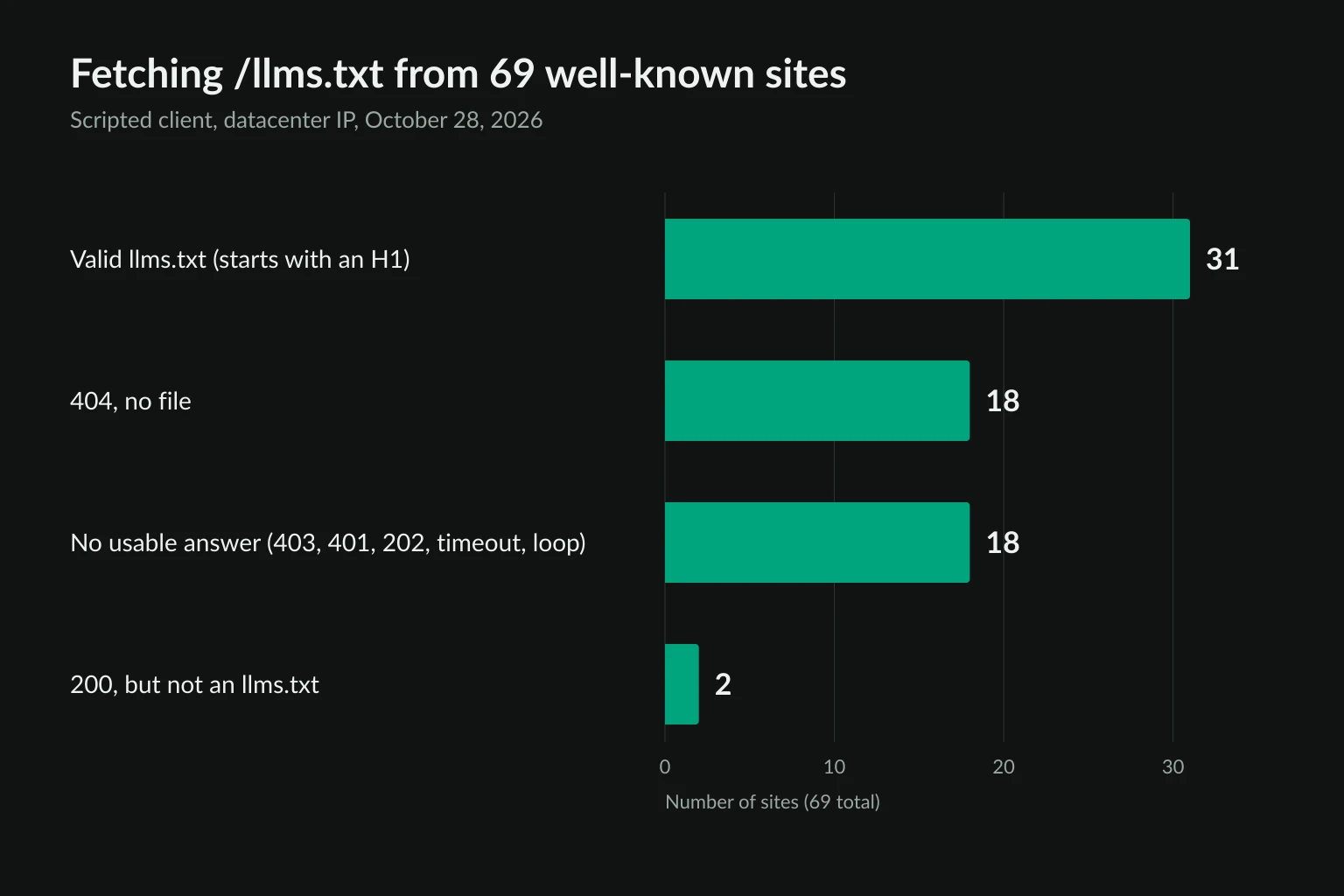
| Result | Sites | Examples |
|---|---|---|
| Valid file (starts with an H1) | 31 | Stripe docs, Cloudflare developer docs, Vercel, GitHub, Notion, Target |
| 404, no file | 18 | CNN, BBC, The Guardian, eBay, Zillow, anthropic.com |
| No usable answer | 18 | Reddit, Medium, openai.com, Perplexity, Booking.com |
| 200, but not an llms.txt | 2 | Forbes, Salesforce |
Valid files are small and mostly plain text. Median size was 12.7 KB. The largest were Stripe's at 97.6 KB with 468 links and the Claude developer docs at 90.9 KB with 821 links. 29 of 31 files were served as text/plain, and two as text/markdown. 27 had the summary blockquote.
Many marketing-site files link only to HTML. 14 of the 31 pointed mostly to Markdown or text files. 13 linked to no Markdown at all, among them HubSpot, Wix, Yoast, Target, and Notion. Those files work as a curated sitemap. Agents still have to fetch and clean full HTML pages.
"No usable answer" doesn't mean "no file." Thirteen sites returned 403, several of them bot-challenge pages such as Cloudflare's "Just a moment...". Reuters returned 401, Booking.com a 202 with an empty body, and two sites timed out. Google's Gemini docs kept redirecting our client back to the same URL until it gave up, while a plain curl request got the file. A 403 tells you the site's bot defenses reacted to your request. It says nothing about whether an llms.txt exists. Treat it the same way you'd treat a 403 Forbidden on any page.
Status 200 isn't proof either. Forbes redirected /llms.txt to a consent page and served HTML with a 200. Salesforce served a 1.02 MB file with no H1 and no H2 sections, just 3,772 bare links. At about 255,000 tokens, it's a sitemap in Markdown syntax.
Three files stood out for other reasons.
- Svelte's per-package file is a full-docs dump. The root
svelte.dev/llms.txtis a clean 1.7 KB index. Butsvelte.dev/docs/svelte/llms.txtis 481 KB of documentation that opens with<SYSTEM>This is the developer documentation for Svelte.</SYSTEM>. Under v2's most-specific-file rule, an agent reading/docs/svelte/overviewwould pick that file first. - Etsy's file is a rulebook. It's titled "Etsy: official reference for AI assistants" and is written as instructions, with sections such as "What you must not assert". It says it may be used "only to browse and cite the publicly accessible Etsy.com pages referenced in it" and that the Terms of Use win in any conflict. It has no file-list links at all.
- Business Insider writes instructions for models but blocks Anthropic's training crawler. The 1.1 KB llms.txt tells models how to cite articles ("include the article's title, author, publication or update date, and canonical URL"). The site's robots.txt disallows
ClaudeBot,CCBot, andanthropic-aifrom/.Claude-User,ChatGPT-User, andGPTBotfall under the general*group, which allows most paths. Run our loader below asClaudeBotand it stops at robots.txt. Run it asClaude-Userand it keeps eight of the nine links, setting aside the one onmarkets.businessinsider.comfor that host's own robots.txt check.
The Business Insider case shows how the two files fit together. robots.txt decides which agents get in, per purpose. llms.txt helps the agents that are allowed in.
Markdown pages are 30 to 140 times smaller than HTML
The biggest practical win for agents isn't the index. It's the Markdown copies of pages the index points to. We fetched four documentation pages twice, once normally and once with Accept: text/markdown, and compared the decompressed response sizes:
| Page | HTML | Markdown | Ratio |
|---|---|---|---|
docs.stripe.com/payments |
852 KB | 6.0 KB | 142× |
vercel.com/docs |
897 KB | 9.3 KB | 96× |
platform.claude.com/docs/en/home |
542 KB | 15.7 KB | 35× |
developers.cloudflare.com/workers/ |
211 KB | 7.0 KB | 30× |
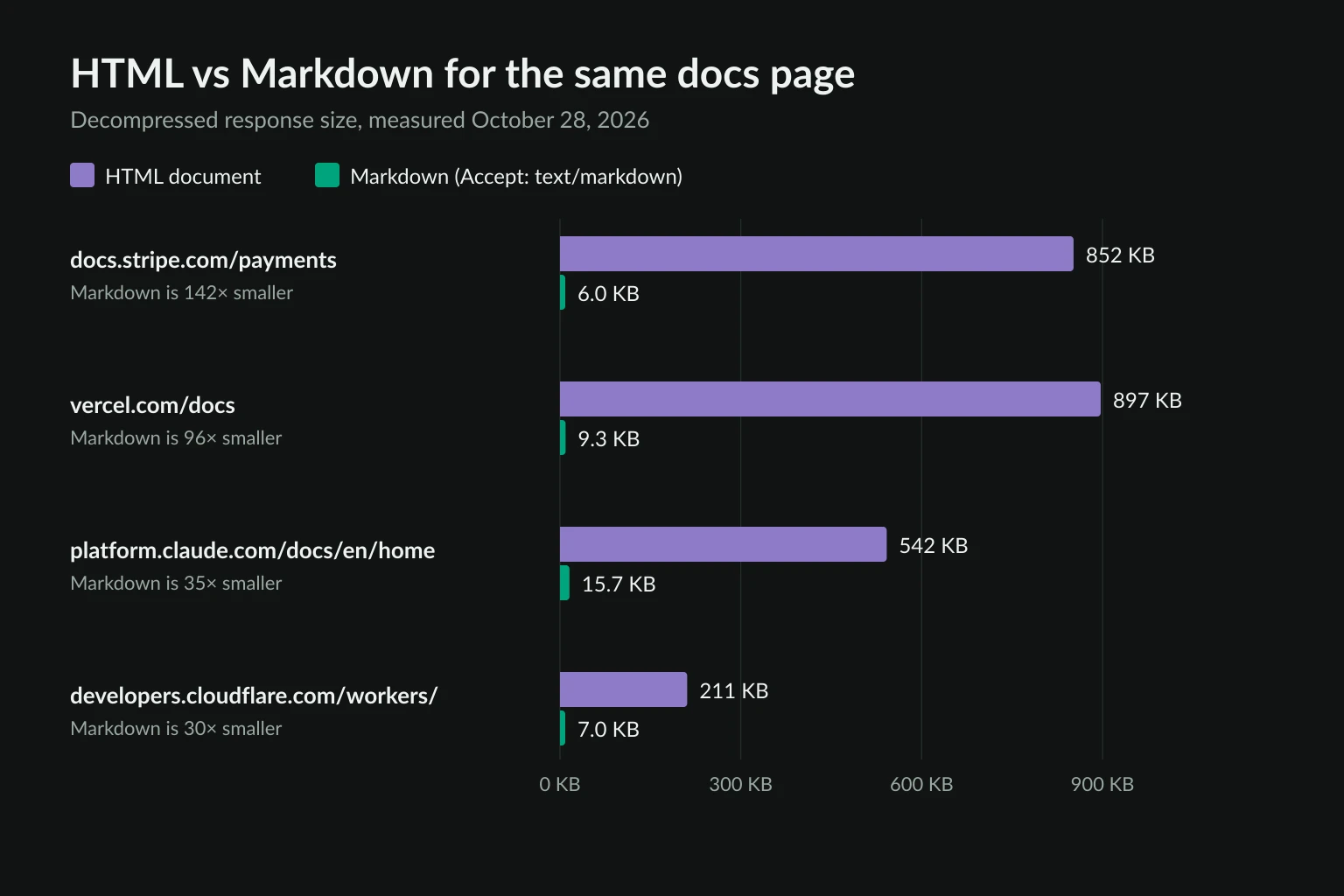
The HTML numbers cover the document alone, not its scripts or images. Content negotiation also worked on blog.cloudflare.com. It didn't work on www.cloudflare.com/learning/, which returned HTML either way, so check the response Content-Type before you trust the format.
Explicit discovery is less consistent. We checked 11 docs pages. Six advertised a Markdown copy with rel="alternate" type="text/markdown": Claude docs, Cloudflare, Vercel, GitHub Docs, Next.js, and Mintlify. The Claude docs also send it as a Link: header. None of the 11 used v2's rel="describedby", and GitHub Docs points to its llms.txt with rel="index" instead. For now, agents should try the Link header, the HTML <link>, and Accept: text/markdown before falling back to HTML.
Compression narrows the gap on the wire but doesn't close it. With gzip or Brotli, the four HTML pages averaged 94 KB per request, and the Markdown versions about 4 KB. An agent that reads 1,000 docs pages a day therefore moves about 94 MB as HTML and about 4 MB as Markdown. On a residential proxy billed per GB, that difference shows up on the invoice.
What agents should respect: a robots-aware llms.txt loader
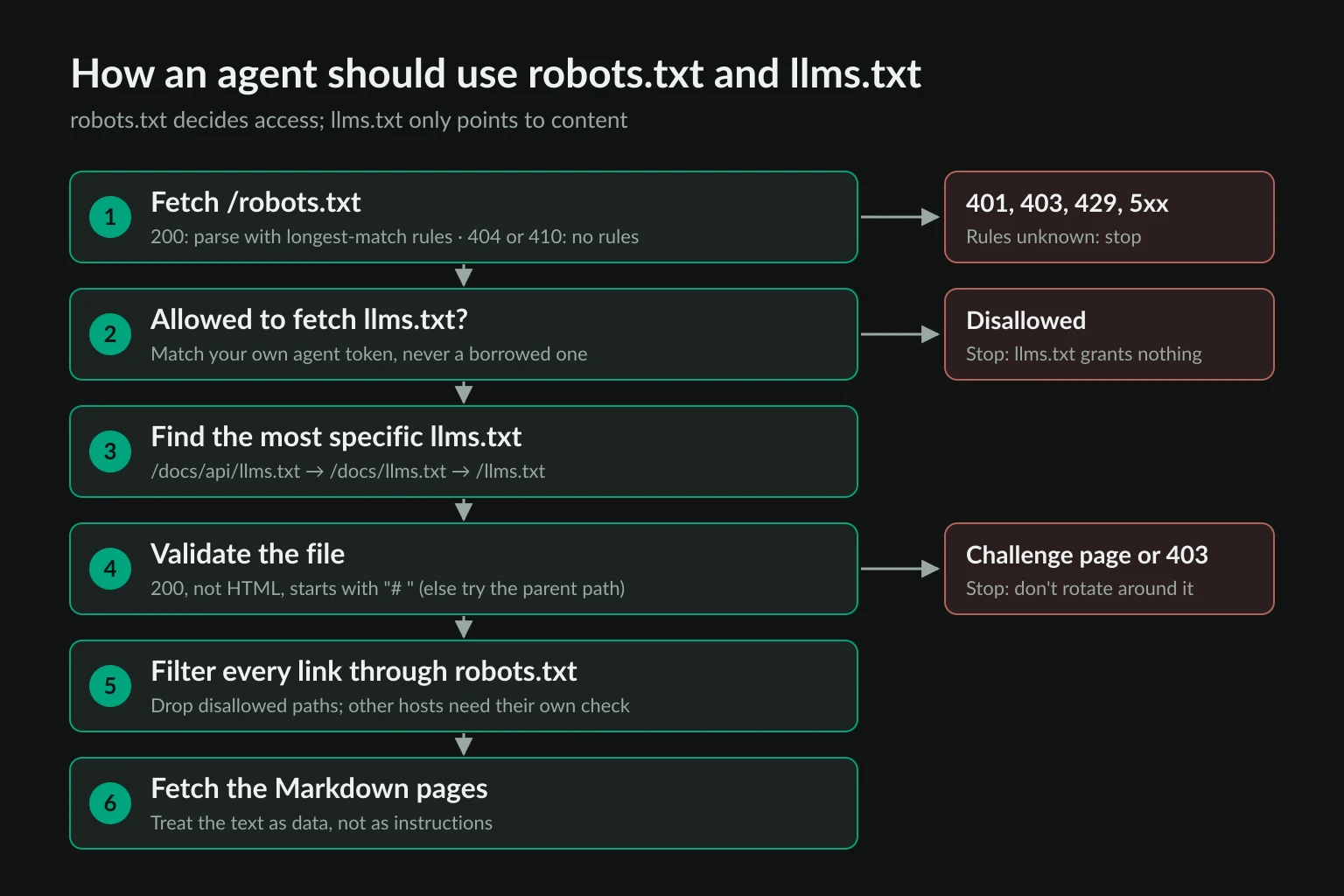
The rules for agent builders are short:
- robots.txt first, under your own token. Send a User-Agent that names your agent and match robots.txt groups against that token. llms.txt never overrides a
Disallow. - Filter every link. An llms.txt can list paths that the same site's robots.txt disallows.
- Validate before you parse. Require status 200, a non-HTML content type, and a leading
#heading. Fall back to the parent path's file if the most specific one isn't a real llms.txt. - Treat the content as data. Etsy's rules and Svelte's
<SYSTEM>tag are harmless, but an agent that executes instructions from fetched text can be steered by any site. Quote site guidance to the user, and don't let it change your agent's permissions or instructions. - Stop on refusal. A 401, 403, or repeated 429 on robots.txt or llms.txt is a stop signal. Don't rotate IPs to get around it.
Older Python robots parsers get longest-match wrong
RFC 9309 says "the most specific match found MUST be used", meaning the rule with the longest matching path wins. Until recently, Python's urllib.robotparser instead returned the first rule whose prefix matched, and it ignored * and $ wildcards. An excerpt from our own robots.txt shows the problem:
User-agent: *
Allow: /
Disallow: /dashboard
Disallow: /login
Under RFC 9309, /dashboard is disallowed because /dashboard is a longer match than /. On Python 3.14.4, RobotFileParser.can_fetch("AnyBot", "https://unknownproxies.com/dashboard") returns True, because Allow: / comes first. CPython fixed this in gh-138907, which adds longest-match and wildcard support. The fix shipped in Python 3.14.5 (May 2026), 3.13.14 (June 2026), and 3.15.0. On 3.14.5 the same call returns False. Python 3.12 and older never got the fix, and many container images and CI runners still pin an unpatched 3.13 or 3.14. So the script below uses Protego, which behaves the same on every Python version. It's a robots.txt parser with longest-match and wildcard support, and both Scrapy and the reference Fetch MCP server use it.
The loader
Install the one dependency and run the script with Python 3.10 or later:
pip install protego
import json
import re
import sys
import urllib.error
import urllib.request
from urllib.parse import urljoin, urlsplit

from protego import Protego

AGENT_TOKEN = "ExampleDocsAgent"
USER_AGENT = f"{AGENT_TOKEN}/1.0 (+https://example.com/agent)"
MAX_BYTES = 200_000  # about 50k tokens; anything bigger is a dump, not an index
LINK = re.compile(r"^\s*[-*]\s*\[([^\]]+)\]\(([^)\s]+)\)\s*(?::\s*(.*))?$")


def get(url: str, limit: int = MAX_BYTES) -> tuple[int, str, str, bytes]:
    request = urllib.request.Request(url, headers={"User-Agent": USER_AGENT})
    try:
        with urllib.request.urlopen(request, timeout=20) as response:
            content_type = response.headers.get("content-type", "")
            return response.status, response.geturl(), content_type, response.read(limit + 1)
    except urllib.error.HTTPError as error:
        return error.code, url, error.headers.get("content-type", ""), b""
    except OSError:  # DNS failure, refused connection, timeout, TLS error
        return 0, url, "", b""


def robots_for(origin: str) -> Protego | None:
    status, _, _, body = get(f"{origin}/robots.txt", limit=500 * 1024)
    if status == 200:
        return Protego.parse(body.decode("utf-8", errors="replace"))
    if status in (404, 410):
        return Protego.parse("")  # no robots.txt means no rules
    return None  # 401, 403, 429, 5xx: rules unknown


def candidates(page_url: str) -> list[str]:
    """Most specific first: /docs/api/page -> /docs/api/llms.txt, /docs/llms.txt, /llms.txt."""
    parts = urlsplit(page_url)
    dirs = [segment for segment in parts.path.split("/")[:-1] if segment]
    origin = f"{parts.scheme}://{parts.netloc}"
    return [origin + "/" + "".join(f"{d}/" for d in dirs[:i]) + "llms.txt" for i in range(len(dirs), -1, -1)]


def load(page_url: str) -> dict:
    parts = urlsplit(page_url)
    origin, host = f"{parts.scheme}://{parts.netloc}", parts.netloc
    robots = robots_for(origin)
    if robots is None:
        return {"page": page_url, "result": "robots.txt unavailable, not fetching"}
    skipped = []
    for url in candidates(page_url):
        if not robots.can_fetch(url, AGENT_TOKEN):
            return {"page": page_url, "result": f"robots.txt disallows {url}"}
        status, final_url, content_type, body = get(url)
        if status == 404:
            continue
        if status != 200:
            return {"page": page_url, "result": f"{url} returned {status}, stopping", "skipped": skipped}
        if urlsplit(final_url).netloc != host or not robots.can_fetch(final_url, AGENT_TOKEN):
            skipped.append(f"{url} redirected to {final_url}, not used")
            continue
        if len(body) > MAX_BYTES:
            skipped.append(f"{final_url} (over {MAX_BYTES} bytes)")
            continue
        text = body.decode("utf-8", errors="replace").lstrip("\ufeff")
        if "html" in content_type or not text.startswith("# "):
            skipped.append(f"{final_url} ({content_type}, no leading H1)")
            continue  # a consent page, a full-docs dump, or something else
        sections, kept, dropped, other_hosts, section = {}, 0, [], [], ""
        for line in text.splitlines():
            if line.startswith("## "):
                section = line[3:].strip()
            elif section and (match := LINK.match(line)):
                link = urljoin(final_url, match.group(2))
                if urlsplit(link).netloc != host:
                    other_hosts.append(link)  # check that host's robots.txt before fetching
                    continue
                if not robots.can_fetch(link, AGENT_TOKEN):
                    dropped.append(link)
                    continue
                sections.setdefault(section, []).append({"title": match.group(1), "url": link, "notes": match.group(3)})
                kept += 1
        return {
            "page": page_url,
            "llms_txt": final_url,
            "title": text.splitlines()[0][2:].strip(),
            "bytes": len(body),
            "links_kept": kept,
            "links_dropped_by_robots": dropped,
            "links_on_other_hosts": other_hosts,
            "skipped": skipped,
            "sections": {name: [link["title"] for link in links[:3]] for name, links in sections.items()},
        }
    return {"page": page_url, "result": "no llms.txt", "skipped": skipped}


for target in sys.argv[1:]:
    print(json.dumps(load(target), indent=2))
Replace ExampleDocsAgent and the contact URL with your agent's real name and info page. Pass it the page your agent is about to read:
python llms_txt_loader.py https://svelte.dev/docs/svelte/overview https://unknownproxies.com/pricing
Trimmed output from our run:
{
  "page": "https://svelte.dev/docs/svelte/overview",
  "llms_txt": "https://svelte.dev/llms.txt",
  "title": "Svelte Documentation for LLMs",
  "bytes": 1676,
  "links_kept": 7,
  "links_dropped_by_robots": [],
  "links_on_other_hosts": [],
  "skipped": [
    "https://svelte.dev/docs/svelte/llms.txt (over 200000 bytes)"
  ]
}
{
  "page": "https://unknownproxies.com/pricing",
  "llms_txt": "https://unknownproxies.com/llms.txt",
  "title": "Unknown Proxies",
  "bytes": 9064,
  "links_kept": 60,
  "links_dropped_by_robots": [
    "https://unknownproxies.com/login",
    "https://unknownproxies.com/dashboard"
  ]
}
The Svelte run skips the 481 KB dump and falls back to the root index. The second run shows the parser bug in practice. Our own llms.txt lists /login and /dashboard as getting-started links, and our robots.txt disallows both. Protego drops them. The standard library parser on Python 3.14.4 would have kept them.
Three limits to know about. The script checks only links on the llms.txt's own host. It returns links to other hosts, such as Business Insider's markets.businessinsider.com, under links_on_other_hosts, and those need that host's robots.txt before you fetch them. urllib follows redirects on its own, so when a candidate redirects to another host or a disallowed path, the script has already fetched that response once before it discards it. It also treats a 401 or 403 on robots.txt as "rules unknown" and stops. RFC 9309 would allow everything in that case, so this is a deliberately stricter choice. A WAF that blocks robots.txt is usually blocking your client, not publishing an absence of rules.
For pacing, caching, and per-host queues once the agent starts fetching the linked pages, see how to crawl a website without getting blocked.
How to write a useful llms.txt as a site owner
If agents already read your docs, an llms.txt is cheap to add and easy to get right:
- Serve it as plain text. Use
text/plainortext/markdownwith UTF-8, and return a 404 when it's absent. Don't redirect to a consent page or an HTML error. - Start with
#and a one-line blockquote. Put the name and summary first, then any notes an agent needs to read the links correctly. - Link to Markdown copies. An index of HTML URLs saves little. Serve
.mdversions or supportAccept: text/markdown, and advertise them withrel="alternate" type="text/markdown". - Keep it an index. Most valid files in our sample were under 40 KB. If you want to ship the whole corpus, call it
llms-full.txtand keep it out of subpaths where the most-specific rule would pick it. - Don't list what robots.txt disallows. Agents that filter properly will drop those links. Agents that don't will fetch them.
- Don't use it for access control or opt-outs. No vendor documents reading llms.txt for crawling decisions. To keep training crawlers out, use robots.txt groups for their tokens and write the restriction into your terms. The data scraping legality guide covers how those terms play out.
Where proxies fit
An agent that reads documentation rarely needs a proxy. The llms.txt and Markdown pages are public, small, and served by sites that want agents to read them. Proxies matter when the agent's job depends on location, for example checking a retailer's regional catalog or localized pricing pages that the site allows you to read. Residential proxies with country targeting cover that, and the robots.txt and llms.txt rules above apply unchanged.
A proxy doesn't change what an agent is allowed to fetch. If a site answers your llms.txt or robots.txt request with a challenge page, find out why before you route around it. Why web browsing agents get blocked explains how to tell IP reputation from fingerprint and behavior problems.
FAQ
Is llms.txt an official standard?
No. It's a community proposal from Answer.AI, now at v2 (August 2026), with no IETF or W3C process behind it. robots.txt is the standardized file, as RFC 9309.
Does llms.txt help SEO?
Not for Google. Google's AI optimization guide says Search doesn't use llms.txt and that having one "will neither harm nor help" rankings. Its value is for agents and docs tools that read your content directly.
Can llms.txt block AI training crawlers?
No. It has no allow or disallow syntax, and no AI vendor documents reading it for crawl decisions. Use robots.txt groups such as User-agent: GPTBot or User-agent: ClaudeBot with Disallow: / for that, and state the restriction in your terms.
What is the difference between llms.txt and llms-full.txt?
llms.txt is a short index with links. llms-full.txt is an unofficial convention for the full documentation in one file. The ones we measured ranged from 1.27 MB to 69.2 MB. The largest run to millions of tokens, far beyond any model's context window.
Should my agent obey robots.txt when a user asked for the page?
Treat robots.txt as binding for your agent's own token. Vendors differ here. OpenAI says robots.txt "may not apply" to user-initiated ChatGPT-User requests, while Anthropic lets site owners control Claude-User through robots.txt. Following the rules is the reading that holds up when a site owner asks what your agent did.
Final thoughts
llms.txt is a useful map and nothing more. For documentation, a clean llms.txt that links to Markdown pages points an agent to the right page on the first try, and it can make each page 30 to 140 times smaller. It won't keep crawlers out, it won't help Google rankings, and it doesn't override a single robots.txt rule. Build agents that check robots.txt first with an RFC 9309 parser, validate the llms.txt they find, and treat its contents as data. If you publish one, keep it a small index that links to Markdown copies of your pages.