"Anonymous proxy detected." means the website looked up your public IP address and found it on a list of proxies, VPNs, hosting servers, Tor exits, or shared relays. The site then blocked you, asked you to verify, or showed a "click here" link. The message is not a virus warning, and it does not prove the site found your real IP.
The first fix is to load the same page on mobile data. If it works there, your home IP is flagged. If you use a VPN or proxy on purpose, disconnect it and retest, then follow the matching steps below.
Quick fixes
If you do not use a VPN or proxy:
- Load the same page on mobile data with Wi-Fi off. If it works, your home network's public IP is flagged, not your device.
- Turn off iCloud Private Relay or "Limit IP Address Tracking" on Apple devices, and any browser VPN or proxy extension.
- Restart your router once, then check if your public IP changed. Many ISPs give you the same IP again.
- If the message shows on every website, check your browser extensions. A site-side block appears on one site, not on all of them.
- Contact the site's support with the time of the block and any reference ID. Ask them to review the IP classification.
If you use a VPN:
- Disconnect the VPN and reload the page. If it works, the site blocks that VPN's servers.
- Try a different server location in the same VPN, or use the site without the VPN if its rules require that.
If you use a proxy on purpose:
- Test the proxy on a neutral IP-check page first and note the exit IP and country.
- Make one slow request to the site and compare it with a direct request. Change only the route.
- Keep one sticky IP for logins, carts, and checkouts. Do not rotate on every request.
- If one endpoint is flagged and others work, remove it from your pool and report it to your provider.
For ticketing and retail checkouts, treat the IP as part of the account. Use one sticky IP per account for the whole session, and match its country to the account. The sticky vs rotating proxies guide explains when each session type fits, and ISP vs residential proxies compares the two IP types for checkout flows.
Do not rotate IPs again and again to force access. A false positive can be fixed. A site rule that forbids proxies, or an account restriction, is a reason to stop and contact the site.
What does "anonymous proxy detected" mean?
The site received your request and put your exit IP, or the request pattern, into a category it restricts. "Anonymous" is the detector's label. The message does not tell you which signal matched or if the label is correct.
Sites rarely inspect your device to decide this. They look up the IP in an IP-intelligence database. For example, the MaxMind Anonymous IP database has separate flags for VPNs, hosting providers, public proxies, residential proxies, and Tor exit nodes. A site can combine that data with its own history and rules. This is why two websites can treat the same IP in different ways.
If a proxy asks you for a username and password before any page loads, that is a different problem. See the 407 Proxy Authentication Required guide. "Anonymous proxy detected" comes from the target site after the connection already works.
Where you see "Anonymous proxy detected, click here"
The same idea shows up in different places and with different wording.
| Where it appears | Typical wording | What it usually means |
|---|---|---|
| A web page, often with a "click here" link | "Anonymous Proxy detected, click here." | The site flagged your IP. The link usually opens a verification step or a help page. |
| Streaming, banking, ticketing, and shop checkouts | "Proxy use detected", "VPN or proxy detected", or an access-denied page | The site uses an IP-reputation database and blocks anonymizing networks by policy. |
| Online games and game launchers | "VPN/proxy detected" or a connection refusal | The game server blocks VPN, proxy, and hosting IPs to stop ban evasion and cheating. |
| Login and sign-up forms | "This IP address has been identified as belonging to a server, proxy, VPN, relay network, or associated with abusive activity." | The service uses a fraud check that refuses risky IP categories. |
| Google Search | "Our systems have detected unusual traffic from your computer network" | Google's own block page. It is a related signal, but Google does not use the "anonymous proxy" wording. |
Before you click a "click here" link, check the address bar. A real block page is on the site you meant to visit or on a known security provider. If the page asks you to download software or "clean your IP", close it. If the banner appears on every site you open, the source is probably a browser extension or other software on your device, not the websites.
Why you see it without a VPN or proxy
This is the most common complaint, and it has real causes.
- Shared ISP addresses. Many ISPs and mobile carriers use carrier-grade NAT (CGNAT). Hundreds of customers share one public IP. If one of them runs proxy software or abuses a site, everyone on that IP can inherit the flag.
- A recycled IP. Your ISP may have given you an address that a previous customer used for a proxy or VPN server. Databases can keep that record for some time.
- Apple Private Relay. iCloud Private Relay and "Limit IP Address Tracking" send Safari and some app traffic through relay servers. Sites see a relay IP, not your home IP.
- Hidden routing software. A security suite, work profile, browser extension, or "privacy" app can route traffic through its own servers.
- Residential proxy software on the network. Some free apps and smart-TV boxes sell your bandwidth to proxy networks. Your home IP then really is a proxy exit. If the flag returns after every router restart, check which devices and apps are on your network.
- A work or school gateway. Managed networks often send traffic through a shared secure web gateway. Do not remove settings your organization installed. Ask the administrator.
How to fix it when you do not use a proxy
Start by finding the layer that causes the block. Avoid factory resets, random command-line "fixes", and IP-cleaning tools you do not trust.
1. Check the scope
Open another well-known site. Then open the affected site once in a private window or another browser. If every website fails, you have a connection or device problem, not a proxy block.
2. Turn off routing you did not choose
Check for an active VPN, browser proxy extension, privacy relay, or security app that routes web traffic.
- iPhone and iPad: Settings > [your name] > iCloud > Private Relay. Then Settings > Wi-Fi > tap (i) next to your network > turn off Limit IP Address Tracking for a test.
- Windows: Settings > Network & internet > Proxy. Microsoft's Windows proxy settings guide shows each mode.
- Mac: System Settings > Network > select the active network > Details > Proxies. Our Mac proxy settings guide covers each field.
- Browser: disable proxy and VPN extensions one at a time.
3. Compare another network
Turn off Wi-Fi and load the page once on trusted mobile data. If mobile data works and home Wi-Fi does not, the home public IP, router, or ISP is the cause. If both fail on one device, go back to the device settings.
4. Get a new IP or ask for a review
Restarting the router can give you a new dynamic IP, but many ISPs keep the same lease. Note your public IP before and after the restart. If the IP stays flagged, contact the website with the block time and any request ID. The site knows which vendor or rule flagged you, so start there rather than with the database company. You can also ask your ISP if your connection uses CGNAT.
How to fix it when you use a VPN or proxy
First, read the site's rules. Streaming, banking, gaming, marketplace, and checkout flows may forbid anonymizing services or require a certain region. A different proxy does not give you permission to break that rule. For more on how the two tools differ, see our proxy server vs VPN comparison.
For an allowed business, testing, or data-collection workflow:
- Test the proxy on a neutral endpoint. Record the exit IP, country, and result. The proxy address guide shows simple
curlchecks. - Send one slow request to the target through the proxy and one through a direct or control route.
- Keep the URL, method, cookies, headers, client, and timing the same. Change only the route.
- If one proxy fails and the control works, replace or report that endpoint. Do not keep it in rotation.
- If every route fails, look at account permissions, site policy, session state, and request behavior before you buy more IPs.
- Use a sticky session for login, cart, account, and other multi-step flows. Match the proxy location to the account.
- Lower concurrency and stop automatic retries after a block or challenge.
- Check the exit country. An IP from a country the site does not serve can trigger the block even when the IP itself is clean.
Free and public proxies are the most likely to be flagged, because databases list them quickly. Our page on what an open proxy is explains why. If a site distrusts hosting networks, a residential or ISP IP may fit better than a datacenter IP. Compare datacenter, residential, and ISP proxies before you change pools. Residential IPs are not invisible, and the site's terms still apply.
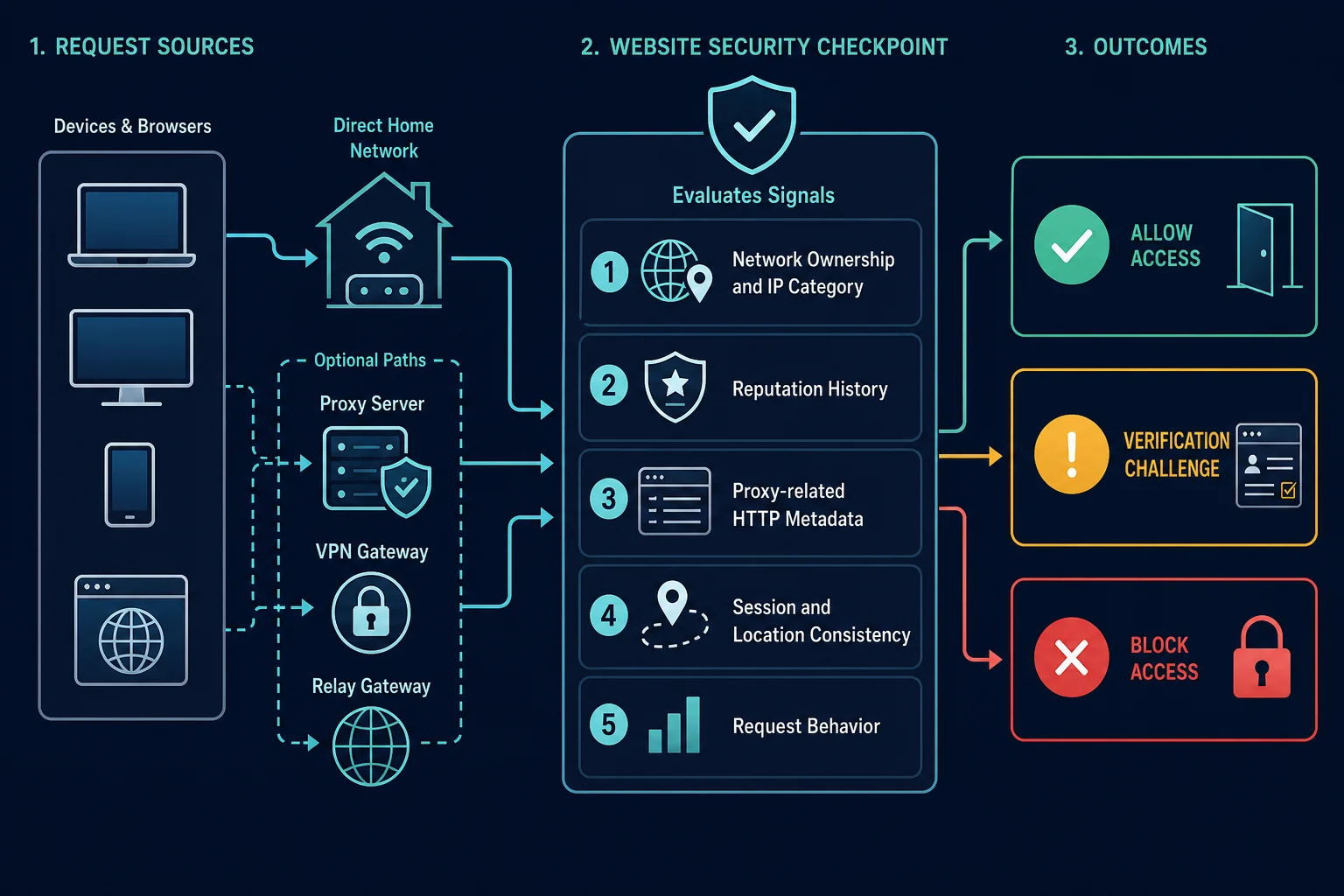
How websites detect proxy traffic
Most detection systems combine several signals. One new IP or one changed header cannot guarantee a different result.
What anonymous, elite, and transparent mean
Proxy vendors sort proxies into three levels by what they reveal in request headers. The levels describe your headers. They do not describe how an IP database labels the address.
| Level | Your real IP in headers | Proxy use visible in headers |
|---|---|---|
| Transparent | Yes, often in X-Forwarded-For |
Yes |
| Anonymous | No | Yes, often through Via |
| Elite | No | No, proxy headers are stripped |
An elite proxy hides the header evidence, but the site can still flag its IP by owner, category, or reputation. That is why a proxy sold as "elite" can still show this message. See the Via header on MDN for the header that gives away anonymous-level proxies.
IP ownership and network category
The site sees the IP that opens the connection. It can look up the owner, the Autonomous System Number (ASN), location, hosting status, and known use as a VPN, relay, public proxy, or Tor exit. Datacenter ranges are easy to classify because the owner is a hosting company. Residential and ISP addresses can also be classified. No IP type is undetectable.
Reputation and shared history
An IP can have a poor history because many users shared it, a previous user abused it, or bots sent a lot of traffic from it or its subnet. This is why you can see the warning when your own request is normal.
Proxy-related HTTP headers
Some proxies add forwarding headers. The Via header records the proxies a message passed through. The Forwarded header can carry the original client address. A site can classify a connection without either header, so removing them does not guarantee anything.
Session, location, and client consistency
A login that jumps between countries, cookies created on a different route, and fast changes inside one session look risky. The browser's TLS and protocol behavior can also fail to match the browser it claims to be. Consistency matters more than adding browser-like headers.
Request rate and behavior
Bursts, parallel retries, repeated logins, and identical navigation patterns can make a clean IP look suspicious. Bot systems combine heuristics, JavaScript signals, fingerprints, and behavior, as Cloudflare's bot detection overview describes. Rotating after every block changes the IP but keeps the behavior that caused it.
Run a controlled proxy detection test
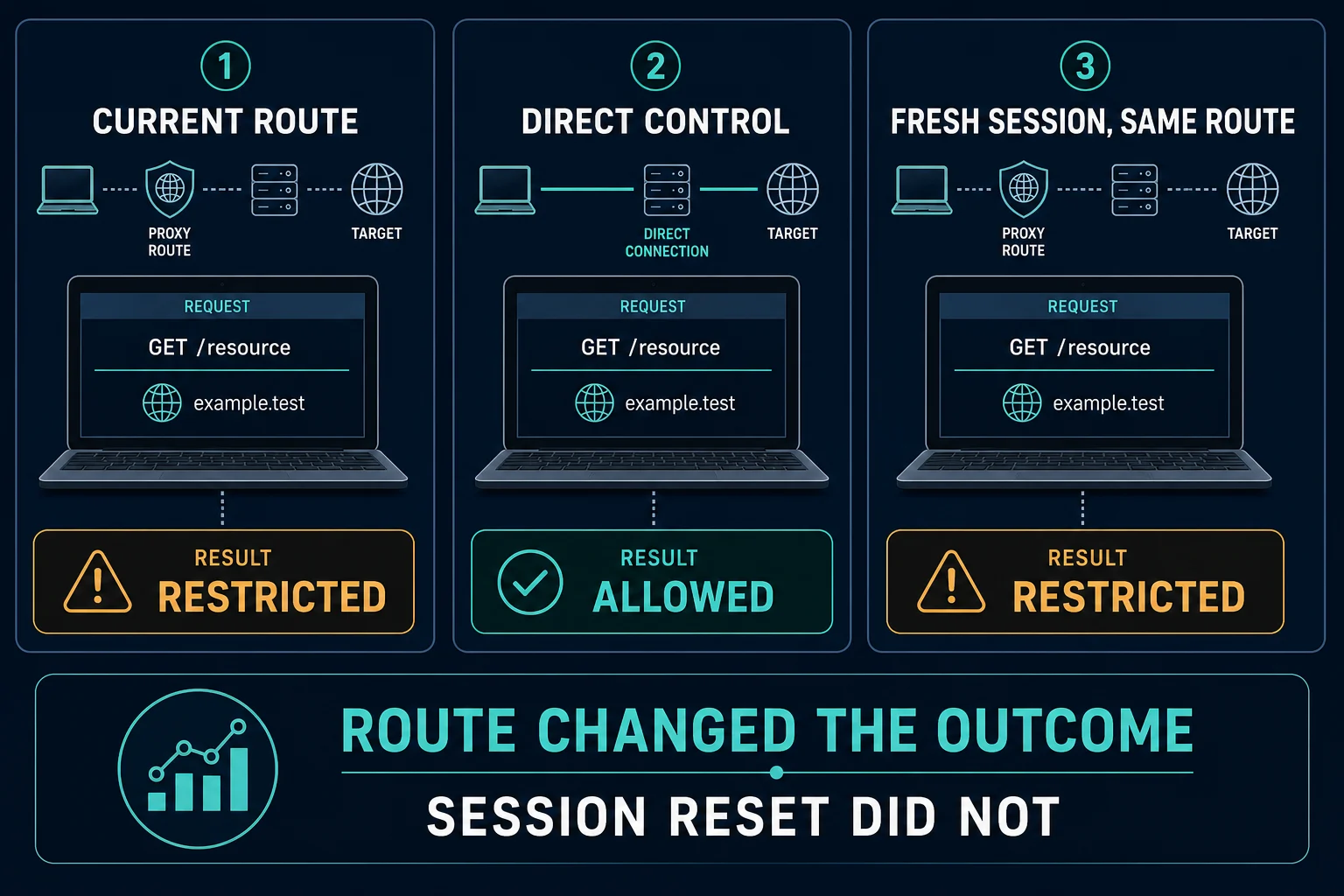
Change one thing at a time. If you change the IP, cookies, headers, browser, and rate together, you cannot tell which change mattered.
| Test | Keep fixed | Change | A different result suggests |
|---|---|---|---|
| A: current setup | URL, account, client, low rate | Nothing | This is the failing baseline |
| B: direct control | Everything possible | Network route only | The proxy or its exit network is the cause |
| C: other trusted network | Device and browser | Public network only | The original ISP or shared IP is the cause |
| D: other approved proxy | Client, session type, country, rate | Proxy endpoint only | One endpoint or pool has a classification problem |
| E: fresh site session | Network and client | Site cookies only | Stored session state adds to the warning |
Record the HTTP status, final URL, page title, request ID, exit IP, region, endpoint, and time. Do not log passwords, authorization headers, or full session cookies. If the site returns a plain access-denied response instead of this message, use the HTTP 403 Forbidden guide to narrow it down.
Fixes that usually do not work
- Clearing the cache. Cached files do not change your public IP. Site cookies matter only when session state is part of the decision.
- Disabling WebRTC. It can stop a local IP leak in some setups, but it does not change how a database labels your public IP.
- Changing the user agent again and again. The IP label stays the same, and mismatched client signals add risk.
- Switching DNS servers. DNS does not change the source IP the site sees.
- Buying a proxy labeled "anonymous" or "elite". These labels describe what the proxy sends in headers, as the levels table above shows. They do not decide how a site labels the IP.
What website owners should check
If your site shows this message to real customers, find the rule that made the decision before you allowlist large networks.
- Log the decision source, rule version, IP category, request ID, and action.
- Treat known abuse, rate anomalies, hosting networks, public proxies, VPNs, and low-confidence labels as separate signals, not one yes/no flag.
- Prefer a verification step over a hard block when risk is uncertain. CGNAT and residential-proxy flags often cover many real users.
- Trust
ForwardedorX-Forwarded-Foronly when your own reverse proxy set and cleaned it. - Give blocked users a support path and a reference ID.
FAQ
What does "anonymous proxy detected" mean?
It means the website labeled your IP address as a proxy, VPN, relay, hosting server, or Tor exit, and it restricts that type of traffic. The label can be wrong, especially on shared ISP addresses.
Is "anonymous proxy detected" a virus?
No. The message is a website's block or warning. A pop-up that asks you to download a "fix" can be unsafe, so check the real domain first. If the banner appears on every site, check your browser extensions.
Why do I see "anonymous proxy detected" when I do not use a VPN?
Your ISP may share one public IP among many customers, or your IP may have a bad history. Apple Private Relay, a security app, or an extension can also route your traffic. Compare the same site on mobile data to find the cause.
Does "anonymous proxy detected" mean my real IP leaked?
Not necessarily. It usually means the exit IP the site saw is on a proxy or VPN list. Test for leaks separately if that is your concern.
What should I do if I see "anonymous proxy detected, click here"?
Check that the page is on the site you meant to visit. If it is, the link usually leads to a verification step or help page. Do not install software from it. If the site still blocks you, contact its support with the time and any reference ID.
What is the difference between an anonymous proxy and an elite proxy?
An anonymous proxy hides your IP but still tells the site a proxy is in use, often through the Via header. An elite proxy also removes those headers. Both can be detected by their IP address, so neither label guarantees access.
Can a residential proxy still be detected?
Yes. Databases flag some residential proxy IPs, and sites also check sessions, fingerprints, and behavior. Residential IPs can reduce hosting-network false positives for allowed tasks, but they do not guarantee access.
Summary
"Anonymous proxy detected." means the site distrusts the IP your traffic comes from. Normal users should test mobile data, turn off relays and extensions, and ask the site for a review if a home connection is flagged. VPN users should disconnect or change servers where the site allows it. Proxy users should test one variable at a time, keep sessions sticky, and slow down. If the IP type is the proven problem, compare residential proxy plans and ISP options instead of adding more rotation.