AI training data is the text, images, code, or other examples a model learns from during pretraining or fine-tuning. For language models, most of it comes from the web, either through existing crawls such as Common Crawl or through a team's own collection. The hard part of AI training data collection is not downloading pages. It is proving afterwards that each document was allowed in, cleaned properly, and traceable to its source.
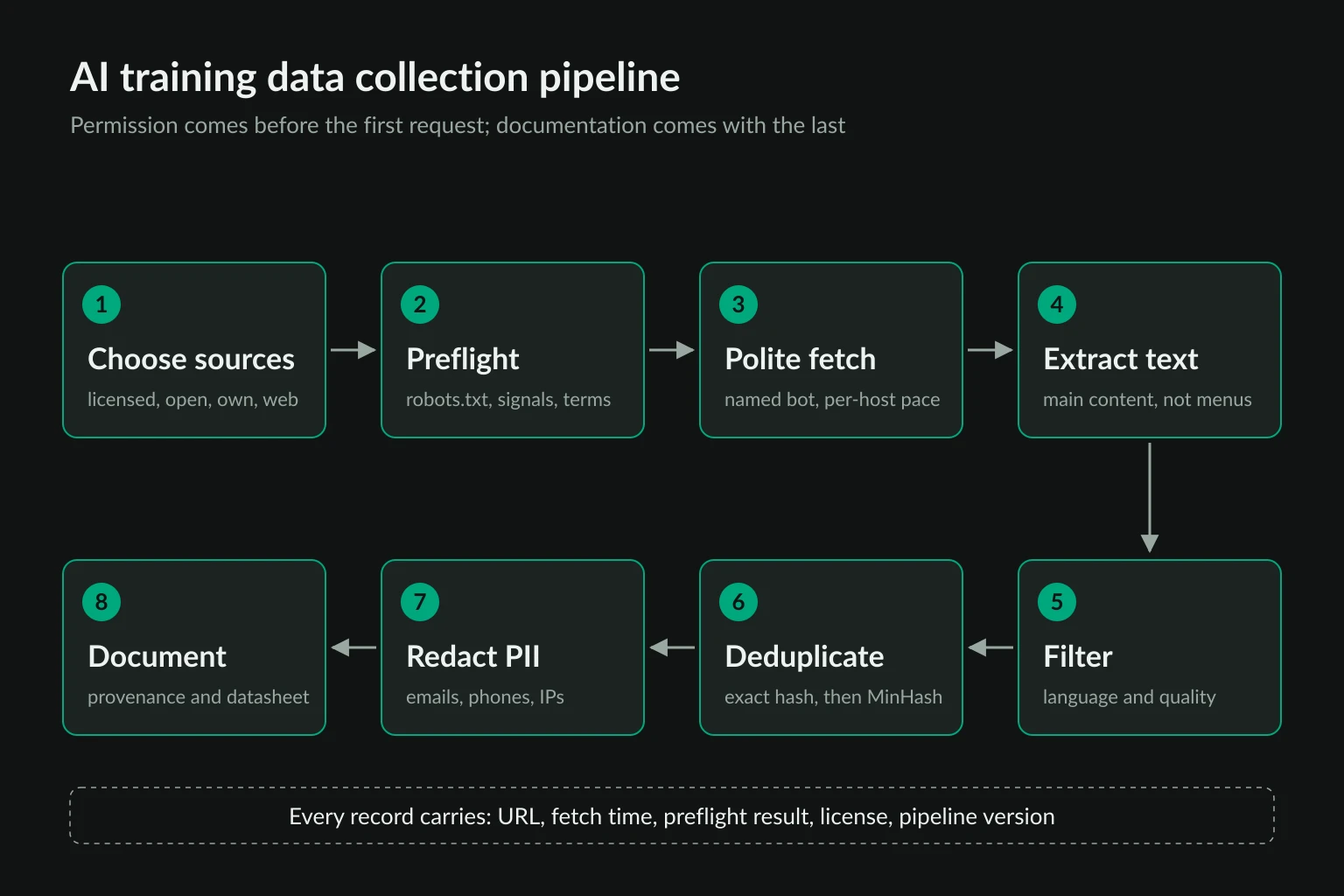
That leads to a fixed order of work. Choose sources you have a right to use, check opt-out signals before the first request, crawl slowly under an identified bot name, and filter, deduplicate, and redact the text. Then document where every record came from. Skipping any step tends to cost more later than doing it up front, because removing data from a trained model is far harder than leaving it out.
This guide follows that order with two runnable Python scripts. One is a per-URL permission preflight. The other is a filtering pass that we ran on a real Common Crawl file, with the measured results. It covers collection for pretraining, fine-tuning, and evaluation sets. For using an LLM to extract fields from pages, see the AI web scraping guide instead.
Where AI training data comes from
Most teams combine several sources. The source decides how much permission work you need before collecting anything.
| Source | Examples | What you get | What you still owe |
|---|---|---|---|
| Licensed data | Publisher deals, data vendors, stock libraries | A contract that names permitted uses | Compliance with the license terms and deletion clauses |
| Open web corpora | Common Crawl, FineWeb, Wikipedia dumps | Billions of pages already crawled | Your own filtering, and a check of current opt-outs |
| First-party data | Your docs, support tickets, product content | Content you control | Privacy review, user consent where it applies |
| Public APIs and feeds | Official APIs, RSS, open-data portals | Structured data with stated terms | Rate limits and API terms, which often restrict AI use |
| Your own web crawl | A targeted crawler for a domain or language | Exactly the pages you want | Every step in this guide |
Start at the top of the table and work down. A licensed or first-party source answers the permission question in writing. A crawl you run yourself puts that question to every host it visits.
The legal side varies by country and by use. Copyright, database rights, terms of service, and privacy law all apply to collection for model training. The data scraping legality guide covers those questions, and anything commercial needs a lawyer's review. This guide covers the engineering controls that make a legal position defensible.
Start from Common Crawl before building a crawler
Common Crawl publishes a new crawl roughly every month. Its August 2026 crawl holds 2.14 billion pages from 40.2 million hosts, collected between August 7 and August 20. Each crawl comes in three formats:
- WARC holds full HTTP responses, including headers and raw HTML. Use it when you want to run your own text extraction.
- WAT holds metadata and extracted links as JSON.
- WET holds plain text that Common Crawl has already extracted. It is the smallest format and the quickest to start with.
Common Crawl's crawler, CCBot, identifies itself, publishes its IP ranges, and can be blocked with a User-agent: CCBot rule (CCBot page). The warcinfo header of the WET file we downloaded says robots.txt was "checked via crawler-commons." That covers the site's rules on the day CCBot visited. It does not cover any opt-out the site added later, and it says nothing about AI training specifically.
Downloading one file takes two commands. The September 2026 crawl, CC-MAIN-2026-39, has 100,000 WET files, and the first one is 66.8 MB compressed:
curl -O https://data.commoncrawl.org/crawl-data/CC-MAIN-2026-39/wet.paths.gz
curl -O "https://data.commoncrawl.org/$(zcat wet.paths.gz | head -1)"
Common Crawl's terms of use ask you to respect the copyrights of the material in the crawl, and they recommend legal advice before any commercial use. Using Common Crawl spares you the crawling, not the permission questions.
Check opt-out signals before collecting AI training data
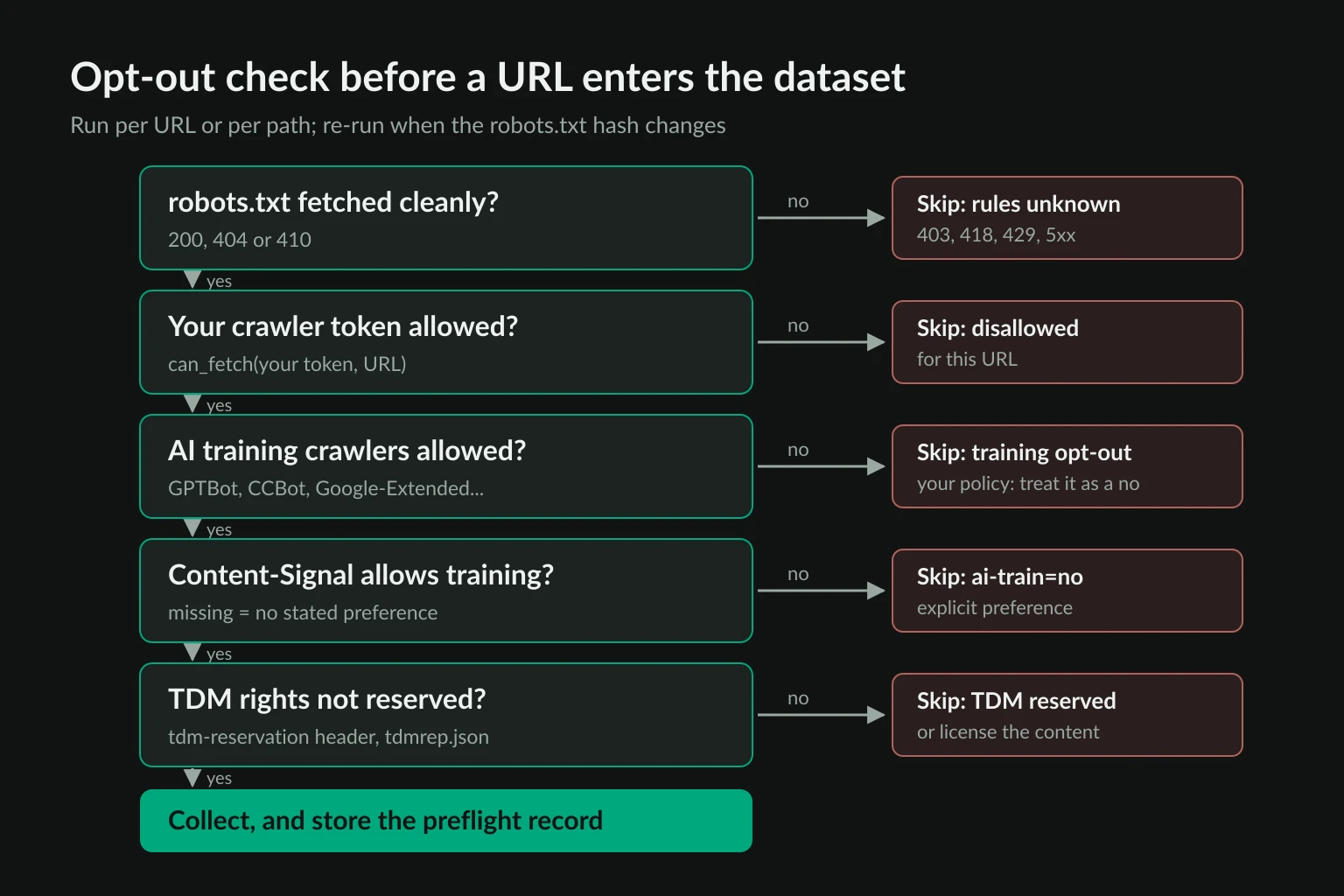
Site owners now state AI preferences in several machine-readable places. None of them technically blocks a request, and they don't always agree with each other. A responsible pipeline reads all of them, records what it found, and treats a "no" from any of them as a no.
| Signal | Where it lives | What it says |
|---|---|---|
| robots.txt (RFC 9309) | /robots.txt |
Which paths each crawler token may fetch |
| AI training tokens | robots.txt groups such as GPTBot, CCBot, Google-Extended |
Whether the site lets known training crawlers in |
| Content Signals | Content-Signal: search=yes, ai-train=no inside a robots.txt group |
Separate yes/no for search, AI input, and AI training |
| TDMRep | tdm-reservation: 1 header or /.well-known/tdmrep.json |
Text and data mining rights are reserved |
| Terms of service | The site's legal pages | Contract terms, often naming AI training directly |
Some tokens are control tokens, not crawlers. Google-Extended has no user agent of its own. It tells Google whether crawled content can be used to train future Gemini models and to ground Gemini answers, where Search index content is added to the prompt in Gemini Apps and Vertex AI's Grounding with Google Search. It doesn't affect Google Search. Content Signals are also statements rather than crawler rules, and Cloudflare says a missing signal means the site neither grants nor restricts that use. The IETF AI Preferences working group is drafting a standard vocabulary for these preferences, and as of October 2026 it is still an Internet-Draft.
In the EU these signals carry legal weight. The text and data mining exception in Article 4 of the DSM Directive only applies when the rightsholder has not reserved their rights, "such as machine-readable means" for online content. Article 53(1)(c) of the AI Act requires providers of general-purpose AI models to identify and comply with those reservations. The General-Purpose AI Code of Practice, published by the Commission in July 2025, turns that into commitments for signatories. They agree to use crawlers that honor robots.txt and other machine-readable protocols, and not to circumvent paywalls or other effective technological measures.
Your crawler token is not the whole answer
robots.txt rules apply to named tokens. A new crawler called ExampleDatasetBot isn't matched by a User-agent: GPTBot group, so a literal parser says it may fetch the page. But a site that blocks GPTBot, ClaudeBot, and CCBot has stated a clear preference against training use. The script below treats that as an opt-out. That is a policy choice rather than something RFC 9309 requires, but it is the reading you can defend.
A permission preflight in Python
This script uses only the standard library. Give it URLs and it prints one JSON report per URL, with a collect or skip decision and the evidence behind it. Save the report with the record, because it is your proof of what the site said on the day you collected:
import hashlib
import json
import re
import sys
import urllib.error
import urllib.request
from datetime import datetime, timezone
from urllib.parse import urlsplit
from urllib.robotparser import RobotFileParser

CRAWLER_TOKEN = "ExampleDatasetBot"
USER_AGENT = f"{CRAWLER_TOKEN}/1.0 (+https://example.com/bot)"
TRAINING_TOKENS = ["GPTBot", "ClaudeBot", "CCBot", "Google-Extended", "Applebot-Extended"]


def get(url: str, method: str = "GET") -> tuple[int, dict, bytes]:
    request = urllib.request.Request(url, headers={"User-Agent": USER_AGENT}, method=method)
    try:
        with urllib.request.urlopen(request, timeout=20) as response:
            headers = {key.lower(): value for key, value in response.headers.items()}
            return response.status, headers, response.read()
    except urllib.error.HTTPError as error:
        return error.code, {}, b""
    except OSError:
        return 0, {}, b""  # DNS failure, refused connection, or timeout


def content_signals(robots_txt: str) -> dict[str, str]:
    """Map each user-agent in robots.txt to the Content-Signal line in its group."""
    signals, group, in_rules = {}, [], False
    for raw in robots_txt.splitlines():
        line = raw.split("#", 1)[0].strip()
        if ":" not in line:
            continue
        field, value = (part.strip() for part in line.split(":", 1))
        if field.lower() == "user-agent":
            if in_rules:
                group, in_rules = [], False
            group.append(value.lower())
        else:
            in_rules = True
            if field.lower() == "content-signal":
                for agent in group:
                    signals[agent] = value
    return signals


def tdm_reservation(origin: str, path: str) -> int | None:
    """Return tdm-reservation from the first /.well-known/tdmrep.json rule matching path."""
    status, _, body = get(f"{origin}/.well-known/tdmrep.json")
    if status != 200:
        return None
    try:
        rules = json.loads(body)
    except ValueError:
        return None  # some sites answer 200 with an HTML error page
    for rule in rules if isinstance(rules, list) else []:
        pattern = re.escape(rule.get("location", "")).replace(r"\*", ".*").replace(r"\$", "$")
        if re.match(pattern, path):
            return rule.get("tdm-reservation")
    return None


def preflight(url: str) -> dict:
    parts = urlsplit(url)
    origin = f"{parts.scheme}://{parts.netloc}"
    status, _, body = get(f"{origin}/robots.txt")
    robots_txt = body.decode("utf-8", errors="replace")

    parser = RobotFileParser()
    robots_verified = status in (200, 404, 410)
    if robots_verified:
        parser.parse(robots_txt.splitlines())  # a missing file parses as allow-all
    else:
        parser.disallow_all = True  # 401, 403, 418, 429, 5xx: rules unknown

    report = {
        "url": url,
        "checked_at": datetime.now(timezone.utc).isoformat(timespec="seconds"),
        "robots_status": status,
        "robots_sha256": hashlib.sha256(body).hexdigest(),
        "allowed_for_our_bot": parser.can_fetch(CRAWLER_TOKEN, url),
        "training_bots_disallowed": [t for t in TRAINING_TOKENS if not parser.can_fetch(t, url)],
        "content_signal": "; ".join(sorted(set(content_signals(robots_txt).values()))) or None,
        "tdmrep_reservation": tdm_reservation(origin, parts.path or "/"),
        "tdm_reservation_header": None,
        "crawl_delay": parser.crawl_delay(CRAWLER_TOKEN),
    }

    reasons = []
    if not robots_verified:
        reasons.append(f"robots.txt returned {status}")
    elif not report["allowed_for_our_bot"]:
        reasons.append("robots.txt disallows our crawler")
    elif report["training_bots_disallowed"]:
        reasons.append("robots.txt blocks AI training crawlers")
    if "ai-train=no" in (report["content_signal"] or "").replace(" ", "").lower():
        reasons.append("Content-Signal ai-train=no")
    if report["tdmrep_reservation"] == 1:
        reasons.append("TDM rights reserved (TDMRep)")
    if not reasons:
        # Only now touch the page, and only with HEAD, to read its tdm-reservation header
        status, headers, _ = get(url, method="HEAD")
        report["tdm_reservation_header"] = headers.get("tdm-reservation")
        if status != 200:
            reasons.append(f"page returned {status}")  # header unknown, so fail closed
        elif report["tdm_reservation_header"] == "1":
            reasons.append("TDM rights reserved (TDMRep)")
    report["decision"] = "skip: " + "; ".join(reasons) if reasons else "collect"
    return report


for target in sys.argv[1:]:
    print(json.dumps(preflight(target), indent=2))
Replace ExampleDatasetBot and the contact URL with your crawler's real name and an info page. Run it with Python 3.10 or later:
python preflight.py https://books.toscrape.com/ https://www.nytimes.com/section/technology
We ran it against five sites on October 27, 2026:
| URL | robots.txt | Decision |
|---|---|---|
books.toscrape.com/ |
404 (no file) | collect |
nytimes.com/section/technology |
200 | skip: robots.txt blocks AI training crawlers (all five tokens) |
lemonde.fr/ |
200 | skip: robots.txt blocks AI training crawlers (four tokens; GPTBot is allowed) |
lefigaro.fr/ |
200 | skip: robots.txt blocks AI training crawlers; TDM rights reserved (TDMRep) |
stackoverflow.com/questions |
418 | skip: robots.txt returned 418 |
The Le Monde result shows why you check every token, not just one. The site allows GPTBot and blocks the other four. A pattern like that usually reflects a deal with one AI company, and it is not permission for anyone else.
The 418 trap
The Stack Overflow row is the one to remember. Its robots.txt has a User-agent: * group containing Content-signal: search=no, ai-train=no and Disallow: /. But our script's request got 418 I'm a teapot instead of the file. Under RFC 9309, a 4xx response for robots.txt counts as "unavailable," and a crawler may then fetch anything. Python's RobotFileParser.read() behaves the same way for every 4xx except 401 and 403, which it treats as disallow-all (module docs).
A spec-compliant crawler would therefore have treated Stack Overflow as fully open, on the strength of a response that was really a block. That is why the script only trusts 200, 404, and 410 and skips the source on anything else. If a site won't serve robots.txt to your crawler, you don't know its rules, and you shouldn't be in its pages.
Re-run the preflight before each crawl and again before each training run. Data you collected last year doesn't carry this year's consent. The Consent in Crisis audit found that, in a single year (2023 to 2024), about 5% of all tokens in the C4 dataset became fully restricted. So did 28% or more of its most actively maintained critical sources. Store robots_sha256 and compare it on the next run: a changed hash means you need to evaluate that source again.
Crawl politely and identify your bot
Once a URL passes the preflight, the fetch rules are those of any well-behaved crawler. For training data, a few of them matter more than usual:
- Name the bot. Use a user agent like
ExampleDatasetBot/1.0 (+https://example.com/bot)and publish a page that explains what you collect, how to opt out, and how to reach you. Don't copy a browser user agent. A training crawler that hides its identity can't credibly claim it respects opt-outs. - Pace per host. One request at a time per host is a sensible default. Honor
Crawl-delaywhen it's present, since the script reports it. The crawling without getting blocked guide covers per-host queues and frontier limits. - Cache and revalidate. Store
ETagandLast-Modified, and sendIf-None-MatchorIf-Modified-Sinceon recrawls. A304 Not Modifiedcosts the site almost nothing. - Stop on refusal. Treat 401, 403, repeated 429s, and CAPTCHA pages as a stop signal for that host, not a reason to retry from somewhere else. The HTTP 429 guide explains
Retry-Afterhandling. - Skip what isn't public. Leave out pages behind logins, paywalls, and consent walls unless you have a written agreement that covers them.
CCBot and OpenAI's GPTBot both publish their IP ranges so site owners can verify them. If your crawler runs at any real scale, do the same.
Clean AI training data: filtering, dedup, and PII
Raw web text is mostly not training material. To see how much survives a basic cleaning pass, we ran the script below on the first WET file of CC-MAIN-2026-39. It keeps English documents, applies four rules from the Gopher quality filter, redacts email addresses and phone numbers, and removes exact duplicates and then near-duplicates with MinHash. Each record it writes carries its provenance fields.
Install the two dependencies, warcio and datasketch:
pip install warcio datasketch
import hashlib
import json
import re
import sys
from collections import Counter

from datasketch import MinHash, MinHashLSH
from warcio.archiveiterator import ArchiveIterator

STOPWORDS = {"the", "be", "to", "of", "and", "that", "have", "with"}
EMAIL = re.compile(r"\b[\w.+-]+@[\w-]+\.[\w.-]+\b")
PHONE = re.compile(r"(?<!\d)(?:\+?1[ .-]?)?\(?\d{3}\)?[ .-]\d{3}[ .-]\d{4}(?!\d)")


def passes_quality(text: str) -> bool:
    words = text.split()
    if not 50 <= len(words) <= 100_000:
        return False
    mean_len = sum(len(w) for w in words) / len(words)
    if not 3 <= mean_len <= 10:
        return False
    lines = [line for line in text.splitlines() if line.strip()]
    if sum(line.rstrip().endswith(("...", "…")) for line in lines) / len(lines) > 0.3:
        return False
    if sum(w.lower() in STOPWORDS for w in words) < 2:
        return False
    return True


def minhash(text: str) -> MinHash:
    words = text.lower().split()
    m = MinHash(num_perm=128)
    for i in range(len(words) - 4):
        m.update(" ".join(words[i : i + 5]).encode())
    return m


counts = Counter()
seen_exact = set()
lsh = MinHashLSH(threshold=0.8, num_perm=128)

with open(sys.argv[1], "rb") as stream, open(sys.argv[2], "w") as out:
    for record in ArchiveIterator(stream):
        if record.rec_type != "conversion":
            continue
        counts["1 documents"] += 1
        langs = record.rec_headers.get_header("WARC-Identified-Content-Language") or ""
        if langs.split(",")[0] != "eng":
            continue
        counts["2 english"] += 1
        text = record.content_stream().read().decode("utf-8", errors="replace")
        if not passes_quality(text):
            continue
        counts["3 quality"] += 1
        text, emails = EMAIL.subn("<EMAIL>", text)
        text, phones = PHONE.subn("<PHONE>", text)
        digest = hashlib.sha1(" ".join(text.split()).encode()).hexdigest()
        if digest in seen_exact:
            continue
        seen_exact.add(digest)
        counts["4 exact dedup"] += 1
        mh = minhash(text)
        if lsh.query(mh):
            continue
        lsh.insert(digest, mh)
        counts["5 near dedup"] += 1
        counts["pii emails redacted"] += emails
        counts["pii phones redacted"] += phones
        out.write(json.dumps({
            "url": record.rec_headers.get_header("WARC-Target-URI"),
            "fetched_at": record.rec_headers.get_header("WARC-Date"),
            "warc_record_id": record.rec_headers.get_header("WARC-Refers-To"),
            "sha1": digest,
            "text": text,
        }) + "\n")

for stage, n in sorted(counts.items()):
    print(f"{stage:>22}: {n:,}")
Run it against the downloaded file. On our host it took about two minutes:
python filter_wet.py CC-MAIN-20260904131603-20260904161603-00000.warc.wet.gz kept.jsonl
           1 documents: 21,529
             2 english: 9,080
             3 quality: 8,211
         4 exact dedup: 8,196
          5 near dedup: 8,145
   pii emails redacted: 4,148
   pii phones redacted: 4,248
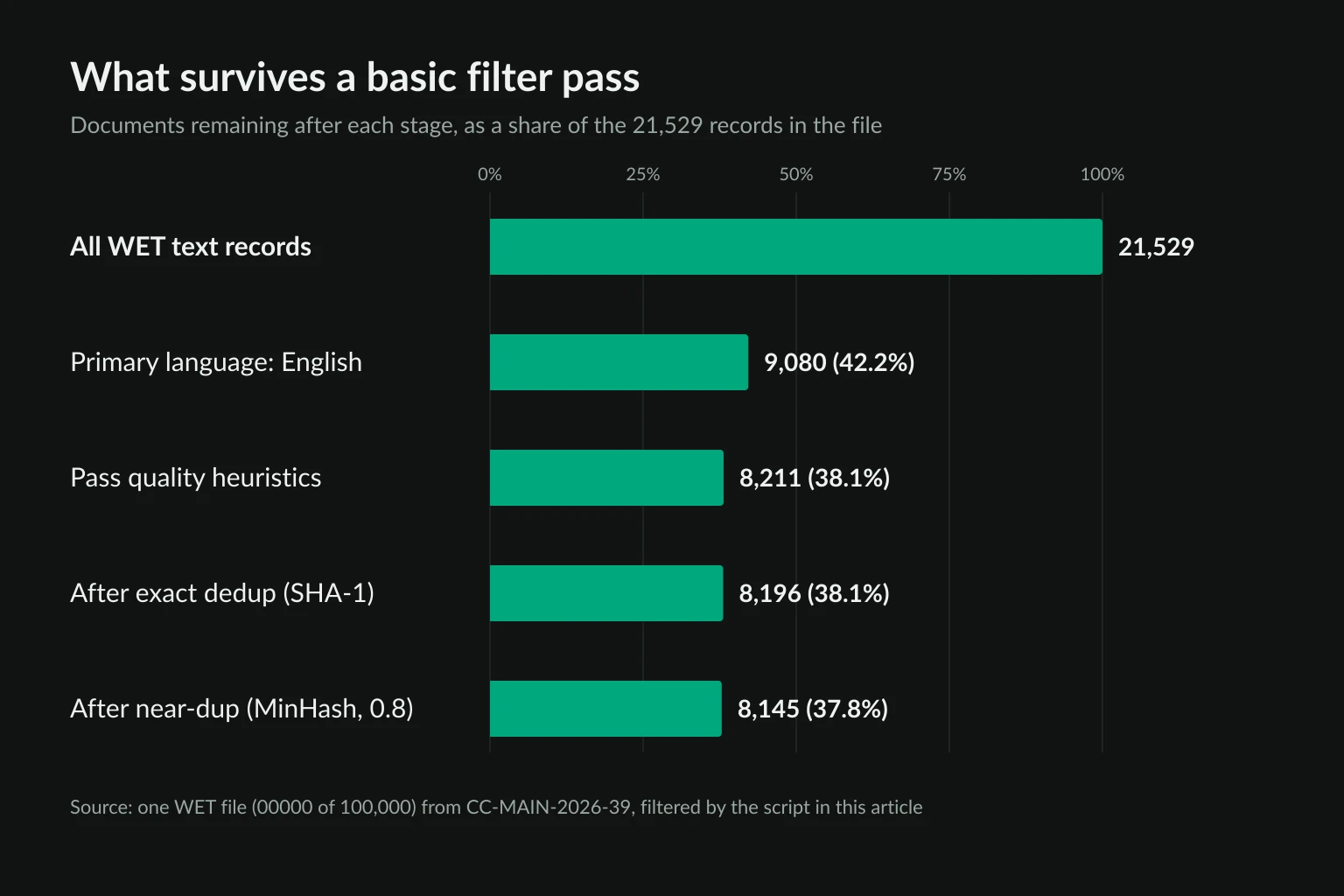
The counts are less interesting than what they leave out. Four findings from inspecting the 8,145 kept documents:
- Language filtering does most of the cutting. Only 42% of records had English as their primary language tag. If you want multilingual data, this is where you decide your language mix, and it should be a deliberate choice.
- Deduplicating one file proves almost nothing. Exact and near-duplicate removal dropped just 66 documents, under 1%, because a crawl rarely holds the same URL twice and copies of the same text are spread across all 100,000 files. Deduplication only works across the whole crawl. FineWeb deduplicates each crawl separately with MinHash (5-grams, 14x8 hash functions), because its tests showed that worked better than deduplicating every crawl together.
- WET text is full of navigation. 32% of non-empty lines in the kept documents appear in three or more documents. The most common were "Home" (3,643 documents), "Contact Us", "Contact", "Search", "Privacy Policy", and "About". The quality rules passed 90% of English documents because menus are made of ordinary words. FineWeb avoids this by running trafilatura on the raw WARC HTML instead of using WET text, and then adds repetition and line-level filters.
- Personal data is everywhere. 28% of kept documents contained at least one email address and 20% contained a phone-shaped number. The phone pattern is North American, so it misses many international formats and catches some non-phone numbers. Regex redaction is a minimum. Tools such as Presidio detect names, addresses, and IDs, and FineWeb also anonymizes public IP addresses.
The script is a starting point, not a production filter. In production you would extract text from WARC HTML, use a language-ID model with a confidence threshold, deduplicate across the crawl, filter boilerplate lines, and screen URLs for adult and malicious domains. You would also remove evaluation benchmarks from the training set so that test scores stay meaningful.
Record provenance and document the dataset
Every record should answer three questions on its own: where did this come from, when, and why were we allowed to use it. A per-record schema that covers that looks like this:
{
  "url": "https://books.toscrape.com/catalogue/a-light-in-the-attic_1000/index.html",
  "fetched_at": "2026-10-27T02:15:58Z",
  "source_type": "own_crawl",
  "preflight": {"decision": "collect", "robots_status": 404, "robots_sha256": "e3b0c442..."},
  "license": "unknown",
  "pipeline_version": "filter-v3",
  "sha1": "…",
  "text": "…"
}
With that in place, three things that are otherwise painful become one query each. You can delete every record from a host that later opts out. You can rebuild the dataset without a source whose license ended. And you can answer a takedown request with evidence.
At the dataset level, write a datasheet. Datasheets for Datasets proposes questions on motivation, composition, collection process, preprocessing, uses, distribution, and maintenance. For a web dataset, add the crawl dates, the opt-out checks you ran, your PII handling, and a contact for removal requests. Providers of general-purpose AI models in the EU also have to publish a training content summary using the AI Office's template, which asks about sources and collection methods. Records that already carry provenance make that summary straightforward to write.
Data collection for AI fine-tuning and evaluation
Fine-tuning and evaluation sets are far smaller than pretraining corpora, often thousands of examples rather than billions of pages. They also need a precise structure: question and answer pairs, labeled classifications, or task transcripts. That changes the method more than the rules.
- Prefer narrow, licensed, or first-party sources. A support-bot fine-tune should come from your own tickets and docs, not a general crawl.
- Use structured sources. For web scraping for machine learning tasks such as classification or entity extraction, structured data in pages (JSON-LD, tables, feeds) gives cleaner labels than free text. The data scraping guide covers record design and validation.
- Keep evaluation data out of training. Hash eval documents and filter them out of every training build.
- Review samples by hand. At this size, reading 200 examples catches labeling and extraction errors that no heuristic will.
The opt-out checks still apply in full. A smaller dataset doesn't need less permission.
Where proxies fit in AI training data collection
Most AI training data collection does not need proxies. Common Crawl, licensed data, and first-party content involve no crawling on your side. A targeted crawl of consenting sources usually runs fine from one well-identified IP range. Proxies are useful in three narrower cases:
- Location-dependent content you are allowed to collect. Some sites serve different language versions, regional catalogs, or local news depending on the visitor's country. Collecting a regional dataset from a partner's sites, or checking your own properties market by market, needs exits in those locations. Residential proxies with country targeting cover that.
- Stable, documented egress. ISP proxies are static IPs, so a crawler can run from a fixed list of addresses that you publish on its info page. Site owners can then allowlist or block them. Reverse DNS on those IPs usually belongs to the ISP, not your domain, so the published list and the user agent carry the identification.
- Separating crawler traffic from production. Running collection through dedicated egress keeps a host's block on your crawler from affecting your office network or API servers.
What proxies should not do is get a training crawler past a refusal. Rotating through residential IPs to get around a 403, a rate limit, or a block on your crawler hides who is collecting. The site loses the ability to recognize your crawler and opt out of it, which defeats the point of running a named bot. If an identified crawler is blocked, that block is the site's answer. The ISP vs residential comparison covers the tradeoffs when you do have a legitimate geographic or egress need.
FAQ
What is AI training data?
AI training data is the set of examples a model learns from. For language models that means large volumes of text, mostly from web crawls, books, code, and licensed sources, followed by smaller curated sets for fine-tuning and evaluation. Its quality, its duplication rate, and its sources all shape what the trained model can do.
Is it legal to scrape websites for AI training data?
It depends on the jurisdiction, the content, the site's terms, and any rights reservations. In the EU, text and data mining is allowed unless the rightsholder has opted out in a machine-readable way, and general-purpose AI providers must honor those opt-outs. Elsewhere, copyright and contract law apply case by case. Get legal advice for any commercial project.
Does robots.txt apply if my crawler isn't GPTBot or CCBot?
A rule for GPTBot doesn't literally apply to a crawler with a different name. A site that blocks the known AI training crawlers has still stated its preference about training use, and ignoring it because your bot has a new name is hard to defend. The preflight script treats those blocks as opt-outs.
Can I use Common Crawl data to train a model?
Common Crawl's terms allow access to the archive, but the pages inside it still belong to their publishers. You remain responsible for respecting their rights. Before training, filter the data against current robots.txt rules and TDM reservations, because sites keep adding opt-outs after a crawl.
What is the difference between AI training data and data for RAG?
Training data changes the model's weights. Data used for retrieval-augmented generation (RAG) is fetched and placed in the prompt when the model answers. Content Signals separate the two: ai-train covers training and fine-tuning, and ai-input covers RAG and grounding. A site can allow one and refuse the other. Google-Extended does not split them: one rule covers both Gemini training and grounding.
Should I use proxies to collect AI training data?
Only for permitted collection that depends on location, or to give your crawler stable, published egress. Proxies should never be used to get around an opt-out, a block, or a rate limit. A training crawler should be identifiable, not spread across many IPs to avoid detection.
Final thoughts
AI training data collection works best when permission is part of the pipeline rather than a check at the end. Start with licensed, open, and first-party sources. Run a preflight that reads robots.txt, AI training tokens, Content-Signal, and TDMRep for each URL, and treat any robots.txt you can't read as a no. Crawl under a named bot, filter and deduplicate across the whole corpus, redact personal data, and keep provenance on every record so you can remove what you shouldn't have.
If your collection needs regional exits or a fixed, published set of crawler IPs, compare residential and ISP plans on the pricing page once the preflight and provenance steps are in place.