The best Firecrawl alternatives depend on which part of Firecrawl you want to replace. If you want the same API without the credit meter, self-host Firecrawl itself. It's AGPL-3.0 and runs in Docker Compose, but without the paid Fire-engine you lose page actions, screenshots, and country targeting. If you want an open-source crawler inside your own Python code, use Crawl4AI. If you only turn single URLs into Markdown for an LLM, Jina Reader is the smallest change. For large managed crawls, look at Spider or Apify's Website Content Crawler.
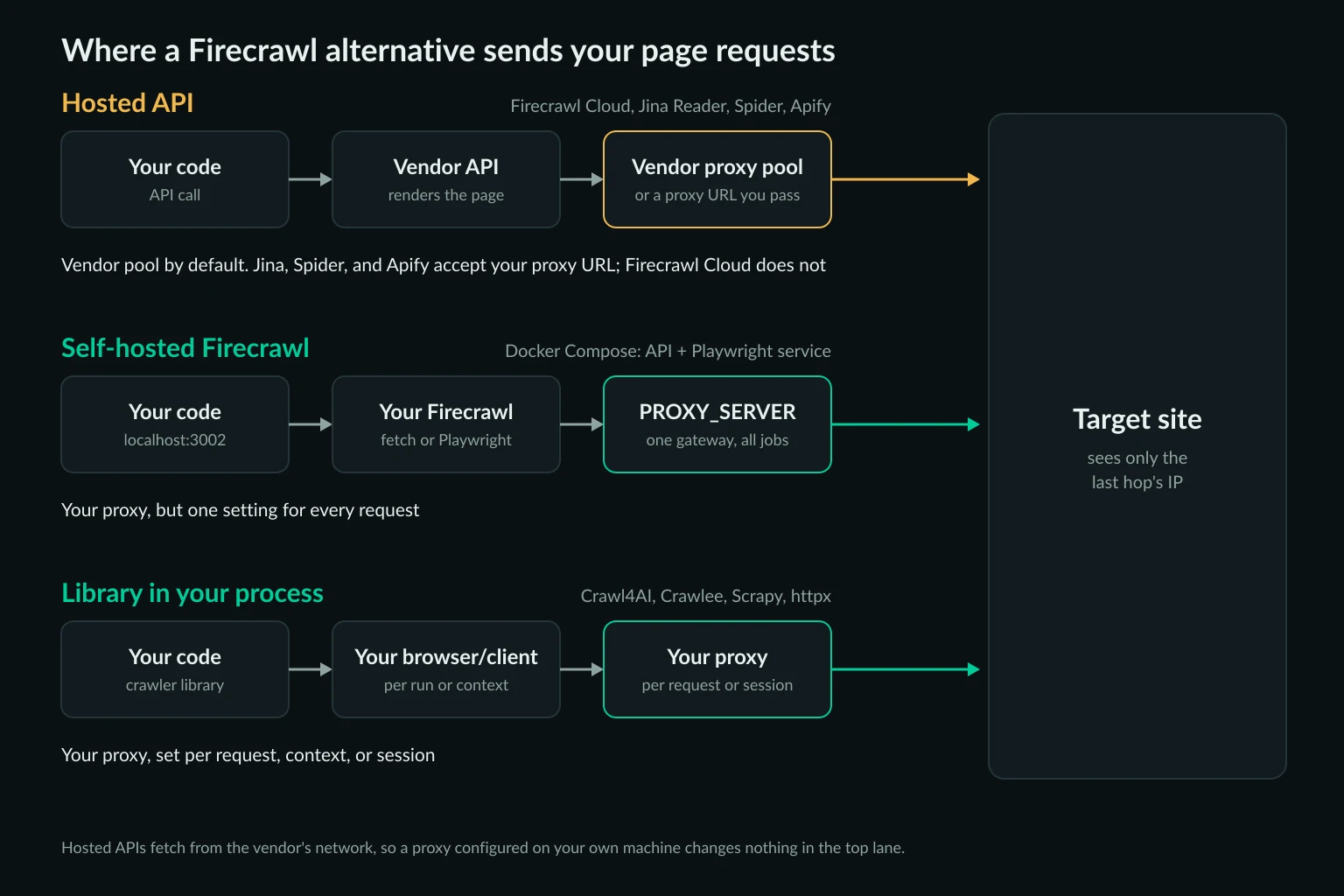
The other deciding factor is the network. Firecrawl Cloud fetches every page through Firecrawl's own proxy pool, and it has no option to bring your own. Most of these alternatives let you choose the exit IP: per request in an open-source library, through one environment variable in self-hosted Firecrawl, or with a proxy URL parameter in Jina Reader, Spider, and Apify.
This guide compares the options on cost, features, and proxy control. It also includes a tested Python script that replaces Firecrawl's scrape and crawl endpoints for static pages. Prices come from each vendor's public pricing page as of October 24, 2026. The Firecrawl details come from its source code on GitHub at the same date.
Firecrawl alternatives at a glance
| Tool | What it is | Cost (October 2026) | JavaScript | Your own proxy |
|---|---|---|---|---|
| Firecrawl Cloud (baseline) | Hosted API | 1,000 free credits a month, $99 a month for 100,000 credits on Standard | Yes | No. You choose a country with location.country from Firecrawl's pool |
| Self-hosted Firecrawl | AGPL-3.0, Docker Compose | Your servers | Yes, bundled Playwright | PROXY_SERVER, one proxy for every job |
| Crawl4AI | Python library, Apache-2.0 plus an attribution clause, 0.9.5 | Free | Yes, Playwright | ProxyConfig per browser or per crawl, with optional rotation |
| Jina Reader | Hosted API, Apache-2.0 source | Keyless at 20 requests a minute, 10M free tokens per API key | Yes, x-engine: browser |
x-proxy-url header |
| Spider | Hosted API plus the MIT spider Rust crate |
$1 per 10,000 credits, bandwidth at $1 per GB plus compute | Yes, request: "browser" or "smart" |
remote_proxy parameter |
| Apify Website Content Crawler | Hosted Actor built on Crawlee | About $0.20 per 1,000 pages over raw HTTP, $0.50-$5 with a browser | Yes | proxyUrls in proxyConfiguration |
| ScrapeGraphAI | MIT library 2.3.1, plus a hosted API | Library free; API from $20 for 10,000 credits | Yes, Chromium loader | loader_kwargs.proxy |
| httpx + trafilatura | DIY, both open source | Free | No | httpx.Client(proxy=...) |
Two license details matter if you redistribute or embed these tools. Firecrawl's server is AGPL-3.0, so offering a modified version as a network service obliges you to publish your changes, though its SDKs are MIT. Crawl4AI's license is Apache-2.0 with an added clause that requires a visible credit line in distributions and public uses. Read both before you ship either inside a product.
What you lose when you leave Firecrawl Cloud
Firecrawl Cloud does several things in one API call, and an alternative has to replace each one you actually use. Before you compare prices, list what your code calls today:
| Firecrawl feature | What replaces it |
|---|---|
| Markdown from a URL | Every tool in the table above |
| JSON extraction from a schema (+4 credits a page) | Self-hosted Firecrawl with your own OPENAI_API_KEY or Ollama, Crawl4AI's LLMExtractionStrategy, or your own model call after fetching. The AI web scraping guide has a validated Python extraction step |
map and crawl |
Crawl4AI's deep-crawl strategies, Spider's crawl with a limit, Apify, or the crawler loop in the DIY script below |
search |
A search API. Jina's s.jina.ai, Tavily, Exa, or Serper return results you then fetch |
location.country |
A geo-targeted proxy in any tool that takes one, Jina's x-proxy: us (API key required), or Spider's country_code |
Actions, interact, screenshots |
A browser you drive, such as Playwright. See Firecrawl MCP vs Playwright MCP for where that line falls |
Two-day page cache (maxAge) |
Jina caches for 3,600 seconds (send x-no-cache: true to skip it). With an open-source library, you build your own cache |
| Proxy rotation and anti-bot handling | Your proxy provider plus pacing in your code, or a hosted API's stealth mode |
The cache row is easy to miss. Firecrawl Cloud serves a copy up to two days old by default, so moving to a tool that always fetches live pages can raise your proxy traffic and the load you put on target sites. It also changes your data: prices and stock levels that came from a cached copy now come from the live page, so day-over-day comparisons can jump at the switch-over.
Self-hosted Firecrawl: the same API on your servers
Self-hosting is the shortest migration because your SDK calls, MCP server, and any integration that accepts a custom API URL keep working. You point them at http://localhost:3002 instead of api.firecrawl.dev. The self-hosting guide covers the first run. The Compose stack in the repository starts the API and workers, a Playwright service, Redis, RabbitMQ, a Postgres queue, and FoundationDB. Pin a release tag (v2.11.0 was the latest, from June 2026) instead of building from main.
The catch is what's missing. The default stack scrapes with two engines: Playwright and a plain fetch. Neither one supports location, actions, screenshots, mobile emulation, or the stealth proxy mode. Those need Fire-engine, which isn't part of the open-source repo. A request that asks for them still succeeds. Firecrawl falls back to an engine that can run it and adds a warning to the response:
{
  "success": true,
  "data": {
    "markdown": "...",
    "warning": "The engine used does not support the following features: location -- your scrape may be partial."
  }
}
Check for data.warning in your client after migrating. Otherwise, a job that used to fetch German prices through a German exit will silently fetch from wherever your server or proxy exits.
Setting a proxy on self-hosted Firecrawl
Self-hosted Firecrawl takes one proxy through three variables in the root .env. Docker Compose passes them to both the API container and the Playwright service:
# .env next to docker-compose.yaml
PROXY_SERVER=http://gate.example-proxy.com:7000
PROXY_USERNAME=your_username
PROXY_PASSWORD=your_password

# Optional: skip images, video, and audio in the Playwright service
BLOCK_MEDIA=true
In the source, the plain fetch engine builds an HTTP agent from PROXY_SERVER and sends a Basic proxy authorization header. The Playwright service chains each browser context through a local proxy that applies SSRF checks before forwarding to your upstream proxy. Leave PROXY_SERVER unset and the Playwright service logs No proxy server provided. Your IP address may be blocked. on every request.
That design has two consequences:
- One proxy for the whole deployment. No request parameter overrides it. If you need US and German exits, you need either two deployments or a proxy gateway that picks the country some other way.
- Rotation is the gateway's job. Point
PROXY_SERVERat a backconnect rotating gateway and each new connection can get a new exit. Firecrawl has no list of proxies to rotate through.
BLOCK_MEDIA=true aborts requests for image, audio, and video files in the browser, and the service already blocks known ad domains. Turn it on when you pay for proxy traffic by the GB, because images are often the largest share of a page's bytes and Markdown output doesn't need them.
Crawl4AI: an open-source crawler in your own code
Crawl4AI is an open-source Python crawler built for the same job as Firecrawl: turning web pages into LLM-ready Markdown. It drives Playwright and returns Markdown with content filtering. It also does CSS or LLM extraction and deep crawls with BFS, DFS, or best-first strategies. It runs as a library or as a Docker server with an MCP endpoint.
The difference from self-hosted Firecrawl is proxy scope. Crawl4AI takes a ProxyConfig(server, username, password) on BrowserConfig for the whole browser, or on CrawlerRunConfig for a single crawl. A run config can also take a list of proxies with RoundRobinProxyStrategy. So one process can send different jobs through different countries or session types, which self-hosted Firecrawl can't do.
Pick Crawl4AI when you want the crawler in your codebase and are comfortable running Chromium. Choose self-hosted Firecrawl instead when other systems already speak Firecrawl's API.
Jina Reader: the smallest change for single URLs
Jina Reader turns a URL into Markdown when you prefix it with https://r.jina.ai/. No SDK is needed, and it works without an API key at 20 requests a minute. A free key raises that to 500 a minute and comes with 10 million tokens. Billing counts the tokens in the response, so cost tracks how much text a page has rather than how many pages you fetch.
We fetched two pages from the books.toscrape.com sandbox without a key. A single product page came back as 500 tokens (1,913 characters of Markdown), and the 20-book category page as 4,130 tokens. At those sizes, the free 10 million tokens cover about 20,000 product pages or 2,400 category pages.
Unlike Firecrawl Cloud, Jina accepts your own proxy. The Reader README documents an x-proxy-url header that accepts http, https, socks4, or socks5 URLs with credentials:
curl -s "https://r.jina.ai/https://books.toscrape.com/" \
  -H "Authorization: Bearer $JINA_API_KEY" \
  -H "x-return-format: markdown" \
  -H "x-proxy-url: http://USER:PASS@HOST:PORT"
That request reaches the target from Jina's servers through your proxy, so the proxy must accept connections from Jina's servers, not only from your machine's IP. That rules out a proxy authorized only by an IP allowlist. Use username and password auth with a sub-user or a separate password you can rotate, because the credentials leave your infrastructure with every request.
Jina doesn't crawl. For multi-page jobs, you discover the URLs yourself (from a sitemap or a search API) and call Reader once per page.
Spider, Apify, and other hosted crawlers
Spider covers the same scrape-and-crawl ground as Firecrawl's API. It charges $1 per 10,000 credits, with usage based on bandwidth ($1 per GB) and compute time, and failed requests are free. Set return_format: "markdown" explicitly, because the default is raw HTML. remote_proxy sends traffic through your proxy, and Spider's docs say this halves the data transfer charge. country_code uses Spider's residential pool instead. If you'd rather run it yourself, the MIT-licensed Rust crate behind it takes a proxy list in its configuration.
Apify's Website Content Crawler suits scheduled crawls of documentation or knowledge bases for RAG. It outputs Markdown, can switch between raw HTTP and a browser automatically with the playwright:adaptive crawler type, and keeps runs, datasets, and schedules in Apify's console. Its proxy settings accept Apify Proxy groups (residential is $8 per GB on Apify's pricing page) or your own proxyUrls. Underneath it is Crawlee, an Apache-2.0 library you can run without Apify, using a ProxyConfiguration.
A few others come up often:
- ScrapingBee returns Markdown with
return_page_markdown=trueand acceptsown_proxy, per its documentation. JavaScript rendering is on by default and costs 5 credits a request. - ScrapeGraphAI is an LLM-first library. You describe the data in a prompt, and the library fetches the page and extracts it. Proxies go in
loader_kwargs. - Tavily Extract and Exa contents suit agents that already use those search APIs. Tavily charges 1 credit per 5 URLs ($0.008 a credit after 1,000 free a month), and Exa $1 per 1,000 pages. Neither accepts your proxy.
A minimal Firecrawl replacement in Python
Many Firecrawl workloads fetch static documentation, blogs, or product pages that don't need a browser at all. For those, an HTTP client and a content extractor do the job of Firecrawl's scrape and crawl endpoints, at a fraction of the bandwidth.
This script fetches pages through an authenticated proxy and converts the main content to Markdown with trafilatura. It crawls same-host links breadth-first up to a page limit, and flags pages that probably need a browser:
# scrape_md.py
import os
import sys
from urllib.parse import urljoin, urlparse

import httpx
import trafilatura
from lxml import html as lxml_html

PROXY_URL = os.environ["PROXY_URL"]  # http://user:pass@host:port
HEADERS = {
    "User-Agent": "Mozilla/5.0 (Windows NT 10.0; Win64; x64) AppleWebKit/537.36 "
    "(KHTML, like Gecko) Chrome/141.0.0.0 Safari/537.36",
    "Accept": "text/html,application/xhtml+xml",
    "Accept-Language": "en-US,en;q=0.9",
}


def scrape(client: httpx.Client, url: str) -> dict:
    try:
        r = client.get(url)
    except httpx.HTTPError as e:  # timeout, DNS, refused connection, proxy error
        return {"url": url, "status": 0, "markdown": None, "links": [], "error": repr(e)}
    final_url = str(r.url)  # after redirects
    if r.status_code != 200 or not r.content.strip():
        return {"url": final_url, "status": r.status_code, "markdown": None, "links": []}
    md = trafilatura.extract(
        r.text, url=final_url, output_format="markdown",
        include_links=True, include_tables=True, favor_recall=True,
    ) or ""
    links = [urljoin(final_url, h) for h in lxml_html.fromstring(r.content).xpath("//a/@href")]
    return {
        "url": final_url,
        "status": 200,
        "markdown": md,
        # Little text from a 200 page usually means it renders client-side
        "needs_browser": len(md) < 200,
        "links": links,
    }


def crawl(start: str, limit: int = 10, include: str = "/") -> list[dict]:
    host = None
    queue, seen, pages = [start], {start}, []
    with httpx.Client(proxy=PROXY_URL, headers=HEADERS, timeout=20,
                      follow_redirects=True) as client:
        while queue and len(pages) < limit:
            page = scrape(client, queue.pop(0))
            pages.append(page)
            seen.add(page["url"])
            host = host or urlparse(page["url"]).netloc  # host the start URL redirected to
            for link in page["links"]:
                link = link.split("#")[0]
                p = urlparse(link)
                if p.netloc == host and p.path.startswith(include) and link not in seen:
                    seen.add(link)
                    queue.append(link)
    return pages


if __name__ == "__main__":
    for page in crawl(sys.argv[1], limit=int(sys.argv[2]) if len(sys.argv) > 2 else 5):
        md = page["markdown"] or ""
        print(page["status"], len(md), page.get("needs_browser"), page["url"], page.get("error", ""))
Install it with pip install httpx trafilatura (lxml comes with trafilatura). We ran it with httpx 0.28.1 and trafilatura 2.3.1 on Python 3.14. The proxy was a local test proxy that requires Basic auth and counts bytes:
$ PROXY_URL=http://user:pass@127.0.0.1:18911 python scrape_md.py https://books.toscrape.com/ 5
200 2830 False https://books.toscrape.com/
200 2830 False https://books.toscrape.com/index.html
200 2610 False https://books.toscrape.com/catalogue/category/books_1/index.html
200 1578 False https://books.toscrape.com/catalogue/category/books/travel_2/index.html
200 2549 False https://books.toscrape.com/catalogue/category/books/mystery_3/index.html
Four results are worth knowing before you adapt it:
- Five pages took 248 KB of proxy traffic, about 50 KB each, including TLS overhead. books.toscrape.com is a light site, so expect more on real pages. A browser loading the same pages also downloads CSS, scripts, and images. On residential traffic billed per GB, that difference often decides whether a browser-based tool is affordable.
- All five pages went through one proxy connection. httpx keeps the tunnel open between requests, so a rotating gateway gives every page the same exit IP. That's what you want for a sticky crawl. For a new exit per page, pass
limits=httpx.Limits(max_keepalive_connections=0)to the client. In our test, four requests then opened four separateCONNECTtunnels. - The JavaScript-rendered page was flagged.
https://quotes.toscrape.com/js/returned 200 but only 29 characters of Markdown ("Quotes to Scrape", "Login", "Next"), soneeds_browsercame backTrue. Send those URLs to Crawl4AI or Playwright instead of trusting an empty result. - A failed page doesn't stop the crawl. Timeouts, refused connections, and proxy errors come back as status
0with the exception inerror. Wrong proxy credentials show up on the first page asProxyError('407 Proxy Authentication Required'), and the crawl ends there because that page has no links to follow.
/ and /index.html came back as two pages with identical content, because the script doesn't deduplicate URL variants. Normalize trailing index.html and query parameters in the crawl loop if your target site uses them. Before crawling a real site, also check its robots.txt and terms, and keep the request rate modest. The guide to crawling without getting blocked covers pacing and caching.
Proxy setup for LLM data pipelines
Leaving Firecrawl Cloud means you choose the network the requests come from. Three decisions cover most pipelines.
Session type. Independent pages, such as a list of docs URLs, can rotate on every request. Crawls that carry state, such as pagination behind a cookie or a search followed by detail pages, need a sticky session so the site sees one visitor. Unknown Proxies sticky residential sessions hold the same IP for up to 2 hours. The sticky vs rotating proxies guide covers the tradeoff.
Proxy type. Residential proxies suit broad crawls across many sites and jobs that need a specific country, because the exits look like home connections in that location. ISP proxies suit repeat jobs against the same sites, such as a nightly docs refresh, where a fast, stable IP matters more than variety. Pricing lists both.
Bandwidth. Plain HTTP fetches cost tens of KB per page. A headless browser costs far more unless you block media. Estimate a month of traffic with the data usage calculator before you pick a plan. If the same pages are fetched repeatedly, a cache in front of the fetcher saves more than any proxy setting.
Route only page requests through the proxy. Calls to your LLM provider and to a hosted API such as Jina's should go direct, so avoid a global HTTPS_PROXY that catches them too. If every request fails from every IP, look at your request rate and headers before adding proxies. Proxies don't grant permission to collect data a site restricts.
How to choose a Firecrawl alternative
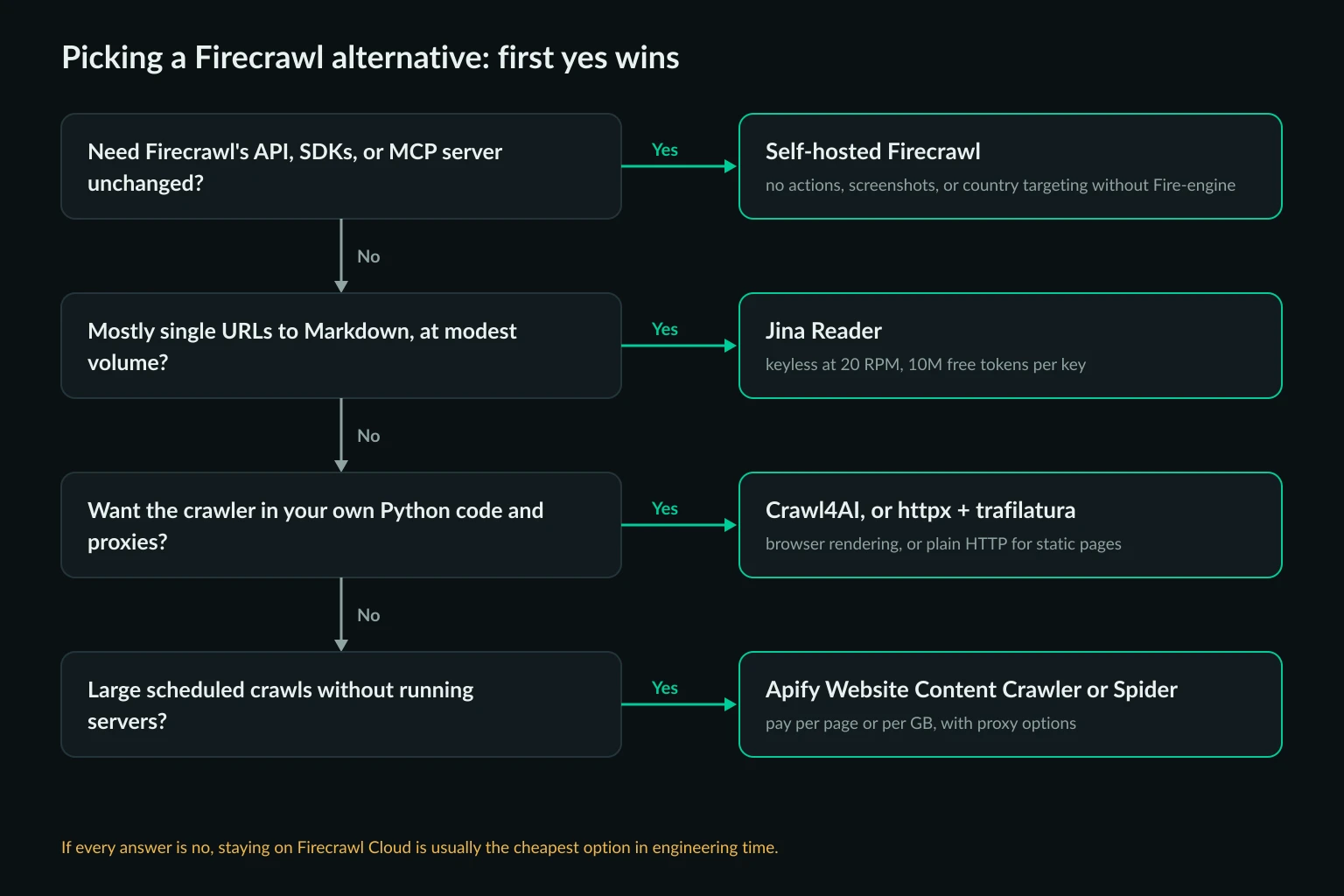
Work through the questions in order and stop at the first yes:
- Do other systems depend on Firecrawl's API, SDKs, or MCP server? Self-host Firecrawl, set
PROXY_SERVER, and check responses fordata.warning. Stay on Cloud if you rely on actions, screenshots, or country targeting. - Is the job mostly single URLs to Markdown at modest volume? Use Jina Reader, with
x-proxy-urlif a site needs your exits. - Do you want the crawler in your own Python code? Use httpx and trafilatura for static pages, and Crawl4AI for pages that need a browser. You can run both, with the
needs_browsercheck deciding which one handles each page. - Do you need large scheduled crawls without running servers? Use Apify's Website Content Crawler or Spider, and bring your own proxy if their pool pricing exceeds yours.
If none of these fits, Firecrawl Cloud may still be the cheapest option once you count engineering time. At $99 a month for 100,000 credits, it costs about $1 per 1,000 Markdown pages, with rendering, retries, and proxies included.
FAQ
Is there a free Firecrawl alternative?
Yes. Self-hosted Firecrawl, Crawl4AI, Crawlee, ScrapeGraphAI's library, and httpx with trafilatura are free and open source. You pay for servers and proxy traffic instead. Jina Reader is free without a key at 20 requests a minute, and new API keys include 10 million tokens.
Is Firecrawl open source?
Firecrawl's server is open source under AGPL-3.0, and its SDKs are MIT. The self-hosted version lacks Fire-engine, which powers actions, screenshots, location targeting, and stealth proxies on Firecrawl Cloud.
Can I use my own proxies with Firecrawl?
Not on Firecrawl Cloud. It routes requests through its own pool and lets you pick a country with location.country. Self-hosted Firecrawl reads one proxy from the PROXY_SERVER, PROXY_USERNAME, and PROXY_PASSWORD environment variables and uses it for every request.
What is the best open-source alternative to Firecrawl?
For a Python codebase, Crawl4AI. It renders JavaScript, outputs Markdown, supports LLM extraction, and lets you set proxies per crawl. For a JavaScript or TypeScript codebase, Crawlee covers crawling, and you add a Markdown converter. If you need Firecrawl's exact API, self-host Firecrawl.
Is Crawl4AI better than Firecrawl?
It depends on who runs the infrastructure. Crawl4AI gives you control over the browser, proxies, and extraction, with no per-page fees. In exchange, you run Chromium and handle blocks yourself. Firecrawl Cloud handles rendering, proxies, and retries for a per-page price, but you can't choose its exit IPs.
Conclusion
The best Firecrawl alternatives are the ones that replace the features you actually use. Self-hosted Firecrawl keeps the API, but it loses actions, screenshots, and country targeting, and it uses one proxy for everything. Crawl4AI and the httpx plus trafilatura script put the crawler and the proxy choice in your code. Jina Reader, Spider, and Apify stay hosted, but each accepts your own proxy URL.
Start by listing which Firecrawl features your code calls. Then test the alternative on a sample of your real URLs, through the proxy you plan to use, and compare the Markdown, failure rate, and GB per 1,000 pages before you switch.