For web agents that run unattended, LangGraph handles blocks better than CrewAI. In LangGraph, a block is control flow. Each node gets its own retry policy, a checkpointer resumes a failed run at the step that failed, and interrupt() pauses the run when a page needs a human. CrewAI gets a multi-agent browsing prototype working faster, and its checkpoints can also resume a crew or Flow after the last finished step. Its block handling, though, mostly lives inside your tools. There is no per-tool retry policy, and max_rpm paces LLM calls rather than page requests.
For browsing itself, the CrewAI vs LangGraph choice matters less than people expect. Neither framework ships a browser. Both drive the same Playwright, Browser Use, Stagehand, and MCP tools, so the pages an agent can open are about the same. The difference shows up when a page answers 403 or 429. We pointed both frameworks at a local server that returned those codes and counted how many requests each one sent.
Tested on 2026-10-18 with Python 3.12.13, langgraph 1.2.16 (langgraph-prebuilt 1.1.1), langchain 1.4.6, crewai 1.15.28, httpx 0.28.1, and requests 2.34.2. A local HTTP server returned 403, 429 (with Retry-After: 2), and 503 responses and counted every hit. A local proxy that required Basic auth logged each request. CrewAI crews ran with a scripted stand-in LLM, and LangChain agents with a scripted chat model, so the frameworks' real agent loops called the tools without a model API.
CrewAI vs LangGraph at a glance
| LangGraph | CrewAI | |
|---|---|---|
| How you build the agent | A graph of nodes and edges with typed state. LangChain's create_agent builds a prebuilt agent loop on top |
Agents with roles, grouped into crews of tasks. Flows add event-driven steps |
| Browsing | Your own tools, LangChain integrations, or MCP servers | crewai-tools browser and scrape tools, custom tools, or MCP servers |
| Retry on a failed fetch | RetryPolicy per node, with your own retry_on |
No per-tool policy. Retry inside the tool |
| Rate limiting | max_concurrency caps parallel nodes. Pacing is yours to write |
max_rpm per agent or crew, counted on LLM calls |
| Resume after a crash | Checkpointer resumes at the failed node | checkpoint= on a Crew or Flow, then kickoff(from_checkpoint=...) skips finished tasks or methods. Flow @persist alone reruns from @start |
| Human handoff on a block | interrupt() pauses the run, and Command(resume=...) continues it |
Flow @human_feedback, or human_input=True on a task |
| Marking a failed tool call | A raised exception, or a ToolMessage with status="error" |
Return a ToolFailure, then set tool_failure_policy to warn or raise |
| Best fit | Long-running, unattended agents that must recover cleanly | Fast multi-agent prototypes and role-based research crews |
Both are model-agnostic Python frameworks, and LangGraph also has a JavaScript version. The rest of this guide covers what each row means when the agent works with real websites.
Browsing: both frameworks use the same tools
LangGraph has no browsing tools of its own. You write a tool, use a LangChain integration, or load MCP servers through LangChain's MCP adapters. CrewAI ships scrape and browser tools in crewai-tools (Selenium, Stagehand, Browserbase, Hyperbrowser, and others), but most serious browsing agents still end up on Playwright, Browser Use, or a Playwright MCP server. The proxy setup for those lives in the tool, and it's the same in both frameworks. The guides for Browser Use and Playwright MCP cover it.
There is one CrewAI caveat. Its built-in ScrapeWebsiteTool downloads pages through an SSRF-safe fetcher that ignores HTTPS_PROXY, so it can't use your proxy. If a CrewAI agent needs proxied fetches, write a custom tool. The one later in this guide works.
Where the browser or HTTP client lives differs more:
- LangGraph state must be serializable once you add a checkpointer. We put an
httpx.Clientin state and the run failed withTypeError: Type is not msgpack serializable: Client. Long-lived objects go in the runtime context instead (StateGraph(State, context_schema=Ctx), thengraph.invoke(..., context=Ctx(...))). Each node reads them fromruntime.context. That is also the natural place to pass a per-run proxy session. - CrewAI tools are objects that hold their own resources. A
BaseToolsubclass can keep a browser or HTTP client in a private attribute for the life of the crew. Agents that share a tool instance share that client.
Parallel browsing differs too. In LangGraph, Send fans a list of URLs out to parallel nodes, and max_concurrency in the run config caps how many run at once. We sent 8 URLs to a node that took 0.5 s each: with no cap all eight ran at once and the run took about 0.5 s, while max_concurrency: 2 stretched it to 2.0 s. CrewAI has no request-level cap. Its max_rpm setting counts calls to the LLM, which we cover below.
What happens when a site blocks the agent
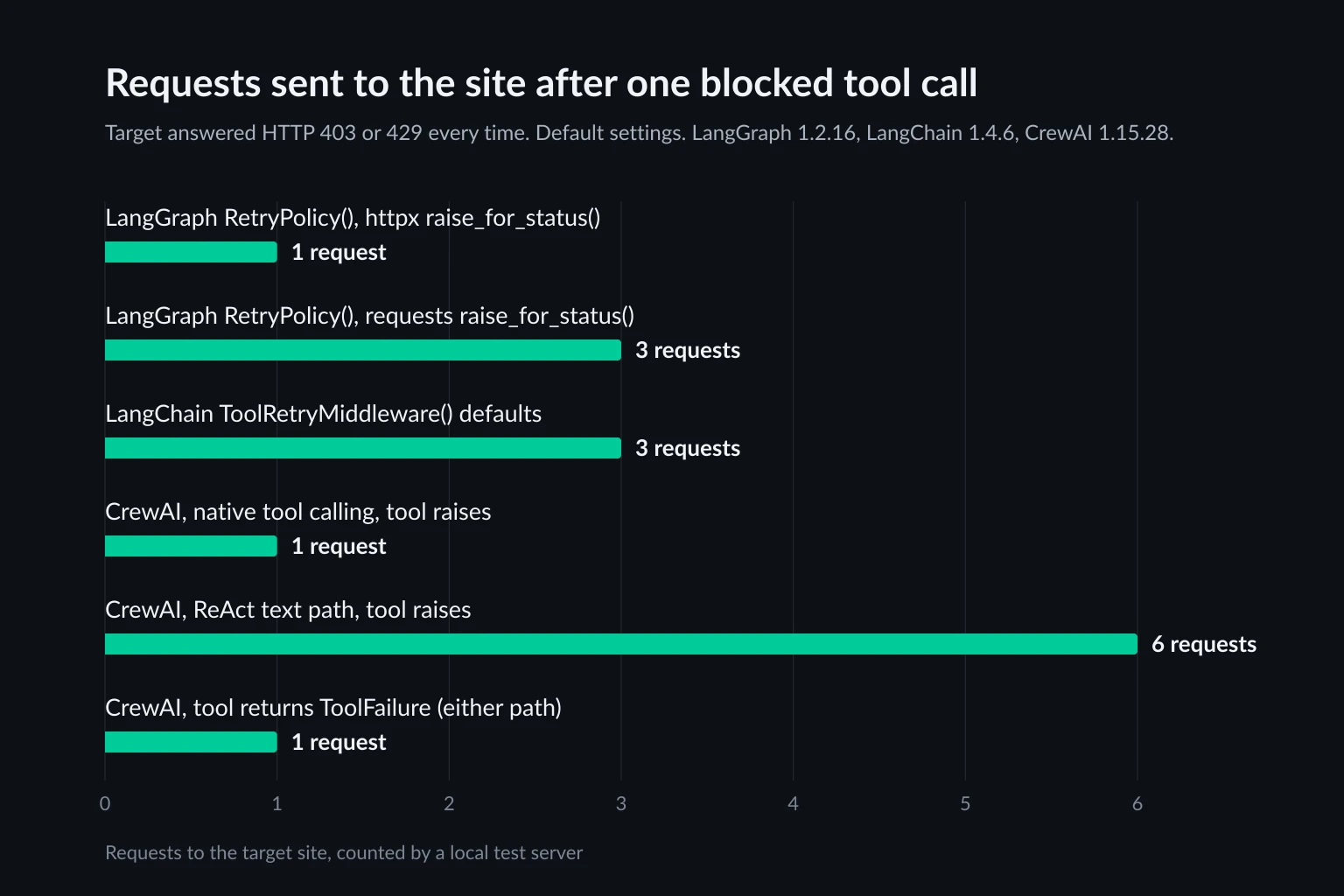
A block reaches your code as an HTTP status, a timeout, or an exception, depending on the client. What the framework does next decides how many more requests hit a site that has already said no. We made each setup fetch a URL that always answered 403 or 429 and counted the requests.
LangGraph's default retries depend on your HTTP client
RetryPolicy() on a node retries up to 3 attempts, with a 0.5 s initial interval, a backoff factor of 2, and jitter. Which exceptions it retries is decided by default_retry_on in LangGraph's source, and the result depends on the HTTP library your node uses:
| Error in the node | httpx | requests |
|---|---|---|
403 after raise_for_status() |
Not retried (1 request) | Retried (3 requests) |
429 after raise_for_status() |
Not retried (1 request) | Retried (3 requests) |
503 after raise_for_status() |
Retried (3 requests) | Retried (3 requests) |
| Connection refused | Retried (3 attempts, 3.3 s) | Not retried, raised at once |
The httpx column matches the intent: retry 5xx and network errors, not client errors. The requests column is inverted. The policy checks if exc.response, and a requests.Response with a 4xx or 5xx status evaluates as false, so every HTTPError is retried. requests.ConnectionError subclasses OSError, which the policy excludes, so a dead proxy is never retried. And when the policy does retry a 429, it ignores Retry-After and waits on its own backoff schedule. If your agent fetches pages, pass your own retry_on instead of relying on the default.
LangChain's create_agent stops on a tool exception
If you build the agent with LangChain's create_agent rather than a hand-written graph, tool errors behave differently. A tool that raised HTTPStatusError on a 429 ended the whole agent.invoke() call. The ToolNode that create_agent builds keeps the default error handler, which only turns argument-validation errors into messages for the model and re-raises everything else. In a hand-written graph, ToolNode(tools, handle_tool_errors=True) gives the model a ToolMessage with status="error" instead. Inside create_agent, handle errors with middleware.
ToolRetryMiddleware adds retries. By default it allows 2 retries, waits about 1 s and then 2 s (with jitter), and retries any exception. That means it also retries a 403. It sent 3 requests for both the 403 and the 429, then handed the model a message that began Tool 'fetch_page' failed after 3 attempts with HTTPStatusError. Pass a retry_on callable that returns False for 401 and 403.
CrewAI turns errors into text, and the tool path matters
By default, CrewAI catches tool exceptions and shows the error text to the model, so a raised exception doesn't end the crew. How many requests that costs depends on how the agent calls tools:
- Native tool calling, used when the LLM supports function calling, runs the tool once. The model then sees
Error executing tool: Client error '429 Too Many Requests'...and decides what to do. - The ReAct text path, used when the LLM doesn't report function-calling support (common with local models), re-runs a raising tool immediately. In
tool_usage.py, each attempt also calls the tool a second time with the raw arguments when the first call raises. One tool call against a 429 sent 6 requests in about 40 ms, with no delay between them.
The fix is the same for both paths: don't raise from a fetch tool. CrewAI 1.15.28 has a ToolFailure type that a tool returns instead of an error string. The model still sees the message, but the failure is also recorded on TaskOutput.tool_failures, and tool_failure_policy on the tool, task, agent, or crew decides what happens next. The default, warn, records the failure and continues. raise aborts the crew with ToolExecutionFailedError. A tool returning ToolFailure for a 403 sent exactly 1 request on both paths. Under raise, the crew stopped after that one request.
Two more CrewAI settings behave differently from what their names suggest:
max_rpmpaces the LLM, not the website. Withmax_rpm=1, the second LLM call waited exactly 60 s. The tool's page request between the two calls was never counted. The controller sleeps a full minute whenever the limit is hit. On a browsing crew,max_rpmmostly caps model spend. Pace page requests inside the tool.- Crew-level caching can replay a block. Tool-result caching is opt-in on
Crew(cache=True)in 1.15.28. When it's on, a second call with the same arguments returns the first result without running the tool. Our tool returned the textHTTP 429, and the agent's retry got that cached 429 without a new request.ToolFailureresults were not served from cache in the same test. If you enable caching for a fetch tool, return failures asToolFailure, or set acache_functionthat rejects them.
Resuming after a failure: checkpoints vs flow state
Blocks and timeouts end runs, and a long browsing job shouldn't start from page one when it restarts. Refetching pages you already have costs proxy bandwidth and adds load to a site that may already be rate limiting you.
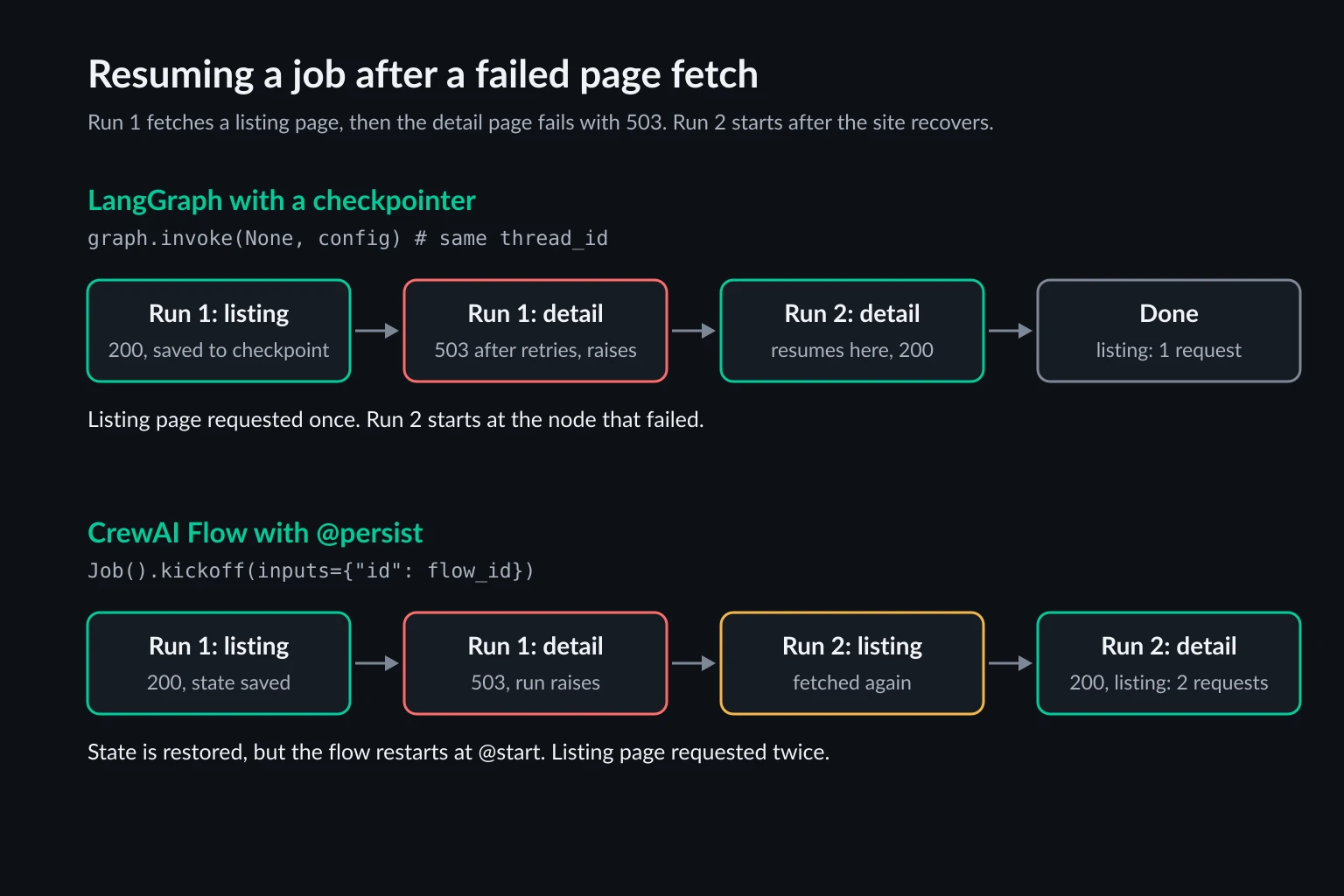
We ran the same two-step job in both frameworks. It fetches a listing page, then a detail page that returns 503 until we tell the test server to recover.
LangGraph with a checkpointer saved state after the listing node. The detail node failed after its retries, and the run raised. graph.get_state(config).next reported ('fetch_detail',). After the site recovered, graph.invoke(None, config) with the same thread_id ran only the detail node, so the listing page was requested once in total. InMemorySaver is fine for testing. In production, use a database-backed checkpointer (SQLite or Postgres) so state survives a restart. The durable execution docs cover the options.
CrewAI Flows with @persist saved state to SQLite. Calling kickoff(inputs={"id": flow_id}) restored that state, but the flow started again at its @start method, so the listing page was requested twice. CrewAI's newer checkpoints behave differently. With checkpoint=CheckpointConfig(on_events=["method_execution_finished"]) on the Flow, kickoff(from_checkpoint=CheckpointConfig(restore_from=path)) skipped the finished listing method and ran only the detail step, so the listing page was requested once, the same as LangGraph. The default on_events is ["task_completed"], which suits crews: Crew(checkpoint=True) writes a checkpoint after each task, and a resumed kickoff skips the tasks already done. The checkpointing docs cover storage and pruning. If you stay on @persist, have each step check state first, for example if self.state.listing: return.
One LangGraph detail costs a request if you miss it. When you resume after interrupt(), the node that called it runs again from the top. In our test, a node that fetched a page and then called interrupt() on a 403 sent the request twice: once before the pause and once on resume. The interrupts docs state this rule. Keep requests in one node and the interrupt() call in a separate node.
Handling blocks in LangGraph
The pattern that worked in both frameworks is to classify the response inside the fetch step and only give the model page text or a short failure message. Back off on 429 and 5xx, stop on 401 and 403, and never rotate IPs to get past a page that refused you.
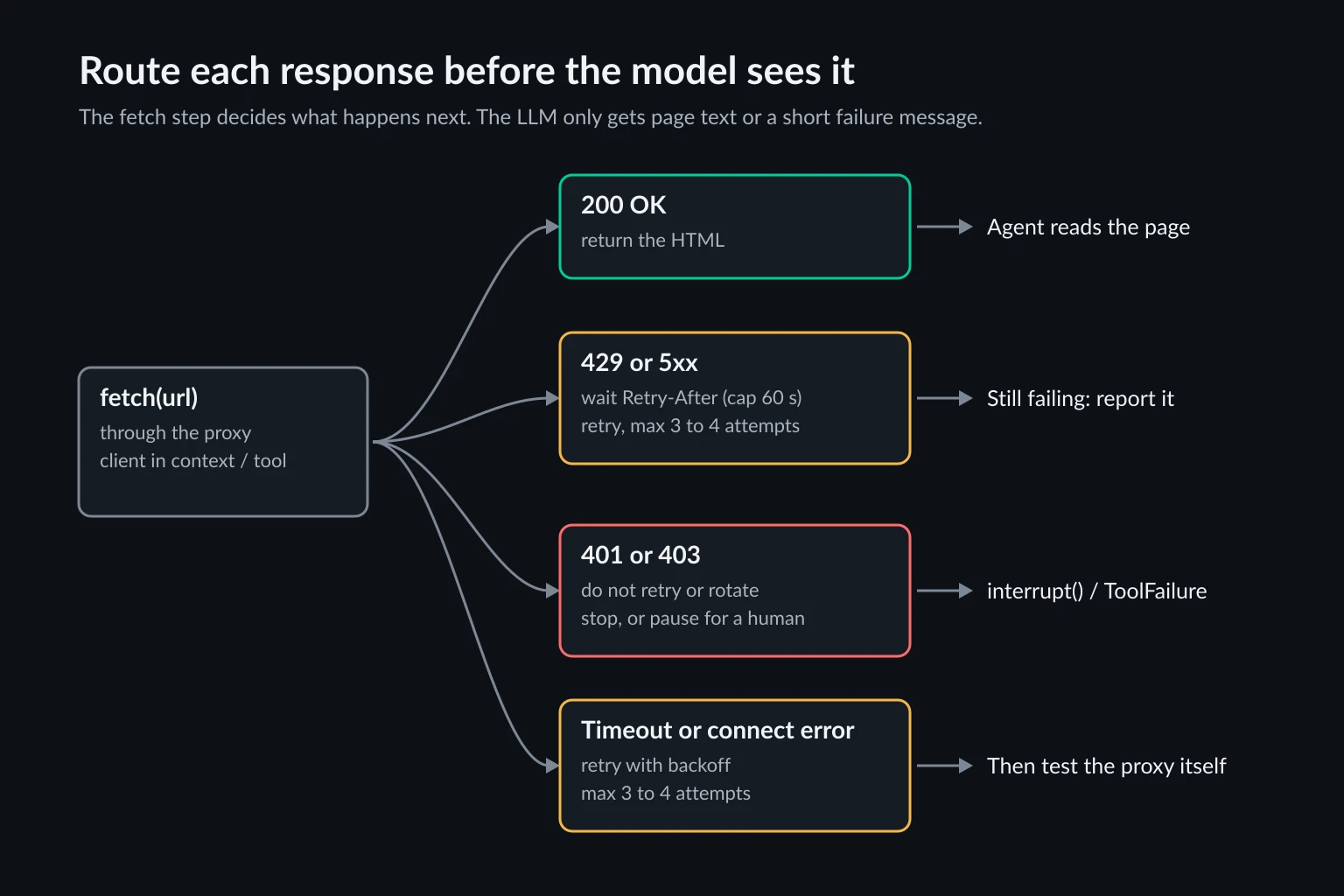
In LangGraph, put the fetch in its own node with a retry policy limited to the errors you want retried, and send 401 and 403 to a node that pauses the run:
import os
import time
from dataclasses import dataclass
from email.utils import parsedate_to_datetime
from typing import TypedDict

import httpx
from langgraph.checkpoint.memory import InMemorySaver
from langgraph.graph import END, START, StateGraph
from langgraph.runtime import Runtime
from langgraph.types import Command, RetryPolicy, interrupt


class Throttled(Exception):
    """A 429 or 5xx response that is worth retrying after a pause."""


@dataclass
class Ctx:
    http: httpx.Client  # not serializable, so it goes in context, not state


class State(TypedDict, total=False):
    url: str
    status: int
    html: str
    decision: str


def retry_after_seconds(value: str | None, default: float = 5.0) -> float:
    if not value:
        return default
    if value.isdigit():
        return float(value)
    try:
        return max(0.0, parsedate_to_datetime(value).timestamp() - time.time())
    except (TypeError, ValueError):
        return default


def fetch(state: State, runtime: Runtime[Ctx]) -> dict:
    r = runtime.context.http.get(state["url"])
    if r.status_code == 429 or r.status_code >= 500:
        time.sleep(min(retry_after_seconds(r.headers.get("Retry-After")), 60))
        raise Throttled(f"HTTP {r.status_code}")
    return {"status": r.status_code, "html": r.text}


def route(state: State) -> str:
    return "ask_human" if state["status"] in (401, 403) else END


def ask_human(state: State) -> dict:
    # This node runs again from the top on resume, so it makes no requests.
    decision = interrupt({"url": state["url"], "status": state["status"]})
    return {"decision": decision}


builder = StateGraph(State, context_schema=Ctx)
builder.add_node(
    "fetch",
    fetch,
    retry_policy=RetryPolicy(
        max_attempts=4,
        initial_interval=1.0,
        retry_on=(Throttled, httpx.TransportError),
    ),
)
builder.add_node("ask_human", ask_human)
builder.add_edge(START, "fetch")
builder.add_conditional_edges("fetch", route, ["ask_human", END])
builder.add_edge("ask_human", END)
graph = builder.compile(checkpointer=InMemorySaver())

http = httpx.Client(
    proxy=os.environ["PROXY_URL"],  # http://USERNAME:PASSWORD@HOST:PORT
    trust_env=False,
    timeout=30,
    follow_redirects=True,
)
ctx = Ctx(http=http)
config = {"configurable": {"thread_id": "job-42"}}

result = graph.invoke({"url": "https://example.com/catalog"}, config, context=ctx)
if "__interrupt__" in result:
    print("Paused:", result["__interrupt__"][0].value)
    result = graph.invoke(Command(resume="skip"), config, context=ctx)
print(result.get("status"), result.get("decision"))
Through the authenticating proxy, a URL that returned one 429 with Retry-After: 2 and then 200 took 2 requests and about 4 s: the 2 s from the header plus the policy's own jittered interval. A 403 took 1 request. The run paused with {'url': ..., 'status': 403} and finished with decision='skip' without fetching again. In a real agent, the ask_human node is where an operator logs in, solves a challenge in a live browser view, or decides to drop the URL.
Two notes on this code. RetryPolicy adds its own interval on top of the Retry-After sleep, so lower initial_interval if that matters. And trust_env=False means a stray HTTPS_PROXY or NO_PROXY can't change the route. The httpx proxy docs cover the proxy= argument.
Handling blocks in CrewAI
CrewAI has no node to hang a retry policy on, so the tool does the retrying and reports failures with ToolFailure instead of raising:
import os
import time

import httpx
from crewai import Agent, Crew, Task
from crewai.tools import BaseTool, ToolFailure
from pydantic import PrivateAttr


class FetchPage(BaseTool):
    name: str = "fetch_page"
    description: str = "Fetch a URL through the proxy and return its HTML."
    _http: httpx.Client = PrivateAttr()

    def __init__(self, proxy_url: str, **kwargs):
        super().__init__(**kwargs)
        self._http = httpx.Client(proxy=proxy_url, trust_env=False, timeout=30, follow_redirects=True)

    def _run(self, url: str) -> str | ToolFailure:
        # Never raise from here: return a ToolFailure so CrewAI doesn't re-run the call.
        for attempt in range(3):
            try:
                r = self._http.get(url)
            except httpx.TransportError as e:
                last = ToolFailure(message=f"Network error for {url}: {e}", retryable=True)
                if attempt < 2:
                    time.sleep(2**attempt)
                continue
            if r.status_code == 429 or r.status_code >= 500:
                wait = r.headers.get("Retry-After", "")
                last = ToolFailure(message=f"HTTP {r.status_code} from {url}", code=str(r.status_code), retryable=True)
                if attempt < 2:  # no point waiting after the last attempt
                    time.sleep(min(float(wait), 60) if wait.isdigit() else 2**attempt)
                continue
            if r.status_code in (401, 403):
                return ToolFailure(message=f"Blocked with HTTP {r.status_code} at {url}. Do not retry it.", code=str(r.status_code))
            return r.text[:20_000]
        return last


researcher = Agent(
    role="Catalog researcher",
    goal="Read product pages and report their titles",
    backstory="You read pages with fetch_page and never guess content.",
    tools=[FetchPage(os.environ["PROXY_URL"])],  # http://USERNAME:PASSWORD@HOST:PORT
    max_iter=8,
    max_rpm=20,  # paces LLM calls, not page requests
)
task = Task(
    description="Fetch {url} and report the page title.",
    expected_output="The page title, or the HTTP status if the page was blocked.",
    agent=researcher,
)
output = Crew(agents=[researcher], tasks=[task]).kickoff(inputs={"url": "https://example.com/catalog"})
print(output.raw)
for record in output.tasks_output[0].tool_failures:
    print(record.summary())
We ran this crew on both tool paths, native function calling and ReAct text. The rate-limited-once URL took 2 requests and returned the page. The 403 took 1 request on both paths, compared with 6 on the ReAct path when the tool raised. The always-429 URL took 3 spaced requests, and the model then saw HTTP 429 from ... (code: 429). Every failure appeared in tool_failures as a line like Tool 'fetch_page' failed during 'Fetch ... and report the page title.': Blocked with HTTP 403 at .... Set tool_failure_policy="raise" on the crew if a block should stop the run rather than leave the next step to the model.
For a human handoff in CrewAI, move the work into a Flow. A @router step can send blocked URLs to a method decorated with @human_feedback, and the human feedback in Flows docs cover async feedback providers that pause a persisted flow and resume it later with from_pending() and resume(). The docs recommend making the steps that run after a resume idempotent, which for a fetch step means not requesting a page the state already holds.
Where the proxy goes in each framework
The proxy belongs on the client that fetches pages, not on the whole agent process. That's the same in both frameworks. Export HTTPS_PROXY globally and the OpenAI and Anthropic SDKs follow it, so prompts and responses also go through, billed as proxy bandwidth. In the code above, the proxy is set only on the fetch tool's httpx.Client, and model traffic goes direct.
Match the proxy to the job:
- Many independent pages (catalog reads, search-then-read loops): rotating residential proxies, so no single IP carries the whole crawl.
- Multi-step tasks on one site (pagination, carts, form flows): a sticky session for the length of the task. Key the session to LangGraph's
thread_idor to one CrewAI kickoff. Sticky vs rotating proxies explains the trade-off. - Logged-in or IP-allowlisted work: a static ISP proxy that keeps the same address between runs.
A proxy changes where requests come from. It doesn't fix a fingerprint problem, and it doesn't make a 403 acceptable to work around. Why web browsing agents get blocked separates IP blocks from fingerprint and behavior blocks. For 429s, the HTTP 429 guide covers Retry-After and request pacing. Keep agents to sites you're allowed to automate, and respect robots.txt and published rate limits.
Which one should you pick?
Pick LangGraph when the agent runs unattended, fetches many pages per job, or has to recover from blocks without a person watching. Per-node retry policies, checkpoint resume, and interrupt() are built for that. Expect to write more code: you design the graph, the state, and the fetch tool.
Pick CrewAI when you want a working multi-agent browsing prototype quickly, or when the problem fits role-based agents (researcher, analyst, writer) with short jobs that can simply rerun. Write your fetch tools to retry internally and return ToolFailure, and treat max_rpm as a model budget, not a politeness setting.
You don't have to choose only one. A LangGraph node is a Python function, so it can call crew.kickoff(). Some teams keep a CrewAI crew for the reasoning-heavy part and wrap it in a LangGraph graph that owns fetching, retries, and checkpoints.
FAQ
Is LangGraph or CrewAI better for web scraping agents?
For long-running scraping agents, LangGraph. Its retry policies are set per node, its checkpointer resumes at the failed step, and interrupt() hands blocked pages to a person. CrewAI can also resume from a checkpoint and works well for short research crews, but you write the retry and pacing logic inside each tool.
Does LangGraph retry HTTP 429 errors by default?
Only if you fetch with requests. With httpx, the default RetryPolicy doesn't retry a 429 or 403 raised by raise_for_status(). With requests, it retries every HTTPError, including 403. Neither honors Retry-After, so pass your own retry_on and sleep for the header value in the node.
Can CrewAI retry failed tool calls?
Not with a retry policy. On native function calling, a raised exception is shown to the model once. On the ReAct text path, CrewAI re-runs a raising tool immediately, which sent 6 requests for one blocked call in our test. Retry inside the tool with backoff, and return a ToolFailure when it gives up.
Does CrewAI's max_rpm limit requests to websites?
No. max_rpm counts LLM calls. When the limit is reached, CrewAI sleeps for 60 seconds before the next model call. Page requests made by tools aren't counted, so pace them inside the tool.
Can a LangGraph or CrewAI agent solve CAPTCHAs?
Neither framework solves CAPTCHAs. LangGraph's interrupt() can pause a run so a person can finish a challenge in a live browser session, and CrewAI Flows can do the same with @human_feedback. If a site serves CAPTCHAs to your agent on every request, slow down or ask the site for API access rather than adding more IPs.
Conclusion
In the CrewAI vs LangGraph comparison for web agents, browsing is close to a tie, because both drive the same browser and MCP tools. Both can resume a failed run from a checkpoint. Block handling is where they split. LangGraph gives you per-node retry policies, resume at the exact node that failed, and interrupt() for a human handoff. CrewAI gives you a faster start, and it needs fetch tools that retry internally, return ToolFailure, and don't rely on max_rpm to protect the target site.
Whichever you choose, check how many requests one blocked call really sends before the agent runs at scale. Then put the proxy on the fetch tool only: residential proxies for rotating or sticky sessions, or ISP proxies for a stable address.