The Ticketmaster waiting room is the holding page you land on before a high-demand on-sale. It usually opens 15 to 30 minutes before the sale. When the on-sale time arrives, everyone in the waiting room is given a spot in the Smart Queue, and anyone who arrives after that goes to the back. The queue then lets a few hundred people shop at a time. When your turn comes, Ticketmaster holds your spot for 10 minutes so you can start picking seats.
Keep the queue page open in one tab for the show. Ticketmaster says VPNs and Private Relay can trigger errors, and busy shared networks can trigger pauses.
This guide covers each stage, the known ways to lose a spot, why the queue can look frozen, and what to set up before you join. Ticketmaster-specific claims come from its queue help article and Smart Queue explainer unless another source is linked. Where we're inferring, we say so.
How the Ticketmaster waiting room works
The waiting room is a pre-queue. Its job is to collect everyone who shows up early so the sale doesn't turn into a race to reload at the exact second it opens.
- When it opens: Ticketmaster's blog says waiting rooms "typically open 15-30 minutes ahead of time". The help center says to join "up to 15 minutes prior". Treat T-15 as the latest safe arrival.
- What you need first: sign in before you join. Your account, saved card, and billing address should be ready, so you can go straight to choosing seats when admitted.
- Multiple dates: for a tour with several shows, you can join each date's sale once, each in its own tab in the same browser. One tab per show is the rule; Ticketmaster says "more than one tab per show will cause errors."
- Arriving late: "If you join the queue after the sale starts, you'll be at the back of the line."
Ticketmaster assigns places when the sale starts. It hasn't published whether arrival time within the waiting room affects placement.
How Smart Queue assigns your place in line
At the on-sale time, the waiting room turns into the Smart Queue. Ticketmaster's business page for Smart Queue says "once the sale starts, waiting fans are assigned a spot in the queue". You don't press anything. The page updates itself and shows your place in line.
How that spot is chosen is the contested part. Many fans assumed it was a lottery. In May 2026, Ticketmaster's global president Saumil Mehta said on X, "I don't know where this notion that queue positions are random came from." In another reply he added, "The whole reason it cannot be random is because security measures are in place." Digital Music News covered the exchange. Ticketmaster has not published how positions are actually set.
Ticketmaster screens queue traffic for bots. It has not published evidence that a VPN or a blocked script changes the position assigned to a fan.
What happens inside the Ticketmaster queue
Once you have a spot, the Smart Queue meters entry to the seat map. Ticketmaster's explainer says "only a few hundred people can shop at once", and new fans are let in only "when space opens up". That pacing is deliberate, and it's why a queue of 40,000 people can move in bursts rather than at a steady rate.
While you wait:
- Your page and spot refresh on their own. Ticketmaster asks you not to refresh, close, or leave the page.
- A notification bell sounds when it's your turn. Ticketmaster says to turn up the volume so you hear it "even if you need to step away", and answers "Yes" to whether you have to stay on the page the entire time. Keep the queue tab open and in front, and step away from the device rather than switching tabs. Chrome's Memory Saver can discard tabs left unused in the background and reload them automatically when you come back, which is exactly the refresh you're trying to avoid.
- If the page shows an error, Ticketmaster says to follow the error's directions or try signing out and signing back in, and that "your place in the queue will not change". Fix it in the same tab rather than opening a second copy of the sale.
- The queue "can move quicker than expected", so stay near the screen even when the estimate looks long.
When your turn comes, your spot is held for 10 minutes so you can start shopping. Inventory is first come, first served from there, and Ticketmaster is clear that tickets "are not guaranteed". A good queue position gets you to the seat map. It doesn't reserve seats.
Why Ticketmaster queue sessions get dropped
Here are the triggers in one place. The first nine come from Ticketmaster: its queue article and Smart Queue explainer, its error-message article, and its paused-or-suspended article. The last one is our inference from how session security works, not something Ticketmaster documents.
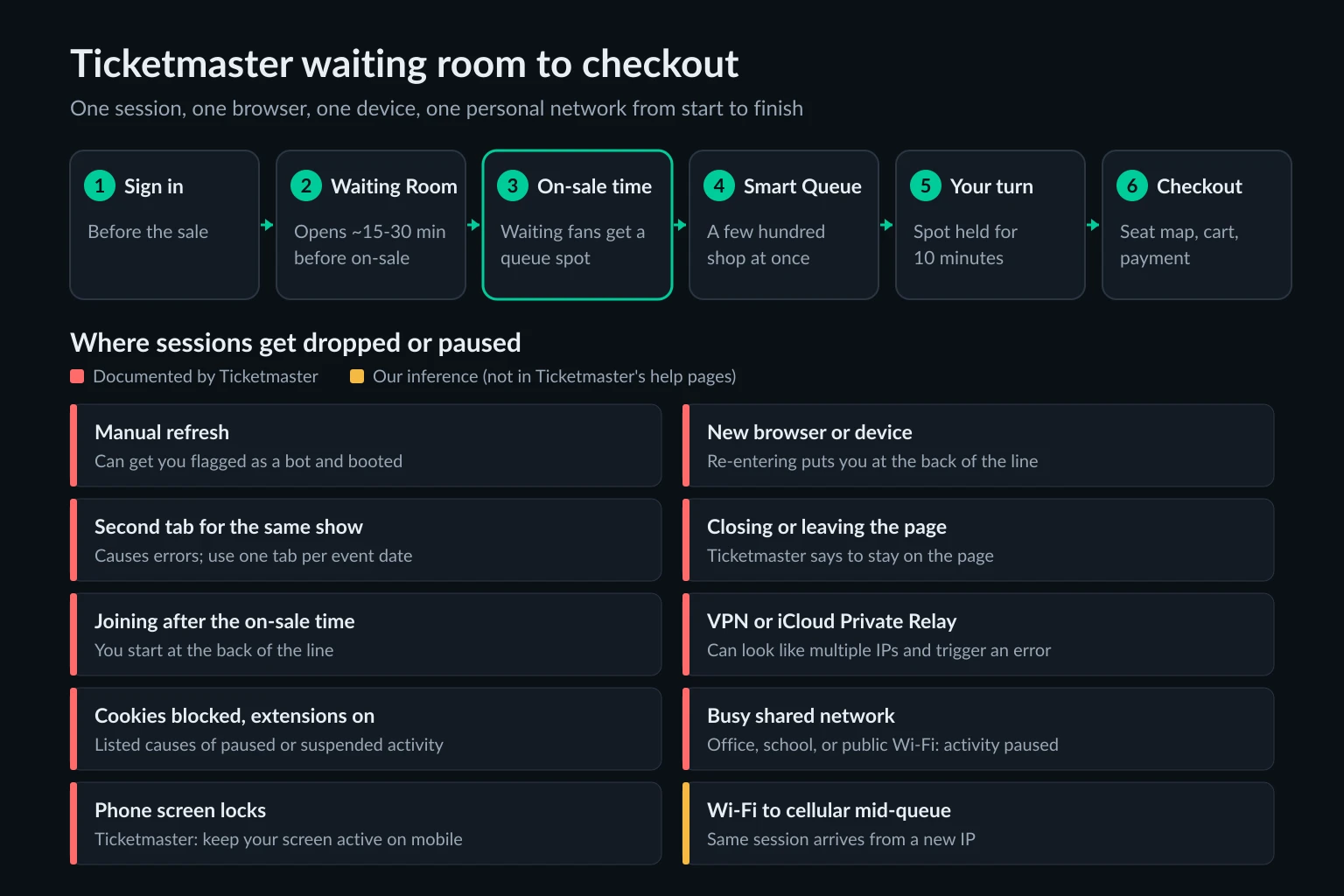
| Trigger | What happens | Source |
|---|---|---|
| Refreshing the page yourself | "Could get you flagged as a bot and booted from the sale" | Ticketmaster |
| Rejoining on a new device or browser | "Will place you at the back of the line" | Ticketmaster |
| A second tab for the same show | "Will cause errors" | Ticketmaster |
| Closing or navigating away from the page | Ticketmaster says to stay on the page to keep your spot | Ticketmaster |
| Arriving after the on-sale time | You start at the back of the line | Ticketmaster |
| VPN or iCloud Private Relay on | Can trigger an error if it "makes it look like you're using multiple IPs" | Ticketmaster |
| Cookies blocked, extensions or automation tools on | Listed causes of paused or suspended activity | Ticketmaster |
| A busy shared network (office, school, public Wi-Fi) | "We've Paused Activity Due To High Activity On Your Network" | Ticketmaster |
| Phone screen locks during the queue | Ticketmaster says to "keep your screen active" when shopping on a phone; a locked screen can pause the browser tab | Ticketmaster |
| Wi-Fi to cellular switch mid-queue | The same session arrives from a different IP partway through | Our inference |
The first group is about identity inside Ticketmaster's system. In practice, your place in line belongs to one browser session, tied to your account and that browser's cookies. A new browser or device is a new session, so it starts again at the back. Ticketmaster's error article lists "repeated page refreshes or clicks within a short time" as unusual activity, which is why a manual refresh can get you removed.
Network problems are the overlooked cause
Your public IP address is part of how a site recognizes a session. Cookies say "this is the same browser"; the IP says where the request came from. Ticketmaster's error article says outright that "you may trigger an error if your VPN, Apple Private Relay or other software makes it look like you're using multiple IPs." Its fix is to turn the VPN off or switch to a mobile network, then refresh and sign in.
Several everyday things can change or muddy your IP partway through a queue:
- A VPN that reconnects or changes servers. Many VPN apps reconnect after sleep or a dropped link, often to a different exit IP.
- iCloud Private Relay. Safari traffic reaches sites through a relay that "generates a temporary IP address", and Apple notes some sites "may require extra steps to sign in or access content" (Apple support). Ticketmaster names it alongside VPNs.
- Walking out of Wi-Fi range on a phone. The phone switches to cellular, and the queue's next update arrives from your carrier's network instead of your home ISP. Ticketmaster doesn't document this case. We include it because a mid-session IP change is a common risk signal, and a stolen session cookie replayed from another network looks the same way.
- A work, school, or public network. Many people share one public IP there. Ticketmaster says this kind of traffic "can mimic bot behavior" and can produce "We've Paused Activity Due To High Activity On Your Network". Its fix is to switch to a personal network such as mobile data and wait a few minutes. Ticketmaster's fixes for both a VPN error and a network pause involve moving to mobile data, so if you'll be on a shared network, switch before you join rather than mid-queue. If Chrome itself shows proxy or firewall errors on a work network, our guide to checking the proxy and the firewall walks through the fix.
VPN and relay IPs cause a second problem as well. They are shared by many users and listed in IP-reputation databases, so ticketing sites often challenge them before any network switch happens. Our anonymous proxy detected guide explains how those lists work. The same principle runs through our explainer on sticky vs rotating proxies: any multi-step flow, from login to checkout, breaks more easily when the IP changes in the middle.
Blockers, extensions, and paused activity
Ticketmaster's queue depends on JavaScript and cookies. Its paused-or-suspended article tells fans to turn on cookies (including allowing third-party cookies in Chrome), turn off automated tools, browser extensions, and plug-ins, keep JavaScript enabled, stay in one browser window on one device, and "Disconnect from VPN or other privacy tools". Otherwise, it says to follow the on-screen instructions, and in some cases you'll need to wait a short period.
Most of those changes need a page reload, and a reload mid-queue is its own risk. Change these settings before you join.
Ticketmaster queue not moving: what it usually means
A queue that sits on the same number is not always broken. Here's how to read it:
- The shopping area is full. Ticketmaster admits more people when space opens up. The 10-minute window is the time to enter the shopping area when called. Big sales move in steps.
- Demand is far above capacity. If 200,000 people are waiting and a few hundred shop at a time, the front of the line moves slowly by design. The Smart Queue page posts inventory updates while you wait, so watch for availability and sold-out notices.
- Your tab is paused. On a phone, a locked screen or a switch to another app can pause the browser tab, and the count stops updating. Ticketmaster's queue article tells mobile shoppers to "keep your screen active", so plug the phone in and turn off Auto-Lock before you join. On a desktop, a background tab can be discarded by Chrome's Memory Saver.
- The page hit an error, or your activity was paused or suspended. Don't just wait it out unless the message gives a wait time. Ticketmaster's advice is to follow the directions in the error message or sign out and sign back in, and it says your place in the queue will not change. On a busy shared network, its fix for a pause is to switch to mobile data.
If the number hasn't moved for a long stretch, look for a status or inventory message on the queue page itself before doing anything. Don't open a second copy of the sale to "check", because a second tab for the same show is one of the documented error causes.
Ticketmaster queue tips: what to set up before you join
Sign in and save your payment details ahead of time. Everything else here is about the queue itself, and the rule behind it is simple: anything that could force a reload or change your network happens before you join the waiting room, not while you're in line.
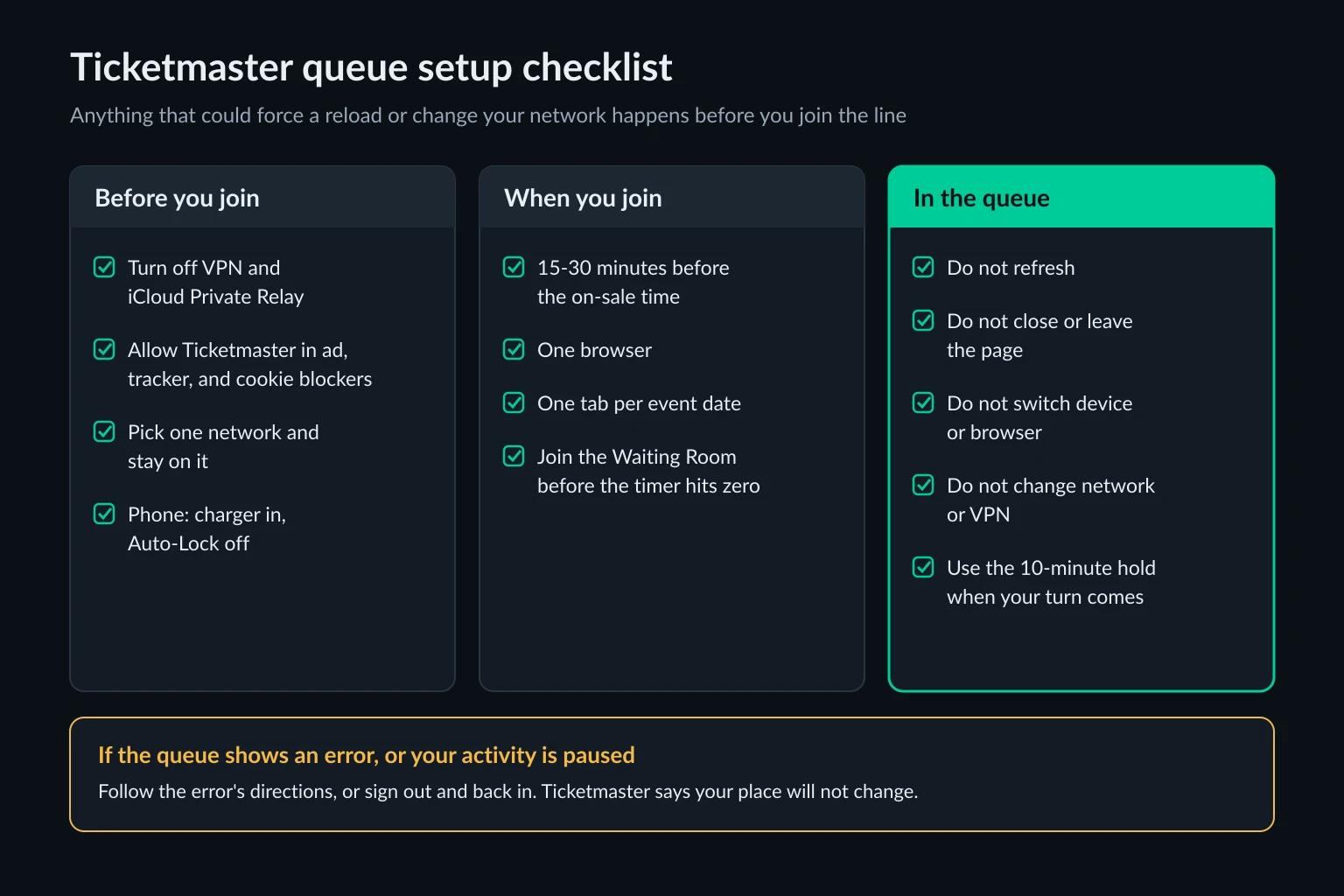
Before you join
- Turn off any VPN, and turn off iCloud Private Relay if you use Safari.
- Allow Ticketmaster in ad, tracker, and cookie blockers, or use a browser profile without them.
- Choose one personal network and stay on it. On a phone, either stay well inside Wi-Fi range or turn Wi-Fi off and use cellular for the whole session. Don't let the phone switch between them. If you're on office, school, or public Wi-Fi, move to mobile data now, since Ticketmaster flags busy shared networks.
- Phones and tablets: plug in the charger and turn off Auto-Lock, since Ticketmaster asks mobile shoppers to keep the screen active.
- Desktop Chrome: add ticketmaster.com to "Always keep these sites active" under Settings > Performance, so Memory Saver doesn't discard the queue tab. Turn the volume up.
When you join, 15 to 30 minutes before the sale
- Open one browser. Use one tab per event date and no more.
- Join the waiting room before the on-sale time.
- Leave the tab alone. Don't refresh it, close it, or open the sale again somewhere else.
If the queue shows an error
Follow the directions on the error, or sign out and sign back in, in the same tab. Ticketmaster says your place in the queue will not change.
When it's your turn
You have a 10-minute hold to start shopping. Decide your quantity and price range before you join, so you're ready to choose seats once admitted.
Do VPNs or proxies help in the Ticketmaster queue?
No. We sell proxies, and this isn't a job for them.
Ticketmaster recommends disconnecting VPNs because they can trigger errors. A VPN offers no documented queue benefit. Ticketmaster separately restricts attempts to conceal identity or circumvent ticketing controls in its Terms of Use.
At covered events, the US BOTS Act prohibits bypassing technical controls that ticket issuers use to enforce posted ticket limits or maintain posted online purchasing-order rules. In the Elite Events case, the July 29 order entered a $10.758 million judgment and suspended the remainder upon payment of $300,000.
For a fan, the useful step runs the other way: turn the VPN off. If you're unsure what each tool changes, our comparison of a proxy server vs a VPN covers the difference.
FAQ
How early should I join the Ticketmaster waiting room?
Join 15 to 30 minutes before the on-sale time. Waiting rooms typically open in that window, and Ticketmaster's help center suggests joining up to 15 minutes ahead. Arriving even a minute after the sale starts puts you at the back.
Does joining the waiting room earlier get me a better spot?
Ticketmaster hasn't published whether joining earlier within the waiting-room window changes your spot. Join before the sale starts.
Can I use my phone and laptop at the same time?
Ticketmaster says to use one device and one browser to shop. Entering the queue on a new device or browser places you at the back of the line, and duplicate tabs for the same show cause errors.
What is Ticketmaster Smart Queue?
Smart Queue is Ticketmaster's virtual line for high-demand sales. It collects fans in a waiting room, assigns spots when the sale starts, screens for bots, and admits a few hundred shoppers at a time to the seat map.
How long do I have when it's my turn?
Ticketmaster holds your spot for 10 minutes so you can start shopping. Seats are still first come, first served, so a good position gets you access, not specific tickets.
Are Ticketmaster queue positions random?
Ticketmaster hasn't said how positions are assigned. Its global president said in May 2026 that positions are not random because security measures are in place, and the company has not published the criteria.
Conclusion
Join the Ticketmaster waiting room before the sale starts, signed in on one device with one tab per show. Keep the page open and follow its instructions. VPNs and Private Relay can trigger errors, and busy shared networks can trigger pauses.