To scrape images from a website with Python, fetch the page with requests, parse it with Beautiful Soup, collect URLs from src, srcset, and lazy-load attributes, resolve them with urljoin, and download each URL as its own response. Check Content-Type and the file itself before saving.
Scraping images from website pages is a two-stage job: extract the image URLs from permitted pages, then download each one as a separate, validated HTTP response. A reliable collector checks more than <img src>. It also handles relative URLs, <picture>, JavaScript-rendered DOM state, redirects, duplicate assets, and misleading responses.
Start with a normal HTTP client and Beautiful Soup when the image URLs exist in the initial HTML. Use a browser only when you have confirmed that JavaScript creates the URLs or scrolling activates required lazy-loaded images. In both cases, review the site's terms, the Robots Exclusion Protocol, copyright, privacy, and applicable law before collecting or reusing images.
This guide builds a bounded Python workflow that discovers image candidates, normalizes them, restricts downloads to approved hosts, verifies response types, and saves files without trusting remote filenames.
Quick start: save the images on one page
This runnable script saves the first five images from the practice site Books to Scrape. Install the packages with python -m pip install requests beautifulsoup4.
import mimetypes
from pathlib import Path
from urllib.parse import urljoin

import requests
from bs4 import BeautifulSoup

PAGE_URL = "https://books.toscrape.com/"
OUTPUT_DIR = Path("images")
OUTPUT_DIR.mkdir(exist_ok=True)

page = requests.get(PAGE_URL, timeout=(5, 20))
page.raise_for_status()
soup = BeautifulSoup(page.content, "html.parser")

for number, img in enumerate(soup.select("img[src]")[:5], start=1):
    image_url = urljoin(page.url, img["src"])
    response = requests.get(image_url, timeout=(5, 20))
    response.raise_for_status()

    media_type = response.headers.get("Content-Type", "").split(";")[0]
    if not media_type.startswith("image/"):
        continue

    suffix = mimetypes.guess_extension(media_type) or ".bin"
    (OUTPUT_DIR / f"image-{number}{suffix}").write_bytes(response.content)
    print("saved", image_url)
It works because every image on that page sits in a plain src. Real sites rarely cooperate that neatly, so the rest of this guide covers srcset, lazy loading, host allowlists, size limits, and file checks.
The image scraping workflow
Treat page retrieval, URL discovery, and binary downloading as separate steps:
- Confirm that the page and intended image use are allowed.
- Fetch one HTML page with a timeout and a stable, truthful client identity.
- Extract candidates from
src,srcset,<picture>, and known lazy-load attributes. - Resolve relative references against the final page URL.
- Keep only HTTP(S) URLs on an explicit host allowlist.
- Deduplicate candidates without removing meaningful transformation queries.
- Download each image with a byte limit and redirects disabled.
- Accept only expected image media types, then write through a temporary file.
- Record the page URL, asset URL, media type, byte count, and local path in a manifest.

Separating these stages makes failures diagnosable. If the page fetch succeeds but the candidate list is empty, inspect rendering and selectors. If candidates exist but downloads fail, inspect asset hosts, cookies, response headers, rate limits, and redirect policy instead of rewriting the parser.
Where websites put image URLs
Modern pages can expose several versions of the same visual. The MDN <img> reference documents src as the basic resource URL and srcset as a set of responsive candidates. The browser combines srcset with layout information to choose what it actually displays.
| Location | What it usually contains | Collection decision |
|---|---|---|
<img src> |
Default or fallback image | Collect when it is a real asset, not a placeholder |
<img srcset> |
Width- or density-specific variants | Keep all variants for an inventory, or choose one deliberately |
<picture><source srcset> |
Format or media-condition alternatives | Expect more than one valid representation |
data-src, data-lazy-src, data-original |
Site-specific lazy-load source | Treat as conventions, not HTML standards |
img.currentSrc |
Resource selected by a rendered browser | Useful when you need the displayed variant |
CSS background-image |
Decorative or layout imagery | Inspect stylesheets or captured network responses separately |
| JSON or API response | Gallery and application state | Prefer the documented API when one is authorized and stable |
| Open Graph metadata | Social preview image | Extract only if the preview itself is part of the requirement |
Do not assume that every URL is a different photograph. A product page may offer the same source at 320, 640, and 1280 pixels, plus WebP and JPEG alternatives. Decide whether the project needs every rendition, the browser-selected rendition, or the largest permitted source before downloading anything.
Extract image URLs with requests and Beautiful Soup
Install the lightweight dependencies:
python -m pip install requests beautifulsoup4
The extractor below inventories standard and common lazy-load attributes. It resolves relative URLs using Python's urljoin, removes fragments, rejects non-HTTP schemes, and preserves query strings because CDNs often encode width, format, or signatures there.
from urllib.parse import urljoin, urlsplit, urlunsplit

import requests
from bs4 import BeautifulSoup

PAGE_URL = "https://example.com/gallery"
ASCII_WHITESPACE = " \t\n\f\r"


def srcset_candidates(value: str) -> list[str]:
    candidates = []
    position = 0

    while position < len(value):
        # Commas separate candidates only before a URL or after its descriptors.
        while position < len(value) and value[position] in f"{ASCII_WHITESPACE},":
            position += 1
        if position == len(value):
            break

        url_start = position
        while position < len(value) and value[position] not in ASCII_WHITESPACE:
            position += 1
        url = value[url_start:position]

        # A trailing comma ends a descriptor-free candidate. Internal commas
        # remain part of the URL, including the comma inside a data URI.
        has_trailing_comma = url.endswith(",")
        url = url.rstrip(",")

        if not has_trailing_comma:
            parentheses = 0
            while position < len(value):
                character = value[position]
                if character == "(":
                    parentheses += 1
                elif character == ")" and parentheses:
                    parentheses -= 1
                elif character == "," and parentheses == 0:
                    position += 1
                    break
                position += 1

        # Inline and browser-local resources are deliberately unsupported.
        if url and not url.lower().startswith(("data:", "blob:")):
            candidates.append(url)

    return candidates


assert srcset_candidates("data:image/png;base64,AAAA 1x, /real.jpg 2x") == [
    "/real.jpg"
]
assert srcset_candidates("/image,name.jpg 1x, /image@2x.jpg 2x") == [
    "/image,name.jpg",
    "/image@2x.jpg",
]


def discover_image_urls(html: bytes | str, base_url: str) -> list[str]:
    document = BeautifulSoup(html, "html.parser")
    raw_urls = []

    for element in document.select("img, picture source"):
        for attribute in ("src", "data-src", "data-lazy-src", "data-original"):
            if value := element.get(attribute):
                raw_urls.append(value.strip())

        for attribute in ("srcset", "data-srcset"):
            if value := element.get(attribute):
                raw_urls.extend(srcset_candidates(value))

    normalized = []
    seen = set()
    for raw_url in raw_urls:
        absolute = urljoin(base_url, raw_url)
        parsed = urlsplit(absolute)
        if parsed.scheme not in {"http", "https"} or not parsed.hostname:
            continue

        without_fragment = urlunsplit(
            (parsed.scheme, parsed.netloc, parsed.path, parsed.query, "")
        )
        if without_fragment not in seen:
            seen.add(without_fragment)
            normalized.append(without_fragment)

    return normalized


session = requests.Session()
session.headers["User-Agent"] = "ExampleImageResearchBot/1.0 (+https://example.org/bot)"

page_response = session.get(PAGE_URL, timeout=(5, 30))
page_response.raise_for_status()

image_urls = discover_image_urls(page_response.content, page_response.url)
print(f"Found {len(image_urls)} unique image candidates")
Beautiful Soup's find_all() documentation explains the equivalent tree-search API; CSS selectors are used here only to keep the extraction scope obvious. Keep site-specific attribute names in configuration rather than adding every data-* value to a universal parser.
The scanner follows srcset URL-token boundaries instead of splitting on every comma. Commas can belong to a URL, most visibly in a data URI, so a plain value.split(",") can invent a relative URL that was never in the document. This example preserves commas in HTTP(S) candidates and deliberately skips data: and blob: resources.
urljoin accepts an absolute candidate and can therefore change the hostname. That behavior is correct for CDN images, but unsafe if untrusted markup can point the collector at arbitrary network destinations. Validate the resolved scheme and hostname before scheduling any request. Do not rely on urlsplit for that check by itself: the Python documentation on URL parsing security says urlsplit() and urlparse() do not validate their input, so an odd URL can still parse without an error. Compare the parsed hostname against an explicit allowlist.
Download and validate image responses
Remote filenames and extensions are not trustworthy. A URL ending in .jpg can return HTML, while an extensionless CDN URL can return a valid WebP image. Check the response status and Content-Type, impose a maximum size, and generate your own collision-resistant filename.
from hashlib import sha256
from pathlib import Path
from urllib.parse import urlsplit

ALLOWED_IMAGE_HOSTS = {"example.com", "cdn.example.com"}
MAX_IMAGE_BYTES = 15 * 1024 * 1024
OUTPUT_DIR = Path("downloaded-images")
MIME_SUFFIXES = {
    "image/avif": ".avif",
    "image/gif": ".gif",
    "image/jpeg": ".jpg",
    "image/png": ".png",
    "image/webp": ".webp",
}


def download_image(session: requests.Session, url: str) -> dict | None:
    hostname = (urlsplit(url).hostname or "").lower()
    if hostname not in ALLOWED_IMAGE_HOSTS:
        return None

    with session.get(
        url,
        timeout=(5, 30),
        stream=True,
        allow_redirects=False,
    ) as response:
        response.raise_for_status()

        if response.is_redirect:
            return None  # Review and allowlist the new destination explicitly.

        media_type = response.headers.get("Content-Type", "").split(";", 1)[0].lower()
        suffix = MIME_SUFFIXES.get(media_type)
        if suffix is None:
            return None

        declared_size = response.headers.get("Content-Length", "")
        if declared_size.isdigit() and int(declared_size) > MAX_IMAGE_BYTES:
            return None

        OUTPUT_DIR.mkdir(parents=True, exist_ok=True)
        asset_id = sha256(url.encode("utf-8")).hexdigest()[:20]
        destination = OUTPUT_DIR / f"{asset_id}{suffix}"
        temporary = destination.with_suffix(f"{suffix}.part")
        written = 0

        try:
            with temporary.open("wb") as file:
                for chunk in response.iter_content(chunk_size=64 * 1024):
                    if not chunk:
                        continue
                    written += len(chunk)
                    if written > MAX_IMAGE_BYTES:
                        raise ValueError(f"Image exceeds {MAX_IMAGE_BYTES} bytes")
                    file.write(chunk)
            temporary.replace(destination)
        except Exception:
            temporary.unlink(missing_ok=True)
            raise

        return {
            "source_url": url,
            "content_type": media_type,
            "bytes": written,
            "path": str(destination),
        }


manifest = []
for image_url in image_urls:
    if record := download_image(session, image_url):
        manifest.append(record)

print(f"Saved {len(manifest)} validated image responses")
Requests recommends iter_content for streaming downloads so large bodies are not read into memory at once. See the official Requests streaming example for the underlying pattern.
Content-Type is a useful first gate, not proof that bytes decode correctly. For production ingestion, open the completed file with a maintained image decoder, reject corrupt or unsupported data, record actual dimensions, and quarantine decompression bombs. If SVG is required, handle it as a separate security-sensitive document format rather than adding it blindly to the raster allowlist.
Pillow can do that check. Install it with python -m pip install pillow. Image.verify() looks for a broken file without decoding the pixels, and the Pillow docs say you must reopen the file if you need the image after calling it. Pillow also raises DecompressionBombError when an image is far larger than its MAX_IMAGE_PIXELS limit, so catch it:
from pathlib import Path

from PIL import Image, UnidentifiedImageError


def inspect_image(path: Path) -> dict | None:
    try:
        with Image.open(path) as image:
            image.verify()
        with Image.open(path) as image:
            return {"format": image.format, "width": image.width, "height": image.height}
    except (UnidentifiedImageError, OSError, Image.DecompressionBombError):
        path.unlink(missing_ok=True)
        return None
Call inspect_image() on each saved path and add the format and dimensions to the manifest record. A file that fails the check is deleted and returns None, so an HTML error page saved as .jpg never reaches the dataset. The Pillow Image reference documents verify() and the pixel limit.
Handle responsive and lazy-loaded images deliberately
Downloading every srcset candidate can multiply bandwidth without adding new content. Choose a policy that matches the dataset:
- For a complete asset inventory, retain every unique candidate and its descriptor.
- For visual archiving, select the largest width candidate within a documented size cap.
- For page reproduction, use a browser's
currentSrcat a fixed viewport and device scale factor. - For machine learning or deduplication, keep the highest useful resolution, then hash decoded pixels to catch format variants.
Native loading="lazy" tells the browser to defer off-screen images; MDN notes that lazy resources may not be loaded when the page's load event fires. A plain HTTP parser can still see URLs already present in src or srcset. Scrolling is needed only when page JavaScript inserts or changes those values based on visibility.
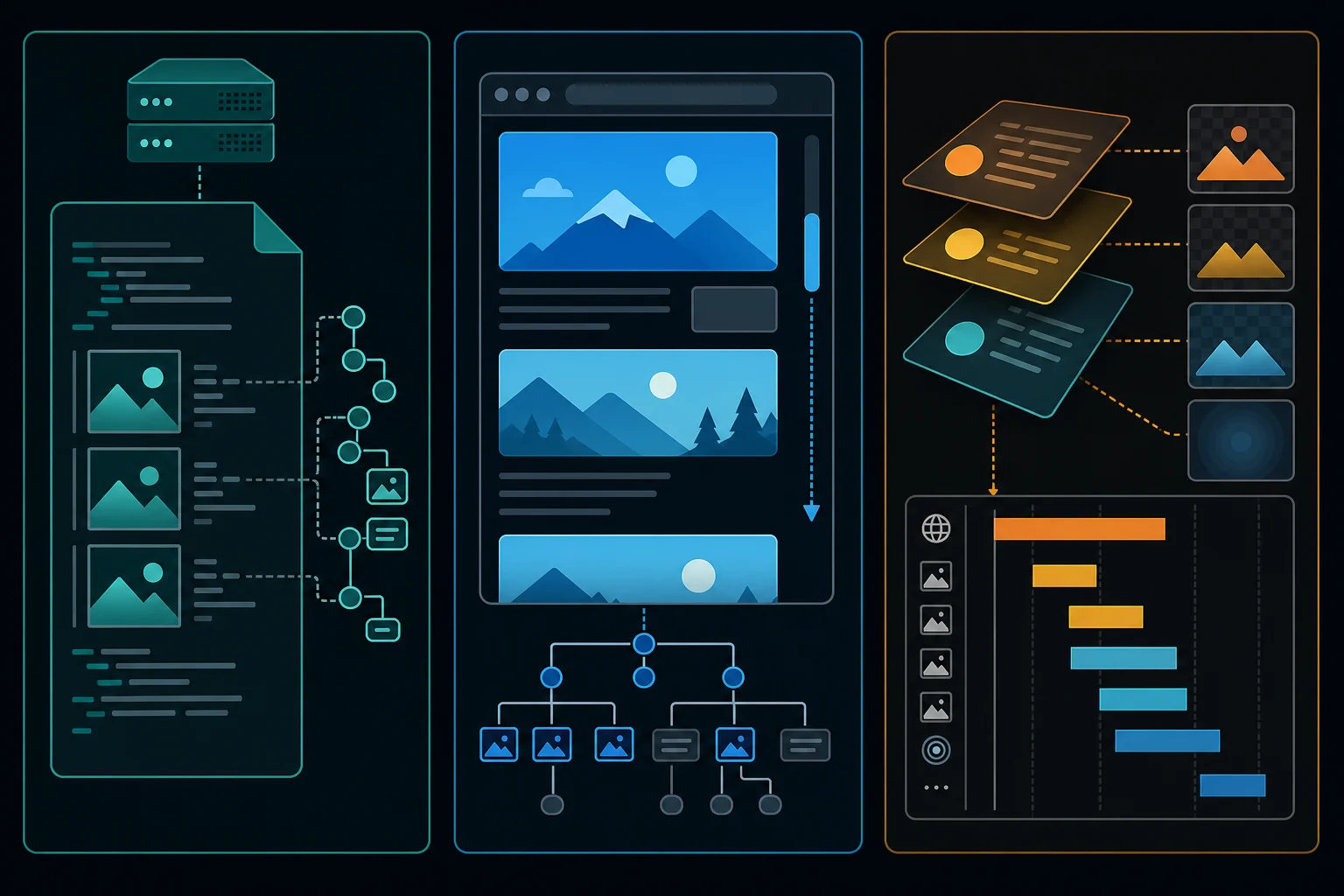
Use Playwright only after comparing the initial response with the rendered DOM. The browser can return the resource it selected for each <img>:
from playwright.sync_api import sync_playwright

with sync_playwright() as playwright:
    browser = playwright.chromium.launch()
    page = browser.new_page(viewport={"width": 1440, "height": 900})
    page.goto(PAGE_URL, wait_until="domcontentloaded", timeout=30_000)

    page.evaluate(
        """
        async () => {
          for (let step = 0; step < 12; step += 1) {
            window.scrollBy(0, Math.floor(window.innerHeight * 0.8));
            await new Promise(resolve => setTimeout(resolve, 150));
          }
        }
        """
    )

    rendered_urls = page.locator("img").evaluate_all(
        "images => images.map(image => image.currentSrc || image.src).filter(Boolean)"
    )
    browser.close()
The Playwright locator API documents that evaluate_all() runs against all matching elements in the page. Keep one browser page and its subrequests on one network identity; changing routes during the load can break cookies, CDN signatures, or regional consistency. The existing Playwright proxy guide covers context-level proxy setup and session isolation.
Find CSS backgrounds and API-supplied images
document.select("img") will never find a hero loaded through background-image. For a known site, inspect the relevant computed styles or parse the specific stylesheets you are authorized to retrieve. Avoid treating every url(...) token as an image: CSS also references fonts, masks, cursors, and data URIs.
Application galleries may arrive in JSON after the page loads. Check browser developer tools for an authorized, documented endpoint before scraping the rendered presentation. If no stable API exists, capture network responses by media type and approved hostname, then apply the same size, redirect, and validation rules as the HTTP downloader.
Keep provenance. A useful manifest associates each saved file with:
- The page where it was discovered.
- The exact source URL and any
srcsetdescriptor. - Whether it came from server HTML, rendered DOM, CSS, metadata, or JSON.
- The retrieval time, status, media type, byte count, dimensions, and checksum.
- The collector version and permission or license record relevant to the job.
That information is more valuable than a directory of files named image-1.jpg when a source changes or an asset must be removed later.
Why an image scraper finds zero or bad files
| Symptom | Likely cause | What to inspect |
|---|---|---|
Zero <img> results |
Images are rendered by JavaScript or implemented in CSS | Compare response HTML, rendered DOM, and network requests |
| Only a tiny placeholder | Real URL is in srcset or a lazy-load data-* attribute |
Inspect the element before and after scrolling |
| Duplicate downloads | Responsive sizes, formats, or query variations | Store descriptors; dedupe URLs and decoded content separately |
| Saved file contains HTML | Login, denial, challenge, or error page returned with 200 | Check page classification, media type, and first bytes |
| 403 on image but not page | Asset requires a permitted session, referer context, or signed URL | Reuse the lawful session and verify URL expiration |
| 429 responses | Request concurrency or retry rate is too high | Honor Retry-After, reduce workers, cache, and back off |
| Broken relative URLs | Candidates were joined to the requested URL, not the final URL | Resolve against response.url after allowed redirects |
| Missing CSS images | Parser only examines image elements | Inspect approved stylesheets or media network responses |
If image requests need a different Accept value from the page request, configure that deliberately while keeping session state consistent. The web scraping headers guide explains why a small, accurate request profile is safer than copying an entire browser header dump.
When proxies help image collection
Proxies are not required for scraping images from website pages. Start with direct, low-volume requests when the source permits them. Adding a proxy does not grant permission, fix a missing selector, renew an expired signed URL, or justify retrying a denial.
A proxy can be relevant when a legitimate project must observe public images that genuinely vary by region, or when approved distributed workers need controlled outbound routes. Image bodies consume far more bandwidth than HTML, so measure bytes per accepted asset before choosing a bandwidth-priced route.
Use one stable session for a page and the image URLs that depend on its cookies or location. Rotate only between independent jobs when the workflow permits it. The rule of thumb is short. Use ISP proxies when one stable, dedicated IP should repeat the same fetches. Use residential proxies when independent requests need many IPs or regional variation. The best proxy for web scraping guide compares residential, ISP, and datacenter options, while the Python proxy requests guide shows how to configure a Requests session without embedding credentials in code.
Before scaling, cache by URL and validator, cap concurrency per host, add jitter, honor Retry-After, and stop repeated 403 responses. Proxies should solve a defined routing or localization requirement, not hide inefficient collection.
FAQ
How do I scrape all images from a website?
Define "all" first: one page, a permitted crawl scope, every responsive rendition, or one visual per asset. Crawl only approved pages, extract standard and site-specific sources, normalize and deduplicate URLs, then download through a host allowlist with rate and size limits. A whole-domain crawl also needs loop prevention, canonical URL handling, and a persisted queue.
Can Beautiful Soup download images?
Beautiful Soup parses HTML and extracts image references; it does not download the binary files. Use an HTTP client such as Requests for both the page response and each allowed image response.
How do I get the highest-resolution image from srcset?
Parse each candidate's width (w) or density (x) descriptor and choose according to a documented maximum. "Largest" is not always best: it can waste bandwidth, and art-directed <picture> sources may have different crops or formats rather than simple resolutions.
Why does requests.get() miss images visible in a browser?
Requests receives the server response but does not execute JavaScript. First check srcset, lazy-load attributes, JSON state, and stylesheets in the response. If JavaScript truly creates the required URLs, use a browser within the site's allowed access rules and read currentSrc after the relevant content renders.
Is scraping website images legal?
It depends on authorization, terms, copyright, database rights, privacy, jurisdiction, and intended reuse. Publicly viewable does not mean free to copy or republish. Prefer owned, licensed, public-domain, or explicitly permitted sources, retain provenance, and get legal advice for the specific project when needed.
How do I check that a downloaded image is valid?
Check the Content-Type before saving, then open the saved file with Pillow and call verify(). A file that fails, or that Pillow cannot identify, is not an image. This catches HTML error pages that a server sent with a 200 status and a .jpg URL.
Should I send the same headers for HTML and images?
Reuse the same lawful session when cookies or locale matter, but request media types the client actually accepts. Let Requests manage transport headers. Do not invent navigation context or copy sensitive browser cookies into logs.
Final thoughts
Find the right URLs before you download anything. Start with the initial HTML, read srcset and lazy-load attributes, and move to the rendered DOM or network responses only when the HTML comes up empty. Restrict hosts, stream with a byte limit, verify each file, and keep a manifest of where every image came from. Add a proxy only after direct requests show a routing or regional problem.