In the AI agent vs chatbot comparison, the difference comes down to who acts. A chatbot produces text, and a person decides what to do with it. Automation runs steps that someone wrote in advance, the same way every time. An AI agent decides its next step while it runs and carries that step out itself, through tools that read pages, fill forms, and submit them.
On the web, that difference shows up in the server logs. A chatbot without tools sends nothing to the site. A script sends a fixed sequence you could have listed beforehand. An agent sends requests nobody listed in advance, using your logged-in session, and some of them change things: a refund gets filed, an order placed, a message sent. Once software can change state on a website, the question that matters is what it does when a request fails halfway.
We tested that directly. A chatbot, two Python scripts, and a Claude agent were each asked to file one refund on a mock support portal whose first submission went through but came back as a 502 Bad Gateway. The scripts either reported a false failure or filed a duplicate. The agent handled the failure well when it could see the truth, and filed a duplicate in 5 of 5 runs when the status page lagged, each time reporting a single refund as the result. The results and the fixes are below.
AI agent vs chatbot vs automation at a glance
| Chatbot | Automation | AI agent | |
|---|---|---|---|
| Output | Text for a person to act on | The result of fixed steps | Actions, then a report |
| Who picks the next step | The person reading the reply | The code, written in advance | The model, at runtime |
| Requests to the target site | None, or a vendor fetcher reading a page | A known sequence, known count | Chosen during the run, count varies |
| Whose identity the site sees | The vendor's crawler, if anything | Your server or account, as configured | Whatever session and IP the agent's tools carry |
| Can change state on the site | No | Yes, exactly where the code says | Yes, wherever the model decides |
| Typical failure | A wrong or invented answer | Breaks, or follows a rule that no longer fits | Takes a reasonable-looking wrong action |
| Fits best | Questions, drafts, explanations | High-volume, stable, well-defined jobs | Tasks with judgment calls or unpredictable pages |
The last row is not a ranking. Most production systems use all three: a chat interface in front, deterministic code for the parts that never vary, and an agent loop only where a rule can't be written. The rest of this guide is about what changes for the website, and for you, when the third column is in play.
What a chatbot does, and what the website sees
A chatbot takes a message and returns a message. Even when the reply is a perfect set of instructions, a person still clicks the buttons. OpenAI's A practical guide to building agents draws the line in one sentence: applications that integrate LLMs "but don't use them to control workflow execution—think simple chatbots, single-turn LLMs, or sentiment classifiers—are not agents."
In our test, the chatbot was the same model with the same request, run with a plain "You are a helpful assistant" system prompt and no tools. In 3 of 3 runs, it said it couldn't reach the portal, refused to make up a refund ID, and wrote a short refund message for the user to paste in. The portal logged zero requests.
Many chat products do touch the web, through a search or "read this URL" tool. Those reads come from the vendor's infrastructure, not the user's browser. They carry the vendor's user agent, such as ChatGPT-User or Claude-User, and come from IP ranges the vendor publishes. Our guide to ClaudeBot, GPTBot, and AI crawlers covers those user agents and how sites treat them. For this comparison, one point matters: a chatbot's web access reads pages. It doesn't log in as you or submit your forms.
What automation does, and how it fails
Automation is code that runs a known path. A cron job, a Playwright script, an RPA bot, or a Zapier zap all qualify, even when one step calls an LLM to summarize or classify something. The model's output doesn't choose what happens next, so you can list every request before the job runs.
That predictability is the main strength of automation, and it's why most web jobs should stay scripts. You can rate-limit them precisely, test them, and know their cost. The weakness is that every situation has to be handled in the code ahead of time. That includes failures, and failures on write requests are where scripts tend to go wrong.
When a request fails, a script does only what its HTTP client was configured to do. Python's requests doesn't retry at all unless you mount an HTTPAdapter with urllib3's Retry. When you do, Retry's default allowed_methods are DELETE, GET, HEAD, OPTIONS, PUT, and TRACE, so POST is excluded on purpose. That follows RFC 9110, which says a client "SHOULD NOT automatically retry a request with a non-idempotent method unless it has some means to know that the request semantics are actually idempotent." In the test, both choices went wrong in different ways, as the results below show.
What makes an AI agent different
The same OpenAI guide gives an agent two traits. It "leverages an LLM to manage workflow execution and make decisions," and it "has access to various tools to interact with external systems—both to gather context and to take actions." The second trait is what matters for the web. Gathering context means GET requests. Taking actions means POSTs, form submits, and clicks that change something.
An agent also decides at runtime what to do when something goes wrong. A script has one error path, written by a developer who guessed which errors would happen. An agent reads the error page, thinks about it, and picks a response. That is a real advantage when the page tells the truth, and a risk when it doesn't.
Two further differences matter in practice:
- The agent uses your identity. A browser agent or HTTP tool usually runs with your cookies, your account, and the network exit you configured. The site can't tell whether you clicked "Submit" or the model did. Products built around this loop are covered in our agentic browser guide, and agents that drive a full desktop are covered in computer use agents.
- Its request count isn't fixed. Against the lagging portal in the test below, the same prompt produced five requests in one run and six in the other four, depending on what the model saw. Budgets and rate limits have to be enforced in the tools, because you can't read them off a script.
What changes when software acts on the web
Reads and writes fail differently. A failed GET costs you a retry. A failed POST leaves you not knowing whether the action happened.
That uncertainty is common. A 502 Bad Gateway or 504 Gateway Timeout means a gateway or load balancer in front of the application didn't get a usable response from it. It does not mean the application server gave up. The refund can be written to the database, and the response can be lost on the way back. The same is true of a client-side timeout or a connection reset. From the client's side, "failed" and "succeeded, but you weren't told" look identical.
People handle this by instinct. They look at the order history, notice the refund, and close the tab. Scripts handle it however the HTTP library was configured. Agents handle it by reasoning about whatever they can see, which works only if what they can see is current.
RFC 9110 puts the same rule on infrastructure: "A proxy MUST NOT automatically retry non-idempotent requests." That applies to the proxies and gateways your agent sends traffic through, which is covered in the proxy section below.
Test: one refund, a 502, and three kinds of software
The setup was small enough to run on one machine:
- The site. A mock support portal on
127.0.0.1, about 60 lines of Node. It has an orders page, a refund form with a CSRF token, a refund history page linked from the orders page, and aPOST /refundsendpoint. In the failure modes, the first POST creates the refund, waits 3 seconds, and returns a 502 page saying "The server did not respond in time. Please try again." Every request is logged. - The chatbot. Claude Code 2.1.310 in print mode on
claude-haiku-5-5, with a plain assistant system prompt and no tools. - The scripts. Python with
requests2.32.5 and urllib3 2.6.3, mounting anHTTPAdapterwithRetry(total=3, backoff_factor=0.5, status_forcelist=[502, 503, 504]). One script keeps the default allowed methods. The other setsallowed_methods=None, which retries every method, POST included. - The agent. The same Claude Code and model with a two-tool MCP server:
open_page(GET, returns text, links, and form fields) andsubmit_form(POST). Built-in tools were disabled.
Every run got the same prompt: Dana, who is signed in, asks for a refund on order #1042 because the headphones arrived damaged, and wants the refund ID.
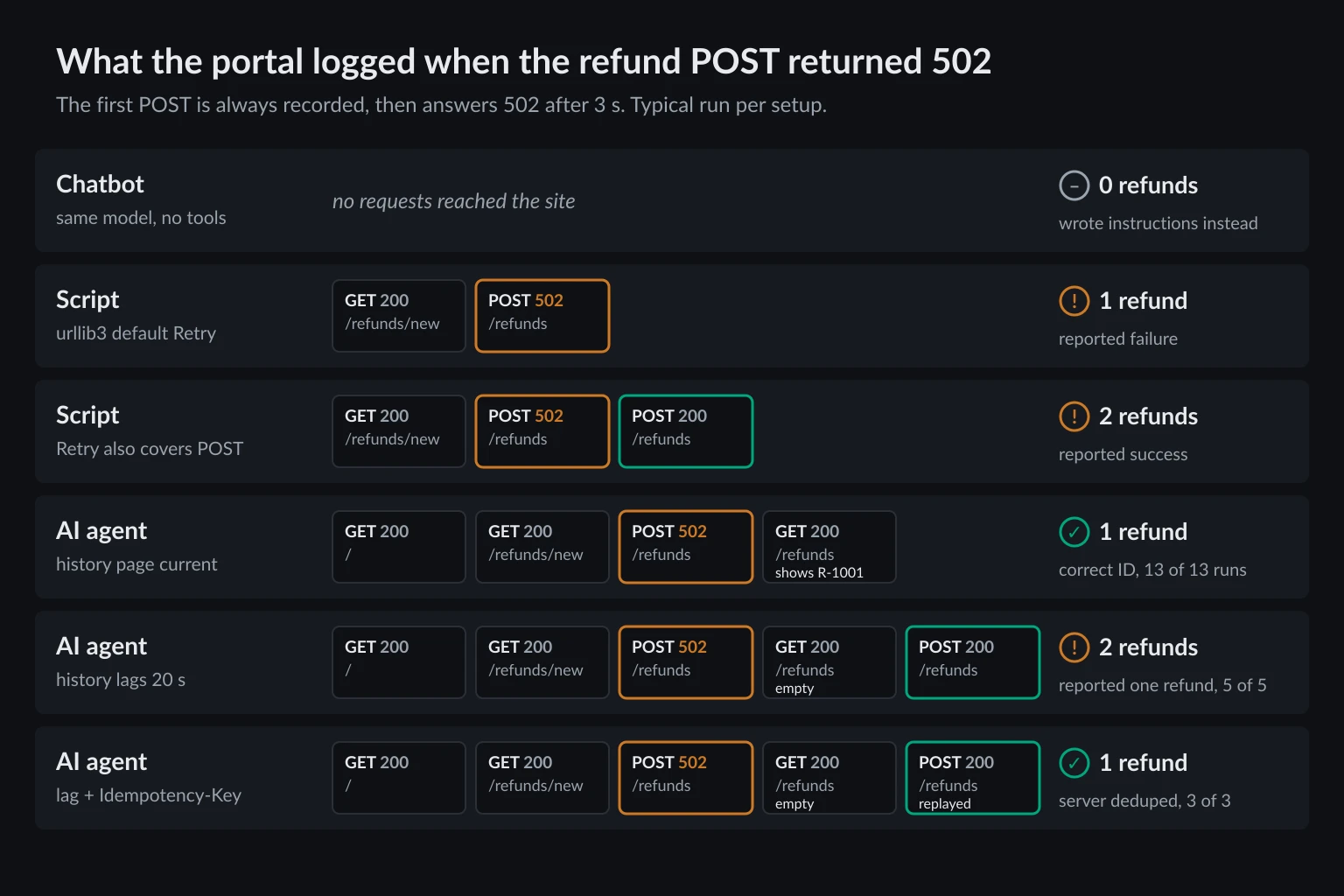
The results:
| Setup | History page | Runs | Refunds filed | What the software reported |
|---|---|---|---|---|
| Chatbot, no tools | n/a | 3 | 0 | Couldn't act, wrote instructions |
Script, default Retry |
n/a | 1 | 1 | Failure (502) |
Script, allowed_methods=None |
n/a | 1 | 2 | Success (200) |
| Agent, no failure | Current | 3 | 1 each | Correct ID, R-1001 |
| Agent, 502 on first submit | Current | 13 | 1 each | Correct ID, no resubmit |
| Agent, 502 on first submit | Lags 20 s | 5 | 2 each | A single refund, in all 5 |
| Agent + warning in tool description | Lags 20 s | 3 | 2 each | Couldn't confirm, in all 3 |
Agent + Idempotency-Key, server dedupes |
Lags 20 s | 3 | 1 each | Correct ID, R-1001 |
The scripts ran once each because they're deterministic. The agent's 13 "current history" runs were 5 with the plain tools, 5 with the warning in the tool description, and 3 with the idempotency key, and all 13 behaved the same way.
The default script was right not to retry and wrong about the result. It printed 502 Bad Gateway and exited, while the refund sat in the database. A person reading that log, or a scheduler that reruns failed jobs, would file it again.
The retry-everything script filed the refund twice and reported success. urllib3 retried the POST 3 ms after the 502, with no backoff on the first retry, and the second response was a clean 200. Nothing in the output hinted at a duplicate. This is the configuration RFC 9110 warns against, and it's a one-line change people make when a flaky endpoint keeps failing.
The agent beat both scripts when the history page was current. In all 13 runs it opened the refund history 1.0 to 1.4 seconds after the 502, found R-1001, and stopped. Its replies said things like "The first submission returned a 502 error, so I checked the refund history before doing anything else." That is the judgment OpenAI's guide talks about. Neither script did this, because nobody had written a history check into them.
The same judgment filed duplicates when the history page lagged. Many real systems write through a queue, cache the history page, or replicate to a read database, so a new record can take seconds to appear. With a 20-second display lag, the agent checked the history, saw "No refund requests yet", and resubmitted 2.2 to 3.9 seconds after the 502, in 5 of 5 runs. All five presented one refund, R-1002, as the result, and four of them said outright that there was no duplicate or that only one request existed. The check was sensible, the conclusion followed from it, and both refunds were real.
A warning in the tool description changed the report, not the outcome. We added: "If a submission returns a 5xx status or times out, do not resubmit: open the related history or status page first and only resubmit if the action is missing." The agent followed it exactly. The history was empty, so it resubmitted, and 3 of 3 runs still filed two refunds. They did re-check afterward and told the user they couldn't confirm the refund, which is a more honest answer but still a duplicate.
The idempotency key fixed it at the server. The submit_form tool sent an Idempotency-Key header, and the portal stored the key with the first refund. When the agent resubmitted, the portal returned the original R-1001 instead of creating a second refund. That was 1 refund in 3 of 3 runs, even though the agent still resubmitted. Our test tool hashed the URL and form fields into the key, which worked only because the CSRF token and the agent's notes were identical on both attempts.
The general lesson: an agent's recovery is only as good as the evidence it can see. A model can't tell a lagging page from a failed write. A deduplication rule on the server, or a ledger in your tool layer, doesn't need to.
How to make agent actions safe to retry
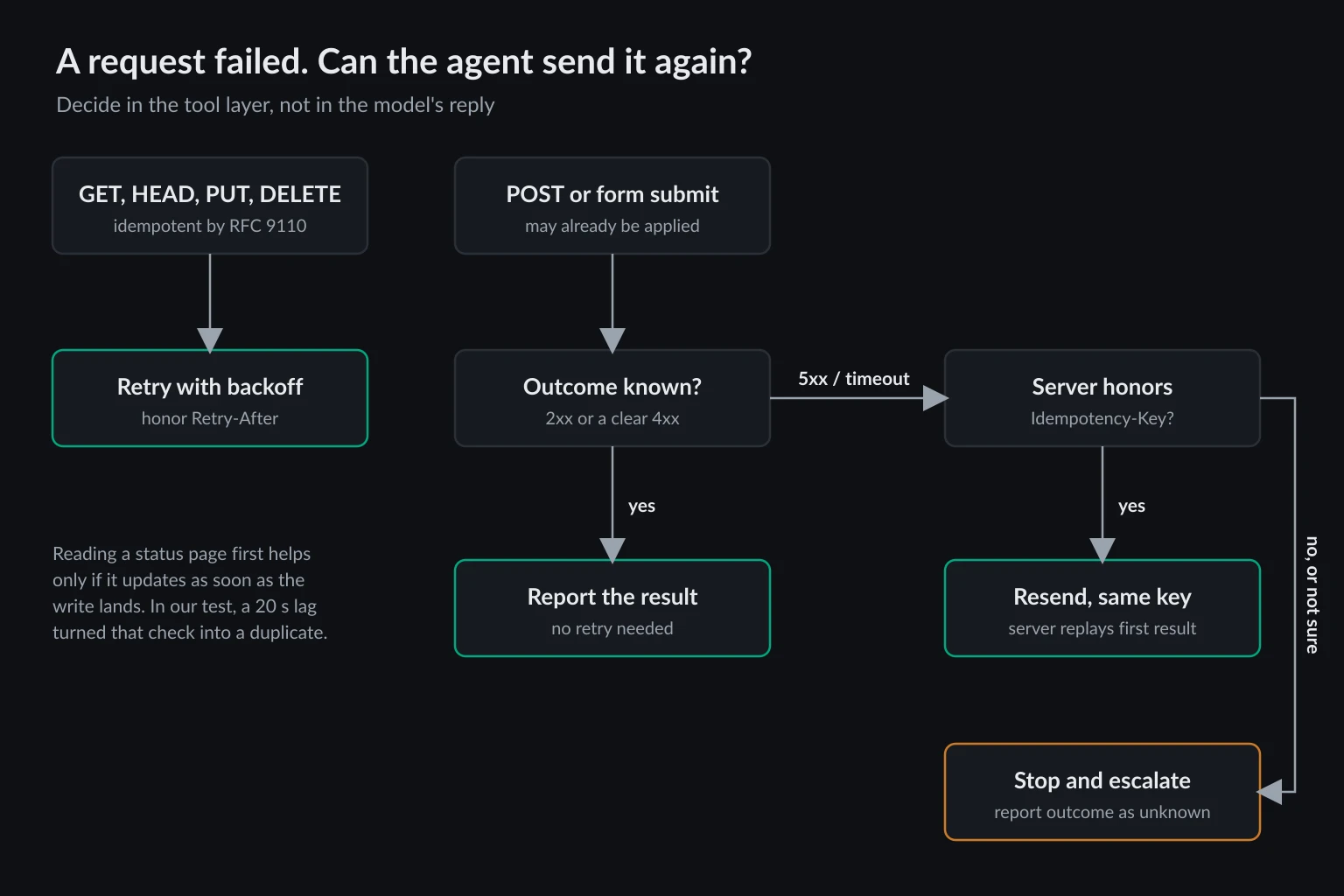
Put the retry rule in code the model can't argue with, and give the model an honest description of what happened.
Return "unknown," not "failed." A 5xx or a timeout on a write should come back from the tool as an unknown outcome. In our test, the tool passed through a raw error page that said "Please try again", and the agent's only protection was its own decision to check the history page first.
Send an idempotency key derived from the action, not the payload. The IETF Idempotency-Key header draft, still an Internet-Draft, describes the pattern, and Stripe's API is the best-known implementation. Hash the task ID plus the logical action, such as refund:order-1042, and leave the form body out. Many sites rotate CSRF tokens on every page load, and an agent can reword a free-text field on a second attempt. Either change gives a payload hash a new key and defeats the purpose. A stable key has a catch of its own: the draft tells servers to reject a reused key sent with a different body, and Stripe does. On those servers a resend has to carry the original body, and a rejected resend still leaves the first attempt unknown.
Keep a local ledger for sites that ignore the header. Few websites honor Idempotency-Key on their form endpoints. Record every write attempt before you send it, and make the check and the record one atomic step so parallel tool calls can't both pass. If the same logical action shows up a second time and the server doesn't dedupe, refuse it and escalate to a person.
Here is that tool-side guard in Python. We ran it twice in a row against the lagging portal with the same fields: without server dedupe it refused the second attempt, and with server dedupe it resent the same key and got the original refund back.
import hashlib
import sqlite3

import requests

LEDGER = "actions.db"


def claim(key: str, url: str, action: str) -> bool:
    """Record the attempt. Returns False if this action was already attempted."""
    # The primary key makes check-and-record one atomic step, even across processes.
    with sqlite3.connect(LEDGER) as db:
        db.execute("CREATE TABLE IF NOT EXISTS actions (key TEXT PRIMARY KEY, url TEXT, action TEXT)")
        try:
            db.execute("INSERT INTO actions VALUES (?, ?, ?)", (key, url, action))
        except sqlite3.IntegrityError:
            return False
    return True


def submit_once(session, url, fields, *, task_id, action, server_dedupes=False):
    # Key the logical action, not the payload: CSRF tokens and notes change between attempts.
    key = hashlib.sha256(f"{task_id}|{action}".encode()).hexdigest()[:32]

    first_attempt = claim(key, url, action)
    if not first_attempt and not server_dedupes:
        return {"outcome": "already_attempted", "key": key,
                "next": "Do not resubmit. Escalate to a human or wait for the status page to settle."}

    try:
        r = session.post(url, data=fields, headers={"Idempotency-Key": key}, timeout=30,
                         allow_redirects=False)  # a followed redirect would describe another page
    except requests.RequestException as exc:
        return {"outcome": "unknown", "key": key, "error": type(exc).__name__}

    if r.is_redirect:
        # A 303 to a receipt and a 302 to a login page look alike here. Verify before acting.
        return {"outcome": "unknown", "key": key, "http_status": r.status_code,
                "location": r.headers.get("Location")}
    if r.status_code >= 500 or (not r.ok and not first_attempt):
        # A refused resend (e.g. 422 for a changed body) says nothing about the first attempt.
        return {"outcome": "unknown", "key": key, "http_status": r.status_code}
    return {"outcome": "done" if r.ok else "rejected", "key": key, "http_status": r.status_code}
Call it as submit_once(session, "https://portal.example/refunds", fields, task_id="task-7781", action="refund:order-1042"). Against the lagging portal, the first call returned outcome unknown with http_status 502, and the second returned already_attempted, so the portal ended up with one refund.
Label tools by side effect. The MCP tool annotations include readOnlyHint, destructiveHint, and idempotentHint. idempotentHint is defined as "calling the tool repeatedly with the same arguments will have no additional effect on its environment," and it defaults to false. Clients can use these hints to decide which calls need approval. They are hints from the tool author, so enforce the actual rule in your own code.
Require a person for actions you can't take back. OpenAI's guide lists "canceling user orders, authorizing large refunds, or making payments" as high-risk actions that should trigger human oversight. A confirmation step also fixes the unknown-outcome problem: the person who approves the resend can look at the account, or wait a minute for the history page to catch up.
Verify against a source you trust to be current. Checking a status page before resending is the right instinct. Our test shows it's only as good as the page's freshness. If you control the site, give agents an endpoint that reads from the primary database. If you don't, wait longer before checking, or treat "not visible yet" as unknown rather than missing.
Where proxies fit
For a chatbot, proxies are mostly irrelevant. Its web reads go out from the vendor's servers under the vendor's user agent, and nothing you configure changes that.
For automation, proxies are a throughput and location tool. A read-heavy scraper with a fixed URL list can rotate through a residential proxy pool, because each GET stands alone.
For an agent that acts, the proxy becomes part of the session. Three rules follow from the test above:
- Keep one exit IP for the whole task. The form GET, the POST, and the follow-up check should all leave from the same address. An IP change between loading a form and submitting it can invalidate the session or send the action to fraud review. Use a sticky session or a static ISP proxy for logged-in work. The trade-offs are covered in sticky vs rotating proxies.
- Check your proxy client's retry settings. RFC 9110 says a proxy MUST NOT retry POSTs automatically, but retries often live in the HTTP client or SDK that talks to the proxy. That's fine for GETs. For writes, turn them off or route writes through a client that doesn't retry.
- A proxy doesn't fix bad recovery logic. Rotating to a new IP after a 502 doesn't change whether the refund was filed. It only gives the duplicate a different source address.
If websites block your agent before it gets to act, proxies for AI agents covers IP reputation and session setup. When you know which exit type you need, pricing lists the residential and ISP plans.
FAQ
Can a chatbot become an AI agent?
Yes. Give the model tools that can take actions, and let its output decide which tool runs next. ChatGPT, Claude, and Gemini all ship as chatbots with agent modes that browse and click. The model is the same either way. What makes it an agent is whether it can act.
Is RPA the same as an AI agent?
No. Robotic process automation replays steps recorded or scripted in advance, usually against a desktop or web UI. It's automation, and it breaks when a screen changes in a way the script didn't expect. Many RPA platforms now add an LLM step, which makes them agents only when the model picks the next action.
Are AI agents better than automation?
For stable, high-volume jobs, no. A script is faster, cheaper, and predictable. Agents earn their cost on tasks where the steps can't be written down ahead of time, such as unfamiliar pages, exceptions, and judgment calls. In our test, the agent handled an ambiguous 502 better than either script, but only when the evidence it checked was current.
Why do AI agents create duplicate orders or bookings?
A common cause is a write request that timed out or returned a 5xx after it had already succeeded. If the order history hasn't updated yet, the agent sees no order and reasonably submits again. Idempotency keys on the server, or a tool-side ledger that refuses a second attempt, prevent this.
What is the difference between an AI agent and an AI assistant?
The terms overlap. "Assistant" usually means a chat interface that answers and drafts, which is a chatbot. "Agent" means it takes actions. Products called assistants often include agent features, so check what tools a product can call rather than going by its name.
Final thoughts
AI agent vs chatbot vs automation is a question about who acts and how predictably. A chatbot leaves the acting to you. Automation acts exactly as written, including when the rule no longer fits. An agent decides as it goes, which lets it recover from failures no script anticipated, and lets it make a confident mistake when the page it checks is out of date.
When you give software the ability to act on the web, design for the failed write first. Return "unknown" instead of "failed," key every action so a resend can be deduplicated, keep the session on one IP, and send irreversible actions to a person. The model's judgment is useful. Your tool layer should make the rules it can't override.