An AI research agent is a language model running a loop: it breaks a question into searches, opens the most promising results, pulls out the facts, and writes a report with citations. ChatGPT deep research, Gemini Deep Research, Claude's Research mode, and Perplexity are hosted versions. You can build your own on Claude Code, the Claude Agent SDK, LangGraph, or a plain script that calls a model and a search API.
The weak step is reading. We ran 12 research tasks with Claude Code and logged every request. With a plain "cite your sources" prompt, the agent opened 1 page across 6 reports, and 38 of its 39 citations pointed at pages it never opened. When we told it to read before citing, it made 32 fetches. Only 15 of them returned usable text, and only 2 of the 17 that didn't came back flagged as errors.
This guide covers how a deep research workflow runs, where its fetches fail and why the failures are easy to miss, and a small fetch tool that makes them visible. If you're choosing a search layer, see Tavily vs Exa vs Serper. This post is about what happens after the search.
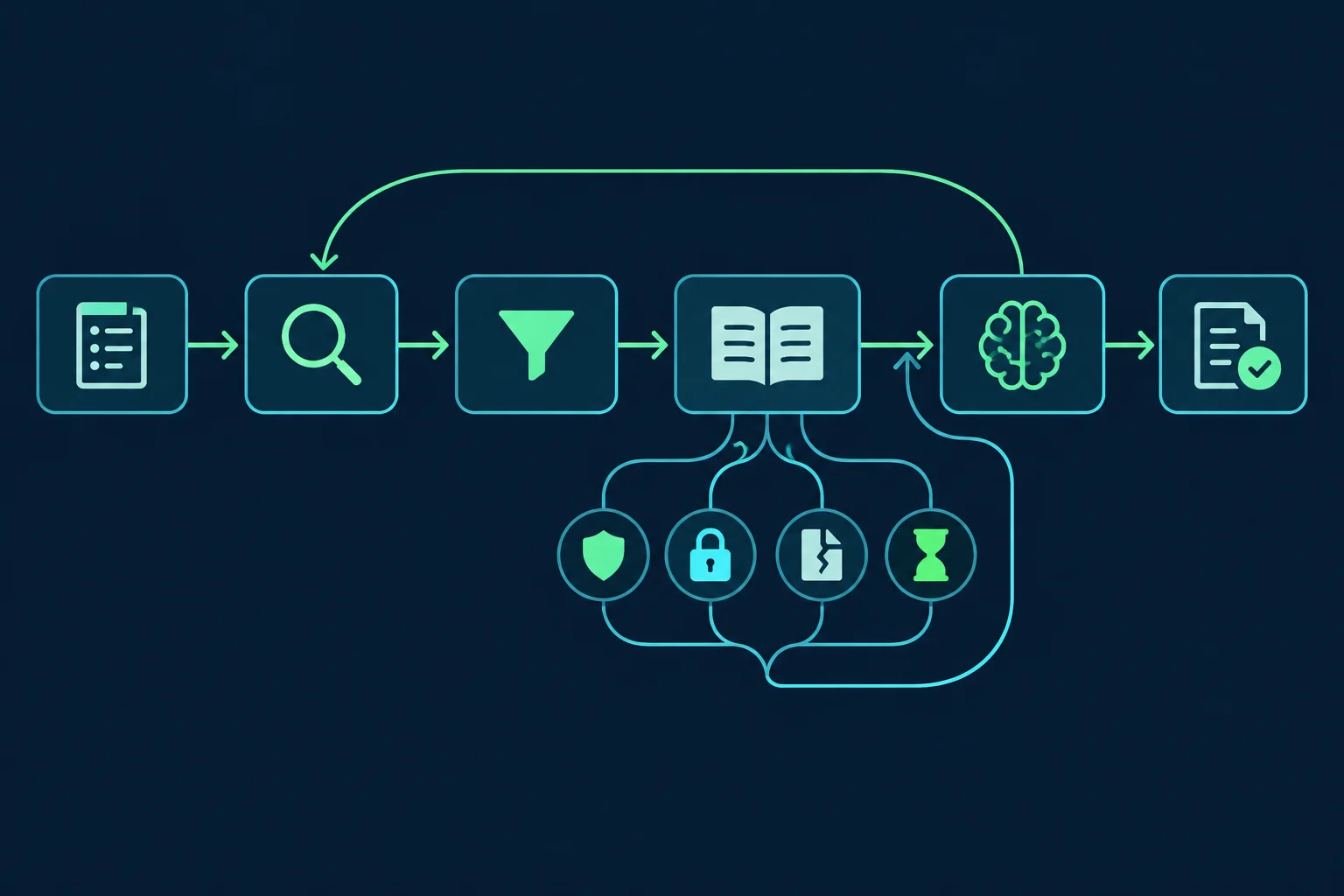
How an AI research agent works
Most deep research systems run the same six steps, whatever the vendor:
- Plan. The model splits the question into sub-questions and search queries. "Four-day work week productivity" becomes queries for trial results, the main paper, and critiques.
- Search. A search tool returns titles, URLs, and usually a short summary for each result. Anthropic's WebSearch, Tavily, Exa, Brave, and Serper all do this.
- Triage. The model picks which results to open. This is where it decides whether a snippet is enough.
- Fetch and read. A fetch tool downloads each page, converts it to text, and often runs a second, cheaper model over it to extract only what was asked.
- Synthesize. The agent merges what it read, notes conflicts, and often runs more searches to fill gaps.
- Cite. The report links each claim to a source URL.
Hosted products loop through steps 2–5 many times and may split the work across parallel sub-agents. Anthropic's write-up of its multi-agent research system describes a lead agent that sends sub-agents to search in parallel and a separate pass that attaches citations at the end. The steps stay the same, and so does the gap between step 3 and step 6: nothing in the loop checks that a cited page was actually read.
Hosted deep research vs a research agent you build
The workflow is the same in both cases. What differs is who runs the fetches and which IP the sites see.
| Setup | Who fetches pages | IP the site sees | What you control |
|---|---|---|---|
| Gemini Deep Research, ChatGPT deep research, Claude Research, Perplexity | The vendor | The vendor's own IP ranges | The prompt and the sources you upload |
| Claude Code or the Claude Agent SDK with WebFetch | Your machine | Your server's IP | Tools, prompts, timeouts, proxy |
| LangGraph, CrewAI, or your own loop with a search API | Your fetch code | Your server's IP, or a proxy | Everything, including how failures are reported |
The hosted products are the right call when you need a report and don't need to control the sources. Build your own when the agent has to read sources a hosted product can't reach, run on a schedule, feed another system, or meet an audit requirement about what was actually read. Once you build it, its fetch failures are yours to handle. AI agent examples shows how research traffic compares with other agent jobs: many domains, one to three requests each.
Claude Code's WebFetch runs on the machine running the agent and sends Claude-User (claude-code/2.1.310; +https://support.anthropic.com/) as its user agent. Our ClaudeBot and GPTBot guide explains why that request fails Anthropic's IP verification when it comes from your own server.
What our deep research test found
We ran Claude Code 2.1.310 with claude-sonnet-5-5, limited to the WebSearch and WebFetch tools, on a Hetzner server in Nuremberg. All traffic went through a local logging proxy, so every page fetch showed up as a connection. We used six research questions with very different source types:
- Four-day work weeks and productivity (studies and news)
- EU AI Act obligations for general-purpose AI models (EU pages and legal analysis)
- LFP vs NMC EV battery degradation (fleet data and papers)
- PgBouncer pooling settings (documentation)
- Microplastics in drinking water (WHO, PubMed, news)
- US home prices and mortgage rates, 2024 to 2026 (industry releases and news)
Each question ran twice. Prompt A asked for "a short report (about 300 words) with sources cited as URLs." Prompt B added one sentence: "Read the source pages with WebFetch before citing them; don't rely on search snippets alone."
| Prompt A (cite sources) | Prompt B (read before citing) | |
|---|---|---|
| Searches per run | 1–3 | 0–3 |
| Page fetches, all 6 runs | 1 | 32 |
| Fetches that returned usable text | 1 | 15 |
| Cited URLs | 39 | 22 |
| Cited URLs never successfully read | 38 | 8 |
| Wall time per run | 14–20 s | 20–152 s |
| Cost per run | $0.047–0.092 | $0.035–0.114 |
With prompt A, five of the six reports were written entirely from search-result summaries. The sixth fetched one page, the PgBouncer config docs. Four of the reports said so plainly, for example: "The search tool returned summaries, and I didn't open the underlying pages to verify them." The AI Act report only said it hadn't read the Official Journal text, and the microplastics report didn't mention it at all. The links looked like normal citations either way.
With prompt B, the agent was honest about what it couldn't read. All 8 citations without a successful read were labeled in the text as unverified, "candidate sources (not read)", or "couldn't open". The microplastics run got usable text from none of its 8 fetches, and it listed all four of its sources as unverified candidates. That's the right behavior. But a pipeline that extracts the links from the reports still gets 8 URLs that nothing read. The mortgage-rate report quoted 2026 rate figures next to a Freddie Mac link that had returned a 403 and a Nasdaq link that had timed out.
Failed fetches cost time as well as accuracy. The six read-first runs took 315 seconds together, and 120 of those were two 60-second timeouts on one site in the mortgage-rate run.
Where research agent fetches fail
Here is what the 32 read-first fetches actually returned.
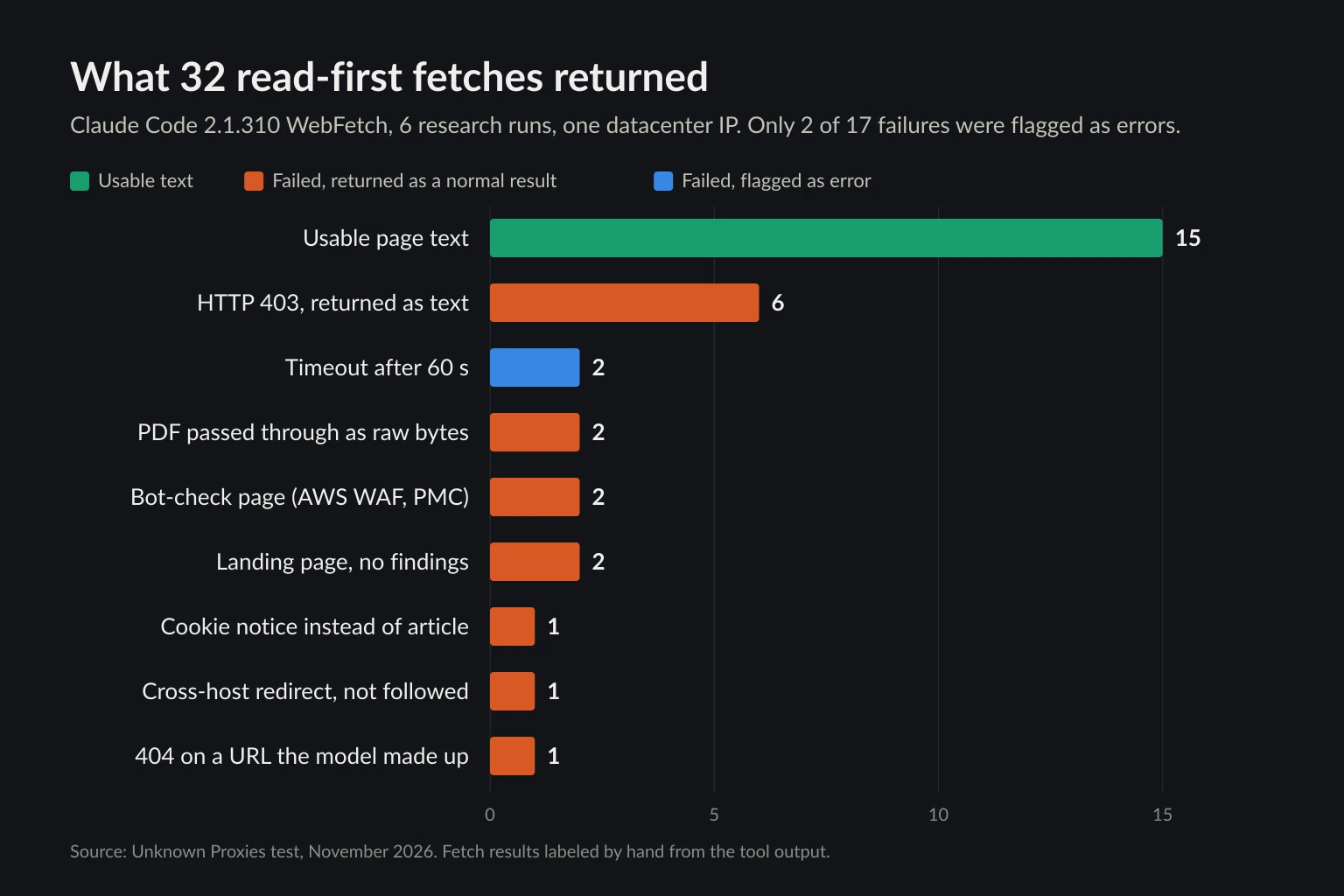
| Outcome | Fetches | Flagged as an error? |
|---|---|---|
| Usable page text | 15 | — |
| HTTP 403, returned as text | 6 | No |
| Timeout after 60 s | 2 | Yes |
| PDF passed through as raw bytes | 2 | No |
| Bot-check page (AWS WAF, PMC verification) | 2 | No |
| Landing page with no findings | 2 | No |
| Cookie notice instead of the article (PubMed) | 1 | No |
| Redirect to another host, not followed | 1 | No |
| 404 on a URL the model made up | 1 | No |
Only the two timeouts came back with is_error: true. Everything else arrived as an ordinary tool result, usually a short sentence written by WebFetch's extraction model, and the agent had to read that sentence to work out that the fetch had failed. Each row has a different cause and a different fix.
Blocks that come back as text
A 403 reached the agent as "The server returned HTTP 403 Forbidden. The response body was not retrieved." Sonnet understood it every time. A smaller model or a framework that only checks for exceptions may not. The six 403s came from Freddie Mac's investor-relations site, Barchart, two Cloudflare-protected news sites, and an association of state drinking-water regulators. None of those pages was readable from our datacenter IP under any user agent we tried (more on that below).
Bot checks that look like a successful fetch
The worst case was technologynetworks.com. Its AWS WAF answered with HTTP 202, an empty body, and x-amzn-waf-action: challenge. AWS documents this as the challenge action's response: a 202 for a client that hasn't solved the JavaScript challenge. A 202 Accepted is a success code, so WebFetch passed the empty page to its extraction model. The model replied that the page "contains only a title" and quoted the agent's own extraction prompt back as that title. A model skimming that reply could easily conclude the article was just short.
PMC returned a "checking your browser" page, and PubMed returned a notice that cookies must be enabled. In both cases the extraction model correctly said the page had no review in it, but the tool still reported a success.
PDFs
Papers, regulator reports, and investor releases are often PDFs, and they're usually the primary sources a research report should rest on. Claude Code 2.1.310's WebFetch passed both PDFs in our runs to its extraction model as raw bytes. The model saw "compressed streams (FlateDecode)" and font tables, not text. A direct test on the arXiv PDF of "Attention Is All You Need" gave the same result. WebFetch does save the binary to a local file, so an agent that also has the Read tool can open it. Our research agent only had WebSearch and WebFetch, so it couldn't. With pypdf, all four PDFs the servers actually returned, including both that failed in the agent runs, gave between 25,000 and 116,000 characters of clean text.
Redirects across hosts
Nature article URLs answer with a 303 to idp.nature.com, which sets a cookie and redirects back. Browsers and httpx follow it and get the full article: 16,506 characters of text in our test. Claude Code's WebFetch documentation says that when a URL redirects to a different host, it returns a notice with the target instead of following it. The agent saw a redirect to a login page and gave up on the Nature paper. In the URL survey below, 11 of the 264 URLs redirected through a different host, including Yahoo News to consent.yahoo.com.
Timeouts that stall the run
Both nasdaq.com fetches hung for 60 seconds and failed with "timeout of 60000ms exceeded". With curl, the same URL and the Claude-User user agent hung over HTTP/1.1 until our 30-second limit. A Chrome user agent got a 200 in 1.3 seconds, and curl's default user agent hung too. Depending on the client, the site's Akamai edge either refused the request at once or held the connection open until the client gave up. The agent's run sat idle for two minutes. A 15-second read timeout would have cost 30 seconds.
Dead and invented URLs
The WHO 404 wasn't in any search result. The model built the URL from memory, and it was wrong. The search index has dead links too: 14 of the 258 search-result URLs we surveyed answered 404 or 410, six of them on a single site. Treat any URL the model typed itself as a guess until it returns a 200.
How often research sources can't be read
The agent runs only fetched 33 pages. To get a broader rate, we pooled 264 URLs on 181 sites from the search results and agent fetches across all runs, plus one pilot run, and fetched each one from the same Hetzner IP with three user agents: Chrome 155, Claude-User, and a descriptive bot string (acme-research-agent/1.0). The same classifier, the script in the next section, judged every response.
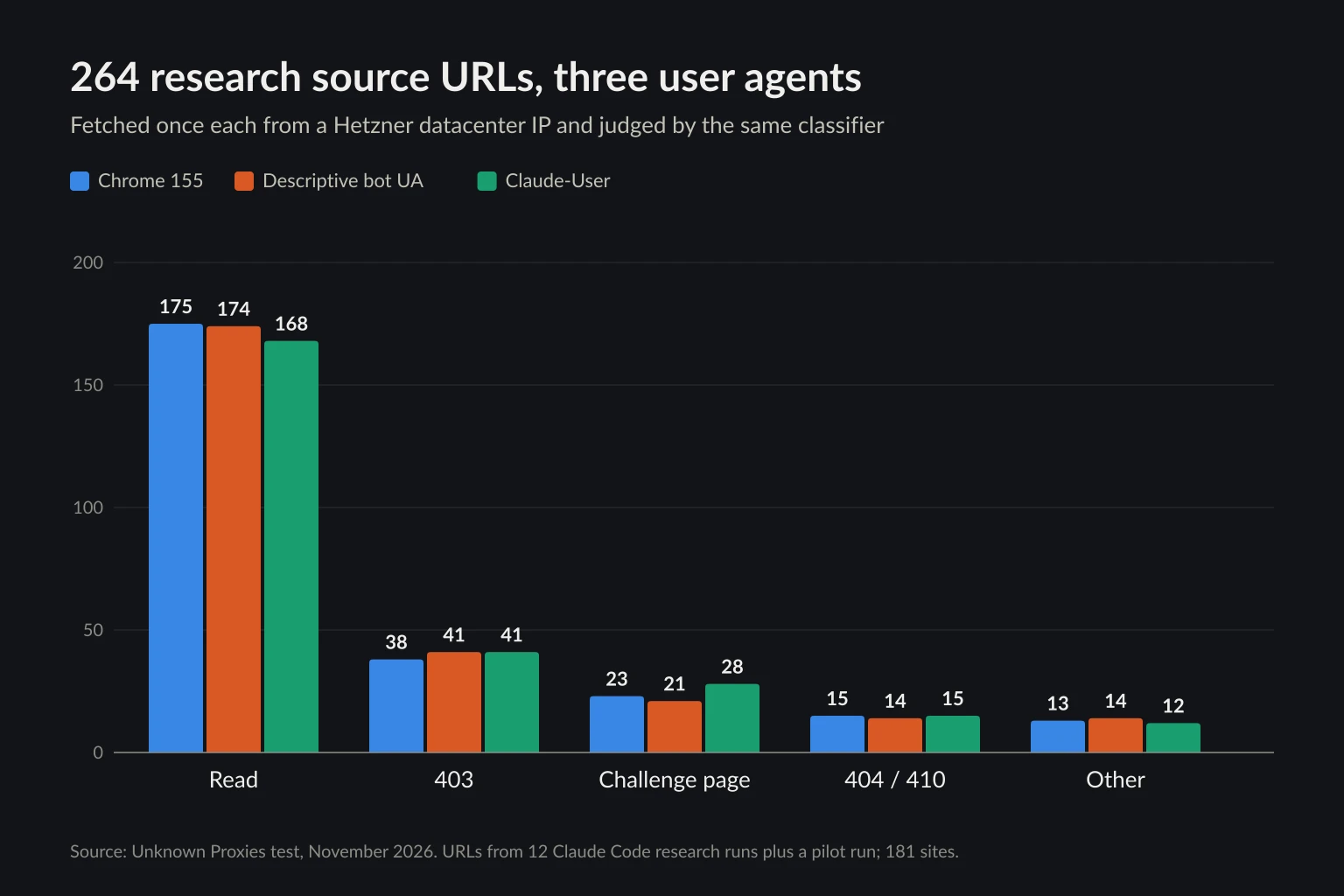
| User agent | Read | 403 | Challenge page | 404/410 | Other |
|---|---|---|---|---|---|
| Chrome 155 | 175 (66%) | 38 | 23 | 15 | 13 |
| Descriptive bot UA | 174 (66%) | 41 | 21 | 14 | 14 |
| Claude-User | 168 (64%) | 41 | 28 | 15 | 12 |
"Other" is mostly pages under 600 characters of text, connection errors, and a few 400 and 503 responses.
Three things stand out:
- The user agent barely changed the result. 59 URLs were blocked under all three, so for most blocked sites the deciding factor was the datacenter IP or the HTTP client, not the name in the header. 25 of those were Freddie Mac release pages and PDFs, which returned 403 to every request. Leaving Freddie Mac out, 15–18% of URLs got a 403 or a challenge page, depending on the user agent.
- Some sites block AI agents by name. Nine URLs refused Claude-User and let both Chrome and the unknown bot string through. Eight of them are behind Cloudflare and returned its challenge (
cf-mitigated: challenge) only to the Claude-User string. Those sites chose to turn away AI fetchers, and the honest response is to skip them. - Some sites serve Markdown. Pages on nine sites answered
Accept: text/markdownwith Markdown instead of HTML. Eight of the nine are on Cloudflare, and six sent the defaultContent-Signal: ai-train=yes, search=yes, ai-input=yesheader that Cloudflare's Markdown for Agents adds. The 11 Markdown responses we could compare were 2.4 to 37 times smaller than the HTML. Our llms.txt guide measured the same effect on documentation sites.
Per site, 132 of the 181 sites gave us at least one readable page under the descriptive user agent, and 33 answered every URL we tried with a 403, a challenge page, a 429, or a timeout. If you run a research agent from a cloud server, plan on about a quarter of the sources it finds being blocked from there, and a third being unreadable for one reason or another.
Make fetch failures visible to the agent
The fix doesn't need a new framework. Give the agent a fetch tool that returns a plain verdict, read: true or read: false with a reason, and keep a ledger of what was read. Then check the report's citations against that ledger before you accept it.
This version uses httpx 0.28.1, trafilatura 2.3.1, and pypdf 7.0.1 on Python 3.12. It's the script that classified the 264 URLs above.
# research_fetch.py: fetch sources for a research agent and record whether each one was actually read.
import io
import json
import os
import re
import sys
from urllib.parse import urldefrag

import httpx
import trafilatura
from pypdf import PdfReader

HEADERS = {
    # Identify your agent honestly and give site owners a way to reach you.
    "User-Agent": "acme-research-agent/1.0 (+https://acme.example/bot)",
    "Accept": "text/markdown, text/html;q=0.9, application/pdf;q=0.8, */*;q=0.1",
}
CHALLENGE_MARKERS = ("Just a moment...", "_cf_chl", "cf-turnstile", "captcha-delivery", "px-captcha")
MIN_CHARS = 600  # less than this is a JS shell, a landing page, or a wall, not a source


def fetch_source(client: httpx.Client, url: str) -> dict:
    out = {"url": url, "read": False}
    try:
        r = client.get(url)
    except httpx.TimeoutException:
        return out | {"reason": "timeout"}
    except httpx.HTTPError as e:
        return out | {"reason": f"network error: {type(e).__name__}"}

    ctype = r.headers.get("content-type", "").split(";")[0].strip()
    out |= {"status": r.status_code, "final_url": str(r.url), "content_type": ctype}
    if r.headers.get("cf-mitigated") or r.headers.get("x-amzn-waf-action"):
        return out | {"reason": "challenge"}
    if r.status_code == 202 and not r.content:
        return out | {"reason": "empty 202"}
    if r.status_code >= 400:
        return out | {"reason": f"http {r.status_code}"}

    if ctype == "application/pdf" or r.content[:5] == b"%PDF-":
        try:
            pages = PdfReader(io.BytesIO(r.content)).pages[:40]
            text = "\n".join(page.extract_text() or "" for page in pages)
        except Exception as e:  # truncated, encrypted, or mislabeled PDFs
            return out | {"reason": f"unreadable pdf: {type(e).__name__}"}
    elif ctype in ("text/markdown", "text/plain"):
        text = r.text
    else:
        text = trafilatura.extract(r.text, favor_recall=True) or ""

    if len(text) < MIN_CHARS:
        # Only a short page counts as a challenge; a long article may quote these markers.
        if any(marker in r.text[:200_000] for marker in CHALLENGE_MARKERS):
            return out | {"reason": "challenge"}
        return out | {"reason": f"only {len(text)} chars of text"}
    return out | {"read": True, "chars": len(text), "text": text}


def unread_citations(report: str, ledger: dict) -> list[str]:
    """Return URLs cited in the report that were never successfully read."""
    read = {urldefrag(u).url for e in ledger.values() if e["read"] for u in (e["url"], e["final_url"])}
    # Allow one level of balanced parentheses, as in DOI links, without eating a Markdown link's ")".
    found = re.findall(r"https?://(?:[^\s()<>\]\"']|\([^\s()<>]*\))+", report)
    cited = {u.rstrip(".,;") for u in found}
    return sorted(u for u in cited if urldefrag(u).url not in read)


if __name__ == "__main__":
    ledger = {}
    with httpx.Client(
        headers=HEADERS,
        follow_redirects=True,
        timeout=httpx.Timeout(15.0, connect=5.0),
        proxy=os.environ.get("RESEARCH_PROXY"),  # e.g. http://user:pass@host:port
    ) as client:
        for url in sys.argv[1:]:
            entry = fetch_source(client, url)
            ledger[url] = entry
            print(json.dumps({k: v for k, v in entry.items() if k != "text"}))
Run it on a few of the URLs from our test:
python research_fetch.py \
  https://www.nature.com/articles/s41562-025-02259-6 \
  https://research.chalmers.se/publication/553740/file/553740_Fulltext.pdf \
  https://www.nasdaq.com/press-release/mortgage-rates-average-667-2026-08-13
{"url": "https://www.nature.com/articles/s41562-025-02259-6", "read": true, "status": 200, "final_url": "https://www.nature.com/articles/s41562-025-02259-6", "content_type": "text/html", "chars": 16506}
{"url": "https://research.chalmers.se/publication/553740/file/553740_Fulltext.pdf", "read": true, "status": 200, "final_url": "https://research.chalmers.se/publication/553740/file/553740_Fulltext.pdf", "content_type": "application/pdf", "chars": 66039}
{"url": "https://www.nasdaq.com/press-release/mortgage-rates-average-667-2026-08-13", "read": false, "status": 403, "final_url": "https://www.nasdaq.com/press-release/mortgage-rates-average-667-2026-08-13", "content_type": "text/html", "reason": "http 403"}
The Nature paper and the Chalmers PDF, both failures in the agent runs, now read cleanly. Nasdaq still refuses this client, but the request fails in under a second with a reason the agent can act on, instead of hanging for 60 seconds.
How to wire it in:
- Expose
fetch_sourceas the agent's fetch tool and return the dict, minus most of the text, as the tool result. In MCP, setisError: truewhenreadis false so frameworks that count errors see the failure. - Run
unread_citationson the final report. Checked against a ledger from our survey fetches, it flagged exactly the three unverified links in the mortgage-rate report. Send a non-empty list back to the agent with "replace or remove these citations", or drop them in code. - Tell the agent what each reason means.
http 404on a URL it typed means search for the real one.challengeorhttp 403means pick another source for the same fact.only N chars of texton a landing page means look for the linked PDF. - Keep timeouts short. Fifteen seconds per read is plenty for a page of text, and one slow site can't stall the run.
When a proxy helps a research agent
Proxies only help with one row of those tables: blocks that depend on where the request comes from. A research agent on a cloud server looks like a datacenter client to every site it visits. The 59 URLs that refused all three user agents fit that pattern, though some may be reacting to the HTTP client rather than the IP. Routing fetches through residential proxies is a reasonable next step for public pages like those. Set RESEARCH_PROXY and the script above sends everything through it. Research traffic is broad and shallow, a few requests per domain, so per-request rotation works, and a sticky session only matters when the agent paginates through one site. We didn't test residential exits in this run, so measure your own block rate before and after rather than assuming it drops to zero. Proxies for AI agents covers how to tell an IP block from a fingerprint block, and datacenter vs residential proxies covers the trade-offs.
A proxy does nothing for:
- PDFs, landing pages, and cross-host redirects. These are parsing and tool-behavior problems. Fix them in the fetch tool.
- 404s and invented URLs. Search again.
- Paywalls and logins. A different IP doesn't make you a subscriber. Use an API, a licensed feed, or a source you have access to.
- Sites that block AI agents by name. The nine URLs that refused only Claude-User were turning away AI fetchers on purpose. Respect that, along with
robots.txtand the site's terms. Is data scraping legal? covers where the limits are.
Pace the fetches too. A research agent that fans out to 30 URLs at once on one domain looks like a crawler, whatever IP it uses.
FAQ
What is an AI research agent?
It's a language model that answers a question by planning searches, opening the results, extracting facts, and writing a cited report, repeating those steps until it has enough. Deep research products from OpenAI, Google, Anthropic, and Perplexity are hosted AI research agents. Frameworks such as the Claude Agent SDK and LangGraph let you build your own.
How is deep research different from normal AI search?
AI search runs one query and answers from the top results, often from the snippets alone. Deep research plans several queries, reads many pages, follows up on gaps, and takes minutes instead of seconds. Our runs show that the reading part isn't automatic. Unless it's prompted or forced to, an agent can produce a deep-research-style report from summaries alone.
Why does my research agent cite pages it never read?
Search tools return a summary with each URL, and the model can write a plausible claim and attach the URL without fetching it. In our test that happened for 38 of 39 citations with a plain prompt. Require reads in the prompt, record every successful fetch, and check the report's URLs against that record before you use it.
Can AI research agents read PDFs?
Only if the fetch tool extracts the text. Claude Code 2.1.310's WebFetch handed both PDFs in our runs to the model as raw bytes, which it couldn't read. A fetch tool that runs pypdf on application/pdf responses read all four PDFs the servers actually returned in our survey.
Do AI research agents need proxies?
Not to start. Most sources were readable from a plain cloud server, and many failures had nothing to do with IPs. Add a proxy when your logs show a lasting block rate on public pages that fail for every user agent. Then measure whether it changes.
Conclusion
An AI research agent is only as reliable as the pages it actually read, and nothing in the standard deep research loop checks that. In our tests, a plain prompt produced reports cited almost entirely from search snippets, and even a read-first prompt left a third of the citations unread, though each one was flagged in the text. Most fetch failures arrived as ordinary tool results, not errors.
Make the fetch tool say plainly whether it read the page. Extract PDFs, keep timeouts short, and check citations against a ledger before you trust the report. Then look at what's left. If public sources keep refusing your server's IP under every user agent, that's when residential proxies are worth testing. Compare plans on the pricing page.