For n8n web scraping through a proxy, open the HTTP Request node, go to Options → Proxy, and enter the full proxy URL with its scheme: http://USERNAME:PASSWORD@proxy.example.com:8000. n8n then opens an authenticated CONNECT tunnel for every HTTPS page. On a self-hosted instance you can set HTTPS_PROXY and HTTP_PROXY on the n8n process instead, and the Proxy field overrides them.
The setup takes one field. The defaults around it cause most of the problems. If the proxy string doesn't start with http:// or https://, n8n ignores it and fetches from your server's own IP, and the run still shows success. The node sends User-Agent: n8n. It also requests every input item at the same time. Its built-in Retry On Fail re-sends every item, including pages that already succeeded. This guide covers the Proxy field, the environment variables, request pacing, and a pasteable workflow that retries one URL at a time.
Tested on 2026-11-14 with n8n 2.47.7 (the current npm release), HTTP Request node v4.5, and Node.js 24.16. Every request went through a local proxy that required credentials and logged each CONNECT, and a local target server returned 429 and 403 on demand and counted concurrent requests.
Set up the proxy in the n8n HTTP Request node
The HTTP Request node is the core of most n8n scraping workflows. It fetches the page, and the HTML node pulls fields out with CSS selectors. To route the fetch through a proxy:
- Set URL to an expression such as
{{ $json.url }}, so each input item fetches its own page. - Turn on Send Headers and add a real browser
User-Agentand anAccept-Language. Without them, the target seesUser-Agent: n8non every request. - Under Options, add Proxy and enter
http://USERNAME:PASSWORD@proxy.example.com:8000. - Add Timeout and set it to
30000. If you leave it unset, the node waits up to 300,000 ms (five minutes) for response headers. That's a long hang when a proxy exit stalls. - Add Response and set the format to Text with an output field such as
html, so the HTML node gets the raw markup.
For an HTTPS URL, our proxy logged CONNECT example.com:443 with a valid Proxy-Authorization header. For a plain HTTP URL, it logged an absolute-URI GET http://... with the same credentials. That's standard HTTP proxy behavior. Since PR #16092, n8n builds these requests with http-proxy-agent and https-proxy-agent. Older 1.x builds sent HTTPS requests to the proxy without a CONNECT, so forum threads from before mid-2025 describe errors you won't see on 2.x.
The headers matter more than they look. A bare n8n User-Agent is easy for a site to filter, whatever IP it comes from. Use the same browser version everywhere you send headers. The web scraping headers guide has current Chrome and Firefox sets, and the User-Agent checker shows what a client actually sends.
If the password contains @, :, /, or #, percent-encode those characters (@ becomes %40). Otherwise the URL parses wrong. n8n's code also accepts an https:// proxy URL and opens TLS to the proxy itself. That only matters if your provider offers a TLS proxy endpoint.
Proxy URLs that n8n ignores without failing
This is the most important check in the guide. n8n 2.47.7 only accepts Proxy values that start with http:// or https://. With anything else, it falls back to the environment proxy variables, and if those aren't set it connects directly:
| Proxy field value | Where the request goes | Error in the run |
|---|---|---|
http://user:pass@host:port |
CONNECT through the proxy with credentials |
None |
https://user:pass@host:port |
Through the proxy, over TLS to the proxy (from the source; we didn't test a TLS proxy) | None |
socks5://user:pass@host:port |
Direct, or the env proxy if one is set | None. The server log says Ignoring unsupported proxy URL |
user:pass@host:port |
Direct, or the env proxy | None. Same log line |
host:port |
Direct, or the env proxy | None. Same log line when the host is a name, no log line at all when it's a bare IP |
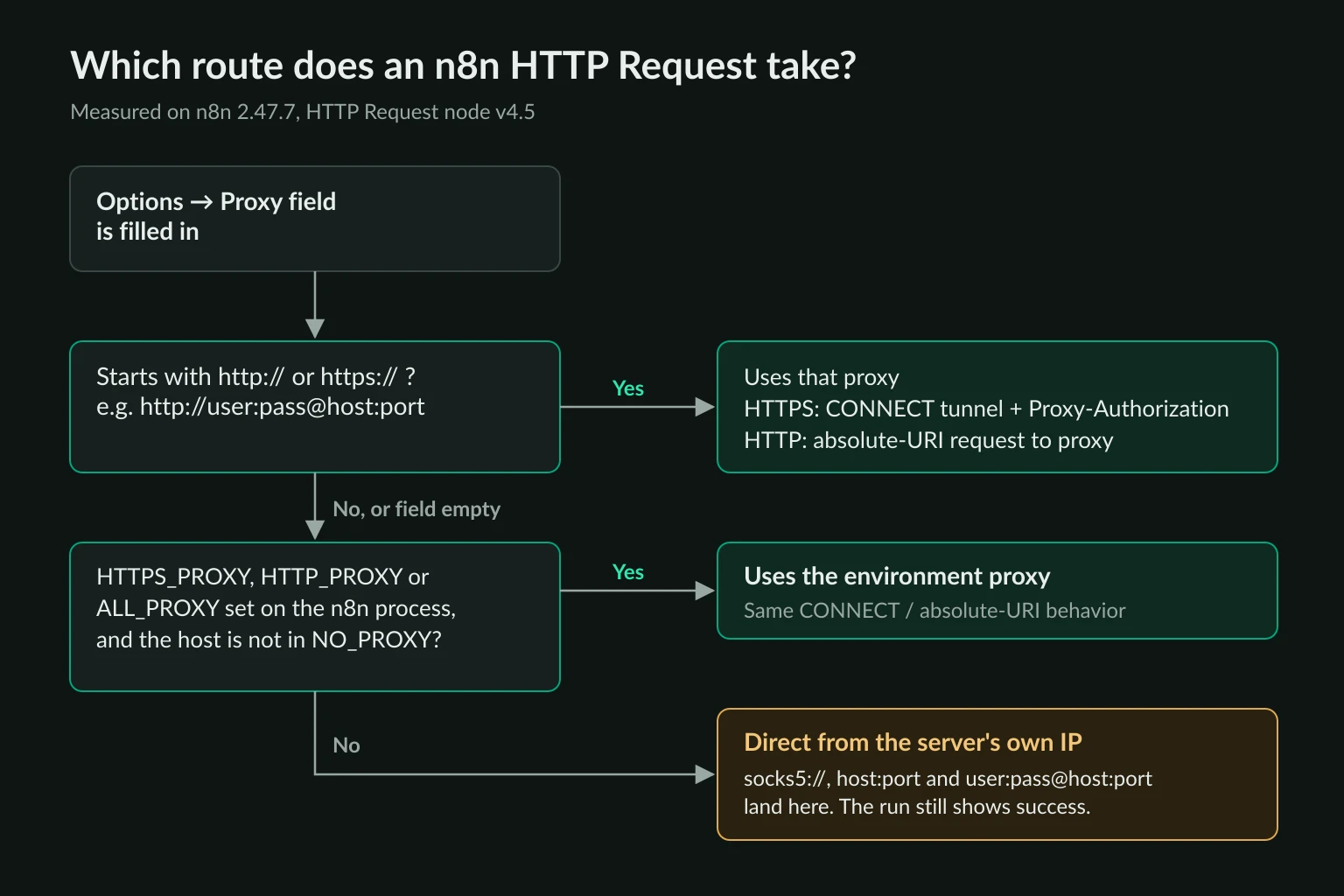
Many proxy dashboards export lines as user:pass@host:port or host:port:user:pass, without a scheme. Unknown Proxies does too. Pasted into n8n as-is, those lines give you a working workflow that never touches the proxy. Add http:// in front, and rearrange host:port:user:pass into http://user:pass@host:port.
Verify the exit IP once before you scrape anything. Point a test HTTP Request node at https://api.ipify.org?format=json with the same Proxy value. If the IP it returns matches your n8n server, the proxy isn't in use. The check takes ten seconds and catches every row of the table above.
SOCKS5 isn't supported in the node at all. If your provider offers both protocols, use the HTTP endpoint. The SOCKS5 vs HTTP proxy comparison explains why that costs you nothing for web scraping.
Proxy field vs HTTPS_PROXY environment variables
On self-hosted n8n, you can set the proxy for the whole instance instead of per node:
docker run -it --rm -p 5678:5678 \
  -e HTTPS_PROXY="http://USERNAME:PASSWORD@proxy.example.com:8000" \
  -e HTTP_PROXY="http://USERNAME:PASSWORD@proxy.example.com:8000" \
  -e NO_PROXY="localhost,127.0.0.1,api.openai.com,.googleapis.com" \
  -v n8n_data:/home/node/.n8n \
  docker.n8n.io/n8nio/n8n
We tested the precedence directly. With HTTPS_PROXY set to one username and the node's Proxy field set to another, the proxy saw only the node's username. With the field empty, both HTTPS and HTTP targets used the environment proxy. Adding the target host to NO_PROXY sent it direct. The deployment variables page adds one more rule: if both https_proxy and HTTPS_PROXY are set, the lowercase one wins.
| Proxy field | HTTPS_PROXY / HTTP_PROXY |
|
|---|---|---|
| Scope | One node, and it can change per item | Every node and backend request on that process |
| n8n Cloud | Works | Not available, because you can't set process env vars |
| Credentials | Stored in plain text in the workflow JSON, and included in exports | Stay on the server |
| Typical use | Scraping nodes only | Corporate egress proxies, or instances that do nothing but scraping |
Prefer the Proxy field for scraping. The environment variables apply to every node, so OpenAI, Google Sheets, and Slack calls would also go through a metered residential proxy. That costs bandwidth for traffic that never needed a proxy. If you do use the variables, put the API hosts you call in NO_PROXY, as in the example. In queue mode, set them on the worker processes as well, because the workers run the workflows.
You might try to keep the password out of the workflow with an expression like {{ $env.SCRAPE_PROXY_URL }}. On 2.47.7 that fails with access to env vars denied unless you start n8n with N8N_BLOCK_ENV_ACCESS_IN_NODE=false. The security variables page lists that variable's default as false, but the code blocks access unless it is explicitly set to false. At least the failure is loud. The node errors instead of falling back to a direct request.
Rotating and sticky sessions per item
The Proxy option is evaluated for each item, so an expression can give each item its own session. Most providers select a sticky session through a value in the username or password. With Unknown Proxies sticky residential lines, the session ID is the number appended to the password, and sticky lines use their own host and port:
http://USERNAME:PASSWORD-{{ $json.sessionId }}@proxy.example.com:8000
We ran three items with session values a1, b2, and a1 through an expression like this. The proxy saw three tunnels, each with that item's credentials. On a provider that maps a session ID to one exit, items with the same session value leave from the same IP, so a product page and its follow-up requests can stay on one address.
Every item opens a new tunnel. The node sends Connection: close, and our log showed one CONNECT per item with no reuse. On a rotating gateway, that means each item normally leaves from a new IP. That suits independent pages. For multi-step flows, such as a search page and then its result pages, use a sticky session. The sticky vs rotating proxies guide covers how long to hold a session.
How many requests n8n web scraping sends at once
The HTTP Request node starts a request for every input item before it waits for any response. We sent 20 items to a page that takes one second to answer. The node had all 20 requests in flight at once and finished in 1.2 seconds. Feed it 500 URLs from a sheet, and it will try to open 500 connections through your proxy at once.
The node's Batching option (Items per Batch, Batch Interval) is the built-in limiter, but it behaves in two ways the field names don't suggest:
- A Batch Interval of
0turns batching off. With 1 item per batch and a 0 ms interval, all 20 requests still ran at once. - The interval is measured from when a batch is sent, not from when its responses arrive. With 5 items per batch, a 500 ms interval, and 1-second responses, batches overlapped and 15 requests were in flight at the peak.
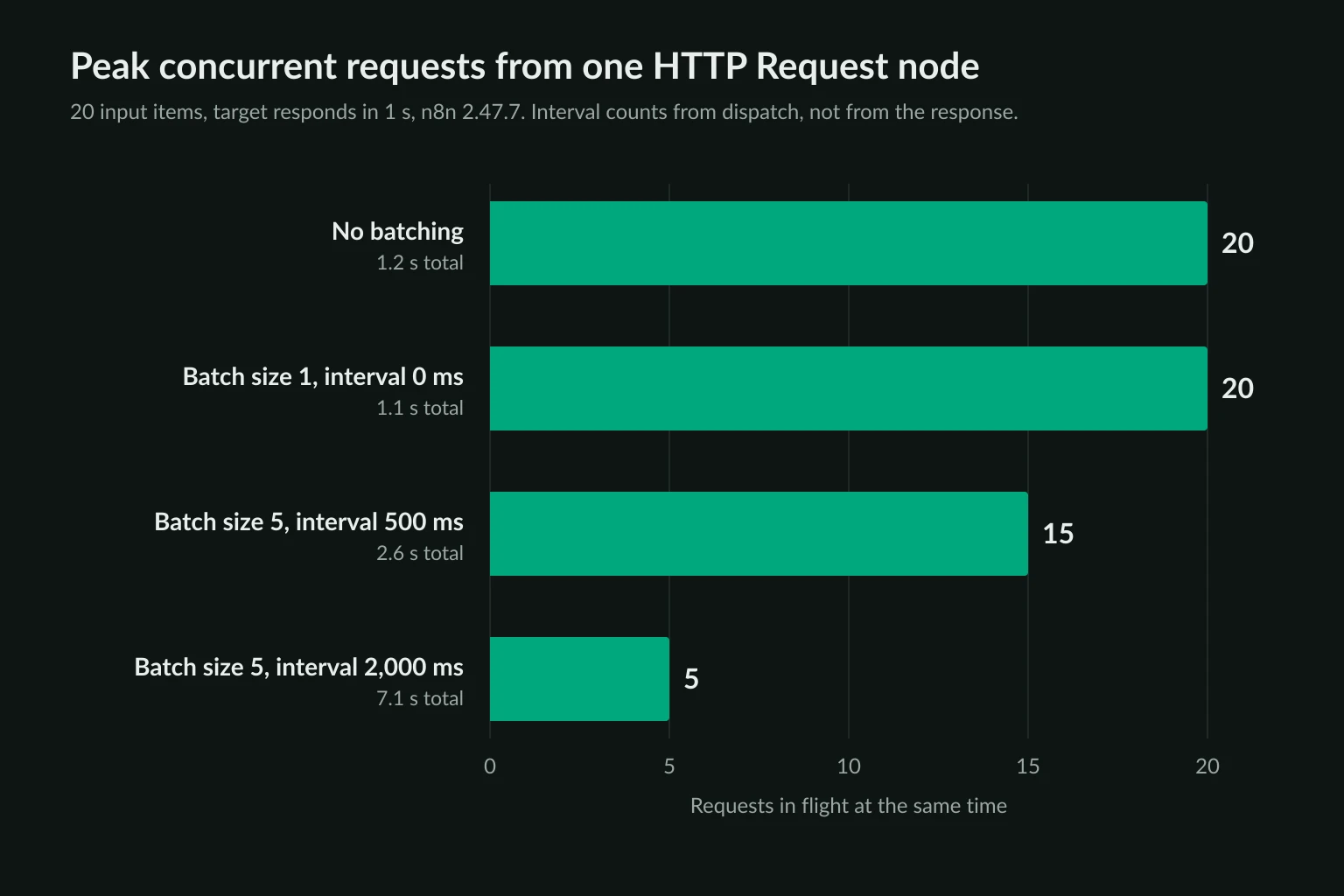
To cap concurrency with batching alone, set the interval longer than your slowest expected response. In practice, that means longer than the Timeout. Otherwise use the loop pattern below, which fetches one page at a time by construction. The delay calculator helps you work out a per-request delay from a target request rate and the number of proxies.
Pagination inside the node is sequential. With Update a Parameter in Each Request and a 1,500 ms Interval Between Requests, we saw three pages go through the proxy 1.5 seconds apart. That covers listing pages with ?page=N URLs without a loop.
Retry On Fail re-sends every item
Retry On Fail sits in the node's Settings tab, and it works at the node level, not per item. When any one request fails, n8n runs the whole node again. We sent five URLs, one of which always returned 429 with Retry-After: 10, and allowed 3 tries 1 second apart:
| Setup | Requests sent | Successful pages fetched again |
|---|---|---|
| Retry On Fail on the node, 5 items at once | 15 | 4 pages × 2 extra times |
| 3 tries, 2 seconds apart, inside Loop Over Items (batch size 1) | 7 | None |
The node-level retries also ignored Retry-After. They came about a second apart, against a requested 10 seconds. The engine caps the settings as well. Max Tries is clamped to 2-5 and Wait Between Tries to 0-5,000 ms, whatever you type. A site that asks you to wait 60 seconds gets up to four retries, at most 5 seconds apart.
On a rate-limited site, that turns one 429 into a burst of repeat traffic across the whole batch, which is exactly what sustains the block. The HTTP 429 guide covers backoff in more detail. In n8n, the practical fix is to retry each URL on its own and pause between URLs.
A paste-ready n8n web scraping workflow
This workflow fetches one URL at a time through the proxy, retries only the URL that failed, pauses between pages, and keeps the source URL next to the extracted fields:
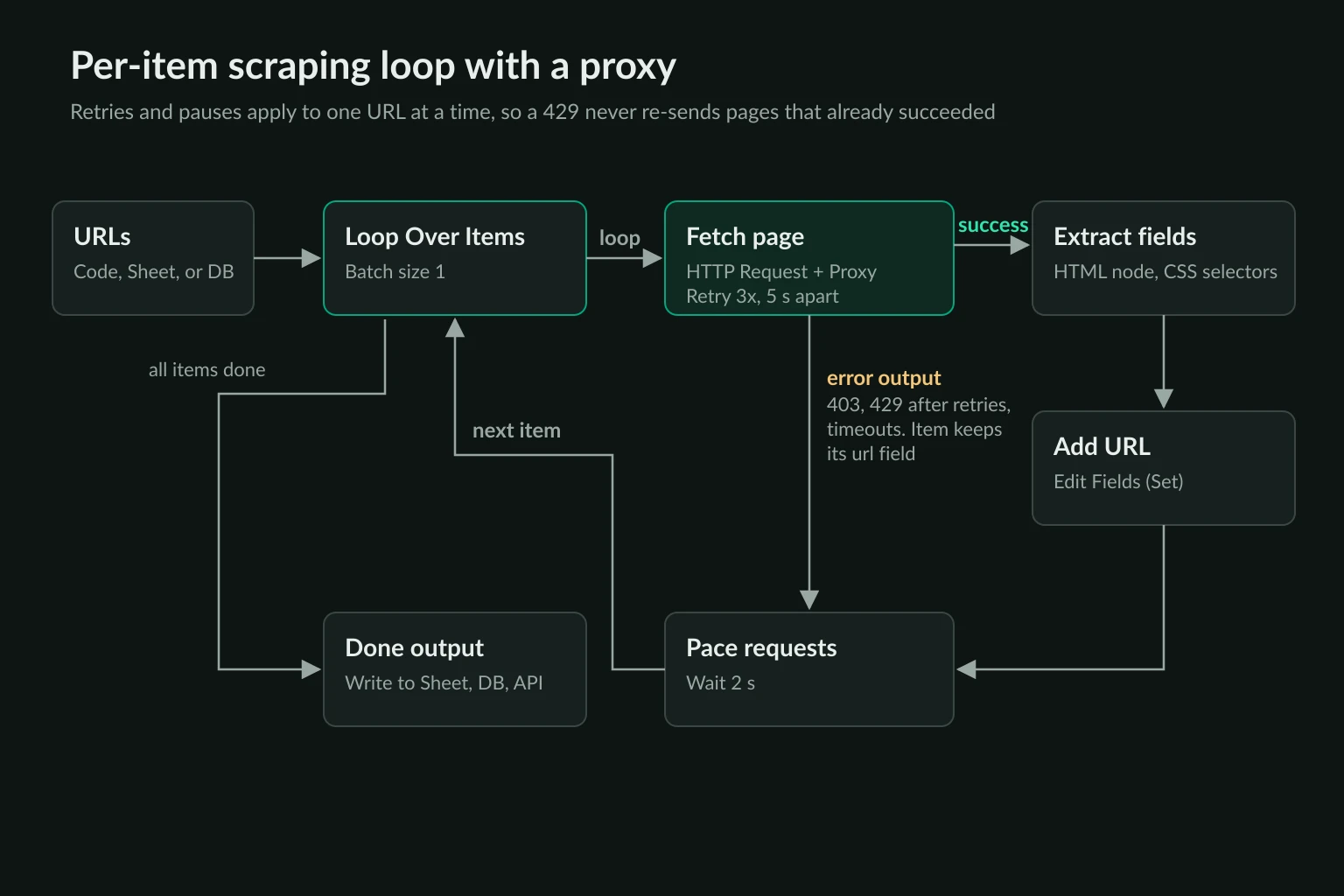
Copy the JSON, click an empty spot on the n8n canvas, and paste. Then replace the proxy URL and the URL list.
{
  "nodes": [
    {
      "name": "Start",
      "type": "n8n-nodes-base.manualTrigger",
      "typeVersion": 1,
      "position": [0, 0],
      "parameters": {}
    },
    {
      "name": "URLs",
      "type": "n8n-nodes-base.code",
      "typeVersion": 2,
      "position": [220, 0],
      "parameters": {
        "jsCode": "return [\n  { json: { url: 'https://example.com/' } },\n  { json: { url: 'https://www.iana.org/help/example-domains' } },\n];"
      }
    },
    {
      "name": "Loop Over Items",
      "type": "n8n-nodes-base.splitInBatches",
      "typeVersion": 3,
      "position": [440, 0],
      "parameters": {"batchSize": 1, "options": {}}
    },
    {
      "name": "Fetch page",
      "type": "n8n-nodes-base.httpRequest",
      "typeVersion": 4.5,
      "position": [660, 80],
      "retryOnFail": true,
      "maxTries": 3,
      "waitBetweenTries": 5000,
      "onError": "continueErrorOutput",
      "parameters": {
        "url": "={{ $json.url }}",
        "sendHeaders": true,
        "headerParameters": {
          "parameters": [
            {
              "name": "User-Agent",
              "value": "Mozilla/5.0 (Windows NT 10.0; Win64; x64) AppleWebKit/537.36 (KHTML, like Gecko) Chrome/155.0.0.0 Safari/537.36"
            },
            {"name": "Accept-Language", "value": "en-US,en;q=0.9"}
          ]
        },
        "options": {
          "proxy": "http://USERNAME:PASSWORD@proxy.example.com:8000",
          "timeout": 30000,
          "response": {"response": {"responseFormat": "text", "outputPropertyName": "html"}}
        }
      }
    },
    {
      "name": "Extract fields",
      "type": "n8n-nodes-base.html",
      "typeVersion": 1.2,
      "position": [880, 0],
      "parameters": {
        "operation": "extractHtmlContent",
        "dataPropertyName": "html",
        "extractionValues": {
          "values": [
            {"key": "title", "cssSelector": "title"},
            {"key": "heading", "cssSelector": "h1"}
          ]
        },
        "options": {}
      }
    },
    {
      "name": "Add URL",
      "type": "n8n-nodes-base.set",
      "typeVersion": 3.4,
      "position": [1100, 0],
      "parameters": {
        "includeOtherFields": true,
        "assignments": {
          "assignments": [
            {
              "id": "u1",
              "name": "url",
              "type": "string",
              "value": "={{ $('Loop Over Items').item.json.url }}"
            }
          ]
        },
        "options": {}
      }
    },
    {
      "name": "Pace requests",
      "type": "n8n-nodes-base.wait",
      "typeVersion": 1.1,
      "position": [1320, 80],
      "webhookId": "5f1c2b9e-3d7a-4e8b-9c1d-2a6f0e4b7c35",
      "parameters": {"amount": 2, "unit": "seconds"}
    }
  ],
  "connections": {
    "Start": {"main": [[{"node": "URLs", "type": "main", "index": 0}]]},
    "URLs": {"main": [[{"node": "Loop Over Items", "type": "main", "index": 0}]]},
    "Loop Over Items": {"main": [[], [{"node": "Fetch page", "type": "main", "index": 0}]]},
    "Fetch page": {
      "main": [
        [{"node": "Extract fields", "type": "main", "index": 0}],
        [{"node": "Pace requests", "type": "main", "index": 0}]
      ]
    },
    "Extract fields": {"main": [[{"node": "Add URL", "type": "main", "index": 0}]]},
    "Add URL": {"main": [[{"node": "Pace requests", "type": "main", "index": 0}]]},
    "Pace requests": {"main": [[{"node": "Loop Over Items", "type": "main", "index": 0}]]}
  }
}
We imported this JSON into n8n 2.47.7, swapped in our test proxy, and ran it. Both pages went through the proxy two seconds apart, and the output rows had title, heading, and url. In a second run we added a URL that always returned 429, and the run still completed. That URL was tried three times, 5 seconds apart, and then left the loop as an item with its url and an error field. The other pages were fetched once.
What each part does:
- Loop Over Items with batch size 1 hands the HTTP Request node one URL per run. That makes Retry On Fail a per-URL retry. Read more in the Loop Over Items docs.
- On Error: Continue (using error output) sends a URL that still fails after its retries down the second output instead of stopping the run. The failed item keeps its input fields, so you know which URL to revisit.
- Pace requests sets the gap between pages. A two-second wait caps one workflow at about 30 pages a minute. Lower it only for sites you know tolerate more.
- Add URL puts the source URL back on the row, because the HTML node's output contains only the fields it extracted.
Replace the URLs Code node with your real source, such as a Google Sheets read, a database query, or a sitemap fetch. Then connect the loop's done output to the place the rows should go. Add a Schedule Trigger when the run is ready to repeat.
Reading n8n proxy and scraping errors
n8n wraps network errors in generic messages, so the status code in the error details is what tells you where the problem is:
| What n8n shows | What happened | Fix |
|---|---|---|
Your request is invalid or could not be processed by the service, details 407 - "" |
The proxy rejected the credentials | Check the username and password, percent-encode special characters, and see 407 Proxy Authentication Required |
The service refused the connection - perhaps it is offline (ECONNREFUSED) |
Nothing accepted the connection at the proxy host and port | Check the port. Sticky and rotating lines often use different ports |
The service is receiving too many requests from you |
The site returned 429 |
Slow down with the loop above, rather than retrying faster |
Status 403 in the error details |
The site refused the request | Check headers and your access first. The HTTP 403 guide walks through the causes |
The request was blocked because it resolves to a restricted IP address |
n8n's SSRF protection blocked a proxy or target on a private or loopback address | Allowlist that range with N8N_SSRF_ALLOWED_IP_RANGES |
access to env vars denied |
A $env expression ran while env access was blocked |
Set N8N_BLOCK_ENV_ACCESS_IN_NODE=false, or keep the URL in the node |
| Success, but the exit IP is your server's | The Proxy value didn't start with http:// or https:// |
Fix the scheme, then recheck with the IP echo test |
The SSRF row only applies if you turned on N8N_SSRF_PROTECTION_ENABLED. It's off by default. When it's on, n8n checks the proxy address as well as the target. A proxy manager on 127.0.0.1 or a Docker-internal address then fails until you allowlist it. The SSRF protection page lists the blocked ranges. The node's common issues page covers the non-proxy errors.
When a proxy helps n8n web scraping
A proxy changes where the request comes from. It doesn't change what the request looks like. The HTTP Request node fetches HTML and doesn't run JavaScript, so pages that render their data client-side come back as an empty shell through any proxy. For those, call the site's JSON endpoint if one is exposed. Otherwise use a browser tool such as Playwright with a proxy, and keep n8n for scheduling and storing the results.
Where the request comes from matters in a few common cases:
- Location-specific pages. Prices, stock, and search results that vary by country or city. Use residential proxies in the target location.
- Many independent pages from one site. A rotating residential gateway spreads one-page-per-item requests across many addresses instead of your server's single IP.
- Allowlisted or session-bound access. A partner portal that allowlists your IP, or a multi-step flow that has to stay on one address. Static ISP proxies give you a fixed IP with IP authentication.
A proxy doesn't make a collection acceptable to the site. Scrape pages you're allowed to access. Respect robots.txt and published rate limits, and treat a 403 or a run of 429s as a signal to slow down or stop, not to rotate faster. Is data scraping legal? covers the questions to settle before you schedule a recurring job.
FAQ
Does the n8n HTTP Request node support SOCKS5 proxies?
No. In n8n 2.47.7 a socks5:// value in the Proxy field is ignored. The request falls back to HTTPS_PROXY/HTTP_PROXY, or goes direct if those aren't set, and the run still succeeds. Use your provider's HTTP proxy endpoint instead.
Can I use a proxy for web scraping on n8n Cloud?
Yes, through the Proxy field on each HTTP Request node. n8n Cloud doesn't let you set process environment variables, so HTTPS_PROXY is only an option on self-hosted instances.
How do I rotate proxies in n8n?
Use a rotating gateway in the Proxy field. n8n opens a new tunnel for every item, so each request normally gets a new exit IP. To pin related requests to one IP, build the proxy URL with an expression that inserts a session ID from the item.
Why does my n8n scraper work without the proxy?
Usually because it isn't using the proxy. A proxy value without http://, such as user:pass@host:port copied straight from a dashboard, sends the request direct. Run the api.ipify.org check in the node and compare the IP with your server's.
Why does n8n retry pages that already worked?
Retry On Fail runs the whole node again when any item fails, so successful items get re-sent too. Put the HTTP Request node inside Loop Over Items with batch size 1, and the retry covers only the URL that failed.
Conclusion
n8n web scraping with a proxy comes down to one setting and four defaults. Put a full http://user:pass@host:port URL in the HTTP Request node's Proxy field, and confirm the exit IP once, because a missing scheme or a SOCKS5 URL sends traffic direct without an error. Then fix the defaults: send real browser headers instead of User-Agent: n8n, set a timeout, keep the node from firing every item at once, and move retries inside a per-item loop so one 429 doesn't re-send the whole batch.
The workflow above runs that way out of the box. When you need location-specific or high-volume page fetches, compare residential and ISP proxy plans and paste the proxy URL into the Fetch page node.