A web unblocker is a proxy endpoint that does the unblocking for you. You send a normal HTTP request, and the vendor picks the IP, replaces your headers and cookies, renders JavaScript if needed, retries until the page loads, and hands back the result. A residential proxy only gives you a household exit IP. Your agent still owns everything else: the TLS handshake, headers, the browser, retries, and sessions.
For AI agents, the choice follows from what the agent does. Use a web unblocker when the agent only fetches public pages through a simple HTTP tool, the target blocks you even on residential IPs, and you'd rather pay per success than tune a client. Use residential proxies when the agent drives a browser, logs in, holds one identity longer than 10 minutes, or sends anything you wouldn't want a third party to read. An unblocker decrypts your traffic by design, and two of the three vendors we checked tell you to turn off certificate verification to use it.
We ran the tests behind this guide in November 2026: a TLS test with a local intercepting proxy standing in for an unblocker, and a 30-page fetch survey through a byte-counting proxy to price both billing models. The numbers are below.
Web unblocker vs residential proxies at a glance
| Web unblocker | Residential proxy | |
|---|---|---|
| What you get back | The page (HTML, rendered HTML, a screenshot, or Markdown with some vendors) | A raw connection through a household IP |
| Who handles headers, cookies, fingerprints | The vendor, by default overriding yours | Your agent |
| TLS | Terminated at the vendor. You skip certificate checks or trust the vendor's CA | End to end between your agent and the site |
| Browser agents (Playwright, Browser Use) | Not a fit. Bright Data and Oxylabs sell separate browser products | Supported. Point the browser at the proxy |
| Holding one IP | Session header, up to 10 minutes | Sticky sessions (up to 2 hours with ours) or a static ISP IP |
| Billing | Per successful request, or per GB with vendor-defined success | Per GB through the tunnel, blocked or not |
| What the provider can read | Method, URL, headers, cookies, bodies | Hostname, port, byte counts |
The rest of this guide explains each row and shows the tests behind it.
What a web unblocker does to your request
All three unblockers we looked at plug in like a proxy. You point your HTTP client at a host and port, add credentials, and request the target URL as usual:
- Oxylabs Web Unblocker at
unblock.oxylabs.io:60000. The request docs list the controls as headers:X-Oxylabs-Session-Idfor a sticky IP,X-Oxylabs-Geo-Location,X-Oxylabs-Render: htmlorpngfor JavaScript rendering, andx-oxylabs-force-headers: 1if you want your own headers merged into theirs. - Bright Data Web Unlocker as a REST call to
api.brightdata.com/requestor as a native proxy atbrd.superproxy.io. Since the root certificate migration, the native proxy runs on port44445. The old certificates on ports22225and33335expired on September 25, 2026, so older tutorials that pair those ports with the old certificate now fail TLS verification. - Decodo Site Unblocker at
unblock.decodo.com:60000, with anX-SU-Session-Idheader for sessions. The quick start offers pay-per-GB and pay-per-request plans.
Under that proxy interface, the product is closer to a hosted scraper than a proxy. Oxylabs puts it plainly: the service uses "pre-defined cookies, headers, and sessions" and asks you to "refrain from sending any custom parameters" that could interfere. Bright Data's Web Unlocker overview lists proxy selection, header and fingerprint matching, CAPTCHA solving, and retries in a single call.
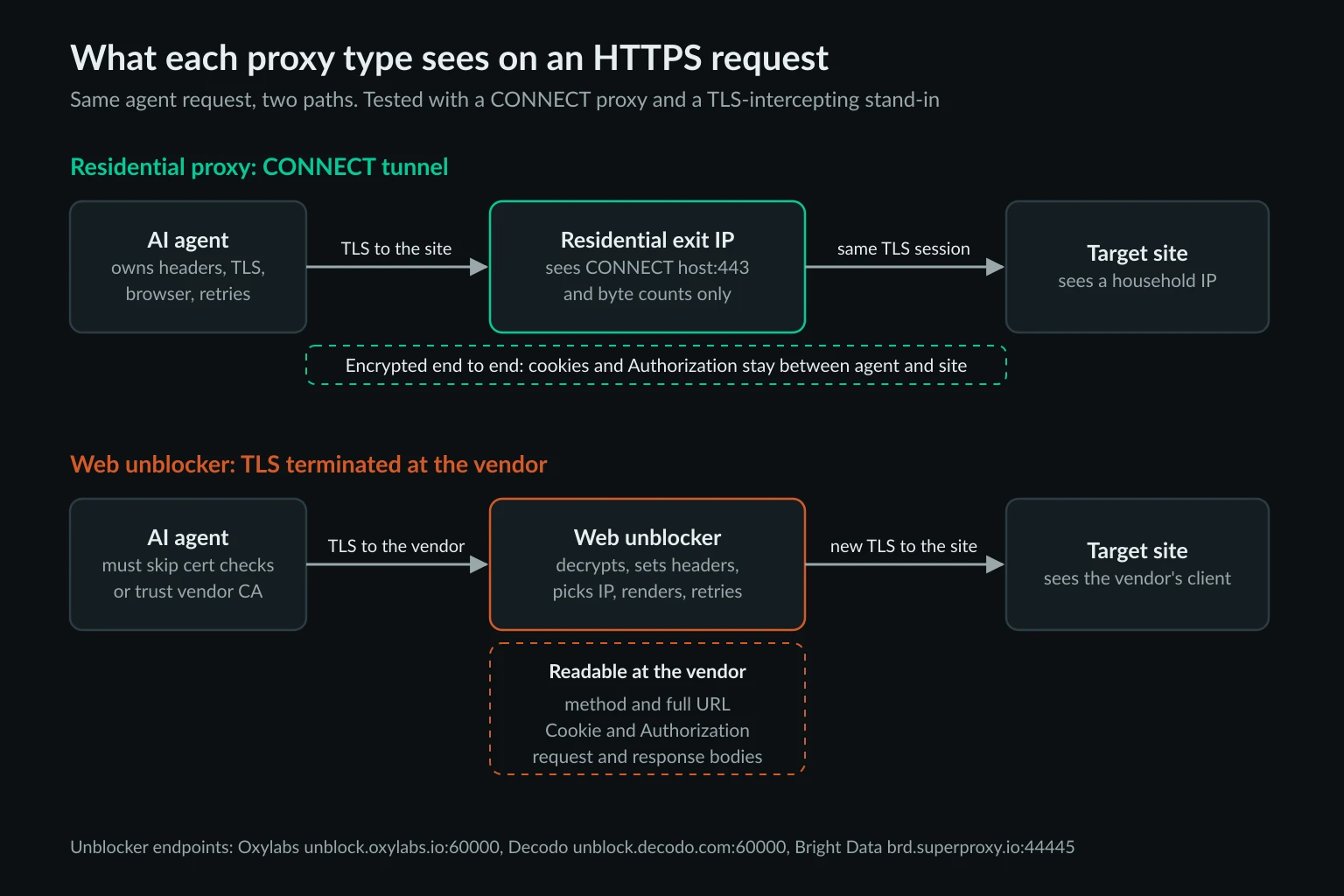
To do that work, the unblocker has to read and rewrite your request. That means it terminates TLS. An ordinary forward proxy can't touch HTTPS headers, because it only sees an encrypted tunnel.
The TLS trade: what a web unblocker can read
Oxylabs says that the "only difference" from a regular proxy is that you must ignore the SSL certificate with -k or an equivalent. Decodo's docs say -k is required. Bright Data publishes a CA file you can trust instead, brightdata_root_ca_44445.crt in its certificate bundle. Oxylabs' docs don't offer a downloadable CA for Web Unblocker.
We wanted to see what that means for an agent process, so we used mitmproxy 12.3.1 on localhost as a stand-in for an unblocker's TLS termination. We sent the same request through it and through a plain CONNECT proxy, with a fake Authorization: Bearer token and a session cookie.
Without trust, every common client refuses
With no -k and no trusted CA, every client an agent tool is likely to use failed before sending a byte to the target:
| Client | Error through the intercepting proxy |
|---|---|
| curl 8.18.0 | curl: (60) SSL certificate OpenSSL verify result: unable to get local issuer certificate (20) |
| Python requests 2.34.2 | SSLError ... [SSL: CERTIFICATE_VERIFY_FAILED] certificate verify failed: unable to get local issuer certificate |
| httpx 0.28.1 | ConnectError: [SSL: CERTIFICATE_VERIFY_FAILED] certificate verify failed: unable to get local issuer certificate |
Node 24.16 fetch with NODE_USE_ENV_PROXY=1 |
TypeError: fetch failed, cause UNABLE_TO_VERIFY_LEAF_SIGNATURE |
The exact wording against a vendor's endpoint depends on its certificate chain, but you'll see one of these the first time you route an agent's fetch tool through an unblocker. If an agent framework exposes only a proxy URL and no TLS option for its web tool, it can't use an unblocker without trusting the vendor's CA, or skipping verification, for the whole process.
The vendor snippet turns off TLS checks for the whole agent
The Node examples in both the Oxylabs and Decodo docs set process.env['NODE_TLS_REJECT_UNAUTHORIZED'] = 0 at the top of the script. That line is global. We put it in a script and fetched https://self-signed.badssl.com/ directly, with no proxy involved. The request returned 200, and Node printed one warning: "Setting the NODE_TLS_REJECT_UNAUTHORIZED environment variable to '0' makes TLS connections and HTTPS requests insecure by disabling certificate verification." Without the line, the same fetch failed with DEPTH_ZERO_SELF_SIGNED_CERT.
In an AI agent, the same process also calls the model API, your tool backends, and any MCP servers over HTTPS. One copied line from a quickstart removes certificate checks from all of them. Node's CLI docs say a value of 0 disables certificate validation for TLS connections. The variable has no setting that limits it to one host.
Scope the trust to one client
Give the unblocker its own HTTP client and leave the default one alone. In Node, an undici ProxyAgent takes TLS options for the requests it carries:
import { readFileSync } from "node:fs";
import { ProxyAgent, fetch as undiciFetch } from "undici";

// Trust the unblocker's CA on this dispatcher only.
const unblocker = new ProxyAgent({
  uri: process.env.UNBLOCKER_URL, // http://USER:PASS@host:port
  requestTls: { ca: readFileSync(process.env.UNBLOCKER_CA) },
});

const page = await undiciFetch("https://httpbin.org/headers", { dispatcher: unblocker });
console.log("via unblocker:", page.status);

// Everything else in the process still verifies certificates.
try {
  await fetch("https://expired.badssl.com/");
} catch (err) {
  console.log("default fetch:", err.cause?.code);
}
With undici 8.12.4 against our stand-in, this printed via unblocker: 200 and default fetch: CERT_HAS_EXPIRED. If the vendor gives you no CA, replace the ca option with requestTls: { rejectUnauthorized: false }. That still limits the exception to one dispatcher. A wrong password in UNBLOCKER_URL made the call fail instead of silently going direct.
In Python, httpx takes an SSL context per client:
import os
import ssl
import httpx

# Trust the unblocker's CA on this client only.
unblocker = httpx.Client(
    proxy=os.environ["UNBLOCKER_URL"],
    verify=ssl.create_default_context(cafile=os.environ["UNBLOCKER_CA"]),
    timeout=60,
)
r = unblocker.get("https://httpbin.org/headers")
print("via unblocker:", r.status_code)
A plain httpx.get("https://expired.badssl.com/") in the same script still raised CERTIFICATE_VERIFY_FAILED. Pass an SSL context rather than a file path: httpx 0.28 deprecates verify=<str> and prints a DeprecationWarning that Python hides by default.
What each proxy logged
Our stand-in logged every request in plaintext: method, full URL, Authorization: Bearer sk-test-not-a-real-key, and Cookie: session=abc123. A real unblocker gets the same view, plus response bodies. For the same request, the CONNECT proxy logged one line: CONNECT httpbin.org:443, three proxy headers (host, user-agent, proxy-connection), and 2,083 bytes up and 3,740 down. That matches what our AI agent security guide found with Squid. A forward proxy without TLS interception can't see the method, path, or body.
So don't send anything through an unblocker that you wouldn't hand the vendor: logged-in sessions, customer API keys, or form posts with personal data. That covers more agent traffic than it sounds like. Agents pick up cookies as they browse, and many tool wrappers reuse one client for every request.
Cost per page: per request vs per GB
The billing models differ, and they reward different page sizes.
- Bright Data Web Unlocker charges per successful request. The pricing page listed $1.50 per 1,000 on pay-as-you-go in November 2026, and $1.30 per 1,000 above the 383K requests included in the $499 Scale plan. If you enable custom headers and cookies, the configuration docs say you're charged for 100% of requests, failed ones included.
- Oxylabs Web Unblocker charges per GB, counting request and response traffic. Its billing page counts every
2xxand4xxfrom the target as successful, even if the result doesn't contain the expected information. A403block page you got through the unblocker is billable. With JavaScript rendering on, the billed traffic includes the page's own external calls. - Residential proxies charge per GB through the tunnel. Blocks, redirects, and retries all count.
To compare them, we fetched 30 pages that agents commonly read (docs, Wikipedia, GitHub, news, shops, listings, jobs) with curl 8.18.0. We used a current Chrome user agent and compressed transfer, and sent everything through a CONNECT proxy that counted every byte both ways. The test ran from a Hetzner datacenter IP in Germany, so it also shows what an agent gets before any proxy is added.
The 19 pages that loaded cost 10 KB to 222 KB on the wire, with a median of 62 KB. That figure includes the TLS handshake and headers. Compression did most of the work: the RFC 9110 page is 1.19 MB of HTML but 222 KB on the wire. Per-GB billing counts the compressed bytes, so make sure your agent's HTTP client sends Accept-Encoding.
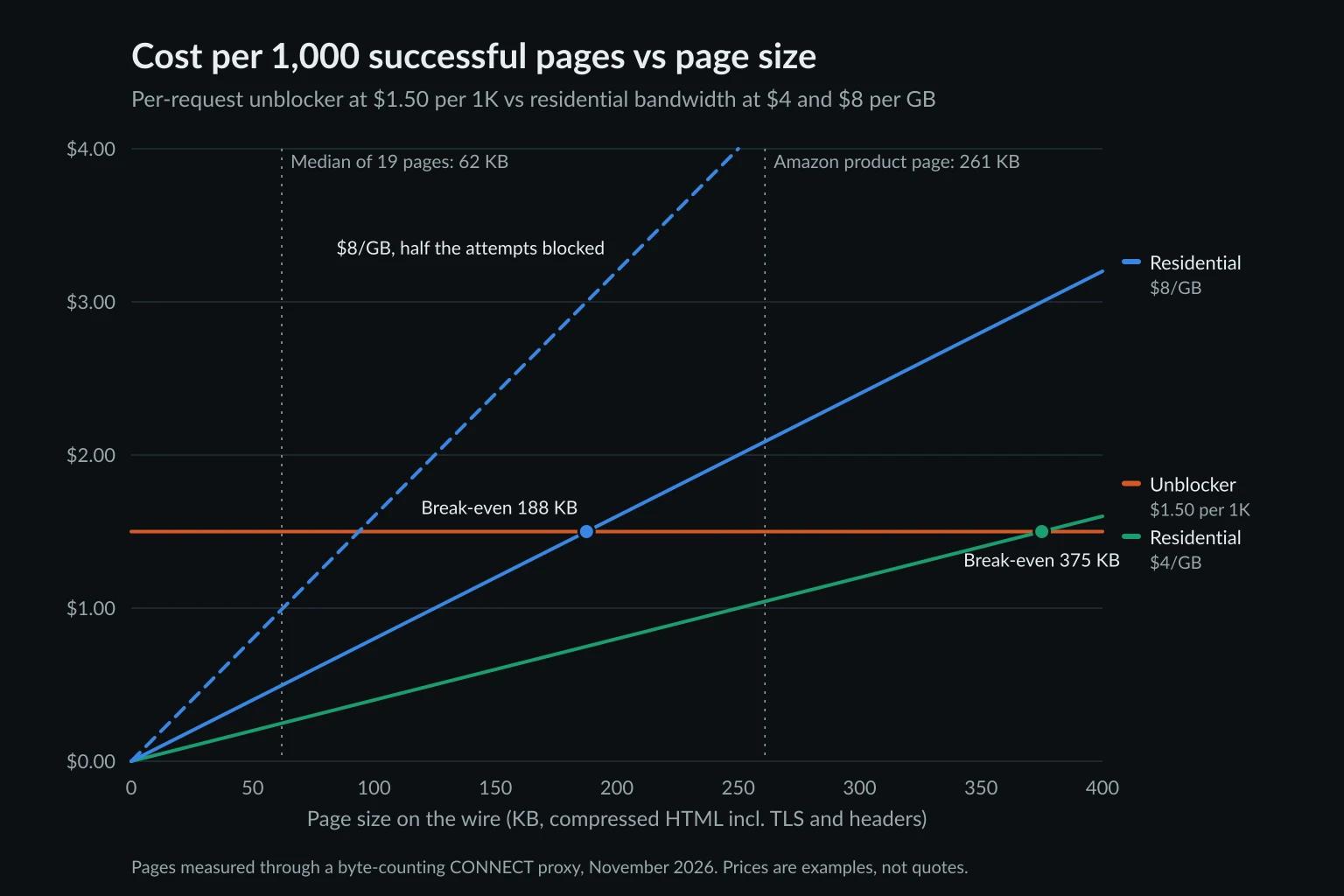
At $1.50 per 1,000, the unblocker costs the same for a 10 KB page and a 400 KB one. Residential cost scales with size. At $8/GB, 1,000 pages of 62 KB cost $0.50, and the break-even page size is 188 KB. At $4/GB, the break-even is 375 KB. Even if half of the residential attempts fail and each failure costs a full page, 62 KB pages come to $1.00 per 1,000 successes at $8/GB.
So on page weight alone, residential is cheaper for most text pages an agent reads. The exceptions are heavy retail pages: the full Amazon product page, fetched with httpx through the same counting proxy, cost 261 KB on the wire. That's past the 188 KB break-even at $8/GB, so per-request pricing wins there, but still under the 375 KB break-even at $4/GB. The bigger factor is the success rate. If residential IPs still get challenged on your target, the cost per successful page is unbounded, and $1.50 for a page that loads is cheap. The data usage calculator turns page size and volume into GB if you want to run the numbers for your own targets.
What blocked the agent, and what each option fixes
From the datacenter IP, 11 of the 30 requests didn't return the page. Here's what came back:
| Site | Status | What came back | Signal |
|---|---|---|---|
| Stack Overflow, npm, AP News, Indeed | 403 | "Just a moment..." challenge page | cf-mitigated: challenge |
| Booking.com | 202 | Empty challenge response, 2 KB | x-amzn-waf-action: challenge |
| Amazon | 200 | 3.8 KB "Continue shopping" CAPTCHA form | None in headers, only in the body |
| eBay | 403 | "Error Page" | server: AkamaiGHost |
| Etsy | 403 | 0.8 KB | x-datadome: protected, risk score 0.99 |
| 403 | 190 KB block page, sent uncompressed | server: snooserv |
|
| Realtor.com | 302, then 429 on retry | No body | None |
| Best Buy | None | Connection hung until the 40-second timeout | None |
Blocks were cheap in bytes, with a median of 12.7 KB. Reddit was the exception: its 190 KB block page arrived uncompressed and took 199 KB on the wire, more than 17 of the 19 successful pages.
The Amazon result shows why "just add a residential IP" isn't always enough. From the same IP and with the same user agent, curl with --compressed got the CAPTCHA form in 3 of 3 runs. httpx got the full 1.4 MB product page in 3 of 3 runs, and curl with Accept-Encoding: gzip, deflate got it in 2 of 2. The IP was the same in every run, and the answer changed with the client. A residential proxy changes the network layer. It doesn't change your TLS handshake or header set, which is the layer our guide on how websites detect AI agents covers. An unblocker replaces both, which is most of what you're paying for.
Status codes your agent's fetch tool must check
Two of the 11 blocks came back with a 2xx status, 200 from Amazon and 202 from Booking.com. A fetch tool that checks only response.ok would hand the LLM a CAPTCHA form as page content. Unblockers add their own status conventions on top:
- Bright Data REST API: once a request reaches the unlocker, the outer response is
200 OK. The target's real status is inx-brd-status-code, and unlocker failures carryx-brd-errorandx-brd-error-code, per the error code reference. On the native proxy, the status is the real one. - Oxylabs:
550 Faulted After Too Many Retriesmeans the job failed, and it isn't billed. Their429means you exceeded your plan's rate limit. The rate limit table caps the Micro through Venture plans at 50 requests per second and 13 rendered requests per second, and the remaining budget comes back inx-ratelimit-*headers.
Check the response before the model sees it. This is the check we ran against all 30 live responses and against mocked Bright Data responses:
import httpx


def page_or_reason(resp: httpx.Response) -> tuple[str | None, str]:
    """Return (html, reason). html is None when the agent shouldn't read the body."""
    if "x-brd-error" in resp.headers:
        return None, "unblocker error: " + resp.headers.get("x-brd-error-code", "unknown")
    # Bright Data's REST API answers 200 and moves the target's status here.
    status = int(resp.headers.get("x-brd-status-code", resp.status_code))
    if resp.headers.get("cf-mitigated") == "challenge":
        return None, "Cloudflare challenge"
    if "x-amzn-waf-action" in resp.headers:
        return None, "AWS WAF " + resp.headers["x-amzn-waf-action"]
    if status != 200:
        return None, f"target returned {status}"
    if len(resp.content) < 10_000 and b"captcha" in resp.content.lower():
        return None, "small page mentioning CAPTCHA"
    return resp.text, "ok"
It labeled the four Cloudflare challenges, the AWS WAF 202, and the other 403s and the 302 correctly, and passed every real page as ok. Fed the saved 3.8 KB Amazon CAPTCHA form, it returned "small page mentioning CAPTCHA". A mocked 200 with x-brd-status-code: 403 came back as "target returned 403". Return the reason string to the model as the tool result, so the agent doesn't summarize a block page.
Where residential proxies win for AI agents
Browser agents. Bright Data's overview says the Web Unlocker "is not intended for browser-based automation or third-party browser tools" such as Puppeteer and Playwright, and points to its separate Browser API. Oxylabs sells a separate browser product too, and its X-Oxylabs-Render header returns finished HTML or a PNG, not a page your agent can click. A Playwright, Browser Use, or computer-use agent needs an ordinary proxy that the browser can tunnel through. Browser traffic is also heavy: in our AI agent examples test, a browser used 1.37 MB to read 4 pages that a fetch tool read in 66 KB. Size the plan for that.
Logged-in work. Unblockers manage cookies themselves. On Oxylabs you need x-oxylabs-force-cookies: 1 to send your own. On Bright Data, custom headers and cookies are a zone setting, values outside the pre-approved list need compliance approval, and turning it on makes every request billable. Bright Data also lists social network account management as an unsupported use case. On top of that, the vendor reads every session cookie. Through a residential or ISP proxy, the agent's cookies stay inside TLS.
Long tasks. Oxylabs and Decodo hold a session IP for up to 10 minutes and then assign a new one. An agent that spends 25 minutes in one account changes IP partway through. Sticky residential sessions with us hold one exit IP for up to 2 hours, and a static ISP proxy never changes. Our sticky vs rotating guide covers when each fits.
Volume on easy and mid-difficulty targets. As the chart shows, most HTML pages cost less per page through residential bandwidth. That holds as long as residential IPs pass. Our survey gives the baseline: 19 of 30 pages loaded from a datacenter IP with no proxy at all, and the failures clustered on retail, jobs, travel, and social sites. Those are the ones to test through residential before deciding.
For those cases we'd use rotating residential proxies for broad fetches and geo checks, and ISP for long-lived identities. The proxies for AI agents guide shows the browser and SDK setup. We sell residential and ISP proxies, not an unblocker, so check our reasoning against your own test results.
Where a web unblocker wins
- Fetch-only agents on hard targets. A research or monitoring agent that reads public pages through an HTTP tool, on sites where residential IPs alone still get challenged. That's the job unblockers are built for.
- No time to tune clients. Matching TLS fingerprints, header order, and retry logic per site takes work. A per-success price moves that cost to the vendor.
- Heavy single pages. Above roughly 190 to 375 KB per page, depending on your per-GB rate, a flat per-request price is cheaper.
- Output in Markdown. Bright Data returns Markdown with the
x-unblock-data-format: markdownheader, which saves an HTML-to-text step before the LLM call.
Keep the unblocker on its own client, as shown above, and send only requests without credentials through it.
Choosing for your agent
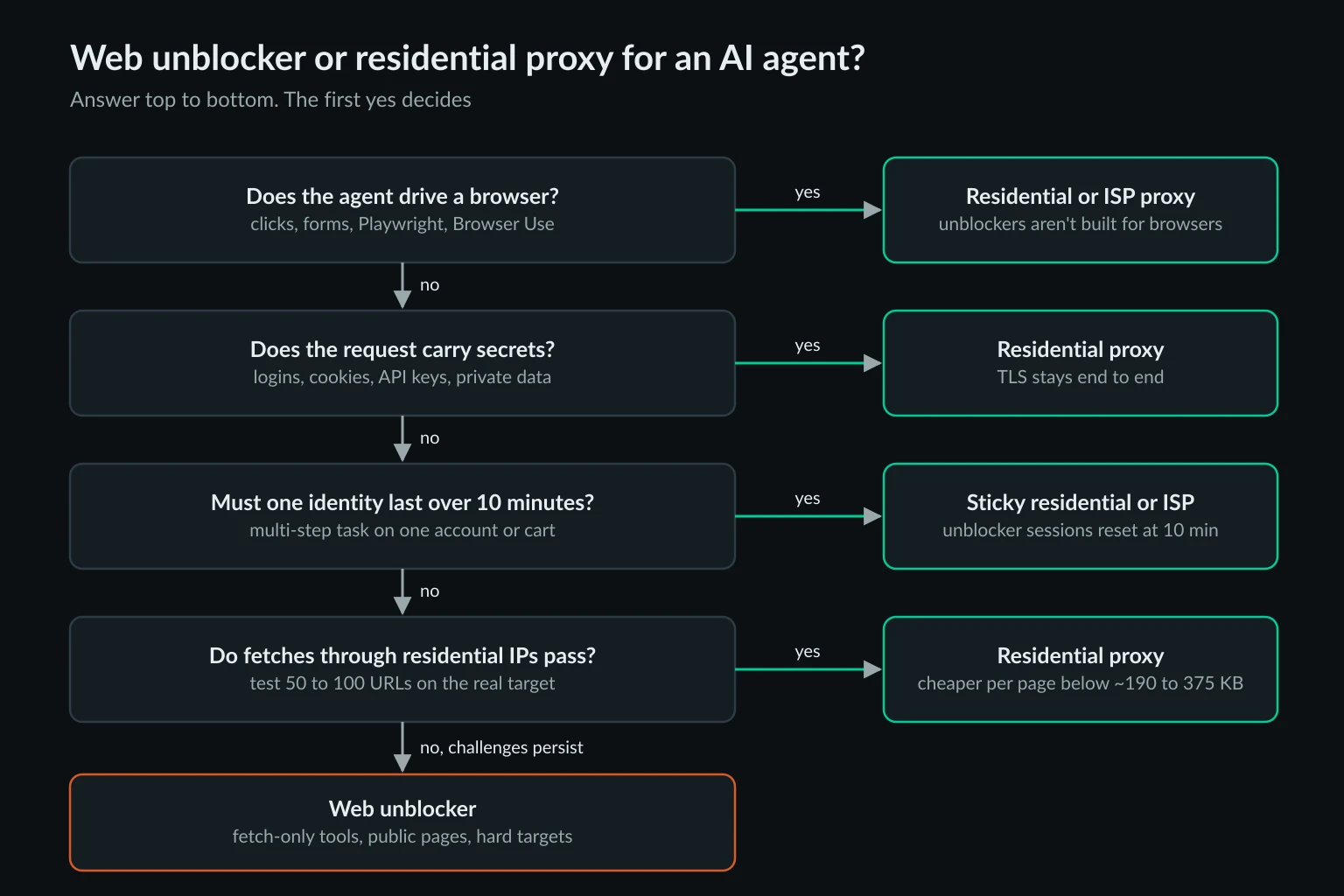
Work through four questions in order:
- Does the agent drive a browser? Use residential or ISP proxies.
- Does the request carry secrets such as logins, cookies, API keys, or private data? Use a proxy that keeps TLS end to end.
- Does one identity need to last more than 10 minutes? Use sticky residential or ISP.
- Do plain fetches through residential IPs pass on your real targets? Test 50 to 100 URLs and classify each response with the check above. If most pass, residential is cheaper. If challenges persist, put those domains on an unblocker.
Many agent stacks end up with both: residential for the browser and everything authenticated, and an unblocker client used only by the fetch tool for a short list of hard public domains.
Site rules still apply
An unblocker changes how a request looks. It doesn't change whether you're allowed to make it. Bright Data solves CAPTCHAs by default (you can switch that off per zone). Its accounts in immediate-access mode, before KYC verification, refuse paths that robots.txt disallows with a ub_bad_endpoint_robots error. A CAPTCHA or a challenge is the site deciding about your traffic. When an agent meets one on a site you don't have permission to automate, the right response is to stop, not to escalate. Our guide on whether data scraping is legal covers where that line usually falls. The same applies to residential proxies.
FAQ
What is a web unblocker?
A web unblocker is a proxy-style endpoint that returns a page instead of a connection. It chooses the IP, sets headers, cookies, and fingerprints, renders JavaScript when asked, and retries failed attempts. You use it like a proxy, but it decrypts your HTTPS traffic to do that work. Oxylabs Web Unblocker, Bright Data Web Unlocker, and Decodo Site Unblocker are the main examples.
Is a web unblocker the same as a residential proxy?
No. An unblocker may use residential IPs internally, but it also takes over the parts of the request that a residential proxy leaves to you. A residential proxy forwards your encrypted connection through a household IP and doesn't touch its contents.
Can I use a web unblocker with Playwright or Browser Use?
Not as a browser proxy. Bright Data says Web Unlocker isn't intended for Puppeteer, Playwright, or other browser tools, and Oxylabs' rendering option returns finished HTML or a screenshot, not a live page. Browser agents need a residential or ISP proxy, or a vendor's separate browser product.
Why does a web unblocker require disabling SSL verification?
It terminates TLS so it can rewrite your request, so the certificate your client sees is the vendor's, not the site's. Oxylabs and Decodo document -k or the equivalent setting in each language. Bright Data offers a CA certificate you can trust instead. Either way, apply the setting to one HTTP client, not the whole process.
Which is better for AI agents, a web unblocker or residential proxies?
Residential proxies are better for browser agents, logged-in tasks, sessions longer than 10 minutes, and high volumes of ordinary pages. A web unblocker is better for fetch-only tools on public pages that keep challenging residential traffic. Many teams use both, split by tool and domain.
Final thoughts
Web unblocker vs residential proxies comes down to who owns the request. An unblocker owns it: it reads and rewrites everything, bills per success or per GB, and works best for fetch-only agents on hard public targets. A residential proxy leaves it with you: TLS stays end to end, sticky or ISP sessions last as long as the task does, and most text pages cost less per page. Test your agent's real targets through residential IPs first, check every response before the model reads it, and move to a separate unblocker client only for the domains that keep failing.