An AI agent CAPTCHA is rarely the thing that detected your agent. By the time a checkbox or puzzle appears, the site has already scored the visit from evidence it collected in layers: who owns the IP, how the TLS handshake looks, which headers arrived, what the page's JavaScript found in the browser, and how the agent moved and typed. The CAPTCHA is just what the site does with a middling score.
That's how websites detect AI agents in practice. Very little of it is specific to AI. An LLM-driven browser gets caught by the same checks as any other automation, plus a few new ones: self-declared agent user agents, signed requests, and hidden-text traps that only a language model would follow.
We measured each layer on 2026-11-02 from a Hetzner server in Nuremberg, using the clients agents actually run on: Python HTTP libraries, Node and Bun fetch, curl, and Playwright driving headless Chrome. The results below show which layer catches which setup, and why patching a single tell rarely changes the outcome.
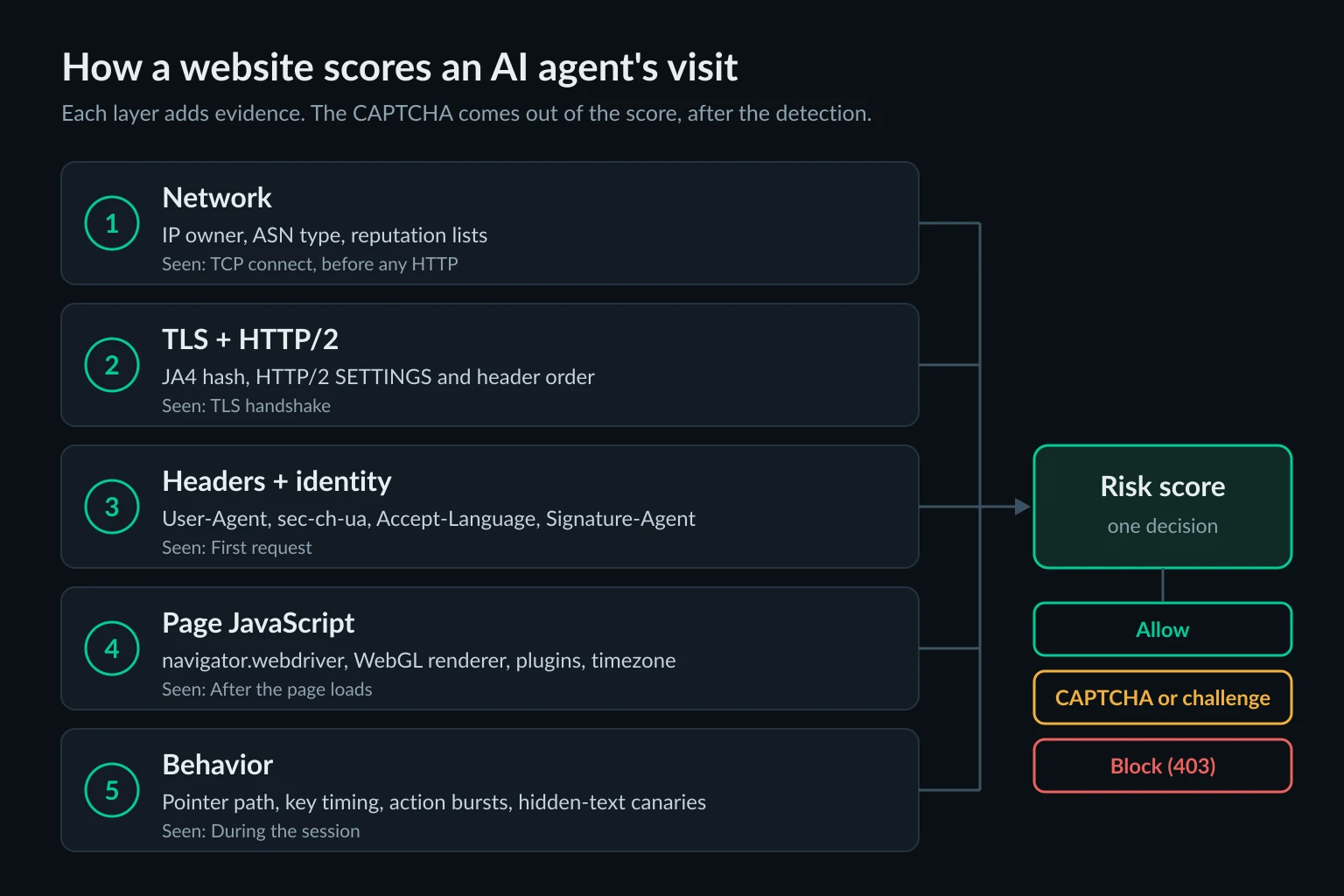
How websites detect AI agents: the five layers
Each layer is visible at a different moment. The early ones are cheap for the site and need nothing from the browser. The later ones need JavaScript on the page.
| Layer | What the site reads | When | What we found |
|---|---|---|---|
| Network | IP owner, ASN type, reputation feeds | On connect | Our server was flagged as hosting by one database and "VPN, risk 66" by another |
| TLS and HTTP/2 | JA4 hash, HTTP/2 SETTINGS frame | Handshake | Python clients looked alike; Playwright's default headless shell sent one TLS extension fewer than Chrome |
| Headers and identity | User-Agent, client hints, Signature-Agent |
First request | Both Chrome builds put HeadlessChrome in the User-Agent |
| Page JavaScript | navigator.webdriver, WebGL, plugins, timezone |
After load | Software rendering and UTC on every setup, even with the webdriver flag off |
| Behavior | Pointer path, key timing, action rhythm | During the session | A Playwright click was one pointer move and a press under 1.5 ms |
Commercial bot managers combine these into a single number. Cloudflare's bot score runs from 1 to 99, where 1 means automated, 2-29 likely automated, and 30-99 likely human. Its engines include heuristics, a machine learning model, and JavaScript Detections, an invisible script that looks for headless browsers and automation tools. Other vendors differ in detail, but the shape is the same: many weak signals, one decision.
Network layer: IP reputation decides first
Before your agent sends a byte of HTTP, the site knows which network the connection came from. Most agents run on cloud servers, and IP intelligence databases label cloud ranges as hosting.
We queried two public databases for our server's IP. The server runs no VPN or proxy:
| Database | Verdict |
|---|---|
| ip-api.com | "hosting": true, "proxy": false, ISP Hetzner Online GmbH |
| proxycheck.io | "type": "VPN", "proxy": "yes", risk 66 |
The two databases disagree about what the server is, and the stricter one calls a bare server a VPN. Sites buy different feeds, so the same agent can pass one site and get an anonymous proxy detected page on the next. Either way, "hosting" is a cheap and strong signal, because very little human browsing comes from a data center.
Declared AI agents are treated differently at this layer. OpenAI publishes the IP ranges behind ChatGPT-User and its crawlers on its bots page, so a site can check that a request claiming to be ChatGPT really came from OpenAI. Our ClaudeBot and GPTBot guide shows that check against server logs.
To see what your agent's exit looks like, ask the same kind of database from the machine or proxy the agent uses:
curl -s "http://ip-api.com/json/?fields=isp,as,mobile,proxy,hosting"
From our server it printed {"isp":"Hetzner Online GmbH","as":"AS24940 Hetzner Online GmbH","mobile":false,"proxy":false,"hosting":true}. Add -x with your proxy URL to check a proxy exit instead.
TLS and HTTP/2 fingerprints: caught before the first header
The TLS Client Hello lists cipher suites, extensions, and ALPN protocols in an order set by the client's TLS library. JA4 condenses that into a short fingerprint, and Cloudflare exposes JA3 and JA4 to Bot Management customers. HTTP/2 adds a second fingerprint from the SETTINGS frame, window update, and pseudo-header order, first described in Akamai's research on passive HTTP/2 fingerprinting.
We sent each client to the BrowserLeaks TLS echo with default settings:
| Client | JA4 | HTTP/2 |
|---|---|---|
Python urllib (3.12) |
t13d1713h1_ab0a1bf427ad_89ab6efea773 |
No |
requests 2.34.2 |
t13d1712h1_ab0a1bf427ad_882d495ac381 |
No |
httpx 0.28.1 |
t13d1712h1_ab0a1bf427ad_8e6e362c5eac |
No |
aiohttp 3.14.5 |
t13d1712h1_ab0a1bf427ad_8e6e362c5eac |
No |
Node 24 fetch |
t13d5212h1_b262b3658495_8e6e362c5eac |
No |
Bun 1.3.14 fetch |
t13d1714h1_5b57614c22b0_43ade6aba3df |
No |
| curl 8.18 (OpenSSL) | t13d3013h2_1d37bd780c83_8537cf56674e |
Yes, m,s,a,p order |
curl_cffi 0.17, impersonate="chrome" |
t13d1517h2_8daaf6152771_cb7bf5808d99 |
Yes, Chrome's |
| Playwright, headless shell 148 | t13d1516h2_8daaf6152771_d8a2da3f94cd |
Yes, Chrome's |
| Playwright, headless shell 156.0.8078.4 | t13d1516h2_8daaf6152771_806a8c22fdea |
Yes, Chrome's |
| Playwright, Chrome for Testing 156 | t13d1517h2_8daaf6152771_cb7bf5808d99 |
Yes, Chrome's |
Four things stand out:
- The Python libraries look alike. On Python 3.12, all four share the cipher section
ab0a1bf427ad, and none offered HTTP/2 (theh1in the first section). The exact value depends on the Python build and the OpenSSL it links against: on Python 3.14.4,urllibsentt13d3014h1_1d37bd780c83_5ae85263eb3b, with the same cipher section as curl. Either way, a site can't easily tellrequestsfromhttpx, but it can tell both from a browser. - Full Chrome in headless mode passes this layer. Chrome for Testing 156 under Playwright matched
curl_cffi's Chrome profile exactly: 17 extensions, the cipher section8daaf6152771, and the HTTP/2 settings1:65536;2:0;4:6291456;6:262144|15663105|0|m,a,s,p. Headless mode in the full browser uses Chrome's normal network stack. - The headless shell doesn't. Playwright's default Chromium browser is the separate headless shell, and at both 148 and 156 it sent 16 extensions. Extension
0xca34, which Chrome 156 andcurl_cffiboth send, was missing. The cipher section and HTTP/2 settings match Chrome, but the JA4 doesn't, so a site that compares the JA4 with the Chrome version in the User-Agent can tell the shell from Chrome before any JavaScript runs. - Chrome's fingerprint moves between versions. Shell 148 and shell 156 sent the same number of extensions but produced different extension hashes (
d8a2da3f94cdvs806a8c22fdea).curl_cffimatched the Chrome 156 handshake exactly, while its User-Agent said Chrome 152. An impersonation library has to keep up with every release.
The mismatch that gets HTTP clients blocked is a browser User-Agent on top of a library handshake. Our HTTP 403 guide covers that case and how to confirm it, and the web scraping headers guide explains when an honest bot User-Agent is the better choice.
Headers and declared identity: AI user agents
Headers arrive with the first request, and they are where an agent either identifies itself or contradicts itself.
Headless Chrome still says so. Both Chrome builds put HeadlessChrome/<version> in the User-Agent header and in navigator.userAgent. That includes Chrome 156's new headless mode, which, per Chrome's headless docs, shares its code with headed Chrome. The older headless shell, which Chrome has shipped as a separate chrome-headless-shell binary since Chrome 132, also lists HeadlessChrome in its sec-ch-ua client hint.
The headless shell sends no Accept-Language. We logged the raw requests on a local server. Playwright's default browser (the shell) sent no Accept-Language header at all, while Chrome 156 sent en-US,en;q=0.9. Desktop Chrome sends one on every navigation. Under Playwright, Chrome 156 also sent Accept-Language last instead of before Upgrade-Insecure-Requests, where the same browser put it when no driver was attached. That was HTTP/1.1 to localhost, so treat header order as a hint rather than a rule.
Client hints can contradict the User-Agent. Chrome 156 headless sent a User-Agent with HeadlessChrome but sec-ch-ua brands of only Chromium and a placeholder brand. Branded Chrome also sends Google Chrome there. A check that compares the two headers finds a mismatch. Paste any User-Agent string into our user agent checker to see what it claims.
Declared AI agents name themselves. Assistants that fetch a page for a user send their own tokens:
| Agent | User-Agent token | Notes |
|---|---|---|
| ChatGPT fetches | ChatGPT-User/1.0 |
Published IP list; OpenAI says it isn't used for automatic crawling |
| Perplexity fetches | Perplexity-User/1.0 |
Perplexity says it generally ignores robots.txt because a user asked |
| Claude fetches | Claude-User |
Covered in our ClaudeBot guide |
Agents that run a full cloud browser go further and sign requests with Web Bot Auth, which adds Signature, Signature-Input, and Signature-Agent headers under RFC 9421. Since July 1, 2026, Cloudflare treats signed agents as verified bots and labels each one Direct (one operator) or Intermediary (a service many end users can run). The agentic browser guide shows how ChatGPT's cloud browser publishes its keys.
For site owners, this is the cleanest detection there is: the agent tells you what it is, and you allow or block it by name. For agent builders, it means an honest identity can be worth more than a clean-looking browser.
Browser fingerprint signals the page can read
Once the page loads, its JavaScript can query the browser directly. We loaded a test page in four setups and recorded what it could read. All four ran headless on the same 2-core server with default options.
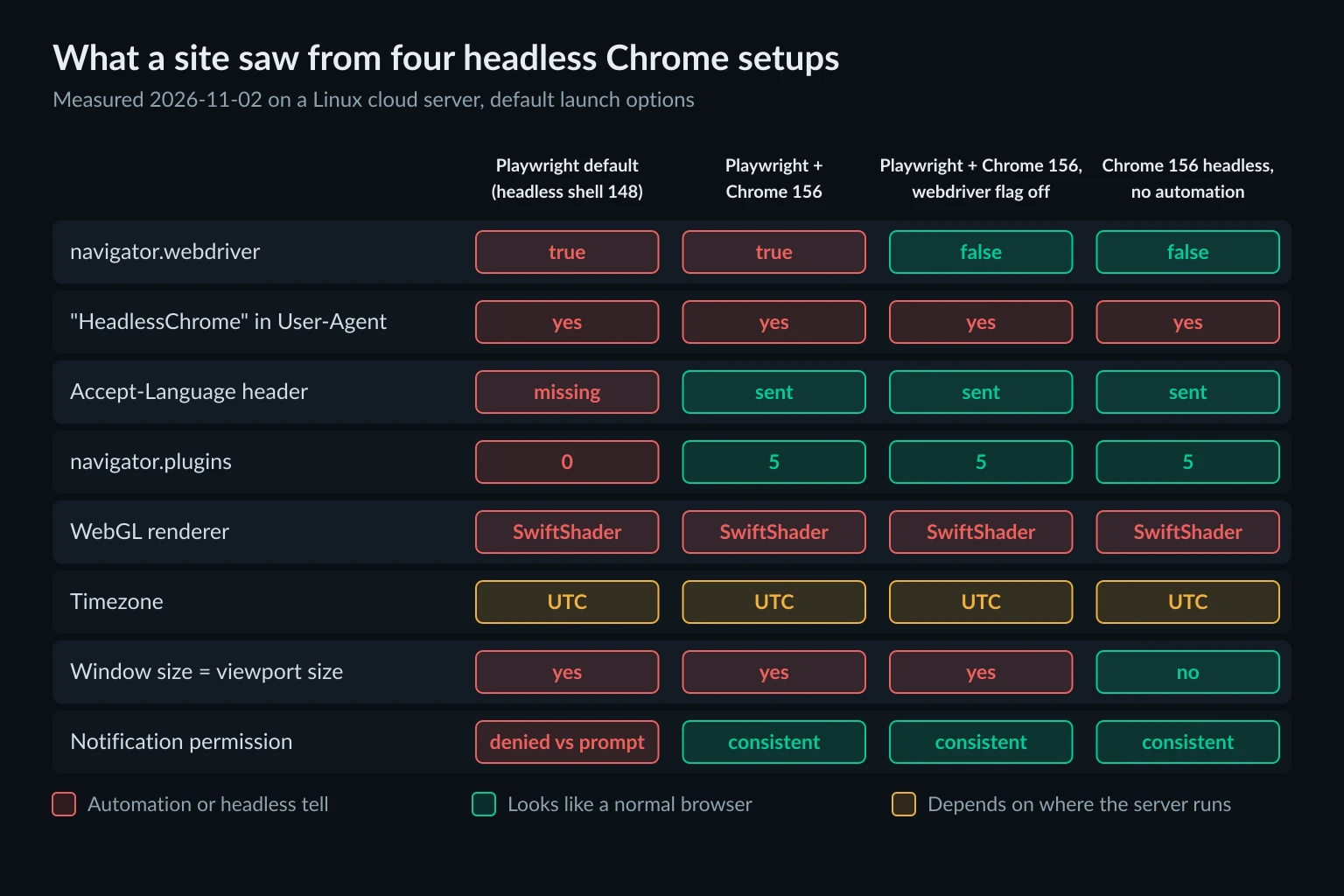
| Signal | Playwright default (headless shell 148) | Playwright + Chrome 156 | Same, AutomationControlled disabled |
Chrome 156 --headless, no driver |
|---|---|---|---|---|
navigator.webdriver |
true |
true |
false |
false |
HeadlessChrome in User-Agent |
Yes | Yes | Yes | Yes |
navigator.plugins.length |
0 | 5 | 5 | 5 |
| WebGL renderer | SwiftShader | SwiftShader | SwiftShader | SwiftShader |
| Timezone | UTC | UTC | UTC | UTC |
| Window vs viewport | 1280×720 = 1280×720 | 1280×720 = 1280×720 | 1280×720 = 1280×720 | 780×580 outer, 780×380 inner |
Notification.permission vs permissions query |
denied vs prompt |
default vs prompt |
default vs prompt |
default vs prompt |
What each row means to a detector:
navigator.webdriveristruewhenever automation controls the browser, by design. Launching Chrome with--disable-blink-features=AutomationControlledflipped it tofalse. Nothing else in the table changed.- SwiftShader is Chrome's software renderer. It shows up on servers without a GPU, which describes most agent hosts and very few laptops.
- Window equals viewport means the browser reports no toolbar or window frame. A desktop browser's outer window is taller than the page area. Chrome 156 headless without a driver reported that difference too (580 px vs 380 px tall), while every Playwright run reported identical sizes.
- The headless shell contradicts itself on notifications.
Notification.permissionsaysdeniedwhile the Permissions API saysprompt, a combination a normal browser doesn't produce. - UTC and 2 CPU cores aren't tells on their own, but they rarely come with a residential IP from another timezone.
One check came back clean everywhere. A trick described in older detection write-ups logs an Error whose stack getter fires only when a DevTools client is listening. It returned false in all four setups, including the three driven by Playwright. Detection lore ages fast, in both directions.
This is why there's no such thing as an undetectable AI browser. Turning off one flag moved one row. The rest of the table, plus the IP and the behavior, still described a headless browser on a server. Patching more properties tends to create new contradictions between them, which is what fingerprinting scripts look for.
Desktop-style computer use agents score differently. In setups like Anthropic's reference container, the agent drives a headed browser with operating-system input events, so navigator.webdriver reports false and the window has real browser chrome. Our computer use agents guide shows what a site sees from that setup.
Behavior signals: how AI agents click and type
Page scripts can also record input events. We added listeners to the test page, then had Playwright call page.click() on a 120×40 px button and page.type() on a text field:
- Pointer path: one
mousemoveevent, landing on the exact center of the button (360, 220). A person's pointer produces a stream of move events on the way. - Press duration: under 1.5 ms between
mousedownandmouseup(0.1 to 1.4 ms across the three runs). - Typing: 11 characters in 11-14 ms, about 1 ms per key.
isTrusted:trueon the click. Input sent through the DevTools protocol counts as trusted, so this old check doesn't separate Playwright from a person.
Exact centers and near-zero press times are easy for a behavioral model to separate from a person's input. LLM agents add a rhythm of their own on top: a pause of several seconds while the model reads a screenshot or the DOM, then a burst of actions, then another pause. When an action fails, an agent often repeats it immediately.
A newer idea tests for the model itself. Text the user can't see, such as an instruction hidden in the page, does nothing to a person or a scripted bot, but an LLM agent may act on it. Researchers used that idea, combined with response timing, to spot AI agents in an SSH honeypot. An agent that obeys hidden page text identifies itself, and it also has a security problem. Our AI agent security guide covers why prompt injection can't be filtered out.
Why an AI agent CAPTCHA appears, and what to do about it
CAPTCHAs today mostly score rather than test. reCAPTCHA v3 returns a score where 1.0 is very likely a good interaction and 0.0 is very likely a bot, and suggests 0.5 as a default threshold. Cloudflare Turnstile's managed mode chooses between a non-interactive check and a checkbox based on visitor risk. So a checkbox in front of your agent usually means the site wasn't sure. On many sites, a more confident score gets a block instead.
That also explains a widely shared moment from July 2025, when OpenAI's ChatGPT Agent clicked through Cloudflare's "Verify you are human" box. Clicking the box was never the test. The evidence had been collected before the click, and it was good enough for that visit.
When your agent meets a CAPTCHA, the right response is to stop and hand the page to a person, not to solve it. Wiring in CAPTCHA-solving services works against a check the site owner deliberately put there, and it usually breaks the site's terms. Our guide on whether data scraping is legal covers where that line usually sits. Retrying doesn't help either, because the score that produced the challenge hasn't changed.
To stop cleanly, the agent has to notice the challenge first. This check runs after each navigation or action in a Playwright agent:
from urllib.parse import parse_qs, urlsplit
from playwright.sync_api import sync_playwright

# widget iframe host -> path prefix
CHALLENGE_FRAMES = {"challenges.cloudflare.com": "/", "google.com": "/recaptcha/",
                    "recaptcha.net": "/recaptcha/", "hcaptcha.com": "/"}

def challenge_host(url):
    parts = urlsplit(url)
    host = parts.hostname or ""
    for domain, path in CHALLENGE_FRAMES.items():
        if (host == domain or host.endswith("." + domain)) and parts.path.startswith(path):
            return domain
    return None

# A passed widget writes its token into a *-response field in its own container.
# Turnstile keeps its iframe in a shadow root, so climb out through the host.
# Stop before <body>: puzzle frames hang off <body>, next to other widgets' tokens.
SOLVED = """iframe => {
  for (let node = iframe; node && node !== document.body;
       node = node.parentElement ?? node.getRootNode().host) {
    const fields = node.querySelectorAll('[name$="-response"]');
    if (fields.length) return [...fields].some((field) => field.value);
  }
  return false;
}"""

def human_check_on_page(page, response=None):
    """Return the host of a visible, unsolved human-check widget, or None."""
    if response is not None and response.headers.get("cf-mitigated") == "challenge":
        return "cloudflare challenge page"
    for frame in page.frames:
        if frame.parent_frame is None:
            continue  # the page itself, not a widget iframe
        host = challenge_host(frame.url)
        if host and "invisible" in parse_qs(urlsplit(frame.url).query).get("size", []):
            continue  # invisible reCAPTCHA badge; its puzzle opens in a separate frame
        element = frame.frame_element() if host else None
        box = element.bounding_box() if element and element.is_visible() else None
        if box and box["width"] >= 50 and box["height"] >= 50 and box["y"] >= 0:
            if not element.evaluate(SOLVED):
                return host
    return None

with sync_playwright() as p:
    browser = p.chromium.launch(headless=False)  # a person may need this window
    page = browser.new_page()
    response = page.goto("https://example.com/")
    page.wait_for_timeout(3000)  # widgets inject their iframe after the script loads
    if blocker := human_check_on_page(page, response):
        page.screenshot(path="needs-human.png")
        input(f"Paused: {blocker}. Finish the check in the browser window, then press Enter.")
    browser.close()
We tested it on local pages with the official test keys for Turnstile, reCAPTCHA v2, and hCaptcha. It flagged the visible widgets that still needed an answer. It ignored a plain page, a Turnstile widget that had already passed, and an invisible Turnstile widget, whose frame is 1×1 px. An invisible reCAPTCHA shows a 256×60 badge even when no challenge is open, so the check skips frames loaded with size=invisible and its hidden puzzle frame. It flags the puzzle once reCAPTCHA makes it visible. Add the hosts of any other CAPTCHA vendors you run into.
For the HTTP side, Cloudflare marks every challenge page with a cf-mitigated: challenge response header, which is what the first check in the function reads. Our Bot Fight Mode guide has a fetch wrapper that returns a block or challenge verdict to the model instead of the challenge HTML.
If you own the site and want to test your agent against your own forms, use the vendor's test keys. Cloudflare publishes dummy Turnstile sitekeys that always pass, always fail, or always show an interactive challenge.
Audit what your agent exposes
Run this with the same launch options and proxy your agent uses. It prints the TLS and HTTP/2 fingerprint the server saw and the browser signals from the table above:
import json
from playwright.sync_api import sync_playwright

SIGNALS = """async () => {
  const gl = document.createElement('canvas').getContext('webgl');
  const dbg = gl && gl.getExtension('WEBGL_debug_renderer_info');
  return {
    webdriver: navigator.webdriver,
    user_agent: navigator.userAgent,
    ua_brands: navigator.userAgentData?.brands.map(b => b.brand).join(', '),
    languages: navigator.languages.join(','),
    timezone: Intl.DateTimeFormat().resolvedOptions().timeZone,
    plugins: navigator.plugins.length,
    cpu_cores: navigator.hardwareConcurrency,
    screen: `${screen.width}x${screen.height}`,
    window: `outer ${outerWidth}x${outerHeight}, inner ${innerWidth}x${innerHeight}`,
    webgl: dbg ? gl.getParameter(dbg.UNMASKED_RENDERER_WEBGL) : 'none',
    notifications: Notification.permission + ' / ' +
      (await navigator.permissions.query({name: 'notifications'})).state,
  };
}"""

with sync_playwright() as p:
    browser = p.chromium.launch()  # copy your agent's launch options and proxy here
    page = browser.new_page()
    page.goto("https://tls.browserleaks.com/json")
    tls = json.loads(page.inner_text("body"))
    report = {"ja4": tls["ja4"], "http2": tls["akamai_text"], **page.evaluate(SIGNALS)}
    browser.close()

for key, value in report.items():
    print(f"{key:14} {value}")
With Playwright 1.60's default browser on our server, it printed:
ja4            t13d1516h2_8daaf6152771_d8a2da3f94cd
http2          1:65536;2:0;4:6291456;6:262144|15663105|0|m,a,s,p
webdriver      True
user_agent     Mozilla/5.0 (X11; Linux x86_64) AppleWebKit/537.36 (KHTML, like Gecko) HeadlessChrome/148.0.7778.96 Safari/537.36
ua_brands      Chromium, HeadlessChrome, Not/A)Brand
languages      en-US
timezone       UTC
plugins        0
cpu_cores      2
screen         1280x720
window         outer 1280x720, inner 1280x720
webgl          ANGLE (Google, Vulkan 1.3.0 (SwiftShader Device (Subzero) (0x0000C0DE)), SwiftShader driver)
notifications  denied / prompt
Read the output as a set. A residential exit with UTC, SwiftShader, and HeadlessChrome still describes a server. The fix that matters most depends on the site: identify the agent where the site supports signed or declared agents, slow the action rhythm, and use a full Chrome build instead of the headless shell when you need a browser at all. The shell differs from Chrome in its TLS handshake as well as in the page signals above.
Where proxies fit
A proxy changes exactly one layer: the network. It replaces a hosting ASN with an address from an ISP or a home connection, which removes the cheapest signal a site has for scoring an agent as automated. It does nothing for the TLS handshake, the headers, the browser fingerprint, or the behavior, and it doesn't change a site's decision to keep unidentified automation out.
For agents that need a stable identity, such as a partner site that allowlists your traffic or a logged-in session that shouldn't jump between addresses, a static ISP proxy gives you one fixed IP registered to a consumer ISP. For tasks that need many locations, rotating residential proxies spread requests across real household IPs. The proxies for AI agents guide covers which to choose and how to wire either into an agent.
FAQ
Can websites detect AI agents?
Yes, mostly the same way they detect other automation: hosting IPs, library TLS fingerprints, headless browser properties, and machine-like input. Agents add their own signals, such as declared user agents like ChatGPT-User, signed requests, and a think-then-burst action rhythm. Agents running in a person's own browser, on their own connection, are much harder to separate from that person.
Why does my AI agent keep getting CAPTCHAs?
Because the site's risk score for the visit landed in the uncertain range. Run the audit script above and check the IP. A cloud server IP, HeadlessChrome in the User-Agent, and software WebGL together are a common cause. A CAPTCHA that follows the agent across IPs points at the browser or behavior, not the network.
Can AI agents solve CAPTCHAs?
Some can click a checkbox, and a passing score does the rest. That doesn't make it appropriate. A CAPTCHA is the site asking for a person, so the agent should pause and hand the page to its user. If your agent has a take-over or confirmation step, this is the moment to use it.
Is there an undetectable AI browser?
No. Changing one property, as our webdriver test showed, leaves the other signals in place and can add contradictions. A browser that a site can't tell from a person usually means a real person's browser on a real connection. That is how local agentic browsers work, and it puts the user, not the agent, on the hook for what it does.
What user agent does ChatGPT use?
User-initiated fetches send ChatGPT-User/1.0 with a link to OpenAI's bot page. OpenAI publishes the IP ranges for it. Search indexing uses OAI-SearchBot and training crawls use GPTBot. ChatGPT's cloud browser signs its requests with Web Bot Auth instead of relying on the User-Agent.
Will a residential proxy stop AI agent CAPTCHAs?
Only when the IP was the main reason for the score. In our tests the browser carried several tells that no proxy touches. Fix those first, then use a proxy so the network layer agrees with the rest of the visit.
Final thoughts
An AI agent CAPTCHA is the end of a chain of evidence: a hosting IP, a library or headless handshake, HeadlessChrome in the headers, SwiftShader and navigator.webdriver in the page, and clicks that land on exact centers with presses under 1.5 ms. Knowing how websites detect AI agents tells you which of those you can fix and which you shouldn't try to hide. Run the audit against your own agent, stop and hand off on the first challenge, and identify the agent wherever the site gives you a way to. Then choose the network layer to match, with an ISP or residential proxy where a server IP is the weak link.