Cloudflare Bot Fight Mode is the bot protection switch on Cloudflare's Free plan. When it is on, Cloudflare answers requests that match known bot patterns with a computationally expensive JavaScript challenge instead of the page. Cloudflare's Free plan page says it targets "simple bots from cloud hosting providers and headless browsers". That describes most AI agents: a Playwright browser or an HTTP fetch tool running on a cloud VM.
There are no settings beyond on and off. It covers the whole domain, and the Bot Fight Mode docs say WAF custom rules and Page Rules can't skip or bypass it. A request that matches an IP Access rule is not evaluated by Bot Fight Mode. Apart from that, the owner's only choices are turning it off or upgrading to Super Bot Fight Mode, which supports exceptions.
So the answer depends on which side you're on. If your agent hits Bot Fight Mode, a challenge from a cloud IP is a stop signal, not something to retry. If you run the site, Bot Fight Mode will also challenge the automation you want: your own agents, API clients, webhooks, and OAuth callbacks. Below is what it does, how it showed up when we pointed five agent-style clients at 29 Cloudflare sites, how to tell its challenge from other Cloudflare blocks, and what each side can do about it.
Quick answer: what Bot Fight Mode does to agent traffic
| Traffic | What happens under Bot Fight Mode |
|---|---|
HTTP fetch tools (requests, httpx, urllib, curl) on a cloud VM |
Challenged when they match a bot pattern. They can't run JavaScript, so they never pass |
| Headless Chromium driven by an agent on a cloud VM | Challenged. In our test, no headless browser cleared a managed challenge within 20 seconds |
| The site's own API clients, mobile apps, webhooks, OAuth callbacks | Can be challenged. Cloudflare warns about API and mobile app traffic |
| Verified bots and signed agents | Free-plan docs describe no setting for them. Verified-bot controls are a Pro-and-up feature |
| Requests whose connecting IP matches an IP Access rule | Not evaluated by Bot Fight Mode |
What Cloudflare Bot Fight Mode actually does
Bot Fight Mode uses the same detection technology as Cloudflare's paid Bot Management, but the owner can't adjust any of it. According to the Bot Fight Mode documentation, it:
- identifies traffic that matches patterns of known bots
- issues challenges that make the client do CPU-heavy work
- protects the entire domain with no per-path or per-endpoint scope
JavaScript Detections is always on with Bot Fight Mode and can't be turned off. Cloudflare injects a small script into HTML pages and stores the result in the cf_clearance cookie. A client that never executes JavaScript never produces that signal.
The action is a challenge. The Free plan page lists "Cloudflare issues a computationally expensive challenge" as its only action, and it doesn't list blocking. That's a useful diagnostic. If you see Cloudflare's "Sorry, you have been blocked" page, something else blocked you: a WAF rule, a managed rule, or a Super Bot Fight Mode block.
The site owner sees each challenged request under Security > Analytics > Events with Bot Fight Mode in the Service field. From the client side you can't see that label, which is why the diagnosis section below works with what you can see.
Why WAF rules can't skip it
Cloudflare's WAF features run as phases of the Ruleset Engine, and a custom rule with the Skip action can step over later phases such as rate limiting, managed rules, and Super Bot Fight Mode. Bot Fight Mode runs in a separate pipeline outside the Ruleset Engine, so Skip, Bypass, and Allow have no effect on it. The security features interoperability page spells this out, and the Skip options reference says: "Currently, you cannot skip Bot Fight Mode, only Super Bot Fight Mode."
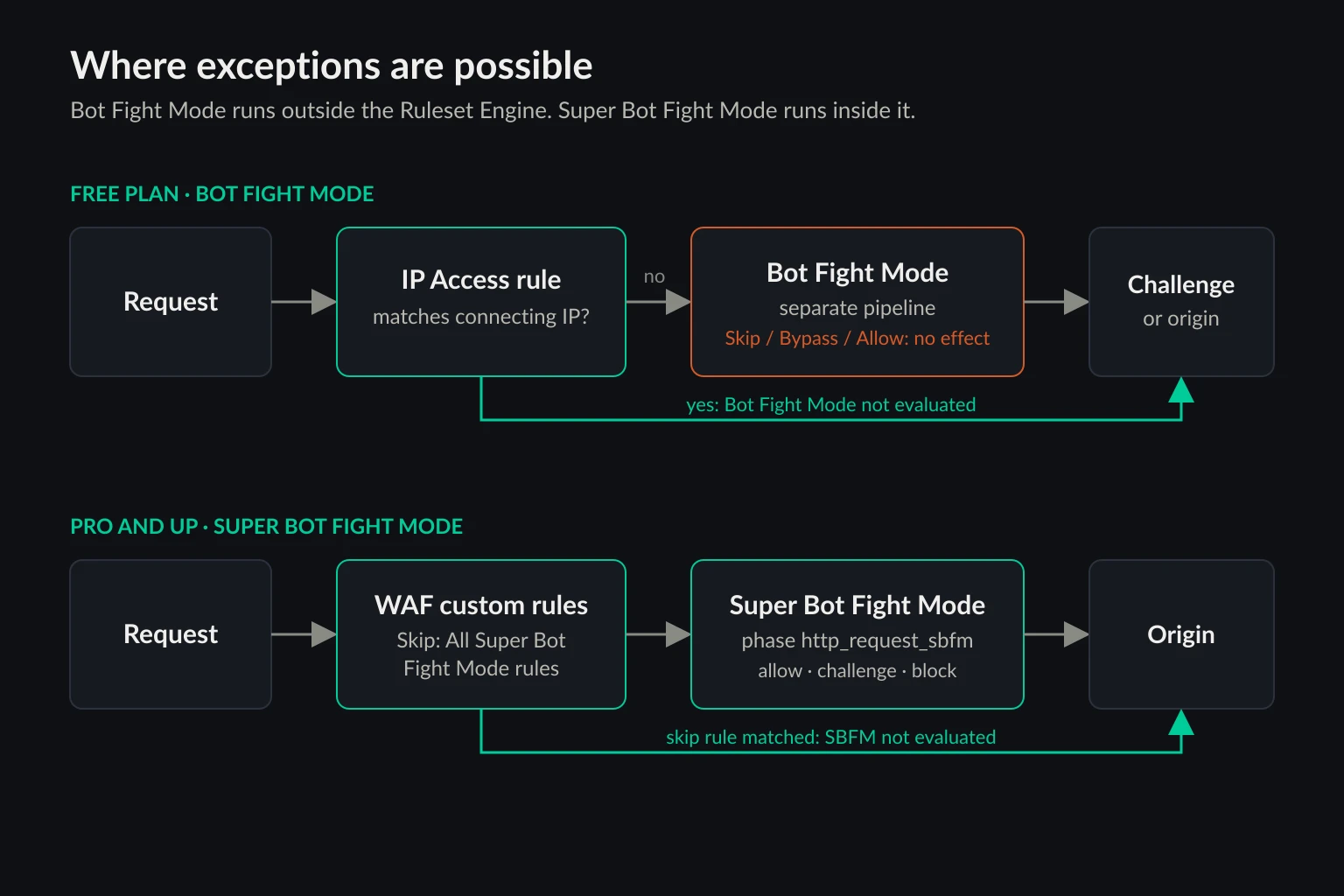
The one documented exception is IP Access rules. The Bot Fight Mode page says it "will not trigger if an IP Access rule matches the request first", and the match is on the connecting IP. Cloudflare's false positives page adds a broader line, saying Bot Fight Mode "will be disabled if there are any IP Access rules present", which contradicts the main page. If you rely on either behavior, confirm it in Security Events.
Bot Fight Mode vs Super Bot Fight Mode vs Bot Management
Which tier a site runs decides what its owner can do about a false positive. The three tiers differ mostly in control, not detection.
| Bot Fight Mode | Super Bot Fight Mode | Bot Management | |
|---|---|---|---|
| Plan | Free | Pro, Business, Enterprise without the add-on | Enterprise add-on |
| Action | Challenge only | Allow, block, or challenge per group | Any WAF action on a bot score from 1 to 99 |
| Exceptions | IP Access rules only | Custom rules with Skip, IP Access Allow | Custom rules on score, path, and verified-bot fields |
| Verified bots | No setting | Allow or block | Fields in rules |
| JavaScript Detections | Always on | Optional | Optional |
| Scope | Whole domain | Whole domain, with skip rules | Rule-level |
Super Bot Fight Mode runs in the http_request_sbfm phase, after WAF custom rules, so a custom rule with Skip can exempt a path, an IP list, or a header. Pro sites get a Definitely automated group (bot score 1). Business adds Likely automated (scores 2 to 29).
Cloudflare's AI bot policies are a separate setting from all three. Since September 15, 2026, new domains get defaults that block bots classified as Training or Agent on pages that display ads. If an agent is blocked on a site with Bot Fight Mode off, check that setting next.
What gets blocked when AI agents meet Bot Fight Mode
On 30 October 2026, we sent one request per client to the homepages of 29 Cloudflare-fronted sites from a Hetzner server in Nuremberg. That is a datacenter IP, which is where most agents run. We used five clients:
curl8.18.0 with its default User-Agent- Python 3.14
urllibwith its defaultPython-urllib/3.14User-Agent - Python
urllibwith a Chrome 155 User-Agent and browserAcceptheaders - Playwright 1.60 with
chrome-headless-shell148, the default forheadless: true - Playwright 1.60 with full Chromium 148 in new headless mode (
channel: "chromium")
Both browsers waited up to 20 seconds for any challenge page to resolve before we recorded the result.
A caveat first. Most of these sites belong to large companies and probably run Business plans or Enterprise Bot Management, not Bot Fight Mode. A managed challenge looks the same from outside whichever product issued it. What the test shows is how agent-style clients fare against Cloudflare's shared detection, and how to read each kind of response.
| Client | Page loaded | Managed challenge | Block page | Error 1010 | Other 403 |
|---|---|---|---|---|---|
curl default |
10 | 9 | 3 | 0 | 7 |
urllib default UA |
2 | 9 | 3 | 9 | 6 |
urllib with Chrome UA |
13 | 10 | 2 | 0 | 4 |
| Headless shell 148 | 11 | 8 | 3 | 0 | 7 |
| Chromium 148 new headless | 11 | 8 | 3 | 0 | 7 |
"Other 403" covers origin errors and other vendors' bot checks, such as G2's "Please enable JS and disable any ad blocker" page and Indeed's "Security Check".
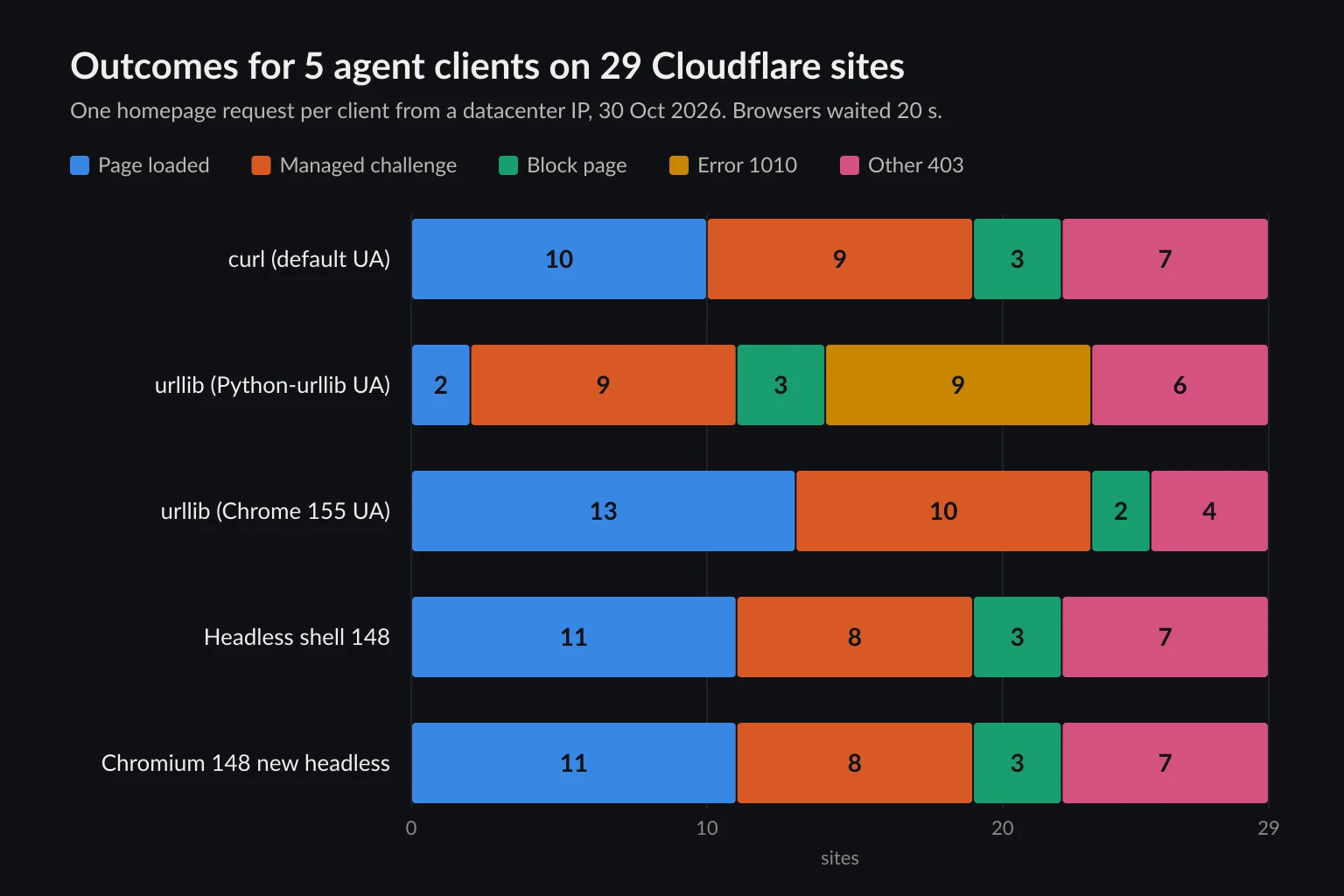
Three results matter for agents.
A real browser didn't get through. Eight sites challenged both headless browsers: npm, Coinbase, Product Hunt, OpenAI, ChatGPT, Claude, Perplexity, and the nowsecure.nl challenge test page. None of the 16 browser attempts on those sites got past "Just a moment..." within 20 seconds. Seven of the eight also challenged every HTTP client. Moving from requests to Playwright doesn't solve a challenge served to a datacenter IP running an automation browser. We ran the HTTP clients three times over about 10 minutes, and those seven sites challenged them every time, so retrying without changing anything doesn't help either.
The default Python User-Agent triggers a different block. Python-urllib/3.14 got Cloudflare error 1010 ("banned your access based on your browser's signature") on 9 sites: Discord, GitLab, Shopify, DigitalOcean, Notion, Substack, Kick, Crunchbase, and G2. curl loaded the first eight. That's Browser Integrity Check, which is on by default on every plan. It isn't Bot Fight Mode. We swapped in a descriptive research-agent/1.0 (+https://example.com/agent) User-Agent, and 8 of the 9 loaded. The User-Agent strings that requests and httpx send by default (python-requests/2.32.5, python-httpx/0.28.1) passed on the same eight. G2 still returned its other vendor's 403. Cloudflare's error 1010 page gives the same advice: send a User-Agent that identifies your application, not necessarily a browser one.
Hard blocks weren't Bot Fight Mode. Upwork and GOAT served "Sorry, you have been blocked" to all five clients, and Medium to four of them. Bot Fight Mode doesn't block, so those came from rules the owners wrote or from paid bot settings.
How to tell a Bot Fight Mode challenge from other Cloudflare blocks
You can't prove from outside that Bot Fight Mode fired, but you can rule it out. Every Cloudflare challenge page carries the cf-mitigated: challenge response header, which Cloudflare documents for exactly this purpose. The status code is usually 403.
| What the agent gets | Signs in the response | Possible source | Could be Bot Fight Mode? |
|---|---|---|---|
| Challenge page | cf-mitigated: challenge, title "Just a moment...", cType: 'managed' in the page script |
Bot Fight Mode, Super Bot Fight Mode, Bot Management, or a WAF challenge rule | Yes |
| Block page | "Sorry, you have been blocked", no cf-mitigated header |
WAF custom or managed rule, Super Bot Fight Mode Block | No |
| Error 1010 | "banned your access based on your browser's signature" | Browser Integrity Check or a User-Agent rule | No |
| Error 1020 | "Access denied", error code 1020 | Owner's firewall rule | No |
| Error 1005 | ASN banned | Owner's ASN rule | No |
| 429 or error 1015 | Rate limit page, sometimes Retry-After |
Rate limiting rule | No |
Custom error pages can hide the familiar layout. Shopify and DigitalOcean showed branded "Access denied" pages, but the text still said "Error reference number: 1010". Match on the code, not the page design.
Return a verdict to the model, not the challenge HTML
An agent that receives a challenge page as tool output will often summarize "Just a moment..." as the page content, or call the tool again. Classify the response in the tool layer and hand the model a short instruction. We ran this standard-library version against the sites above. It returned challenge for npm, block for GOAT, 1010 for Substack when we switched back to the default User-Agent, and the page for Substack with the descriptive one.
import re
import urllib.error
import urllib.request

# Identify the agent honestly. Library defaults such as Python-urllib/3.x trip
# Cloudflare's Browser Integrity Check (error 1010) on many sites.
AGENT_UA = "acme-research-agent/1.2 (+https://acme.example/agent)"

ADVICE = {
    "challenge": "Cloudflare served a JavaScript challenge. Do not retry. "
                 "Report that this page needs a browser session or the site's permission.",
    "block": "A Cloudflare security rule blocked this request. Do not retry or switch IPs. "
             "Report the Ray ID to the user.",
    "1010": "Blocked on client signature (error 1010). Check the User-Agent before anything else.",
    "1015": "Rate limited. Wait before any further request to this site.",
    "429": "Rate limited. Wait before any further request to this site.",
}


def classify(status, headers, body):
    if headers.get("cf-mitigated") == "challenge":
        return "challenge"
    if status < 400:
        return "ok"
    text = re.sub(r"<[^>]+>", " ", body)
    code = re.search(r"[Ee]rror(?: code:?| reference number:)?\s+(10\d\d)\b", text)
    if code:
        return code.group(1)
    if "Sorry, you have been blocked" in text:
        return "block"
    return str(status)


def fetch_for_agent(url):
    req = urllib.request.Request(url, headers={
        "User-Agent": AGENT_UA,
        "Accept": "text/html,application/xhtml+xml,*/*;q=0.8",
    })
    try:
        with urllib.request.urlopen(req, timeout=20) as resp:
            status, headers, raw = resp.status, resp.headers, resp.read(2_000_000)
    except urllib.error.HTTPError as err:
        status, headers, raw = err.code, err.headers, err.read(2_000_000)
    except OSError as err:  # DNS failure, refused connection, timeout, TLS error
        return {
            "ok": False,
            "status": None,
            "blocked_by": "network_error",
            "cf_ray": None,
            "instruction": f"Request failed: {getattr(err, 'reason', err)}. "
                           "Do not retry in a loop.",
        }
    body = raw.decode("utf-8", "replace")
    verdict = classify(status, headers, body)
    if verdict == "ok":
        return {"ok": True, "status": status, "content": body}
    return {
        "ok": False,
        "status": status,
        "blocked_by": verdict,
        "cf_ray": headers.get("cf-ray"),
        "instruction": ADVICE.get(verdict, "The site refused the request. Do not retry."),
    }
For npm, the agent receives this instead of the challenge markup:
{'ok': False, 'status': 403, 'blocked_by': 'challenge', 'cf_ray': 'a526f2af2b407024-CDG', 'instruction': "Cloudflare served a JavaScript challenge. Do not retry. Report that this page needs a browser session or the site's permission."}
Keep the cf_ray value. It is the fastest way for a site owner to find your request in Security Events. If your agent drives a browser instead, check the same header on the navigation response, as the guide to why web browsing agents get blocked describes.
How to respond when your AI agent hits Bot Fight Mode
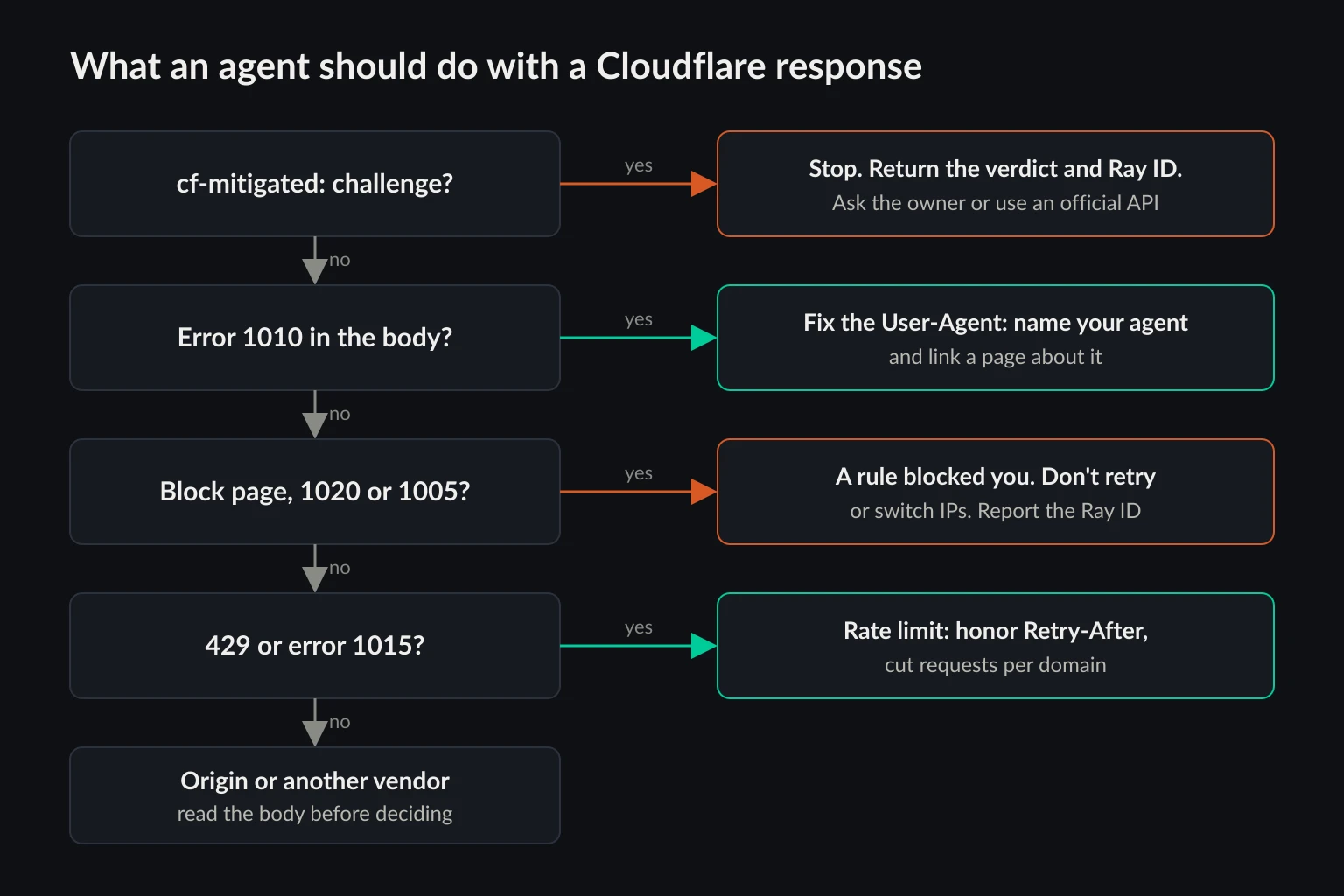
Stop on the first challenge. A challenge isn't a rate limit, so backing off and retrying from the same client gets the same answer, as our repeated runs showed. Don't wire in CAPTCHA-solving services either. The challenge is the owner telling unidentified automation to stay out, and getting around it puts you on the wrong side of most sites' terms. Our guide on whether data scraping is legal covers where that line usually sits.
Fix what you control. Replace library-default User-Agents with one that names your agent and links to a page about it. That cleared every error 1010 in our test that wasn't caused by another vendor. Send the headers your client would normally send, and don't claim to be Chrome from a script that can't run JavaScript. Web scraping headers covers what a consistent header set looks like.
Look for an official route. Some sites that challenge page requests also publish an API, an RSS feed, or a data export. Checking robots.txt and the site's developer pages takes a minute, and an agent that uses the API never meets Bot Fight Mode.
Ask the owner, and know what they can actually do. On a Free plan, the only per-client exception is an IP Access rule with the Allow action that matches your agent's connecting IP. That means your agent needs a fixed egress IP the owner can add. A rotating residential pool can't be allowlisted, because the exit changes on every session. A static ISP proxy or your own fixed server IP can. If the owner is on Pro or above, they can instead write a Super Bot Fight Mode skip rule for your IP or a path. When you ask, send the Ray ID, the time in UTC, and the IP you'll use.
Identify your agent where the site can act on it. Cloudflare now treats agents signed with Web Bot Auth as verified bots, labeled by behavior (Agent, Search, Training) and by whether one operator or many end users drive them. Owners on Super Bot Fight Mode or Bot Management can allow verified bots. Bot Fight Mode has no verified-bot setting in the current docs, and one owner reported it challenging Zapier's OAuth token requests even though Zapier is on Cloudflare's verified bots list. Signing is worth doing for an agent product, but don't count on it on a Free-plan site. The proxies for AI agents guide walks through the signing headers.
Where proxies help and where they don't
Cloudflare names cloud hosting providers as one of the patterns Bot Fight Mode looks for, so the exit IP is part of the signal. Moving an agent from a hosting ASN to a residential or ISP exit removes that part. It doesn't change the rest of the request. An HTTP client still can't run the challenge script, and a headless browser still reports HeadlessChrome and navigator.webdriver. A cleaner IP can lower how often a site that allows your use case challenges you. It won't get you past a site that keeps automated access out on purpose.
Proxies matter most for the allowlist route above. An owner can only add a fixed address to an IP Access rule, which makes an ISP proxy plan the practical choice when an agent needs to be recognized by a partner site. For one-off fetches across many sites, rotating residential proxies spread load but give the owner nothing stable to allow.
How site owners stop Bot Fight Mode from blocking agents they want
If you turned Bot Fight Mode on and your own automation broke, start with the evidence.
- Ask for the Ray ID from the failing client, or take the
cf-rayheader from your own logs. - Open Security > Analytics > Events and filter by Ray ID, IP, or path.
- If the Service field says Bot Fight Mode, no WAF rule will fix it. If it names a custom rule, managed rule, or Browser Integrity Check, fix that instead. The error 1020 owner steps cover WAF rules.
Then list the automated traffic you depend on. Check payment and Git webhooks, OAuth token endpoints called by integrations, uptime monitors, mobile app API calls, RSS readers, MCP servers or agent tools you host behind the zone, and your own agents. A webhook or token request that gets an HTML challenge instead of JSON fails on the sender's side, and because Cloudflare answered at the edge, the request never appears in your app logs.
Your options on the Free plan:
- Allow fixed IPs with IP Access rules. This works for partners that publish egress ranges and for your own agents if they leave through a static IP. It doesn't work for services that rotate through large cloud ranges.
- Move machine endpoints to a zone with Bot Fight Mode off. The setting is per zone, so an API on a separate domain with its own Cloudflare zone isn't covered. A subdomain in the same zone is.
- Turn Bot Fight Mode off and replace it with rules you can scope. WAF custom rules and rate limiting rules are both available on Free. A Managed Challenge rule on your login and signup paths, a rate limiting rule, and Turnstile on forms put friction where abuse usually lands while leaving
/api/alone.
On Pro or above, turn Bot Fight Mode off and Super Bot Fight Mode on, as Cloudflare's upgrade note says. Then add a custom rule with the Skip action and All Super Bot Fight Mode rules selected:
(starts_with(http.request.uri.path, "/api/") or ip.src in {203.0.113.10 198.51.100.24})
Replace the path and the documentation-range IPs with your own API prefix and the fixed IPs of agents you trust. Set Verified bots to Allow if you want search crawlers and signed agents through. If you use Cloudflare Tunnel, keep Definitely automated on Allow, because Cloudflare warns that Super Bot Fight Mode can otherwise break tunnel connections with websocket: bad handshake.
If you want to keep AI agents out rather than let them in, Bot Fight Mode alone won't tell agents apart from your other automation. The AI bot policies in Security Settings let you block the Agent, Search, and Training behaviors separately.
FAQ
Does Cloudflare Bot Fight Mode block Googlebot and other good bots?
Cloudflare says verified bots such as search engine crawlers have historically been excluded from its default bot settings on all plans. Its current Bot Fight Mode docs describe no verified-bot setting, though, and at least one owner has reported a verified service being challenged. Verified-bot allow and block controls come with Super Bot Fight Mode on Pro and above. After you enable Bot Fight Mode, filter Security Events for crawlers you care about.
Can I whitelist an IP or path in Bot Fight Mode?
You can't exempt a path. An IP Access rule with the Allow action that matches the connecting IP keeps Bot Fight Mode from evaluating that request. WAF custom rules with Skip and Page Rules don't work, because Bot Fight Mode runs outside the Ruleset Engine.
Does Bot Fight Mode block API requests?
It can. Cloudflare says Bot Fight Mode "may challenge API or mobile app traffic". An API client expecting JSON gets an HTML challenge with a 403 and a cf-mitigated: challenge header instead.
Is Bot Fight Mode the same as blocking AI bots?
No. Bot Fight Mode challenges traffic that looks automated, whatever its purpose. The AI bot policies block crawlers and agents by behavior (Search, Agent, Training) and can be limited to pages with ads. They're separate settings, and both can be on.
Will a residential proxy get my AI agent past Bot Fight Mode?
Not by itself. It replaces a cloud IP, which is one input. The client still has to run the challenge, and an automation browser still looks automated. If a site challenges your agent, ask for access or use an official API.
How do I turn off Cloudflare Bot Fight Mode?
In the Cloudflare dashboard, go to Security > Settings, filter by Bot traffic, and switch Bot fight mode off. The change applies to the whole zone.
Final thoughts
Cloudflare Bot Fight Mode is a blunt tool by design. It challenges anything that looks like a cloud-hosted script or headless browser, and on the Free plan the owner can't carve out exceptions beyond IP Access rules. For an AI agent, that makes a Bot Fight Mode challenge a signal to stop and report, not to retry, after you've fixed what you control, such as a default library User-Agent. For an owner, it means auditing which agents, webhooks, and API clients you need before you turn it on, and moving to Super Bot Fight Mode when you need skip rules. If a partner site will allowlist your agent, give it a fixed IP it can add, such as a dedicated address from an ISP proxy plan.