Agentic workflows are multi-step processes where a language model makes some of the decisions that code would normally make: which step runs next, which tool to call, which URL to open, or whether a result is good enough to ship. The rest stays ordinary software. Code still triggers the run, enforces limits, and stores the output. "Agentic" describes how much of the path the model chooses, not a specific framework or product.
That choice has a direct effect on the web traffic. In a fixed pipeline you can list every URL before the run starts. In an agentic workflow, the model picks some of them while the run is underway. Each search result, fetched page, or browser screen it reads then becomes input to the next decision.
To make the trade-off concrete, we ran one task both ways. A scripted pipeline and a Claude Haiku agent each collected every Albert Einstein quote from a 10-page site. Both got the right answer. The agent's request pattern changed completely depending on whether it recognized the site, and the scripted version returned a wrong answer with no error after a markup change that renamed one CSS class. The details are below, after the definitions and patterns.
What makes a workflow agentic
The clearest line comes from Anthropic's Building effective agents. It groups everything under "agentic systems" and then splits them in two. Workflows are "orchestrated through predefined code paths," and agents "dynamically direct their own processes and tool usage." The LangGraph docs draw the same line. Workflows "have predetermined code paths," while agents "define their own processes and tool usage."
In practice, people use "agentic workflow" for everything from a two-prompt chain to a fully autonomous agent. A more useful test is to ask who decides the next request.
| Approach | Who picks the next step | Who picks the URLs | Request count known in advance | Typical failure |
|---|---|---|---|---|
| Fixed pipeline | Code | Code | Yes | Breaks, or goes quietly wrong, when a site changes |
| Workflow with LLM steps | Code | Code | Yes | Bad extraction or summary from one step |
| Agentic workflow | Code sets the stages, the model decides inside them | The model, inside limits you set | Roughly | Loops, wrong branch, extra fetches |
| Autonomous agent | The model | The model | No | Runaway cost, wandering off task |
Most production systems that call themselves agentic sit in the third row. Code owns the outer structure: a trigger, a few stages, a stop condition, and a place to write results. The model makes the calls that are hard to script, such as which of five sources to check, whether a page answers the question, or whether a draft needs another pass.
Andrew Ng's March 2024 letter, Agentic Design Patterns Part 1, grouped the techniques into four patterns: reflection, tool use, planning, and multi-agent collaboration. He also cited coding benchmark results in which GPT-3.5 went from 48.1% correct zero-shot to up to 95.1% "wrapped in an agent loop." The point is that iterating with feedback beats one long pass. That holds just as well for research and data tasks, as long as the feedback comes from something real, like a page or a test.
Common agentic workflow patterns and their web traffic
Anthropic's guide names five workflow patterns. Each one decides something different, and so each one hits websites differently. The traffic column is the part most pattern write-ups leave out.
| Pattern | What the model decides | Web traffic shape | Limit to set in code |
|---|---|---|---|
| Prompt chaining | Nothing about flow. Each call transforms the previous output | Fixed. Code fetches, the model reads | None beyond normal scraping limits |
| Routing | Which branch handles the input | One of a few known shapes | Per-branch source allowlist |
| Parallelization | Nothing. Code splits or votes | Bursts: N fetches at once, often to one domain | Per-domain concurrency cap |
| Orchestrator-workers | How many subtasks, and what each one covers | Unknown count, many sessions at once | Max workers, a request budget per worker |
| Evaluator-optimizer | Whether the output passes | Repeats: each round can search or re-fetch | Max rounds, a cache for pages already read |
Prompt chaining is the least agentic of the five. A typical chain fetches a page in code, has one LLM call extract fields, and has a second normalize them. You can add a gate between steps, a programmatic check that stops the chain when an output looks wrong. For web data, that gate is where you catch an empty extraction from a blocked page before it reaches the next step.
Routing sends each input down one of several paths. A support workflow might send "where is my order" to an internal API and "compare your plan to X" to a web research branch. Only the second branch touches the open web, so only that branch needs a fetch tool, a proxy, and a budget.
Parallelization runs independent LLM calls at the same time. It's the pattern that most often triggers rate limits by accident, because twenty "independent" subtasks often fetch from the same domain. Cap concurrency per domain, not just per workflow.
Orchestrator-workers lets a model split a task into subtasks at run time and hand them to workers. It fits research questions where you can't know in advance which sources matter. It's also where request counts become hard to predict. Give each worker its own session and budget, and put a hard ceiling on the number of workers. This post doesn't cover multi-agent coordination in depth. The network rule is the same as for any parallel task: workers don't share cookie jars.
Evaluator-optimizer loops. One call drafts, another critiques, and the draft goes back for revision until it passes. If the evaluator is allowed to check facts against the web, every round can trigger new searches and fetches. Put the round limit in code, and cache pages so a second check reads from memory instead of the site.
Ng's four patterns map onto these. Reflection is the evaluator-optimizer loop. Tool use is how the steps reach the web at all. Planning is the orchestrator deciding subtasks. Multi-agent collaboration is several workers, each with its own role.
Where web data enters the loop
An agentic workflow takes in outside content at more places than "the fetch tool." Here are the six we see most often. Each one is a point where text you didn't write becomes model input, and a model decision then follows from it.
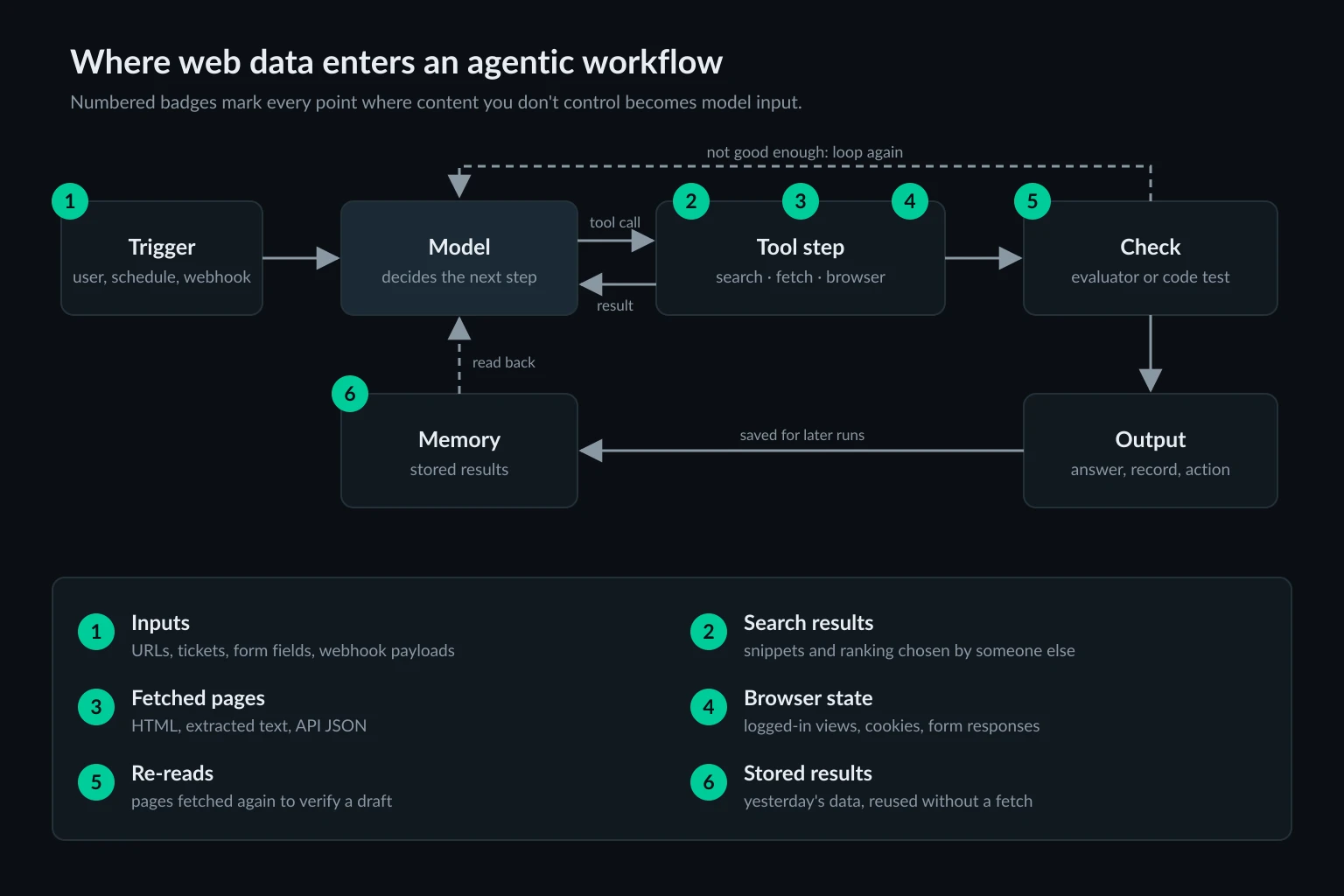
| Entry point | Who chooses what comes in | What goes wrong | Control |
|---|---|---|---|
| 1. Inputs | The user or upstream system | Arbitrary URLs, internal addresses, oversized payloads | Validate and allowlist URLs before any fetch |
| 2. Search results | The search engine's ranking | Irrelevant or SEO-spam sources, stale snippets | Restrict domains, open only the top few results |
| 3. Fetched pages | The site | Blocks returned as "content," huge pages, injected instructions | Classify status before parsing, cap result size |
| 4. Browser state | The site and your session | Logged-in data leaking across runs, side effects from clicks | One browser context per run, confirm writes |
| 5. Re-reads | The evaluator | Duplicate traffic, verification against a changed page | Cache by URL for the run, record fetch time |
| 6. Stored results | A previous run | Stale facts, injected text that persists | Store source URL, status, and timestamp with each fact |
Inputs (1) come in before the model sees anything. If a workflow accepts a URL from a ticket or a form, that URL can point at localhost, a cloud metadata address, or a page built to steer the model. Validate it in code before any tool runs.
Search results (2) decide which pages the model is even able to consider. A snippet can look authoritative and still be a scraper copy of the real page. If you only trust a handful of sources for a task, restrict the search to them instead of hoping the model picks well.
Fetched pages (3) are the main entry point, and the one that most often fails silently. A 403 page, a CAPTCHA, or a cookie wall arrives as HTML just like real content. Unless the tool checks the status code and returns a clear verdict, the model may summarize a "verify you are human" page as if it were the answer. Size matters too. Whatever a fetch returns usually stays in the conversation and is re-sent on every later model call.
Browser state (4) carries more than page text. A browser step that logs in has cookies, local storage, and the power to submit forms. Keep one browser context per run, and require human confirmation outside the model before anything that writes. Add an idempotency key as well so a retry can't repeat the write.
Re-reads (5) come from verification loops. An evaluator that "double-checks the source" fetches the same page again. That's fine when it reads from a run-level cache and wasteful when it goes back to the site every round.
Stored results (6) are web data that entered the loop in an earlier run. Treat them as data with an age. If a run reuses a price from yesterday, the output should say so.
Everything that enters at these points is untrusted. OWASP's LLM01 prompt injection entry describes indirect injection as content "from external sources, such as websites or files" that alters the model's behavior. A workflow that reads a page and then sends an email has turned that page into a possible instruction source. AI agent security covers sandboxing and egress controls for that case.
Test: the same task as a fixed workflow and an agentic workflow
We wanted to see how much the "who picks the URLs" column matters in practice. The task was to find every quote by Albert Einstein on quotes.toscrape.com, a public scraping sandbox with 100 quotes across 10 listing pages. There are 10 Einstein quotes, spread over pages 1 to 6 and page 9.
Fixed workflow. A 14-line Node 24 script fetched the homepage, collected quotes with a regular expression, and followed the <li class="next"> link until there wasn't one.
Agentic workflow. claude -p (Claude Code 2.1.310) running Claude Haiku 5.5, with one tool: a small MCP stdio server exposing fetch_page(url). It returned the page title, up to 4,000 characters of visible text, and the page's links. The prompt only stated the goal. We ran it five times.
Then we changed the site. We served a saved copy of the same 10 pages from a local server on 127.0.0.1 with one edit, renaming the pagination class from next to pager-forward. The visible "Next →" link was unchanged. The agent ran five more times against that host, and the fixed script ran once.
| Run | Requests | Model calls | Input tokens | Wall time | Correct |
|---|---|---|---|---|---|
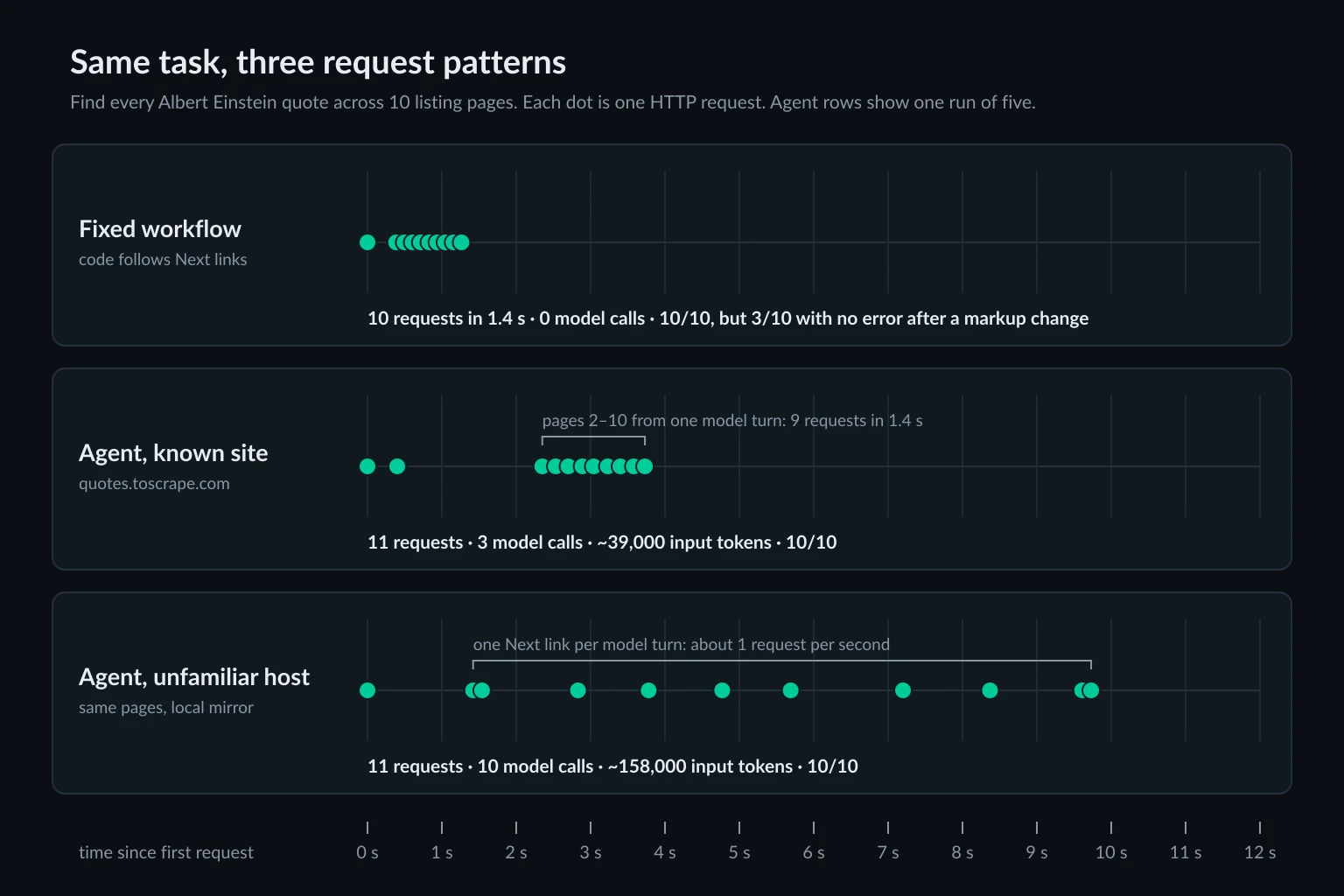
| Fixed workflow, real site | 10 in 1.4 s | 0 | 0 | 1.4 s | 10 of 10 |
| Fixed workflow, changed markup | 1 | 0 | 0 | 0.06 s | 3 of 10, no error |
| Agent, real site (5 runs) | 11 | 3 | 37,000–39,300 | 21.5–30.5 s | 10 of 10, every run |
| Agent, changed markup on an unfamiliar host (5 runs) | 10–11 | 10–11 | 158,000–184,000 | 17.5–19.5 s | 10 of 10, every run |
Three things stood out.
The model's prior knowledge set the traffic shape. On quotes.toscrape.com, every run started by guessing /author/Albert-Einstein/, a URL it had not yet seen on any page. That page holds a biography, not quotes. It fetched the homepage in the same turn (in one run, in the next turn), then asked for pages 2 to 10 all at once. That was another pattern it knew in advance, because the homepage only links to page 2. Claude Code executed those nine tool calls one after another, so they reached the site in about 1.4 seconds, about as fast as the scripted loop. On the unfamiliar host, the same model with the same tool and the same page content walked the site one "Next" link per model turn, at about one request per second. Nothing in the task told you which pattern you'd get.
Same answer, four to five times the input tokens. The walk cost 10 to 11 model calls and 158,000 to 184,000 input tokens, against 3 calls and about 38,000 tokens for the burst. Each extra turn re-sends the conversation so far. Billed cost barely moved, $0.0069 to $0.0080 per run in both cases, because most of the re-sent tokens were prompt-cache reads. On a model or provider without caching, that gap would show up on the invoice.
The fixed workflow failed silently. The agent didn't notice the change at all. Renaming one CSS class made the scripted run stop after page 1 and report 3 quotes, with no exception and a normal exit. The agent never saw class names, only link text, so the change didn't affect it. This is the real argument for an agentic step. It costs more and you can't predict its traffic, but it holds up when the page changes underneath it.
A few caveats. This is one small task on one model, and Claude Code runs MCP tool calls sequentially. A framework that runs parallel tool calls concurrently would deliver that burst of nine all at once. Our Pydantic AI proxy guide logged five parallel fetches within 1 ms of each other. Wall time was dominated by generation, not fetching. The real-site runs were slower overall because the model generated more output in its three turns, 4,200 to 6,300 tokens against about 2,300 to 2,700, most of it hidden reasoning rather than answer text.
How to design the web steps of an agentic workflow
The test points to a simple split. Put the model where judgment is needed, and keep the parts you can script in code, with checks that fail loudly.
Script the paths you already know. Pagination, sitemaps, known API endpoints, and scheduled re-checks belong in code. The scripted run was more than 15 times faster and used zero tokens. Its only weakness was failing silently, and that can be fixed:
// Keep the browser version current.
const UA =
  "Mozilla/5.0 (Windows NT 10.0; Win64; x64) AppleWebKit/537.36 " +
  "(KHTML, like Gecko) Chrome/155.0.0.0 Safari/537.36";
const QUOTE = /<span class="text"[^>]*>(.*?)<\/span>[\s\S]*?<small class="author"[^>]*>(.*?)<\/small>/g;
const NEXT = /<li class="next">\s*<a href="([^"]+)"/;

async function collectQuotes(startUrl, maxPages = 50) {
  const quotes = [];
  let url = startUrl;
  for (let page = 1; url; page++) {
    if (page > maxPages) throw new Error(`Stopped after ${maxPages} pages`);
    const res = await fetch(url, { headers: { "user-agent": UA } });
    if (!res.ok) throw new Error(`HTTP ${res.status} on ${url}`);
    const html = await res.text();

    const found = [...html.matchAll(QUOTE)];
    if (found.length === 0) throw new Error(`No quotes parsed on ${url}`);
    quotes.push(...found.map(([, text, author]) => ({ text, author, url })));

    const next = html.match(NEXT);
    // The page still offers a next page, but our selector missed it.
    if (!next && />\s*Next\b/.test(html)) {
      throw new Error(`Pagination markup changed on ${url}`);
    }
    url = next ? new URL(next[1], url).href : null;
  }
  return quotes;
}

const quotes = await collectQuotes(process.argv[2] ?? "https://quotes.toscrape.com/");
const einstein = quotes.filter((q) => q.author === "Albert Einstein");
console.log(`${quotes.length} quotes, ${einstein.length} by Albert Einstein`);
Saved as collect.mjs and run with Node 24, it prints 100 quotes, 10 by Albert Einstein against the live site. Against our changed copy it throws Pagination markup changed on http://127.0.0.1:18950/ instead of returning 3. That exception is your routing signal. Send that one source to an agentic fallback, or to a human, and keep the cheap path for everything else.
Give the model decisions, not plumbing. Good agentic steps include choosing which of several sources to check, deciding whether a page answers the question, extracting fields from a page whose layout you don't control, and judging whether a draft is supported by what was read. Pacing, retries, and sessions are not decisions the model should make. AI agent frameworks compared shows where each framework lets you put those controls.
Set budgets in code for every agentic step. Each one needs a maximum number of model calls, a maximum number of requests, a per-domain rate, and a deadline. The test showed why: the same task produced either 3 model calls or 11 depending on the host, and either a 1.4-second burst or a slow walk. Size your limits for the worst shape, not the typical one. The delay calculator helps you turn a per-site request rate into a delay between requests.
Allowlist what the model can fetch. If a workflow step only needs three domains, the fetch tool should reject everything else, whatever the model asks for. This blocks off-site links and any request an injected instruction sends to a domain outside the list. Guessed paths on an allowed domain still get through, so the request budget has to catch those.
Return verdicts, not raw failures. When a fetch gets a 403, a 429 with Retry-After, or a challenge page, the tool should say so in one line instead of passing the HTML along. CrewAI vs LangGraph for web agents shows how much extra traffic a single blocked call can create when the framework and the model both retry.
Log every request with its run and step. When an agentic workflow misbehaves, the first question is which step sent which request and why. A line per request with the run ID, step name, URL, status, and bytes is enough to answer it.
Where proxies fit in agentic workflows
Proxies matter only at the entry points your own code runs: fetch tools, browser steps, and any search you run yourself. Provider-hosted search and fetch tools go out from the provider's servers, and you can't choose their IP.
Agentic workflows usually run on cloud servers, and many sites treat data center addresses more strictly than residential ones. The pattern table above is a good guide to which exit each step needs:
- Parallelization and orchestrator-workers: independent fetches spread across many sites suit rotating residential proxies. The per-domain concurrency cap still has to live in your code, because rotation spreads requests across IPs, not across time.
- Evaluator-optimizer loops and paginated walks like our test: every round goes back to the same site, so hold one session for the whole run. A new IP between a page and its re-check can turn a verification pass into a fresh visitor with no cookies. Sticky vs rotating proxies explains the session mechanics.
- Routing branches that use an account: if a branch signs in to a reporting account on a schedule, give that branch a static ISP proxy and leave the other branches on their own exits.
Keep the proxy on the tool step only. Model API calls gain nothing from a residential exit, so send them direct. If your workflow is getting 403s or challenges, proxies for AI agents breaks down the usual causes, so check those first. A proxy doesn't fix a workflow that bursts, loops, or ignores Retry-After, and it isn't a way around a site that has said no. Respect robots.txt, site terms, and rate limits.
FAQ
What is an agentic workflow?
It's a multi-step process where a language model makes some of the control decisions, such as which step runs next, which tool to call, or whether a result is good enough. Code still defines the overall structure, the limits, and where results go. That's the difference from a single prompt and from a fully autonomous agent.
What is the difference between agentic workflows and AI agents?
It's a matter of degree. In an agentic workflow, code sets the stages and the model decides within them. An AI agent directs its own process and tool use from start to finish. Most production systems mix the two. They use fixed code paths for what can be scripted and agentic steps where judgment is needed.
Are tools like Zapier or n8n agentic workflows?
Not by default. A Zapier or n8n flow is a fixed pipeline, even when one step calls an LLM to summarize or classify. It becomes agentic when the model's output picks the branch, the tool, or the next URL, for example through an AI agent node that calls tools.
What are examples of agentic workflows?
Common ones include a research workflow that searches, picks sources, reads them, and drafts a cited summary. Others are a competitor price monitor that scripts known product URLs and uses a model only for pages whose layout changed, a support triage flow that routes tickets and looks up answers, and a lead enrichment job that finds a company's site and extracts details.
Do agentic workflows need proxies?
Only for the steps that fetch or browse from your own infrastructure, and only when those steps need a different IP, a stable session, or a specific location. Workflows that use provider-hosted search, or that only call APIs you already have access to, don't need one.
How do you stop an agentic workflow from looping forever?
Put the limits in code, not in the prompt: a maximum number of model calls, a request budget per run, a maximum number of evaluator rounds, and a wall-clock deadline. A run-level cache also keeps a verification loop from fetching the same page again and again.
Final thoughts
Agentic workflows put a model in charge of some decisions inside a structure your code owns. They pay off where the path can't be scripted or where pages change under you. In our test, an agentic step got the right answer after a markup change that silently broke the scripted run. The cost is predictability. The same task produced a 1.4-second burst or a slow walk, and anywhere from 37,000 to 184,000 input tokens, depending on whether the model recognized the site.
So script the paths you know, add checks that fail loudly, and route only the failures to the model. Then treat every point where web data enters the loop as an input that needs a limit: an allowlist, a budget, a cache, or a timestamp. Once those are in place, compare residential and ISP plans for the steps that fetch from your own infrastructure.