
An AI agent architecture has five parts: a model that plans the next step, a runtime that runs the loop, tools the model can call, memory that carries what it has learned, and a network layer that actually talks to the web. The model never opens a connection itself. It asks for a tool call, the runtime executes it, and whatever comes back becomes the next thing the model reads.
Most architecture diagrams stop at the "tools" box. That box is where web agents fail in practice, through blocked IPs, retry storms, broken sessions, and pages that flood the context window. Those failures come from network-layer decisions, so this guide treats the network layer as its own component, with its own owner and rules.
We also measured two of those decisions with a real agent, Claude Haiku driving an MCP fetch tool in Claude Code. Returning distilled text instead of raw HTML cut the task's input tokens from about 92,400 to 37,100, for the same bytes over the wire. Moving 429 retries from the model into the tool took a rate-limited task from 0 of 3 successful runs to 3 of 3.
The five components of an AI agent architecture
| Component | Job | Typical implementation | What breaks when it's wrong |
|---|---|---|---|
| Planner | Chooses the next action from what's in context | An LLM with tool calling | Loops, wrong tool, invented URLs |
| Runtime | Runs the loop, executes tool calls, enforces limits | A framework's agent loop, or your own while loop |
No stop condition, runaway cost |
| Tools | Typed functions the model is allowed to call | Function tools, MCP servers | Vague schemas, errors the model can't act on |
| Memory | What the agent knows within a call, a task, and across tasks | Context window, checkpointed state, a long-term store | Context bloat, stale or poisoned facts |
| Network layer | Sends the web traffic: search, fetch, browser | An HTTP client, a headless browser, a proxy | Blocks, retry storms, broken sessions, leaks |
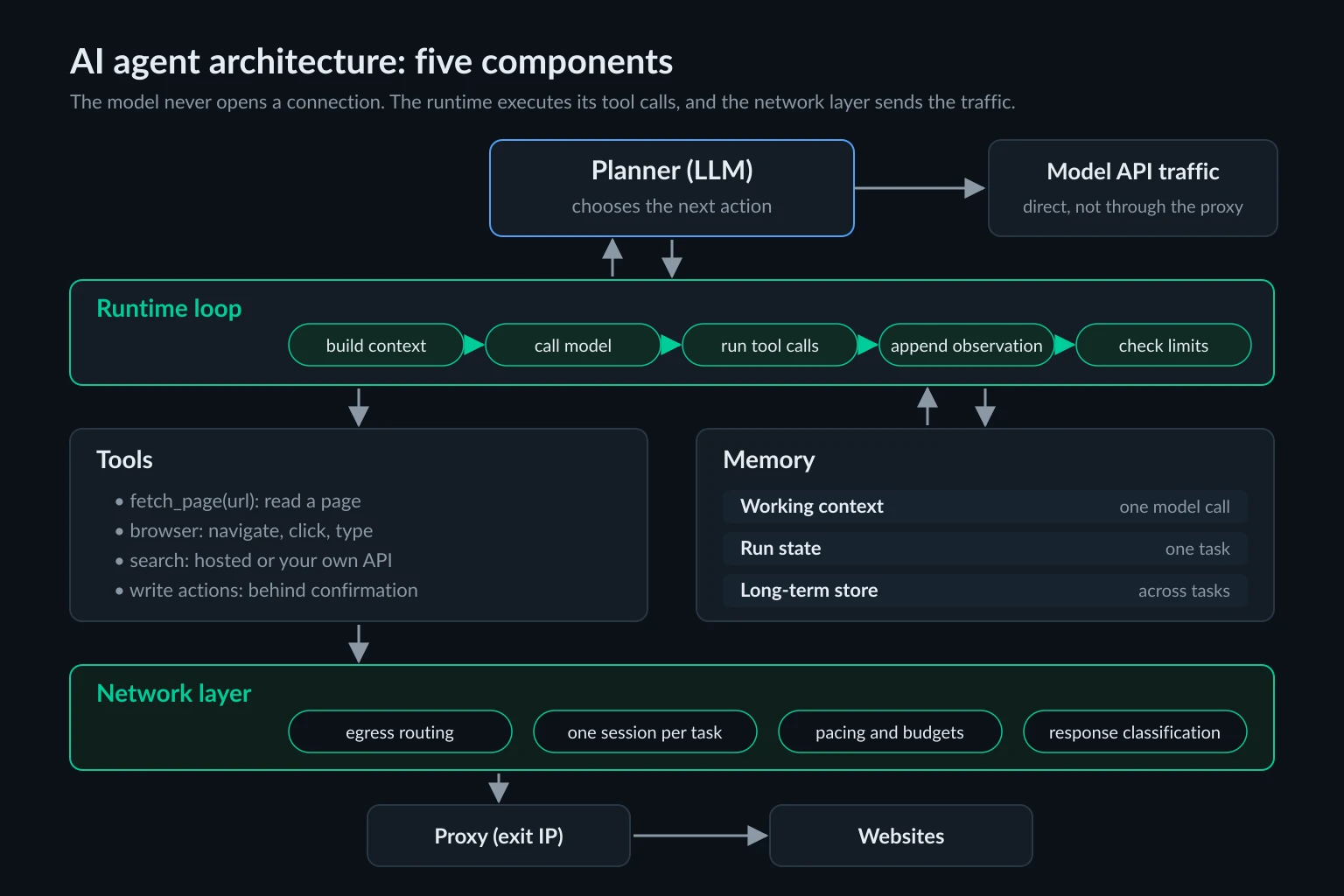
The planner, memory, and tools split goes back to Lilian Weng's widely cited overview of LLM-powered agents. The CoALA paper formalized the memory side into working, episodic, semantic, and procedural memory. Both put web access inside "tools" or "actions." That's fine for a calculator tool. A web tool is different, because it talks to systems you don't control, and those systems respond to how your agent behaves. That's why it gets a separate layer here.
How the agent loop connects the components
Every agent framework runs some version of this loop:
- The runtime builds the context: system prompt, tool definitions, relevant memory, and the conversation so far.
- The model returns either a final answer or one or more tool calls.
- The runtime validates each call and executes it. Web tools hand the request to the network layer.
- Each result is appended to the conversation as an observation.
- Repeat until the model answers or the runtime hits a limit: model calls, requests, time, or money.
Step 4 is the one that bites. An observation stays in the conversation, so every later model call re-sends it. A 30 KB page fetched on turn two is paid for again on turns three, four, and five. That's why the size of tool results matters far more in agents than in a single prompt, and the memory section below puts numbers on it.
Anthropic's Building effective agents draws a useful line here. Workflows are "systems where LLMs and tools are orchestrated through predefined code paths," while agents "dynamically direct their own processes and tool usage." The components are the same in both. What differs is who picks the next step, your code or the model. Plenty of production systems are workflows with one agentic step inside, and they still need every layer on this page.
The planner: choosing the next action
The planner is the model plus the prompt that frames its decisions. Three patterns cover most designs.
ReAct. The model alternates reasoning and one action at a time, reading each result before choosing the next (Yao et al.). It's the default loop in most frameworks and the right one when the next URL depends on what the last page said.
Plan-and-execute. The model writes the whole plan up front, code executes the steps, and the model only returns to fix the plan or summarize. ReWOO is an early published version. It uses fewer model calls and lets you run fetches in parallel. It also breaks more easily when a page doesn't look the way the plan assumed.
Router. A cheap first call classifies the request and hands it to a specialized flow or sub-agent with its own tools and prompt.
Each pattern produces a different traffic shape. ReAct traffic is sequential and paced by model latency, roughly one request every second or two. Plan-and-execute fans out: twenty planned fetches can hit one domain in the same second. That pushes per-domain rate limits from "nice to have" to required. Sub-agents add a third shape, several independent tasks running at once, and each one needs its own session in the network layer.
Tools: the contract between the model and the web
A tool is a name, a description, an input schema, and a result. The model only sees those four things, so they are the whole interface.
Keep schemas narrow. fetch_page(url) is easier to use correctly than http_request(method, url, headers, body). A narrow tool also limits what a prompt-injected model can do with it. Keep read and write tools separate, and require human confirmation outside the model before anything submits a form, sends a message, or spends money. Use an idempotency key as well to prevent duplicate writes on retries. AI agent security covers why that boundary has to live outside the model.
Return errors as results. The MCP tools specification splits failures in two. Protocol errors, such as an unknown tool or a malformed request, go back as JSON-RPC errors. Tool execution errors go back as a normal result with isError: true, and clients "SHOULD provide tool execution errors to language models to enable self-correction." That only works if the error says something the model can act on. Anthropic's guide to writing tools for agents recommends actionable error messages over "opaque error codes or tracebacks," and it notes that Claude Code limits tool responses to 25,000 tokens by default.
Decide what the model is allowed to fix. A typo in a URL is the model's problem. Wrong proxy credentials, a full request budget, or a site that asked you to slow down are not. Those belong to the runtime and the network layer, and the model should see a short verdict, not a puzzle to solve.
Memory: what the agent keeps, and for how long
"Memory" covers three separate things with different lifetimes:
| Tier | What it holds | Lifetime | Where it lives |
|---|---|---|---|
| Working context | Instructions, tool definitions, recent messages, tool results | One model call | The context window |
| Run state | The task's progress: plan, visited URLs, partial results | One task or thread | Checkpoints, such as LangGraph persistence |
| Long-term store | Facts, preferences, and results reused across tasks | Until you expire it | A key-value or vector store |
The context window is the expensive tier, and it degrades as it grows. Anthropic's context engineering guide calls this context rot: "as the number of tokens in the context window increases, the model's ability to accurately recall information from that context decreases." Its three main remedies are compaction, structured note-taking, and sub-agents with clean context windows. All three move information out of working context and into run state or a sub-agent.
For web results, store the extracted fact, not the page. Save the URL, the fetch time, and the HTTP status next to each fact, so you can expire it and re-check it later. Be careful about what you promote to long-term memory, too. Page text written into a long-term store keeps any prompt injection it contains, and that injection comes back in future tasks.
What a fetch tool returns decides how fast context grows
To see how much the tool's output format matters, we ran the same task six times. The task was to start at the books.toscrape.com scraping sandbox, open the Travel category, and report the first three books with prices and the stock counts from their product pages. The agent was claude -p (Claude Code 2.1.310) running Claude Haiku 5.5. Its only tool was a 50-line MCP stdio server with one fetch_page tool, and we changed one thing between runs:
- Raw: the tool returned the HTML, capped at 40,000 characters.
- Distilled: the tool returned the title, up to 4,000 characters of visible text, and the page's links, capped at 8,000 characters.
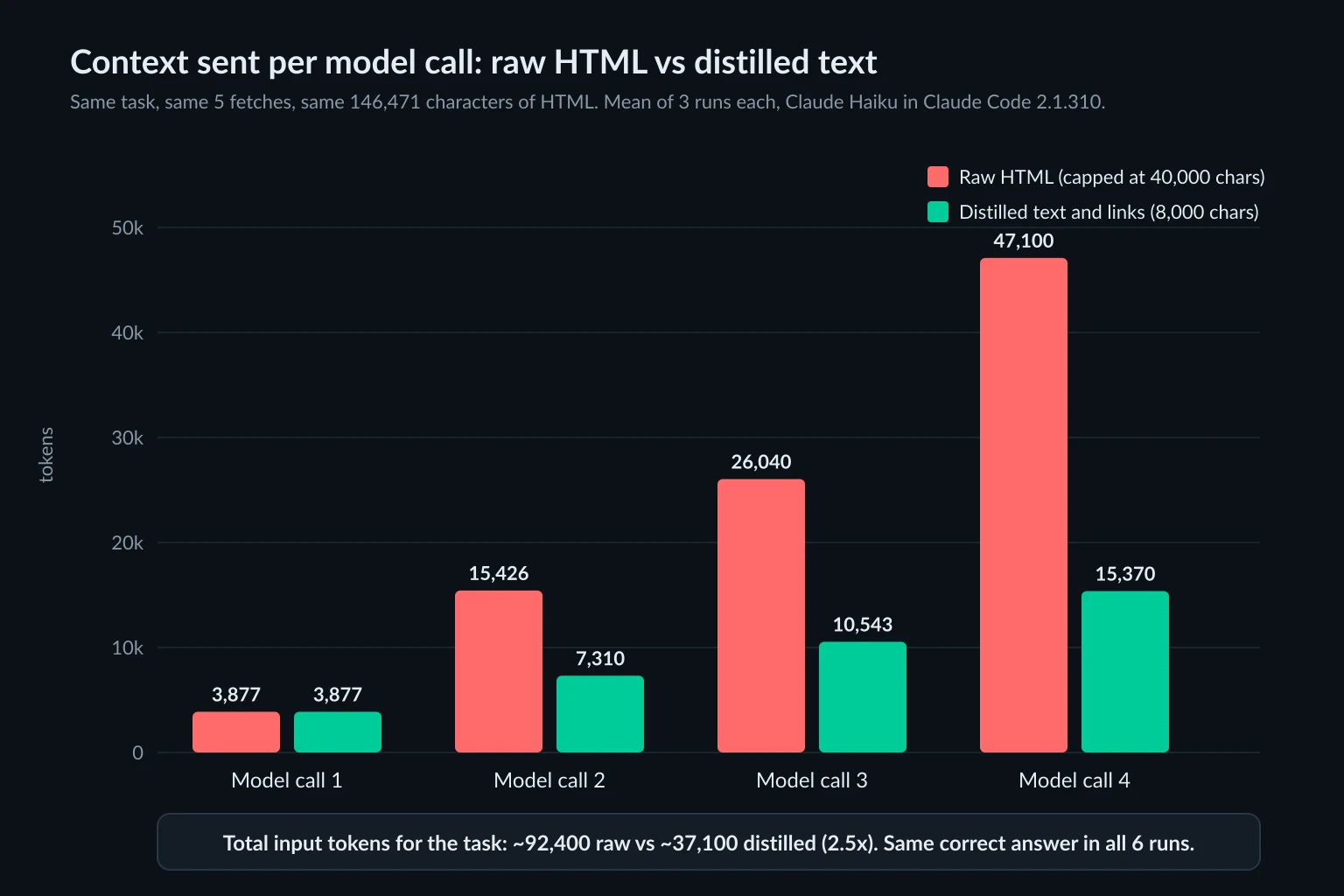
Every run made the same 5 fetches, moved the same 146,471 characters of HTML, used 4 model calls, and returned the same correct answer. The difference was all in memory:
| Tool output | Context per model call (tokens) | Total input tokens |
|---|---|---|
| Raw HTML | 3,877 → 15,426 → ~26,040 → ~47,100 | ~92,400 |
| Distilled text and links | 3,877 → 7,310 → 10,543 → ~15,370 | ~37,100 |
The three runs per mode differed by under 0.2%. Raw HTML cost 2.5 times the input tokens, and the gap grows with every extra page, because each page is re-sent on every later call. Prompt caching makes those re-sent tokens cheaper, but they still take up the context window. We used the 40,000-character cap because Claude Code saves MCP results over 50,000 characters to a file instead of passing them to the model. The books.toscrape.com homepage is 51 KB, and in a first run with a 60,000-character cap, that result added only about 1,200 tokens to the context, which fits the file hand-off. Best MCP servers for web access has more on those client limits and how browser snapshots compare with Markdown.
The bandwidth didn't change at all. Distilling saves context, not proxy traffic. To save traffic you have to stop the download early or skip resources, which is a network-layer job.
The network layer: where the agent meets the web
Web traffic leaves an agent by one of three paths, and the first question is which one you're on.
| Path | Where the request comes from | Who picks the IP | Good for |
|---|---|---|---|
| Server-side tools (hosted web search, the Claude API's web fetch tool) | The model provider's servers | The provider | Public lookups with no geo, session, or login needs |
| HTTP fetch tool | Your runtime | You | Reading pages and APIs |
| Browser tool (Playwright, a browser MCP server, computer use) | Your browser or sandbox | You | JavaScript-heavy pages, logins, forms |
On the last two paths, the network layer is your code, and it owns four jobs.
Egress routing. Decide which traffic uses the proxy. Tool traffic needs the exit IP. Model API calls and telemetry don't, and on a bandwidth-billed plan they shouldn't pay for it. AI agent frameworks compared shows which framework tools follow HTTPS_PROXY and how to scope a proxy to one tool. If the agent runs code, lock egress down at the network level too, as AI agent security describes.
Identity per task. One task gets one cookie jar and one exit IP for its whole life. A sub-agent is a separate task, with its own session. Rotating the IP in the middle of a logged-in task can look like a hijacked session to a site's fraud checks. Sticky vs rotating proxies covers the session mechanics.
Pacing and budgets. Rate-limit per domain across all running tasks, honor Retry-After, and give each task a request budget and a deadline. The model can't keep time, so these limits have to live in code.
Response classification. Turn status codes and headers into a small set of outcomes the planner can act on: page, blocked, rate limited, challenge, proxy failure, budget spent. Raw challenge HTML in the context helps nobody.
Who should own retries: the model or the network layer
A 429 is the clearest test of where a decision should live. We pointed the same agent at a local mock site that answers 429 Too Many Requests for six seconds after the first hit on each path, with a Retry-After header that counts down. The task was to read two of those pages. We ran it three times with each tool design:
- Model-owned retries: the tool passed the 429 status, the
Retry-Aftervalue, and the body straight to the model. - Tool-owned retries: the tool slept for
Retry-After(up to 30 seconds, at most 3 attempts) and returned only the final result.
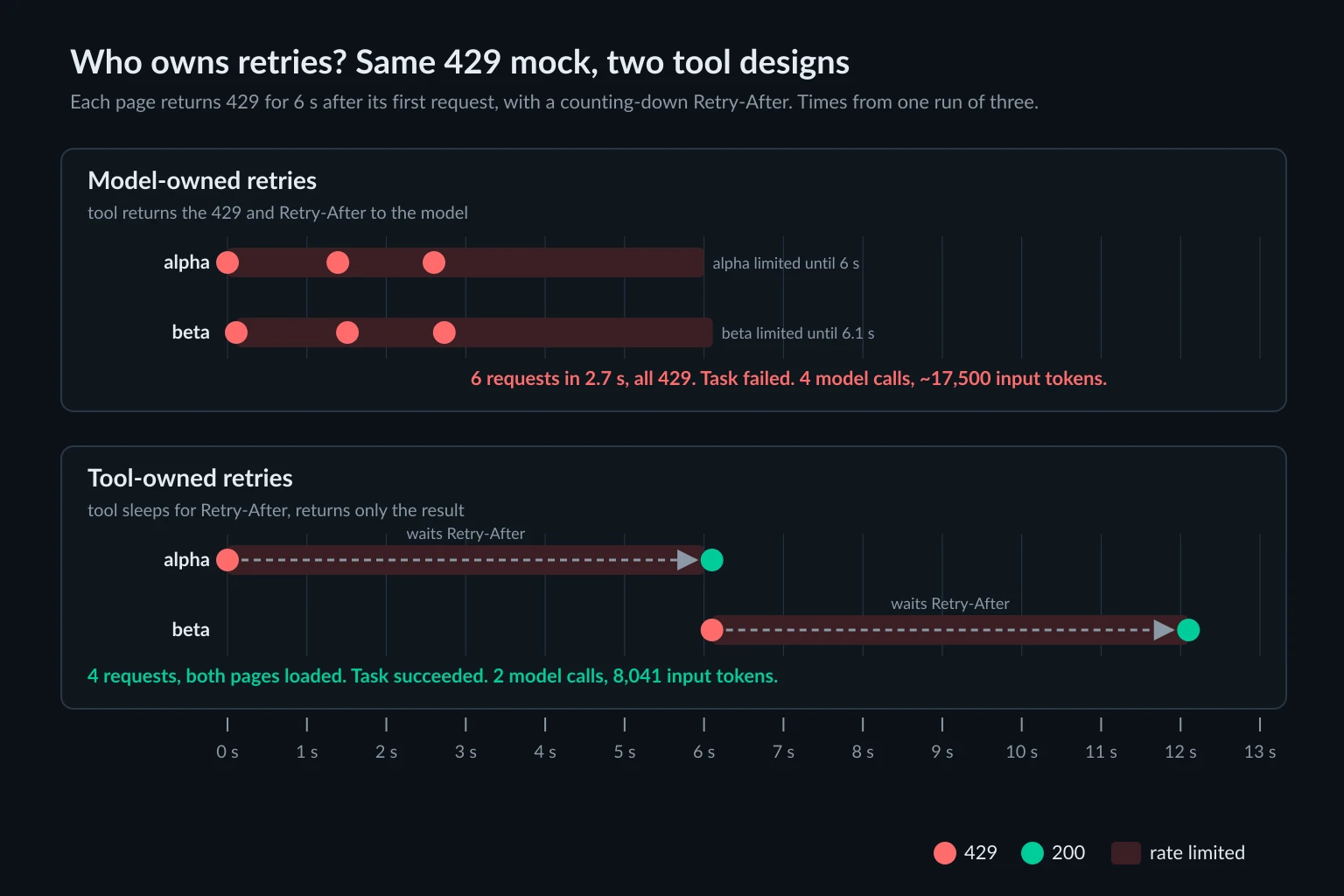
With model-owned retries, the agent failed all three runs. Each time it retried both URLs twice more, for six requests in 2.5 to 3.0 seconds. Every request got a 429, and then it gave up. Its own summary was accurate: the server asked for a pause, and it had no way to wait between calls. Each retry costs a full model round trip, which here took 1.1 to 1.4 seconds, so the agent retries too soon to clear the limit and too slowly to be cheap. Those runs used 4 model calls and about 17,500 input tokens.
With tool-owned retries, all three runs succeeded on the first tool call per page. The mock site logged four requests: one 429 and one 200 per page. The runs used 2 model calls and 8,041 input tokens. They took about 15 seconds of wall time, because Claude Code executed the two tool calls one after the other and the two 6-second waits added up.
Giving the model a sleep tool would let it wait, but every wait still costs a model call, and it relies on the model reading the header correctly every time. Frameworks add one more retry layer, and some of them retry 403s with no delay. CrewAI vs LangGraph for web agents counts the requests each one sends after a single blocked call. Check what yours does before adding your own retries.
The split that follows from this:
| Event | Owner | What the model sees |
|---|---|---|
429 or 503 with a short Retry-After |
Network layer waits and retries | Only the final page |
| Still rate limited after retries | Planner | "Rate limited. Work on other sources, then come back." |
| 401 or 403 | Planner | "Access refused. Do not retry this URL in this task." |
Challenge page (cf-mitigated: challenge) |
Planner, or a human | "Challenge page. Do not retry; use another source or stop." |
| 407 or a failed proxy connection | Runtime stops the task | A stop message; the operator gets an alert |
| Request budget spent | Runtime | "Answer with what you have." |
If you are diagnosing why those 403s and challenges happen in the first place, proxies for AI agents breaks down blocks by cause.
A minimal network layer in Python
This is a small, self-contained network layer that takes on the jobs above. Create one NetworkLayer per task. It holds a sticky proxy session named after the task, a cookie jar, a request budget, and a cache. It waits out short Retry-After values, classifies everything else, and returns a compact observation instead of HTML. It uses httpx 0.28 and the standard library.
import os
import time
from email.utils import parsedate_to_datetime
from html.parser import HTMLParser
from urllib.parse import urljoin

import httpx

# Keep the browser version current.
UA = (
    "Mozilla/5.0 (Windows NT 10.0; Win64; x64) AppleWebKit/537.36 "
    "(KHTML, like Gecko) Chrome/155.0.0.0 Safari/537.36"
)
# Sticky-session proxy URL with a {session} placeholder. Copy the exact
# session syntax from your provider's dashboard.
PROXY_TEMPLATE = os.environ["AGENT_PROXY_TEMPLATE"]
MAX_WAIT = 30  # longest Retry-After the layer will sleep through
MAX_CHARS = 8_000  # what one observation may add to the context


class PageText(HTMLParser):
    """Visible text, title, and links. Swap in trafilatura or similar for real pages."""

    def __init__(self, base: str):
        super().__init__()
        self.base, self.title, self.text, self.links = base, "", [], []
        self._skip = self._in_title = False
        self._href = None

    def handle_starttag(self, tag, attrs):
        if tag in ("script", "style", "noscript"):
            self._skip = True
        elif tag == "title":
            self._in_title = True
        elif tag == "a":
            self._href = dict(attrs).get("href")

    def handle_endtag(self, tag):
        if tag in ("script", "style", "noscript"):
            self._skip = False
        elif tag == "title":
            self._in_title = False
        elif tag == "a":
            self._href = None

    def handle_data(self, data):
        data = " ".join(data.split())
        if not data or self._skip:
            return
        if self._in_title:
            self.title += data
        else:
            self.text.append(data)
            if self._href and not self._href.startswith("#"):
                try:
                    self.links.append((data, urljoin(self.base, self._href)))
                except ValueError:  # malformed href, e.g. "http://[broken"
                    pass


def retry_after_seconds(response: httpx.Response) -> float | None:
    value = response.headers.get("retry-after", "")
    if value.isdigit():
        return float(value)
    try:  # HTTP-date form
        return max(0.0, parsedate_to_datetime(value).timestamp() - time.time())
    except (TypeError, ValueError):
        return None


def observe(url: str, response: httpx.Response) -> dict:
    """Turn a response into the observation the planner sees."""
    status = response.status_code
    if response.headers.get("cf-mitigated") == "challenge":
        return {"ok": False, "kind": "challenge", "status": status, "url": url,
                "hint": "Challenge page. Do not retry; use another source or stop."}
    if status in (401, 403):
        return {"ok": False, "kind": "blocked", "status": status, "url": url,
                "hint": "Access refused. Do not retry this URL in this task."}
    if status in (429, 503):
        return {"ok": False, "kind": "rate_limited", "status": status, "url": url,
                "hint": "Rate limited. Work on other sources, then come back."}
    if status == 407:
        return {"ok": False, "kind": "proxy_auth", "status": status, "url": url,
                "hint": "Proxy credentials rejected. Stop the task."}
    if status >= 400:
        return {"ok": False, "kind": "http_error", "status": status, "url": url,
                "hint": f"HTTP {status}. Check the URL."}
    page = PageText(str(response.url))
    page.feed(response.text)
    text = " ".join(page.text)[: MAX_CHARS // 2]
    links = [f"{label}: {href}" for label, href in page.links]
    links_text = "\n".join(links)[: MAX_CHARS // 2]
    return {"ok": True, "kind": "page", "status": status, "url": str(response.url),
            "title": page.title[:200], "text": text, "links": links_text}


class BudgetSpent(Exception):
    pass


class NetworkLayer:
    """One instance per task: one sticky exit, one cookie jar, one fetch budget."""

    def __init__(self, task_id: str, max_requests: int = 25):
        self.client = httpx.Client(
            proxy=PROXY_TEMPLATE.format(session=task_id),
            headers={"user-agent": UA},
            timeout=30,
            follow_redirects=True,
            event_hooks={"request": [self._spend]},  # runs for redirects too
        )
        self.requests_left = max_requests
        self.cache: dict[str, dict] = {}

    def _spend(self, request: httpx.Request):
        if self.requests_left <= 0:
            raise BudgetSpent
        self.requests_left -= 1

    def fetch(self, url: str) -> dict:
        if url in self.cache:
            return self.cache[url]
        for attempt in range(3):
            try:
                response = self.client.get(url)
            except BudgetSpent:
                return {"ok": False, "kind": "budget", "url": url,
                        "hint": "Request budget spent. Answer with what you have."}
            except httpx.ProxyError as exc:  # e.g. a 407 on CONNECT for HTTPS
                return {"ok": False, "kind": "proxy_error", "url": url,
                        "hint": f"Proxy failed ({exc}). Stop the task."}
            except httpx.TimeoutException:
                return {"ok": False, "kind": "timeout", "url": url,
                        "hint": "Timed out. Try another source."}
            except httpx.RequestError as exc:  # connect or TLS failure, redirect loop, ...
                return {"ok": False, "kind": "request_error", "url": url,
                        "hint": f"Request failed ({type(exc).__name__}). Try another source."}
            if response.status_code in (429, 503) and attempt < 2:
                wait = retry_after_seconds(response)
                if wait is not None and wait <= MAX_WAIT:
                    time.sleep(wait)
                    continue
            break
        result = observe(url, response)
        if result["ok"]:
            self.cache[url] = result
        return result

    def close(self):
        self.client.close()
To give it to an agent, wrap fetch in your framework's tool decorator and return json.dumps(net.fetch(url)). Create the NetworkLayer when the task starts and close it when the task ends, so the session and cookies never leak into the next task. The runtime should check for proxy_auth and proxy_error results and end the task itself rather than leave that to the model.
We ran this file against a local mock site through a logging proxy, with AGENT_PROXY_TEMPLATE=http://agent:secret-{session}@127.0.0.1:18931 and NetworkLayer("task-7f3a"). Here is what came back, summarized:
4.0s  /slow/report      ok=True  kind=page          (429, waited Retry-After 4, then 200)
0.0s  /slow/report      ok=True  kind=page          (cache, no request)
0.0s  /forbidden        ok=False kind=blocked       status=403
0.0s  /challenge        ok=False kind=challenge     status=403
0.4s  books.toscrape.com product page  ok=True  kind=page
requests_left 20
Every request reached the proxy with the password secret-task-7f3a, so the whole task ran on one session. One detail showed up in testing. With bad credentials, an HTTPS URL doesn't produce a 407 response at all. The proxy rejects the CONNECT, and httpx raises ProxyError: 407 Proxy Authentication Required. A plain-HTTP URL through the same proxy returns an ordinary 407 response. The layer handles both cases, and both end the task.
Where proxies fit in an AI agent architecture
The proxy sits at the bottom of the network layer and decides one thing: the IP address the website sees. That matters because agents usually run on cloud servers, and cloud IP ranges get stricter treatment from many sites than home or mobile connections do. Pick the proxy type based on the task:
- Independent fetches across many domains: rotating residential proxies, a new exit per request.
- A multi-step task without a login: a sticky residential session per task, as in the code above.
- A long-lived agent that logs in to the same account every day: a static ISP proxy, so the account sees the same address each time.
A proxy doesn't fix the layers above it. An agent that retries 403s, fans out twenty requests per second to one domain, or rotates IPs halfway through a login gets blocked from clean IPs too. Respect robots.txt, site terms, and rate limits. Use a proxy for reliability and geographic accuracy, not to get around a site that has said no.
Common AI agent architecture mistakes
- Exporting
HTTPS_PROXYfor the whole process. Model API calls then go through residential bandwidth along with the pages. - Returning raw HTML to the model. In our test it cost 2.5 times the input tokens for the same answer.
- Letting the model own retries. It can't wait, so it retries too soon, and each retry is a full model call.
- One session shared by all tasks, or rotation in the middle of a task. Sessions break and cookies from different tasks end up mixed.
- Writing unchecked page text to long-term memory. Injected instructions survive into the next task.
- No hard stops. Every task needs a maximum number of model calls, a request budget, and a deadline that the runtime enforces.
FAQ
What are the main components of an AI agent architecture?
A planner (the model), a runtime that runs the loop and enforces limits, tools the model can call, memory at three levels (working context, run state, and long-term storage), and a network layer that performs web requests. Most diagrams fold the network layer into tools. For web agents it's worth separating, because that's where blocks and retries happen.
What is the difference between agent memory and the context window?
The context window is the working memory for one model call. Everything in it is re-sent on every call. Run state, such as a checkpointed plan and the list of visited URLs, persists for one task. A long-term store persists across tasks. Good designs keep the context window small and move everything else into the other two tiers.
Is MCP an AI agent architecture?
No. MCP is a protocol for the tool layer. It standardizes how a client discovers and calls tools that a server exposes, and how errors come back. It doesn't define planning, memory, or how the agent loop runs.
Should an AI agent send model API calls through a proxy?
Usually not. The model provider doesn't need to see a residential or ISP IP, and on a bandwidth-billed plan each model call re-uploads the whole conversation through the proxy. Give the proxy to the web tools only, and send API traffic direct or through your normal corporate egress.
What is the difference between ReAct and plan-and-execute?
ReAct decides one action at a time and reads each result before choosing the next. Plan-and-execute writes the full plan first and executes it with fewer model calls. ReAct copes better with surprises. Plan-and-execute is cheaper and faster, but it can fan out many requests at once, so it needs per-domain rate limiting in the network layer.
Do sub-agents need separate proxy sessions?
Yes, if they run independent tasks at the same time. Treat each sub-agent's task as its own session with its own cookie jar and exit IP. Two sub-agents sharing one logged-in session will interfere with each other's state.
Final thoughts
A useful AI agent architecture gives every decision a clear owner. The model decides what to do next. The runtime decides when to stop. Tools define what's possible. Memory decides what's worth keeping. The network layer decides how the agent behaves on the web. In our tests, two network-layer decisions, distilling pages and owning retries, cut input tokens by 2.5 times and turned a failing rate-limited task into a passing one, without changing the model or the prompt.
If you're building the network layer now, start with one session per task and one classifier for every response. Then pick the exit that fits the task: residential proxies for rotating or task-length sessions, and ISP plans for agents that need the same address every day.