Cloudflare Pay Per Crawl lets a site owner charge AI crawlers a fixed price for each page. A crawler that hasn't agreed to pay gets HTTP 402 Payment Required with a crawler-price header. A crawler that has agreed sends a payment header, gets the page with 200, and is billed through Cloudflare. AI Labyrinth targets crawlers that ignore no-crawl rules. Cloudflare injects hidden nofollow links into the page, and a crawler that follows them gets AI-generated decoy pages and is flagged as a bot across Cloudflare's network.
For most scrapers and AI agents, neither feature works the way the headlines suggest. Only crawlers that sign their requests with Web Bot Auth, are registered with Cloudflare as verified bots, and have a billing account can pay. Pay Per Crawl itself is still in closed beta. On 2026-11-01 we sent five User-Agents to 33 Cloudflare-fronted sites. Six of the sites returned 402 to AI crawler User-Agents, and none of those 18 responses carried a price. They were blocks with a licensing message.
This guide covers what each feature does, how to tell a real Pay Per Crawl response from other 402s, how a crawler avoids the Labyrinth, and what all of this means for agents and proxies.
How Cloudflare Pay Per Crawl works
Pay Per Crawl is part of AI Crawl Control, the dashboard Cloudflare used to call AI Audit. The site owner sets one price per crawl for the zone, with a minimum of $0.001. Then they pick an action for each known AI crawler: Allow (free), Charge (pay the set price), or Block. Every charged crawler pays the same price. The Pay Per Crawl FAQ says there's no per-crawler pricing.
The protocol is plain HTTP headers. The crawl pages docs describe two ways to pay:
- Reactive. The crawler requests the page, gets
402withcrawler-price: USD 0.01, and retries withcrawler-exact-price: USD 0.01. - Proactive. The crawler sends
crawler-max-price: USD 0.05on the first request. If the page costs that much or less, it gets200and pays the page's price, not the cap. If the page costs more, it gets402.
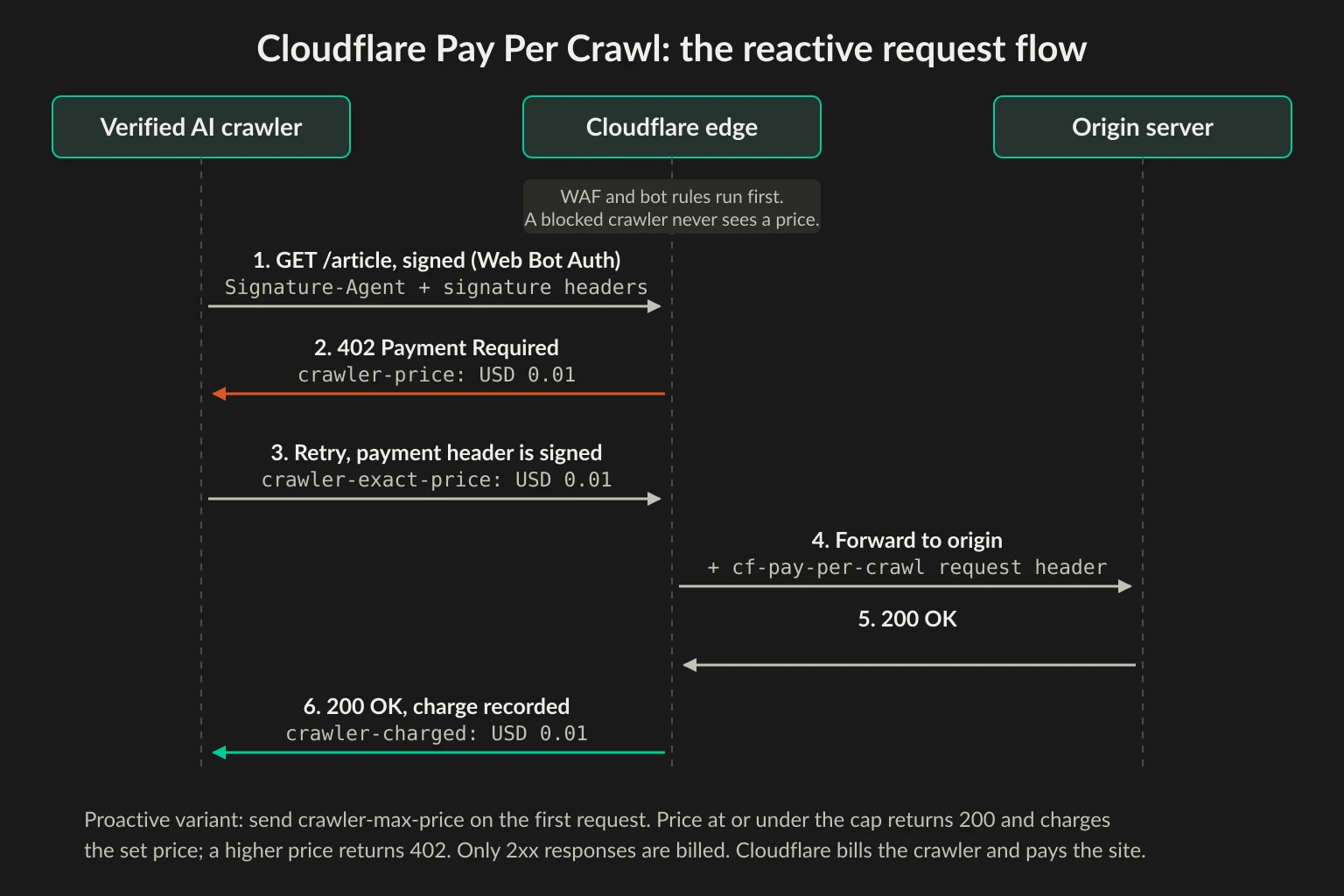
A successful paid response carries crawler-charged: USD 0.01, and Cloudflare says to log that value, because the bill is the sum of those headers. Some details matter if you plan a budget:
- Every fetch is billed. Re-crawling the same URL costs the price again.
- Only
2xxresponses are billed. Errors are free even when you sent a price header. - Some paths are always free:
/robots.txt,/sitemap.xml,/security.txt,/.well-known/security.txt, and/crawlers.json. - Owners can exempt paths. A Configuration Rule can turn off charging for a homepage or a
/public/*directory. - Prices can vary by page. With dynamic pricing, the origin or a Worker returns its own
crawler-priceheader. The edge only passes that header to the client on a402. The advanced configuration page shows a Worker that charges $3.14 under/premium-content/.
Cloudflare is the merchant of record. It bills the crawler operator's account and pays the site owner through Stripe.
Who can actually pay
Sending a crawler-max-price header doesn't make you a paying crawler. Cloudflare's crawler verification steps require all of the following:
- A Cloudflare account with Stripe connected.
- Every request signed with Web Bot Auth, meaning HTTP message signatures with an Ed25519 key. The payment header must be one of the signed components, a rule added in December 2025 so a middlebox can't change the price.
- A bot submission form, approved, that registers the crawler as a Verified Bot or Signed Agent, and compliance with Cloudflare's verified bots policy.
- Admission to the closed beta.
An unsigned request carrying a payment header gets an error, not a charge. The error code table lists StrongAuthRequired (400) and InvalidSignature (400), returned in a crawler-error header. The Discovery API, which lists the domains that charge your crawler, is closed to anonymous callers. An unsigned GET https://crawlers-api.ai-audit.cfdata.org/charged_zones returned this to us:
HTTP/2 403
content-type: application/json

{"error":"Only verified bots can use this endpoint"}
Pay Per Crawl is built for AI companies running named, registered crawlers. A scraper or agent without a Cloudflare identity has no way to buy access, and spoofing a registered crawler's User-Agent doesn't change that. Cloudflare's pay per crawl announcement says the Allow and Charge decisions run after WAF and bot management rules. If a request is blocked or challenged there, it never reaches the pricing step.
Most 402s you'll see are not Pay Per Crawl
Since August 2025, owners on paid plans who block a crawler in AI Crawl Control can choose to answer with 402 instead of 403 and write their own response body. That is a block that points to a licensing contact. You can't pay through it.
To see which kind is common, we picked 90 large publishers, reference sites, and developer-content sites and kept the 33 that returned a cf-ray header. We sent one GET to each homepage with five User-Agents from a Hetzner server in Germany: Chrome 155 and the published GPTBot, ClaudeBot, CCBot, and Bytespider strings. That's 165 requests, spaced one second apart on each site. The crawler User-Agents came from an IP the crawlers don't use, so Cloudflare could treat them as unverified.
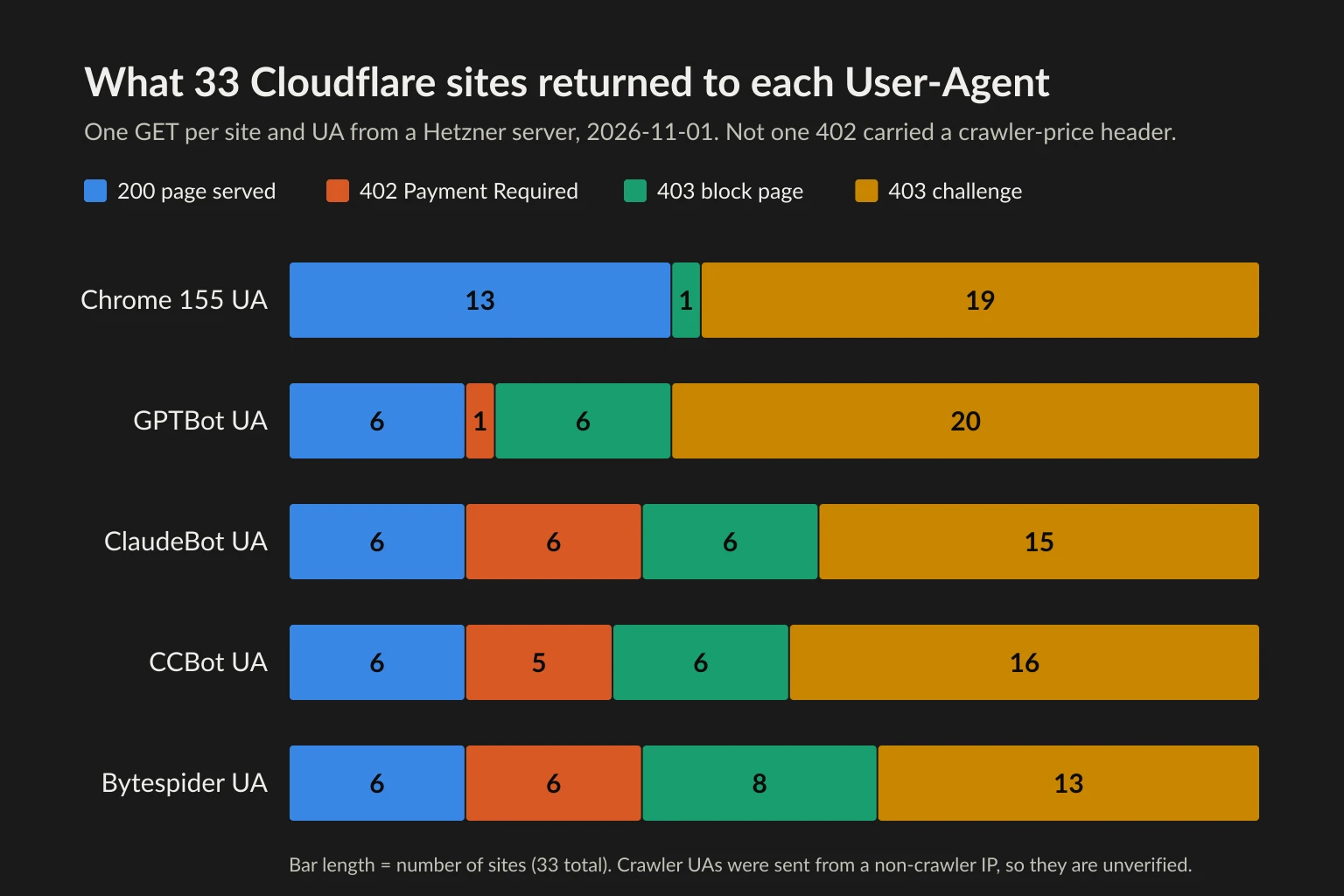
Six sites returned 402: people.com, allrecipes.com, investopedia.com, seriouseats.com, theatlantic.com, and fandom.com. None of the 18 402 responses had a crawler-price header. The bodies make it clear what they are. The four People Inc sites send a plain-text licensing note:
HTTP/2 402
content-type: text/plain
server: cloudflare

Payment Required - If you wish to license content from People Inc, please contact contentlicensing@people.inc
The Atlantic and Fandom return {"message":"Please contact the site owner for access."}. That is the same body as the example in Cloudflare's AI Crawl Control changelog for a custom 402 block response.
Other details from the run:
- Paths that Pay Per Crawl always serves free were blocked here. The Atlantic answered
/sitemap.xmlwith402to the ClaudeBot UA, and Fandom answered/robots.txtwith403. Pay Per Crawl never charges for those paths, so this is a block rule. - Adding a payment header changed nothing. With
crawler-max-price: USD 0.05added, all four sites we retried still returned402with no price and nocrawler-error. - GPTBot was treated differently. The four People Inc sites challenged the GPTBot UA, and The Atlantic returned a
403without a challenge, while all five returned402to ClaudeBot. That fits the licensing deals both publishers announced with OpenAI in 2024: Dotdash Meredith, now People Inc, and The Atlantic. If GPTBot is allowed in AI Crawl Control, a fake GPTBot passes that rule and then hits bot management, which challenges it for coming from the wrong network. That explanation is our inference. - Bot management challenged most requests. The Chrome UA, sent from curl on a cloud IP, was challenged on 19 of 33 sites. A challenge is a separate problem with a separate fix. Our Bot Fight Mode guide covers it.
Stack Overflow is one publisher that has described using Pay Per Crawl publicly. From our server it challenged every User-Agent, including Chrome, before any pricing could apply.
Tell the 402s apart in code
A 402 can come from Pay Per Crawl, from a custom block page, or from an x402 payment gate. An x402 gate puts a base64 offer in a payment-required header. Cloudflare publishes an x402 Worker template, and some APIs use x402 too: Exa's keyless search endpoint returns one, as our Tavily vs Exa vs Serper comparison shows. Each kind needs a different response from your crawler, so classify it before your retry logic sees it:
import sys
import urllib.error
import urllib.request

UA = "example-research-agent/1.0 (+https://example.com/agent)"


def fetch(url, ua=UA):
    req = urllib.request.Request(url, headers={"User-Agent": ua})
    try:
        with urllib.request.urlopen(req, timeout=15) as resp:
            return resp.status, resp.headers
    except urllib.error.HTTPError as err:
        return err.code, err.headers
    except OSError:
        return 0, {}  # DNS failure, refused connection, or timeout


def classify(status, headers):
    if status == 0:
        return "network error: the request never reached the site"
    if headers.get("crawler-error"):
        return f"pay per crawl refused the request: {headers['crawler-error']}"
    if status == 402 and headers.get("crawler-price"):
        return f"pay per crawl, price {headers['crawler-price']}"
    if status == 402 and headers.get("payment-required"):
        return "x402 payment offer, not Cloudflare pay per crawl"
    if status == 402:
        return "402 with no price: a block with a licensing message, not a sale"
    if headers.get("cf-mitigated") == "challenge":
        return "bot challenge, not a payment wall"
    if headers.get("crawler-charged"):
        return f"paid, charged {headers['crawler-charged']}"
    if status >= 400:
        return f"HTTP {status}"
    return "OK"


if __name__ == "__main__":
    url = sys.argv[1]
    ua = sys.argv[2] if len(sys.argv) > 2 else UA
    status, headers = fetch(url, ua)
    print(status, classify(status, headers))
We tested it on Python 3.14 against the live sites and against a local server that returns the headers from Cloudflare's docs:
$ python3 check402.py https://www.investopedia.com/ "Mozilla/5.0 AppleWebKit/537.36 (KHTML, like Gecko; compatible; ClaudeBot/1.0; +claudebot@anthropic.com)"
402 402 with no price: a block with a licensing message, not a sale
$ python3 check402.py https://people.com/
403 bot challenge, not a payment wall
$ python3 check402.py http://127.0.0.1:18402/paid
402 pay per crawl, price USD 0.01
$ python3 check402.py http://127.0.0.1:18402/auth
400 pay per crawl refused the request: StrongAuthRequired
$ python3 check402.py http://127.0.0.1:18402/ok
200 paid, charged USD 0.01
With the descriptive agent UA, People returned a challenge rather than its licensing 402. The 402 only goes to crawlers the site recognizes by name. Here's what to do with each result:
| Response | What it means | What your crawler should do |
|---|---|---|
402 + crawler-price |
Pay Per Crawl. This crawler is set to Charge | Skip, unless you are a registered payer with a budget |
crawler-error header (400, 402, 403, or 5xx) |
Pay Per Crawl rejected the request. 400 is a signature or header error, 402 a missing or mismatched price, 403 CrawlerForbidden or PaymentFailed, 5xx a Cloudflare or site configuration fault |
Fix signature and price errors before retrying. CrawlerForbidden means the owner blocked you, so stop. Back off on 5xx |
402 with no price |
A block that offers licensing | Stop. Contact the owner if you need the data |
402 + payment-required |
An x402 offer | Pay only if your agent is built and budgeted for x402 |
403 + cf-mitigated: challenge |
Bot management | Stop. Don't solve or retry |
Never retry a 402 in a loop. None of the variants clears after a delay, and a crawler that hammers a licensing page looks like the kind of bot the owner wanted to keep out.
What AI Labyrinth does to crawlers
AI Labyrinth is a honeypot. When Cloudflare suspects inappropriate bot activity, it rewrites the HTML response to add invisible links with nofollow attributes. People don't see them, and crawlers that respect no-crawl instructions skip them. A crawler that follows one lands on AI-generated pages linking to more AI-generated pages.
According to Cloudflare's launch post from March 2025, the decoy pages are generated ahead of time with Workers AI and stored in R2. They contain real scientific facts that have nothing to do with the site being crawled, and they carry meta directives that keep search engines from indexing them. Any site owner can turn it on with one toggle under Security Settings > Bot traffic, Free plan included.
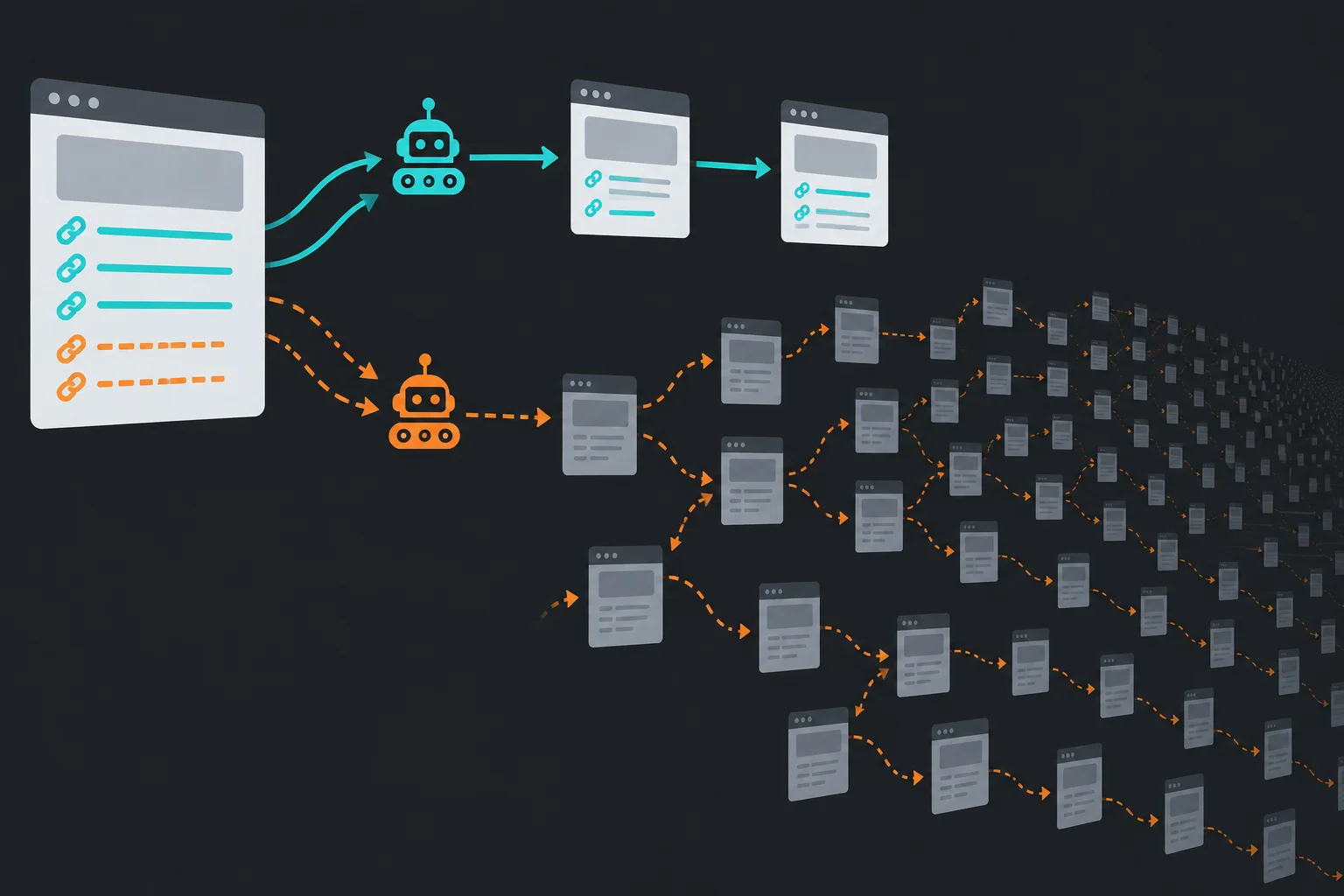
The Labyrinth doesn't block anything. The docs say its two Security Analytics events, AI Labyrinth Served and AI Labyrinth Crawls, are "not mitigations". A crawler that falls in gets 200 responses with plausible text, and that causes two problems:
- Your dataset gets polluted without any sign of it. No status code or header flags the decoys. If you store everything you fetch, you're storing generated filler under the target site's URLs.
- Your crawler gets fingerprinted. Following a hidden link is taken as strong evidence of automation. The docs say Cloudflare records these crawlers and uses that data for every customer who blocks AI bots. A mistake on one Free-plan blog can follow you to sites you never crawled.
Turning the feature off doesn't end it right away. Links generated while it was on keep serving decoy content until they expire.
You can't see from outside whether a site has it on. We fetched eight Cloudflare sites with a crawler UA and with the python-requests UA and found no links that were both hidden and nofollow. That suggests the injection is held back for traffic Cloudflare already distrusts, and Cloudflare doesn't publish the markup. Don't try to detect the Labyrinth. Write a crawler that wouldn't follow its links anyway.
How a crawler stays out of the Labyrinth
Cloudflare says crawlers that respect no-crawl instructions will ignore the honeypot. In practice that means honoring three signals when you extract links: rel="nofollow" on the link, <meta name="robots" content="nofollow"> on the page, and links a person can't see. This standard-library filter does all three:
import re
import sys
from html.parser import HTMLParser
from urllib.parse import urljoin

VOID = {"area", "base", "br", "col", "embed", "hr", "img", "input",
        "link", "meta", "source", "track", "wbr"}
HIDDEN_STYLE = re.compile(r"display\s*:\s*none|visibility\s*:\s*hidden", re.I)


def is_hidden(attrs):
    return ("hidden" in attrs or attrs.get("aria-hidden") == "true"
            or HIDDEN_STYLE.search(attrs.get("style") or ""))


class CrawlableLinks(HTMLParser):
    def __init__(self, base):
        super().__init__()
        self.base = base
        self.stack = []  # (tag, hides its children) for each open element
        self.follow, self.skipped = [], []
        self.page_nofollow = False

    def handle_starttag(self, tag, attrs):
        attrs = dict(attrs)
        if tag == "meta" and (attrs.get("name") or "").lower() == "robots":
            directives = re.split(r"[\s,]+", (attrs.get("content") or "").lower())
            if "nofollow" in directives or "none" in directives:
                self.page_nofollow = True
        if tag == "a" and attrs.get("href"):
            url = urljoin(self.base, attrs["href"])
            rel = (attrs.get("rel") or "").lower().split()
            if self.page_nofollow or "nofollow" in rel:
                self.skipped.append(("nofollow", url))
            elif any(hidden for _, hidden in self.stack) or is_hidden(attrs):
                self.skipped.append(("hidden", url))
            else:
                self.follow.append(url)
        if tag not in VOID:
            self.stack.append((tag, bool(is_hidden(attrs))))

    def handle_endtag(self, tag):
        if tag in VOID:
            return
        for index in range(len(self.stack) - 1, -1, -1):
            if self.stack[index][0] == tag:
                del self.stack[index:]
                break


if __name__ == "__main__":
    parser = CrawlableLinks(sys.argv[1])
    parser.feed(open(sys.argv[2], encoding="utf-8", errors="ignore").read())
    print("follow:", *parser.follow, sep="\n  ")
    print("skip:", *(f"{why} {url}" for why, url in parser.skipped), sep="\n  ")
Run it on a test page with one link of each kind. The hidden paths below are made up, since Cloudflare doesn't publish its URL format:
<html><head><title>Guide</title></head><body>
<nav><a href="/guides/">Guides</a></nav>
<p>Read the <a href="/guides/rate-limits">rate limit guide</a>.</p>
<a href="https://partner.example/deal" rel="sponsored nofollow">Partner</a>
<div style="display: none"><a href="/a8f3/notes-on-tidal-energy">Tidal energy</a></div>
<a href="/b19c/history-of-ceramics" hidden>Ceramics</a>
</body></html>
$ python3 links.py https://example.com/guides/proxies page.html
follow:
  https://example.com/guides/
  https://example.com/guides/rate-limits
skip:
  nofollow https://partner.example/deal
  hidden https://example.com/a8f3/notes-on-tidal-energy
  hidden https://example.com/b19c/history-of-ceramics
On a real page the cost is small. On the MacRumors homepage it kept 607 links and skipped 123. Of those, 102 were nofollow (mostly affiliate links) and 21 were hidden. The hidden ones were the collapsed mobile menu, and 20 of the 21 URLs also appeared as visible links elsewhere on the page.
The filter only sees inline styles and attributes, not CSS classes. So add two backstops that catch any trap:
- Cap pages per host and link depth. A focused crawl rarely needs more than a few levels from its seed URLs, and a maze is all depth.
- Check that the content matches the site. A recipe site that starts returning essays about ceramics has sent you somewhere you didn't mean to go. Compare page titles or embeddings against the seed pages and stop the branch when they drift.
Check robots.txt as well. The AI training data collection guide has a preflight script for robots.txt and content signals, and our guide to crawling without getting blocked covers pacing.
What it means for AI agents
Cloudflare sorts AI traffic by behavior: Search, Agent (acting in real time for a person), and Training. Site owners can treat each one differently. The AI Crawl Control crawler list includes an AI assistant category next to AI crawlers, so a named assistant's fetcher can be blocked or charged just like a training crawler.
A custom agent that fetches pages for a user is in a different position:
- It can't be charged. Pay Per Crawl needs a registered identity. An unsigned agent meets the site's general bot rules and never sees a price.
- It can still get a licensing 402 if it sends a crawler User-Agent the owner blocked by name. Treat that as final for the task and tell the user the site restricts AI access.
- It can fall into the Labyrinth if its link extraction ignores
nofollow. An agent that clicks through a page's links to "explore" behaves like the crawlers the trap was built for.
If you ship an agent product, signing requests with Web Bot Auth gives you an identity owners can allow or, later, charge. The proxies for AI agents guide walks through the signature headers. Our ClaudeBot and GPTBot guide shows how sites verify the big crawlers today.
Where proxies help and where they don't
Pay Per Crawl decides who you are from a signature, not an IP address. Sending traffic through a residential proxy doesn't make an unsigned crawler verified. A spoofed crawler User-Agent from a residential IP is still a spoofed User-Agent. And a site that returns a licensing 402 is telling you it wants a contract, not fewer requests per IP. Rotating IPs to get around that is evasion, and it's the behavior the Labyrinth was built to catch. Whether collecting a particular site's data is lawful at all is a separate question, covered in is data scraping legal.
Proxies are still useful for legitimate work around these features:
- Checking what you serve. If you run a site with AI Crawl Control, residential exits in a few countries let you confirm that real browsers get pages while crawler UAs get your chosen response, without testing from your office IP.
- A fixed identity for partners. A content partner that allows your crawler through a WAF or IP Access rule needs a stable address. A dedicated ISP proxy gives you that.
- Spreading permitted crawls. Where the owner allows your crawler, residential exits keep geo-specific fetches realistic and spread load. They don't override a Block, Charge, or Labyrinth decision.
If you run the site: Block, Charge, or Labyrinth
The three tools solve different problems, and you can combine them.
- Block with a custom 402 body when you want to license content but don't want to wait for the beta. It's on all paid plans, and named crawlers see your contact address in the response body.
- Charge when you want automated payment from crawlers that have registered and are paying. You need beta access. Leave search engine crawlers on Allow, since Cloudflare warns that charging or blocking them can hurt SEO.
- AI Labyrinth for crawlers that ignore your rules and don't identify themselves. It costs nothing to run and adds to the data Cloudflare uses to block bad crawlers for every customer who blocks AI bots.
Before you switch anything on, list the bots you depend on. A block rule that matches on User-Agent will also catch a partner's integration if it sends a similar string. The Cloudflare error 1020 guide covers how to debug WAF rule matches.
FAQ
Is Cloudflare Pay Per Crawl available to everyone?
No. As of November 2026, Cloudflare's docs describe Pay Per Crawl as a closed beta, and owners join through a signup form. The custom 402 block response is available to all paid plans, which is why most 402s you'll see from Cloudflare sites today are blocks rather than prices.
How much does Cloudflare Pay Per Crawl cost per page?
The site owner sets the price, with a minimum of $0.001 per successful crawl. One price applies to all charged crawlers on the zone, although owners with dynamic pricing can return different prices per path. Cloudflare's examples use USD 0.01.
Can a small scraper or a single developer pay to crawl a site?
Only if it goes through the same onboarding as a large AI crawler: a Cloudflare account, Stripe, Web Bot Auth signing, an approved bot submission, and beta access. There's no anonymous pay-as-you-go option. If you need one site's content, ask the owner about licensing or an API.
Does AI Labyrinth block my crawler?
Not directly. It returns 200 responses full of decoy content and records your crawler as following hidden links. That data feeds the bot detection that other Cloudflare customers use to block AI bots, so you'll see the effect later and on other sites.
Is a 402 Payment Required response from Cloudflare always Pay Per Crawl?
No. Check for a crawler-price header. Without it, the 402 is a block response with a licensing message. With a payment-required header, it's an x402 offer. HTTP defines 402 as "reserved for future use", so the status code alone tells you very little.
Does Pay Per Crawl apply to Googlebot?
Only if the owner sets it to Charge. Search engine crawlers appear in the same AI Crawl Control list, and Cloudflare advises against blocking or charging them because it can hurt indexing.
Final thoughts
Cloudflare Pay Per Crawl is a payment protocol for registered AI crawlers. It isn't a toll that any scraper can pay. For now, the 402s you're likely to meet are block pages asking you to contact the owner about licensing. AI Labyrinth is the trap for crawlers that ignore the rules, and a crawler that honors nofollow, skips hidden links, and limits its depth won't fall into it.
Classify every 402 before your retry logic sees it, keep link extraction polite, and decide early whether your agent needs an identity of its own. If it fetches pages for users at scale, signing with Web Bot Auth will matter more over time than any choice of IP pool.