
An Instagram proxy routes a browser or approved account-management tool through another IP address. For a signed-in account workflow, the safest default is a stable ISP proxy or a sticky residential session, not a residential route that changes on every request.
Choose an ISP proxy when one authorized account or browser profile needs the same dedicated IP over repeated sessions. Choose a sticky residential proxy when you need a consumer-network route or a specific available location for a bounded session. Rotating residential proxies are a better fit for independent, permitted public-page checks that do not reuse a login, cookies, or other account state.
A proxy changes the network route. It does not make prohibited automation acceptable, erase account-level signals, or guarantee that Instagram will not request verification. Use it for legitimate access, regional QA, authorized team workflows, and routing reliability while following Instagram's terms and your organization's security policy.
Instagram proxy quick decision
Start with continuity rather than asking which proxy type is universally "best for Instagram."
| Workflow | Better starting point | Why |
|---|---|---|
| Repeated access to one authorized account | ISP proxy | A dedicated IP is easy to keep assigned to the same profile |
| Short account session that needs a residential region | Sticky residential | The consumer-network exit stays consistent for the session window |
| Independent public-page or regional QA checks | Rotating residential | Each permitted check can start with a fresh, isolated session |
| Long-running browser profile | ISP proxy | Stable IP and predictable latency reduce avoidable identity changes |
| Travel or a temporary network change | Direct connection or one trusted stable route | Adding constant rotation creates more variables, not fewer |
| Automated publishing or analytics | Official Meta tools and APIs first | A proxy does not replace platform permission or API access |
The practical rule is simple: if request two depends on the login, cookie, or state created by request one, keep the same exit IP. If every check is truly independent and allowed, rotation can be useful.
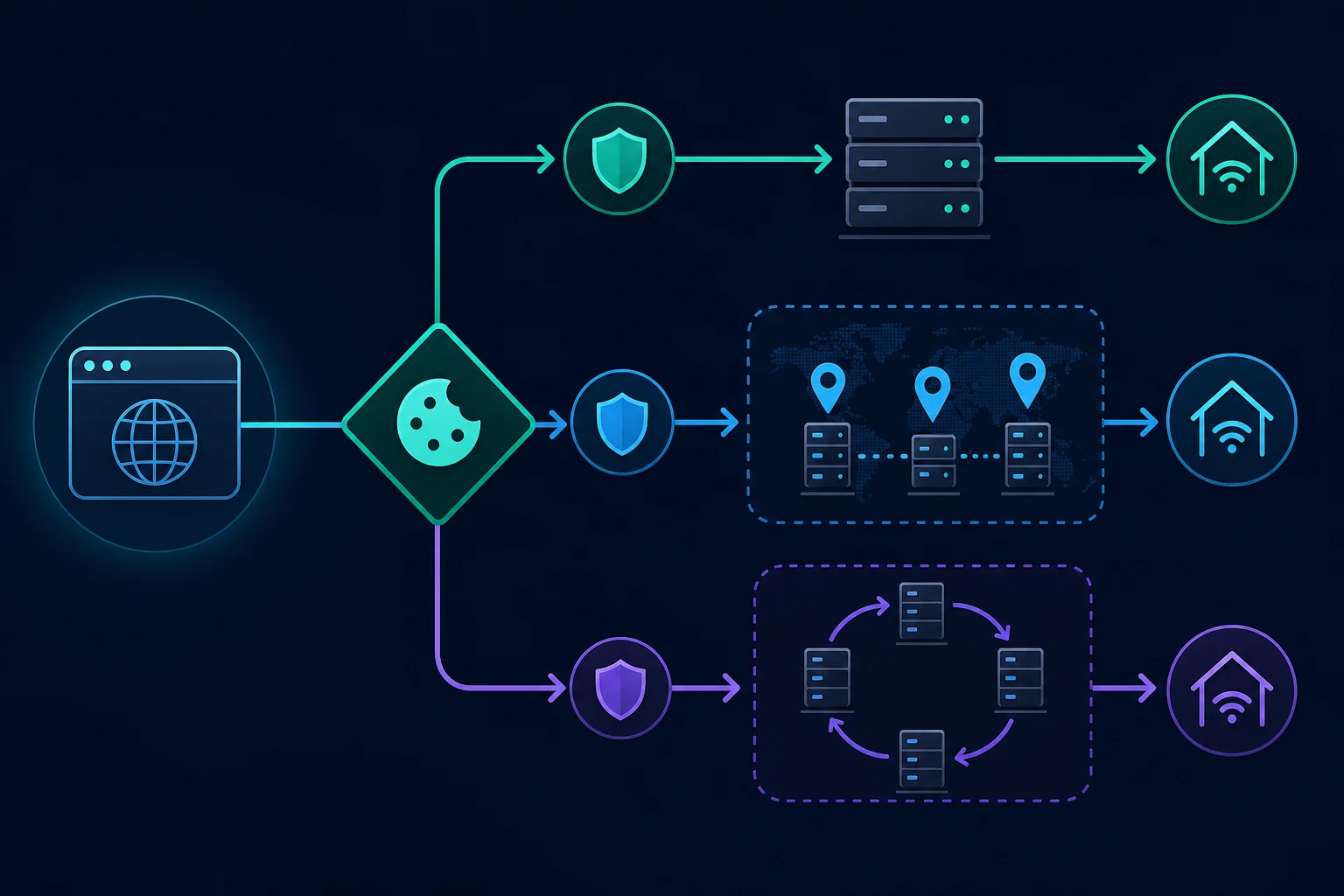
What an Instagram proxy changes
Without a proxy, Instagram sees the public IP of your office, home, mobile network, or cloud environment. With a proxy, the destination sees the proxy exit IP for traffic that the client actually routes through it.
That changes one part of the connection. The account, cookies, device and browser state, region, timing, and activity pattern still matter. If the proxy is configured only in one browser profile, other browsers and apps may continue to use the normal connection.
An Instagram proxy therefore helps with controlled routing, but it is not a complete account-isolation system. A successful IP check proves that one tested request used the proxy; it does not prove that every app, DNS path, browser profile, or background process uses the same route.
Residential vs ISP proxies for Instagram
Residential and ISP proxies can both provide consumer-style network routes, but their operating models are different.
| Factor | ISP proxy | Residential proxy |
|---|---|---|
| Exit behavior | Static, dedicated IP | Rotating pool or time-limited sticky session |
| Best fit | Repeated account and browser-profile access | Regional QA, short sticky sessions, or independent checks |
| Session continuity | Strong | Strong only while a sticky session remains active |
| Location coverage | Limited to available static regions | Usually broader country, state, or city targeting |
| Speed | Usually predictable | Varies by exit and location |
| Billing model | Commonly by IP and duration | Commonly by bandwidth |
| Main planning risk | Overloading one stable IP with too many tasks | Rotating during a stateful login or consuming excess bandwidth |
The broader ISP proxies vs residential proxies comparison explains the infrastructure and cost tradeoffs. For Instagram, the deciding factor is usually how long one signed-in identity needs to remain stable.
When to use an ISP proxy
Use an ISP proxy when you want one fixed route for one account or browser profile over time. This is usually the cleanest setup for an authorized social team that returns to the same profile, because the assignment can remain stable between work sessions.
ISP proxies also suit full browser workflows because their speed and latency are generally more predictable than a residential pool. They are not unlimited: rapidly sharing one IP across unrelated accounts, locations, or high-volume activity can still create operational and policy problems.
Compare ISP proxy plans when stable dedicated assignment is the requirement.
When to use a sticky residential proxy
Use a sticky residential proxy when a permitted workflow needs a consumer-network route in a location that your ISP inventory does not cover. Keep the same sticky session identifier throughout login and all dependent actions.
Unknown Proxies sticky residential sessions rotate every two hours. That makes them useful for bounded work, but less suitable than a dedicated ISP IP when a profile should return through the same address day after day. The residential proxy setup guide explains how sticky identifiers, cookies, and browser state fit together.
Compare residential proxies when broader location targeting or a rotating pool is genuinely needed.
When not to rotate
Do not rotate an Instagram residential proxy between the login page, a verification step, settings, publishing, or another action that depends on the same signed-in session. The account can appear to jump between networks while keeping the same cookies and browser state.
Per-request rotation is for isolated work with no reused login state. If a public-page QA check becomes a multi-page or authenticated flow, switch to a new sticky session and keep it until that flow ends.
Map one account, profile, and proxy together
Treat the proxy assignment as part of the account's operating record. For every account you are authorized to manage, keep these elements aligned:
- One browser profile or managed workspace.
- One cookie and local-storage set.
- One expected country or region.
- One ISP proxy or sticky residential session.
- One named owner or approved team process.
- One record of route changes and verification events.
Do not copy cookies between profiles or switch the same signed-in profile among random proxy exits. If you must replace a failed route, stop the workflow, record the change, start a clean browser session where appropriate, and be prepared to complete Instagram's legitimate security check.
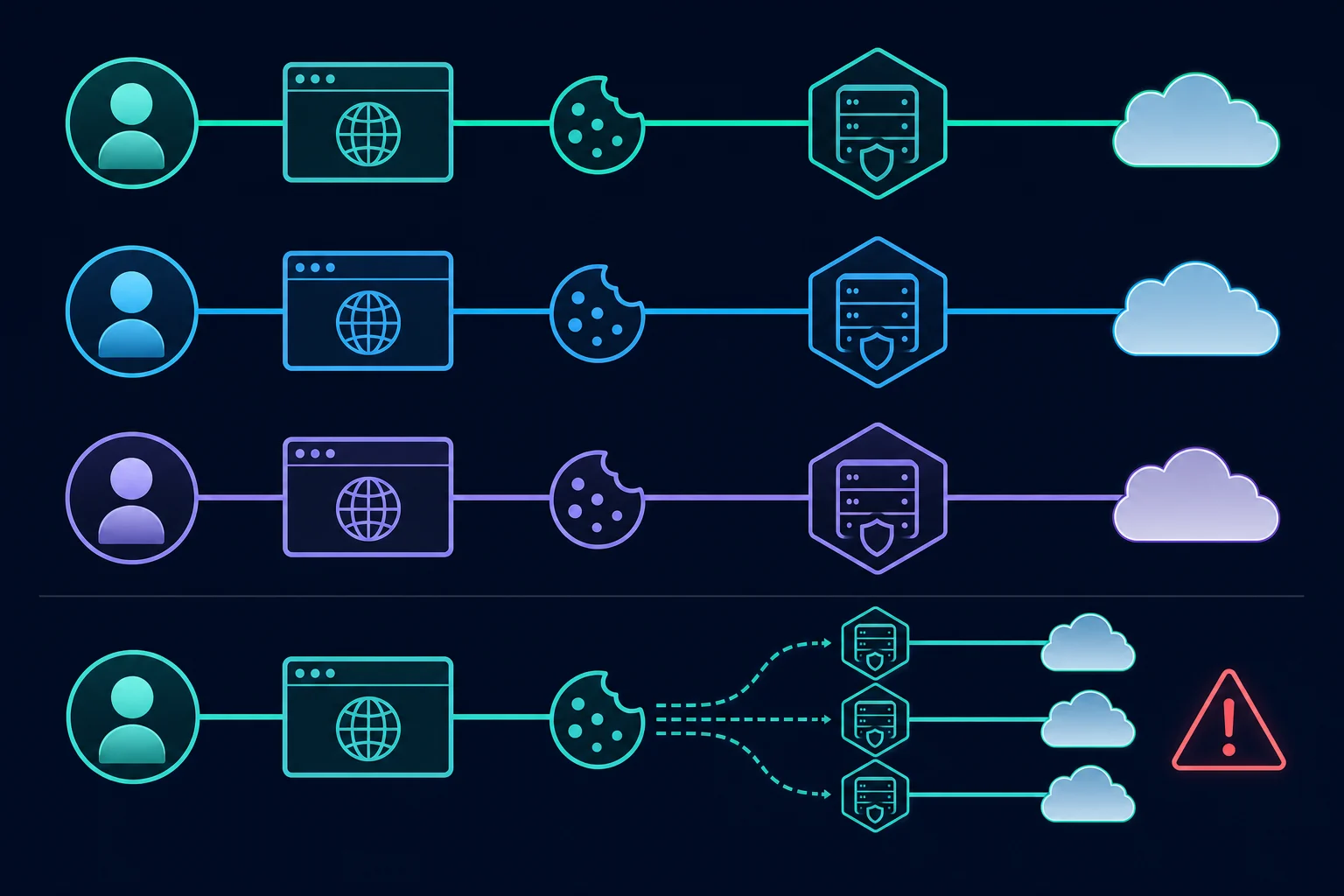
This mapping is operational hygiene, not a method for manufacturing accounts or evading enforcement. The goal is to reduce accidental session churn for accounts your team legitimately owns or administers.
How to set up an Instagram proxy safely
Use a controlled setup sequence so you can distinguish a proxy problem from an account, browser, or policy problem.
- Choose the session model. Pick static ISP for long-lived assignment, sticky residential for a bounded regional session, or rotating residential only for independent public checks.
- Create or select the browser profile. Do not begin with a profile already carrying unrelated account cookies or proxy extensions.
- Enter the endpoint in a trusted client. Use the provider's documented host, port, protocol, and authentication method. If your tool expects a different layout, the proxy formatter converts
host:port:user:passstrings. Never publish real credentials in screenshots, tickets, or shell history. - Verify the route before login. Open
https://ipv4.unknownproxies.com/ipand confirm that the expected proxy IP appears. - Confirm the intended region. Check that the assigned country or region matches the account workflow; avoid a more specific location than the task needs.
- Open Instagram only after routing works. Sign in normally and complete any legitimate verification prompt. Do not loop login attempts.
- Keep the route fixed for the session. Preserve the proxy, browser profile, cookies, locale, and account assignment until the work is complete.
- Log exceptions. Record timeouts, proxy changes, login challenges, and who handled them without storing passwords or backup codes.
Most browser tools accept HTTP(S) proxies. Use SOCKS5 only when the client explicitly supports the endpoint and authentication method. If protocol choice is unclear, compare SOCKS5 vs HTTP proxy before configuring several profiles.
Verify the route before signing in
Verification should happen in layers:
- Test the proxy host and port against the provider's IP-check endpoint.
- Confirm the result is the assigned exit, not the device's normal public IP.
- Open a neutral HTTPS page to verify ordinary browsing works.
- Restart the intended browser profile and repeat the IP check.
- Confirm another profile remains direct or uses its own assigned route.
- Only then open Instagram and sign in.
If the IP-check page shows your normal connection, stop. The proxy may be bypassed, the wrong browser profile may be open, or another VPN or extension may control routing. Signing in before fixing that ambiguity creates a network change you did not intend.
Troubleshoot Instagram proxy problems
Change one variable at a time. Replacing the proxy, browser profile, cookies, region, and protocol together makes the result impossible to diagnose.
| Symptom | Likely layer | First action |
|---|---|---|
| No sites load | Proxy connection | Recheck host, port, protocol, credentials, and plan status |
| Neutral sites work, Instagram does not | Destination or account | Stop retries; inspect the response and account status |
| IP checker shows the direct IP | Routing scope | Check browser profile, bypass rules, VPNs, and proxy extensions |
| Login works, then the session resets | Identity continuity | Confirm the exit IP did not rotate and cookies stayed in one profile |
| A verification prompt appears | Account security | Complete the official flow; do not rotate or retry rapidly |
| The route is unexpectedly slow | Exit or location | Test one nearby assigned exit before changing the whole setup |
| Many profiles fail at once | Shared environment or policy | Pause activity and inspect network, tooling, permissions, and platform notices |
A proxy cannot fix a wrong password, disabled account, expired session, unsupported client, account-level restriction, or action that Instagram does not permit. It also cannot guarantee access when the platform challenges an IP, device, browser, or activity pattern.
Security and Instagram policy boundaries
Protect the account before optimizing its network path. Enable two-factor authentication, store backup codes securely, restrict access to approved operators, and remove old trusted devices. Instagram's official two-factor authentication guide explains its supported methods and trusted-device controls.
Do not give a proxy service, browser extension, or unapproved automation tool the account password unless it is part of your organization's vetted security model. Proxy credentials and Instagram credentials should remain separate secrets.
Instagram's Terms of Use prohibit creating accounts or accessing or collecting information in automated ways without express permission, along with attempts to bypass access controls. Meta also says automated likes, follows, and comments that create inauthentic activity violate Instagram's guidelines in its help article on inauthentic activity.
Use official Meta business features and approved APIs when they cover publishing, messaging, moderation, or analytics. A proxy is routing infrastructure; it does not grant platform permission. If the real goal is public Instagram data rather than account access, our guide to choosing an Instagram scraping tool covers the permitted options and their limits.
Common Instagram proxy mistakes
- Using per-request rotation for a signed-in browser session.
- Sharing one proxy and one browser profile across unrelated operators.
- Moving old cookies to a new IP without a controlled session reset.
- Selecting a distant or overly specific region without a business need.
- Retrying login, verification, or blocked actions rapidly.
- Assuming a successful IP check means every app on the device is proxied.
- Treating a proxy as a replacement for two-factor authentication or access control.
- Using automated engagement or collection that the platform has not authorized.
The remedy is usually less churn: one documented assignment, a trusted client, a verified route, conservative activity, and a clear stop condition when Instagram or the account reports a problem. Teams that manage several platforms can apply the same rules with the social media proxy selection guide.
FAQ
What is the best proxy for Instagram?
For repeated access to an authorized account, a static ISP proxy is usually the best starting point because it keeps one dedicated IP assigned to one browser profile. Use a sticky residential proxy when a bounded session needs broader regional coverage.
Are residential proxies good for Instagram?
Residential proxies can fit permitted regional QA and account sessions when sticky mode is enabled. Avoid per-request rotation while logged in because the IP can change while cookies and browser state remain the same.
Should an Instagram proxy be static or rotating?
Use a static or sticky proxy for login and other stateful workflows. Use rotating proxies only for independent, permitted checks that do not reuse an account session.
Can I use one proxy for multiple Instagram accounts?
A shared office or household connection can naturally serve multiple people, but deliberately crowding unrelated managed accounts onto one proxy makes operations harder to isolate and audit. For a professional workflow, keep a documented account-to-profile-to-proxy assignment based on legitimate access needs.
Does an Instagram proxy prevent verification prompts?
No. Instagram can evaluate account, device, browser, cookie, network, location, and activity signals. A stable proxy reduces unnecessary IP changes but cannot guarantee that a security prompt will not appear.
Can a proxy fix an Instagram action block?
Not reliably. An action block may be tied to the account or activity rather than only the IP. Stop the blocked action, review platform notices and permissions, and avoid rapid retries or proxy hopping.
Is it safe to use a free Instagram proxy?
Unknown free proxies are risky for account traffic because the operator may log destinations, modify unencrypted traffic, or reuse an abused address. Use a trusted provider, HTTPS, separate credentials, and a route you can verify.
Final thoughts on choosing an Instagram proxy
An Instagram proxy should make an authorized workflow more stable and auditable, not more random. Use an ISP proxy for a long-lived one-account-to-one-profile assignment. Use a sticky residential proxy for a bounded session that needs consumer-network location coverage. Reserve rotation for independent public checks with no reused login state.
Verify the exit before signing in, keep the browser profile and cookies attached to that route, enable two-factor authentication, and stop when the platform reports a security or policy issue. When the session model is clear, compare ISP pricing for dedicated IPs or residential pricing for sticky and rotating pool access.