The best proxies for social media keep an authorized account on a consistent network identity. For day-to-day account management, a static ISP proxy is usually the cleanest choice: one dedicated IP, assigned to one account, that does not change between sessions. A sticky residential proxy can fit shorter sessions or legitimate regional testing, while a rotating residential proxy should be reserved for independent public checks that do not reuse an account session.
Start with the workflow, not the platform name. A team signing into its own business accounts needs continuity; an approved ad-quality check across several markets needs location coverage. Proxies change the network route, but they do not grant permission, make automation compliant, or fix a mismatched browser profile.
This guide explains how to choose among ISP, residential, mobile, and datacenter options, map accounts to stable routes, test a provider, and avoid paying for rotation you should not use.
Best social media proxies: quick decision
Use the least complex proxy type that meets the authorized workflow.
| Workflow | Usually choose | Session rule |
|---|---|---|
| Managing an owned business account | Static ISP proxy | Keep one account and browser profile on one IP |
| Short authorized session from a required region | Sticky residential proxy | Hold the same exit for the whole session |
| Public ad or content QA across regions | Rotating residential proxy | Start a fresh, independent session per region |
| Testing the experience on a carrier network | Mobile proxy | Use only when mobile-network egress is the test variable |
| Low-risk internal or API workflow on a permissive service | Datacenter proxy or direct connection | Prefer the official API and stable server egress |
If the next action depends on cookies or state from the previous action, do not rotate. Use a static ISP route or a sticky residential session. If every check is independent, residential rotation may be useful.
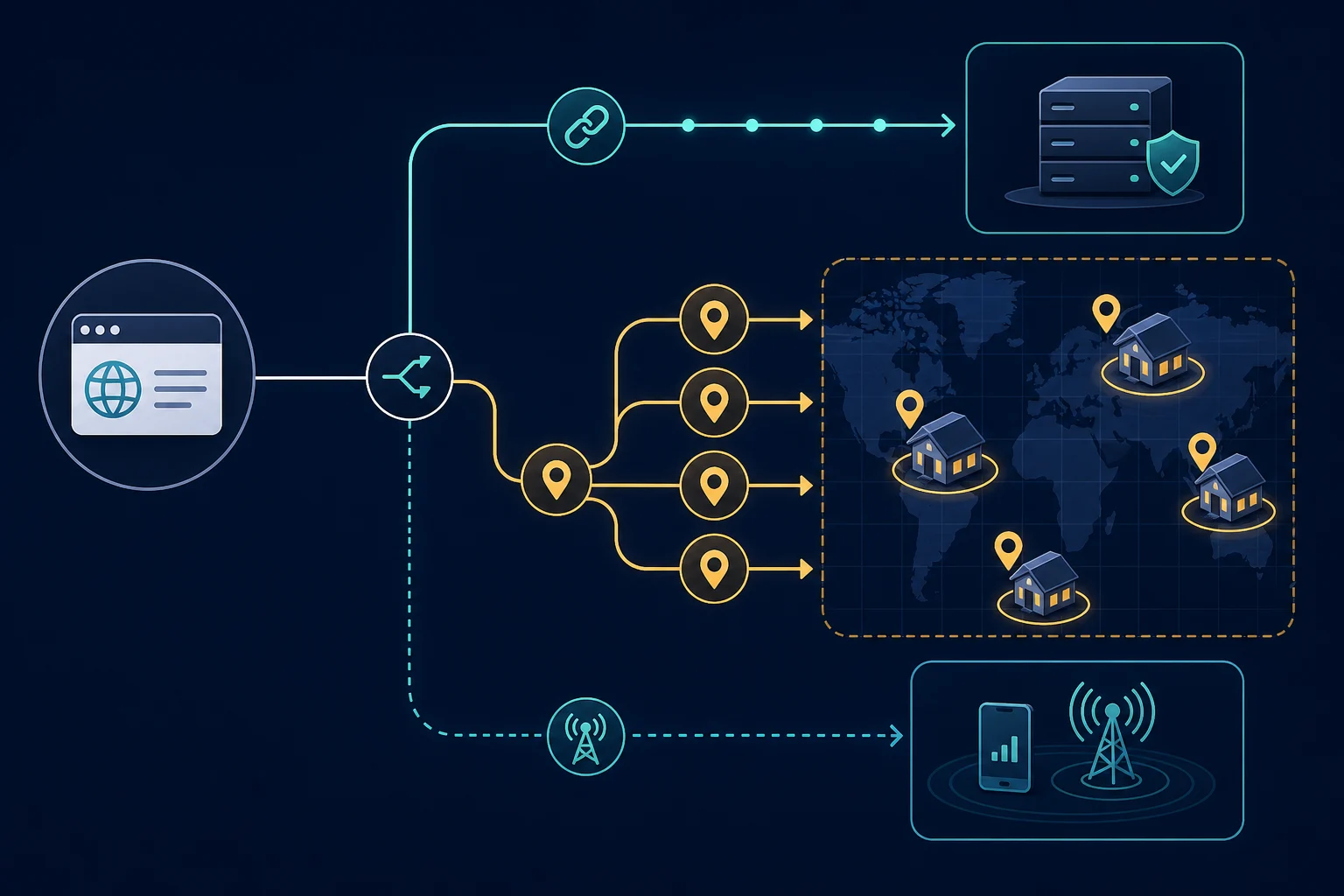
What a social media proxy actually changes
A proxy sits between your browser or application and the destination service. The platform sees the proxy's public IP as the network endpoint, while cookies, account state, browser storage, device signals, and application behavior still come from the client.
That boundary matters. A proxy can provide a stable business egress point, route an approved QA session through a required region, or separate unrelated client environments. It cannot make an unapproved action permissible or hide inconsistent behavior across the rest of the session. The MDN proxy guide covers the underlying forwarding model.
Social platforms also recognize more than an IP address. For example, Meta explains that Facebook can remember browser and device information for recognized logins, and Instagram login alerts show the device and approximate location. Keep those signals coherent instead of treating IP rotation as the entire identity.
Which proxy type fits social media workflows?
The marketing labels overlap, so compare operational behavior rather than assuming one category is universally best.
ISP proxies for stable account sessions
ISP proxies are static, dedicated routes intended for longer assignments. They usually offer more predictable latency than pool-based residential routes and make one-to-one account mapping straightforward.
Use an ISP proxy when:
- Your team manages an account it owns or is authorized to access.
- The same browser profile returns over days or weeks.
- Login, publishing, support, or moderation work needs a consistent region.
- You want a fixed IP that can be assigned to one operator or client environment.
The main limitation is geographic breadth. An ISP provider may not have the exact market you need, and a fixed IP can accumulate problems if too many tasks share it. Compare the broader tradeoffs in ISP proxies vs residential proxies.
Sticky residential proxies for regional sessions
Sticky residential proxies hold one residential exit for a defined session window. They are useful when an authorized browser session needs consumer-style regional egress but still depends on cookies and continuity.
Check the provider's actual sticky duration. A session that expires during a long review, upload, or moderation task can move the account to a different IP at the wrong time. If the workflow regularly outlasts the sticky window, use a static route instead.
Residential plans are commonly billed by bandwidth. Full social feeds, video, uploads, and browser assets consume far more data than lean HTTP checks, so estimate traffic from a small real session before buying at scale.
Rotating residential proxies for independent public checks
Rotating residential proxies change the exit frequently and provide broader location coverage. They fit approved ad verification, public-content localization checks, or brand QA where each observation starts clean and does not sign in.
They are a poor default for account management. Rotating an authenticated session can make consecutive requests appear to come from unrelated networks, while the same cookies and browser profile remain attached. If a check requires login, switch to sticky mode and keep the region fixed.
For a new residential configuration, follow the residential proxy setup guide before testing regions or session modes.
Mobile proxies for carrier-network QA
Mobile proxies use IP space associated with cellular carriers. They can be useful when the test question is specifically whether an owned campaign, link, or application behaves differently on mobile-network egress.
Do not pay the mobile premium just because the destination is a mobile app. A normal business account session often benefits more from a dedicated ISP route. Mobile networks may also use carrier-grade NAT, so an apparent IP can be shared by many subscribers; "mobile" does not mean dedicated or automatically low risk.
Datacenter proxies for permissive workflows
Datacenter proxies are fast and usually inexpensive, but their IP ranges are easier to identify as hosted infrastructure. They may be enough for a permitted internal tool, a public check on a tolerant endpoint, or stable server-side API access.
Use the platform's official API when one exists and fits the task. A proxy should not be used to work around API limits or substitute for required authorization.
Why ISP proxies work well for social media
ISP proxies get the most searches in this category for a reason. They match what account management needs:
- The IP stays the same. A static ISP proxy keeps one address for as long as you hold it. The account sees the same network day after day, as it would from an office or home line.
- The IP is registered to an internet provider. ISP proxies are announced under consumer or business ISP networks, not under a cloud host. That does not make them invisible, but it avoids the hosting-network label that datacenter IPs carry.
- They are dedicated. One IP serves one customer, so another user's activity does not share your address at the same time.
- Latency is predictable. Uploads, live moderation, and long browser sessions run on a steady route instead of a changing residential exit.
- Billing is per IP, not per GB. Social feeds load images and video. On a plan billed by bandwidth, a few hours of browsing can use a lot of data. An ISP proxy has a fixed cost per IP for the term.
The tradeoff is location. ISP inventory covers fewer places than a residential pool. If an account belongs to a market your ISP provider does not cover, use a sticky residential session in that country instead.
How many ISP proxies do you need for social media?
Start with one per account or per client browser profile. Then add a small reserve for replacements.
| Setup | Proxies to start with |
|---|---|
| One brand, one account per platform (for example Instagram, TikTok, X) | One per account, so three |
| Agency with 10 client accounts | 10, plus 1 or 2 spares |
| Several operators sharing one account | One proxy for the account, with each operator on their own platform role |
| Regional ad or content QA, no login | No ISP proxies; use rotating or sticky residential |
Unknown Proxies ISP plans are sold in packs that start at 15 IPs, in US East Coast and West Coast regions plus the UK, Germany, France, Italy, the Netherlands, Australia, and Asia. Check the ISP proxy plans for current options.
Keep one account, profile, and proxy together
The strongest operational rule is simple: one account, one browser profile, one cookie jar, and one stable proxy assignment.
Store the assignment in your team's profile manager or runbook. If an operator changes devices or a proxy must be replaced, close the old session, confirm the new route, and begin a clean session rather than carrying a live cookie jar across unrelated IPs.
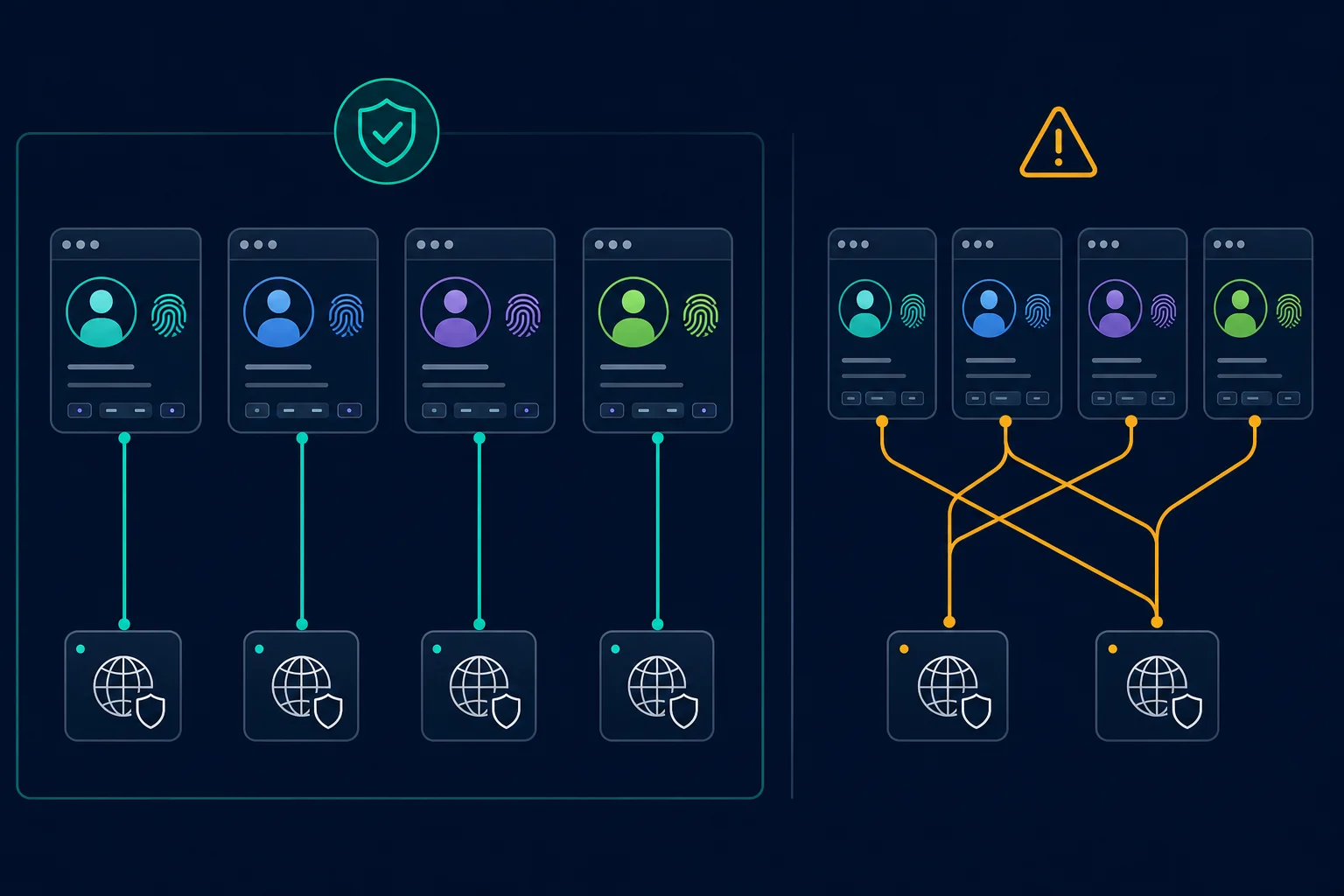
This mapping reduces accidental location jumps, shared-cookie mistakes, and cross-client contamination. It also makes incident review possible because the team can identify which account, profile, operator, and route were active at a given time.
A stable proxy is not permission to share credentials widely. Keep two-factor authentication enabled, limit operator access, and follow the platform's supported business-management or delegated-access features where available. Meta's account security guidance recommends login alerts and two-factor authentication; these controls remain important when a proxy is in use.
How to evaluate a social media proxy provider
Shortlist providers using details you can verify, not pool-size slogans.
- Session control: Confirm whether IPs are static, sticky for a stated duration, or rotating per request. The provider should let you choose deliberately.
- Network ownership and sharing: Ask whether an IP is dedicated, shared, or drawn from a pool. For persistent account assignments, dedicated routes are easier to audit.
- Location accuracy: Test country and region results with an IP lookup and the actual authorized workflow. Do not buy city targeting unless the work genuinely needs it.
- Authentication: Use unique credentials or IP allowlisting, restrict who can retrieve them, and rotate credentials when an operator leaves.
- Protocol support: HTTP(S) works for most browsers and profile managers; SOCKS5 can be useful when the application explicitly supports it. Choose the protocol the client handles reliably.
- Capacity and billing: Compare IP-count pricing for static routes with bandwidth pricing for residential traffic. Include video, images, retries, and uploads in the estimate.
- Replacement and support policy: Learn how unhealthy static IPs are diagnosed and replaced. Constant self-service replacement can undermine the continuity you bought them for.
- Source transparency: Avoid providers that cannot explain how residential or mobile access is sourced and consented.
Test the final two candidates on a small, authorized workload. A provider that looks inexpensive per IP or per GB can cost more if latency, session churn, or failed traffic adds operator time.
A practical proxy test before you scale
Run a controlled test for several normal work sessions. Keep account, browser profile, device, region, and action sequence the same while changing only the proxy candidate.
Record:
- Connection success and authentication failures.
- Median and slowest useful response time.
- Unexpected IP changes inside the session.
- Login alerts, forced reauthentication, or session resets.
- Whether the observed location matches the requested region.
- Bandwidth consumed by a representative browser session.
- The exact account-to-proxy assignment and test time.
First establish a baseline on your normal approved connection. Then compare one ISP or sticky residential route at a time. Stop the test if the platform shows security warnings or if the workflow does not comply with its rules; buying a larger pool is not a valid response to an authorization problem.
Common social media proxy mistakes
Avoid these patterns:
- Rotating IPs during an authenticated session.
- Sharing one browser profile across several accounts or clients.
- Moving an account between distant regions without a business reason.
- Reusing cookies after changing the assigned proxy.
- Sending many accounts through one cheap shared endpoint.
- Choosing mobile proxies without testing whether mobile egress changes the result.
- Treating every login challenge as an IP-quality problem.
- Using browser automation where the platform requires its API or express permission.
Platform rules are part of proxy selection. Instagram's Terms of Use prohibit automated access or collection without express permission. X's developer guidelines tell builders to use the official API rather than browser automation; the Twitter proxies guide covers stable account assignments, IP reputation, and controlled troubleshooting for that platform. Account-based classifieds can be stricter still: the Craigslist proxies guide explains why manual posting and built-in search alerts are the safe defaults. Review the current rules for every service in your workflow before connecting a proxy.
For platform-specific setup, see the Instagram proxy guide, the TikTok proxy guide for SIM and account-region signals, and the YouTube proxy guide for regional tests and channel access.
When Unknown Proxies fits
Unknown Proxies offers two relevant starting points:
- ISP proxy plans for fixed, dedicated assignments where account and browser continuity matter.
- Residential proxies for approved regional QA, rotating independent checks, or sticky sessions that fit within the available session window.
Choose ISP when the work is primarily stable account management. Choose residential when location breadth or independent rotation is the real requirement. If neither condition applies, a direct connection or official API may be the better answer.
FAQ
What are the best proxies for social media accounts?
Static ISP proxies are usually the best fit for authorized social media account management because one dedicated IP can stay mapped to one account and browser profile. Sticky residential proxies fit shorter regional sessions. Do not rotate an active login.
Are ISP proxies good for social media automation?
ISP proxies are a good network layer for social media work because each account keeps one stable, dedicated IP. They do not make automation allowed. Use each platform's official API for automated publishing or data access, and keep browser sessions human-operated.
Which static residential proxy is best for Instagram and TikTok in the United States?
"Static residential" usually means an ISP proxy: a fixed IP registered to an internet provider. For US Instagram and TikTok accounts, pick a static US ISP proxy close to where the account normally operates, one per account. Use a sticky residential proxy with US state or city targeting when you need a location the ISP inventory does not cover.
Are residential or ISP proxies better for social media?
ISP proxies are better for long-lived, stable account sessions. Residential proxies are better for broader location coverage and independent public checks. Use sticky residential mode when a permitted regional workflow needs login continuity.
Should each social media account have a separate proxy?
For operational isolation, map each account or client browser profile to its own stable proxy when possible. At minimum, do not mix unrelated clients, cookie jars, and changing IPs in the same profile.
Are mobile proxies best for Instagram or TikTok?
Not automatically. Mobile proxies are justified when you must test carrier-network behavior. For normal authorized account management, a stable dedicated ISP proxy is often simpler, faster, and easier to audit.
Can proxies prevent social media account restrictions?
No. A proxy changes network routing only. Platform permissions, account history, content, API rules, device recognition, browser state, rate limits, and operator behavior can all affect restrictions.
Final thoughts
The best social media proxies are the ones that preserve the right kind of identity for an authorized workflow. Use a static ISP proxy for persistent account management, a sticky residential session for shorter regional work, rotating residential exits for independent public QA, and mobile proxies only when carrier egress is the variable you need to test.
Keep each account, browser profile, cookie jar, and proxy assignment together. Verify platform rules before automating anything, test with a small workload, and compare ISP and residential pricing only after the session and location requirements are clear.