OpenAI Agent Builder is the visual workflow canvas OpenAI launched with AgentKit in October 2025, and it is going away. OpenAI announced the deprecation on June 3, 2026, and the product is scheduled to shut down on November 30, 2026. To keep a workflow running, export it as Agents SDK code in Python or TypeScript and run it yourself. If you'd rather have a no-code tool, OpenAI's other suggested path is ChatGPT Workspace Agents.
The export also changes who controls web access. Inside Agent Builder, the Web search tool ran on OpenAI's infrastructure and any MCP server you attached was called from it. Search traffic came from OpenAI's network, and to choose an exit IP you had to put a proxy inside your own MCP server. After the export, the agent loop runs in your process. You can add a fetch tool that reads pages through your own proxy, keep OpenAI's hosted search where it works, and send model traffic straight to the API.
This guide covers the shutdown timeline, what the exported code contains, where each tool's requests come from, and how to add proxied web access without routing model calls and traces through a proxy you pay for by the gigabyte.
Tested on 2026-10-21 with openai-agents 0.24.0 (Python 3.12), @openai/agents 0.21.0 on Node 24.16, and mcp 2.3.0. Traffic went through a local proxy that logged every tunnel and counted bytes. Model calls went to a mock Responses API endpoint, so no OpenAI account was needed.
OpenAI Agent Builder shutdown: what goes away and what stays
Agent Builder isn't the only AgentKit piece leaving. The deprecations page lists three related shutdowns, all announced on June 3, 2026:
| Product | What happens | Date |
|---|---|---|
| Agent Builder | Shuts down | November 30, 2026 |
| Evals | Existing evals become read-only, then the dashboard and API shut down | October 31, 2026, then November 30, 2026 |
Reusable prompts (v1/prompts) |
API and prompt objects shut down. Move prompt text into your code | November 30, 2026 |
| ChatKit | Stays available | No end date announced |
| Agents SDK | Not affected | No end date announced |
OpenAI's migration guide offers two paths. The Agents SDK keeps the workflow as code you deploy. Workspace Agents rebuild it as a ChatGPT agent from a natural-language description, and they need a ChatGPT Business, Enterprise, or Edu workspace. The guide warns that workflows built on deterministic logic may not survive the move to a workspace agent. Workspace Agents also run inside ChatGPT and use its tools, so you don't control where their web requests come from. If the workflow reads websites and you care where those requests exit, use the Agents SDK.
Export the Agent Builder workflow to Agents SDK code
The export takes a minute:
- Open the workflow in Agent Builder.
- Select Code in the top bar, then Agents SDK.
- Pick Python or TypeScript and copy the whole file.
The export does not convert your graph node by node, and OpenAI says behavior may not transfer unchanged, so test it against real inputs before you deploy it. Here is the tool and agent part of a public export of a flight-status workflow. We trimmed the imports to the ones this part uses and shortened the instructions string:
from agents import WebSearchTool, Agent, ModelSettings
from openai.types.shared.reasoning import Reasoning

# Tool definitions
web_search_preview = WebSearchTool(
  user_location={
    "type": "approximate",
    "country": None,
    "region": None,
    "city": None,
    "timezone": None
  },
  search_context_size="high"
)
my_agent = Agent(
  name="My agent",
  instructions="""You are FlightStatusAgent. Your job is to fetch today's live flight status...""",
  model="gpt-5",
  tools=[
    web_search_preview
  ],
  model_settings=ModelSettings(
    store=True,
    reasoning=Reasoning(
      effort="low",
      summary="auto"
    )
  )
)
The rest of the file defines a WorkflowInput model and an async run_workflow() function. It builds the conversation, calls Runner.run() for each Agent node, and tags the run with RunConfig(trace_metadata={"__trace_source__": "agent-builder", "workflow_id": "wf_..."}). That workflow ID is only a trace label. The exported code calls the Responses API directly and never loads the workflow from Agent Builder, so it keeps working after the shutdown.
Logic nodes turn into plain Python. An If/else node becomes an if/elif/else block. A Human approval node becomes an approval_request() stub that returns True under a # TODO: Implement comment, so the exported workflow approves everything until you write that function. Exports with Guardrails nodes import guardrails.runtime, which comes from the openai-guardrails package, so install that package alongside openai-agents.
Where an exported workflow's web requests come from
The export runs the agent loop on your machine. The web requests don't all move with it.
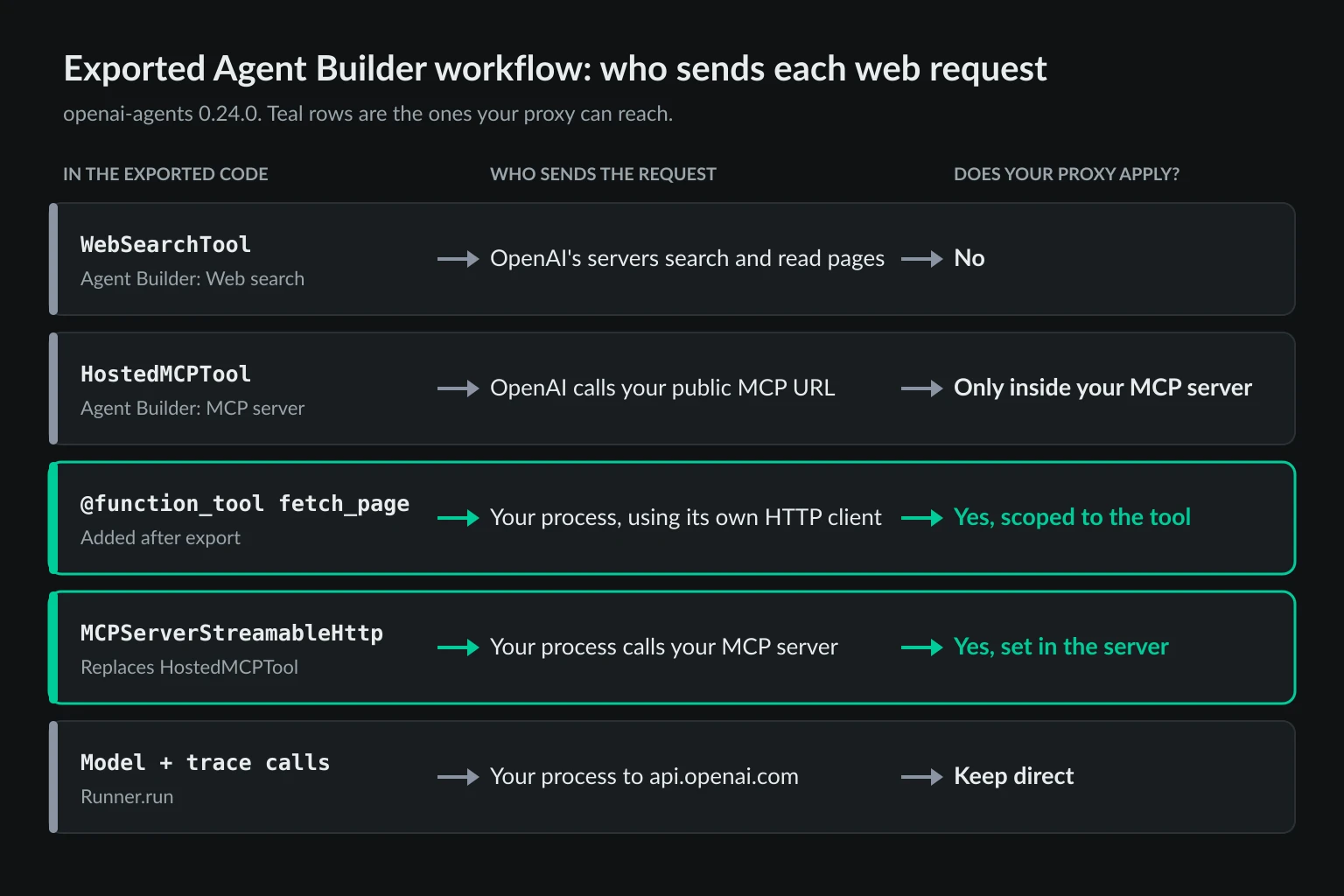
Web search stays on OpenAI. The Agent node's Web search tool exports as WebSearchTool, a hosted tool. Your process only sends its config to the Responses API. We checked the request body. The tool entry held only settings ("type": "web_search", search_context_size, and empty filters and location), with no URL or fetch logic, so OpenAI runs the search and reads the results. The web search docs describe user_location as an approximate location used to refine results. It doesn't change the IP the search comes from. You can limit results to up to 100 allowed_domains, and external_web_access: false switches the tool to cache-only mode.
Hosted MCP servers are called by OpenAI. The SDK's HostedMCPTool (Python) or hostedMcpTool (TypeScript) does the same thing as an MCP server attached in Agent Builder. The request to OpenAI contains {"type": "mcp", "server_url": "https://...", ...}, and OpenAI's servers connect to that URL. The server must be reachable from the public internet over Streamable HTTP or HTTP/SSE, unless you use OpenAI's Secure MCP Tunnel. OpenAI's published egress IP ranges only list ChatGPT integrations and Codex cloud, not MCP calls made through the API, so authenticate the server with the tool's authorization field rather than relying on an IP allowlist.
Function tools run in your process. Anything decorated with @function_tool, or defined with tool() in TypeScript, runs inside Runner.run. That makes it the place to put proxied web access.
Model calls and traces also leave from your process. Every Runner.run turn calls api.openai.com. The tracing exporter uploads spans to https://api.openai.com/v1/traces/ingest. That's a fixed default in the exporter, and it doesn't follow OPENAI_BASE_URL. When we pointed the model client at a different base URL, traces still went to OpenAI and failed with [non-fatal] Tracing client error 401. If you move an export to another provider or gateway, disable tracing with OPENAI_AGENTS_DISABLE_TRACING=1 or give it a valid OpenAI key with set_tracing_export_api_key().
Add proxied web access to the exported agent (Python)
Add a function tool with its own HTTP client and give only that client the proxy. Hosted search still finds URLs, and the new tool reads them from an IP you choose. That's useful when you need country-specific content, a stable session on one site, or more control than a hosted search provides.
pip install openai-agents
openai-agents 0.24.0 depends on httpx2, a next-generation version of httpx, and the openai 3.x package uses it as well. You already have it installed. On older SDK versions that ship plain httpx, change the import and the same code works.
import asyncio
import os

import httpx2
from agents import Agent, ModelSettings, Runner, WebSearchTool, function_tool

# Only this client uses the proxy. Model calls keep using the default OpenAI client.
web_client = httpx2.AsyncClient(
    proxy=os.environ["AGENT_PROXY_URL"],  # e.g. http://user:pass@proxy.example.com:8000
    timeout=httpx2.Timeout(30.0, connect=10.0),
    follow_redirects=True,
    headers={
        "User-Agent": "example-research-agent/1.0 (ops@example.com)",
        "Accept-Language": "en-US,en;q=0.9",
    },
)
MAX_BYTES = 1_000_000  # stop downloading after 1 MB of body


@function_tool
async def fetch_page(url: str) -> str:
    """Download a public web page and return its HTTP status and text.

    Args:
        url: The full https:// URL to fetch.
    """
    try:
        async with web_client.stream("GET", url) as response:
            if response.status_code in (403, 429):
                return f"HTTP {response.status_code}: the site refused this request. Do not retry it."
            body = bytearray()
            async for chunk in response.aiter_bytes():
                body += chunk
                if len(body) >= MAX_BYTES:
                    break
            text = body.decode(response.encoding or "utf-8", errors="replace")
    except httpx2.HTTPError as exc:
        return f"Request failed: {type(exc).__name__}"
    return f"HTTP {response.status_code}\n\n{text[:20000]}"


web_search_preview = WebSearchTool(search_context_size="medium")

research_agent = Agent(
    name="Research agent",
    instructions="Use web search to find sources, then fetch_page to read the pages you cite.",
    model="gpt-5",
    tools=[web_search_preview, fetch_page],
    model_settings=ModelSettings(store=True),
)


async def main() -> None:
    result = await Runner.run(research_agent, "What does example.com say?")
    print(result.final_output)
    await web_client.aclose()


asyncio.run(main())
In your export, keep the generated run_workflow(), paste in web_client and fetch_page, and add fetch_page to the tools list of each agent that should read pages. Don't export HTTPS_PROXY for this. The proxy URL goes only into this one client.
In our run, the logging proxy saw exactly one tunnel, CONNECT en.wikipedia.org:443, with 69.4 KB received. Model requests didn't touch the proxy. Three details came up in testing:
- Set a User-Agent. With httpx2's default
python-httpx2/2.15.1, Wikipedia answered 403 with "Please set a user-agent and respect our robot policy". A descriptive agent name with a contact address got a 200. That's what the Wikimedia User-Agent policy asks for, and it's a good default for any agent you run. - Return blocks as text the model can act on. If a tool raises, the SDK's default error handler tells the model "An error occurred while running the tool. Please try again.", which invites a retry against the same blocked URL. A string like "HTTP 403, do not retry" lets the model pick another source instead. For what those codes mean, see the guides to HTTP 403 and HTTP 429.
- Wrong proxy credentials show up as
ProxyError. httpx2 raises it when the proxy answers407 Proxy Authentication Required, and the tool above reports it as "Request failed: ProxyError". If you see that, fix the credentials before you start debugging the 407 any further.
The two limits do different jobs. MAX_BYTES stops the download, so a link to a large file can't pull hundreds of megabytes through a plan billed per GB. Without it, the tool would download the whole response before trimming it. The 20,000-character cap is for the model, because raw HTML is expensive context and a heavy page would otherwise fill the window. Converting the page to text first cuts tokens much further, as shown in AI web scraping with LLM extraction.
The same fetch tool in a TypeScript export
TypeScript exports use @openai/agents. Node's fetch takes a proxy through an undici ProxyAgent passed as dispatcher:
npm install @openai/agents zod undici
import { Agent, run, tool, webSearchTool } from "@openai/agents";
import { ProxyAgent, fetch } from "undici";
import { z } from "zod";

// Only this dispatcher uses the proxy. Model calls keep the default connection.
const proxy = new ProxyAgent(process.env.AGENT_PROXY_URL); // http://user:pass@host:port
const MAX_BYTES = 1_000_000; // stop downloading after 1 MB of body

const fetchPage = tool({
  name: "fetch_page",
  description: "Download a public web page and return its HTTP status and text.",
  parameters: z.object({ url: z.string().describe("The full https:// URL to fetch.") }),
  async execute({ url }) {
    try {
      const response = await fetch(url, {
        dispatcher: proxy,
        headers: { "User-Agent": "example-research-agent/1.0 (ops@example.com)" },
        signal: AbortSignal.timeout(30_000),
      });
      if (response.status === 403 || response.status === 429) {
        await response.body?.cancel();
        return `HTTP ${response.status}: the site refused this request. Do not retry it.`;
      }
      const chunks = [];
      let size = 0;
      for await (const chunk of response.body ?? []) {
        chunks.push(chunk);
        size += chunk.length;
        if (size >= MAX_BYTES) break; // leaving the loop cancels the download
      }
      const text = Buffer.concat(chunks).toString("utf8");
      return `HTTP ${response.status}\n\n${text.slice(0, 20_000)}`;
    } catch (error) {
      return `Request failed: ${error.cause?.message ?? error.message}`;
    }
  },
});

const researchAgent = new Agent({
  name: "Research agent",
  instructions: "Use web search to find sources, then fetch_page to read the pages you cite.",
  model: "gpt-5",
  tools: [webSearchTool(), fetchPage],
});

const result = await run(researchAgent, "What does the Wikipedia page on proxy servers cover?");
console.log(result.finalOutput);
Save it as an .mjs file, or as .js with "type": "module", because it uses top-level await. One quirk from testing: with wrong proxy credentials, undici 8.12.3 doesn't surface a 407. fetch throws "fetch failed", and the cause is just "Request was cancelled." If a TypeScript agent's fetches all fail that way, check the proxy credentials first.
Don't export HTTPS_PROXY for the whole exported agent
The tempting shortcut is to export HTTPS_PROXY and let everything follow it. In the Agents SDK, a lot of traffic follows it. With the variable set and the real API endpoint, the logging proxy saw two tunnels to api.openai.com:443: one for the Responses call and one for the trace upload.
To measure the cost, we ran the Python agent above with HTTPS_PROXY exported and the model pointed at the mock endpoint. The model asked for one fetch_page call on a Wikipedia article and then answered:
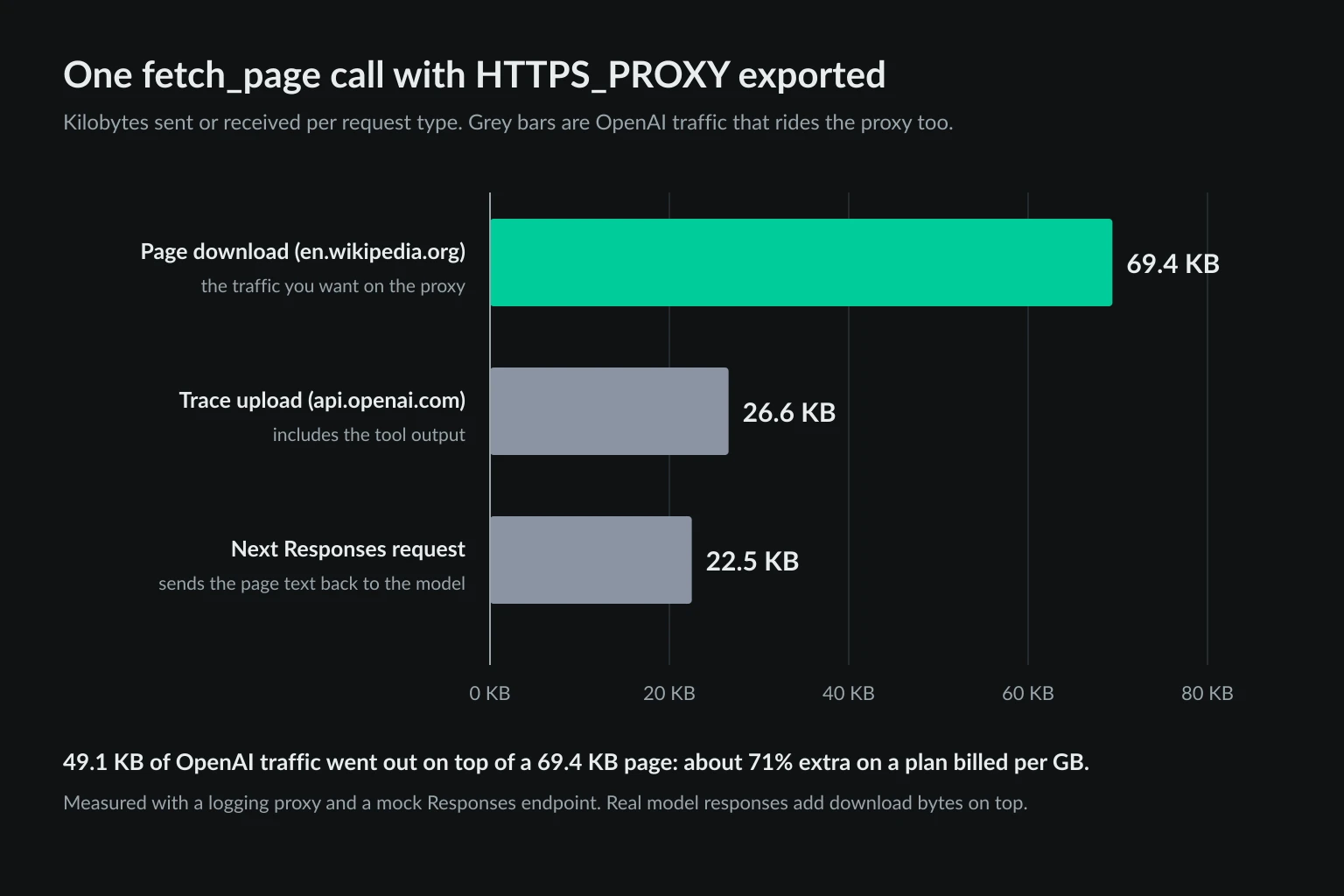
The page was 69.4 KB. The trace upload was 26.6 KB, because by default spans include tool inputs and outputs, and here that meant the page text. The next Responses request was 22.5 KB, since it sends the page text back to the model. That's about 49 KB of OpenAI traffic on top of a 69 KB page, or roughly 71% extra on a plan billed per GB, before counting the model's responses. Every extra turn sends the conversation again.
There are two fixes, and they combine:
- Exempt OpenAI with
NO_PROXYif something else in the process does need the variable. httpx2 kept both the Responses call and the trace upload off the proxy withNO_PROXY=api.openai.com,.openai.com, or a bareopenai.com. The wildcard form*.openai.comdid not match, and both calls went through the proxy. Requests treats*.prefixes the same way, as the NO_PROXY matching rules show. - Stop shipping page text in traces. Setting
OPENAI_AGENTS_TRACE_INCLUDE_SENSITIVE_DATA=false, orRunConfig(trace_include_sensitive_data=False), cut the trace upload from 26.6 KB to 4.9 KB in the same run. It also keeps fetched page content out of your trace dashboard.
The cleanest setup is the one in the code above. Pass the proxy explicitly to the tool's client and leave the process environment alone.
Moving an Agent Builder MCP server off OpenAI's infrastructure
If your workflow used a custom MCP server for web access, you have two options after export.
Keep it hosted. Leave the HostedMCPTool as it is. OpenAI still calls your public server, and your server makes the page requests, so the proxy goes in the server's own HTTP client. Remote MCP servers require approval by default. Check the require_approval value in your export: "never" means the model can send data to the server without a person signing off.
Call it from your process. Swap the hosted tool for MCPServerStreamableHttp. Then the SDK connects to the server from your machine, so the server can sit on localhost or a private network with no public URL. The model sees its tools as ordinary function tools. Here is a minimal server whose fetch tool uses the proxy:
import os

import httpx2
from mcp.server.mcpserver import MCPServer

mcp = MCPServer("web-fetch")
client = httpx2.AsyncClient(
    proxy=os.environ["AGENT_PROXY_URL"],
    timeout=30.0,
    follow_redirects=True,
    headers={"User-Agent": "example-research-agent/1.0 (ops@example.com)"},
)


@mcp.tool()
async def fetch_page(url: str) -> str:
    """Download a public web page through the proxy and return its HTTP status and text."""
    async with client.stream("GET", url) as response:
        body = bytearray()
        async for chunk in response.aiter_bytes():
            body += chunk
            if len(body) >= 1_000_000:  # same 1 MB download cap as above
                break
        text = body.decode(response.encoding or "utf-8", errors="replace")
    return f"HTTP {response.status_code}\n\n{text[:20000]}"


if __name__ == "__main__":
    mcp.run(transport="streamable-http", host="127.0.0.1", port=8000)
Connect the exported agent to it:
import asyncio

from agents import Agent, Runner
from agents.mcp import MCPServerStreamableHttp


async def main() -> None:
    async with MCPServerStreamableHttp(
        name="web-fetch",
        params={"url": "http://127.0.0.1:8000/mcp", "timeout": 30},
        cache_tools_list=True,
        client_session_timeout_seconds=40,
    ) as fetch_server:
        agent = Agent(
            name="Research agent",
            instructions="Use fetch_page to read the pages you cite.",
            model="gpt-5",
            mcp_servers=[fetch_server],
        )
        result = await Runner.run(agent, "What does the Wikipedia page on proxy servers cover?")
        print(result.final_output)


asyncio.run(main())
Keep client_session_timeout_seconds above the server's own 30-second fetch timeout. It defaults to 5 seconds and applies to every tool call. In our test, a page that took 8 seconds to load through the proxy failed with "Request 'tools/call' timed out" at the default, and the same call succeeded at 40.
Most MCP tutorials from Agent Builder's launch use from mcp.server.fastmcp import FastMCP. On mcp 2.x that import fails with "No module named 'mcp.server.fastmcp'. This is mcp 2.x, where FastMCP was renamed to MCPServer". The server above uses the new name. The mcp v2 migration guide lists the other API changes, or you can pin mcp<2 to keep old code running. If you want a ready-made server instead, the reference Fetch MCP server takes a proxy too. The best MCP servers for web access compares search, fetch, and browser servers by how much context each one returns.
ChatKit apps built on Agent Builder workflows
If you embedded the workflow with ChatKit using a workflow ID, the chat UI talks to an OpenAI-hosted backend that runs the Agent Builder workflow. ChatKit itself stays available. The ChatKit guide limits the hosted workflow path to existing Agent Builder users during the transition and recommends the custom server integration for migrations.
That path uses the openai-chatkit Python package. You subclass ChatKitServer, implement respond(), run your exported agent with Runner.run_streamed(), and stream the result back with stream_agent_response(). You also provide a Store for threads and messages, and the frontend's apiURL points at your server. Because the agent now runs on your server, the proxied fetch_page tool from earlier works unchanged inside the ChatKit app.
Which proxy fits an exported agent's fetch tool
Match the proxy to how the agent reads pages:
- One-off reads across many sites, such as research, price checks, and citations, suit rotating residential proxies. Each fetch can use a fresh IP, and residential addresses get flagged less often than cloud IPs.
- Multi-step work on one site, such as a login, a cart, or paginated results, needs the same IP for the whole task. Use a sticky residential session or a static ISP proxy. Sticky vs rotating proxies explains how to choose.
Size the plan by page weight. A 70 KB article is small, while a JavaScript-heavy retail page can be several megabytes. The data usage calculator estimates monthly GB from page size and request volume.
A proxy changes where requests come from. It doesn't make a blocked request acceptable. Keep agents to sites you're allowed to access, respect robots.txt and published rate limits, and treat a 403 as a stop signal rather than a reason to rotate. If an agent keeps getting blocked, why web browsing agents get blocked explains how to tell an IP problem from a fingerprint or behavior problem.
FAQ
Is OpenAI Agent Builder shutting down?
Yes. OpenAI announced the deprecation on June 3, 2026, and Agent Builder is scheduled to shut down on November 30, 2026. Evals and reusable prompt objects shut down the same day. ChatKit and the Agents SDK stay.
Will my exported Agents SDK code stop working when Agent Builder shuts down?
No. The exported code calls the Responses API through the Agents SDK. The workflow_id in its trace metadata is only a label. If the original workflow relied on a reusable prompt object, move that prompt text into your code, because v1/prompts shuts down on November 30, 2026, as well.
Can Agent Builder's web search run from a specific country?
Not by IP. WebSearchTool runs on OpenAI's infrastructure. Its user_location setting is an approximate location that tunes which results come back. To read pages as they appear from a particular country, fetch them with your own tool through a proxy that exits there.
Does the OpenAI Agents SDK have a proxy setting?
It has no proxy option of its own. The OpenAI client and the trace exporter read HTTPS_PROXY from the environment, so exporting it routes model calls and trace uploads through the proxy. Put the proxy on the HTTP client inside your web tools instead, or exempt api.openai.com with NO_PROXY.
Should I migrate to the Agents SDK or Workspace Agents?
Choose the Agents SDK if the workflow has deterministic branching, runs inside your product, or needs to control where its web requests come from. Choose Workspace Agents if your team works in ChatGPT Business, Enterprise, or Edu and the workflow is mostly prompt-driven.
Conclusion
OpenAI Agent Builder shuts down on November 30, 2026. The practical move is to export each workflow as Agents SDK code, test it against real inputs, and run it on your own infrastructure. Use the ChatKit custom server if you need a chat UI. The export also gives you more control over how the agent reaches the web than Agent Builder did. Hosted search still runs on OpenAI. Pages you fetch yourself can go through a proxy you choose, while model calls and traces go straight to OpenAI.
Add a fetch_page tool with its own proxied client, check the exit IP and status codes in your logs, and keep HTTPS_PROXY out of the process environment. For the fetch tool's traffic, start with residential proxies for rotating reads or an ISP plan when the agent needs one stable address.