
AI agent infrastructure covers everything an agent needs to run outside a notebook. That means model access, a host that keeps the loop alive for as long as a task takes, tool servers, browsers, a network egress layer with proxies, durable state, and monitoring. The model decides what to do. The infrastructure decides where that happens, how long it can take, and which IP address the website sees.
Most stack diagrams draw these layers as separate boxes. In production they share a clock: the model's think time between tool calls. We measured that gap across 9 agent runs on three Claude models. It ran from 1.3 to 7.1 seconds, with medians between 2.2 and 2.7 seconds. Node's built-in fetch drops an idle connection after 4 seconds, so 8 of the 33 gaps forced a new proxy tunnel. Behind a gateway that assigns a new exit per connection, each of those reconnects can mean a new IP in the middle of a task. This guide walks through the stack one layer at a time and shows where those defaults bite.
The AI agent infrastructure stack at a glance
| Layer | What it does | Typical options | What breaks in production |
|---|---|---|---|
| Model access | Runs the planner model | Provider API, a model gateway, self-hosted inference | Rate limits, latency spikes, provider outages |
| Hosting and runtime | Keeps the agent loop running | Serverless function, container service, managed agent runtime, a worker on a VM | Timeouts that kill long tasks, lost state on redeploy |
| State | Saves progress so a task can resume | Checkpoint store, queue, database | A resumed task that forgets its session or redoes side effects |
| Tools | Functions and MCP servers the model calls | In-process tools, local stdio MCP servers, remote MCP servers | Requests leaving from a machine you didn't expect |
| Browser | Renders pages and runs logins | Local headless Chromium, cloud browser services | Memory per session, bandwidth, fingerprints |
| Network egress | Decides how traffic leaves and which IP it uses | Direct cloud egress, NAT, residential or ISP proxies | Datacenter IP blocks, IP changes mid-task, leaks |
| Monitoring | Records what each task did | Traces, request logs, cost tracking | Failures you can't reconstruct |
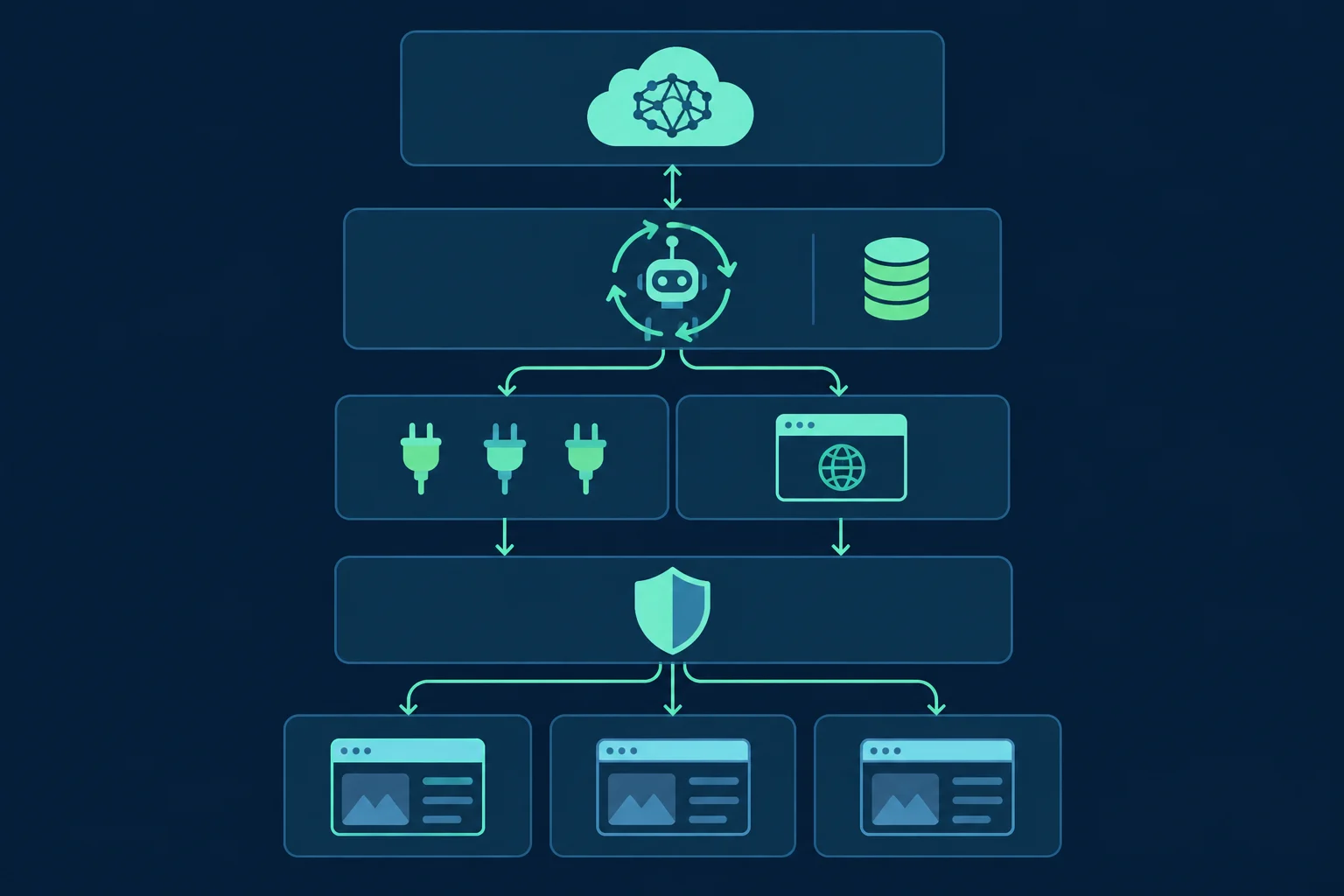
AI agent architecture covers what goes on inside one agent: the planner, the tools, memory, and the network layer as a component in code. This guide takes the operations view. It looks at where each of those parts runs, what limits the platform puts on it, and how the layers interact once real traffic flows through them.
Model access: the agent's clock
Most production agents call a hosted model API. Some put a gateway in front of it to manage keys, fall back to another model, and track spend per task. A few run open-weight models on their own GPUs. For the rest of the stack, the important property is latency: the time between handing the model a tool result and getting the next tool call back.
That latency sets the pace of all web traffic. A fetch-driven agent sends one request, then sits idle while the model reads the result and picks the next step. Nothing goes over the network while it thinks. Keep model API traffic off your proxy as well. It doesn't need a residential IP, and on a bandwidth-billed plan it would re-upload the whole conversation on every call. AI agent frameworks compared shows which framework clients follow HTTPS_PROXY, so you can scope the proxy to web tools only.
AI agent hosting: where the loop runs
Agent tasks run longer than web requests. A research task can take a few minutes. A task that waits for a human to approve a purchase can take hours. The first hosting question is whether the platform will let a single run live that long.
| Host | Hard limit on one run | Good fit |
|---|---|---|
| AWS Lambda | 900 seconds (15 minutes) maximum timeout for standard functions | Short single-shot tasks, tool endpoints |
| Cloud Run services | 300-second default request timeout, extendable to 60 minutes | Tasks that finish within one request |
| Amazon Bedrock AgentCore Runtime | Sessions of up to 8 hours per lifecycle on microVMs; stopped after 15 minutes idle by default | Per-user agent sessions on a managed runtime |
| A worker on a container service or VM, fed by a queue | None from the platform | Long tasks, browsers, fixed egress |
These are the published limits as of November 2026. Whichever you pick, three habits make AI agent deployment survive restarts and timeouts:
- Checkpoint between steps. Save the plan, visited URLs, and partial results after every tool call, using something like LangGraph persistence or your own table. A redeploy or a timeout should resume the task, not restart it.
- Store the network identity with the task. Put the proxy session ID and cookie jar in the checkpoint. A resumed task should come back on the same exit IP and session, not a fresh one that looks like a different user halfway through a login.
- Make write actions idempotent. A task resumed from a checkpoint can repeat the step that was running when it died. Anything that submits, buys, or sends needs a key that makes the second attempt a no-op.
Serverless platforms also give you shared cloud egress. Unless you add a NAT gateway or a proxy, requests leave from the provider's IP ranges, and many sites treat those more strictly than home or office connections.
Tool servers: who actually sends the request
Tools are where web traffic starts, and the hosting question applies to them too. The MCP specification defines two standard transports. stdio runs the server as a "client-launched subprocess", so it runs on the same machine as the agent and uses that machine's network. Streamable HTTP servers run wherever they're deployed. A remote MCP server that fetches pages sends those requests from its own host, with its own IP and its own proxy settings, or none.
So for each web tool, write down where the request actually leaves from. In-process tools and stdio servers use your host's egress, which is where your proxy settings apply. Remote MCP servers and hosted search tools use someone else's egress, and your proxy settings don't reach them. Best MCP servers for web access compares the common options, including which ones run locally.
The browser layer: local or hosted
A browser tool is the heaviest part of the stack. Each concurrent task needs its own browser context, and a full page load pulls far more data than the HTML alone: scripts, fonts, images, and third-party tags. You have two ways to run it.
Local headless Chromium runs next to the agent. You control the binary, the launch flags, and the proxy, and you pay in memory and CPU per concurrent session. Hyperbrowser vs Steel vs Lightpanda has measured memory and bandwidth for self-hosted options.
Cloud browser services run the browser for you and hand back a CDP URL or an API. You pay per browser-hour, and often per GB of their proxy traffic. Browserbase alternatives compares the pricing models. If you bring your own proxy, check how the service applies it. AWS documents its AgentCore Browser proxy support in unusual detail, and the constraints are typical of the category:
- The proxy is applied with Chromium's
--proxy-serverflag when the session starts, and the docs call it "a browser-level setting", not a network-level control. - Proxy settings are fixed per browser session. To rotate, you start a new session.
- Only HTTP and HTTPS proxies with CONNECT are supported, with Basic auth or IP allowlisting. SOCKS is not supported.
- Proxy connectivity isn't checked at session creation, so a bad proxy only shows up as browser error pages once the agent starts browsing.
The last point is a good reason to run an exit-IP check as the first step of every task, before the agent does anything that matters.
Network egress: proxies in the agent stack
The egress layer decides which IP address each request comes from. The rules from the earlier layers come together here: web tool traffic goes through the proxy, model API traffic doesn't, and one task keeps one identity for its whole life. AI agent security covers the other job of this layer, which is enforcing egress so a compromised agent can't send data anywhere it likes.
There's one detail about HTTPS proxies that most stack diagrams leave out. With HTTPS, the client opens a tunnel with CONNECT host:443 and encrypts everything inside it. The proxy can't see individual requests. It sees tunnels, so a gateway that rotates IPs can only pick a new exit when a new tunnel opens. That means your HTTP client's connection pooling, not the proxy, decides how often a "rotating" proxy actually rotates during a task. And the pool's idle timeout gets measured against the model's think time.
Test: model think time vs connection lifetimes
We measured all three parts on November 8, 2026, from a Hetzner server in Nuremberg.
Setup
- Agent:
claude -p(Claude Code 2.1.310) with Claude Haiku 5.5, Sonnet 5.5, and Opus 5.5, three runs each. Its only tool was a small MCP stdio server with afetch_pagetool that returns distilled page text. The server used Node 24.16's built-infetch(undici 7.25) withNODE_USE_ENV_PROXY=1, so every fetch went through a local logging CONNECT proxy. The proxy recorded when each tunnel opened, when it closed, and which side closed it. - Task: start at the Wikipedia article on keepalive and follow links one layer down the network stack for five pages, fetching one page per step. Every request went to
en.wikipedia.org, so one connection could have served the whole task. - Gap: the time from the tool returning a result to the next tool call arriving, timestamped inside the MCP server. It includes the model call plus Claude Code's own overhead, which is the idle time a connection actually sees.
Results
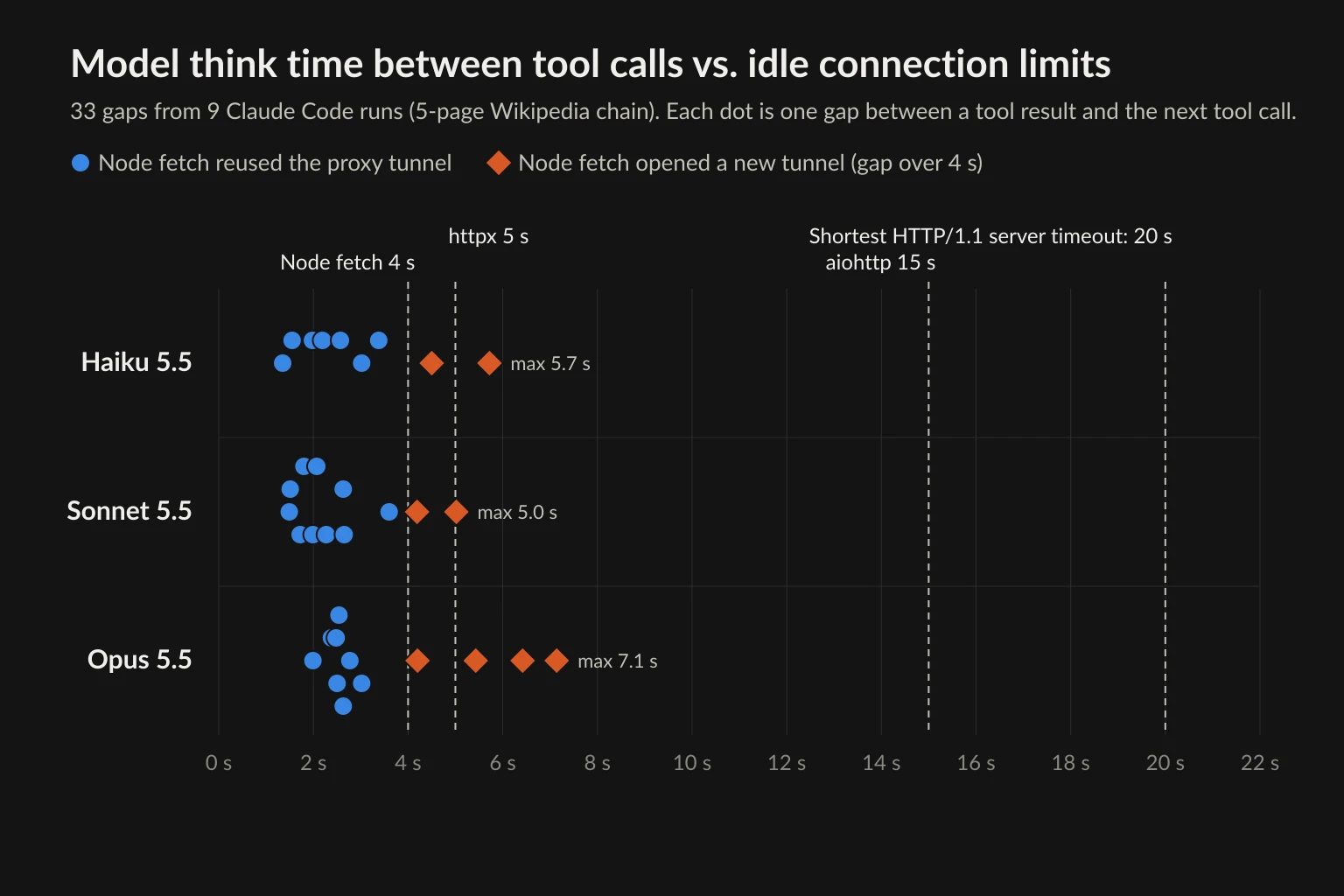
| Model | Fetches | Gaps | Median gap | Longest gap | Gaps over 4 s | Proxy tunnels opened |
|---|---|---|---|---|---|---|
| Haiku 5.5 | 12 | 9 | 2.6 s | 5.7 s | 2 | 5 |
| Sonnet 5.5 | 15 | 12 | 2.2 s | 5.0 s | 2 | 5 |
| Opus 5.5 | 15 | 12 | 2.7 s | 7.1 s | 4 | 7 |
The Haiku runs stopped after four pages, at the physical layer, and said there was no lower layer to go to. The Sonnet and Opus runs found a fifth page.
Every one of the 8 gaps over 4 seconds opened a new tunnel, and none of the shorter gaps did. The proxy log showed the client closing each idle tunnel 4.0 seconds after its last byte. That matches undici's documented keepAliveTimeout default of 4 seconds, which a server's Keep-Alive header can override. Wikipedia's responses didn't carry that header. One Opus run used three tunnels for a five-page task. On a gateway that assigns an exit per connection, that run could have reached Wikipedia from three different IP addresses.
These gaps are a lower bound. The task was short and the context stayed small. Agents with longer contexts, extended thinking, several tools per step, or a human approval in the middle wait much longer between requests.
Client defaults decide reuse, not the server
Next we took the model out and ran a plain timer instead. Each client fetched the books.toscrape.com homepage, sat idle for a set time, then fetched page 2 through the same logging proxy. We did one run per client and gap. The site runs nginx, which closed idle connections after about 75 seconds in our survey. That matches nginx's default keepalive_timeout of 75s.
| Client (default idle limit) | 3 s | 8 s | 20 s | 60 s | 100 s |
|---|---|---|---|---|---|
Node 24.16 fetch / undici 7.25 (4 s) |
Reused | New | New | New | New |
httpx 0.28.1 (keepalive_expiry 5 s) |
Reused | New | New | New | New |
aiohttp 3.14.5 (keepalive_timeout 15 s) |
Reused | Reused | New | New | New |
| requests 2.34.2 / urllib3 2.8.0 (none) | Reused | Reused | Reused | Reused | New |
| Chromium 148 headless shell, Playwright 1.60 (5 min) | Reused | Reused | Reused | Reused | New |
The defaults come from each project's docs or source: httpx resource limits, aiohttp's connector, and undici's Client options. Chromium's socket pool keeps used idle sockets for up to 5 minutes. At 100 seconds, even requests and Chromium opened a new tunnel. The server had closed the idle connection at about 75 seconds, and the proxy log recorded the close coming from the server side.
The clients also time out in different ways. aiohttp closed its idle tunnel at about 15 seconds. httpx kept the tunnel open but wouldn't reuse it after 5 seconds, so it opened a second tunnel next to the first and only closed the old one at that point. Either way, the next request paid for a new tunnel.
A new tunnel also costs time. Through a proxy on the same machine, the second request took 308 to 315 ms on a reused connection with the Python clients, and 615 to 648 ms on a new tunnel. For Node it was 222 ms against 418 to 429 ms. That extra 200 to 300 ms covers the CONNECT exchange plus new TCP and TLS handshakes to the site. With a remote proxy, each of those round trips crosses the longer path through the gateway, so expect more.
How long servers keep an idle connection
The clients' limits only matter if servers wait longer. To check, we opened one TLS connection to the homepage of each of 48 popular sites, sent a single GET with a Chrome User-Agent, then waited at least 400 seconds for the server to close. We did this once over HTTP/1.1, which most Python and Node HTTP clients use by default, and once over HTTP/2, which browsers use. Two sites gave no usable response, which leaves 46.
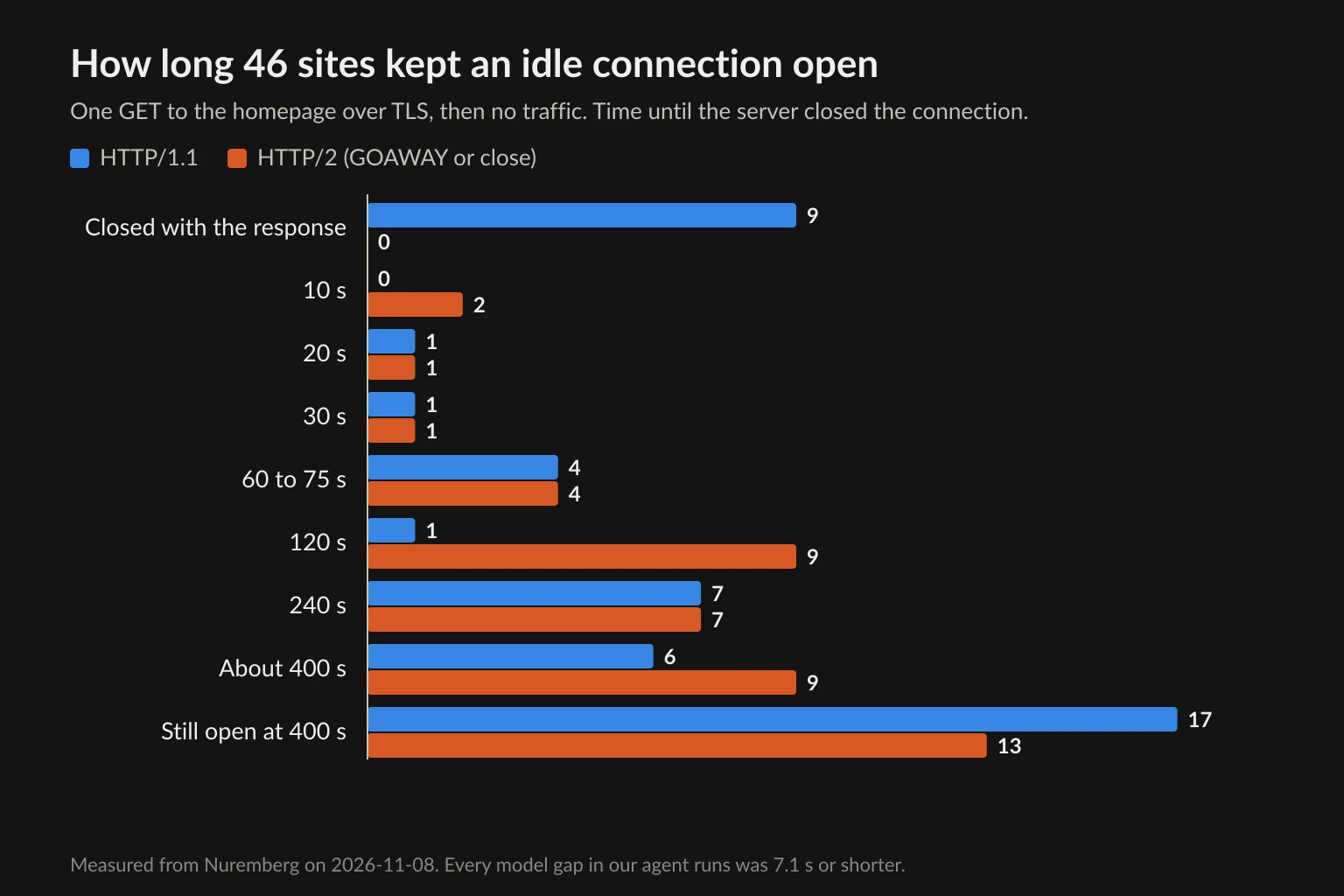
Over HTTP/1.1, nine sites closed the connection together with the response. Seven of those responses were 403 blocks sent with Connection: close, from Cloudflare, Akamai, DataDome, Varnish, and Reddit's servers. Six other 403s kept the connection open. When a block closes the connection, the agent's next request needs a new tunnel, and on a per-connection gateway that may mean a new IP. That makes the block look like it went away on its own, which is a good reason not to let the model retry blocks.
Among the HTTP/1.1 connections that stayed open, the shortest idle timeout was 20 seconds. Over HTTP/2, no site closed with the response, but timeouts were often shorter. Two Akamai sites sent GOAWAY after 10 seconds, and nine sites closed at 120 seconds compared with one over HTTP/1.1. A GOAWAY on an idle connection is a clean shutdown, so the browser simply opens a new connection for its next request.
Every model gap in our runs was 7.1 seconds or less. RFC 9112 notes that "servers will usually have some timeout value beyond which they will no longer maintain an inactive connection." In this sample, those timeouts were nearly always longer than the model's think time. Within one task, the website rarely drops the connection. The client's default does.
What to change
Raise the client idle limit above your model's think time. Fifteen seconds covered every gap in our runs with room to spare. It also stayed under the shortest HTTP/1.1 timeout we saw. Don't go above the server's timeout, or the client will try to reuse a connection the server already closed, and the request on it can fail. For Python with httpx:
import os
import time

import httpx

# One client per task. Keep idle connections for 15 s instead of 5 s.
client = httpx.Client(
    proxy=os.environ["AGENT_PROXY_URL"],
    limits=httpx.Limits(keepalive_expiry=15),
)

first = client.get("https://books.toscrape.com/")
time.sleep(8)  # the model is thinking
second = client.get("https://books.toscrape.com/catalogue/page-2.html")
print(first.status_code, second.status_code)
client.close()
And for Node with undici:
import { fetch, ProxyAgent } from "undici";

// One dispatcher per task. Keep idle connections for 15 s instead of 4 s.
const dispatcher = new ProxyAgent({
  uri: process.env.AGENT_PROXY_URL,
  keepAliveTimeout: 15_000,
});

const first = await fetch("https://books.toscrape.com/", { dispatcher });
await first.text();
await new Promise((r) => setTimeout(r, 8_000)); // the model is thinking
const second = await fetch("https://books.toscrape.com/catalogue/page-2.html", { dispatcher });
console.log(first.status, second.status);
await dispatcher.close();
We ran both through the logging proxy with httpx 0.28.1 and undici 7.25.0. Each printed 200 200 and used one tunnel for both requests, where the defaults had opened two. Set AGENT_PROXY_URL to your proxy URL, with the provider's sticky-session username if it has one.
The other two changes:
- Use sticky sessions for multi-step tasks. Connection reuse is a weak guarantee. A human approval, a slow tool, or a server timeout will open a new tunnel sooner or later. A session ID in the proxy username keeps the exit IP the same across reconnects, so connection pooling stops deciding your IP. Sticky vs rotating proxies explains how session IDs work.
- Count tunnels per task. Log each CONNECT with the task ID. If a five-page task opened three tunnels, you know whether its exit IP changed, even when the agent's answer looks fine.
Running AI agents in production: a checklist
Run through this list once per layer before you ship AI agents in production:
- Model: keep API traffic off the proxy. Set per-task limits on model calls and spend. Know your provider's rate limits and what the agent does when it hits one.
- Hosting: choose a host whose time limit is longer than your slowest task, or one that resumes cleanly from checkpoints.
- State: checkpoint after every tool call, and include the proxy session ID and cookies. Make write actions idempotent.
- Tools: for every web tool, know which host the request leaves from. Pass proxy settings to stdio servers explicitly.
- Browser: one context per task. Run an exit-IP check before the first real navigation. Budget bandwidth per page.
- Egress: one sticky session per task, rotation only between tasks, and egress enforced at the network level when the agent can run code.
- Connections: set client idle limits above model think time and below server timeouts. Log tunnels per task.
- Monitoring: for every task, record requests, status codes, tunnels, exit IPs, model calls, and cost, so you can reconstruct a failure afterwards.
Where Unknown Proxies fits
At the egress layer, the choice depends on how long one identity needs to last. For independent fetches across many sites, rotating residential proxies spread the traffic over many exits. Unknown Proxies rotating lines can get a new exit on each new connection, so the client idle limits above decide how often that happens. For multi-step tasks, use a sticky residential session per task. Unknown Proxies sticky residential sessions hold for up to 2 hours, which covers most fetch-driven tasks and many browser tasks. Agents that log in to the same accounts every day need an address that doesn't change at all. A static ISP proxy gives them that.
A proxy changes the IP, not the behavior. Agents that ignore robots.txt, site terms, or rate limits get blocked from clean IPs too. Use proxies for reliable sessions and accurate locations, not to get around a site that has refused access.
FAQ
What is AI agent infrastructure?
It's the set of systems around the model that let an agent run reliably: model access, a host that runs the agent loop, durable state, tool servers, browsers, network egress with proxies, and monitoring. The model chooses actions. The infrastructure runs them, keeps them within limits, and records what happened.
What is the difference between AI agent architecture and AI agent infrastructure?
Architecture describes the parts of one agent and how they talk to each other: planner, tools, memory, network layer. Infrastructure describes where those parts run and what limits they run under: which host, how long a task may last, where state lives, which machine sends web requests, and which IP it uses.
Can AI agents run on serverless functions?
Short ones can. AWS Lambda stops a function after at most 15 minutes, and a Cloud Run request can last up to 60 minutes. Agents that browse for longer, or wait for human approval, need checkpoints so they can resume, or a long-running worker or managed agent runtime instead.
How do you deploy AI agents to production?
Put the agent loop on a host whose time limit fits your longest task. Checkpoint after each tool call, give every task its own proxy session and browser context, and enforce limits on model calls, requests, and time in code. Log every request with the task ID, so you can see what each run actually did.
Does a rotating proxy change IP between an agent's requests?
With HTTPS, a rotating gateway can only pick a new exit when a new tunnel opens. If your client reuses the connection, consecutive requests keep the same IP. If the connection idles past the client's limit (4 seconds for Node fetch, 5 seconds for httpx), the next request opens a new tunnel and can get a new IP. Use a sticky session when a task needs one IP throughout.
How long should a proxy session last for an AI agent?
As long as the longest task it serves, plus some margin. A fetch-driven research task usually needs minutes. A browser task with a login can need an hour or more. Start a new session for each task instead of keeping one session across tasks.
Final thoughts
AI agent infrastructure is easy to draw as separate boxes. In practice the layers depend on each other. In our test, the model layer set a think time of 1.3 to 7.1 seconds. The HTTP client's 4-second default then turned 8 of 33 gaps into new proxy tunnels, and the egress layer decided whether each new tunnel meant a new IP. Hosting limits, checkpoints, and session IDs follow the same pattern: each is a small decision, and together they decide whether a long task finishes with one identity or several.
To build the stack, start at the bottom. Give each task one sticky session, set client idle limits above your model's think time, and log every tunnel. When you're ready to choose an exit, compare residential and ISP plans.