
"AI proxies" names three different things, and they sit at opposite ends of a request. An LLM gateway (LiteLLM, OpenRouter, Cloudflare AI Gateway) sits between your app and the model provider. It holds the provider keys and handles routing, budgets, and logs. A roleplay proxy, the "Proxy URL" field in JanitorAI and similar chat apps, is the same idea run by someone else: an OpenAI-compatible endpoint that relays your chats to a model. An IP proxy for AI workloads is an ordinary residential, ISP, or datacenter proxy that agents and scrapers use to reach websites.
To tell which one someone means, ask where the proxy sits. If it sits in front of the model, it's a gateway or relay. It reads every prompt, and a residential IP won't help with it. If it sits in front of websites, it's an IP proxy, and you're choosing exit IPs, sessions, and bandwidth.
We ran LiteLLM's gateway against a mock provider and a logging forward proxy to see what each kind actually passes along. The results are below, along with a short way to decide which kind of AI proxy your setup needs.
The three things "AI proxies" means
| LLM gateway | Roleplay "proxy" | IP proxy for AI workloads | |
|---|---|---|---|
| Sits between | Your app and the model provider | A chat app and a model provider | Your agent or scraper and websites |
| Who runs it | You, or a hosted service | Usually a third party | A proxy provider |
| Reads your prompts | Yes | Yes | No, over HTTPS it sees the hostname and byte counts |
| Holds a model API key | Yes, the provider key | Yes, its own or yours | No |
| What the far end sees | The gateway's IP and key | The relay's IP and key | The proxy's exit IP |
| Examples | LiteLLM Proxy, OpenRouter, Cloudflare AI Gateway, Kong AI Proxy | Endpoints pasted into JanitorAI | Residential, ISP, datacenter proxies |
| You need it when | You call several models or need key custody, budgets, logs | You want a chat app to use a model it doesn't host | Your agent's web requests get blocked or need a country |
The first two are reverse proxies in the classic sense: clients send requests to them as if they were the server. The third is a forward proxy, which sends your traffic out on your behalf. MDN's overview of proxy servers and tunneling explains the difference if the terms are new to you.
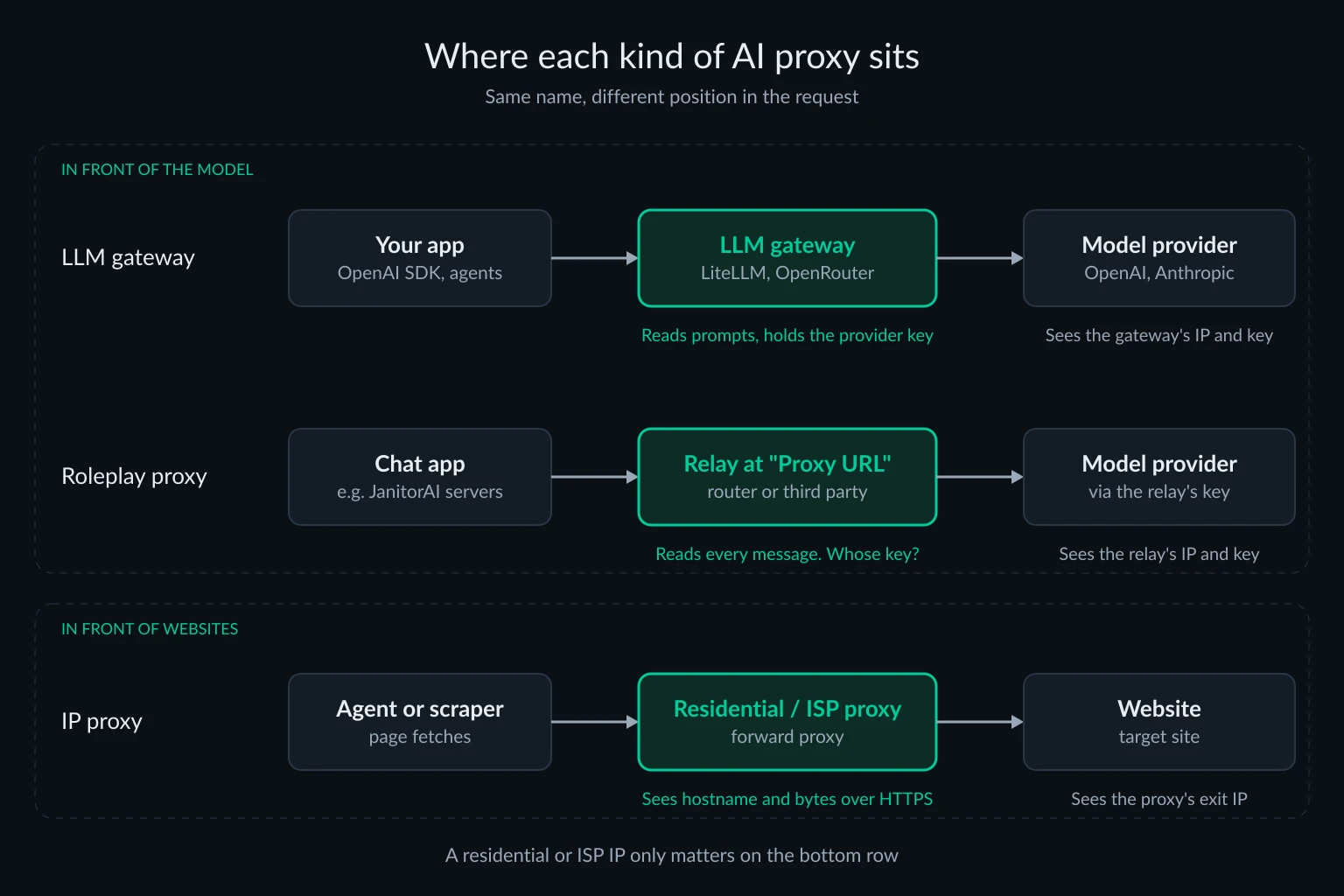
LLM gateways: the AI proxy in front of the model
An LLM gateway gives your code one OpenAI-compatible endpoint and keeps the provider keys behind it. The usual reasons to run one are key custody (developers get gateway keys, never the real ones), per-team budgets, fallback between providers, caching, and one place to log usage. LiteLLM Proxy is the common self-hosted choice. OpenRouter is a hosted one that puts hundreds of models behind https://openrouter.ai/api/v1. Cloudflare AI Gateway adds logging, caching, rate limits, retries, and model fallback in front of providers you already use. If you already run Kong as an API gateway, its AI Proxy plugin does the same job there: it takes OpenAI-style requests and translates them for each provider behind it.
None of these change your IP reputation on websites. A gateway only makes outbound calls to model APIs, which authenticate by key rather than scoring residential vs datacenter IPs the way retail or travel sites do.
What a gateway passes to the provider: our test
We ran LiteLLM 1.109.1 on a Linux server with a mock OpenAI-compatible upstream that logged every header and body it received. The client was the OpenAI Python SDK 3.51.0, sending one chat request with extra headers attached. Here is what reached the "provider":
| Sent by the client | Default gateway | With forward_client_headers_to_llm_api: true |
|---|---|---|
Authorization: Bearer <gateway key> |
Replaced with the gateway's provider key | Replaced |
User-Agent: my-app/1.0 |
Replaced with AsyncOpenAI/Python 3.51.0 |
Replaced |
X-Forwarded-For: 203.0.113.7 |
Dropped | Forwarded as sent |
X-Trace-Id: trace-42 |
Dropped | Forwarded |
Cookie: session=abc123 |
Dropped | Dropped |
X-Api-Key: <client's own provider key> |
Dropped | Dropped |
user: "end-user-77" in the body |
Forwarded | Forwarded |
| The prompt text | Forwarded verbatim | Forwarded verbatim |
A few things stand out:
- The provider sees the gateway, not your users. Every request arrived with the gateway's key and the gateway's IP. In the default configuration it also carried
x-stainless-*headers describing the gateway's own runtime (Linux, CPython 3.12.13), not the client's. If you want the provider to see per-user attribution, send it on purpose in theuserfield. - The
userfield can disappear quietly. In our first run the model was namedopenai/mock-gpt, and LiteLLM droppeduserwithout an error. Its OpenAI adapter only forwardsuserfor model names in OpenAI's catalog, because other OpenAI-compatible endpoints may reject it. Renaming the model toopenai/gpt-4o-minibrought it back. - Header forwarding trusts the client. With forwarding on, custom
x-headers such asX-Trace-IdandX-Forwarded-Forwent through, including anX-Forwarded-Forvalue the client simply made up. The gateway didn't add the real client address. LiteLLM's header forwarding docs describe this as an allowlist ofx-headers plusanthropic-beta, with provider auth headers stripped unless you also setforward_llm_provider_auth_headers. - The gateway reads everything. The default log contained no prompt text. With
LITELLM_LOG=DEBUG, the test prompt, including the customer email address in it, showed up in three log lines. The provider key was redacted in both modes.
Two defaults are worth knowing before you deploy one. The litellm CLI binds 0.0.0.0 on port 4000 unless you pass --host. Version 1.109.1 also refused to start without a master key, and it prints the opt-out flag (LITELLM_DANGEROUSLY_PERMIT_WEAK_OR_UNSET_MASTER_KEY) in that error. Leave that flag off on any host other people can reach. A gateway that accepts any key is an open proxy for your model spend.
Roleplay "AI proxies" in JanitorAI and similar apps
In character-chat communities, "proxy" means the endpoint a chat site sends your messages to so they reach a model the site doesn't host. In JanitorAI you open API Settings, choose Proxy, and fill in a configuration name, model name, Proxy URL, and API key. NanoGPT's JanitorAI guide shows a typical Proxy URL, https://nano-gpt.com/api/v1/chat/completions. The guide also warns that JanitorAI's servers can't reach one of NanoGPT's hostnames, which suggests the request leaves from JanitorAI's servers, not your browser.
So three parties handle each message: the chat site, whoever runs the Proxy URL, and the model provider. Our gateway test shows what that middle party gets. It receives the full prompt verbatim, and it can log it with a single debug switch.
The bigger risk is free shared endpoints. In 2024 Sysdig's threat research team traced an attack that used stolen cloud credentials to reach hosted LLMs, with code that pointed to the open-source OAI Reverse Proxy project. A February 2025 follow-up found over a dozen such proxy servers running on stolen credentials, and access to one was sold at $30 for 30 days. If a "free proxy" gives you a frontier model with no account, ask whose key pays for it.
The safer setup is a key from a provider or router you have an account with, pasted into the Proxy URL fields yourself. Don't paste a key into a relay you don't trust. Residential or ISP proxies don't help with any of this. The chat app's servers make the call, so your own IP isn't what the model provider sees.
IP proxies for AI agents and scrapers
This is the meaning proxy providers use. Your agent, crawler, or extraction pipeline fetches web pages, and a forward proxy gives those requests a different exit IP. The website sees the proxy's address. The proxy doesn't see your prompts. In our test, the logging proxy recorded a model call as CONNECT api.openai.com:443 with 2,335 bytes up and 6,007 bytes down, and nothing else. Over HTTPS the proxy sees the hostname and the volume. AI agent security covers what that does and doesn't protect.
An IP proxy helps when the failure is about the IP:
- The agent works from your laptop but gets 403s or CAPTCHAs from a cloud server, because the site scores datacenter ranges as risky. Proxies for AI agents walks through diagnosing that.
- The task needs a country or city, such as local prices, search results, or availability.
- A multi-step task needs one IP for its whole session, for example a login followed by several page views.
- A crawl needs to spread load across IPs while staying inside each site's rate limits. AI web scraping and AI training data collection cover the fetch layer and the opt-out signals to check first.
Rotating residential IPs fit broad crawls and geo checks. Static ISP IPs fit long sessions and accounts that should keep one address. ISP proxies vs residential proxies compares them in detail. An IP proxy won't fix an agent that ignores robots.txt, hammers a site, or trips fingerprint checks. Those need changes on the agent's side.
Keep model traffic off your IP proxy
The two kinds of AI proxy meet in one place: the agent process. It talks to a model and to websites, and only the website traffic needs a residential or ISP exit. Model calls sent through a residential proxy cost per-GB bandwidth and gain nothing.
Exported proxy variables make that easy to get wrong. We started the LiteLLM gateway with HTTPS_PROXY pointing at our logging proxy. Its upstream call to api.openai.com went through the proxy, and so did a 225 KB model price list it downloads from raw.githubusercontent.com at startup. Adding NO_PROXY=api.openai.com sent the model call direct, but the price list still went through the proxy. The Crawl4AI proxy guide found the same pattern inside a crawler. Setting LITELLM_LOCAL_MODEL_COST_MAP=True stopped the download, and with both settings the gateway opened no tunnels at startup.
The cleaner fix is not to export proxy variables at all. Give the proxy only to the client that fetches pages:
import os

import httpx
from openai import OpenAI

# Model calls: straight to your gateway, never through the IP proxy
llm = OpenAI(base_url="http://127.0.0.1:4000/v1", api_key=os.environ["LITELLM_API_KEY"])

# Page fetches: through the residential proxy, and only these
web = httpx.Client(proxy=os.environ["RESIDENTIAL_PROXY_URL"], trust_env=False, timeout=30)

page = web.get("https://example.com/")
page.raise_for_status()

reply = llm.chat.completions.create(
    model="gpt-4o-mini",
    messages=[{"role": "user", "content": f"Summarize this page:\n\n{page.text[:4000]}"}],
)
print(reply.choices[0].message.content)
We ran this against the test gateway with RESIDENTIAL_PROXY_URL=http://user:pass@127.0.0.1:18921. The proxy logged one tunnel, to example.com:443. The model call reached the gateway directly. trust_env=False keeps the page client from picking up stray environment settings. Browser tools such as Playwright take the proxy in their launch options instead. AI agent frameworks compared shows which framework web tools respect a proxy setting at all.
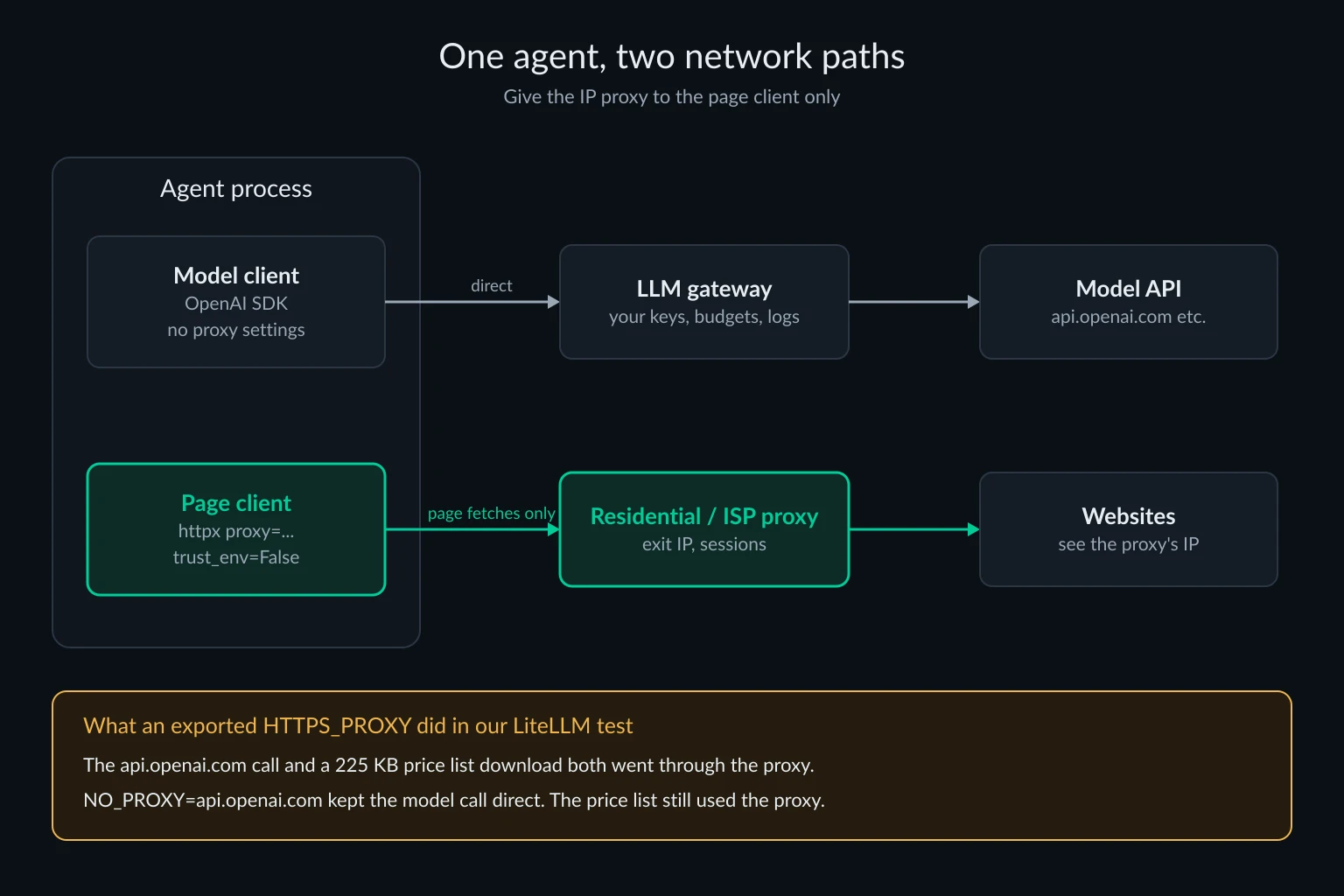
"AI-powered proxies" and unblockers
Some vendors label a managed unblocking service an "AI proxy." You send a URL, and the service picks IPs, headers, retries, and sometimes a browser to get a page back. Whatever the model inside does, you judge these services the way you judge any proxy: success rate on your target sites, cost per successful page rather than per GB, and whether you can keep a session when a task needs one. The label alone tells you nothing about which of those it does well.
Proxies for reaching AI services from unsupported countries
Some searches for AI proxies come from people trying to use ChatGPT or Claude where they aren't offered. Both companies publish supported regions. Anthropic's supported regions policy, effective November 12, 2026, says any country not listed is unsupported. OpenAI's supported countries page warns that access from outside the list may result in an account being blocked or suspended. A proxy doesn't change the account holder's location under those terms. We don't recommend using one to get around them.
Which kind of AI proxy you need
- You call two or more model providers, or need budgets, key custody, or usage logs: an LLM gateway. Self-host LiteLLM if no company other than the model provider should handle your prompts. Use a hosted router if you'd rather not run it.
- You want a chat app to use a model of your choice: a provider or router endpoint under your own account. Avoid anonymous free relays.
- Your agent or scraper gets blocked, needs a country, or needs a stable session: an IP proxy. Use rotating residential for broad or geo-targeted fetches and static ISP for long sessions.
- You run an agent that needs both: a gateway for model calls and an IP proxy for page fetches, configured on separate clients.
For the IP side, size bandwidth before you buy. The data usage calculator estimates GB from page weight and volume. Residential proxies and ISP plans cover the two session styles above.
FAQ
What is an AI proxy?
It depends on who's asking. To developers it usually means an LLM gateway between an app and model providers. To character-chat users it means the endpoint a chat app relays messages to. To proxy buyers it means residential, ISP, or datacenter IPs used by AI agents and scrapers.
Is an LLM gateway the same as a reverse proxy?
Functionally, yes. Clients send requests to it as if it were the model API, and it forwards them with its own credentials. Gateways add model-specific features on top, such as token budgets, fallbacks between providers, and per-key spend tracking.
Are free JanitorAI proxies safe?
Assume the operator can read and keep every message. Sysdig has also found shared relays running on stolen cloud credentials. A key from a provider you have an account with is the safer choice.
Do I need residential proxies to use the OpenAI or Claude API?
No. Model APIs authenticate by API key, and normal use doesn't need a particular IP type. Sending model calls through a residential proxy only adds bandwidth cost.
Can an LLM gateway use a forward proxy?
Yes. In our test, LiteLLM followed HTTPS_PROXY for upstream model calls and honored NO_PROXY. That's useful on networks where all outbound traffic must go through a corporate egress proxy. Don't point it at residential bandwidth.
Are AI proxies legal?
Running a gateway, using a relay, or buying proxy IPs is legal in most places. What you do through them is a separate question: a site's terms, its rate limits, a provider's supported regions, and privacy law still apply.
Final thoughts
AI proxies are three tools with one name. A gateway or relay sits in front of the model and sees every prompt. Pick one by who you trust with that text, and lock down the keys. An IP proxy sits in front of websites and sees hostnames and bytes. Pick one by the exit IP, session length, and bandwidth your agent needs. If you're building an agent, you may need both. Keep them on separate clients so model calls don't use proxy bandwidth.