Crawl4AI takes a proxy as a ProxyConfig(server, username, password) object. Put it on CrawlerRunConfig to scope it to one crawl config, or on BrowserConfig to use it for every crawl in that browser. For rotation, pass a RoundRobinProxyStrategy with a list of proxies. To keep one IP across several pages, add proxy_session_id. That's the basic Crawl4AI proxy setup, as the official proxy docs show it.
The details are where crawls go wrong. On a fresh crawler, arun_many() with a rotation strategy sent our test URLs through the wrong proxies, and Crawl4AI's own stats reported the intended route instead of the real one. A rotating gateway can hand a whole crawl one exit IP, because Crawl4AI keeps one browser context per proxy and Chromium reuses the open tunnel. And robots.txt checks, certificate fetches, and LLM extraction calls don't use ProxyConfig at all. This guide shows the setup that held up in testing, with a workaround for each of these.
Tested on 2026-10-25 with Crawl4AI 0.9.5 (the current PyPI release), Playwright 1.64.1 and its Chromium headless shell (the binary BrowserConfig(headless=True) launches), and Python 3.12. Traffic went through a local proxy with three ports. It required credentials and logged every tunnel and request. The targets were the toscrape.com practice sites, httpbin.org, and example.com.
Crawl4AI proxy setup in one config
This is the minimal working setup. Credentials come from the environment, and a lower page_timeout makes a broken proxy fail in 20 seconds instead of 60:
import asyncio
import os

from crawl4ai import AsyncWebCrawler, BrowserConfig, CacheMode, CrawlerRunConfig, ProxyConfig

proxy = ProxyConfig(
    server=os.environ["PROXY_SERVER"],  # e.g. http://gate.example.com:7000
    username=os.environ["PROXY_USER"],
    password=os.environ["PROXY_PASS"],
)


async def main():
    run = CrawlerRunConfig(
        proxy_config=proxy,
        cache_mode=CacheMode.BYPASS,
        page_timeout=20_000,  # fail fast; the default is 60 s
    )
    async with AsyncWebCrawler(config=BrowserConfig(headless=True)) as crawler:
        result = await crawler.arun("https://httpbin.org/ip", config=run)
        if not result.success:
            raise SystemExit(f"Crawl failed: {result.error_message[:300]}")
        print(result.status_code, result.markdown)


asyncio.run(main())
Install with pip install crawl4ai, then run crawl4ai-setup to download the browser. The origin in the output is the exit IP the site saw.
Crawl4AI has five places a proxy can go:
| Setting | What it does | Use it for |
|---|---|---|
BrowserConfig(proxy_config=...) |
Applies to every crawl in that browser | One proxy for the whole job |
CrawlerRunConfig(proxy_config=...) |
Applies to crawls that use this config | Per-job or per-URL proxies (what the docs recommend) |
CrawlerRunConfig(proxy_config=[a, b]) |
Tries each entry in order until one isn't blocked | Falling back to a second proxy type |
proxy_rotation_strategy=RoundRobinProxyStrategy(list) |
Takes the next proxy on each arun() call |
Rotating through a list of IPs |
proxy_session_id="name" (with a strategy) |
Pins one proxy from the strategy to a session name | Sticky multi-page sessions |
Under the hood, every distinct proxy (server, username, and password) gets its own Playwright browser context. Crawl4AI caches up to 20 of them and reuses a context whenever the same proxy comes up again. That makes cookies per proxy, not per crawl, and it explains the connection reuse covered below. The context-level mechanism is the same one described in the Playwright proxy guide.
Proxy string formats and two parsing traps
proxy_config also accepts a string or a dict, and ProxyConfig.from_env("PROXIES") reads a comma-separated list from an environment variable. The parser understands http://user:pass@host:port, host:port:user:pass, host:port, and socks5://host:port. Two inputs break it:
- A colon in the password in the
host:port:user:passform raisesValueError: Invalid proxy string format, because the parser expects exactly four parts. - An
@in the password in URL form doesn't raise anything.http://user:p@ss@1.2.3.4:8000parses to passwordpand serverhttp://ss@1.2.3.4:8000, and the crawl then fails on authentication. Percent-encode the character (p%40ss) and Crawl4AI decodes it.
SOCKS5 works only without credentials. With socks5://user:secret@host:port, every crawl fails with Browser.new_context: Browser does not support socks5 proxy authentication. That's a Chromium limit, so use your provider's HTTP port or allowlist your server's IP. The SOCKS5 vs HTTP proxy comparison covers when the protocol matters.
Test the proxy before a long crawl
Crawl4AI doesn't report a rejected proxy password as a 407. With the wrong password, the crawl waits out page_timeout and returns success=False with this error:
Error: Failed on navigating ACS-GOTO:
Page.goto: Timeout 60000ms exceeded.
Call log:
  - navigating to "https://httpbin.org/ip", waiting until "domcontentloaded"
Our proxy log showed Chromium's first request without credentials, one retry with the wrong ones, and then nothing until the timeout. When the proxy is set on BrowserConfig, the log line even says Proxy direct failed, because no run-level proxy is set. Nothing in the result mentions the proxy.
An exported HTTPS_PROXY causes the same symptom. With HTTPS_PROXY=http://user:pass@host:port set and no proxy_config, the headless browser read the variable, sent the request through that proxy without credentials, got a 407, and timed out after 60 seconds. When proxy_config was set as well, the page went through ProxyConfig and ignored the variable. Don't export proxy variables in a Crawl4AI process unless you mean them for something else (see the egress section below).
Check the credentials with curl first, and keep page_timeout short while you test:
curl -sS -x "$PROXY_SERVER" --proxy-user "$PROXY_USER:$PROXY_PASS" https://httpbin.org/ip
A 407 here means the credentials are wrong, not Crawl4AI. The 407 Proxy Authentication Required guide covers the usual causes.
Rotating proxies in Crawl4AI
Rotation comes in two shapes. You might have a list of proxy addresses, such as static ISP IPs or per-session endpoints, and want Crawl4AI to cycle through them. Or you might have one rotating gateway that picks a new exit IP for you. Each has a trap.
RoundRobinProxyStrategy and arun_many on a cold start
With sequential arun() calls, RoundRobinProxyStrategy does what it says. Six URLs went through proxies 1, 2, 3, 1, 2, 3, and the proxy log matched.
arun_many() is different. We crawled 9 URLs with three proxies on a freshly started crawler, which is the pattern in Crawl4AI's own rotation example. In six runs, the third proxy never carried a request. The split was 3/6/0 every time. result.crawl_stats["proxies_used"] still listed the third proxy for some of those URLs, so the stats show what Crawl4AI intended, not where the request went.
The cause is shared state. arun_many() hands the same CrawlerRunConfig object to every concurrent crawl, and the strategy writes each chosen proxy onto that object. While the per-proxy browser contexts are still being created, one crawl can build its context with another crawl's proxy, and the cache then keeps that context under the wrong key. After a warm-up that used each proxy once in sequence, arun_many() routed all 9 URLs correctly in two runs. A BFS deep crawl, which also uses arun_many() internally, mapped all 10 pages correctly in two runs. So the bug depends on timing, and you shouldn't rely on the timing.
The fallback list has the same weakness. With proxy_config=[blocked, good] and arun_many() over 9 URLs, only 2 URLs tried the first entry. The other 7 went straight to the second proxy, because the list on the shared config had already been overwritten.
The workaround is to give every URL its own copy of the config, with its proxy already set, and limit concurrency yourself:
import asyncio
import itertools

from crawl4ai import AsyncWebCrawler, BrowserConfig, CacheMode, CrawlerRunConfig, ProxyConfig

# PROXIES="203.0.113.10:8000:user:pass,203.0.113.11:8000:user:pass"
PROXIES = ProxyConfig.from_env("PROXIES")
if not PROXIES:
    raise SystemExit("PROXIES produced no usable proxies; check the entry format")
BASE = CrawlerRunConfig(cache_mode=CacheMode.BYPASS, page_timeout=30_000)


async def crawl_all(urls: list[str], concurrency: int = 5):
    sem = asyncio.Semaphore(concurrency)
    pool = itertools.cycle(PROXIES)

    async with AsyncWebCrawler(config=BrowserConfig(headless=True, text_mode=True)) as crawler:

        async def crawl_one(url: str, proxy: ProxyConfig):
            async with sem:
                # A private copy per URL, so concurrent crawls can't overwrite each other's proxy
                return await crawler.arun(url, config=BASE.clone(proxy_config=proxy))

        return await asyncio.gather(*(crawl_one(url, next(pool)) for url in urls))


urls = [f"https://books.toscrape.com/catalogue/page-{n}.html" for n in range(1, 10)]
for result in asyncio.run(crawl_all(urls)):
    print(result.status_code, result.url, len(result.markdown or ""))
In six runs with 9 URLs, at 5 and 9 concurrent crawls, each proxy carried exactly three URLs. In the three runs where we checked URL by URL, every URL went through the proxy assigned to it. from_env stops at the first entry it can't parse, prints an error, and returns only the proxies before it, so check the count before starting a large job.
Why a rotating gateway can give a whole crawl one IP
Many residential gateways pick a new exit IP for each new connection, not for each request. Backconnect rotating proxies explains the model. Crawl4AI and Chromium work against it. With one gateway ProxyConfig, five sequential pages of books.toscrape.com went through a single CONNECT tunnel. Crawl4AI reused the cached context for that proxy, and Chromium reused the open connection. On a per-connection gateway, all five pages would have left from the same IP.
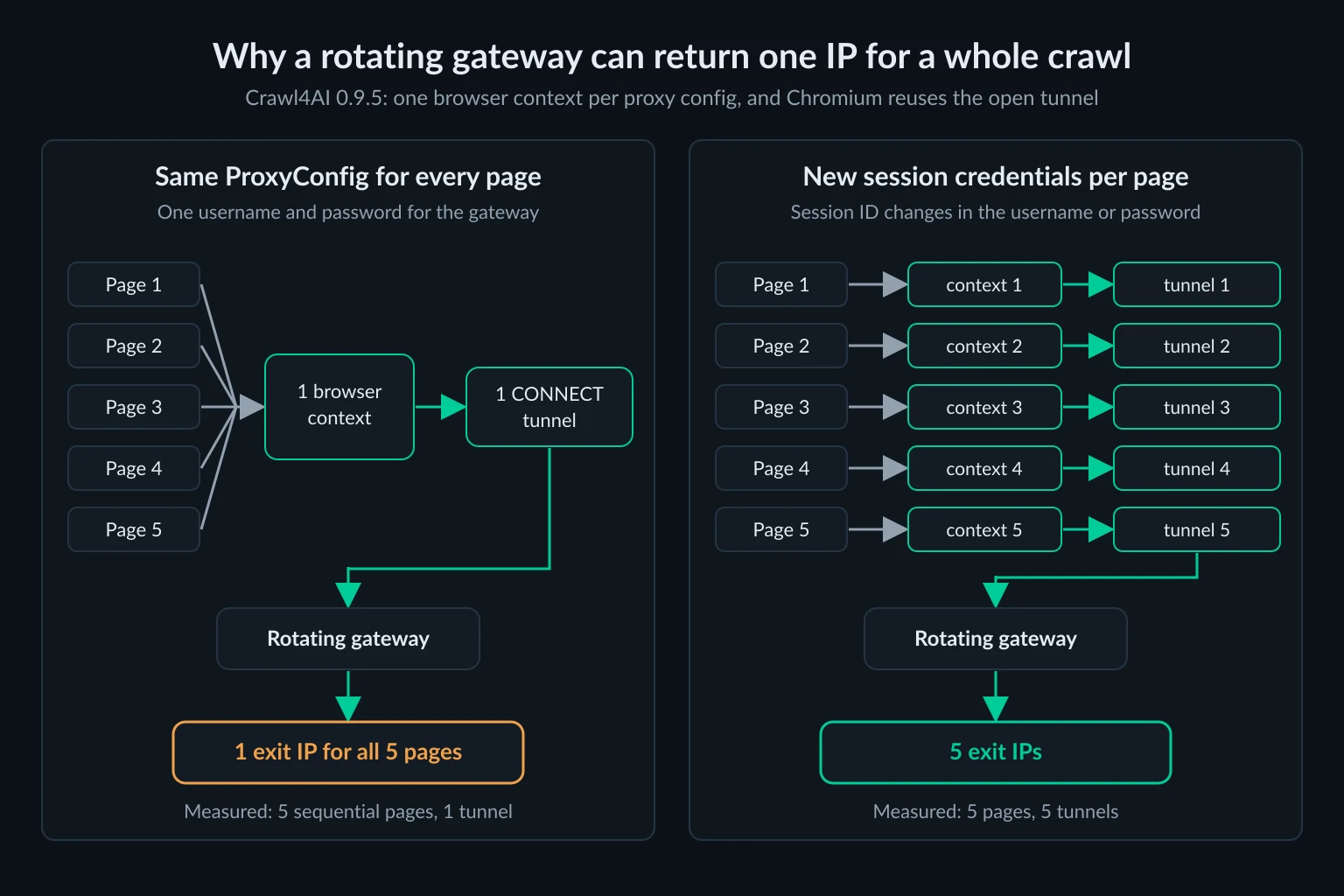
To get a new IP per page, make each page's proxy credentials different, using your provider's session format. When the username or password changes, Crawl4AI treats it as a different proxy and creates a new context with a new tunnel. With a session ID per page, the same five pages used five tunnels:
import os
import uuid

from crawl4ai import ProxyConfig


def fresh_exit() -> ProxyConfig:
    # Example format only: providers put the session ID in the username or the password
    return ProxyConfig(
        server=os.environ["PROXY_SERVER"],
        username=f"{os.environ['PROXY_USER']}-session-{uuid.uuid4().hex[:8]}",
        password=os.environ["PROXY_PASS"],
    )
Pass BASE.clone(proxy_config=fresh_exit()) per URL in the loop above. Unknown Proxies residential sticky lines, for example, put the session ID at the end of the password instead. Copy one generated line from your dashboard and change only the session part. A fresh context per page has two costs: no cookies carry over, and every page pays for a new TLS handshake. That's fine for independent pages. It's wrong for anything that needs a session.
Sticky sessions with proxy_session_id and session_id
Crawl4AI has two session settings, and multi-step crawls usually need both:
proxy_session_idasks the rotation strategy for the same proxy each time it sees that name.proxy_session_ttlsets an expiry in seconds.session_idkeeps the same browser page open betweenarun()calls, so cookies, local storage, and page state carry over.
import asyncio

from crawl4ai import (
    AsyncWebCrawler,
    BrowserConfig,
    CacheMode,
    CrawlerRunConfig,
    ProxyConfig,
    RoundRobinProxyStrategy,
)

proxies = ProxyConfig.from_env("PROXIES")
if not proxies:
    raise SystemExit("PROXIES produced no usable proxies; check the entry format")
strategy = RoundRobinProxyStrategy(proxies)


async def crawl_session(crawler: AsyncWebCrawler, name: str, urls: list[str]):
    run = CrawlerRunConfig(
        cache_mode=CacheMode.BYPASS,
        proxy_rotation_strategy=strategy,
        proxy_session_id=name,  # same proxy for every crawl in this session
        session_id=name,  # same browser page, so cookies and state carry over
    )
    try:
        return [await crawler.arun(url, config=run) for url in urls]
    finally:
        await crawler.crawler_strategy.kill_session(name)
        await strategy.release_session(name)


async def main():
    steps = [
        "https://quotes.toscrape.com/",
        "https://quotes.toscrape.com/page/2/",
        "https://quotes.toscrape.com/page/3/",
    ]
    async with AsyncWebCrawler(config=BrowserConfig(headless=True)) as crawler:
        for name in ("session-a", "session-b"):
            for result in await crawl_session(crawler, name, steps):
                print(name, result.status_code, result.url)


asyncio.run(main())
In our run, all three session-a pages went through the first proxy and all three session-b pages through the second. Run the steps of one session in sequence, as the loop does, because one page can't navigate to two URLs at once. Keep the empty-list check: a strategy with no proxies hands out none, and Crawl4AI then crawls from your server's own IP without a warning.
There's a catch when you combine the two settings. Once a session_id page exists, Crawl4AI reuses that page and its context on every call, so the proxy can't change mid-session. We set proxy_session_ttl=2 with a session_id and waited 3 seconds between crawls. crawl_stats reported a move from proxy 1 to 2 to 3. All three requests actually went through proxy 1. If a session needs a new IP, call kill_session() and start a new session_id, as the finally block does.
proxy_session_id also works for deep crawls. A BFSDeepCrawlStrategy crawl with max_pages=10 and a session ID sent all 10 pages through one proxy. For how long a sticky IP should last and when to rotate instead, see sticky vs rotating proxies.
Fallback proxies and retries
A list in proxy_config makes Crawl4AI try each entry in order until it gets a response that its anti-bot check doesn't flag. That check flags every 429, any 403 or 503 that is near-empty or looks like a block page, and known challenge-page markup. A common use is trying a static ISP IP first and moving to residential only when the ISP IP is blocked:
import asyncio
import os

from crawl4ai import AsyncWebCrawler, BrowserConfig, CacheMode, CrawlerRunConfig, ProxyConfig

isp = ProxyConfig.from_string(os.environ["ISP_PROXY"])
residential = ProxyConfig.from_string(os.environ["RESI_PROXY"])


async def main():
    run = CrawlerRunConfig(
        cache_mode=CacheMode.BYPASS,
        proxy_config=[isp, residential],  # try in order until one isn't blocked
    )
    async with AsyncWebCrawler(config=BrowserConfig(headless=True)) as crawler:
        result = await crawler.arun("http://httpbin.org/anything/fallback", config=run)
        print(result.success, result.status_code)
        for attempt in result.crawl_stats["proxies_used"]:
            print(attempt["proxy"], attempt["status_code"], attempt["reason"])


asyncio.run(main())
Against our local test proxies, with the first one set up to return 403, the output shows both attempts:
True 200
http://127.0.0.1:18921 403 HTTP 403 with near-empty response (81 bytes)
http://127.0.0.1:18922 200
ProxyConfig.DIRECT in the list means "no proxy", so [ProxyConfig.DIRECT, residential] tries your server's own IP first. That saves proxy traffic, but the target sees your server's address.
max_retries repeats the whole list, with no delay between attempts. For a URL that always returned 429, proxy_config=[ProxyConfig.DIRECT, residential] with max_retries=1 made four requests back to back. Nothing in Crawl4AI's code reads Retry-After, so a server's requested wait is ignored. Retrying a rate limit immediately only extends it. Slow down instead: with a single proxy, the RateLimiter in arun_many() backs off per domain on 429 and 503. In the clone-per-URL loop, add your own delay. The HTTP 429 guide covers pacing.
Requests that skip your Crawl4AI proxy
ProxyConfig covers the browser (or the HTTP crawler) and nothing else. Several other parts of Crawl4AI open their own connections:
| Request | Uses ProxyConfig |
What we saw |
|---|---|---|
| Page and its subresources, browser strategy | Yes | All tunnels went through the configured proxy |
Page, AsyncHTTPCrawlerStrategy |
Yes | One proxied request per page |
robots.txt with check_robots_txt=True |
No | Fetched directly from the server's IP. It ignores HTTPS_PROXY too |
fetch_ssl_certificate=True |
No | A separate direct TLS connection to port 443 |
LLMExtractionStrategy model calls |
No | Direct, or through HTTPS_PROXY if exported |
| LiteLLM model price list | No | 163 KB from raw.githubusercontent.com when LiteLLM loaded, through HTTPS_PROXY |
AsyncUrlSeeder (sitemaps, Common Crawl) |
No | From the source: an httpx client that follows HTTPS_PROXY |
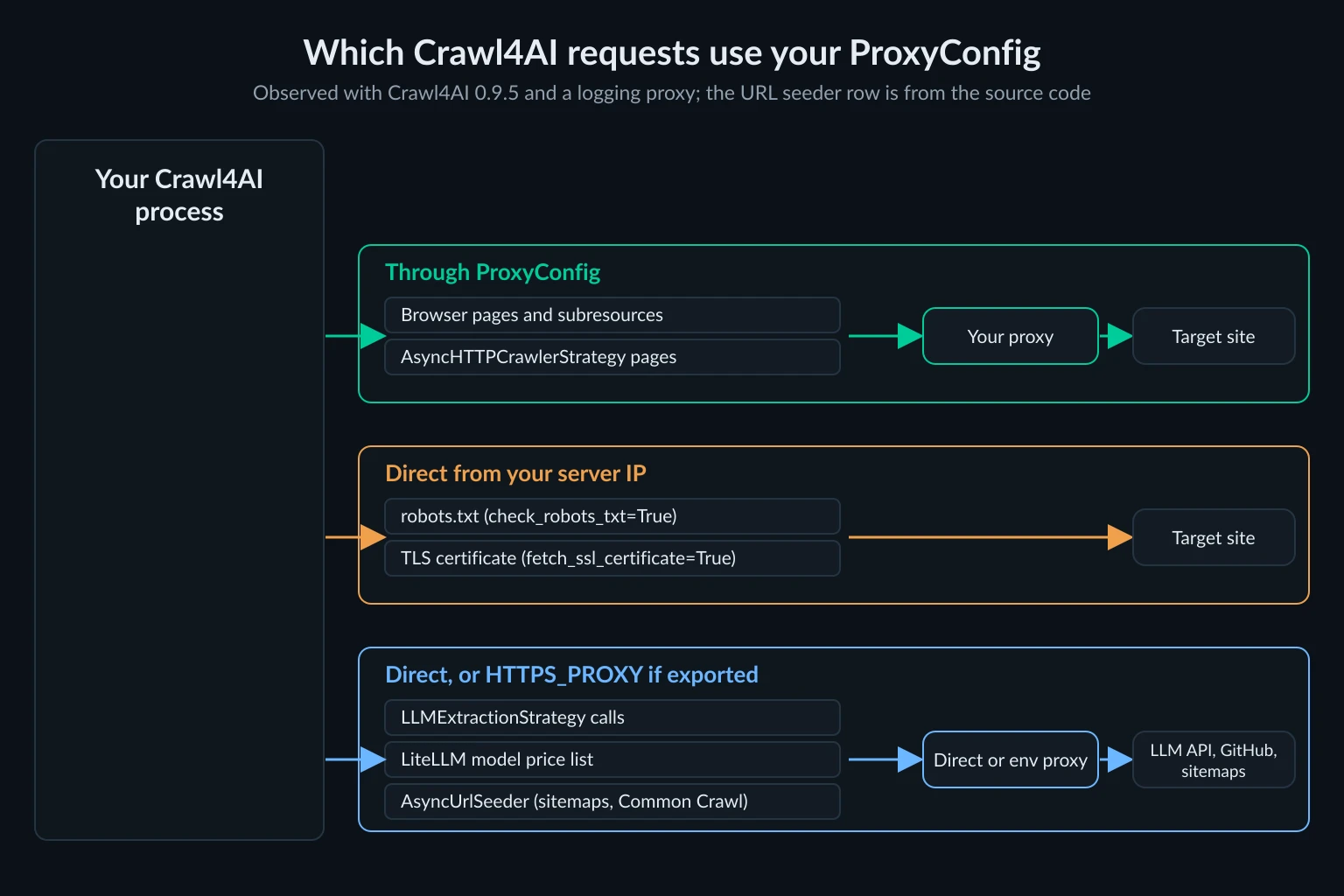
This matters in two ways. First, the target site sees the robots.txt request and the certificate check from your server's IP, even when every page comes through a proxy. If that's not acceptable, leave those options off and check robots.txt yourself through the same proxy. Second, if you export HTTPS_PROXY to route something else, LLM traffic follows it. One extraction call sent about 18 KB of request data to api.openai.com through the exported proxy, which costs you residential bandwidth for traffic that doesn't need a residential IP. Set LITELLM_LOCAL_MODEL_COST_MAP=True to stop the price-list download. Better still, don't export proxy variables at all, and pass ProxyConfig explicitly.
fetch_ssl_certificate didn't return a certificate in our install anyway. It failed with 'X509' object has no attribute 'get_extension' under pyOpenSSL 26.4.0, but the direct connection still happened.
Cut proxy bandwidth per page
Residential proxies are billed per GB, and a full browser fetches far more than the text you keep. We measured the bytes received through the proxy for one page load in each mode. These are single runs, and the Markdown length is the size of result.markdown:
| Mode | books.toscrape.com | Markdown | quotes.toscrape.com/js/ | Markdown |
|---|---|---|---|---|
| Browser, defaults | 339.3 KB | 13,476 chars | 122.8 KB | 1,666 chars |
text_mode=True |
117.4 KB | 13,476 chars | 69.2 KB | 1,666 chars |
text_mode=True, avoid_css=True |
81.0 KB | 13,476 chars | 38.8 KB | 1,666 chars |
AsyncHTTPCrawlerStrategy |
10.7 KB | 13,476 chars | 6.8 KB | 255 chars |
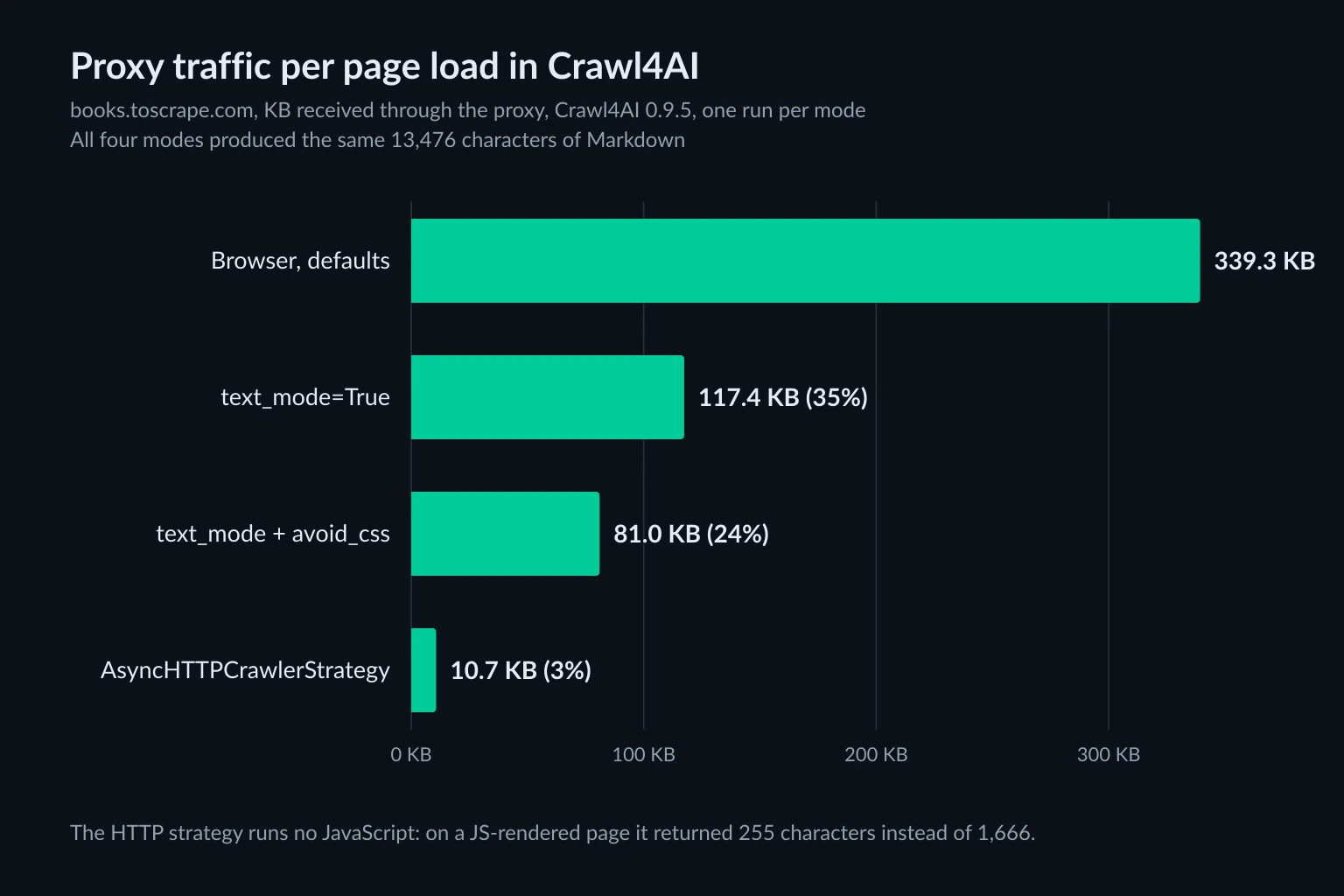
text_mode blocks images and fonts, and avoid_css blocks stylesheets. On the static catalog page, the two together cut traffic by 76%, and the Markdown didn't change. The HTTP strategy skips the browser entirely and used about 3% of the default traffic. But on the JavaScript-rendered quotes page it returned 255 characters instead of 1,666, because nothing ran the script that builds the page. Check one page from each site in both modes before you pick one.
import asyncio
import os

from crawl4ai import AsyncWebCrawler, CacheMode, CrawlerRunConfig, HTTPCrawlerConfig, ProxyConfig
from crawl4ai.async_crawler_strategy import AsyncHTTPCrawlerStrategy

proxy = ProxyConfig.from_string(os.environ["PROXY_URL"])  # http://user:pass@host:port


async def main():
    strategy = AsyncHTTPCrawlerStrategy(browser_config=HTTPCrawlerConfig())
    run = CrawlerRunConfig(proxy_config=proxy, cache_mode=CacheMode.BYPASS)
    async with AsyncWebCrawler(crawler_strategy=strategy) as crawler:
        result = await crawler.arun("https://books.toscrape.com/", config=run)
        print(result.status_code, len(result.markdown or ""))


asyncio.run(main())
For a browser crawl, use BrowserConfig(headless=True, text_mode=True, avoid_css=True). Multiply your measured KB per page by your page count in the data usage calculator to size a plan.
Crawl4AI Docker server: one upstream proxy for everything
The Docker server, which also hosts Crawl4AI's MCP endpoint, works differently from the library. In 0.9.5, every API request body counts as untrusted input. Proxy fields in that body are rejected, including proxy_config on either config, proxy_rotation_strategy, and proxy_session_id. Run against the 0.9.5 loader, a body with a proxy fails with field 'proxy_config' is not permitted on CrawlerRunConfig from an untrusted request, which the server returns as HTTP 400.
The server sends the browser through its own local forward proxy, which resolves each target, blocks private addresses, and pins the IP. To add your proxy, set it as that proxy's upstream when you start the container:
export CRAWL4AI_API_TOKEN="$(openssl rand -hex 32)"
docker run -d -p 127.0.0.1:11235:11235 --shm-size=1g \
  -e CRAWL4AI_API_TOKEN="$CRAWL4AI_API_TOKEN" \
  -e CRAWL4AI_UPSTREAM_PROXY="http://user:pass@gate.example.com:7000" \
  unclecode/crawl4ai:0.9.5
Without CRAWL4AI_API_TOKEN, the 0.9.5 container listens only on its own loopback, so the published port doesn't answer. Clients send the token as Authorization: Bearer <token>. Publishing on 127.0.0.1 keeps the server, and the paid proxy behind it, off the public internet.
From the server source, a few limits follow. CRAWL4AI_UPSTREAM_PROXY takes precedence over HTTPS_PROXY and HTTP_PROXY. Only http:// upstreams work (other schemes are ignored with a warning), and Basic auth is supported. The upstream receives a CONNECT to the resolved IP, not the hostname. Every crawl on the server shares this one proxy, so there is no per-request rotation, session, or country choice unless your gateway rotates by itself. We read the server code instead of running the 2.3 GB image. If you need per-job proxies, run the library in your own service. The MCP servers for web access roundup compares Crawl4AI's MCP endpoint with hosted options.
Which proxies fit Crawl4AI jobs
The proxy type follows the crawl shape, not the tool:
- Broad crawls of independent pages (catalogs, documentation for RAG, price snapshots): rotating residential proxies with a session per page, or a list of IPs through the clone-per-URL loop above. Turn on
text_mode, since bandwidth is the main cost. - Multi-step sessions (pagination behind a search form, a logged-in area you're allowed to access): one sticky residential session per job, with
proxy_session_idplussession_id. - Allowlisted or long-lived identities (a partner portal that allowlists IPs, monitoring that should look like one stable client): static ISP proxies. Their
host:port:user:passlines load directly withProxyConfig.from_env.
No proxy fixes a crawl that's too fast or that ignores a site's terms. Keep concurrency per domain low and respect robots.txt. The guide to crawling without getting blocked covers pacing, and is data scraping legal covers the legal side. If you're still choosing between Crawl4AI, a model API, and a hosted scraper, the AI web scraping guide compares them.
FAQ
Does Crawl4AI support proxies?
Yes. Pass a ProxyConfig with server, username, and password as proxy_config on CrawlerRunConfig or BrowserConfig. For rotation, use proxy_rotation_strategy=RoundRobinProxyStrategy(proxies). For a fixed IP across pages, add proxy_session_id.
Does Crawl4AI use HTTP_PROXY or HTTPS_PROXY?
Not as a setting, but some parts of it pick the variables up. In our test, Chromium used an exported HTTPS_PROXY without its credentials and timed out on the 407. LiteLLM model calls and the URL seeder also follow it, while robots.txt fetches ignore it. Set proxy_config explicitly and avoid exporting proxy variables.
Does Crawl4AI support SOCKS5 proxies?
Only without authentication. A socks5:// proxy with a username and password fails with "Browser does not support socks5 proxy authentication". Use the provider's HTTP endpoint or IP allowlisting instead.
How do I check which IP Crawl4AI used?
Crawl https://httpbin.org/ip with the same config and read the origin value, or log the exit IP from a test page per proxy. Don't rely on crawl_stats["proxies_used"] alone. It records the proxy Crawl4AI chose, and in two of our tests that wasn't the route the request took.
Can I set a proxy through the Crawl4AI Docker API or MCP server?
Not per request in 0.9.5. The server rejects proxy fields in request bodies with HTTP 400. Set one upstream proxy for the whole server with CRAWL4AI_UPSTREAM_PROXY when you start the container.
Conclusion
A working Crawl4AI proxy setup takes one ProxyConfig on CrawlerRunConfig, and Crawl4AI handles credentials correctly over HTTP. The problems are in the layers around it. Clone the config per URL instead of handing a rotation strategy to arun_many(). Change the session credentials per page if you want a rotating gateway to rotate. Use proxy_session_id with session_id for sticky sessions, and kill the session to change IP. Leave check_robots_txt and fetch_ssl_certificate off if every request must come from the proxy, and keep HTTPS_PROXY out of the process. Then confirm the exit IP with a test page rather than the stats, measure KB per page, and choose rotating residential, sticky residential, or static ISP IPs to match how the crawl moves through the site.