The Claude Agent SDK is Anthropic's library for running Claude Code's agent loop inside your own Python or TypeScript program. It reaches the web in three ways. WebSearch runs on Anthropic's servers. WebFetch downloads pages from the machine your code runs on. Any browser or scraper you add through MCP or a custom tool makes requests from wherever that tool runs.
The SDK has no proxy option of its own. It reads the standard HTTPS_PROXY variable, which you can pass through the env option. Set only that, though, and every model request goes through your proxy along with the pages. To proxy page traffic only, add NO_PROXY=.anthropic.com (the leading dot matters), or give the proxy to a custom fetch tool or a browser MCP server instead of the whole process.
Tested on October 16, 2026 with claude-agent-sdk 0.2.168 for Python (which bundles Claude Code 2.1.301), @anthropic-ai/claude-agent-sdk 0.3.301 on Node 24.16, and @playwright/mcp 0.0.83 with Chromium headless shell. Claude Haiku ran the agent. All traffic went through a local proxy that required Basic auth, logged every CONNECT, and counted bytes.
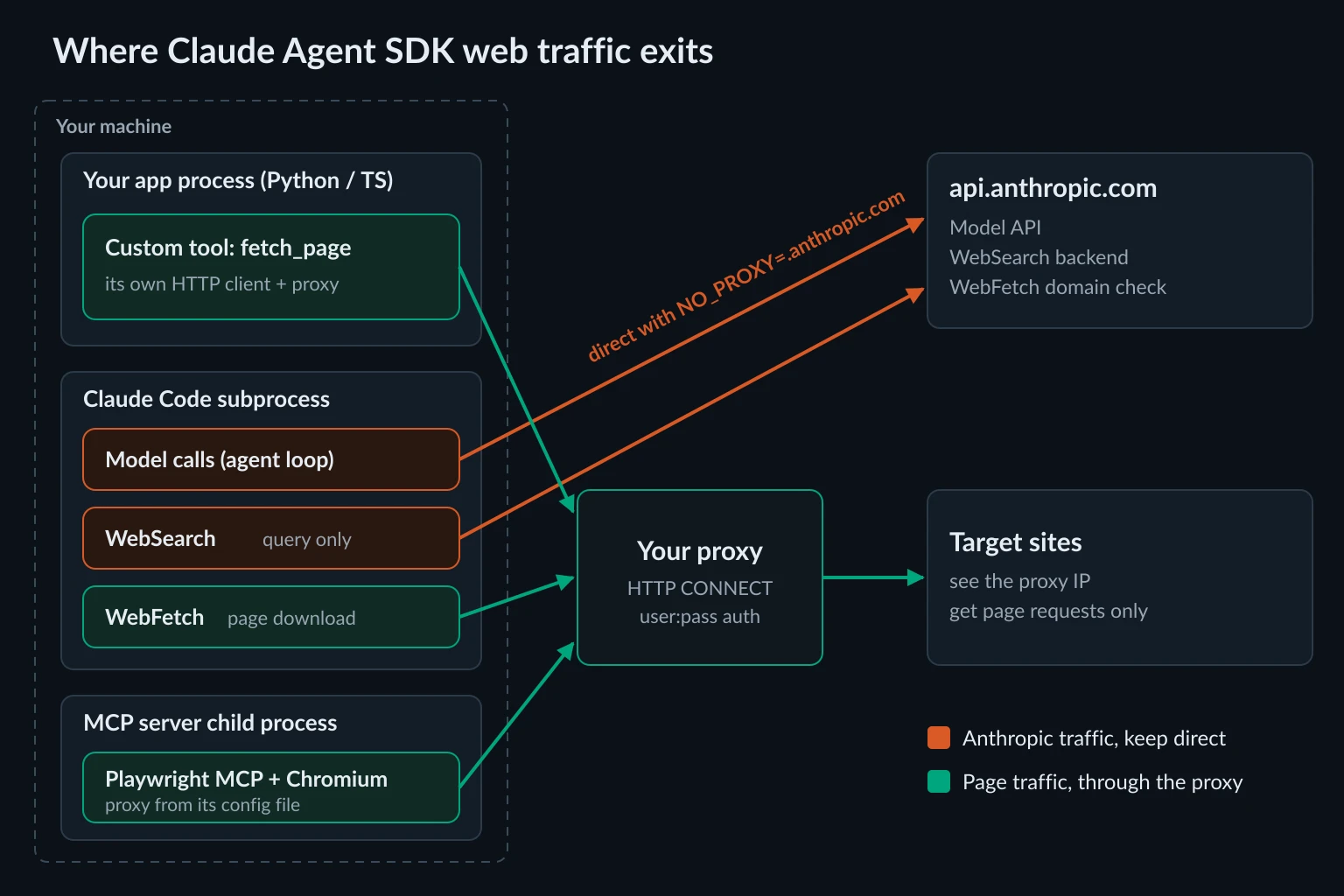
How the Claude Agent SDK reaches the web
The Python package is claude-agent-sdk (pip install claude-agent-sdk) and the TypeScript package is @anthropic-ai/claude-agent-sdk. Both ship a Claude Code binary and run it as a subprocess, so the SDK gets Claude Code's built-in tools, permission rules, and network behavior. The Agent SDK overview lists what carries over.
That subprocess matters for proxies. Requests made by built-in tools come from the Claude Code process. Requests made by your own Python or TypeScript tools come from your process. Requests made by MCP servers come from their child processes. Each one picks up proxy settings in a different place.
| Web tool | Where the request leaves from | Follows HTTPS_PROXY in env |
What the model gets back |
|---|---|---|---|
WebSearch |
Anthropic's search backend | No, only the API call that triggers it | Result titles and URLs |
WebFetch |
The Claude Code subprocess on your machine | Yes | A summary written by a second model call |
Custom tool (@tool / tool()) |
Your own process, with whatever client you write | Only if your client reads it | Whatever your function returns |
| Browser MCP server | The server's child process and its browser | Inherited, but Playwright MCP's Chromium sent no credentials | Accessibility snapshots, clicks, screenshots |
Bash with curl |
A shell on your machine | Yes, curl reads it |
Raw command output |
The last row is easy to miss. In one of our runs a custom tool returned an error, and the model tried curl through Bash to get the page another way. If your proxy setup only covers one tool, block the others with disallowed_tools. Otherwise the model can fall back to an unproxied path.
WebSearch and WebFetch in the Agent SDK
WebSearch sends the query to Anthropic's web search backend and returns titles and URLs. It never fetches the pages. One call can run up to eight backend searches. It is available on the Claude API, Claude Platform on AWS, and Microsoft Foundry, and on Google Cloud's Agent Platform with Opus 4, Sonnet 4, Haiku 4.5, and later models. Amazon Bedrock doesn't support it. With a proxy set, a search produced only Anthropic API and telemetry tunnels in our logs, so the IP that runs the search is Anthropic's, whatever proxy you use.
WebFetch downloads the URL locally, converts HTML to Markdown, and runs your prompt against it in a separate model call. Claude receives that model's answer, not the page. Per the tools reference, it also:
- upgrades
http://URLs to HTTPS and refuseslocalhostand any hostname without a dot - reads up to 100,000 characters per call and caches each URL for 15 minutes (
CLAUDE_CODE_WEBFETCH_CACHE_TTL_MSchanges that) - returns cross-host redirects to the model instead of following them, so a redirect costs a second call
- sends a
User-Agentstarting withClaude-User, which httpbin.org echoed back asClaude-User (claude-code/2.1.301; +https://support.anthropic.com/) - sends the hostname, but not the path, to
api.anthropic.comfor a domain safety check before fetching, unless you setskipWebFetchPreflight: truein settings
The summary step makes WebFetch lossy. If you need raw HTML, exact prices, or structured fields, a custom tool that returns the page text is a better fit than tuning WebFetch prompts.
Enable the web tools you want
allowed_tools auto-approves tools. It doesn't limit Claude to them. disallowed_tools removes a tool from Claude's context entirely. For a fetch-only research agent:
from claude_agent_sdk import ClaudeAgentOptions

options = ClaudeAgentOptions(
    allowed_tools=["WebFetch(domain:docs.python.org)", "WebFetch(domain:en.wikipedia.org)"],
    disallowed_tools=["WebSearch", "Bash"],
)
WebFetch(domain:...) rules follow Claude Code's permission syntax. A fetch to a domain that isn't listed falls through to permission_mode and your can_use_tool callback. With neither set, the call fails and the model sees Claude requested permissions to use WebFetch, but you haven't granted it yet. In a headless service, can_use_tool is where you decide case by case.
Claude Agent SDK proxy configuration with HTTPS_PROXY
Claude Code respects the standard proxy variables HTTPS_PROXY, HTTP_PROXY, and NO_PROXY, including lowercase forms. In the SDK you set them through env. Python merges env on top of the inherited environment. TypeScript replaces the environment, which is covered below.
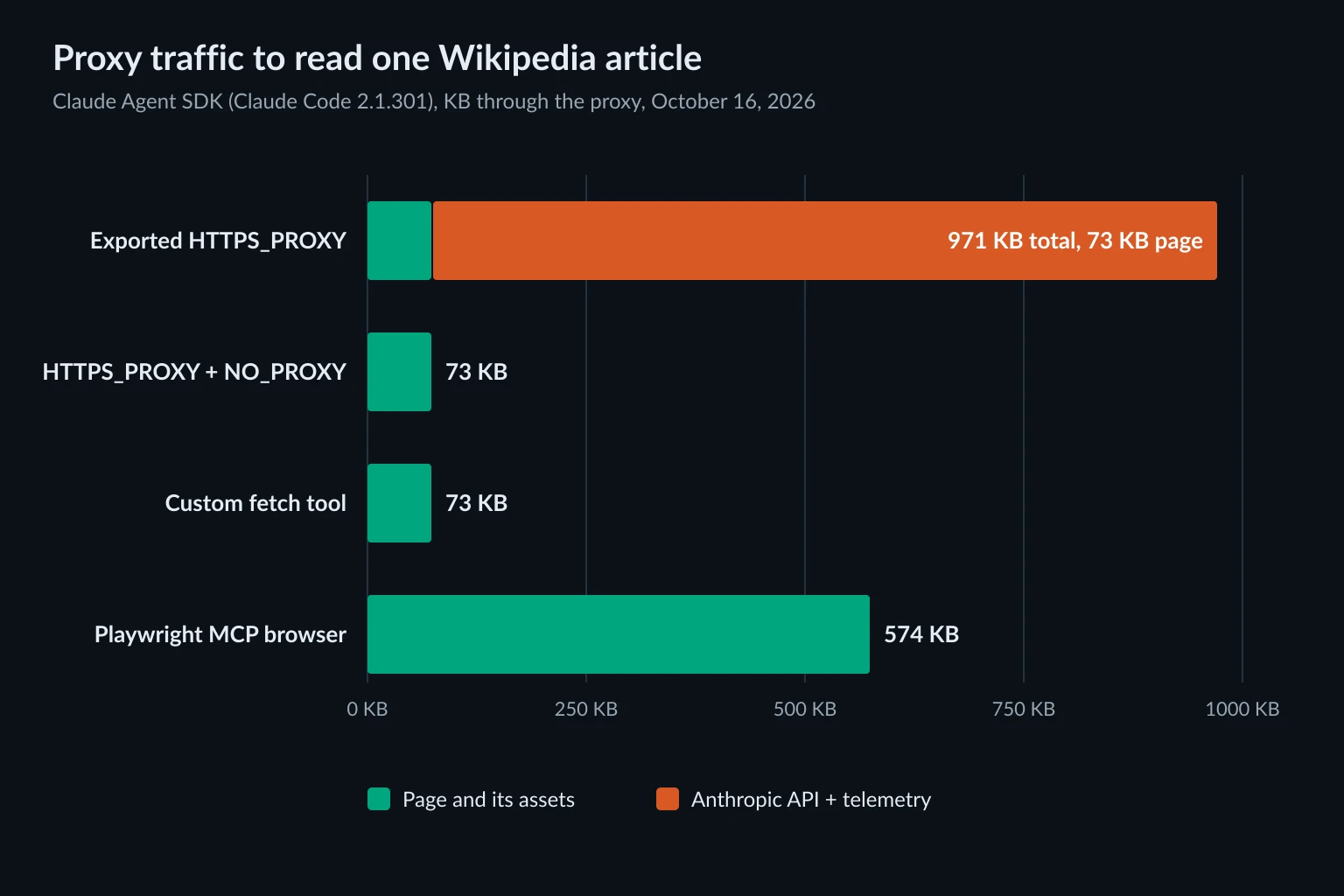
We passed only HTTPS_PROXY and asked the agent to read one Wikipedia article with WebFetch. The proxy logged 13 CONNECT api.anthropic.com:443 tunnels, one to Claude Code's Datadog telemetry host, and one to en.wikipedia.org. Of the 971 KB that crossed the proxy, the article accounted for 73 KB.
Every turn of the agent loop resends the conversation, so the overhead grows with the task, while the page bytes stay the same. On a residential plan billed per GB, you pay for prompts going through consumer IPs, and every model call picks up the proxy's latency. When we ran the SDK under a claude.ai login, Claude Code also fetched claude.ai MCP connectors through mcp-proxy.anthropic.com (5 tunnels, 158 KB) until we set ENABLE_CLAUDEAI_MCP_SERVERS=false. API-key setups don't load those connectors.
Two more things to know about the variable itself:
- The scheme is required.
HTTPS_PROXY=127.0.0.1:18901stops the CLI at startup. The SDK raisesProcessError: Command failed with exit code 1, and the real reason only shows up on stderr:Invalid proxy URL in HTTPS_PROXY: "127.0.0.1:18901" cannot be parsed as a URL.Pass astderrcallback inClaudeAgentOptionsso you can see it. - SOCKS isn't supported. Claude Code's docs say so. We set
socks5://user:pass@...and Claude Code sent an HTTPCONNECTto that address anyway, which only worked because our test proxy speaks HTTP. Point it at your provider's HTTP endpoint.
Keep model traffic direct with NO_PROXY
The smallest change that fixes this is a second variable. With NO_PROXY covering Anthropic's hosts, the proxy logged exactly one tunnel, to en.wikipedia.org. That's 73 KB, the same page bytes as before, and none of the API calls.
import asyncio
import os

from claude_agent_sdk import ClaudeAgentOptions, ResultMessage, query

options = ClaudeAgentOptions(
    allowed_tools=["WebFetch"],
    env={
        "HTTPS_PROXY": os.environ["SCRAPE_PROXY_URL"],
        "NO_PROXY": ".anthropic.com,.datadoghq.com",
    },
)


async def main():
    async for message in query(
        prompt="Fetch https://en.wikipedia.org/wiki/Proxy_server and list its section headings.",
        options=options,
    ):
        if isinstance(message, ResultMessage):
            print(message.result)


asyncio.run(main())
Set SCRAPE_PROXY_URL to http://USERNAME:PASSWORD@host:port. Percent-encode any @, :, or / in the password. The WebFetch domain safety check goes to api.anthropic.com, so it stays direct too.
How you write the bypass entry matters. We tried four forms and checked whether api.anthropic.com still went through the proxy:
NO_PROXY entry |
api.anthropic.com bypassed? |
|---|---|
api.anthropic.com |
Yes |
.anthropic.com |
Yes |
anthropic.com |
Partly. Model requests went direct, but startup, settings, and telemetry calls to api.anthropic.com still tunneled through the proxy |
*.anthropic.com |
Partly, the same split as anthropic.com |
Many HTTP clients treat a bare domain as covering its subdomains. Claude Code 2.1.301 did that for its model requests and not for its other calls to api.anthropic.com. Use a leading dot, and confirm with your proxy's logs. .datadoghq.com covers the telemetry host. You can also drop telemetry with DISABLE_TELEMETRY=1.
In TypeScript, env replaces the subprocess environment instead of merging with it, according to the TypeScript reference. Spread process.env so ANTHROPIC_API_KEY, PATH, and anything else you rely on still reach the CLI:
import { query } from "@anthropic-ai/claude-agent-sdk";

for await (const message of query({
  prompt: "Fetch https://en.wikipedia.org/wiki/Proxy_server and list its section headings.",
  options: {
    allowedTools: ["WebFetch"],
    env: {
      ...process.env,
      HTTPS_PROXY: process.env.SCRAPE_PROXY_URL,
      NO_PROXY: ".anthropic.com,.datadoghq.com",
    },
  },
})) {
  if (message.type === "result" && message.subtype === "success") {
    console.log(message.result);
  }
}
This file type-checks under strict and runs as-is on Node 24 (node agent.ts) in an ES module project. Our proxy log for it matched the Python run: one tunnel, to Wikipedia.
The weakness of NO_PROXY is that it is a denylist. Any host you didn't list goes through the proxy, including MCP servers and Bash commands, which inherit the same environment. That is fine when every non-Anthropic request should use the proxy. When it shouldn't, scope the proxy to one tool.
Route only the agent's fetches through a custom tool
An in-process tool runs in your Python process, not in the Claude Code subprocess. It ignores the env option and uses whatever HTTP client you give it. That makes it the most explicit way to decide which requests use the proxy:
import asyncio
import os

import httpx
from bs4 import BeautifulSoup
from claude_agent_sdk import (
    ClaudeAgentOptions,
    ResultMessage,
    create_sdk_mcp_server,
    query,
    tool,
)

PROXY_URL = os.environ["SCRAPE_PROXY_URL"]  # http://USERNAME:PASSWORD@host:port
HEADERS = {"User-Agent": "acme-research-agent/1.0 (+https://example.com/bot; ops@example.com)"}
MAX_BYTES = 2_000_000  # stop downloading after about 2 MB


@tool("fetch_page", "Fetch a web page through the scraping proxy and return its text", {"url": str})
async def fetch_page(args):
    async with httpx.AsyncClient(
        proxy=PROXY_URL, headers=HEADERS, timeout=30, follow_redirects=True
    ) as client:
        async with client.stream("GET", args["url"]) as response:
            if response.status_code >= 400:
                return {
                    "content": [{"type": "text", "text": f"HTTP {response.status_code} from {response.url}"}],
                    "is_error": True,
                }
            body = bytearray()
            async for chunk in response.aiter_bytes():
                body.extend(chunk)
                if len(body) >= MAX_BYTES:
                    break
    text = BeautifulSoup(bytes(body[:MAX_BYTES]), "html.parser").get_text("\n", strip=True)
    return {"content": [{"type": "text", "text": text[:40000]}]}


options = ClaudeAgentOptions(
    mcp_servers={"web": create_sdk_mcp_server(name="web", tools=[fetch_page])},
    allowed_tools=["mcp__web__fetch_page"],
    disallowed_tools=["WebFetch", "Bash"],
)


async def main():
    async for message in query(
        prompt="Read https://en.wikipedia.org/wiki/Proxy_server and summarize it in three bullets.",
        options=options,
    ):
        if isinstance(message, ResultMessage):
            print(message.result)


asyncio.run(main())
It needs pip install claude-agent-sdk httpx beautifulsoup4. The proxy saw one 73 KB tunnel to Wikipedia, and the model got the page text itself (up to 40,000 characters) instead of a summary. The MAX_BYTES cap stops the download early, so a large file or an endless response can't eat your proxy bandwidth. The 40,000-character cut alone would only trim the text after the whole body arrived.
Our first version had no User-Agent header, and Wikipedia answered 403. HTTPX's default python-httpx/x.y doesn't meet Wikipedia's User-Agent policy. That is a client identity problem, and a different IP wouldn't have fixed it. Send an honest, descriptive agent string with contact details. The HTTP 403 Forbidden guide covers the other causes. In that same failed run, Claude tried curl through Bash, which this version disallows. It then summarized the article from memory, which is a good reason to check is_error results in your logs instead of trusting the final answer.
Custom tools also give you control the built-in tools don't. You can pick a sticky or rotating session per call, retry on 429 with backoff, return raw HTML or JSON, and cap response size. The rotating proxy Python guide has session and retry patterns that drop straight into a tool function.
If you'd rather not write code, the reference Fetch MCP server does the same job. Add it to mcp_servers with --proxy-url in its args and disallow WebFetch, and only its requests use the proxy. The Fetch MCP server proxy guide covers the setup and its per-call bandwidth.
Browser tools: Playwright MCP through a proxy
The Agent SDK has no browser of its own. For JavaScript-heavy pages, logins, and forms, connect a browser MCP server through mcp_servers. Playwright MCP takes an authenticated proxy in a config file under browser.launchOptions.proxy, which keeps the password out of your code and process list. The Playwright MCP proxy guide has the file format. In the SDK:
from claude_agent_sdk import ClaudeAgentOptions

options = ClaudeAgentOptions(
    mcp_servers={
        "playwright": {
            "command": "npx",
            "args": ["@playwright/mcp@latest", "--config=/home/you/.config/playwright-mcp/proxy.json"],
        }
    },
    allowed_tools=[
        "mcp__playwright__browser_navigate",
        "mcp__playwright__browser_snapshot",
        "mcp__playwright__browser_click",
    ],
    disallowed_tools=["WebFetch", "Bash", "mcp__playwright__browser_run_code_unsafe"],
)
Three things came out of testing this setup:
An inherited proxy breaks the browser. MCP servers started by Claude Code inherit its environment, including whatever you put in env. With HTTPS_PROXY set there and no proxy in the Playwright config, the browser picked up the variable but never sent the credentials. Our proxy logged CONNECT en.wikipedia.org:443 with no Proxy-Authorization header and answered 407. The tool then failed with TimeoutError: browserBackend.callTool: Timeout 60000ms exceeded, so you get a timeout and no auth error. With the proxy in the config file as well, the browser used the configured proxy and its credentials, and the page loaded.
A browser moves far more data. The same article took 574 KB over 10 tunnels to 4 hosts (en.wikipedia.org, upload.wikimedia.org, thumb.wikimedia.org, auth.wikimedia.org), against 73 KB for WebFetch or the custom tool. Images, scripts, and styles all load. If you pay per GB, size it with the data usage calculator and use a fetch tool whenever the page doesn't need JavaScript.
Big snapshots land on disk. The Wikipedia snapshot was too large to return inline. Claude Code saved it under ~/.claude/projects/.../tool-results/ and the agent read it with Grep. Leave Grep and Read available if you rely on large snapshots.
The browser MCP server guide compares Playwright MCP with Chrome DevTools MCP and Browser MCP if you need a different browser server.
Claude Agent SDK proxy errors and what they mean
The model often paraphrases tool errors, so log the raw ToolResultBlock content when you debug. These came from our runs:
| What you see | Cause | Fix |
|---|---|---|
ProcessError: Command failed with exit code 1 and stderr Invalid proxy URL in HTTPS_PROXY |
Proxy URL without http:// |
Use a full URL, and pass a stderr callback to see messages like this |
WebFetch result proxy refused the connection |
Proxy returned 407 because of wrong or missing credentials |
Check the username, password, and percent-encoding. See 407 Proxy Authentication Required |
Playwright TimeoutError ... Timeout 60000ms exceeded with a 407 in the proxy log |
Browser inherited HTTPS_PROXY without credentials |
Put the proxy in the Playwright MCP config file |
Custom tool returns HTTP 403 |
Site rejected the client, often the default library User-Agent |
Send a descriptive User-Agent and respect the site's policy before you change IPs |
api.anthropic.com tunnels show up in proxy logs |
NO_PROXY missing, or written as anthropic.com or *.anthropic.com, which only some of Claude Code's requests honor |
Use .anthropic.com |
socks5:// URL "works" against one proxy and fails against another |
Claude Code speaks HTTP CONNECT to the address whatever the scheme |
Use the provider's HTTP endpoint |
Which proxies fit a Claude Agent SDK agent
Most agent fetches are one-off reads, so a rotating residential proxy works well for WebFetch and custom fetch tools. Each call is one connection, and nothing has to persist between calls. Browser sessions are different. A login, a cart, or a multi-step form should keep one IP for the whole task, so use a sticky residential session or an ISP proxy. The sticky vs rotating proxies guide covers when each breaks, and proxies for AI agents covers why agent traffic gets blocked in the first place.
Unknown Proxies sells residential proxies with rotating endpoints or sticky sessions that hold an IP for up to 2 hours, plus ISP proxies with static IPs for long sessions. A proxy changes the IP a site sees. It doesn't change the site's terms, rate limits, or robots rules. WebFetch announces itself as Claude-User, and an agent that respects a site's limits is less likely to get blocked than one rotating through IPs to get past them.
FAQ
Does the Claude Agent SDK have a proxy option?
No. There's no proxy field in ClaudeAgentOptions or the TypeScript Options. The bundled Claude Code reads HTTPS_PROXY, HTTP_PROXY, and NO_PROXY from its environment, which you set through env or before starting your program. Custom tools and MCP servers need their own proxy settings.
Does WebSearch use my proxy?
Only for the API request that asks Anthropic to search. The search runs on Anthropic's backend, so the target sites never see your proxy IP. To search from your own IP or with a different provider, add a search MCP server.
Can the Claude Agent SDK use a SOCKS5 proxy?
Not for its own traffic. Claude Code doesn't support SOCKS and sent HTTP CONNECT to a socks5:// address in our test. A custom tool can use SOCKS5 through its own client, for example httpx with the socks extra.
Do I need Claude Code installed to use the Agent SDK?
No. Both packages ship a Claude Code binary. The Python wheel we installed put it at claude_agent_sdk/_bundled/claude, and the TypeScript package installs it as an optional dependency. Set cli_path or pathToClaudeCodeExecutable to use a different one.
Can WebFetch read localhost or internal hosts?
It refuses localhost and bare intranet names without a dot, such as http://wiki/, before sending a request. A fully qualified internal host like wiki.corp.example.com isn't covered by that rule. Use a custom tool for internal services, with an HTTP client that doesn't send them through your scraping proxy.
Conclusion
Claude Agent SDK web access comes from three places: WebSearch on Anthropic's side, WebFetch from your machine, and whatever browser or custom tools you add. The SDK has no proxy setting, and an HTTPS_PROXY passed through env carries your model traffic too. Add NO_PROXY=.anthropic.com,.datadoghq.com to keep API calls direct, or move the proxy into a custom fetch tool or a Playwright MCP config file so it only touches the requests you meant. Then check your proxy logs before you trust the setup.
Technical references: Agent SDK overview, Python SDK reference, custom tools, MCP in the SDK, Claude Code network configuration, and the Playwright MCP README.