eBay scraping means collecting listing data such as titles, prices, sellers, item condition, shipping, and availability. eBay's User Agreement bans robots, spiders, and scrapers without its permission, and its robots.txt disallows /sch/ search pages. For approved access, use the Browse API for current listings, Marketplace Insights for sold data (limited release), or your own seller exports.
For most teams the hard part is not fetching one page. It is keeping the data accurate while listings end, sellers revise offers, variations change, and results shift by marketplace. Treat eBay scraping as a controlled pipeline with a narrow scope and validation, not an open crawler.
This guide covers research, catalog matching, and retail price and stock monitoring. It is not legal advice. Review eBay's terms and the current eBay robots.txt before collecting anything.
Is eBay scraping allowed?
eBay's rules sit in three places, and they point the same way.
| Source | What it says (as of October 2026) |
|---|---|
| User Agreement, Section 3 | You may not use "any robot, spider, scraper, data mining tools, data gathering and extraction tools, or other automated means" to access the Services without eBay's prior express permission. For existing users the current version took effect June 28, 2026 |
| January 2026 update | The same clause now names "buy-for-me agents, LLM-driven bots, or any end-to-end flow that attempts to place orders without human review" (The Register) |
| robots.txt | For User-agent: *, /sch/ search pages are disallowed (with exceptions such as /sch/allcategories/), while /itm/ listing pages are blocked only for paths like /itm/watch/. The file says checkouts are strictly for human users and points approved integrations to the official API. ClaudeBot and GPTBot are fully disallowed |
Two practical reads. First, a listing page being crawlable under robots.txt does not override the contract. The Robots Exclusion Protocol (RFC 9309) is a crawler convention, not a license. Second, the search-results path is the one eBay explicitly disallows, so a search-page crawler is the weakest design. Prefer the API for search and keep any HTML work to a small list of known listings you are permitted to check.
eBay scraping workflow for marketplace data
Build the workflow around listing identity and data quality. A practical eBay scraping pipeline separates source choice, discovery, fetching, extraction, and validation so a parser bug does not become bad business data.
- Define the exact marketplace, category, listing types, and fields you need.
- Check whether an official API, partner feed, seller export, or licensed source covers the use case.
- Create a bounded queue from approved search URLs, listing IDs, seller pages, or catalog mappings.
- Normalize URLs and reject anything outside the approved hosts and paths.
- Apply policy checks, pacing, and cache rules before each request.
- Fetch the page or API response with a timeout and clear user agent.
- Classify the response as listing, search result, unavailable, ended, sign-in, challenge, rate limit, or error.
- Extract fields into a versioned schema.
- Validate listing identity, price, currency, condition, seller, and availability before storage.
- Schedule the next check based on how often the listing or category changes.
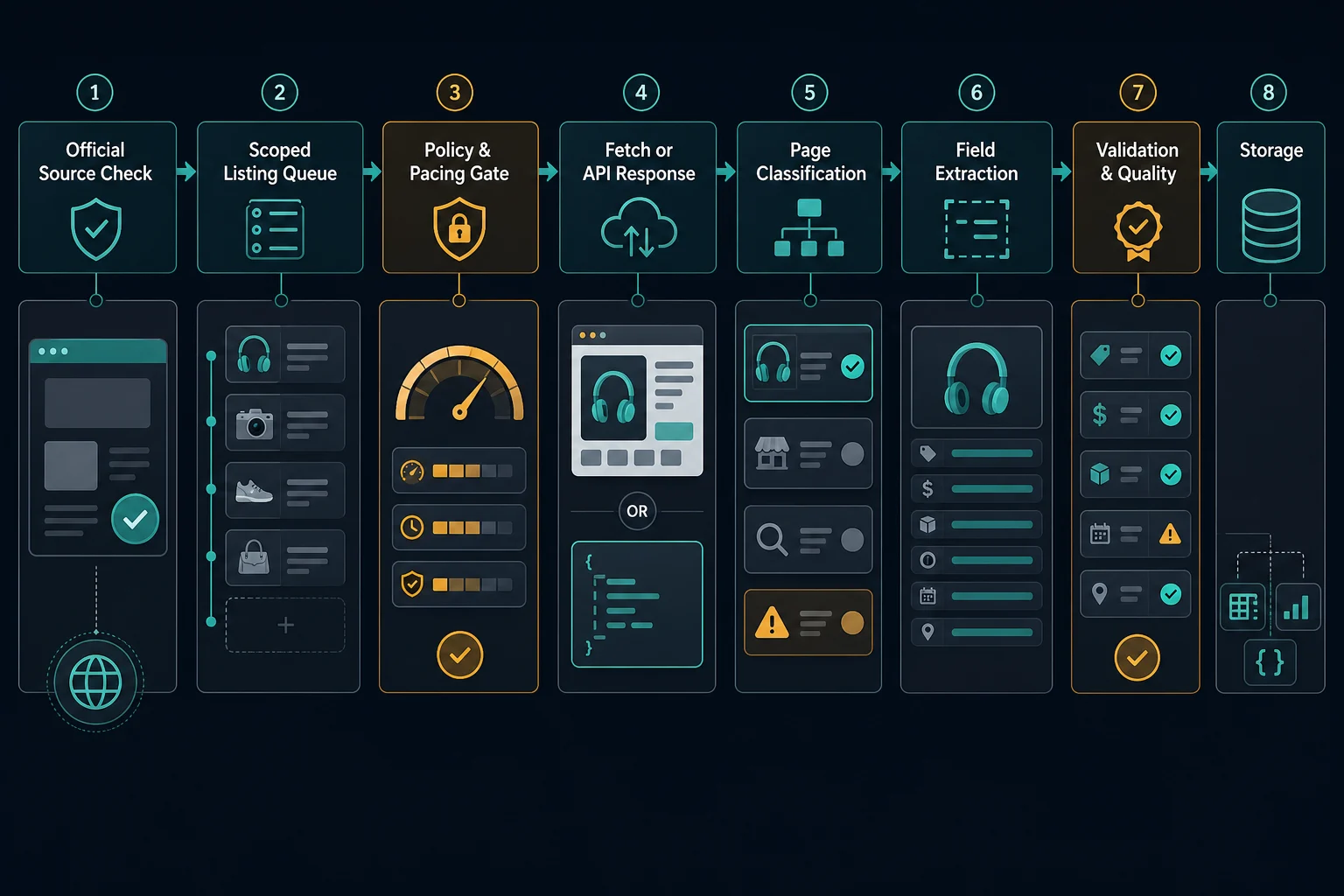
Keep raw responses or structured fixtures only when your policy allows it, and redact cookies, tokens, account data, and personal data. Fixtures are useful because eBay pages can vary by category, condition, seller, marketplace, shipping option, and item state.
Start with the eBay API before HTML scraping
The lowest-risk source is the one that explicitly supports your data need. For item search and listing details, eBay's current option is the Browse API. Its item_summary resource searches listings by keyword, category, GTIN, or product, and its item resource returns listing details. All Browse API methods need an Application access token from the OAuth client credentials flow. eBay decommissioned the older Finding API and Shopping API on February 5, 2025, so tutorials built on them no longer work.
Some limits to plan around. A search holds at most 10,000 items, limit accepts 1 to 200 (default 50), q takes up to 100 characters, and wildcards are not allowed. The X-EBAY-C-MARKETPLACE-ID header selects the marketplace and defaults to EBAY_US. eBay's developer program page lists a free tier of 5,000 API calls per day for new accounts as of October 2026, and production access to the Buy APIs requires meeting eBay's eligibility requirements and signing its contracts.
A minimal Browse API search
The token endpoint and header formats below follow eBay's authorization guide. Tokens last 7,200 seconds, so cache and reuse them.
import base64
import os

import requests

CLIENT_ID = os.environ["EBAY_CLIENT_ID"]
CLIENT_SECRET = os.environ["EBAY_CLIENT_SECRET"]

def get_token() -> str:
    basic = base64.b64encode(f"{CLIENT_ID}:{CLIENT_SECRET}".encode()).decode()
    response = requests.post(
        "https://api.ebay.com/identity/v1/oauth2/token",
        headers={
            "Content-Type": "application/x-www-form-urlencoded",
            "Authorization": f"Basic {basic}",
        },
        data={
            "grant_type": "client_credentials",
            "scope": "https://api.ebay.com/oauth/api_scope",
        },
        timeout=15,
    )
    response.raise_for_status()
    return response.json()["access_token"]

def search(token: str, query: str, marketplace: str = "EBAY_US", limit: int = 50) -> list[dict]:
    response = requests.get(
        "https://api.ebay.com/buy/browse/v1/item_summary/search",
        headers={
            "Authorization": f"Bearer {token}",
            "X-EBAY-C-MARKETPLACE-ID": marketplace,
        },
        params={"q": query, "limit": limit},
        timeout=15,
    )
    response.raise_for_status()
    return response.json().get("itemSummaries", [])

if __name__ == "__main__":
    for item in search(get_token(), "mechanical keyboard")[:5]:
        print(item.get("itemId"), item.get("title"), item.get("price"))
Check field names against the Browse API reference before you build a schema on them, and log the errors array when a call fails. For a monitored list, fetch known items with the item resource instead of repeating broad searches. That uses far fewer calls against your daily quota.
APIs will not fit every project. They have eligibility rules, quotas, field limits, and missing historical data. Still, evaluate them first because they provide stable identifiers and clearer usage boundaries.
Use this source decision table before writing selectors:
| Source | Best fit | Main tradeoff |
|---|---|---|
| eBay API | Approved item search or listing-detail access | Eligibility, quotas, field coverage, and marketplace support |
| Your own seller export | Monitoring your own listings, inventory, and orders | Limited to data your account can access |
| Marketplace Insights API | Sold-item history for approved partners | Limited release, 90-day window, restricted categories |
| Licensed feed or vendor data | Commercial marketplace intelligence | Cost, contract limits, and freshness |
| Public listing HTML | Small, permitted research or monitoring scopes | Layout changes, policy review, and page-state handling |
| Browser-rendered page | Permitted fields that require rendering | Higher bandwidth, session complexity, and more failure modes |
Sold and completed listings
Sold prices are the most requested eBay dataset and the hardest to get cleanly. eBay's Marketplace Insights API returns sales history for items sold in the past 90 days, but its documentation describes it as a limited release for select approved developers, and it does not support every category.
Many tutorials get the same data from public search pages by adding sold and completed filters to the search URL. That route runs through /sch/, which robots.txt disallows, and through the User Agreement clause above. If you need sold comps, apply for Marketplace Insights, buy licensed data, or use sales from your own seller account. Do not build a retail pricing process on a path eBay explicitly blocks.
Define the listing schema before fetching pages
Marketplace data gets messy when the schema is vague. An eBay listing can include auctions, buy-it-now prices, offers, seller ratings, variations, item condition, shipping charges, local pickup, promoted placements, and ended or unavailable states.
Define one record type before scraping:
{
  "marketplace": "EBAY_US",
  "listing_id": "example-listing-id",
  "canonical_url": "https://www.ebay.com/itm/example-listing-id",
  "title": "Example item title",
  "seller": "example-seller",
  "condition": "used",
  "format": "buy_it_now",
  "price": {
    "amount": "49.99",
    "currency": "USD",
    "type": "current_offer"
  },
  "shipping_amount": "5.99",
  "availability": "available",
  "observed_at": "2026-07-10T12:00:00Z",
  "parser_version": "ebay-listing-v1"
}
Use listing ID plus marketplace as the primary identity. Do not use the title as a key. Titles can change, and search URLs can contain tracking, sort, filter, and campaign parameters that do not identify a unique item.
Keep raw display text separate from normalized values. Store "$49.99" if it helps audits, but parse the amount and currency into explicit fields. Shipping and taxes should be separate unless your monitoring rule intentionally compares total landed cost.
Scope eBay search and listing URLs
Open-ended marketplace crawling creates duplicates, noisy data, and policy risk. Start from a bounded list: approved categories, search terms, listing IDs, seller IDs, or internal product mappings.
For search-result collection, store the exact query assumptions:
- Marketplace, such as
EBAY_USorEBAY_GB. - Category and keyword scope.
- Sort order and filters.
- Item condition, buying format, and price range when relevant.
- Region, language, and shipping destination assumptions.
- Maximum page depth and refresh interval.
For listing-detail collection, canonicalize before enqueueing:
- Normalize the hostname for the intended eBay marketplace.
- Extract the listing ID from the URL.
- Remove tracking, affiliate, campaign, and session parameters.
- Reject redirects that leave the approved marketplace or change item identity.
- Deduplicate by marketplace plus listing ID.
- Record where the URL came from: search, seller page, API result, or internal mapping.
If your goal is product price tracking rather than general marketplace research, read the price monitoring pipeline guide before scaling. It covers observation history, validation gates, and alert deduplication after collection.
Use HTTP first, browser rendering only when needed
Begin with the simplest permitted source that returns the required data. If an API response or initial HTML contains the fields you need, a browser adds cost and failure modes without improving accuracy.
Use browser automation only when a permitted field genuinely appears after rendering or when the page workflow requires browser state. Browser sessions load scripts, images, storage, cookies, and subresources, so they consume more bandwidth and make proxy/session alignment more important.
| Observation | Better starting point |
|---|---|
| API exposes the needed listing fields | API client |
| Initial HTML includes the required public fields | HTTP client |
| Required permitted fields appear only after rendering | Browser context |
| Page is sign-in, challenge, or access denial | Stop and diagnose scope or policy |
| Search result changes by region | API marketplace parameter or region-aligned route |
For browser work, the Playwright proxy setup guide covers context isolation and proxy assignment. For a lighter HTTP client workflow, the Python proxy requests guide covers proxy URL formats, authentication, timeouts, and quick route checks.
Validate eBay marketplace scraping results
Extraction success is not data success. A page can return HTTP 200 while showing an ended item, unavailable listing, sign-in wall, consent screen, challenge, or search page instead of the target listing.
Validate every accepted record:
- The listing ID matches the queued listing ID.
- The marketplace and currency match the intended market.
- The title is present and within reasonable length bounds.
- The selected seller and item condition are captured when they matter.
- The price type is known: buy-it-now, current auction bid, accepted offer, coupon, or unavailable.
- Shipping is either parsed, explicitly out of scope, or marked unknown.
- Availability distinguishes active, ended, sold, out of stock, and removed.
- The response is not a sign-in, challenge, consent, blocked, or error page.
- Parser version and observation time are recorded.
For search-result scraping, validate rank and page position separately from listing detail. A sponsored result, duplicate card, promoted listing, or related item can be real, but it may not belong in the same dataset as organic search position.
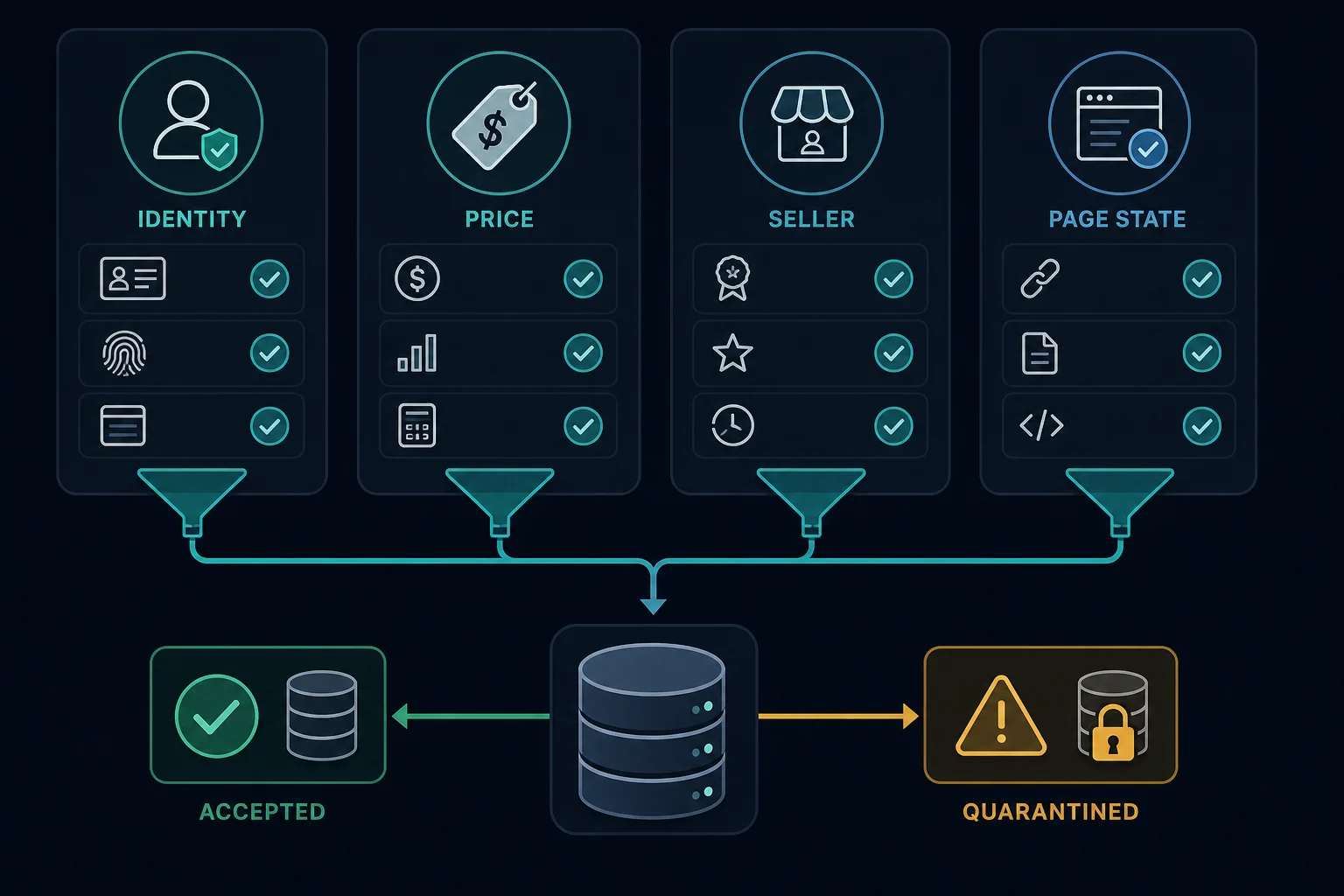
Track invalid records instead of dropping them silently. A sudden increase in ended items, missing prices, unknown currencies, or wrong-page classifications usually means your source, parser, or schedule needs review.
Handle rate limits, blocks, and retries
Classify failures before retrying. A retry loop that treats every error as temporary can create more traffic and worse data.
| Result | Likely meaning | Action |
|---|---|---|
| 403 | Access, policy, authentication, or WAF denial | Stop automatic retries and review scope, request behavior, and permissions |
| 429 | Request rate is too high | Honor cooldowns, reduce concurrency, and add jitter |
| 5xx | Target or upstream instability | Retry a small number of times with exponential backoff |
| Timeout | Network, proxy, browser, or target delay | Retry once after logging the failing layer |
| 200 with wrong page | Challenge, sign-in, consent, ended item, or parser mismatch | Classify and quarantine the observation |
The HTTP reference for 429 Too Many Requests notes that servers may include Retry-After. Treat that value as a minimum wait, then restart gradually instead of sending all workers back at once. The local HTTP 429 guide covers backoff and pacing in more detail, while the HTTP 403 guide helps separate access denial from rate pressure.
For recurring monitoring, calculate load before increasing task count. The delay calculator can turn task count, proxy count, and delay into a practical pacing model, but site-specific rules and permissions still control the final schedule.
When proxies fit eBay scraping
Proxies are routing infrastructure. They do not grant permission, override eBay policies, repair selectors, or make excessive request rates acceptable. They can help legitimate eBay scraping when routing affects the measurement or when workers need stable outbound paths.
Useful proxy fits include:
- Localized marketplace checks where price, shipping, availability, or search order differs by region.
- Independent public listing checks that need route diversity and conservative pacing.
- Browser sessions where one cookie jar, locale, and route should stay aligned.
- Cloud-hosted workers that need consistent outbound IP assignment.
- QA checks that compare how public pages render from different markets.
Choose the proxy mode based on the workflow:
| Workflow | Proxy pattern |
|---|---|
| Independent listing-detail checks | Rotating residential sessions between tasks |
| Search page to listing-detail path | Sticky residential session for the whole path |
| Repeated monitoring of a small listing set | ISP or sticky session with strong pacing |
| Browser-rendered page | One stable route per browser context |
| Same denial from every route | Stop and review policy, page state, and scraper behavior |
The best proxy for web scraping guide compares residential, ISP, and datacenter fit by target strictness and workflow shape. For a small, repeated listing set, a static route from ISP proxy plans keeps the identity stable. If you need country, state, or city routing for marketplace scraping, residential proxies are the natural starting point. For session behavior, compare sticky vs rotating proxies before assigning workers.
Monitor data quality, not just HTTP status
An eBay scraper can look healthy at the transport layer while returning poor data. Track the request and the accepted observation separately.
Useful metrics include:
- Fetch count by status code and classified page type.
- Accepted, quarantined, and rejected records.
- Missing field rates by marketplace, category, and parser version.
- Price, shipping, and currency parsing failures.
- Ended, sold, unavailable, and removed listing rates.
- Duplicate listing IDs and canonicalization failures.
- 403 and 429 rates by worker, route, and schedule.
- Median and high-percentile latency.
- Bandwidth used per accepted record.
Set alerts on data-quality changes, not only scraper crashes. If accepted records drop from 96% to 62%, that matters even when the job exits successfully.
For broader marketplace and retail tracking, the competitor price scraping guide covers comparable offer definitions and review loops. The Amazon ecommerce scraping guide is useful when you need the same pipeline pattern for another large marketplace with different identifiers and page states.
FAQ
Is eBay scraping allowed?
Not without permission. The User Agreement bars robots, spiders, scrapers, and data gathering tools unless eBay approves them, and robots.txt disallows /sch/ search pages. Use the Browse API, Marketplace Insights, licensed feeds, or your own seller exports where they fit.
Does eBay have an API for listing data?
Yes. The Browse API searches and retrieves current listings with an Application access token, and the older Finding and Shopping APIs were decommissioned in February 2025. Production access has eligibility requirements, and a free tier of 5,000 calls per day is listed for new developer accounts.
How do I get eBay sold listings data?
The official route is the Marketplace Insights API, which covers sales from the past 90 days but is a limited release. Other options are licensed data or your own seller sales data. Scraping sold-filtered search pages conflicts with the /sch/ robots rule.
Do I need a browser for scraping eBay?
Not by default. Use a browser only when a permitted field depends on rendering or browser state. If the API or initial HTML has the data, an HTTP client is easier to run and audit.
What data can be collected from eBay listings?
A scoped workflow may need title, listing ID, seller, condition, price, currency, shipping, availability, buying format, category, and observation time. Collect only what the project needs and validate each field before storage.
Are residential proxies useful for marketplace scraping?
For permitted regional checks and independent public-page tasks, yes. They do not fix forbidden access, poor pacing, bad selectors, or collection outside your approved scope.
Final thoughts
Start eBay data work with the Browse API and your own seller exports, and treat sold data as a separate access question. Keep any HTML collection to a short list of known listings, validate listing ID, price, currency, and availability on every record, and pace requests conservatively. Use proxies only when routing changes a legitimate measurement. Run a small test, measure accepted-record quality, and fix validation failures before you raise volume.