The OpenClaw browser tool drives a dedicated Chrome profile that OpenClaw launches itself, and that Chrome ignores every proxy setting you might have set elsewhere. OpenClaw starts it with --no-proxy-server and strips HTTP_PROXY, HTTPS_PROXY, and ALL_PROXY from its environment. The Gateway-wide proxy.proxyUrl setting doesn't reach it either.
To give the OpenClaw browser a residential or ISP exit, you need three changes in ~/.openclaw/openclaw.json. Add a --proxy-server flag to browser.extraArgs. Set browser.ssrfPolicy.dangerouslyAllowPrivateNetwork to true, because otherwise OpenClaw blocks every navigation once the browser is proxied. And point Chrome at an endpoint that needs no password, because Chrome can't send proxy credentials from a command-line flag.
That last point trips up most setups, so this guide covers it in detail: IP allowlisting, a local forwarder that holds the credentials, and why openclaw browser set credentials is the wrong fix. It also covers the MCP route. You can register a Playwright MCP server with openclaw mcp add and give it its own proxy, which also gets around OpenClaw's one-proxy-for-all-profiles limit.
We checked the behavior described here against OpenClaw's source on main in October 2026 (release 2026.9.8). Where we say something was tested, we ran it in headless Chromium against a local authenticating proxy, attached over CDP the same way OpenClaw attaches.
Why a self-hosted OpenClaw browser needs a proxy
OpenClaw, formerly Clawdbot and then Moltbot, is a personal agent you host yourself. A lot of people run it on a cheap VPS so it stays online for Telegram or WhatsApp. That puts the browser tool on a datacenter IP, which many sites score as high-risk before the page even loads. One OpenClaw issue lists Indeed and Glassdoor behind Cloudflare blocks, plus CAPTCHA walls on Bing and DuckDuckGo, all from a VPS running headless Chrome. Nothing was wrong with the agent. Those sites just don't trust hosting ranges.
If your OpenClaw runs on a laptop or home server, its browser already exits from your home connection. You only need a proxy there for a different location, a separate identity from your own browsing, or a fixed IP for an account the agent manages. The broader reasons agents get blocked are covered in proxies for AI agents. This post is about the OpenClaw wiring.
Where OpenClaw browser traffic exits
OpenClaw makes outbound connections from several places, and each one has its own proxy setting. Getting this map right first saves you from proxying the wrong thing.
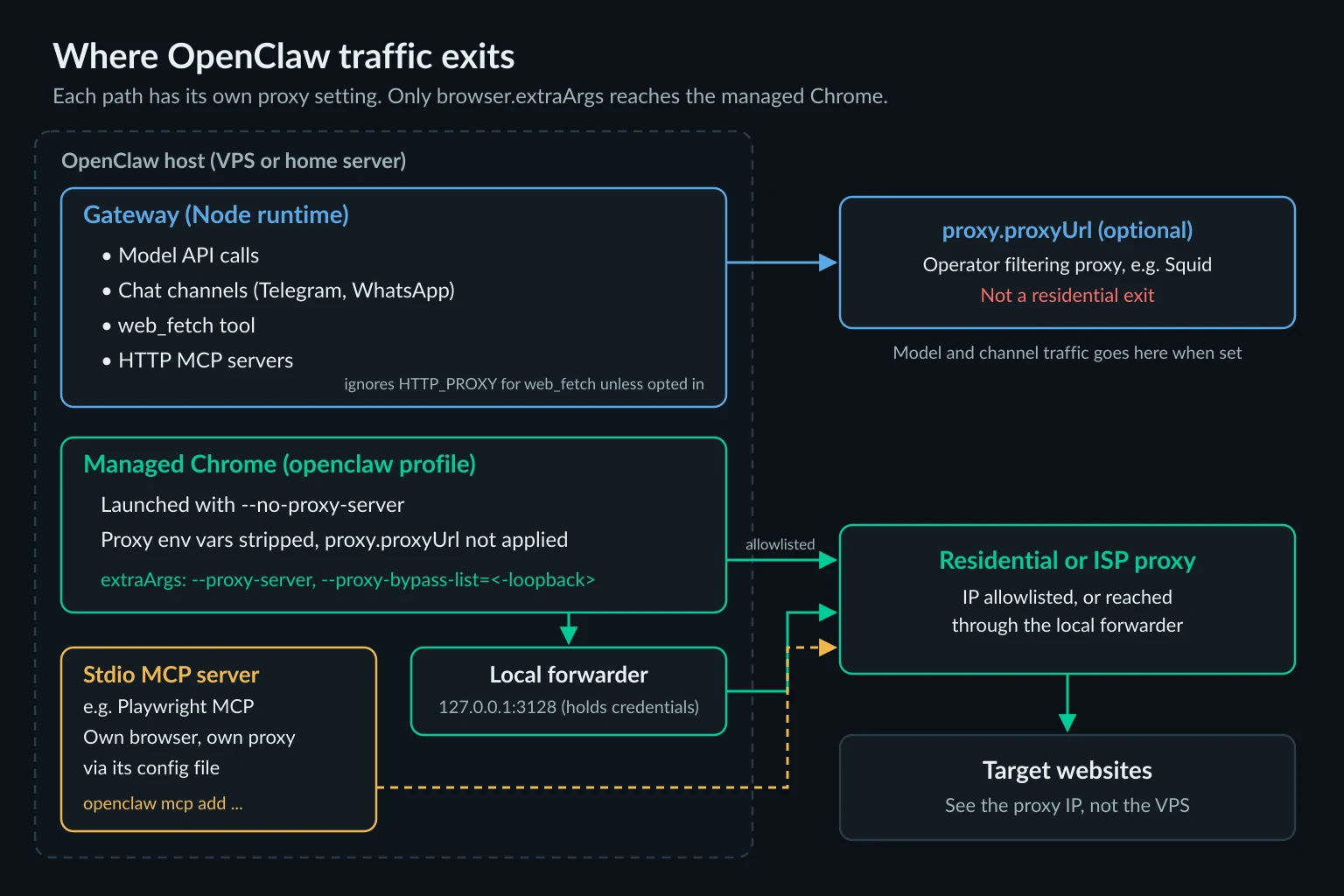
| Traffic | Leaves from | Proxy setting that applies |
|---|---|---|
Browser tool pages (managed openclaw profile) |
The Chrome process OpenClaw launches | --proxy-server in browser.extraArgs only |
web_fetch tool |
The Gateway's Node process | proxy.proxyUrl, or HTTP(S)_PROXY plus tools.web.fetch.useTrustedEnvProxy: true |
| Model API calls, chat channels, HTTP MCP servers | The Gateway's Node process | proxy.proxyUrl / OPENCLAW_PROXY_URL |
| Stdio MCP servers, such as Playwright MCP | Their own child process | The server's own flags or config file |
| Remote CDP profiles (Browserless, Browserbase, Notte) | The remote browser | The provider's proxy settings |
user profile (your signed-in Chrome via Chrome DevTools MCP) |
Your own Chrome | Whatever proxy your Chrome or OS already uses |
Two rows cause most of the confusion. First, proxy.proxyUrl is OpenClaw's managed network proxy, meant for an operator-run filtering proxy such as Squid. It routes the Node runtime's fetch, node:http, and WebSocket clients, which includes your model provider traffic. Point it at a residential proxy and every LLM request and Telegram poll goes through a gateway you pay for per GB. The browser still exits from the VPS, because managed Chrome is a separate process that OpenClaw deliberately launches direct.
Second, web_fetch ignores HTTP_PROXY unless you opt in. openclaw doctor warns about exactly this: "web_fetch still uses direct connections because tools.web.fetch.useTrustedEnvProxy is not enabled." The opt-in makes the proxy resolve DNS instead of OpenClaw. OpenClaw's docs say to enable it only for a proxy you control.
OpenClaw browser proxy setup in four steps
This setup works for the default managed profile and any other profile OpenClaw launches locally. It doesn't affect remote CDP, attachOnly, user, or extension profiles, because OpenClaw doesn't launch those browsers.
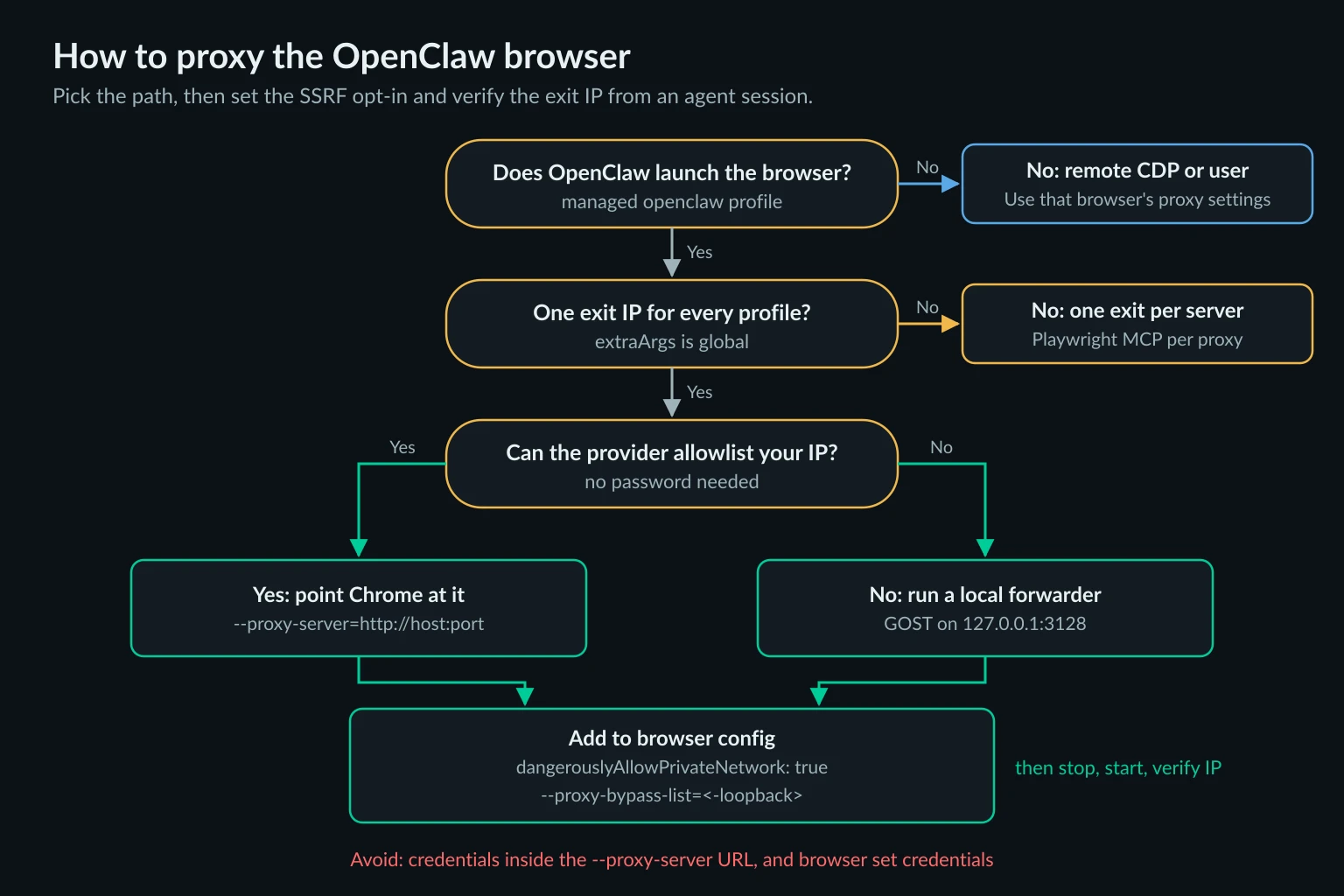
Step 1: Get an endpoint Chrome can use without a password
Chrome's --proxy-server flag takes a host and port, not credentials. We tested --proxy-server=http://user:pass@127.0.0.1:18921 and Chrome refused every request with net::ERR_NO_SUPPORTED_PROXIES. You have two clean options.
IP allowlisting. If your provider can authorize your server's public IP, the proxy needs no username or password, and Chrome can use it directly. This is the simplest setup for a VPS with a fixed IP. Many Unknown Proxies ISP plans offer IP authentication in the plan's Manage Auth dialog, with up to five allowlisted IPs. Where it isn't offered, use the forwarder.
A local forwarder. If your proxy uses a username and password, as most residential gateways do, run a small forwarder on loopback. It accepts unauthenticated connections from Chrome and adds the credentials upstream. GOST is a single binary that does this. Put the credentials in a config file rather than on the command line, because OpenClaw's exec tool can run ps and read process arguments:
# /etc/gost/openclaw-egress.yaml
services:
  - name: openclaw-egress
    addr: 127.0.0.1:3128
    handler:
      type: http
      chain: upstream
    listener:
      type: tcp
chains:
  - name: upstream
    hops:
      - name: hop-0
        nodes:
          - name: provider
            addr: proxy.example.com:8080
            connector:
              type: http
              auth:
                username: YOUR_PROXY_USER
                password: YOUR_PROXY_PASS
            dialer:
              type: tcp
Run it with gost -C /etc/gost/openclaw-egress.yaml. Use a separate system user that owns the file with mode 600, so the user account running OpenClaw can't read it. We tested this config with GOST 3.3.0 in front of an authenticating proxy, and the upstream received the correct Proxy-Authorization header on every CONNECT. Keep the listener on 127.0.0.1. An unauthenticated proxy on a public interface is an open relay billed to your account. The Skyvern proxy guide uses the same GOST forwarder inside Docker Compose for its self-hosted Chromium.
Step 2: Add the proxy flags to browser.extraArgs
Edit ~/.openclaw/openclaw.json:
{
  browser: {
    enabled: true,
    extraArgs: [
      "--proxy-server=http://127.0.0.1:3128",
      "--proxy-bypass-list=<-loopback>",
    ],
    ssrfPolicy: {
      dangerouslyAllowPrivateNetwork: true, // required once the browser is proxied, see step 3
    },
  },
}
With an IP-allowlisted endpoint, put the provider's host and port in --proxy-server instead of the forwarder's. OpenClaw only adds its own --no-proxy-server when extraArgs contains no proxy flag, so your flag wins. --proxy-pac-url and --proxy-auto-detect count as proxy flags too.
The second flag matters more than it looks. Chrome never sends localhost, 127.0.0.1, or [::1] through a proxy unless you remove that implicit rule with <-loopback>. In our test, a proxied Chrome without it loaded a 127.0.0.1 page directly while the proxy saw nothing. With it, the same request went to the proxy. That matters for an agent because the OpenClaw Gateway, its control service, and anything else you run on the box all listen on loopback. With <-loopback> set, a page that tries to steer the agent to http://127.0.0.1:18789 goes to the remote proxy instead, and a remote proxy can't reach your machine's loopback.
extraArgs is global. Every locally launched profile gets the same flags, so you can't give work one exit and openclaw another this way. A feature request for per-profile proxies is still open. The MCP section below shows the workaround.
Step 3: Opt out of strict browser SSRF, deliberately
Without the ssrfPolicy line, the first navigation fails with:
Navigation blocked: strict browser SSRF policy cannot be enforced while this browser profile is proxy-routed
This is intentional. OpenClaw's default browser policy resolves each hostname itself and refuses private, loopback, and link-local targets before Chrome connects. Once Chrome sends traffic to a proxy, the proxy does the DNS lookup and the connection, and OpenClaw can no longer check where a page really lands. Rather than pretend, OpenClaw refuses to navigate until you accept that tradeoff with dangerouslyAllowPrivateNetwork: true.
Here's what you give up, and how to win most of it back:
- LAN and metadata addresses. With a remote proxy, requests for
192.168.1.1or169.254.169.254go to the proxy provider, not your network. Reputable providers refuse private destinations. Test yours from the server withcurl -x http://127.0.0.1:3128 http://169.254.169.254/and confirm it fails. - Loopback. This is covered by
<-loopback>from step 2. Without it, loopback stays reachable from the agent's browser. - Hostname rules.
browser.ssrfPolicy.allowedHostnamesstops mattering for private targets once private access is allowed. If you relied on it, move that policy to the proxy or the network layer.
Hot reload restarts the browser control service when ssrfPolicy changes. When extraArgs changes, OpenClaw marks the managed profile for a relaunch, because Chrome reads flags only at startup.
Step 4: Restart the browser and verify the exit IP
openclaw browser stop
openclaw browser start
openclaw browser open "https://api.ipify.org?format=json"
openclaw browser snapshot
The snapshot should show the proxy's IP, not your server's. Then ask the agent to do the same thing in chat ("open api.ipify.org and tell me the IP"). That confirms the agent's tool calls use the profile you just changed, not user or a remote profile. Repeat the check whenever you change defaultProfile or add profiles.
If the agent runs in a sandboxed session, it gets a separate Chromium in Docker from OpenClaw's sandbox browser image. That browser is configured with an empty extraArgs list and a fixed set of launch flags, so the host's proxy flags don't reach it. Check the exit from a sandboxed session separately before you rely on it.
Why credentials don't belong in the browser
OpenClaw has a command that looks like the fix for an authenticated proxy:
openclaw browser set credentials YOUR_PROXY_USER YOUR_PROXY_PASS
It calls Playwright's setHTTPCredentials on the browser context, without an origin restriction. Playwright then answers every authentication challenge Chrome reports with those credentials, and it doesn't distinguish a proxy's 407 from a website's 401. So in our test it did get past the proxy. It also sent the same username and password, as a Basic Authorization header, to a test site that answered with 401 WWW-Authenticate: Basic. Any page the agent visits that asks for HTTP Basic auth would receive your proxy credentials.
It is also session state, not config. Nothing lands in openclaw.json, so a browser relaunch drops it. Then the next navigation hits a 407, and with Playwright attached, Chrome doesn't show an auth prompt. In our test, page.goto hung until our 15-second timeout fired, and the only clue was a 407 in the proxy's log. Use IP allowlisting or the forwarder instead. The credentials then live in a file the agent can't read, and websites never see them.
OpenClaw MCP: a proxied Playwright MCP browser
OpenClaw can also use an MCP browser server instead of its built-in browser tool. openclaw mcp add registers stdio servers, and Playwright MCP accepts a proxy through its own config file. This is the cleanest way to give one OpenClaw install more than one exit IP, since each MCP server launches its own browser with its own proxy. Playwright MCP is not the only server OpenClaw can register. The browser MCP server guide covers where Chrome DevTools MCP, Puppeteer MCP, and the attach-mode servers take a proxy, and the best MCP servers for web access guide covers the search and fetch servers worth adding alongside.
Create a config file for Playwright MCP with the proxy under browser.launchOptions.proxy:
{
  "browser": {
    "browserName": "chromium",
    "launchOptions": {
      "headless": true,
      "proxy": {
        "server": "http://proxy.example.com:8080",
        "username": "YOUR_PROXY_USER",
        "password": "YOUR_PROXY_PASS"
      }
    }
  }
}
Then register it with OpenClaw and check that it starts:
openclaw mcp add web-de \
  --command npx \
  --arg -y \
  --arg @playwright/mcp@latest \
  --arg --config=/home/openclaw/.config/playwright-mcp/de.json
openclaw mcp doctor web-de --probe
Add a second server, such as web-us with a different config file, for a second exit. Playwright handles proxy auth itself here, so you don't need a forwarder. Playwright-launched Chromium also proxies loopback by default, so you get the <-loopback> behavior without asking for it. The Playwright MCP proxy guide covers the config file, SOCKS5 limits, and version quirks in more depth.
Know what you're trading. OpenClaw's browser SSRF policy, tab cleanup, and snapshot handling apply to its built-in browser tool, not to an MCP server's browser. MCP tools still go through OpenClaw's tool policy and approvals, but the Playwright MCP browser can open any URL its process can reach. Keep the config file readable only by the account that runs it. Unlike the forwarder setup, the Playwright MCP process has to hold the credentials.
One naming collision: openclaw mcp serve works in the opposite direction. It exposes OpenClaw conversations to other MCP clients and has nothing to do with web browsing.
Other ways to change the OpenClaw browser's exit
Remote CDP. Point a profile's cdpUrl at a hosted browser such as Browserless, Browserbase, or Notte, and the page traffic exits from that provider. Its proxy settings apply, and OpenClaw's extraArgs don't. For a self-hosted Browserless container on the same host, set attachOnly: true as well, or OpenClaw treats the loopback port as a browser it should launch. What hosted browsers charge for proxy bandwidth is covered in Browserbase alternatives.
A second Chrome you launch yourself. Start Chrome with its own --proxy-server, --remote-debugging-port, and a non-default --user-data-dir, then add it as a profile with that cdpUrl and attachOnly: true. OpenClaw attaches instead of launching, so this is another way around the global extraArgs limit. You keep OpenClaw's own browser tool instead of an MCP one, but you're now responsible for that Chrome's lifecycle.
Your own signed-in Chrome. The built-in user profile attaches to your desktop Chrome through Chrome DevTools MCP. Pages exit from wherever that Chrome does, often your home connection. It only works on the machine where you browse, and someone has to be there to approve the attach.
Residential or ISP proxies for an OpenClaw agent
For a personal agent, the choice usually comes down to whether it logs into accounts.
- ISP proxies give the agent one static IP that stays the same for months. That suits an agent managing your own logins, because the site sees the same address, cookies, and browser profile every day. Pricing is per IP rather than per GB, and IP allowlisting removes the forwarder from step 1. Compare ISP proxy plans.
- Residential proxies suit research-style browsing across many sites and locations. Use a sticky session for anything that spans more than one page, because a per-request rotating endpoint can change the IP between a login and the next click. See residential proxies for location targeting and sticky sessions.
Watch bandwidth on per-GB plans. A browser loads every script, image, and font, so one agent task can pull several megabytes through the proxy. Screenshots don't add to it. OpenClaw captures them locally over CDP, and any vision call that describes them goes from the Gateway to the model provider, not through the browser's proxy.
Troubleshooting the OpenClaw browser proxy
| Symptom | Likely cause | Fix |
|---|---|---|
Navigation blocked: strict browser SSRF policy cannot be enforced while this browser profile is proxy-routed |
Proxy flag in extraArgs with the default strict policy |
Set browser.ssrfPolicy.dangerouslyAllowPrivateNetwork: true and read step 3 |
net::ERR_NO_SUPPORTED_PROXIES |
Credentials inside the --proxy-server URL |
Use IP allowlisting or a local forwarder |
Navigation times out and the proxy logs a 407 |
The proxy wants auth that Chrome can't send | Same as above. Don't rely on set credentials |
net::ERR_PROXY_CONNECTION_FAILED |
Forwarder not running, wrong port, or bound to another interface | Test with curl -x http://127.0.0.1:3128 https://api.ipify.org from the same host |
| Exit IP is still the server's | Browser not relaunched, a non-managed profile in use, or a sandboxed session | openclaw browser stop, then start. Check defaultProfile and openclaw browser --json status |
HTTP_PROXY set but nothing changes |
Managed Chrome strips proxy env vars by design | Use browser.extraArgs |
| SOCKS5 endpoint with a username fails | Chromium doesn't support SOCKS5 authentication | Use the provider's HTTP endpoint, or SOCKS5 with IP allowlisting |
If a site still blocks a clean residential or ISP exit, the IP may not be the problem. Rate, behavior, and an obviously automated browser all count. How to crawl a website without getting blocked covers pacing and the other signals.
Use the OpenClaw browser within site rules
A proxy changes where requests come from. It doesn't change what you're allowed to do. Stay within each site's terms and robots rules, keep request rates close to what a person would do, and don't use rotating IPs to get around a ban or an account limit. Where a site offers an API for the task, the API is usually more reliable than driving its UI with an agent.
FAQ
Does the OpenClaw browser use HTTP_PROXY?
No. OpenClaw strips HTTP_PROXY, HTTPS_PROXY, ALL_PROXY, and NO_PROXY from the managed Chrome's environment and launches it with --no-proxy-server. The only way to proxy it is a proxy flag in browser.extraArgs.
Can each OpenClaw browser profile use a different proxy?
Not through extraArgs, which applies to every locally launched profile. For separate exits, register one Playwright MCP server per proxy, or attach attachOnly CDP profiles to Chrome instances you launch with their own flags.
Does OpenClaw support authenticated proxies for the browser?
Not directly. Chrome can't take credentials in --proxy-server. Use an IP-allowlisted endpoint, or a loopback forwarder that adds the credentials upstream. openclaw browser set credentials gets past a proxy, but it also sends the same credentials to any site that answers with HTTP 401.
Should I set proxy.proxyUrl for the OpenClaw browser?
No. proxy.proxyUrl routes the Gateway's own traffic, including model API calls and chat channels, and it doesn't touch the managed browser. It's meant for an operator-controlled filtering proxy, not a residential exit.
Is OpenClaw the same as Clawdbot or Moltbot?
Yes. OpenClaw is the current name of the project formerly called Clawdbot and then Moltbot. Older guides that use those names still describe the same browser tool, but check config keys against the current browser configuration docs.
Conclusion
An OpenClaw browser proxy comes down to three settings: a --proxy-server flag in browser.extraArgs, the deliberate dangerouslyAllowPrivateNetwork opt-in, and an endpoint Chrome can use without a password. Add --proxy-bypass-list=<-loopback> so the agent's browser can't reach the Gateway on loopback. Leave proxy.proxyUrl for egress filtering, not residential exits. If you need more than one exit, register Playwright MCP servers with their own config files through openclaw mcp add.
Then check the exit IP from inside a real agent session. If the agent manages your own accounts, a static ISP proxy with IP allowlisting is the shortest path. For research across many sites and locations, start with sticky residential proxies.