ScrapeGraphAI takes a proxy as a dictionary in loader_kwargs: {"server": "host:port", "username": "...", "password": "..."}. The library hands that dictionary to Playwright when it launches Chromium, so every page fetched by SmartScraperGraph and its siblings goes through your proxy. DuckDuckGo searches in SearchGraph use it too. Model API calls and telemetry don't. They follow HTTPS_PROXY from the environment, or go direct.
Getting the proxy working takes five lines. Running ScrapeGraphAI at volume needs more care. Version 2.3.1 launches a fresh browser for every URL, retries nothing by default, and passes 403 pages to the model as if they were content. With OpenAI models, an open bug can also inflate model input by about 58x. For production, we recommend fetching pages with your own proxied HTTP client and passing the HTML to the graph. That pattern is near the end, after the measurements that explain why.
Tested on 2026-10-26 with scrapegraphai 2.3.1 (the current PyPI release), Playwright 1.64.1 and its bundled headless Chromium shell, langchain-openai 1.7.2, ddgs 9.16.1, httpx 0.28.1, and Python 3.12. All traffic went through a local proxy that required credentials and logged each tunnel's bytes. Model calls went to a local OpenAI-compatible mock that recorded every prompt, so the token counts below are for the exact text ScrapeGraphAI sent.
ScrapeGraphAI proxy config in loader_kwargs
Here is a complete SmartScraperGraph config with a residential gateway, retries, and images turned off:
import os

from scrapegraphai.graphs import SmartScraperGraph

config = {
    "llm": {
        "model": "openai/gpt-4o-mini",
        "api_key": os.environ["OPENAI_API_KEY"],
    },
    "loader_kwargs": {
        "proxy": {
            "server": os.environ["PROXY_SERVER"],  # gateway.example.com:8000, no scheme
            "username": os.environ["PROXY_USER"],
            "password": os.environ["PROXY_PASS"],
        },
        "retry_limit": 3,
        "timeout": 45,
        "args": ["--blink-settings=imagesEnabled=false"],
    },
}

graph = SmartScraperGraph(
    prompt="List every book title and price on this page",
    source="https://books.toscrape.com/",
    config=config,
)
print(graph.run())
Everything in loader_kwargs goes to ChromiumLoader. It keeps its own settings, such as proxy, retry_limit, timeout, and backend, and passes any key it doesn't know straight to Playwright's chromium.launch(). That's why args works here. The proxy dictionary uses the same fields as Playwright's launch proxy option, plus an optional bypass list.
Test the format before you start a long run, because a wrong format doesn't fail cleanly. Results from our runs:
proxy value |
Result in 2.3.1 |
|---|---|
{"server": "127.0.0.1:18931", "username": ..., "password": ...} |
Works |
{"server": "http://127.0.0.1:18931", ...} |
Works for page fetches; breaks SearchGraph (see below) |
{"server": "http://user:pass@127.0.0.1:18931"} |
Proxy answers 407, then Page.goto: Timeout 30000ms exceeded |
{"server": "localhost:18931", ...} |
AssertionError: unknown proxy server type |
{"server": "socks5://127.0.0.1:18931", ...} |
Browser does not support socks5 proxy authentication |
| Wrong password | Page.goto: Timeout 30000ms exceeded, never a 407 message |
Two rows need explaining. Playwright ignores credentials written into the server URL, so they never reach the proxy. And ScrapeGraphAI only accepts an IPv4 address or a hostname with a dot and a TLD, so localhost, a Docker service name such as proxy:8080, and IPv6 addresses fail before the browser starts. Open PR #1170 fixes both. Until it ships, put credentials in username and password, and use 127.0.0.1 for a local forwarder.
Leave the scheme off server. The Playwright loader doesn't need it, and the search code adds its own.
What the ScrapeGraphAI proxy covers and what skips it
The proxy dictionary reaches two places in the code: the Chromium loader and the search helper. Everything else in a run uses its own client.
| Request | Client | Uses loader_kwargs proxy |
Follows HTTPS_PROXY |
|---|---|---|---|
| Page fetch (default path) | Playwright Chromium, one launch per URL | Yes | Only when no proxy is set, and without credentials |
SearchGraph with duckduckgo (default) |
ddgs |
Yes, as a URL string | Yes |
SearchGraph with bing |
requests |
Yes | Yes |
SearchGraph with searxng or serper |
requests |
No | Yes |
| LLM calls (OpenAI, Anthropic, and others) | Provider SDK through LangChain | No | Yes |
| Telemetry | urllib |
No | Yes |
browser_base and scrape_do loaders |
Vendor API | No | Vendor handles proxies |
plasmate loader |
Local Plasmate binary | No, the fetch node doesn't pass it | Not tested |
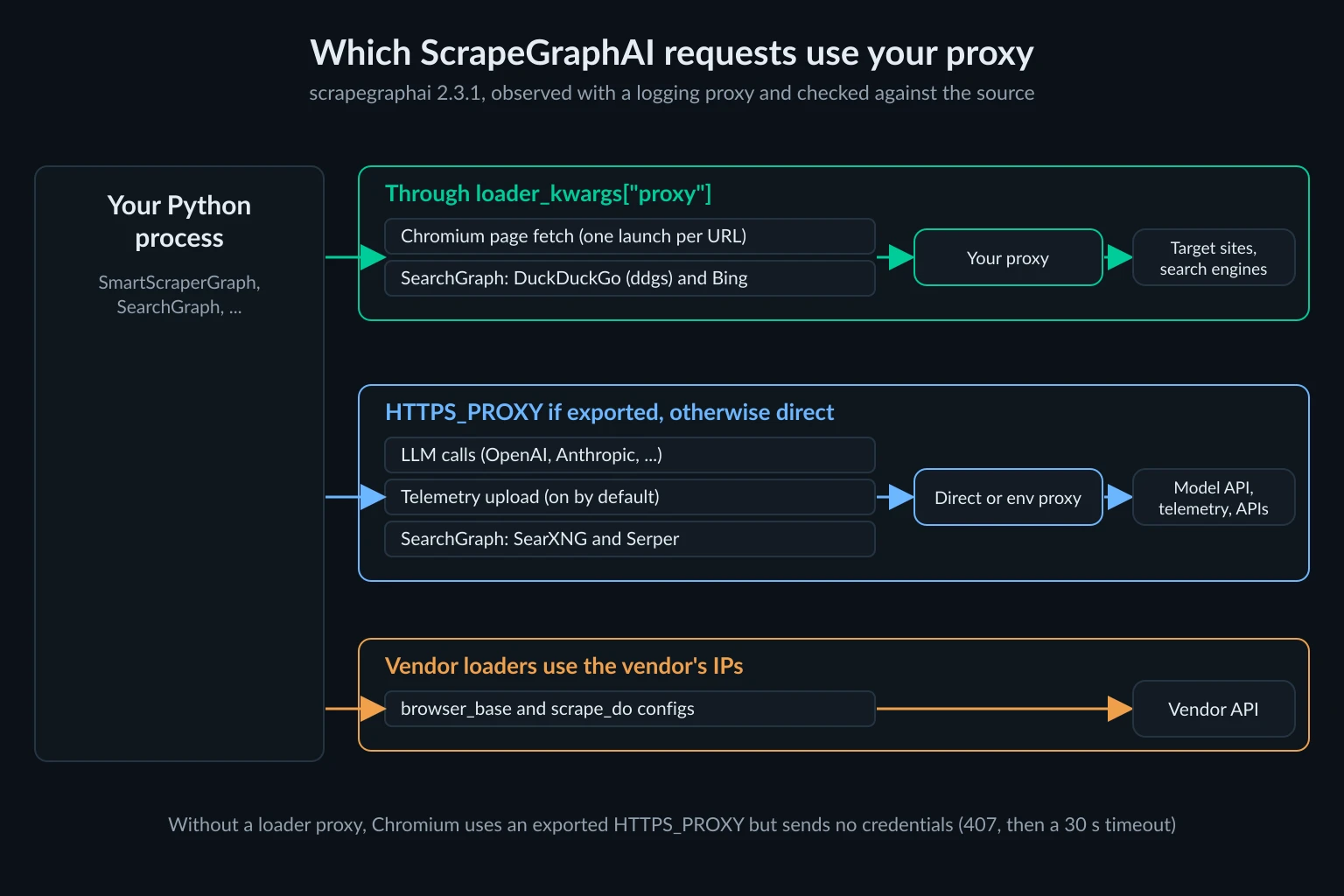
Search has a trap. SearchGraph turns the proxy dictionary into a URL with http://{username}:{password}@{server}. With server set to http://host:port, that becomes http://user:pass@http://host:port, and our search failed with DNSError. The same code doesn't URL-encode the password, so a password containing @ or : breaks it too. One DuckDuckGo search through ddgs 9.16 also opened four tunnels in our test, to mojeek.com, wikipedia.org, html.duckduckgo.com, and grokipedia.com. Those all count against your proxy bandwidth.
Model calls are the reverse problem. If you export HTTPS_PROXY so search and telemetry go through the proxy, your OpenAI or Anthropic requests go through it too, and long prompts become residential traffic you pay for. Keep the proxy in loader_kwargs and leave the environment variable unset. If something else needs it exported, add the model API host to NO_PROXY.
The use_soup: True option doesn't help either. SmartScraperGraph never passes it to its fetch node, so pages still load in Chromium.
The OpenAI token bug to check before you scale
With an OpenAI or Azure OpenAI model, ScrapeGraphAI 2.3.1 converts the fetched HTML to Markdown before parsing it. The call passes the page's HTML as the base URL for links, so html2text prepends the whole document to every relative link. Issue #1142 reports it, and PR #1151 fixes it. Both were still open when we tested.
We counted the prompts our mock received, using o200k_base, the tokenizer for gpt-4o-mini:
| Page | Model input as shipped | Model input with the fix |
|---|---|---|
| books.toscrape.com home (51 KB HTML) | 202,478 tokens across 3 calls | 3,466 tokens, 1 call |
| Poetry category page (48 KB HTML) | 20 characters of page content | 3,012 tokens |
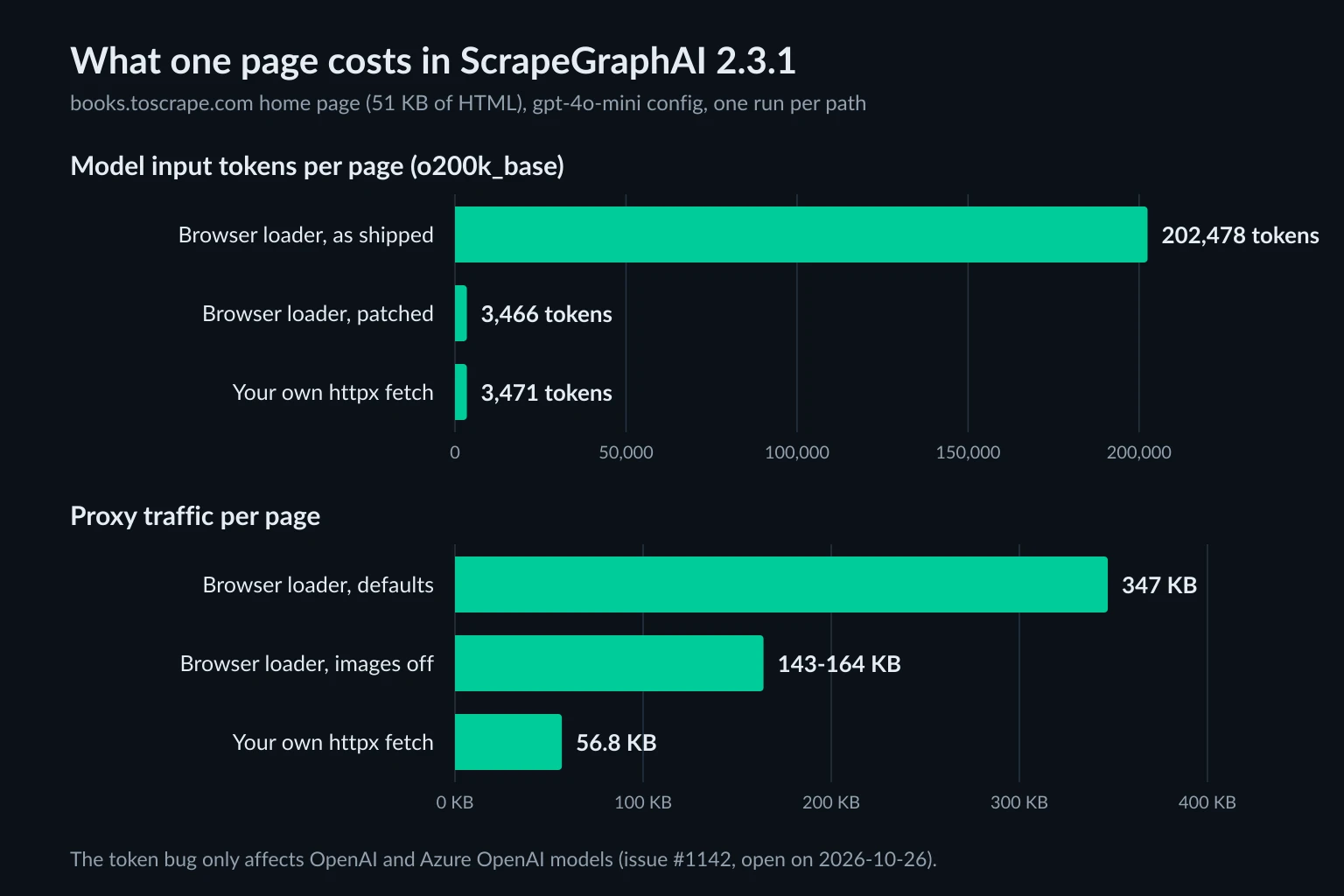
The bug cuts both ways. On the home page, the model received about 58x more input than it needed, split into chunks and then merged. On the category page, the parser kept only the site name, so the model never saw a single book. A real model would answer "NA" there, and nothing in the run would fail.
Other providers aren't affected by default, because ScrapeGraphAI only does this conversion for ChatOpenAI and AzureChatOpenAI models (or when you set force: True). If you use an OpenAI model with the browser loader, patch the call before you build any graph:
import scrapegraphai.nodes.fetch_node as fetch_node
from scrapegraphai.utils.convert_to_md import convert_to_md

# Until PR #1151 ships, ignore the HTML that FetchNode passes as the base URL.
fetch_node.convert_to_md = lambda html, url=None: convert_to_md(html)
Relative links stay relative after the patch. If you need absolute URLs in the output, resolve them yourself against the page URL.
Turn off ScrapeGraphAI telemetry
Telemetry is on by default. The README describes it as "anonymous usage metrics", but for a URL run with an output schema, the payload sent to sgai-oss-tracing.onrender.com has your prompt, your schema, the parsed page content, the model's answer, the model name, and the URL. We blocked the upload in-process and captured it. One run on the poetry page produced a 9,297-byte payload, with all 8,576 characters of the page's Markdown in website_content. You can read the payload builder in telemetry.py.
Disable it before importing the library:
export SCRAPEGRAPHAI_TELEMETRY_ENABLED=false
The setting telemetry_enabled = false under [DEFAULT] in ~/.scrapegraphai.conf does the same. The proxy angle matters too. The upload uses urllib, so with HTTPS_PROXY exported it leaves through your proxy, from the IP you use for scraping.
Rotating and sticky residential IPs in ScrapeGraphAI
ScrapeGraphAI doesn't rotate proxies itself. It launches a new Chromium for every URL, which opens a new connection to the proxy. That decides how your provider's rotation behaves:
- Rotating gateway. Each URL gets a new tunnel and, on most gateways, a new exit IP. That's the right default for independent pages across many sites.
- Sticky session. Put a session ID in the username or password, in the format your provider documents. Unknown Proxies sticky lines carry it at the end of the password. Every URL in the graph then exits from one IP until the session expires.
SmartScraperMultiGraph runs one SmartScraperGraph per URL, up to 16 at a time by default. In our test, three URLs produced three browser launches and three tunnels, all with the same proxy credentials. There's no per-URL proxy setting, and each launch starts with an empty cookie jar unless you pass storage_state.
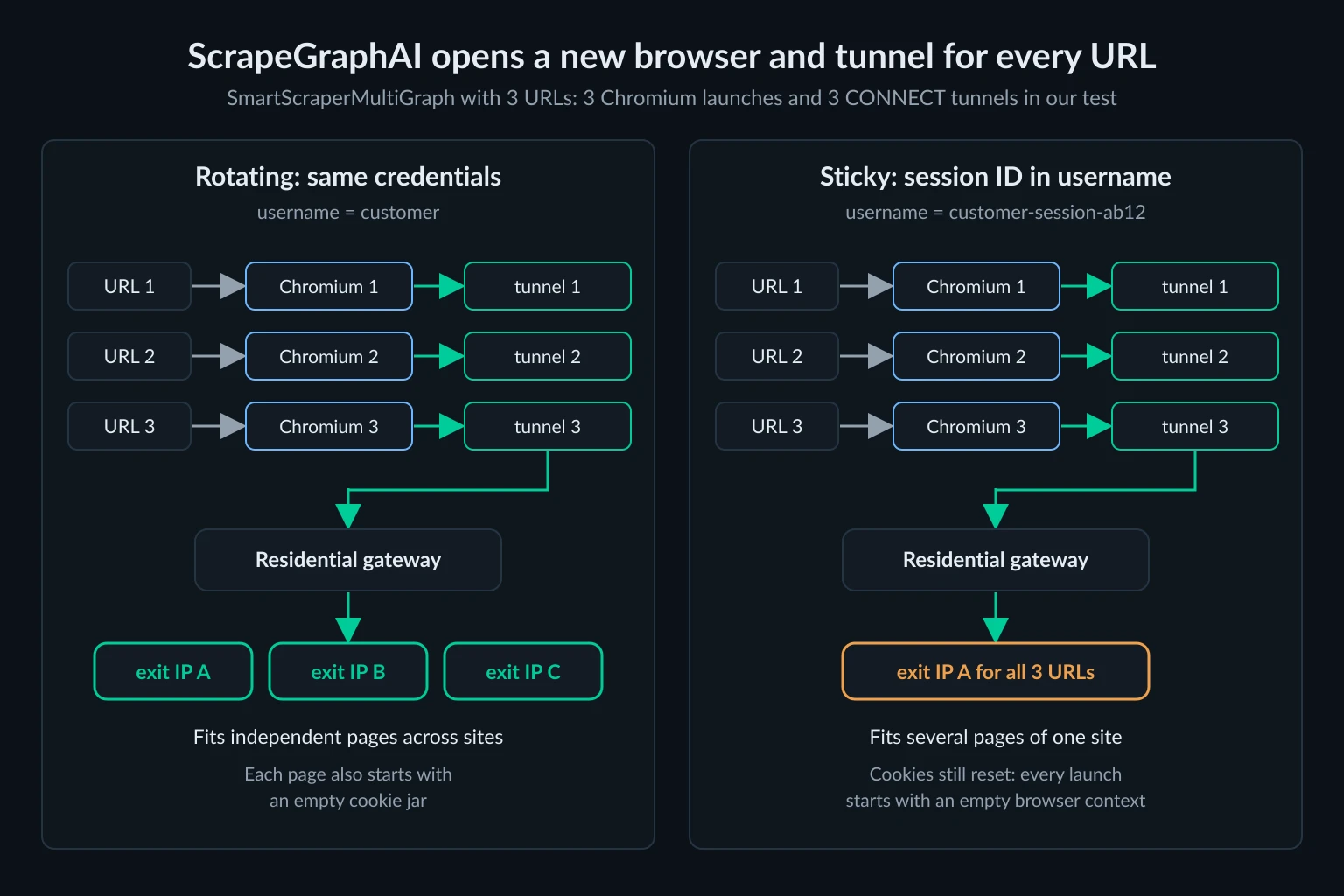
The diagram shows the username form many gateways use. The code below uses the Unknown Proxies form, with the session ID at the end of the password. To give each job its own session, build one graph per job:
import os
import random

from scrapegraphai.graphs import SmartScraperGraph


def sticky_proxy(session_id: str) -> dict:
    # Unknown Proxies format: the sticky host and port from your dashboard, and your
    # password without any -<session> suffix, with a new session ID appended.
    return {
        "server": os.environ["PROXY_SERVER"],
        "username": os.environ["PROXY_USER"],
        "password": f"{os.environ['PROXY_PASS']}-{session_id}",
    }


def scrape_store(urls: list[str], prompt: str) -> list[dict]:
    session_id = f"{random.randrange(10**9):09d}"  # most pools use 9 digits; match your dashboard's sticky lines
    results = []
    for url in urls:
        graph = SmartScraperGraph(
            prompt=prompt,
            source=url,
            config={
                "llm": {"model": "openai/gpt-4o-mini", "api_key": os.environ["OPENAI_API_KEY"]},
                "loader_kwargs": {"proxy": sticky_proxy(session_id)},
            },
        )
        results.append(graph.run())
    return results
A sticky IP keeps the exit address stable, but it doesn't carry cookies between ScrapeGraphAI fetches. If a site sets a consent or region cookie on the first page, the next page still arrives without it. The sticky vs rotating proxies guide covers which jobs need which, and the backconnect rotating proxies guide explains how gateways assign exit IPs.
Blocks, retries, and timeouts
The Chromium loader decides what counts as a failure, and its defaults are loose:
retry_limitis 1. A failed fetch raisesRuntimeError: Failed to scrape after 1 attemptson the first error. Withretry_limit: 3and a wrong proxy password, our run took 94 seconds to fail: three 30-second navigation timeouts.- A 403 is not a failure. We made the proxy return
403 Forbiddenfor one session. ScrapeGraphAI loggedReceived HTTP 403 ... the scraped content is likely an error page, sent# 403 Forbidden Access deniedto the model as the website content, and returned a normal result. Retries don't trigger, because no exception is raised. - Proxy auth errors look like timeouts. A 407 never surfaces. You get
Page.goto: Timeout 30000ms exceeded, which reads like a slow site. - The 30-second navigation limit is Playwright's default. The loader's
timeoutcaps the whole attempt. Raising it above 30 doesn't givepage.gotomore time.
One more default changes what a proxy can do to your data. The loader creates its browser context with ignore_https_errors=True. We loaded https://self-signed.badssl.com/ through the proxy, and ScrapeGraphAI returned the page without complaint. Plain Playwright with the same proxy stopped with net::ERR_CERT_AUTHORITY_INVALID. With a trusted provider that's a minor point. With an unknown proxy, it means a proxy that intercepts TLS can rewrite the pages your model reads, and nothing warns you.
That makes the built-in "server": "broker" option a bad idea. It uses the free-proxy package to pick an address from public free proxy lists. Pages fetched through it go to the model as trusted content, with certificate checks off.
Fetch pages yourself and pass the HTML to ScrapeGraphAI
The cleanest fix for most of the issues above is to keep ScrapeGraphAI for extraction and do the fetching yourself. SmartScraperGraph and the other single-page graphs also take raw HTML: a source that doesn't start with http is treated as a local document. That path converts the HTML correctly (the token bug doesn't apply), and it skips the telemetry content upload, which only fires for URL sources. Your fetch code controls status checks, retries, headers, and the proxy:
import os
import random
import time

import httpx
from scrapegraphai.graphs import SmartScraperGraph

PROXY_URL = os.environ["PROXY_URL"]  # http://user:pass@gateway:port
HEADERS = {
    # Keep the browser version current.
    "User-Agent": "Mozilla/5.0 (Windows NT 10.0; Win64; x64) AppleWebKit/537.36 "
    "(KHTML, like Gecko) Chrome/155.0.0.0 Safari/537.36",
    "Accept": "text/html,application/xhtml+xml",
    "Accept-Language": "en-US,en;q=0.9",
}


def fetch_html(url: str, attempts: int = 3) -> str:
    for attempt in range(attempts):
        # A new client opens a new tunnel, so a rotating gateway assigns a new IP.
        try:
            with httpx.Client(proxy=PROXY_URL, headers=HEADERS, timeout=30, follow_redirects=True) as client:
                response = client.get(url)
        except httpx.TransportError as exc:  # timeouts, refused tunnels, dropped connections
            failure = type(exc).__name__
        else:
            if response.status_code == 200:
                return response.text
            if response.status_code not in (403, 429, 503):
                response.raise_for_status()
            failure = response.status_code
        if attempt < attempts - 1:
            time.sleep(2**attempt + random.random())
    raise RuntimeError(f"{url} returned {failure} after {attempts} attempts")


url = "https://books.toscrape.com/"
graph = SmartScraperGraph(
    prompt="List every book title and price on this page",
    source=fetch_html(url),
    config={
        "llm": {"model": "openai/gpt-4o-mini", "api_key": os.environ["OPENAI_API_KEY"]},
    },
)
print(graph.run())
On the same home page, this used 56.8 KB of proxy traffic and sent 3,471 tokens to the model. When we pointed it at a session that always got a 403, it made three requests and raised a RuntimeError ending in returned 403 after 3 attempts, without ever calling the model. Put the credentials in the URL with percent-encoding if they contain special characters. The Python proxy requests guide covers the formats, and rotating proxy Python covers pools and session handling.
Per-page proxy traffic for books.toscrape.com's home page:
| Fetch method | Proxy traffic per page |
|---|---|
| ScrapeGraphAI Chromium loader, defaults | 347 KB |
Chromium loader with --blink-settings=imagesEnabled=false |
143-164 KB |
| httpx, HTML only | 56.8 KB |
Use the browser loader only for pages that need JavaScript to render the data. For those, keep images off and apply the token patch. For the rest, plain HTTP is faster and about six times lighter on residential bandwidth. Realistic web scraping headers matter more on the HTTP path, because there's no browser to send them for you.
ScrapeGraphAI pricing: open-source library vs hosted API
The library on GitHub is MIT-licensed and free. You pay for the model tokens, your servers, and proxy traffic, so the token bug and bandwidth numbers above are your real costs.
The hosted API is a separate product with its own fetch layer. Its proxy docs describe a fully managed proxy layer, and fetch_config has no field for your own proxy. You pick a two-letter country in fetch_config, and stealth: true adds a residential proxy with anti-bot headers. The pricing page listed, on 2026-10-26:
| Plan | Price | Credits |
|---|---|---|
| Free | $0 | 500, one time |
| Starter | $20 a month | 10,000 a month |
| Growth | $100 a month | 100,000 a month |
| Pro | $500 a month | 750,000 a month |
An extract costs 5 credits, a Markdown scrape 1, and stealth adds 5 credits to any request. So Starter covers 2,000 extractions, or 1,000 with stealth. The API makes sense when you don't want to run browsers or manage IPs. The library makes sense when you need control over exit IPs, sessions, and which model reads the page.
If you're comparing ScrapeGraphAI alternatives, the AI web scraping guide compares where each LLM scraping tool runs its fetch, and best web data scraping tools covers the non-LLM options.
Which proxies fit ScrapeGraphAI jobs
Match the proxy to how the graph fetches:
- Many independent pages across sites. Rotating residential proxies suit ScrapeGraphAI's one-browser-per-URL design, because each page already gets a fresh connection.
- Several pages from one site in one session. Use a sticky residential session or a static ISP IP, and fetch the pages yourself with one client so cookies persist. The pricing page compares both plan types.
- SearchGraph runs. Budget for the search backends as well as the result pages. One query opened four tunnels in our test.
A proxy doesn't make an LLM scraper polite. Keep concurrency low per site, honor Retry-After, and check each site's terms before you automate it. How to crawl a website without getting blocked covers pacing, and is data scraping legal covers the legal side.
FAQ
Does ScrapeGraphAI support proxies?
Yes. Set loader_kwargs["proxy"] to a dictionary with server, username, and password. It applies to the default Chromium loader and to DuckDuckGo and Bing searches in SearchGraph. It doesn't apply to model API calls or telemetry.
Does ScrapeGraphAI use HTTP_PROXY or HTTPS_PROXY?
Partly. Model calls, telemetry, SearXNG, and Serper requests follow HTTPS_PROXY because their HTTP clients read the environment. The Chromium page loader uses the loader_kwargs proxy. Without one, Chromium picked up an exported HTTPS_PROXY in our test but sent no credentials, so an authenticated proxy answered 407 and the fetch timed out after 30 seconds. Set the proxy in loader_kwargs and keep model traffic off it.
Why does ScrapeGraphAI time out after 30 seconds with a proxy?
That's usually a proxy authentication failure. Playwright waits for a page that never loads, and ScrapeGraphAI reports Page.goto: Timeout 30000ms exceeded. Check that credentials are in username and password rather than in the server URL, and test them with curl -x first.
Does ScrapeGraphAI support SOCKS5 proxies?
Only without authentication. Chromium can't send SOCKS5 credentials, so Playwright raises Browser does not support socks5 proxy authentication. Use your provider's HTTP endpoint, or run a local forwarder on 127.0.0.1.
How do I disable ScrapeGraphAI telemetry?
Set SCRAPEGRAPHAI_TELEMETRY_ENABLED=false in the environment, or telemetry_enabled = false in ~/.scrapegraphai.conf. With telemetry on, URL runs with a schema upload the parsed page content.
Is ScrapeGraphAI free?
The open-source library is free under the MIT license, and you pay your model provider and proxy provider directly. The hosted API has a free tier of 500 one-time credits, then plans from $20 a month.
Conclusion
ScrapeGraphAI proxy setup takes one dictionary in loader_kwargs, with credentials in their own fields and no scheme on the server. Getting reliable results takes more. Before you scale, disable telemetry and patch the OpenAI conversion bug, or avoid it. Set retry_limit above 1, and watch for 403 pages that pass silently into the model. For production, fetch pages with your own proxied HTTP client, check status codes there, and give ScrapeGraphAI the HTML. That's about six times less proxy traffic per page, and the extraction stays the same.