A Discord proxy routes Discord traffic through an intermediary server, so Discord sees the proxy's IP instead of yours. Discord has no proxy field in its settings on desktop, web, or mobile. To use a proxy you set it in the browser, pass a launch flag to the desktop app, or configure it in your bot library.
Quick answers:
- Discord in a browser: set the proxy in the browser. Discord Web follows it.
- Discord desktop app: there is no in-app setting. You can start the app with Chromium's
--proxy-serverflag, but voice may not go through it. - discord.js bot: pass an undici
ProxyAgentas the RESTagent. The gateway WebSocket does not use it. - discord.py bot: pass
proxy=andproxy_auth=todiscord.Client. It covers REST and the gateway. - Webhooks: a "webhook proxy" is a relay that forwards your webhook calls to Discord. It sees your webhook URL, so trust it fully or run your own.
Which proxy type: a static datacenter or ISP proxy for a company bot's outbound traffic, and a static ISP proxy or one sticky residential session for a human-operated login. Accounts per IP: Discord publishes no per-IP number that we found (checked October 2026), so keep one human-operated account per route. Session length: a static IP never rotates, and Unknown Proxies sticky residential sessions rotate every two hours, so do not let a login straddle a rotation.
A proxy does not remove account rules, permissions, bans, or API rate limits. For most normal users it is unnecessary and makes Discord slower or harder to troubleshoot. Never use one for spam, self-bots, ban evasion, fake engagement, mass account creation, or unauthorized scraping. Those uses conflict with Discord's policies.
What "Discord proxy" can mean
The same phrase covers several different tools. Pick the section that matches your job.
| You mean | What it is | Section |
|---|---|---|
| A proxy for the Discord app | Routing the desktop, web, or mobile client through a proxy server | Discord desktop proxy settings |
| A proxy for a bot | An HTTP or SOCKS proxy set in discord.js, discord.py, or another library | Proxy configuration for Discord bots |
The @discordjs/proxy package |
A local HTTP server in front of Discord's REST API that shares rate-limit state between processes | The @discordjs/proxy package |
| A webhook proxy | A relay that receives webhook calls (often from Roblox games) and forwards them to Discord | Discord webhook proxies |
proxy_url in the API |
Discord's own media proxy URL for attachments and embed images | Not a network proxy you configure |
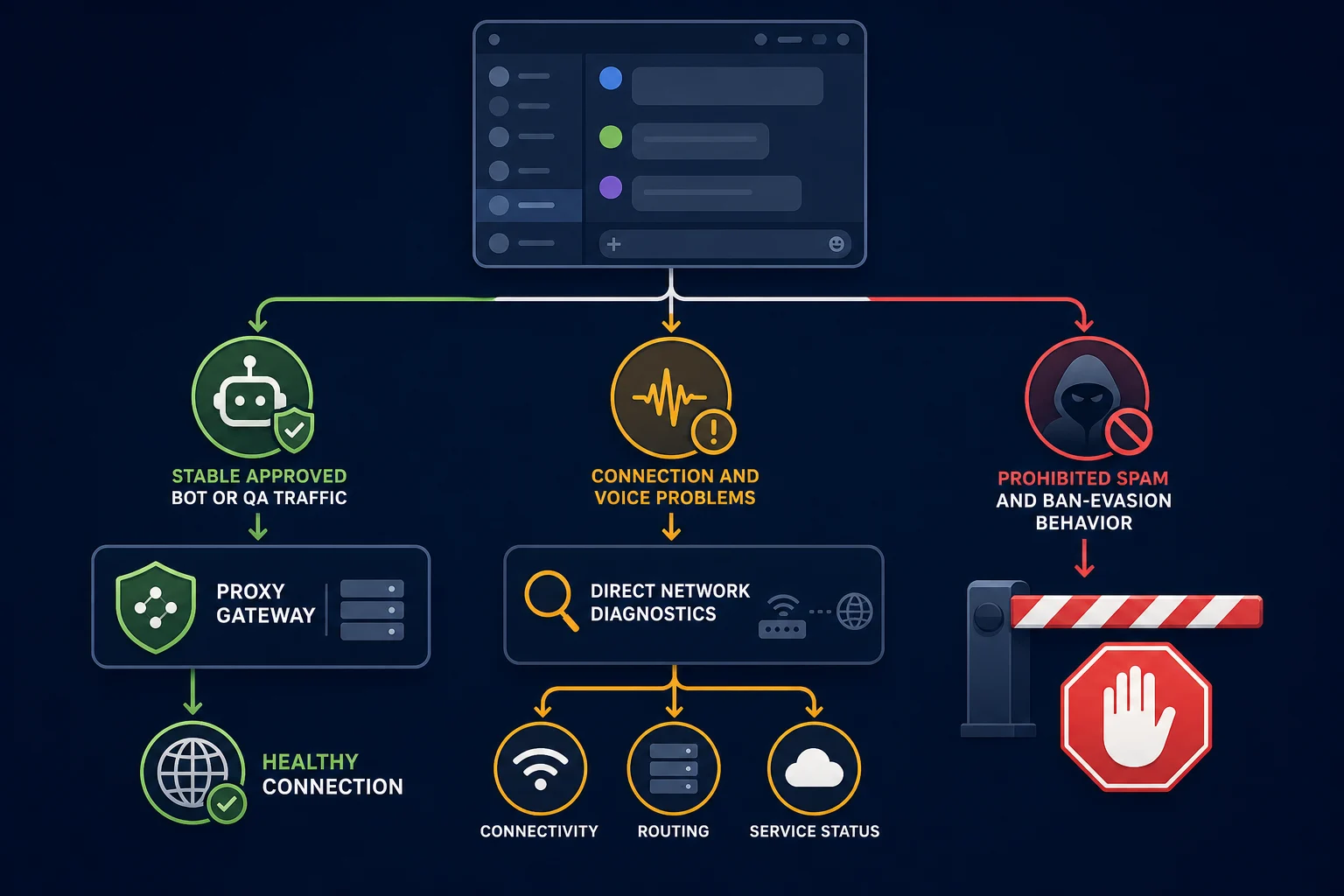
Discord proxy quick decision
Start with the problem you are actually trying to solve.
| Situation | Will a proxy help? | Better first move |
|---|---|---|
| A company-owned bot needs a controlled outbound IP | Sometimes | Use one stable route and obey API rate-limit headers |
| An authorized QA test needs a specific regional network path | Sometimes | Use a stable regional session and test at low volume |
| Discord is stuck on "Connecting" | Usually not | Disable the proxy first and test the direct connection |
| Voice or video is lagging | Usually not | Test latency, packet loss, firewall rules, and UDP directly |
| A bot receives HTTP 429 | No | Honor Retry-After and fix request pacing |
| An account or server is banned | No | Use Discord's appeal or support process |
| Someone wants self-bots, spam, raids, or fake members | No | Do not run the workflow |
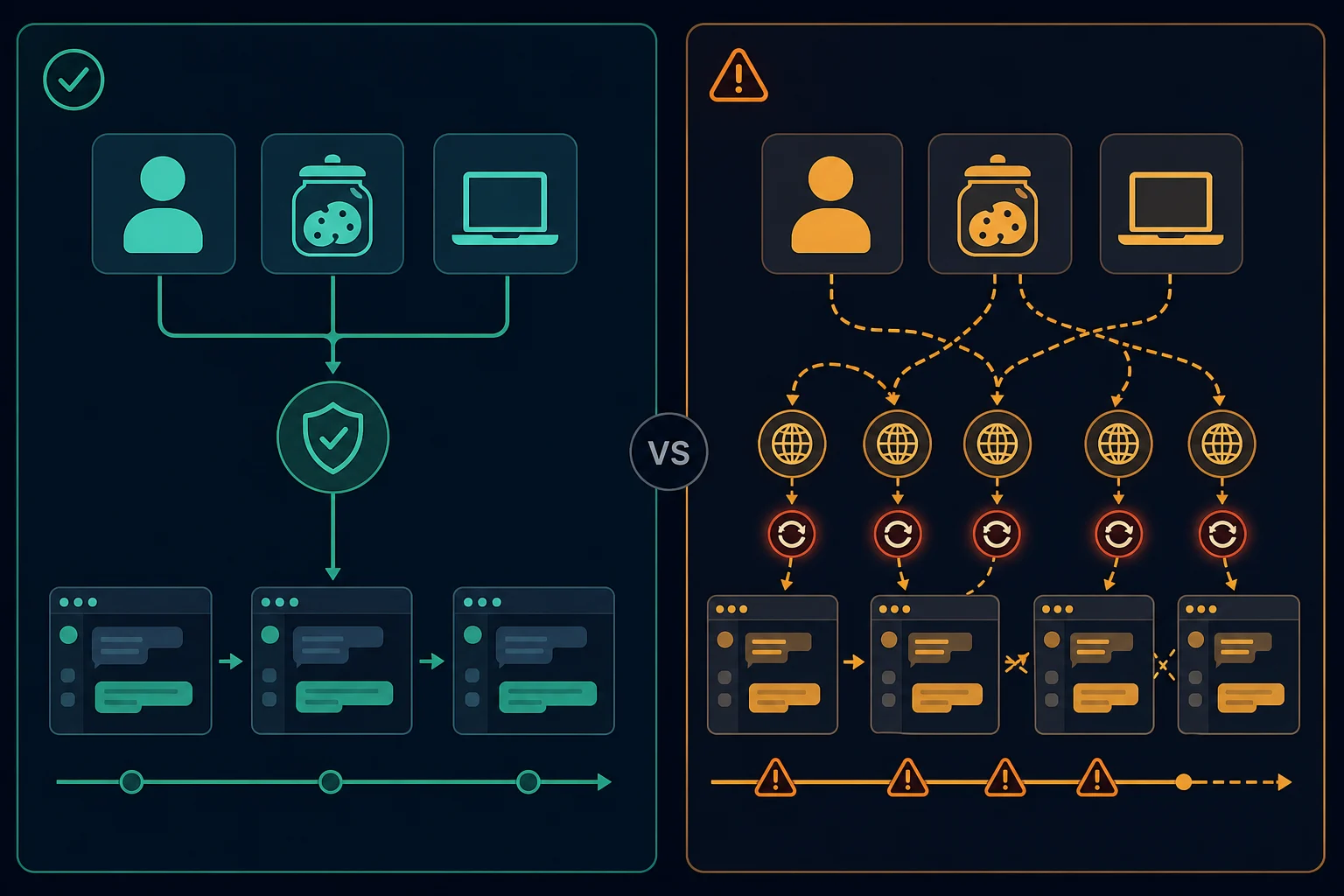
| A logged-in session changes IP on every request | Usually harmful | Keep one profile, cookie jar, and stable exit together |
A useful Discord proxy solves a routing or infrastructure problem. It is not a substitute for authorization or compliant behavior.
Discord desktop proxy settings: what is and is not supported
Open User Settings in the Discord app and you will not find a proxy option. Users have asked Discord for one in its feedback forum for years. Everything below is a workaround, not a supported feature, and an app update can change how it behaves.
Discord Web: use the browser's proxy
The simplest supported route is Discord in a browser at discord.com/app. The browser's proxy setting covers text chat and the gateway connection. Set the proxy in the browser or a separate browser profile, then verify the exit IP before you log in. Our guides to Chrome SOCKS5 proxy setup and Firefox SOCKS5 proxy setup cover the browser side.
Discord desktop: Chromium's --proxy-server flag
The desktop app is built on Electron, which uses Chromium. Chromium accepts a --proxy-server launch flag, and many users start Discord with it.
On Windows, the Discord shortcut runs Update.exe, which then starts Discord.exe. Pass the flag through to Discord with --process-start-args. Edit the shortcut's Target field:
C:\Users\<you>\AppData\Local\Discord\Update.exe --processStart Discord.exe --process-start-args="--proxy-server=http://127.0.0.1:8080"
On Linux, start the binary with the flag:
discord --proxy-server="socks5://127.0.0.1:1080"
On macOS, quit Discord fully, then start it from Terminal:
open -a Discord --args --proxy-server="http://127.0.0.1:8080"
Know the limits before you rely on it:
- No credentials in the flag. Chromium does not read a username and password from
--proxy-server. Use a proxy that authorizes your IP, or run a local forwarder on127.0.0.1that adds the credentials. - Voice and video use UDP. Discord voice runs over a separate UDP connection. An HTTP or SOCKS5 proxy flag does not carry it, so voice may connect directly or fail.
- Updates can break it. The updater, the flag handling, or the shortcut can change with a new release.
- System proxy behavior varies. Do not assume the app follows the Windows or macOS proxy setting. Verify with an IP check.
If you need every Discord connection on the proxy, a per-app proxy tool or a VPN is more reliable than a launch flag. Our proxy server vs VPN guide explains the difference.
Discord desktop: per-app proxy tools such as Proxifier
Windows tools like Proxifier sit below the app and route its connections through a proxy, so they do not depend on Discord's launch flags. Proxifier supports SOCKS5 and rules keyed on application names, according to its documentation (checked October 2026). The setup is the same in most tools of this kind:
- Add your proxy under the tool's proxy server list, with host, port, protocol, and credentials.
- Create a rule that matches
Discord.exe. Tools usually need the updater and the versioned app executable covered too, so add the Discord folder names if the rule does not match. - Point that rule at the proxy and leave everything else on Direct.
- Restart Discord, then confirm in the tool's connection log that Discord traffic uses the proxy.
Text chat and the gateway use TCP and follow this route. Voice is the hard part. Discord's voice documentation says voice media travels over a separate UDP connection. A SOCKS5 proxy can relay UDP only through the UDP ASSOCIATE command defined in RFC 1928, and both the proxy and the routing tool must support it. Proxifier's documentation does not say whether it does, so test a voice call before you rely on it. If text works and voice hangs, the route carries TCP only.
Discord mobile
The iOS and Android apps have no proxy setting either. A Wi-Fi proxy on the phone applies only to that Wi-Fi network and only to traffic that uses the system proxy. Mobile data does not use it, and voice still runs over UDP.
Proxy configuration for Discord bots
Bots are where a proxy setting is most useful, for example when a company network only allows outbound traffic through an egress proxy. Check what each library actually routes.
discord.js
discord.js sends REST calls through undici. Pass an undici ProxyAgent in the rest.agent client option:
import { Client, GatewayIntentBits } from "discord.js";
import { ProxyAgent } from "undici";

const client = new Client({
  intents: [GatewayIntentBits.Guilds],
  rest: {
    agent: new ProxyAgent("http://user:pass@proxy.example.com:8080"),
  },
});

client.login(process.env.DISCORD_TOKEN);
ProxyAgent reads the username and password from the URL and sends them as Proxy-Authorization. You can also call client.rest.setAgent(...) after creating the client.
This covers REST only. The gateway WebSocket in @discordjs/ws has no proxy option, so it connects directly. If all traffic must leave through the proxy, enforce it at the network layer, for example with container egress rules.
discord.py
discord.py has proxy and proxy_auth arguments on discord.Client (and commands.Bot). They apply to REST calls and the gateway WebSocket:
import os
import aiohttp
import discord

client = discord.Client(
    intents=discord.Intents.default(),
    proxy="http://proxy.example.com:8080",
    proxy_auth=aiohttp.BasicAuth("user", "pass"),
)

client.run(os.environ["DISCORD_TOKEN"])
discord.py uses aiohttp, which supports HTTP proxies. SOCKS5 needs a third-party aiohttp connector. Voice connections in both libraries use UDP and do not go through these settings.
The @discordjs/proxy package is a REST proxy
The top search result for "discord proxy" is the discord.js @discordjs/proxy package. It does not change your IP. It runs an HTTP server in front of Discord's API using @discordjs/rest, so several bot processes or shards share one rate-limit queue instead of each tracking limits alone.
import { createServer } from "node:http";
import { proxyRequests } from "@discordjs/proxy";
import { REST } from "@discordjs/rest";

const api = new REST();
createServer(proxyRequests(api)).listen(8080);
Each bot then points its REST base URL at the proxy, for example rest: { api: "http://127.0.0.1:8080/api" } in the discord.js client options. The proxy forwards the bot's Authorization header to Discord. Keep it on a private network, because anyone who can reach it can send requests with any token they hold.
Discord webhook proxies
A Discord webhook is a URL in the form https://discord.com/api/webhooks/{id}/{token}. Anyone who has the URL can post to the channel. A webhook proxy is a relay that accepts your request and sends it on to that URL.
The most common reason is Roblox. Roblox developers report that Discord rejects webhook requests sent from Roblox game servers, while the same code works in Studio. Community relays forward those calls from other IPs and often queue them to respect Discord's rate limits.
Before you use one:
- The relay sees your webhook token. A public relay can post to your channel. Use one you trust, or run your own small forwarder.
- It does not lift rate limits. Discord still limits webhook calls. A good relay queues requests and honors
Retry-Afterinstead of retrying at once. - Rotate a leaked URL. If a webhook URL is exposed, delete the webhook in the channel's Integrations settings and create a new one.
A residential or ISP proxy is not needed here. A webhook relay is a server-side forwarder, and a normal cloud server with a fixed IP is the usual choice.
What a Discord proxy actually changes
A proxy changes the route between a supported client or service and Discord. Instead of Discord seeing a direct connection from the original public IP, it sees the proxy exit IP for the traffic that actually passes through that proxy.
That can change:
- The public source IP and its network or ASN.
- The apparent country or region of the proxied route.
- Latency, reliability, and the path traffic takes.
- Which organization controls and logs the outbound connection.
It does not automatically change:
- The Discord account, bot token, application, or server permissions.
- Cookies, device state, browser fingerprint, or account history.
- API rate-limit buckets associated with authenticated bot or user traffic.
- Discord's Terms of Service, Community Guidelines, or enforcement decisions.
- Traffic that the client sends outside the configured proxy.
That last point matters because Discord is not only a set of web pages. Text and bot traffic can involve HTTPS and persistent WebSocket connections, while Discord's official voice connection documentation describes a separate UDP connection for voice media. An HTTP proxy that carries browser requests does not automatically carry UDP voice packets.
When a Discord proxy can help
There are a few legitimate cases where a proxy for Discord can be useful.
Controlled egress for an approved bot
A business may want a company-owned Discord bot to make outbound API calls through a known IP for firewall policy, observability, or infrastructure consistency. A static datacenter or ISP proxy can provide that stable egress if the HTTP client and WebSocket library support it.
This does not create extra API capacity. Discord says API limits can be per route and global, and that authenticated identities are used for many limits. A compliant bot should inspect X-RateLimit-* headers and wait for Retry-After after a 429, as described in Discord's rate-limit documentation.
Authorized regional and network QA
If you own a bot, webhook integration, or community workflow, a regional proxy can help reproduce a routing issue or confirm how your own service behaves from a permitted location. Keep the test narrow: one region, one stable session, low request volume, and a documented expected result.
A proxy is not proof of what every user in that location experiences. DNS, device settings, carrier routing, app version, and local firewall policy can still differ. Treat the proxy result as one network observation, not a universal regional verdict.
Consistent routing for a legitimate session
Some approved account workflows benefit from avoiding unexplained network changes during a session. Map one human-operated account and browser profile to one stable exit, and keep its cookies and region consistent. Enable two-factor authentication and keep the account's recovery email or phone current.
Do not read this as advice to create an account farm. Discord's Platform Manipulation Policy prohibits spam, automated account groups created for abuse, fake engagement, and tools that facilitate those activities. Discord's Community Guidelines also prohibit self-bots and require every normal account to be associated with a human.
When a Discord proxy does not help
The wrong proxy can conceal the real failure or introduce a second one.
Bans, permissions, and account enforcement
A new IP does not restore a missing channel permission, reverse a server moderation action, or appeal a Discord account enforcement decision. Trying to evade a ban can create further policy problems. Use the server's moderation process or Discord's official support and appeal path instead.
API and bot rate limits
Rotating IPs is not the correct response to a Discord API 429. The limit may be tied to a bot or user authentication identity, a route, a shared resource, or the global request stream. Parse the response scope, stop the affected work, and resume after the supplied delay.
If an unauthenticated request is limited by IP, that still does not justify cycling proxies to keep sending it. Cache responses, remove duplicate calls, reduce concurrency, and use supported authenticated endpoints. Our HTTP 429 guide explains a general bounded-backoff approach.
Self-bots, spam, and artificial engagement
Discord proxies do not make prohibited automation acceptable. Do not use them to automate user accounts, send unsolicited bulk messages, raid servers, scrape Discord without written consent, create accounts in bulk, or inflate server membership.
Discord's current Terms of Service expressly restrict unauthorized scraping and intentionally overburdening its systems. Use an official bot account and documented API for allowed automation, and design the bot around its granted scopes and permissions.
Voice, video, and gaming latency
Adding a proxy adds another network hop. If the exit is farther from you or the Discord voice server, latency and packet loss can increase. Many HTTP proxy configurations also do not carry the UDP media path at all.
Test voice separately from text and API traffic. If Discord is stuck connecting, disable the proxy and test the direct route first, then check Discord Status for a service incident. Direct access is the right baseline before adding any intermediary.
Complete anonymity
A Discord proxy changes a network route, not the full set of signals associated with an account or device. The proxy provider can also see connection metadata and may keep logs. Do not promise anonymity, and never send proxy credentials or account tokens to an untrusted operator.
Discord blocked at school, at work, or in your country
Users in countries and networks that block Discord have asked for proxy support in Discord's own feedback forum for years, and that is part of why this topic ranks. A network-level block stops the app or the website from loading at all. A proxy or VPN can route around it, but a school or employer may prohibit that in its acceptable-use policy, so check the policy or ask IT first.
Expect gaps even when it works. Text may load while voice fails, because the UDP voice path needs more than a web proxy. If Discord loads but a single server or account is restricted, the cause is the account or server, not the network, and a new IP will not fix it.
ISP, residential, or datacenter proxy for Discord?
Choose by session behavior and network requirements, not by the most expensive label.
| Proxy type | Reasonable fit | Main drawback |
|---|---|---|
| Static ISP | Stable human-operated session or long-lived approved workflow | Costs more than basic datacenter egress |
| Sticky residential | Short authorized regional QA that needs a consumer-network route | Session may expire and bandwidth costs can rise |
| Rotating residential | Rarely appropriate for a logged-in Discord session | IP churn can break continuity and does not defeat account-level rules |
| Datacenter | Approved bot egress, development, or permissive network routing | Hosting-network IPs may not resemble consumer access |
For most persistent account-style sessions, stability matters more than rotation. A static ISP proxy keeps one exit assigned, while a sticky residential session holds an exit only for a defined window. The sticky vs rotating proxies guide explains why changing IPs mid-session can conflict with cookies and client state, and the datacenter vs residential comparison covers when hosting IPs are enough. Teams running several platforms can apply the same one-account-per-route rule from the social media proxy guide.
If you need a stable dedicated route, compare ISP proxy plans. If a legitimate regional test specifically requires consumer-network routing, residential proxies offer location targeting and sticky sessions. Start with the simplest route that passes the test; do not buy rotation you do not need.
HTTP vs SOCKS5 for Discord
Use the protocol supported by the traffic source:
- Use HTTP(S) when an approved bot's HTTP client, webhook service, browser, or egress gateway explicitly supports an HTTP proxy.
- Use SOCKS5 when the application explicitly supports SOCKS and you need a more general TCP tunnel.
- Do not assume either option covers Discord voice. Confirm UDP support end to end.
- Do not paste proxy credentials into an unknown Discord modification, extension, or "account tool."
For a remote SOCKS5 proxy, prefer the socks5h:// scheme in tools that support it. It sends DNS lookups through the proxy too, so name resolution matches the exit. If protocol choice is the problem, compare SOCKS5 vs HTTP proxies before changing the proxy type too.
How to test a Discord proxy safely
Use a controlled test rather than moving every account or service at once.
- Write down the allowed use case. Name the account owner, bot application, expected region, and why a proxy is required.
- Test direct access first. Confirm login, text, bot API, and voice behavior without the proxy so you have a baseline.
- Choose one stable exit. Keep the account or bot, client, cookies, region, and proxy fixed during the test.
- Verify the route. Use a neutral IP-check endpoint in the same client where possible; never expose a Discord token to that endpoint.
- Test traffic separately. Check HTTPS, Gateway/WebSocket connectivity, and voice because success in one path does not prove the others work.
- Measure the result. Record connection time, latency, reconnects, 401, 403, 407, 429, and 5xx responses.
- Stop on policy or auth errors. Fix credentials, scopes, permissions, or request behavior instead of rotating exits.
- Protect access. Use unique proxy credentials, two-factor authentication, and a provider you trust.
If the proxy itself returns 407 Proxy Authentication Required, fix its username, password, allowlist, or address format. The 407 proxy authentication guide keeps that transport-layer failure separate from Discord permissions and rate limits.
Common Discord proxy mistakes
Avoid these patterns:
- Rotating the IP during one login or Gateway session.
- Sharing one proxy and cookie profile across unrelated accounts.
- Treating a bot-token limit as an IP-pool sizing problem.
- Assuming text success means voice UDP is proxied.
- Buying residential bandwidth before testing a basic stable route.
- Using free public proxies that can log traffic, inject failures, or disappear.
- Changing protocol, account, region, proxy type, and client at the same time.
- Retrying immediately after 429, 401, or 403 responses.
Change one variable at a time. A useful log includes the client, account or bot identifier, proxy endpoint label, request route, response class, timestamp, and retry delay. Never log the raw token or proxy password.
FAQ
Where are the proxy settings in Discord?
There are none. Discord has no proxy option in User Settings on desktop, web, or mobile. Use Discord in a browser with the browser's proxy, start the desktop app with Chromium's --proxy-server flag, or use a per-app proxy tool or VPN. On a corporate network that requires a proxy, the browser route is the most predictable.
Does discord.js support proxies?
Yes, for REST calls. Pass an undici ProxyAgent as rest.agent in the client options. The gateway WebSocket has no proxy option and connects directly. The separate @discordjs/proxy package is a REST proxy that shares rate limits between processes. It does not change your IP.
What is a Discord webhook proxy?
It is a relay server that receives your webhook request and forwards it to Discord. Roblox developers use them because Discord rejects webhook calls from Roblox game servers. The relay sees your webhook URL, which works like a password, so use a relay you trust or host your own.
Are Discord proxies allowed?
A proxy is a routing tool, but the activity still has to comply with Discord's Terms, Community Guidelines, Developer Terms, and applicable law. Do not use one for ban evasion, self-bots, spam, mass account creation, fake engagement, or unauthorized scraping.
What is the best proxy for Discord?
For a legitimate long-lived session, a stable ISP proxy is usually a better fit than a rapidly rotating pool. For an approved bot that only needs controlled egress, a static datacenter route may be enough. Use sticky residential access only when authorized regional testing genuinely needs a consumer-network path.
Does Discord voice work through a SOCKS5 proxy?
Only if the proxy and your routing tool both relay UDP. The desktop app accepts a SOCKS5 address in Chromium's --proxy-server flag and browsers can send Discord Web through SOCKS5, but neither carries voice UDP. Test text, the gateway, and voice separately.
Can I use Discord behind a proxy at work or school?
If the network forces traffic through a proxy, the browser version follows the system or browser proxy and is the most reliable route. If the network blocks Discord, check the acceptable-use policy before using a proxy or VPN to get around it.
Final thoughts on Discord proxies
Discord proxies are useful only when they solve a defined routing problem: stable egress for an approved bot, a consistent route for a legitimate session, or a narrow regional QA test. They do not overturn bans, permissions, platform policy, bot-token limits, or poor retry logic.
Choose a stable proxy over per-request rotation, test direct access first, and verify HTTPS, WebSocket, and voice paths separately. If stable dedicated routing fits the approved workflow, compare ISP pricing; if consumer-region QA is the real requirement, evaluate residential proxy access with a sticky session and conservative traffic.